
How to fix Windows activation error 0x803fa067?

Prefer to fix it yourself? The manual steps follow.
- 7methods
- 2 to 30 minutes
- Easy
Applies to Windows 11 and Windows 10, Home and Pro, after entering a product key, upgrading Home to Pro, reinstalling Windows or a motherboard repair
7 methods in this guide
Hi, I reinstalled Windows 10 recently because of earlier problems, and now I just can't seem to activate Windows, despite having a valid key. I always receive error 0x803fa067. How do I fix this?
Error 0x803FA067 means Windows could not activate with the product key or licence it has. Microsoft ties it to a key that cannot be used on this copy, busy servers after an upgrade, or a reinstall that did not reactivate. Most often the key and the installed edition do not match, so check the edition first.
Open Settings > System > Activation and compare the edition (Home or Pro) with your key (Fix 1). Upgrading Home to Pro? Microsoft says Home must be activated before you enter the Pro key (Fix 2). After a reinstall or upgrade, wait, select Activate again and run Troubleshoot (Fix 3). If the key was used elsewhere or bought cheaply, the key itself is refused (Fix 6).
| Error | 0x803FA067: "We can't activate Windows on this device at the moment." Microsoft's error list writes it as 0x803FA067L. |
|---|---|
| Where it appears | Settings > System > Activation (Windows 10: Settings > Update & Security > Activation), after Change product key, Activate or a reinstall. |
| Main cause | A product key that cannot be used on this copy of Windows, most often a Pro key on a Home installation that is not activated, or a key for the other edition. |
| Fastest fix | Check the edition against your key, then activate Home before entering a Pro key (Fix 1 and Fix 2). |
| Also written as | 0x803fa067, 0x803FA067L, (0x803fa067), "Error code: 0x803fa067". Microsoft groups it with 0xC004F050 and 0xC004C003 is a close cousin for a key used on too many devices. |
| Affects | Windows 11 and Windows 10, Home and Pro. Windows 10 left support on 14 October 2025, but its activation works the same way. |
| Vendor status | Not a bug in general. Dell reports a separate case after motherboard replacements on its PCs, which it says Microsoft is investigating and fixes on the server side. |
| When it is not fixable on the PC | A key already used on another device, a key from an unauthorised seller, or a preinstalled licence moved to new hardware. |
| Time to fix | 2 minutes for an edition check, up to 48 hours when you wait for a server-side reactivation, about an hour for a clean installation. |
Facts checked on 15 October 2026. Steps written for Windows 11 (25H2 and 26H2) and Windows 10 22H2.
What Windows activation error 0x803fa067 means
Microsoft does not give 0x803FA067 a line of its own. Its page on activation errors puts the code, written 0x803FA067L, in one row with 0xC004C060, 0xC004F050 and about a dozen others. It gives three reasons for the whole row: you entered a product key that cannot be used to activate Windows, the activation servers were busy after an upgrade, or Windows was not activated again after a reinstall.
In practice the first reason is the common one. The key is real, but it does not fit the copy of Windows it was typed into: the edition differs, Home is not activated yet, or the key was meant for another kind of licence.
| What you see | Where | What it tells you |
|---|---|---|
| We can't activate Windows on this device at the moment. You can try activating again later, or go to the Store to buy genuine Windows. Error code: 0x803fa067 | Activation page, under Windows is not activated | Windows tried the key or licence it has and the activation servers refused it. |
| Error code: 0x803fa067 right after Change product key | Enter a product key window | The new key does not fit this edition or this installation. |
| Activate Windows watermark | Desktop | Only the result. The code on the Activation page tells you why. |
| 0xC004C003 | Activation page | A cousin: Microsoft says the key was used, or tried, on more than one device and is marked not valid. |
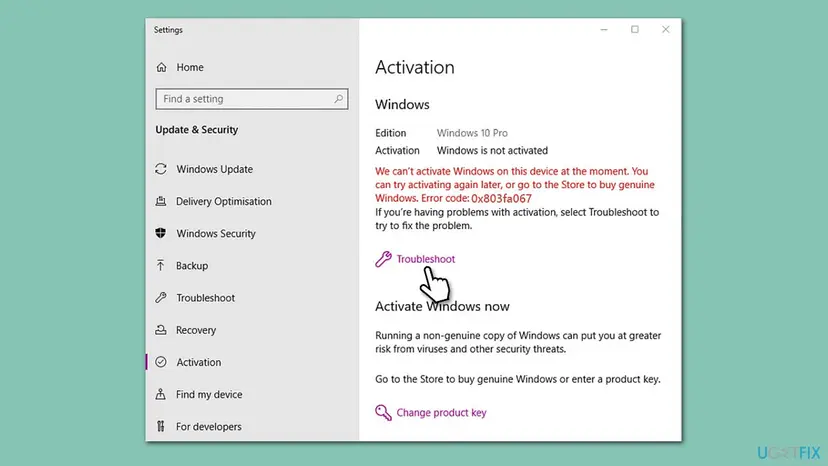
The error does not delete anything and Windows keeps starting. Dell notes that some personalisation options may be unavailable until Windows is activated again, so you have time to pick the right fix.
Why error 0x803fa067 appears, from most to least common
The code is the same in every case. What differs is what happened just before it. Find your row and go to its fix.
| Cause | How often | How to tell | Fix |
|---|---|---|---|
| A Pro key typed into Windows Home that is not activated yet. | Most often | The Activation page says Home and Windows is not activated. | Fix 1, Fix 2 |
| A key for the other edition, for example a Home key on a Pro installation. | Often | The edition on the Activation page differs from your receipt or key card. | Fix 1, Fix 7 |
| Windows was reinstalled or upgraded and the servers were busy or the licence was not found at once. | Often | Windows was activated on this PC before. | Fix 3 |
| The motherboard was replaced, for example by the PC maker's service. | Sometimes | The error appeared after a repair. | Fix 4 |
| The key was used on another PC, or came from an unauthorised seller. | Sometimes | A cheap key from a marketplace, or the same key on two PCs. | Fix 5, Fix 6 |
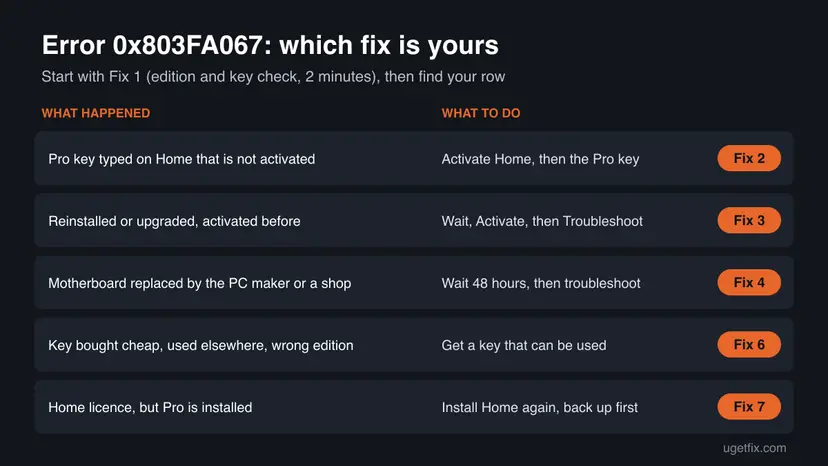
Older guides blame a blocked connection to Microsoft. A PC with no connection usually gets a different message, so check the network only as part of Fix 3, not as the first suspect.
How to fix Windows activation error 0x803fa067
Fix 1 takes two minutes and tells you which of the others you need. Fixes 2 to 4 activate the licence you already have. Fix 5 gives a clearer message from Command Prompt. Fixes 6 and 7 are for a key that cannot be used and for the wrong edition. Never use an activator tool or a free key from the web.
| What you see or did | Start with |
|---|---|
| You do not know which edition is installed or which key you have. | Fix 1 |
| You typed a Pro key on Windows Home. | Fix 2 |
| Windows was activated before, then you reinstalled or upgraded. | Fix 3 |
| The motherboard was replaced in a repair. | Fix 4 |
| Settings shows only the code and you want the real reason. | Fix 5 |
| The key was cheap, second hand or used on another PC. | Fix 6 |
| You own a Home licence but Pro is installed. | Fix 7 |
Fix 1. Check that the installed edition matches your product key
2 minutesNo riskEveryone who sees the code, before any other fix.
Microsoft's first reason for this code is a key that cannot be used on this copy. A Home key does not activate Pro and a Pro key does not activate Home as it is, so the edition decides the next step.
- Open Settings > System > Activation. On Windows 10 it is Settings > Update & Security > Activation.
- Read the edition: Windows 11 shows it at the top next to the Windows logo, Windows 10 next to Edition.
- Read the status next to Activation state (Windows 10: Activation).
- Find what your key is for: the box card, the shop's email or your Microsoft account order says Home or Pro.
- Compare the two and pick the fix from the table below.
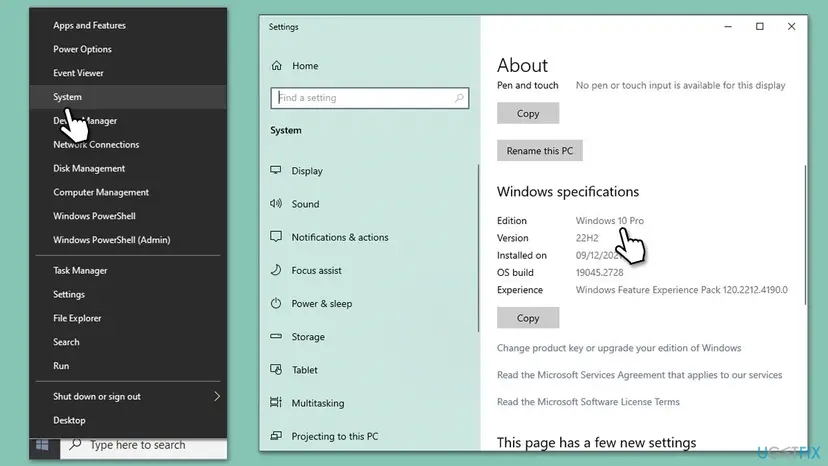
| Installed | Your key | Next |
|---|---|---|
| Home, activated | Pro | Fix 2, it should work now. |
| Home, not activated | Pro | Fix 2: activate Home first. |
| Pro | Pro | Fix 3, then Fix 5. |
| Pro | Home | Fix 7. |
It worked if: You know the edition, the activation state and what your key is for.
If not: If you cannot find what the key is for, enter it with Fix 5: slmgr /dlv then names the edition the key installed.
Fix 2. Upgrading Home to Pro: activate Home first, then enter the Pro key
10 minutesLow riskYou bought a Pro key or Pro upgrade and run Windows Home.
Microsoft's steps for upgrading Home to Pro apply only to a device running an activated copy of Home. Typed into Home that is not activated, the Pro key is a key that cannot be used on this copy, which is exactly this error.
- Open Settings > System > Activation and make sure the state reads activated. If not, activate Home first with Fix 3 or with your Home key.
- Next to Change product key, select Change. On Windows 10, select the Change product key link.
- If User Account Control asks, sign in as an administrator and select Yes.
- Type the 25-character Pro key and select Next.
- Let Windows install Pro and restart when asked.
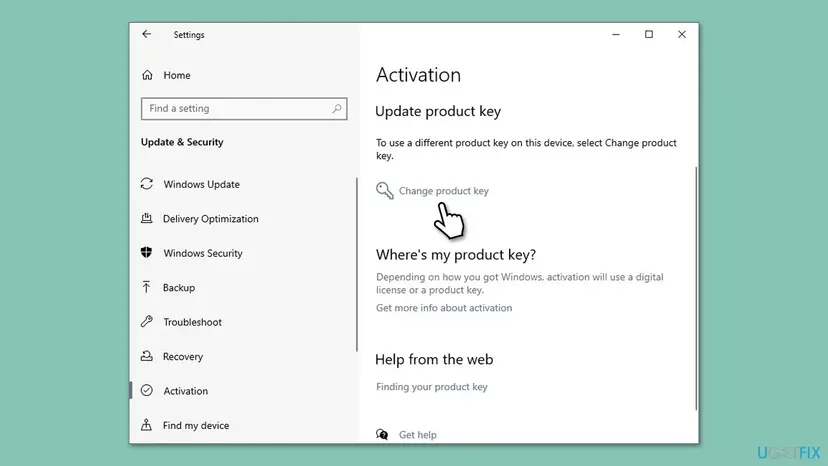
Microsoft's other route is the Store: on Windows 11 expand Upgrade your edition of Windows and select Open Store next to Upgrade in the Microsoft app; on Windows 10 select Go to the Store. Sign in with your Microsoft account before you buy. If the option is missing, Microsoft says the PC may already run Pro or the upgrade may not be available.
Older guides suggest a generic key and an offline trick to switch the edition. Microsoft's upgrade page does not describe it, so we do not give it here.
It worked if: Windows restarts as Pro, and the Activation page says Windows is activated.
If not: If Home itself does not activate, go to Fix 3. If the Pro key still gives 0x803FA067 on activated Home, the key is the problem: Fix 6.
Fix 3. After a reinstall or upgrade: wait, select Activate, then run the troubleshooter
5 minutes, sometimes a day of waitingNo riskWindows was activated on this PC before, and you reinstalled it or upgraded to Windows 11.
Microsoft says a copy upgraded with the free offer should activate by itself after a reinstall, unless the hardware changed significantly, and that busy activation servers after an upgrade can return this code. Retrying later and the troubleshooter cover both cases.
Activation needs a working connection. Check it first: How to check your internet connection in Windows
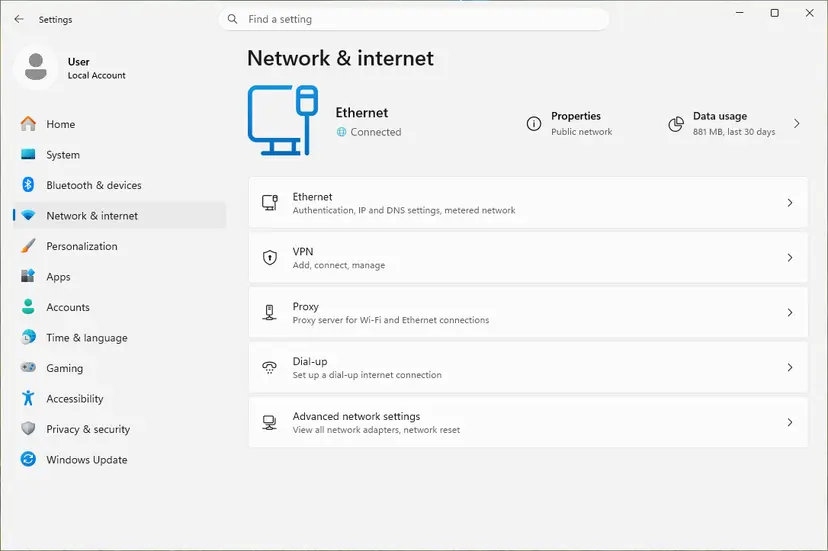
- Sign in to Windows with the Microsoft account you used before the reinstall, if you had one.
- Open Settings > System > Activation and select Activate if it is offered. If it fails, wait a few hours and try again.
- Still not activated: select Troubleshoot on the same page.
- Follow the troubleshooter. If you changed hardware, choose I changed hardware on this device recently and sign in.
- Restart the PC and open the Activation page again.
Make sure you reinstalled the same edition you had before. A digital licence for Home does not activate a Pro installation. If the edition changed, go to Fix 7.
It worked if: The Activation page says Windows is activated with a digital license, and the watermark goes after a restart.
If not: If you have a key, enter it with Fix 5. If Microsoft's servers still refuse it, contact customer support from the troubleshooter page.
Fix 4. After a motherboard replacement: give Windows 48 hours, then troubleshoot
Up to 48 hours of waiting, then 5 minutesNo riskThe error appeared after the PC maker or a repair shop replaced the motherboard.
Dell documents 0x803FA067 after motherboard replacements on its PCs. It says Windows keeps checking with the activation servers and reactivates by itself once the server-side fix is published, and that changing parts again does not help.
- Keep using the PC normally and leave it connected to the internet.
- Do not swap parts again or reinstall Windows for this error. Dell says that does not resolve it.
- After 48 hours, open Settings > System > Activation and check the state.
- Still not activated: select Troubleshoot and choose I changed hardware on this device recently.
- If the repair was under warranty, give the maker's support the repair number and the error code.
The full troubleshooter path after a hardware change, and what to do with a preinstalled licence when you replaced the board yourself, is in our guide to error 0xC004F211.
It worked if: Windows reactivates on its own within two days, or after the troubleshooter.
If not: If you replaced the board yourself and Windows came preinstalled, the licence may not move: see Fix 6.
Fix 5. Enter the key and activate from Command Prompt
5 minutesLow riskSettings shows only the code, or does not accept the key.
slmgr is the licensing script built into Windows. It installs the key, tries online activation and names the edition and status, which shows whether the key fits this copy.
- Type cmd in the search box, select Run as administrator next to Command Prompt, then Yes.
- Install your key, with your own characters in place of the X:
slmgr /ipk XXXXX-XXXXX-XXXXX-XXXXX-XXXXX - Restart the PC and open Command Prompt as administrator again.
- Start online activation:
slmgr /ato - Read the details: the Name line gives the edition and License Status the result.
slmgr /dlv
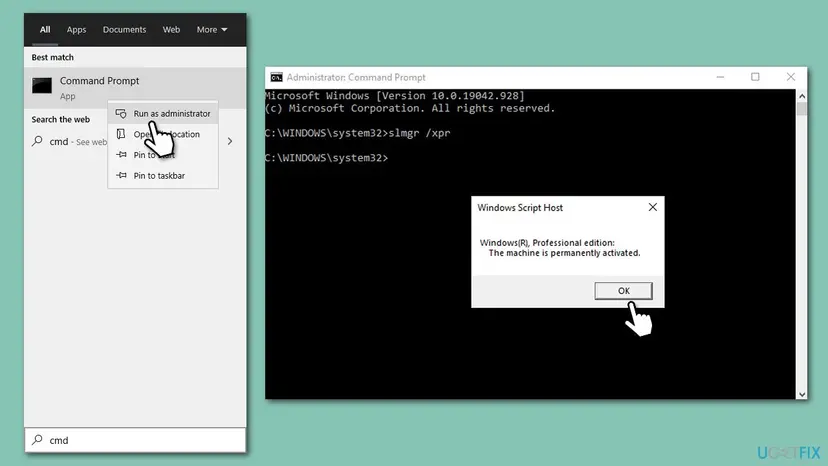
Older guides read the firmware key with a wmic command. Microsoft removed WMIC from supported Windows 11 versions, starting with 25H2, as our 0xC004F211 guide explains.
It worked if: slmgr /ato reports that the product was activated successfully and slmgr /dlv shows License Status: Licensed.
If not: If slmgr /dlv names an edition other than the one installed, go to Fix 7. If activation is refused again, go to Fix 6.
Fix 6. When the key itself cannot be used: get a valid one
15 minutes, or the time of a purchaseNo riskThe key came from a marketplace far below the retail price, was used on another PC, or was preinstalled on another device.
Microsoft's answer for a key that cannot be used is to enter a different key or buy a new one. For the related code 0xC004C003 it adds that a key used on several devices is marked not valid.
| Where the key came from | Who can help |
|---|---|
| A reseller who sold it as valid | The reseller. Microsoft says to contact them. |
| The PC came with Windows preinstalled | The PC maker, as Microsoft advises for a new device that never activated. |
| An independent repair shop replaced parts | The shop. Microsoft says to ask whether the repair needs a new licence. |
| Your own key bought from Microsoft or a known retailer | Microsoft customer support, linked from the troubleshooter. |
- Look for the original proof: the box card, the order email, or your Microsoft account order history.
- Run
slmgr /dlvfrom Fix 5 and save a screenshot for support. - Contact the seller, the PC maker or Microsoft support from the table.
- If no one can confirm the key, buy a licence through Settings > System > Activation or an authorised retailer.
- Enter the new key with Fix 2 or Fix 5.
Tools that promise free activation change system files and run with full rights on your PC, and free keys posted online are generic or stolen. This page does not link to any of them, and you should not run them.
It worked if: You get a working key from the seller or a new licence, and Windows activates.
If not: If support confirms the key is fine but it still fails, check the edition again with Fix 1.
Fix 7. You own a Home licence but Pro is installed: install Home again
About 1 hourRead the warningA reinstall put Pro on a PC whose licence is Home.
A Home licence or key cannot activate a Pro installation, so the code stays until the edition matches the licence.
Installing Home over Pro removes your apps, settings and files on the system drive. Back up everything first: Back up your files (Windows Backup, File History, Time Machine)
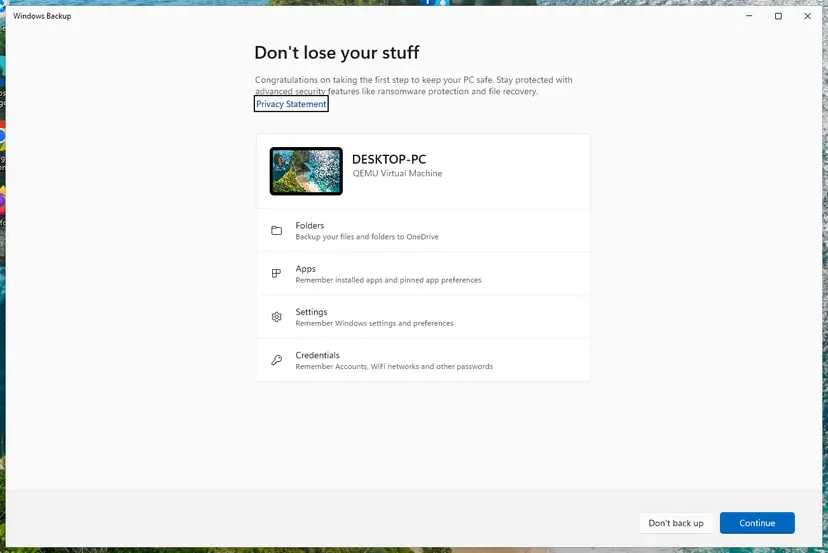
- Back up your files and note the Microsoft account you use.
- Create installation media from Microsoft's Windows 11 download page.
- Start the PC from the media and choose Windows 11 Home when setup asks for the edition.
- If setup asks for a key, enter your Home key, or skip it if Home was activated on this PC before.
- After setup, sign in with your Microsoft account and open Settings > System > Activation.
It worked if: The Activation page shows Home and Windows is activated.
If not: If Home is still not activated, run Fix 3 again on the new installation.
If error 0x803fa067 is still there
When none of the fixes worked, the question is no longer a setting. It is whether this key or licence may activate this copy. Collect these facts before you contact anyone.
| What to check | Where | What it tells you |
|---|---|---|
| Edition and status | Settings > System > Activation | Home and Pro do not cross. |
| Edition of the installed key | slmgr /dlv in Command Prompt | Whether the key fits the installed edition. |
| Proof of purchase | Box card, order email, Microsoft account orders | Who sold the key and who can confirm it. |
| Recent changes | Your memory or the repair receipt | A reinstall, an upgrade or a new motherboard. |
- Key from a reseller: the reseller.
- Preinstalled Windows or a repair: the PC maker or the repair shop.
- Key or Store purchase from Microsoft: Microsoft customer support from the troubleshooter.
How to avoid error 0x803fa067
- Activate Windows Home before you enter a Pro upgrade key.
- Reinstall the same edition you own, and keep the key card or order email.
- Sign in with your Microsoft account so the licence is easy to find after a reinstall.
- Buy keys from Microsoft or an authorised retailer.
- Do not use one key on two PCs.
- Do not buy keys at a fraction of the retail price.
- Do not run activator tools or registry tricks from forums or videos.
- Do not reinstall Windows to fix this code unless the edition is wrong.
Frequently asked questions
What does error code 0x803fa067 mean?
It means Windows could not activate with the key or licence it has. Microsoft lists the code, as 0x803FA067L, with a group of activation errors and gives three reasons: a product key that cannot be used to activate Windows, activation servers that were busy after an upgrade, and a reinstall that did not reactivate. Most often the key does not fit the installed edition, so compare Home or Pro with your key first.
Why do I get 0x803fa067 on Windows 11 Pro activation?
Usually because the Pro key was typed into Windows Home that is not activated yet, or into an installation of another edition. Microsoft's upgrade steps apply only to an activated copy of Home: activate Home first, then enter the Pro key under Change product key. If Pro is already installed and the key is for Pro, try slmgr /ato from Command Prompt and then check where the key came from.
Is 0x803fa067 different on Windows 10?
No. Windows 10 shows the same code with the message "We can't activate Windows on this device at the moment" and the same causes. Only the path differs: Settings > Update & Security > Activation instead of Settings > System > Activation, and Go to the Store instead of Open Store. Windows 10 left support on 14 October 2025, so if you reactivate now, consider moving to Windows 11.
My Windows 10 product key gives 0x803fa067. Is the key fake?
Not necessarily. A genuine key also fails when it is for another edition or typed into Home that is not activated. Check the edition first. If it matches and the key still fails, ask where it came from: Microsoft says a key used on more than one device is marked not valid, and a key from a reseller should be taken up with the reseller. A very cheap key from a marketplace is the usual suspect.
I reinstalled Windows and get 0x803fa067. What should I do?
Sign in with the Microsoft account you used before, make sure you installed the same edition, and select Activate on the Activation page. Microsoft says a copy upgraded with the free offer should activate by itself after a reinstall if the hardware did not change significantly. If it does not, wait a few hours, then run Troubleshoot. Have your key ready in case the troubleshooter asks for it.
Can 0x803fa067 appear after a motherboard repair?
Yes. Dell documents the code on Windows 10 and Windows 11 PCs after a motherboard replacement and says Microsoft is investigating. Dell's advice is to keep using the PC, not to replace parts again, and to wait: Windows rechecks with the activation servers and reactivates once the fix is out. If it has not reactivated within 48 hours, run the Activation troubleshooter.
Does a firewall or VPN cause 0x803fa067?
We found no Microsoft source that ties this code to a firewall. Activation does need the internet, so check that Settings says Connected and try again without a VPN if you use one. Do not turn off the firewall or antivirus for good to activate Windows. If the network is fine, the cause is almost always the key or the edition, covered in Fix 1 and Fix 2.
How do I fix 0x803fa067 with Command Prompt?
Open Command Prompt as administrator, run slmgr /ipk followed by your key, restart, then run slmgr /ato to activate and slmgr /dlv to read the result. The last command names the edition the key installed and the licence status. It does not bypass anything: if the key cannot be used on this copy, Command Prompt returns the same refusal, but with more detail to give support.
Is there a free key or tool that fixes 0x803fa067?
No legitimate one. Free keys posted online are generic or stolen, and activation tools change system files and run with full rights on your PC. The legal ways are your own key, a digital licence linked to your Microsoft account, the PC maker for preinstalled Windows, or a licence bought through Settings > System > Activation or an authorised retailer. This page does not cover activators.
What happens if I leave Windows unactivated?
Windows keeps starting and your files stay where they are. Dell notes that some personalisation options may be unavailable until Windows is activated again, and you will see reminders and a watermark. Use the time to check the edition, find your key or wait for a server-side fix after a repair, then activate with one of the fixes above.
Sources
- Microsoft Support: Get help with Windows activation errors (support.microsoft.com)
- Microsoft Support: Upgrade Windows Home to Windows Pro (support.microsoft.com)
- Dell: Windows Activation Fails with error 0x803fa067 After a Motherboard Replacement (000218462) (dell.com)
Did this fix work?
One click, no account. It tells the next reader which guides are worth their time.
Questions and experiences: fix Windows activation error 0x803fa067
Still broken, or found a fix we did not cover? Ask here: members and our editors answer. Reading is open; writing needs a free account.
…