
How to fix Windows activation error 0x803FABB8?

Prefer to fix it yourself? The manual steps follow.
- 8methods
- 2 to 30 minutes
- Easy
Applies to Windows 11 and Windows 10, Home and Pro, after a reinstall, a motherboard or CPU change, or a BIOS update
8 methods in this guide
Hi, my PC kept crashing, so I reinstalled Windows. The crashes are gone, but Windows is no longer activated, and the message says there is an activation issue with error code 0x803FABB8. I used genuine Windows before, which I got as a free upgrade when Windows 10 was released. I have no idea what my key is or how to find it. Any help would be appreciated.
Error 0x803FABB8 means Windows could not match a licence to this PC, so activation stops. Users report it after a clean reinstall and, most often, after a new motherboard or CPU. Check that the installed edition matches your licence first, then reactivate with the Activation troubleshooter or your own product key.
Open Settings > System > Activation and check the edition: Home or Pro must be the same as before (Fix 1). After a reinstall on the same PC, a wrong edition is the usual reason (Fix 2). After a new motherboard or CPU, run Troubleshoot and choose I changed hardware on this device recently, signed in with your Microsoft account (Fix 3). Have a key? Enter it under Change product key (Fix 4).
| Error | 0x803FABB8, shown under Activation as "Windows is not activated" with a message that ends in Error code: 0x803FABB8. |
|---|---|
| Where it appears | Settings > System > Activation on Windows 11, Settings > Update & Security > Activation on Windows 10, and in the Activation troubleshooter. |
| Main cause | Windows finds no licence that matches this hardware and edition: after a motherboard or CPU change, or after a reinstall with a different edition. |
| Fastest fix | Check the edition (Fix 1), then the Activation troubleshooter with I changed hardware on this device recently (Fix 3) or your own key (Fix 4). |
| Also written as | 0x803fabb8, 0x803FABB8, "Error code: 0x803FABB8". People also type 0x803fabba, which we found in no Microsoft source. |
| Affects | Windows 11 and Windows 10, Home and Pro. Windows 10 left support on 14 October 2025, but activation works the same way. |
| Vendor status | Microsoft's list of activation errors has no row for 0x803FABB8. Its hardware change rules, written for 0xC004F211, are the ones that fit the reported cases. |
| Related code | Users report that the troubleshooter can turn 0x803FABB8 into 0x803FABC3. Both are about a licence that no longer matches the PC. |
| When it is not fixable on the PC | A licence that came preinstalled with the PC after the motherboard was replaced. Microsoft says you may need to purchase a new licence. |
| Time to fix | 2 minutes to check, 5 minutes for the troubleshooter or a key, longer when you wait for support or the PC maker. |
Facts checked on 15 October 2026. Steps written for Windows 11 (25H2 and 26H2) and Windows 10 22H2.
What Windows activation error 0x803FABB8 means
Microsoft's page of activation errors does not list 0x803FABB8, so there is no official one-line meaning. The message that comes with it and the cases on Microsoft's own Q&A forum point the same way: Windows looked for a licence that fits this PC and could not use the one it found.
On Windows 10 and Windows 11 the message under the Activation state reads: We can't activate Windows on this device at the moment. You can try activating again later, or go to the Store to buy genuine Windows. Error code: 0x803FABB8. The words "at the moment" sound like a server problem, but in most reports the licence itself is the issue.
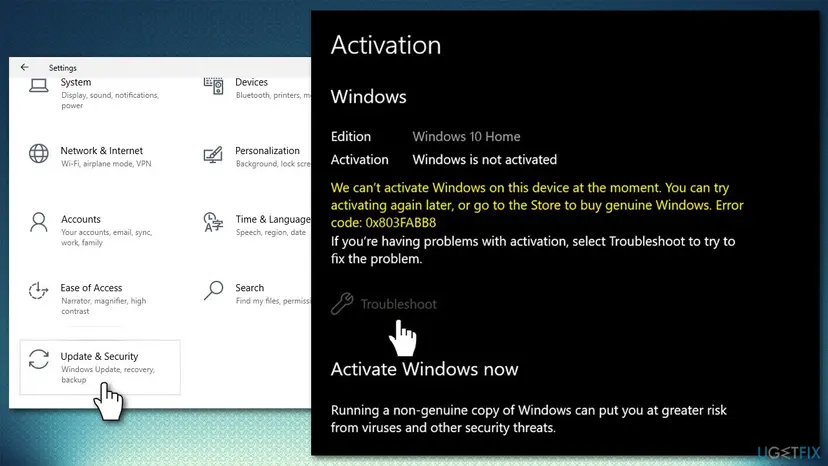
Microsoft explains the mechanism on its hardware change page. A digital licence associates itself with the hardware of the device. After a significant change, such as a new motherboard, Windows no longer finds a matching licence and has to be reactivated. The same page says the licence and the key reactivate only if the edition, Home or Pro, stays the same.
An activation error deletes nothing and Windows keeps starting. You see a watermark and reminders, and some personalisation settings are locked until Windows is activated again, so there is time to pick the right fix.
Why error 0x803FABB8 appears, from most to least common
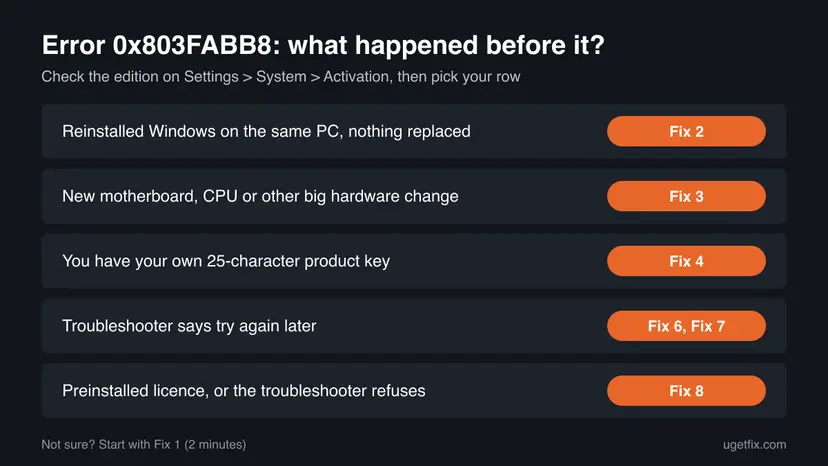
The code is the same in every case. What differs is what happened just before it. Find your row and go to its fix.
| Cause | How often | How to tell | Fix |
|---|---|---|---|
| The motherboard, the CPU or both were replaced, so the licence no longer matches the hardware. | Most often in user reports | Windows was activated before the change. | Fix 3, Fix 4 |
| Windows was reinstalled with a different edition than the licence, for example Pro on a Home licence. | Often after a reinstall | Nothing was replaced, and the edition on the Activation page differs from before. | Fix 2 |
| The licence was never linked to a Microsoft account, so the troubleshooter cannot find it after the change. | Often | The troubleshooter does not list your old device. | Fix 4, Fix 8 |
| Microsoft's servers cannot confirm the licence right now, or the PC is offline. | Sometimes | The troubleshooter says to try again later. | Fix 6, Fix 7 |
| The licence cannot move: it came preinstalled with the PC, or it began as an old Windows 7 or 8 upgrade. | Sometimes | Every fix above refuses the licence. | Fix 8 |
Older guides send everyone to Windows Update first. We found no source that ties this code to a missing update. Keeping Windows updated is good practice, but it does not bring back a licence that no longer matches the PC.
How to fix Windows activation error 0x803FABB8
Fix 1 takes two minutes and tells you which of the others you need. Fix 2 is for a reinstall on the same PC. Fixes 3 and 4 reactivate a licence you own after a hardware change. Fix 5 gives a clearer answer from Command Prompt. Fixes 6 and 7 are for the try again later reply, and Fix 8 for a licence that cannot move. Never use an activator tool or a free key from the web.
| What you see or did | Start with |
|---|---|
| You are not sure what changed or which licence you have. | Fix 1 |
| You reinstalled Windows on the same PC and replaced nothing. | Fix 2 |
| You replaced the motherboard or the CPU. | Fix 3 |
| You have a product key from a box, a card or an order email. | Fix 4 |
| Settings shows only the code and you want more detail. | Fix 5 |
| The troubleshooter says to try again later. | Fix 6, then Fix 7 |
| Windows came preinstalled and the motherboard is new. | Fix 8 |
Fix 1. Check the edition, the account and the message on the Activation page
2 minutesNo riskEveryone who sees the code, before any other fix.
The right fix depends on the installed edition, whether your Microsoft account was linked to the licence, and what changed before the error. Microsoft says a licence reactivates only on the same edition.
- Open Settings > System > Activation. On Windows 10 it is Settings > Update & Security > Activation.
- Read the edition next to the Windows logo: Home or Pro. Compare it with what the PC had before.
- Expand Activation state and read the message. Note the exact code: 0x803FABB8 or a different one.
- Open Settings > Accounts > Your info. Check that it says Administrator and shows an email address, which means a Microsoft account.
- Think back: a reinstall, a new motherboard, a new CPU or a BIOS update?
Microsoft says the edition, Windows 11 Home or Windows 11 Pro, must be the same before and after a hardware change, because the digital licence and the product key reactivate only if the edition remains the same. The same is true for Windows 10.
It worked if: You know the edition, whether you sign in with a Microsoft account, and what changed before the error.
If not: If you replaced hardware, go to Fix 3. If you only reinstalled, go to Fix 2.
Fix 2. After a reinstall on the same PC: install the edition your licence is for
5 minutes to check, an hour if you reinstallRead the warningYou reinstalled Windows, replaced no parts, and the edition on the Activation page is not the one the PC had before.
A digital licence from a free Windows 10 upgrade stays with the hardware, so a reinstall on the same PC needs no key. It still activates only the edition it was issued for. A Pro installation on a Home licence, or the other way round, ends in an activation error.
- Connect the PC to the internet and restart it once. On the same hardware and edition, Windows reactivates by itself.
- If the edition differs from before, note which one the licence was for. The old order email, the box or a photo of the old Activation page tells you.
- Back up your files first: Back up your files (Windows Backup, File History, Time Machine)
- Install Windows again from Microsoft's own installation media and pick the edition your licence is for when setup asks.
- When setup asks for a product key, select I don't have a product key. The digital licence is found after setup, once the PC is online.
- Open Settings > System > Activation and check the state.
A clean installation erases the apps and files on the system drive. Copy your documents, photos and browser data to an external drive or cloud storage first, and only reinstall when the edition really differs.
It worked if: After setup the Activation page says Windows is activated with a digital license.
If not: If the edition is right and the error stays, run the troubleshooter in Fix 3. A BIOS update or a repair may have changed the hardware Windows sees.
Fix 3. After a motherboard or CPU change: run the Activation troubleshooter
5 minutesNo riskWindows was activated on this PC before you replaced the motherboard, the CPU or both, and your Microsoft account was linked to the licence.
Microsoft offers an exception path for moving a licence after a hardware change. It works through the troubleshooter, and Microsoft says it works only with the Microsoft account that is connected to the licence.
- Sign in to Windows as an administrator, with the Microsoft account you used before the hardware change.
- Open Settings > System > Activation and select Troubleshoot. The troubleshooter shows Windows can't be activated on your device.
- Select I changed hardware on this device recently, then Next.
- Enter your Microsoft account and password and select Sign in.
- In the list of devices linked to your account, tick This is the device I'm using right now.
- Select Activate and wait for the result.
Microsoft says to check that you signed in with the same Microsoft account that you associated with the digital licence. If the licence was never linked before the change, the troubleshooter cannot find it, and Fix 4 or Fix 8 is the way.
The troubleshooter is offered only while Windows is not activated. One user on Microsoft Q&A reports that the troubleshooter changed the code to 0x803FABC3 during this path. Our guide to error 0x803FABC3 covers that code.
It worked if: The Activation page says Windows is activated with a digital license linked to your Microsoft account and the watermark goes after a restart.
If not: If you have a product key, enter it with Fix 4. If the troubleshooter says to try again later, go to Fix 6.
Fix 4. Enter your own product key under Change product key
5 minutesLow riskYou have a 25-character key from a box, a card, a sticker or an order email, or you installed a retail copy with a key.
Microsoft says that if you used a product key to get Windows, you need that same key again after a hardware change. A retail key does not depend on the Microsoft account link that the troubleshooter needs.
- Find the key: the order confirmation email, the packaging, or the Certificate of Authenticity sticker on the back or bottom of the PC.
- Open Settings > System > Activation. On Windows 10 open Settings > Update & Security > Activation.
- Select Change product key. On Windows 11 it is the Change button in that row.
- If User Account Control asks, select Yes.
- Type the 25-character key and select Next, then Activate.
The key must be for the installed edition. A Home key does not activate Pro and a Pro key does not activate Home as it is.
A free upgrade from the Windows 10 launch, like the one in the reader's question, usually has no key of its own: it is a digital licence. In that case skip this fix and use Fix 2 or Fix 3.
It worked if: The Activation page says Windows is activated and the error message is gone.
If not: If Settings refuses the key or shows only a code, try Fix 5 for a clearer reply. If the key was used on another PC, go to Fix 8.
Fix 5. Check the status and activate from Command Prompt
5 minutesLow riskSettings shows only the code or does not take the key, and you want the exact reply.
slmgr is the licensing script built into Windows. It shows the licence details, installs a key and tries online activation, which tells you what Microsoft's servers answered.
- Type cmd in the search box, select Run as administrator next to Command Prompt, then Yes. Step by step: How to run a program as administrator or in compatibility mode
- Check the activation status:
slmgr /xpr - Read the licence details: the Name line gives the edition and License Status the result.
slmgr /dlv - If you have a key, install it, with your characters in place of the X:
slmgr /ipk XXXXX-XXXXX-XXXXX-XXXXX-XXXXX - Start online activation:
slmgr /ato
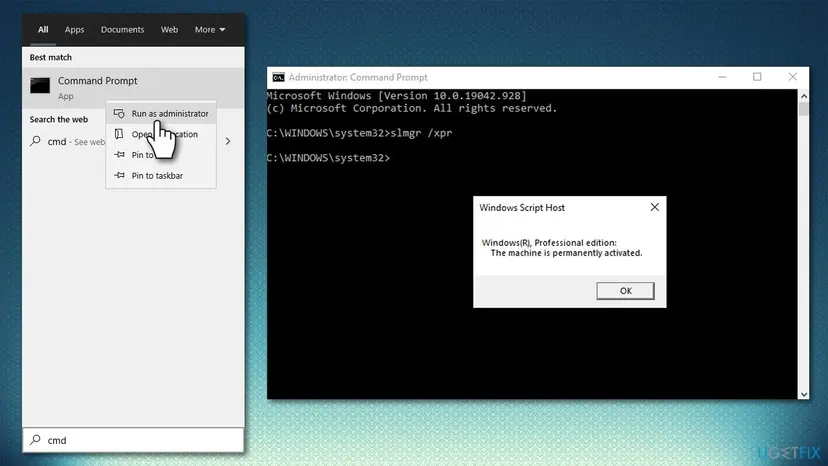
If the licence cannot be used on this PC, Command Prompt returns the same refusal as Settings, with more detail for support. Save a screenshot of slmgr /dlv for Fix 8.
It worked if: slmgr /ato reports that the product was activated successfully and slmgr /dlv shows License Status: Licensed.
If not: If the edition in slmgr /dlv differs from your licence, go back to Fix 2. If activation is refused again, go to Fix 6.
Fix 6. When the troubleshooter says try again later: check the connection and wait
5 minutes, sometimes a day of waitingNo riskThe message or the troubleshooter tells you to try again later, or nothing at all changed on the PC.
Microsoft says the device must be connected to the internet before you reactivate. A user on Microsoft Q&A with this code reports that the troubleshooter only said to try again later, so a second try after a pause is worth the few minutes.
Activation needs the internet. Check it first: How to check your internet connection in Windows
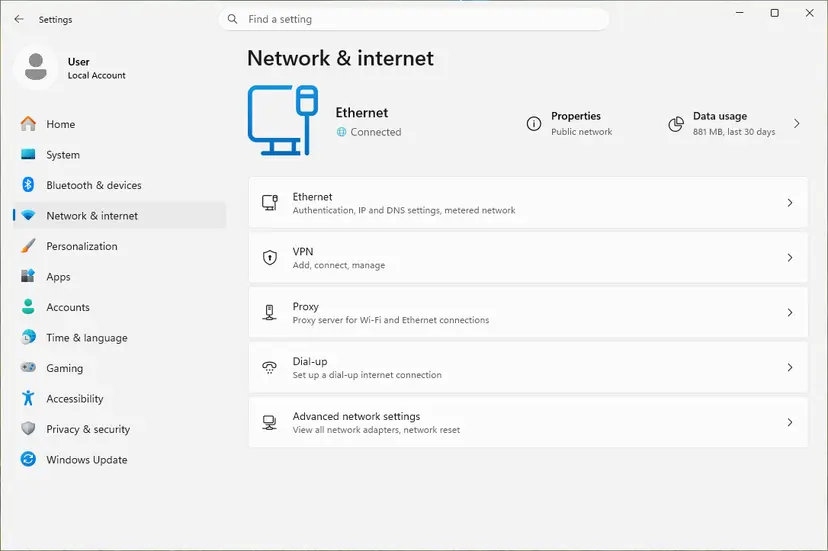
- Turn off any VPN or proxy you use at home for the test.
- Open Settings > System > Activation and select Activate if it is offered, or run Troubleshoot again.
- If it fails, leave the PC connected and try again after a few hours.
- Turn the VPN back on when you are done.
It worked if: Windows activates on a later try.
If not: If it still says to try again later the next day, the licence needs to be checked by a person: Fix 7 or Fix 8.
Fix 7. Activate by phone with the installation ID
10 minutesNo riskOnline activation keeps failing, but you are sure the licence is valid for this PC and edition.
Phone activation sends the installation ID of this PC to Microsoft's automated line and returns a confirmation ID, so it does not depend on the online servers that keep saying try again later.
- Press Win + R, type
slui 4and press Enter. - Select your country or region and select Next.
- Call the free number shown and follow the automated prompts. Read out the installation ID from the screen.
- Type the confirmation ID you hear and select Activate Windows.
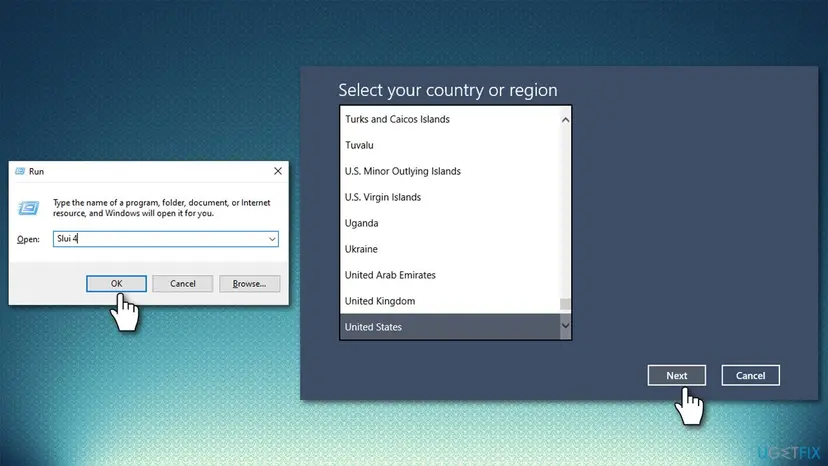
We did not find a current Microsoft page today that describes slui 4, and the window may not open on every PC or in every country. The user on Microsoft Q&A who called the automated line with the installation ID still could not activate, so phone activation does not fix a licence that cannot move.
It worked if: The window says Windows is activated, and the Activation page agrees after a restart.
If not: If the automated line refuses the ID or slui 4 opens nothing, go to Fix 8 and contact support.
Fix 8. When the licence cannot move to this PC: get help or a valid licence
15 minutes, or the time of a purchaseNo riskWindows came preinstalled with the PC and the motherboard was replaced, or every fix above refuses the licence.
Microsoft says that if Windows came preinstalled on your device and you replaced the motherboard, you may need to purchase a new licence. A licence that was never linked to an account and has no key also leaves nothing for Windows to find.
| Your situation | Who can help |
|---|---|
| The PC maker or its service replaced the board under warranty | The PC maker. Give them the repair number and the error code. |
| An independent repair shop replaced the board | The shop. Ask whether the repair needs a new licence. |
| You built or upgraded the PC yourself with a retail key | Microsoft customer support, with your proof of purchase. |
| The licence began as a free upgrade from an old Windows 7 or 8 key | Microsoft customer support. See the note below. |
- Look for proof: the box card, the order email, or your Microsoft account order history.
- Run
slmgr /dlvfrom Fix 5 and save a screenshot for support. - Contact the PC maker, the shop or Microsoft customer support from the table.
- If no one can restore the licence, open Settings > System > Activation, select Go to Store and buy a digital licence there.
- Or buy a key from an authorised retailer and enter it with Fix 4.
Tools that promise free activation change system files and run with full rights on your PC, and free keys posted online are generic or stolen. This page does not link to any of them, and you should not run them.
A volunteer moderator on Microsoft Q&A says Microsoft does not allow activation with a licence that began as an upgrade from Windows 7 or 8 after such a change. We could not confirm this in a Microsoft source, so ask support before you buy.
It worked if: The maker, the shop or support restores the licence, or a new licence activates Windows.
If not: If support confirms the licence is fine but activation still fails, check the edition again with Fix 1.
If error 0x803FABB8 is still there
When none of the fixes worked, the question is no longer a setting on the PC. It is whether this licence may activate this hardware and edition. Collect these facts before you contact anyone, so support does not start from zero.
| What to check | Where | What it tells you |
|---|---|---|
| The exact code and message | Settings > System > Activation, under Activation state | 0x803FABB8, or a new code such as 0x803FABC3. |
| Edition and licence details | slmgr /dlv in Command Prompt | The edition and the licence status Microsoft returned. |
| Account link | Settings > Accounts > Your info | Whether a Microsoft account was there to carry the licence. |
| Proof of purchase | Box card, order email, sticker, Microsoft account orders | Who sold the licence and who can confirm it. |
| Recent changes | Repair receipt or your memory | A reinstall, a new board, CPU or BIOS, and when. |
- Board replaced under warranty: the PC maker.
- Board replaced by a repair shop: the shop.
- Retail key, free upgrade or a licence bought from Microsoft: Microsoft customer support.
- Still the same error after all of this: a new licence through Go to Store on the Activation page.
How to avoid error 0x803FABB8
Most cases of this code start with a hardware change or a reinstall made before the licence was linked to a Microsoft account. Microsoft calls that link essential for reactivating after a significant change. Two minutes before you open the case or reinstall save an afternoon later.
- Before a hardware change, check that the Activation page says Windows is activated with a digital license linked to your Microsoft account.
- If it does not, select Add an account on the Activation page and sign in with your Microsoft account.
- Take a photo of the Activation page, with the edition, before you reinstall.
- Keep the key card, the sticker photo or the order email.
- Do not reinstall with a different edition than the licence.
- Do not use one key on two PCs.
- Do not buy keys at a fraction of the retail price.
- Do not run activator tools or type keys found on the web.
Frequently asked questions
What does error code 0x803FABB8 mean?
It means Windows could not match a licence to this PC, so activation failed. Microsoft does not list the code on its page of activation errors. The message that comes with it and the cases on Microsoft's Q&A forum point to a licence that no longer fits the hardware or the edition. That happens after a new motherboard or CPU, or after a reinstall with Home instead of Pro or the other way round. Check the edition on the Activation page first, then pick the fix for what changed.
How do I fix 0x803FABB8 on Windows 11?
Open Settings > System > Activation and check that the edition is the same as before. After a motherboard or CPU change, select Troubleshoot, choose I changed hardware on this device recently, sign in with the Microsoft account that was linked to the licence and select Activate. If you have your own product key, enter it under Change product key instead. If both refuse, contact Microsoft customer support with the output of slmgr /dlv.
I reinstalled Windows and now get 0x803FABB8. Why?
A digital licence is tied to the hardware, so a reinstall on the same PC normally reactivates by itself once you are online. The usual reason it does not is the edition: Microsoft says a licence reactivates only if the edition stays the same. If you had Home before and installed Pro, or the reverse, the licence does not fit. Check the edition on the Activation page and see Fix 2. If the edition is right, run the troubleshooter.
I got Windows 10 as a free upgrade and have no key. How do I find it?
A free upgrade usually gave a digital licence, not a key you can look up. It is stored with Microsoft for your hardware, and Windows finds it by itself when the edition matches and the hardware has not changed. After a hardware change, the Activation troubleshooter finds it through your Microsoft account if the two were linked. If they were not linked and you have no key, Microsoft customer support is the next step.
Why did 0x803FABB8 appear after I replaced my motherboard?
A Windows licence associates itself with the hardware of the device, and Microsoft names the motherboard as the typical significant change. After it, Windows no longer finds a matching licence. If your licence was linked to your Microsoft account, the Activation troubleshooter can move it. If Windows came preinstalled on the PC, Microsoft says you may need to purchase a new licence, because a preinstalled licence stays with the original board.
The troubleshooter turned 0x803FABB8 into 0x803FABC3. What now?
A user on Microsoft Q&A reports exactly this after a new motherboard and CPU. Both codes say the licence does not fit this PC, so the way forward is the same. Check that you signed in with the Microsoft account linked to the licence, enter your own key if you have one, and contact support if neither works. Our guide to error 0x803FABC3 covers that code in detail.
Will Windows Update, SFC or DISM fix 0x803FABB8?
We found no source that ties this code to a missing update or to damaged system files. Older guides list these repairs first, but the code is about the licence, the edition and the hardware, not about the files of Windows. Run them only if Windows has other problems too. For activation, the edition check, the Activation troubleshooter, your own product key or support are what help.
Is 0x803FABBA the same error as 0x803FABB8?
We could not confirm that. Microsoft's list of activation errors has neither code, and we found no source for 0x803FABBA. It is often a misread of 0x803FABB8, so check the exact code under Activation state. If your code really is different, the same questions still decide the fix: did the hardware change, is the edition the same, and do you have a key or a linked Microsoft account.
Is there a free key or tool that fixes 0x803FABB8?
No legitimate one. Free keys posted online are generic or stolen, and activation tools change system files and run with full rights on your PC. The legal ways are your digital licence and Microsoft account, your own key, the PC maker, or a licence bought through Go to Store on the Activation page. This page does not link to activators and you should not run them.
What happens if I leave Windows unactivated?
Windows keeps starting and your files stay where they are. You see a watermark and reminders, and some personalisation settings are locked until Windows is activated. Nothing is deleted, so you can take the time to find your key, contact the PC maker or wait for support, then activate with one of the fixes above.
Sources
- Microsoft Support: Reactivating Windows after a hardware change (support.microsoft.com)
- Microsoft Support: Get help with Windows activation errors (support.microsoft.com)
- Microsoft Q&A: Error Code 0x803FABB8, reactivating after device change (user report) (learn.microsoft.com)
Did this fix work?
One click, no account. It tells the next reader which guides are worth their time.
Questions and experiences: fix Windows activation error 0x803FABB8
Still broken, or found a fix we did not cover? Ask here: members and our editors answer. Reading is open; writing needs a free account.
…