
How to fix "Windows reported that no product key was found on your device" error?

Prefer to fix it yourself? The manual steps follow.
- 7methods
- 2 to 30 minutes
- Easy
Applies to Windows 11 and Windows 10 Home and Pro: new PCs, PCs after a motherboard change and PCs after a clean install; work and school PCs are covered in the FAQ
7 methods in this guide
I'm getting the error "Windows reported that no product key was found on your device," so it looks like my Windows isn't activated. What could be causing this, and how do I resolve it? There is an error code shown too: 0xC004F213.
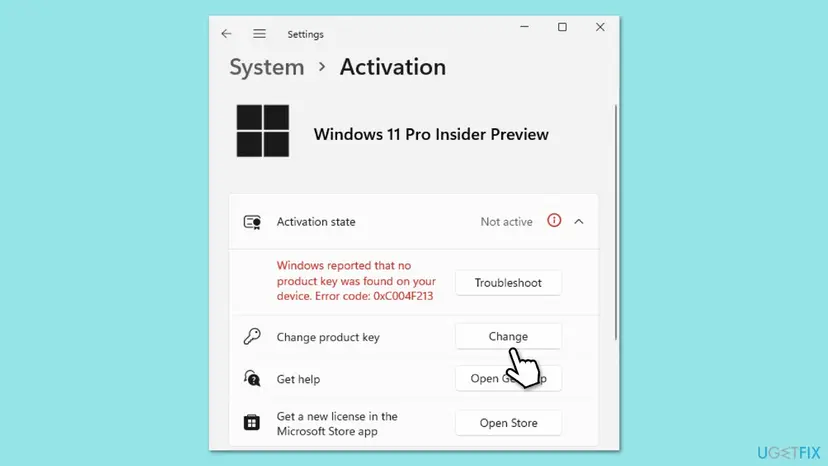
This message is activation error 0xC004F213: Windows looked for a licence that matches this PC and found none. On a new PC it often clears with the Activation troubleshooter, and after a motherboard change or a clean install the fix depends on your licence. Start with the troubleshooter.
Check that the PC is online, then open Settings > System > Activation and select Troubleshoot (Fix 1). Dell confirms this clears 0xC004F213 on new PCs. If you replaced the motherboard, choose I changed hardware on this device recently and sign in with the Microsoft account the licence was linked to (Fix 2). Have a key? Use Change product key (Fix 3). A self-built PC with no key needs a licence (Fix 6).
| Error | 0xC004F213: "Windows reported that no product key was found on your device." |
|---|---|
| Where it appears | Settings > System > Activation, in the Activation state row next to Not active (Windows 10: Settings > Update & Security > Activation), with the Activate Windows watermark on the desktop. |
| Main cause | Windows cannot find a licence that matches the hardware: after a motherboard change, after a clean install without a key, or a first activation on a new PC that did not go through. |
| Fastest fix | The Activation troubleshooter with a working internet connection (Fix 1). After a motherboard change, its I changed hardware on this device recently option (Fix 2). |
| Also written as | 0xc004f213, C004F213, "Error code: 0xC004F213", "Windows reported no product key", "no product key was found on your device", "product key not found". |
| Affects | Windows 11 and Windows 10, Home and Pro. Windows 10 reached end of support on 14 October 2025, but activation works the same way. |
| Microsoft's status | Expected behaviour, not a bug. Microsoft lists 0xC004F213 in the same row as 0xC004F211 (hardware changed) and gives the same steps. |
| When it is not fixable for free | Preinstalled (OEM) Windows after you replaced the motherboard yourself, or a self-built PC that never had a licence. Microsoft says a new licence may be needed. |
| Time to fix | About 2 to 5 minutes with the troubleshooter or a key. A new licence takes as long as the purchase. |
Facts checked on 15 October 2026. Steps written for Windows 11 (25H2 and 26H2) and Windows 10 22H2.
What "Windows reported that no product key was found on your device" means
Microsoft lists error 0xC004F213 with the text "Windows reported that no product key was found on your device". It shares a row with 0xC004F211, which reads "Windows reported that the hardware of your device has changed". Microsoft explains both the same way. A Windows licence is associated with your device hardware. Significant changes, such as a new motherboard, can stop Windows from locating a matching license.
In plain words, Windows asked for a licence for this PC and got none back. That can be because the hardware changed, because no key was ever entered, or because the first activation on a new PC did not complete. Dell describes the last case on new Windows 10 Home PCs and calls it a software activation issue, not a hardware fault.
| What you see | Where | What it tells you |
|---|---|---|
| Windows reported that no product key was found on your device. Error code: 0xC004F213 | Settings > System > Activation, Activation state: Not active | No licence matched this PC at the last check. |
| Activate Windows watermark | Desktop | Only the result. The code on the Activation page tells you why. |
| 0x800704CF: Windows can't reach our activation servers right now | Activation page, often on a new PC | Dell lists it next to 0xC004F213: check the internet connection first. |
| 0xC004F211: the hardware of your device has changed | Activation page | A sibling code with the same fixes. Our 0xC004F211 guide covers motherboard changes in more depth. |
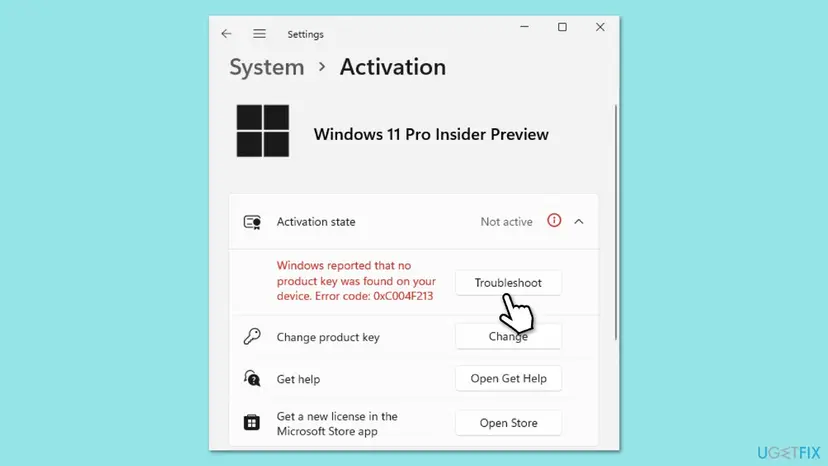
The error does not delete anything and Windows keeps starting. You see reminders and the watermark until Windows is activated. Take the few minutes to find out which licence you have before you buy anything.
Why error 0xC004F213 appears, from most to least common
The code itself does not say which case you are in. What you did with the PC lately does. Find your row, then go to its fix.
| Cause | How often | How to tell | Fix |
|---|---|---|---|
| The motherboard was replaced (or the PC rebuilt), and the digital licence was linked to your Microsoft account. | Most often | The error appeared on the first start after the change. | Fix 2 |
| A new PC or a fresh setup could not finish its first activation. | Often | Nothing changed, the PC is new or was just set up, and the internet may have been off. | Fix 1 |
| Windows was installed again and no key was entered, or a key you own was lost from the system. | Often | You have a key card, a shop email or a Microsoft Store order. | Fix 3, Fix 4 |
| The installed edition is not the one your licence is for, for example Pro on a Home licence. | Sometimes | The edition on the Activation page differs from what you paid for. | Fix 5 |
| Preinstalled Windows on a replaced motherboard, or a self-built PC that never had a licence. | Sometimes | No key of your own; a PC maker sticker, or no Windows purchase at all. | Fix 6 |
| A licence you bought from Microsoft that the account does not show. | Rarely | The troubleshooter does not list the PC and you have a receipt. | Fix 7 |
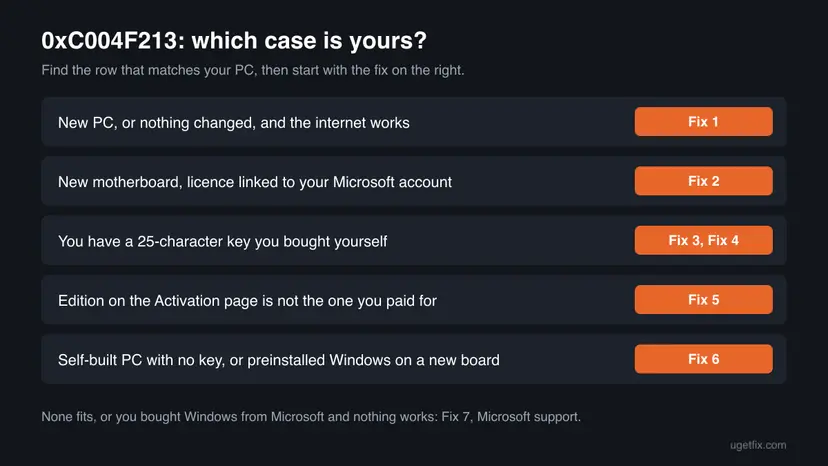
Users on Microsoft's forum also report the message after a Windows update with no hardware change. We found no Microsoft statement that explains that case, so treat it as unconfirmed and start with Fix 1.
Where Windows looks for your licence
Microsoft's activation pages name two ways a PC is activated: a digital licence or a 25-character product key. A PC that came with Windows has a key from the PC maker. The table shows which one you have and what happens to it.
| How you got Windows | What you have | What brings it back |
|---|---|---|
| Free upgrade, or bought in the Microsoft Store app | Digital licence | The troubleshooter, signed in with the Microsoft account it is linked to (Fix 1 or Fix 2). |
| Box copy or digital copy from a retailer | 25-character product key | The same key again with Change product key (Fix 3). |
| Came with the PC | PC maker's key (OEM) | The PC maker after a repair. After your own motherboard swap, Microsoft says you may need a new licence (Fix 6). |
| Self-built PC, Windows installed with no key | Nothing | A licence bought in the Store or from an authorised seller (Fix 6). |
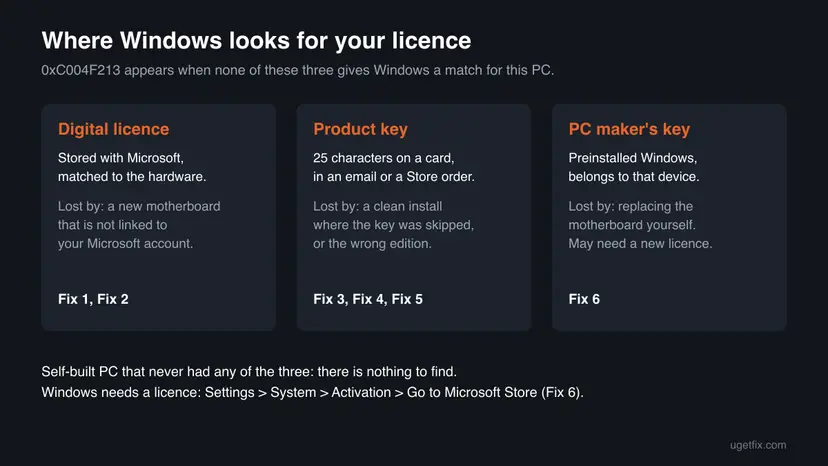
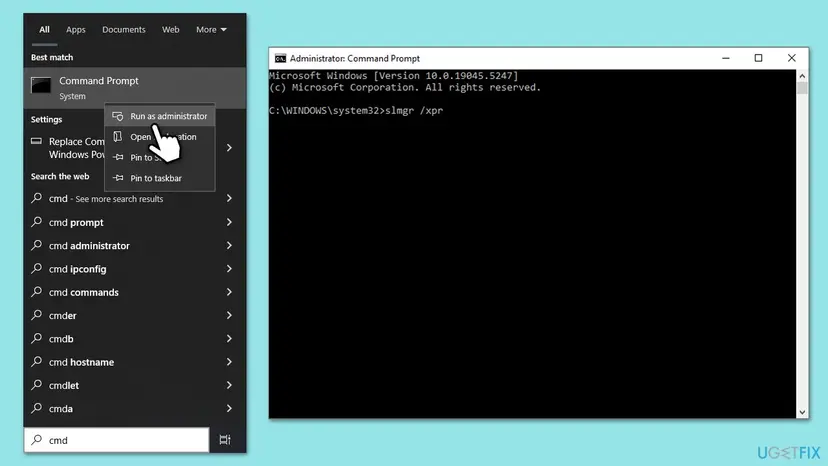
To see what Windows itself reports, open Command Prompt and run the two commands below. The 0xC004F211 guide explains how to read the channel line.
Show the licence channel and the activation status
slmgr /dli
slmgr /xpr
How to fix "Windows reported that no product key was found on your device"
Fix 1 is the one Microsoft and Dell both give and costs nothing. Fixes 2 to 4 bring back a licence you already own. Fix 5 is for a wrong edition, Fix 6 for a PC with no licence of its own, Fix 7 for a purchase the account does not show. Never use an activator tool or a cheap key site.
| What you see or have | Start with |
|---|---|
| A new PC, or nothing changed, and the error just appeared. | Fix 1 |
| You replaced the motherboard, and you sign in to Windows with a Microsoft account. | Fix 2 |
| You have a 25-character key you bought. | Fix 3, then Fix 4 |
| The Activation page shows Pro, but you paid for Home, or the reverse. | Fix 5 |
| You built the PC yourself and never bought Windows, or Windows came with the PC and you swapped the board. | Fix 6 |
| You bought Windows from Microsoft and nothing above worked. | Fix 7 |
Fix 1. Check the connection and run the Activation troubleshooter
2 to 5 minutesNo riskA new PC, a fresh setup, or the error appeared with no hardware change.
Dell's support article for 0xC004F213 on new PCs says it is not a hardware issue and that the Activation troubleshooter resolves it once the PC is online. The troubleshooter asks Microsoft again for a licence that matches this PC.
Dell's first step is to open a browser and load microsoft.com. If that fails, fix the connection first: How to check your internet connection in Windows
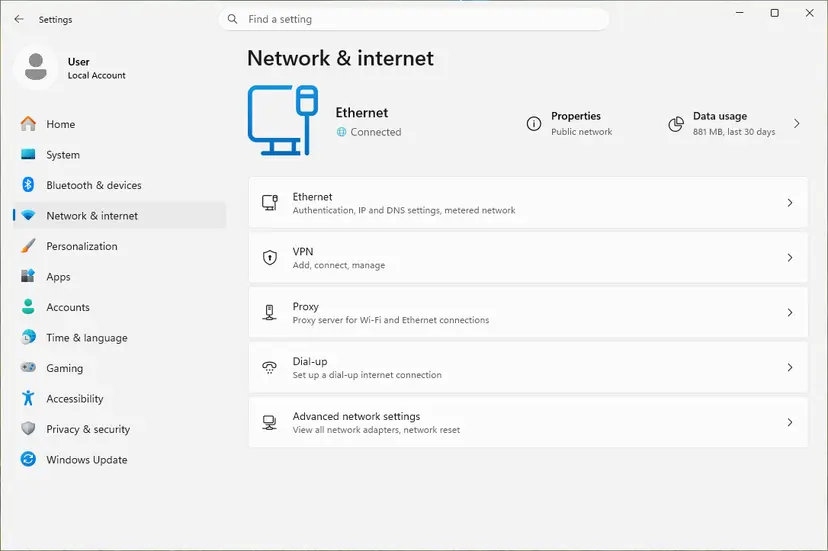
- Sign in with an administrator account. Settings > Accounts > Your info shows Administrator under your name.
- Open Settings > System > Activation. On Windows 10 it is Settings > Update & Security > Activation.
- Expand Activation state if the message is hidden.
- Select Troubleshoot. Microsoft notes it is only available while Windows is not activated.
- Wait for the result. If it says Windows was activated, restart the PC.
It worked if: The Activation page says Windows is activated, and the watermark is gone after a restart.
If not: If the troubleshooter offers I changed hardware on this device recently, go to Fix 2. If it reports that it cannot activate and you have a key, go to Fix 3.
Fix 2. Reactivate after a motherboard change with your Microsoft account
5 minutesNo riskYou replaced the motherboard or rebuilt the PC, and the licence was a digital one.
Microsoft offers an exception path for moving a licence after a hardware change. It works only if the licence was linked to your Microsoft account before the change, because the troubleshooter finds the old PC in that account.
- Open Settings > System > Activation and select Troubleshoot.
- Select I changed hardware on this device recently, then Next.
- Enter the Microsoft account and password the licence was linked to, then select Sign in. Microsoft says the troubleshooter works only with that connected account.
- In the list of devices linked to the account, tick This is the device I'm using right now next to the old PC.
- Select Activate.
Microsoft says a digital licence and a product key reactivate only if the edition, Home or Pro, is the same before and after the hardware change. If it differs, do Fix 5 first.
The full walk through this path, with a picture of every screen and what to do when the old PC is missing, is in our 0xC004F211 guide.
It worked if: The Activation page says Windows is activated with a digital license linked to your Microsoft account.
If not: If the old PC is not in the list, Microsoft says to check that you signed in with the same account. Try every account you used on it, then Fix 3 if you have a key, or Fix 7.
Fix 3. Enter the product key you own
3 minutesNo riskYou bought a retail key, or Windows was installed again without one.
The error literally says no key was found. Microsoft's answer for 0xC004F213 is to enter a key previously used on the device through Change product key. A retail key is yours, not the motherboard's.
- Find the key: the card in the retail box, the shop's confirmation email, or the order in your Microsoft account if you bought it from Microsoft online.
- Open Settings > System > Activation.
- Select Change in the Change product key row. On Windows 10 select Change product key.
- Type the 25-character key and select Next.
- Select Activate and wait for the result.
Generic keys posted online only install an edition; they do not activate it. Keys sold far below the retail price are often resold volume or OEM keys. Use only a key you bought.
It worked if: The Activation page says Windows is activated.
If not: If Settings refuses the key or hangs, enter it from Command Prompt in Fix 4, which gives a clearer message.
Fix 4. Install the key from Command Prompt, or activate by phone
5 to 15 minutesLow riskSettings will not accept your key, or online activation keeps failing.
slmgr is the script Windows ships for installing keys and starting activation. It reports the result in words, which often shows what the Settings page hides, such as a key for another edition.
- Type cmd in the search box, right-click Command Prompt, select Run as administrator and then Yes.
- Install your key, replacing the X characters:
slmgr /ipk XXXXX-XXXXX-XXXXX-XXXXX-XXXXX - Restart the PC and open Command Prompt as administrator again.
- Start online activation:
slmgr /ato - Check the result:
slmgr /xpr
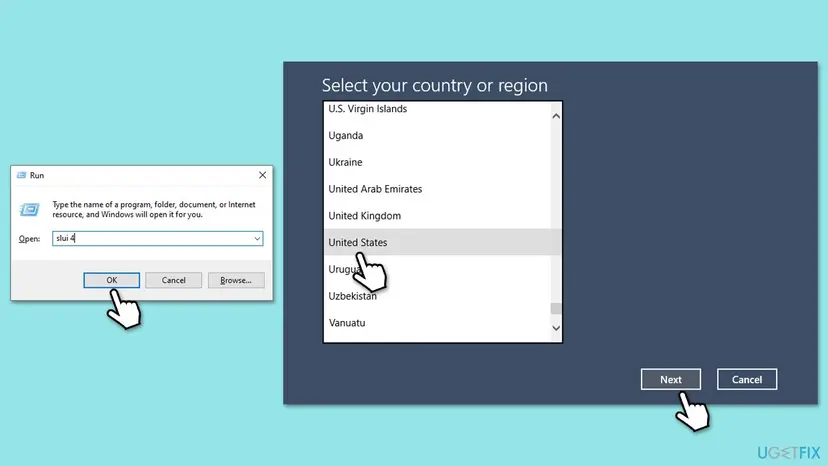
If online activation keeps failing with a valid key, Windows also offers activation by phone. Press Win + R, type slui 4 and press Enter, pick your country and follow the screen.
We could not confirm that phone activation accepts every key after a hardware change, and it does not create a licence where there is none. Do not use slmgr /rearm or /upk here; they reset or remove and fix nothing.
It worked if: slmgr /ato reports that the product was activated successfully, and slmgr /xpr says the machine is permanently activated.
If not: A message that the key is for another edition means Fix 5. A message that the key is blocked or used too often means the key cannot move to this PC: Fix 6 or Fix 7.
Fix 5. Install the same edition your licence is for
10 minutes to 1 hourRead the warningWindows was installed again and the edition is not the one you paid for.
Microsoft says a licence reactivates only when the edition stays the same. A Home licence finds no match on Pro, and a reinstall or a repair shop can switch the edition without you noticing.
| Your licence | Installed now | What to do |
|---|---|---|
| Pro | Home | Enter your Pro key with Fix 3. Windows upgrades the edition and keeps your files. |
| Home | Pro | Install Home again with Microsoft's installation media, and skip the key during setup. A Home digital licence activates by itself. |
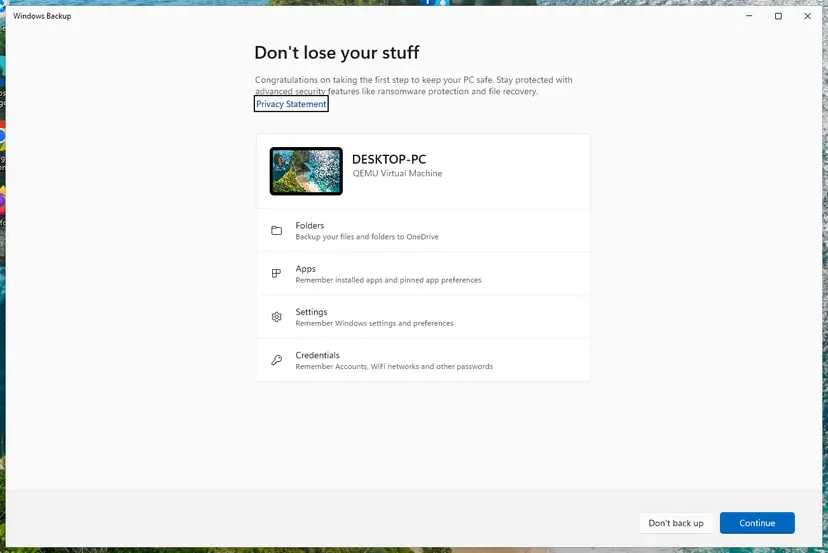
Installing Home over Pro removes apps, settings and files from the system drive. Back up everything you want to keep first: Back up your files (Windows Backup, File History, Time Machine). Sign in with the Microsoft account linked to the licence when setup asks.
- Compare the edition on Settings > System > Activation with your receipt, key card or Store order.
- Licence is Pro and Home is installed: enter the Pro key with Fix 3.
- Licence is Home and Pro is installed: back up your files and create installation media from Microsoft's Windows 11 download page.
- During setup choose Windows 11 Home, and select I don't have a product key when asked.
- After setup, sign in with your Microsoft account and open Settings > System > Activation.
It worked if: The edition on the Activation page matches the licence, and the status changes to activated at once or after Fix 1.
If not: If the matching edition still shows 0xC004F213, run Fix 1 or Fix 2 again now that the edition is right.
Fix 6. No licence of your own: the PC maker or a new licence
10 minutes, or the time of a purchaseNo riskA self-built PC that never had a licence, or preinstalled Windows on a replaced motherboard.
Here there is truly no product key to find. Microsoft says that if Windows came preinstalled and you replaced the motherboard, you may need to purchase a new license. A PC built from parts never had one.
| Your situation | What to do |
|---|---|
| The manufacturer or its service partner replaced the board | Contact the manufacturer with the repair number and ask them to restore the Windows key on the new board. |
| You replaced the board of a PC that came with Windows | The preinstalled licence stays with the old board. Buy a licence. |
| You built the PC and installed Windows without a key | Buy a licence. Windows was never activated on this hardware. |
- Open Settings > System > Activation.
- Select Open Store in the Get a new license in the Microsoft Store app row. Microsoft's own wording is Go to Microsoft Store.
- Buy the edition that is installed, Home or Pro. A Store purchase activates by itself when it finishes.
- If you bought a key from an authorised retailer instead, enter it with Fix 3.
- Once activated, link the licence to your Microsoft account so the next motherboard change takes five minutes.
Tools that promise to activate Windows for free change system files and run with full rights, and they often carry malware. Microsoft's licence terms forbid bypassing activation. This page does not link to any of them.
It worked if: Windows activates with the manufacturer's key or with the licence you bought.
If not: If the manufacturer refuses and you are sure your licence was retail, go back to Fix 3 with the retail key.
Fix 7. Ask Microsoft support to check a purchase the account does not show
15 to 30 minutesNo riskYou bought Windows from Microsoft, but no fix above found the licence.
The troubleshooter only sees licences linked to the account you sign in with. Support can look up a purchase by order and confirm whether the licence may move to this PC.
- Collect your proof: the Microsoft Store order or confirmation email, the account used to buy, and a photo of any key card.
- Run
slmgr /dliin Command Prompt and save a screenshot of the window. - Note the exact message, Windows reported that no product key was found on your device, and what changed on the PC.
- Open the contact page at support.microsoft.com/contactus and choose Windows activation.
- Give support all of the above in one message.
It worked if: Support reactivates Windows, or tells you plainly that the licence cannot move to this hardware.
If not: If support says the licence was preinstalled on another PC, read Fix 6. That answer is final under the licence terms.
If "no product key was found" is still there
When none of the fixes worked, the question is no longer technical. It is whether this PC has a licence at all. Collect these facts before you ask anyone.
| What to check | Where | What it tells you |
|---|---|---|
| Licence channel and status | slmgr /dli in Command Prompt | Retail, OEM or volume, and whether any key is installed. |
| Edition | Settings > System > Activation | Home and Pro licences do not cross. |
| Linked devices | account.microsoft.com, Devices | Whether the old PC is still on the account the troubleshooter uses. |
| Activation events | Event Viewer, Windows Logs > Application, source Security-SPP | The time of each attempt. We could not confirm a specific event ID for 0xC004F213. |
The old version of this guide suggested running SFC and DISM and reinstalling Windows. No Microsoft source ties 0xC004F213 to damaged system files, and a reinstall on the same hardware asks the same licence question. A reinstall helps only when the edition was wrong (Fix 5).
How to avoid 0xC004F213 next time
Microsoft says the hardware change exception works only if you are signed in with the same Microsoft account before the change. Linking takes a minute and has to happen while Windows is still activated.
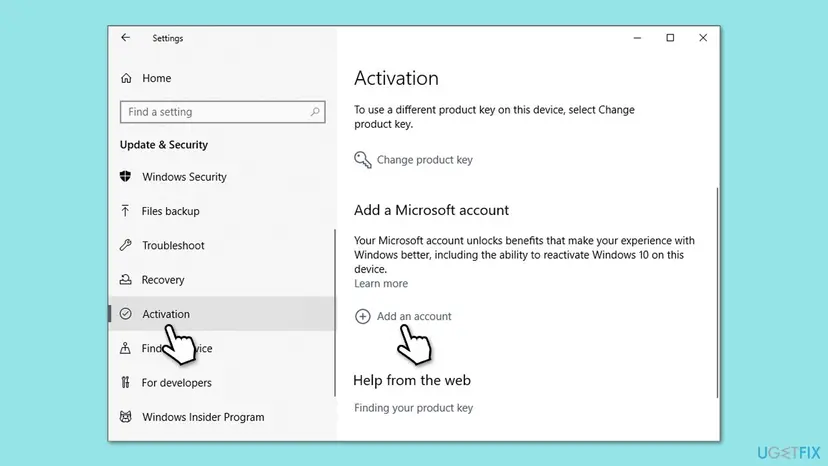
- Open Settings > System > Activation now. If it says only activated with a digital license, select Add an account and sign in.
- Keep the retail key card, the shop email or the Store order where you can find it.
- Reinstall the same edition after a repair, and tell the repair shop which one you have.
- Keep the PC online during the first setup of a new PC, so the first activation can finish.
- Do not remove the old PC from your Microsoft account before the new one is activated.
- Do not run activator tools or registry tricks from forums or videos.
- Do not buy keys from marketplaces at a fraction of the retail price.
- Do not skip the product key during a reinstall if you activated with a key before.
Frequently asked questions
What does "Windows reported that no product key was found on your device" mean?
It means Windows looked for a licence that matches this PC and found none. Microsoft lists the message as error 0xC004F213 and explains that a licence is associated with the device hardware. The usual triggers are a new motherboard, a reinstall without a key, or a first activation on a new PC that did not finish. Windows keeps working, but it shows as not activated until a licence is found or added.
How do I fix error code 0xC004F213?
Start with the Activation troubleshooter in Settings > System > Activation while the PC is online. Dell says this alone fixes the code on new PCs. After a motherboard change, choose I changed hardware on this device recently and sign in with the Microsoft account linked to the licence. If you have a key, enter it with Change product key. A PC with no licence of its own needs one bought in the Store or from an authorised seller.
Why does Windows say no product key was found when I never changed anything?
On a new PC, the first activation may not have completed, often because the PC was offline during setup. Dell describes exactly this on new Windows 10 Home PCs and says the Activation troubleshooter fixes it. A laptop that came back from repair may also have a new motherboard without you knowing. Users on Microsoft's forum report the message after updates too, which Microsoft does not explain. Run Fix 1 first.
Can I fix "no product key found" on Windows 11 for free?
Yes, when a licence exists. The troubleshooter, a digital licence linked to your Microsoft account and a retail key you already own all cost nothing. It is not free when the PC never had a licence, such as a self-built PC, or when Windows came preinstalled and you replaced the motherboard yourself. Microsoft says you may need to buy a new licence in that case.
Is 0xC004F213 different on Windows 10?
No. Windows 10 shows the same message and code, and the fixes are the same. Only the path differs: Settings > Update & Security > Activation instead of Settings > System > Activation. Windows 10 reached end of support on 14 October 2025, so it gets no more security updates without extended support. If you are reactivating anyway, it is a good moment to plan the move to Windows 11.
Where do I find my Windows product key?
A key you bought is on the card in the retail box, in the shop's confirmation email, or in your Microsoft account orders if you bought it from Microsoft online. A digital licence has no key to find: it is stored with Microsoft and returns through the troubleshooter. A PC that came with Windows uses the PC maker's key, so after a repair the manufacturer is the one to ask.
Will SFC, DISM or reinstalling Windows fix 0xC004F213?
Usually not. No Microsoft source links this code to damaged system files, so SFC and DISM do not address it. Reinstalling Windows on the same hardware leaves Windows asking the same licence question. A reinstall helps only when the wrong edition was installed, for example Pro on a Home licence. In that case install the matching edition and skip the key during setup.
The cmd commands didn't work. What now?
Look at the message slmgr returns. A key for another edition means you need the matching edition (Fix 5). A key that is blocked or has been used too often cannot move to this PC (Fix 6 or Fix 7). The old wmic command for reading a key from the firmware no longer works on current Windows 11, and slmgr /xpr only shows status. It never activates anything by itself.
Is there a free key or tool that removes the no product key error?
No legitimate one. Free keys posted online are generic or stolen, and activation tools change system files and run with full rights on your PC, often with malware attached. Microsoft's licence terms forbid bypassing activation. The legal ways are on this page: your linked account, your own key, the PC maker after a repair, or a licence from the Microsoft Store or an authorised retailer.
What if this is a work or school PC?
Then the organisation manages activation, usually through a volume licence or a subscription tied to the work account. Do not enter a personal key or buy a licence in the Store on that PC. Connect to the organisation's network or VPN, save the output of slmgr /dli, and send it to the IT administrator together with the error message and what changed.
Sources
- Microsoft Support: Get help with Windows activation errors (support.microsoft.com)
- Microsoft Support: Reactivating Windows after a hardware change (support.microsoft.com)
- Dell Support: Windows 10 Home Activation Error 0x800704CF 0xC004F213 On New Devices (dell.com)
Did this fix work?
One click, no account. It tells the next reader which guides are worth their time.
Questions and experiences: fix "Windows reported that no product key was found on your device" error
Still broken, or found a fix we did not cover? Ask here: members and our editors answer. Reading is open; writing needs a free account.
…