
How to fix nvspcap64.dll error in Windows?

Prefer to fix it yourself? The manual steps follow.
- 5methods
- 5 to 30 minutes
- Easy
Applies to Windows 11, Windows 10; PCs with an NVIDIA graphics card that have or had GeForce Experience
5 methods in this guide
Every time I launch any game I own (for example, Valorant), I always get an error message saying "C:\Windows\system32\nvspcap64.dll is either not designed to run on Windows or it contains an error. Try installing the program again using the original installation media or contact your system administrator or the software vendor for support. Error status 0xc000012f." Why is this happening?
nvspcap64.dll is a file of NVIDIA's game capture (ShadowPlay), installed with GeForce Experience, not a part of Windows. The error means a leftover NVIDIA startup entry calls it, or the file itself is damaged. Read your message first: a startup message needs Fix 1, a Bad Image message needs Fix 3.
If the message appears right after you sign in to Windows, an old NVIDIA startup entry still points to nvspcap64.dll: turn it off in Task Manager (Fix 1) or Autoruns (Fix 2). If a game shows Bad Image with 0xc000012f, the file is damaged: uninstall GeForce Experience and install the NVIDIA app fresh (Fix 3). Never download the DLL from a DLL site.
| Error | "C:\Windows\system32\nvspcap64.dll is either not designed to run on Windows or it contains an error" (Bad Image), or a startup message about the same file. |
|---|---|
| Where it appears | In a small window right after you sign in, or each time a game or program starts. The window title names the program, for example VALORANT.exe - Bad Image. |
| Main cause | At startup: a leftover NVIDIA ShadowPlay startup entry. When a program opens: a damaged copy of the file. |
| Fastest fix | Disable the NVIDIA entry in Task Manager > Startup apps (Fix 1). For Bad Image, reinstall NVIDIA's software (Fix 3). |
| Also written as | nvspcap.dll (the 32-bit file), nvscap64.dll (a typo), "Missing entry: ShadowPlayOnSystemStart", "The specified module could not be found". |
| Status codes | 0xc000012f (STATUS_INVALID_IMAGE_NOT_MZ) and 0xc0000020 (STATUS_INVALID_FILE_FOR_SECTION), both meaning the file cannot be loaded as a program file. |
| Belongs to | NVIDIA's capture part of GeForce Experience (ShadowPlay). It is not a Windows file, so SFC does not restore it. |
| Affects | Windows 11 and Windows 10, also older Windows versions. Reports go back to 2015. |
| Time to fix | 5 minutes for a startup entry, up to 30 minutes for a full NVIDIA reinstall. |
Facts checked on 15 October 2026. Steps written for Windows 11 (25H2 and 26H2) and Windows 10 22H2.
What nvspcap64.dll is and what the error means
nvspcap64.dll sits in C:\Windows\System32 and belongs to NVIDIA's ShadowPlay capture, the part of GeForce Experience that records and streams gameplay. Its 32-bit twin is nvspcap.dll. Windows does not need either file: they come and go with NVIDIA's software.
The error comes in three versions, and the text tells you the cause. Two appear right after you sign in, because a startup entry tries to run a function in the file. The third appears when a game or program opens and Windows refuses to load the file at all.
Bad Image, when a game or program starts
C:\Windows\system32\nvspcap64.dll is either not designed to run on Windows or it contains an error.
Try installing the program again using the original installation media or contact your system administrator or the software vendor for support.
Error status 0xc000012f.
At startup, two versions
There was a problem starting C:\Windows\system32\nvspcap64.dll. The specified module could not be found.

Error in C:\WINDOWS\system32\nvspcap64.dll
Missing entry: ShadowPlayOnSystemStart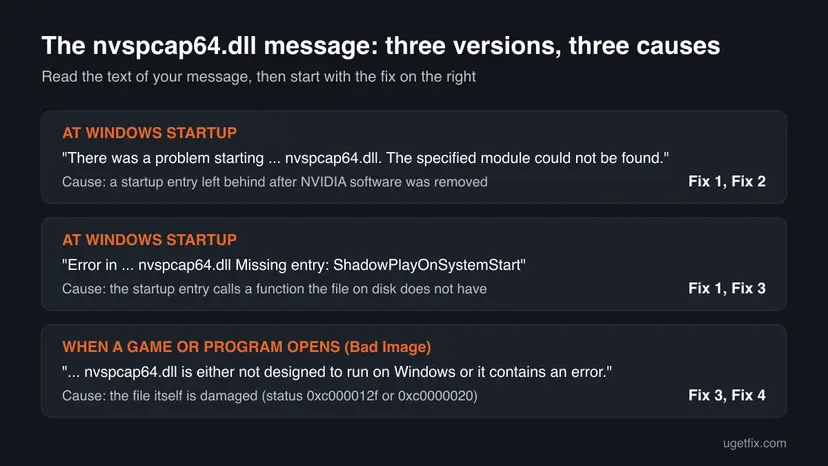
In the Bad Image case the program named in the title bar is not at fault. Users report the same message from games, Firefox, Steam and Movie Maker, because each of them loaded the damaged NVIDIA file. Fixing the file fixes all of them at once.
nvspcap64.dll is either not designed to run on Windows: what 0xc000012f and 0xc0000020 mean
The Bad Image text is Microsoft's standard message for a program file that Windows cannot load. The status code at the end says why. Microsoft's list of NTSTATUS values gives these meanings:
| Code | Microsoft's name | What it means for this file |
|---|---|---|
0xc000012f | STATUS_INVALID_IMAGE_NOT_MZ | The file does not start like a Windows program file. It is cut short, empty or overwritten. |
0xc0000020 | STATUS_INVALID_FILE_FOR_SECTION | Windows could not read the file to map it into memory. It is damaged or unreadable. |
0xc000007b | STATUS_INVALID_IMAGE_FORMAT | The general Bad Image code. Often a 32-bit and 64-bit mix-up. |
Both common codes say the file on disk is broken, not that a setting is wrong. Copying the file back by hand or re-registering it does not help. Reinstalling NVIDIA's software writes a good copy, or removes it when you do not want ShadowPlay.
Why the nvspcap64.dll error happens
Most often GeForce Experience was removed or updated and left a startup entry that still points to nvspcap64.dll. Less often the file itself was damaged, for example by a crash during an update or a disk problem. Rarely the whole NVIDIA driver install is broken, and other NVIDIA files such as nvapi.dll fail too.
| Cause | How often | How to tell | Fix |
|---|---|---|---|
| A leftover NVIDIA startup entry after GeForce Experience was removed or changed. | Most often | The message appears only after sign-in. | Fix 1, Fix 2 |
| The startup entry and the file are from different versions. | Often | "Missing entry: ShadowPlayOnSystemStart". | Fix 1, Fix 3 |
| The file is damaged. | Sometimes | Bad Image with 0xc000012f or 0xc0000020 when programs open. | Fix 3 |
| The NVIDIA driver install is damaged. | Rarely | nvapi.dll or other NVIDIA files give the same message. | Fix 4 |
| Windows system files or the disk are damaged. | Rarely | Windows' own DLLs fail too. | Fix 5 |
NVIDIA has published no support article on this file that we could find, and we found no known-issue entry for it. Malware is not a known cause, but a copy downloaded from a DLL site can be one.
How to fix the nvspcap64.dll error
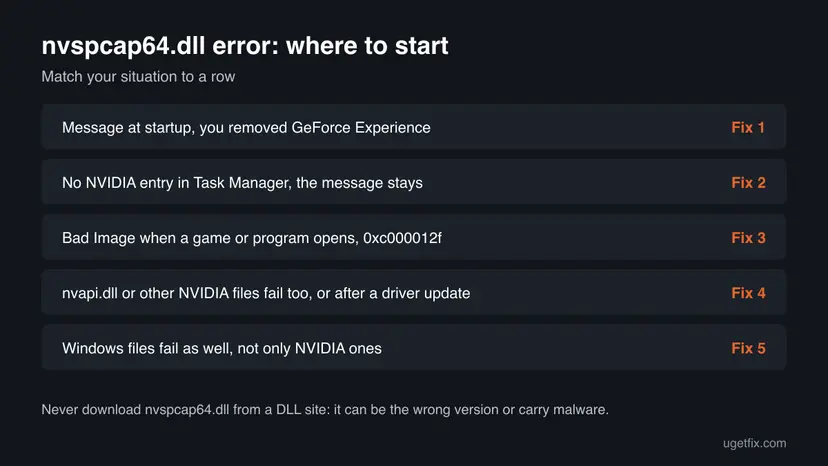
Fixes 1 and 2 remove the startup entry and solve the messages that appear after sign-in. Fix 3 replaces or removes the damaged file behind Bad Image. Fixes 4 and 5 are for the rare cases where the driver or Windows itself is damaged.
| What you see | Start with |
|---|---|
| A message right after sign-in, and you removed GeForce Experience. | Fix 1 |
| The message stays, and Task Manager shows no NVIDIA entry. | Fix 2 |
| "Missing entry: ShadowPlayOnSystemStart" and you still use GeForce Experience or the NVIDIA app. | Fix 3 |
| Bad Image with 0xc000012f or 0xc0000020 when a game or program opens. | Fix 3 |
nvapi.dll or other NVIDIA files fail too, or it began after a driver update. | Fix 4 |
| Windows' own DLLs fail as well. | Fix 5 |
Fix 1. Disable the leftover NVIDIA startup entry in Task Manager
5 minutesNo riskThe message appears right after you sign in, often after you uninstalled GeForce Experience.
The startup messages come from an entry that runs a ShadowPlay function in nvspcap64.dll at every sign-in. When the file is gone or does not have that function, the entry fails. Turning the entry off stops the call without touching any file.
- Press Ctrl + Shift + Esc to open Task Manager.
- Select Startup apps on the left. On Windows 10, select the Startup tab.
- Look for an NVIDIA entry: NVIDIA GeForce Experience or another entry whose publisher is NVIDIA Corporation.
- If you are not sure, right-click the column header, turn on Command line and look for
nvspcap64.dllin it. - Select the entry and select Disable.
- Restart the PC.
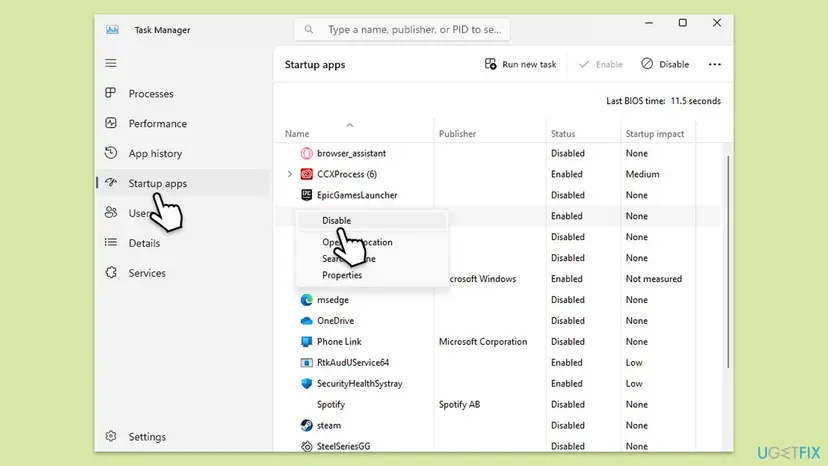
The same list is in Settings, with switches instead of a button: Stop apps from opening at startup
It worked if: After the restart no message appears. Games and the screen work as before, because the driver does not need this entry.
If not: If you find no NVIDIA entry, or the message comes back, go to Fix 2.
Fix 2. Find and turn off the hidden entry with Microsoft Autoruns
10 minutesLow riskTask Manager shows no NVIDIA entry, but the startup message stays.
Task Manager lists only some places that start programs. Autoruns, a free Sysinternals tool from Microsoft, lists all of them, including scheduled tasks and registry Run keys. Unticking an entry turns it off and keeps it, so you can tick it again.
- Download Autoruns from Microsoft's Sysinternals page and unzip it.
- Right-click Autoruns64.exe and select Run as administrator.
- Type
nvspcapin the Filter box at the top. - Untick every entry that names
nvspcap64.dllornvspcap.dll. Do not delete them yet. - Restart the PC and check that the message is gone.
Entries shown on a yellow background point to a file that no longer exists. Those are safe to delete with Entry > Delete once the message is gone for a few days.
It worked if: The filter shows one or two NVIDIA entries. After you untick them and restart, the message no longer appears.
If not: If no entry matches and the message still appears, the file is damaged rather than missing. Go to Fix 3.
Fix 3. Uninstall GeForce Experience and install the NVIDIA app fresh
20 minutesLow riskBad Image with 0xc000012f or 0xc0000020 when programs open, or "Missing entry: ShadowPlayOnSystemStart" while you still use NVIDIA's capture.
A damaged nvspcap64.dll cannot be repaired in place. The NVIDIA software that installed it can remove it and write a matching copy, together with a startup entry of the same version. NVIDIA now offers the NVIDIA app as the successor of GeForce Experience.
- Right-click Start, open Settings and go to Apps > Installed apps.
- Find NVIDIA GeForce Experience, select the three dots next to it and select Uninstall. Do the same for NVIDIA App if it is listed.
- Restart the PC.
- Check whether the message is gone. If you do not record or stream games, you can stop here.
- To get the capture features back, open NVIDIA's app page, select Download Now and run the file.
- Restart the PC once more and open the game that showed the error.
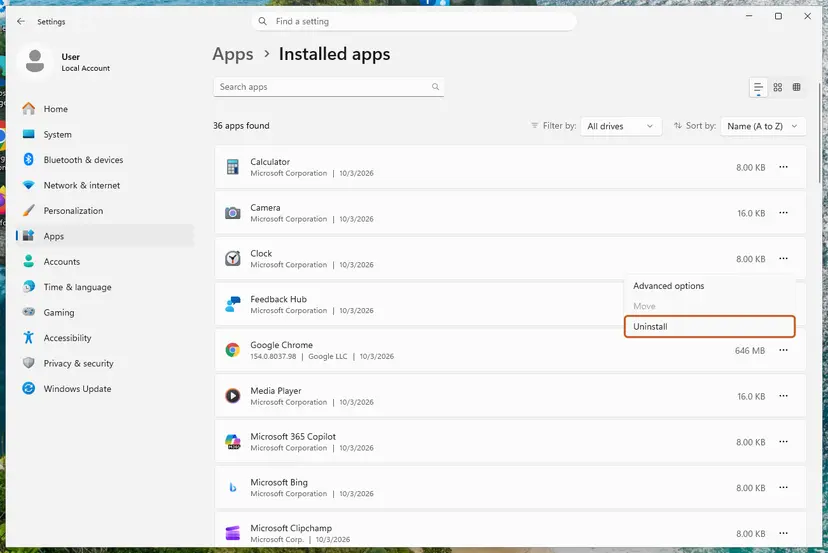
We could not confirm whether the current NVIDIA app still installs a file named nvspcap64.dll. Either way, a fresh install leaves no damaged copy that programs try to load.
If the NVIDIA installer itself fails with error 0xE6000000: How to fix NVIDIA Installer cannot continue error code 0xE6000000.
It worked if: Games and programs open without the Bad Image window, and no message appears at sign-in.
If not: If the message stays after the reinstall, or nvapi.dll fails too, go to Fix 4.
Fix 4. Remove and reinstall the NVIDIA graphics driver
20 minutesLow riskOther NVIDIA files such as nvapi.dll give the same Bad Image message, the error began after a driver update, or Fix 3 did not help.
NVIDIA's driver package writes several files into System32. If an update stopped halfway, more than one of them can be damaged, and a full remove and reinstall writes all of them anew.
Download the driver for your card from NVIDIA's driver page first, so the installer is ready before you remove the old one.
- Right-click Start and select Device Manager.
- Expand Display adapters, right-click your NVIDIA card and select Uninstall device.
- Tick Attempt to remove the driver for this device and select Uninstall.
- Restart the PC. The screen runs with a basic Windows driver for now.
- Run the driver file you downloaded and finish the setup.
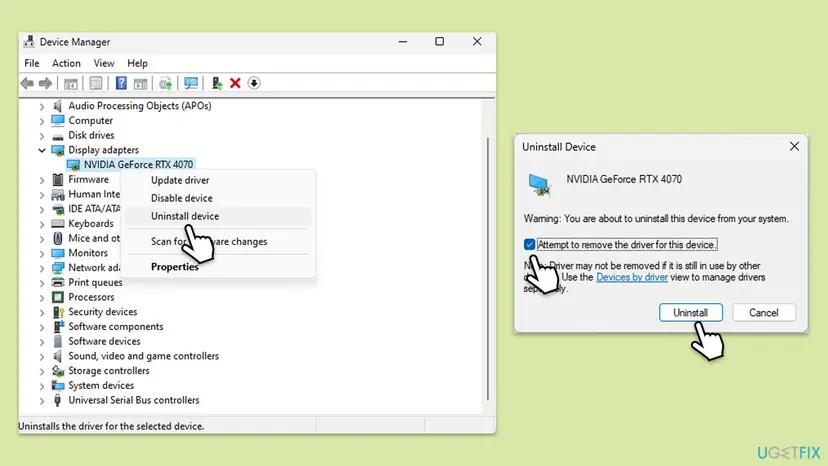
Updating, rolling back and reinstalling drivers on both Windows versions: Update, roll back or reinstall a driver
It worked if: Device Manager shows your card by name, and neither nvspcap64.dll nor nvapi.dll gives a Bad Image message.
If not: If Windows' own DLLs fail too, go to Fix 5.
Fix 5. Repair Windows system files with DISM and SFC
20 minutesNo riskBad Image messages name Windows' own files as well, not only NVIDIA ones.
SFC and DISM repair only files that belong to Windows. They do not restore nvspcap64.dll, so run them only when Windows files fail as well. Then the shared cause, such as damaged system files, is the thing to fix.
- Open an elevated command window. Right-click Start and select Terminal (Admin), or type cmd in the search box, right-click Command Prompt and select Run as administrator. Select Yes when Windows asks for permission.
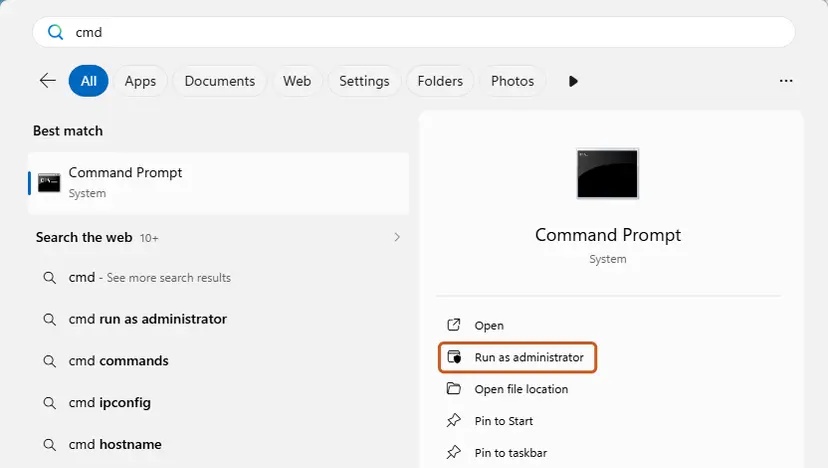
Search for cmd and choose Run as administrator. Screenshot: Windows 11 26H2. - Run DISM first. Type the command below and press Enter. DISM downloads clean copies of damaged components from Windows Update, so it can take several minutes. Wait until it says The operation completed successfully.
DISM.exe /Online /Cleanup-Image /RestoreHealth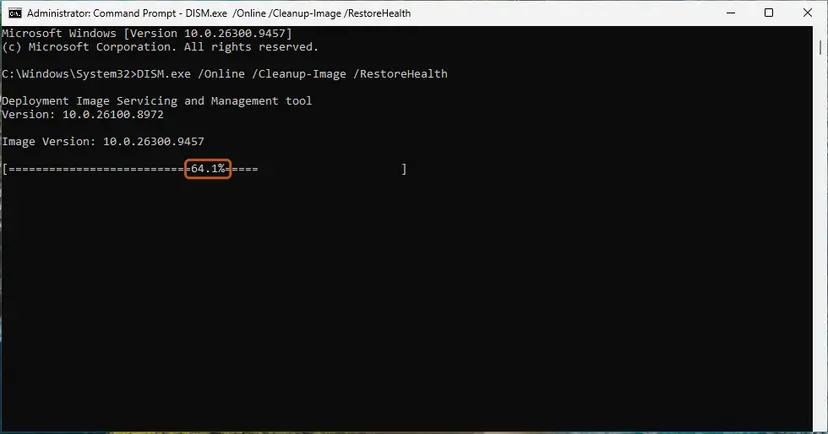
DISM /RestoreHealth running. Screenshot: Windows 11 26H2. - Run System File Checker. In the same window, type the command below and press Enter. Do not close the window until the verification reaches 100%.
sfc /scannow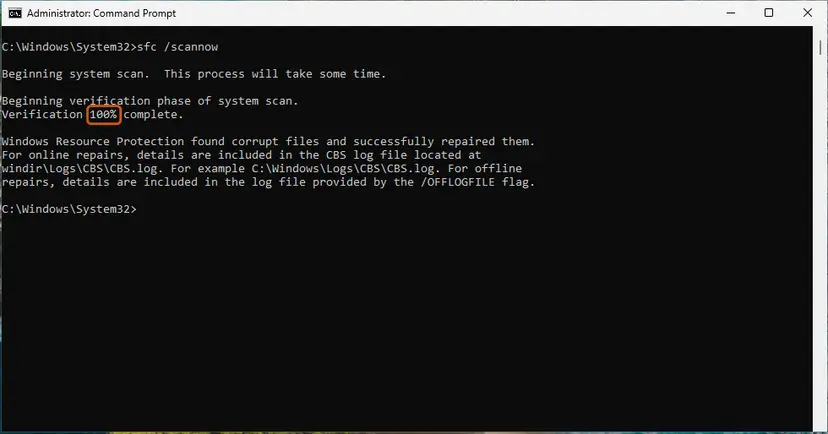
sfc /scannow at 100%. Screenshot: Windows 11 26H2. - Read the result and restart. Compare the last message with the table below this guide, then restart the PC so that repaired files are loaded.
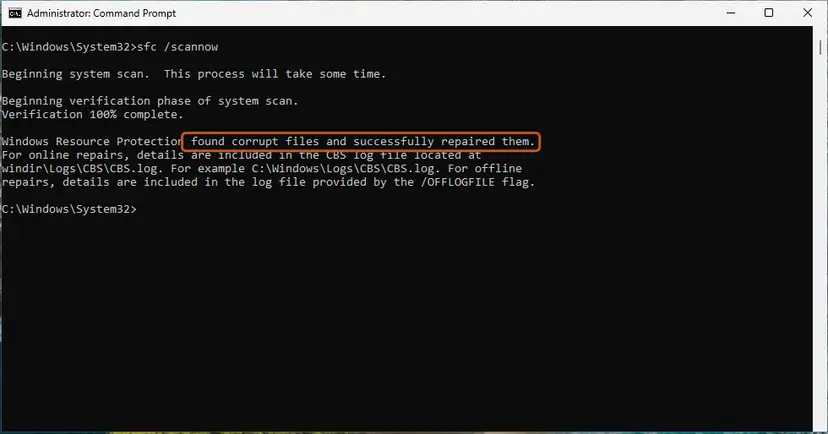
The result line tells you what SFC did. Screenshot: Windows 11 26H2.
These steps were written for Windows 11 24H2 and 25H2. The full page with the other versions and what each result means: Run DISM and SFC to repair Windows system files
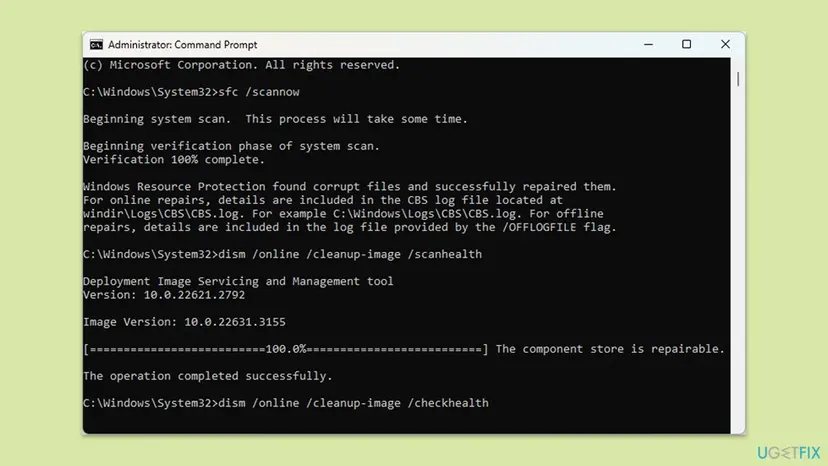
It worked if: SFC reports that it found no problems or repaired files, and the Bad Image messages stop.
If not: If SFC cannot repair files, check the disk as described under "If the nvspcap64.dll error still appears".
If the nvspcap64.dll error still appears
Find out what loads the file and when. The window title of the Bad Image message names the program, and Event Viewer often keeps a record of the same moment.
- Note the exact text and status code of the message, and the program name in its title bar.
- Press Win + R, type
eventvwr.mscand press Enter. - Open Windows Logs > Application and Windows Logs > System, and look for errors at the time the message appeared.
- Run
winverand note your Windows version, and note your NVIDIA driver version from Device Manager.
- When the file comes back damaged after a reinstall: the disk may be failing. Run a disk check with Check a disk for errors (chkdsk) and back up your files first.
- When only one program shows it: reinstall that program, or verify its files if it is a game: How to verify game files in Steam, Epic Games, Xbox app, EA app, Battle.net and GOG Galaxy.
- What to send to NVIDIA support: the message text, the status code, the Event Viewer entries and both versions above.
How to keep the nvspcap64.dll error from coming back
- Uninstall NVIDIA software from Settings > Apps > Installed apps, then restart the PC.
- Check Task Manager > Startup apps after you remove NVIDIA software.
- Restart the PC after every driver or NVIDIA app update, and let updates finish.
- Download drivers and the NVIDIA app only from nvidia.com.
- Do not download
nvspcap64.dllfrom DLL sites. - Do not delete files from
System32by hand. - Do not switch off the PC while a driver update runs.
Frequently asked questions
What is nvspcap64.dll?
It is a file of NVIDIA's ShadowPlay capture, the gameplay recording and streaming part of GeForce Experience. It sits in C:\Windows\System32 even though it is not a Windows file. The 64-bit version is nvspcap64.dll and the 32-bit version is nvspcap.dll, so 32-bit and 64-bit programs can both use the capture. If you do not record or stream games with NVIDIA's tools, you do not need it. Removing NVIDIA's software in Settings removes it the proper way.
Is nvspcap64.dll a virus?
The real file comes from NVIDIA and is not a virus. A copy downloaded from a DLL site may be the wrong version or carry malware, so do not use one. If you are unsure about your copy, right-click it in C:\Windows\System32, open Properties and check the Digital Signatures tab for NVIDIA Corporation. If the signature is missing, run a full scan with Microsoft Defender: How to scan for malware with Microsoft Defender.
Can I download nvspcap64.dll and copy it into System32?
No. DLL download sites offer files of unknown version and origin, and a copy that does not match your NVIDIA software gives the same error or a new one. The file is not a separate download from NVIDIA. It comes inside NVIDIA's software, so the safe way to get a good copy is Fix 3: uninstall GeForce Experience and install the NVIDIA app from nvidia.com. If you do not need the capture features, you do not need the file at all.
What does "Missing entry: ShadowPlayOnSystemStart" mean?
A startup entry asks nvspcap64.dll to run a function called ShadowPlayOnSystemStart, and the file on disk does not have that function. This happens when the entry and the file come from different NVIDIA versions, or when the file was replaced. Turn off the entry in Task Manager (Fix 1) or Autoruns (Fix 2). If you still use NVIDIA's capture, reinstall NVIDIA's software (Fix 3) so that the entry and the file match again. Users see the same message in Spanish, Russian and other languages.
What is the nvspcap.dll error?
It is the same error for the 32-bit version of the file. 32-bit programs load nvspcap.dll, 64-bit programs load nvspcap64.dll, and both come with GeForce Experience. In a 2015 Microsoft forum thread, a user saw nvspcap.dll Bad Image with status 0xc0000020 in Movie Maker, Firefox and Steam. The fixes on this page work for both files. Remove the startup entry if the message appears at sign-in, or reinstall NVIDIA's software for Bad Image.
Why do I get nvspcap64.dll is either not designed to run on Windows when I open a game?
The game loads NVIDIA's capture file as it starts, and Windows finds that the file is damaged. Status 0xc000012f means the file does not even start like a program file. The game itself is fine, which is why every game shows the same message. Uninstall GeForce Experience and install the NVIDIA app (Fix 3). This removes the damaged copy. If the message comes back after that, reinstall the driver (Fix 4).
What about nvapi.dll is either not designed to run on Windows?
nvapi.dll is a part of the NVIDIA graphics driver, not of GeForce Experience. The same Bad Image message for it means a driver file is damaged. The fix is a full driver removal and reinstall (Fix 4). If both nvapi.dll and nvspcap64.dll fail, do Fix 4 first and then Fix 3. When Windows' own DLLs fail as well, repair Windows with Fix 5 and check the disk, because several damaged files at once can point to a disk fault.
Is the nvspcap64.dll error different on Windows 11?
No. The file, the messages and the fixes are the same on Windows 11 and Windows 10. Only the place of the startup list differs. On Windows 11 it is Task Manager > Startup apps or Settings > Apps > Startup. On Windows 10 it is the Startup tab of Task Manager. Windows 10 left support on 14 October 2025, so keep it updated as far as Windows Update still offers.
I get the nvspcap64.dll error when RealVNC starts. Why?
We found no statement from RealVNC about this file. A screen sharing program captures the screen, so it may load NVIDIA's capture file like a game does. A damaged copy then gives the same Bad Image message. The fixes are the same: reinstall NVIDIA's software (Fix 3) and, if needed, the driver (Fix 4). If only RealVNC shows the message after that, reinstall RealVNC.
Will re-registering nvspcap64.dll with regsvr32 fix it?
We do not recommend it. Re-registering cannot repair a damaged file, and in a Microsoft forum thread a user reported error 87 when trying it on this file. The startup messages are also not about registration, but about an entry that calls the file. Remove the entry (Fix 1 or Fix 2) or let NVIDIA's installer write a good copy (Fix 3) instead.
Sources
- Microsoft Learn: [MS-ERREF] NTSTATUS Values (0xC000012F, 0xC0000020, 0xC000007B) (learn.microsoft.com)
- Microsoft Q&A: nvspcap.dll is either not designed to run on Windows or it contains an error. Error status 0xc0000020 (learn.microsoft.com)
- malekal.com: Erreur nvspcap64.dll au démarrage de Windows (malekal.com)
Did this fix work?
One click, no account. It tells the next reader which guides are worth their time.
Questions and experiences: fix nvspcap64.dll error in Windows
Still broken, or found a fix we did not cover? Ask here: members and our editors answer. Reading is open; writing needs a free account.
…