
Iqvw64e.sys "A driver cannot load on this device": how to fix it in Windows 11 and 10

Prefer to fix it yourself? The manual steps follow.
- 7methods
- 5 to 15 minutes
- Easy
Applies to Windows 11 and Windows 10 PCs that show "A driver cannot load on this device" for iqvw64e.sys
7 methods in this guide
Hello. After recent Windows updates, I started receiving the error "A driver cannot load on this device" with the driver iqvw64e.sys mentioned. Kindly help me resolve this, if it is possible at all.
Iqvw64e.sys is the Intel Ethernet diagnostics driver, and Windows refuses to load old copies of it because they have a known kernel flaw. Your PC is protected, not broken, and your internet keeps working. Remove the old Intel network tool that asks for it, or replace it with Intel's current package, and keep Memory integrity on.
The message means Windows Security blocked iqvw64e.sys, an Intel network diagnostics driver with a published flaw (CVE-2015-2291). Uninstall old Intel network tools you do not use, such as Intel PROSet or Intel Network Connections (Fix 1). If you need them, install Intel's current Ethernet package (Fix 2). If no Intel tool is installed, check where the file sits (Fix 3). Do not turn Memory integrity off to hide the message.
| Error | "A driver cannot load on this device" from Program Compatibility Assistant, naming Driver: iqvw64e.sys |
|---|---|
| Where it appears | A small window at Windows sign-in, after a Windows update, or when Intel network software starts |
| Main cause | Old Intel Ethernet software tries to load an old copy of the Intel Ethernet diagnostics driver, and the Microsoft vulnerable driver blocklist or Memory integrity stops it |
| Fastest fix | Uninstall the Intel network tools you do not use (Fix 1); install Intel's current package only if you need them (Fix 2) |
| Also written as | iqvw64e.sys, iqvw64e sys, iqvw64e, driver iqvw64e.sys, iqw64e.sys (typo); the 32-bit file is iqvw32.sys |
| Affects | Windows 11 (25H2, 26H2) and Windows 10 22H2 PCs with older Intel Ethernet software installed |
| Vendor status | Intel advisory INTEL-SA-00051: versions before 1.3.1.0 are affected; Intel fixed it in June 2015 (Ethernet Adapters Connections CD 20.1 and later) |
| Microsoft's view | A blocked driver has a vulnerability and is most likely not malicious; look for an updated driver first |
| Time to fix | 5 to 15 minutes, with one restart |
Facts checked on 15 October 2026. Steps written for Windows 11 (25H2 and 26H2) and Windows 10 22H2.
What iqvw64e.sys is and what "A driver cannot load on this device" means
Iqvw64e.sys is the 64-bit Intel Ethernet diagnostics driver for Windows. Intel's network adapter software uses it to test and query the wired network card from Windows. It is not the driver that runs your network connection: that one is separate and keeps working while iqvw64e.sys is blocked.
The window comes from Program Compatibility Assistant. Windows Security refused to load the driver because it is detected as vulnerable, not because it is broken or missing. The same window names the file twice, once after Driver: and once on its own line.
- Title
- A driver cannot load on this device
- Driver line
- Driver: iqvw64e.sys
- Reason line
- A security setting is detecting this as a vulnerable driver and blocking it from loading. You'll need to adjust your settings to load this driver
- Buttons
- Learn more, Close and a box Don't show this message again
- Which setting
- Memory integrity in Windows Security, with the Microsoft vulnerable driver blocklist it enforces
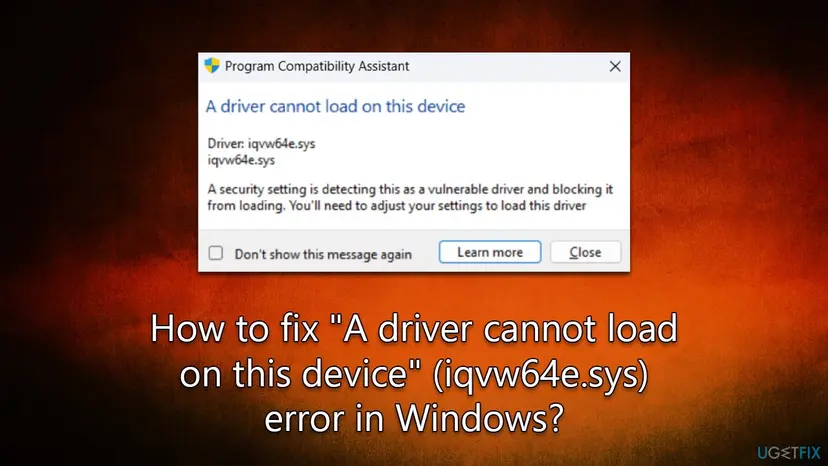
Iqvw64e.sys before version 1.3.1.0 has a flaw, CVE-2015-2291, that lets a local program crash Windows or possibly run code with kernel rights through crafted requests to the driver. Intel published a fixed driver in June 2015. Attackers still carry the old signed file onto PCs to reach the kernel, a trick called "bring your own vulnerable driver". Microsoft calls such drivers most likely not malicious, but the block protects you from their misuse.
Why the iqvw64e.sys error appears on Windows 11, from most to least common
Most often old Intel network software, installed with a motherboard driver disc or years ago by a PC maker, still starts with Windows and asks for an old iqvw64e.sys. Less often you use that software and it is simply out of date. Rarely, the software is gone but a leftover driver entry remains, or the file was placed on the PC by something else.
| Cause | How common | What you see | Fix |
|---|---|---|---|
| Old Intel network tool you do not use still installed | Most cases | The message at sign-in, Intel PROSet or Intel Network Connections in Installed apps | Fix 1 |
| Intel network tool you need is an old version | Common | The tool opens but its diagnostics or adapter tests fail | Fix 2 |
| A Windows update or a new PC turned Memory integrity on | Common | The message started after an update, nothing else changed | Fix 1 or Fix 2, then Fix 4 |
| A newer Intel driver is offered by the PC maker through Windows Update | Less common | An optional Intel network driver appears | Fix 5 |
| Leftover driver entry after the tool was removed | Rare | No Intel network tool installed, the message still appears | Fix 3, then Fix 6 |
| The file sits in a Temp or download folder | Rare | iqvw64e.sys outside C:\Windows\System32\drivers | Fix 3 |
How to fix the iqvw64e.sys "A driver cannot load on this device" error on Windows 11 and Windows 10
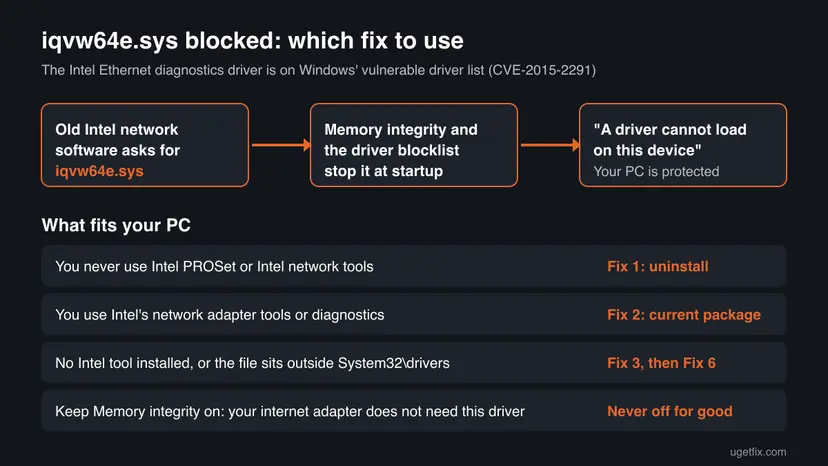
Start with Fix 1: most home users never open the Intel tool that loads this driver. Fix 2 is for those who do. Fix 3 is a quick check when no Intel tool is installed. Fix 7 exists because Microsoft mentions it, but it lowers protection and is meant for one task only. You need an administrator account.
| What you see or have | Start with |
|---|---|
| You do not know what Intel PROSet or Intel Network Connections is | Fix 1 |
| You use Intel's network adapter tools or run adapter diagnostics | Fix 2, then Fix 4 |
| No Intel network tool is installed but the message still appears | Fix 3, then Fix 6 |
| You want to keep the old tool and just stop the window | Fix 4 |
| You must run an old Intel diagnostic once | Fix 7, then turn protection back on |
Fix 1. Uninstall the old Intel network tools you do not use
5 minutesLow riskEveryone who does not use Intel's network adapter software. This is most readers with the message.
The diagnostics driver only tries to load because an Intel network program asks for it. When the program is gone, nothing requests iqvw64e.sys and the window stops. Your wired connection keeps working with the normal adapter driver.
- Windows 11: open Settings > Apps > Installed apps. Windows 10: open Settings > Apps > Apps & features.
- Type
Intelinto the search box above the list. - Look for network entries such as Intel PROSet, Intel Network Connections or Intel Ethernet tools.
- Select ... next to the entry and choose Uninstall, then accept the Intel uninstaller's prompts.
- Restart the PC and sign in again.
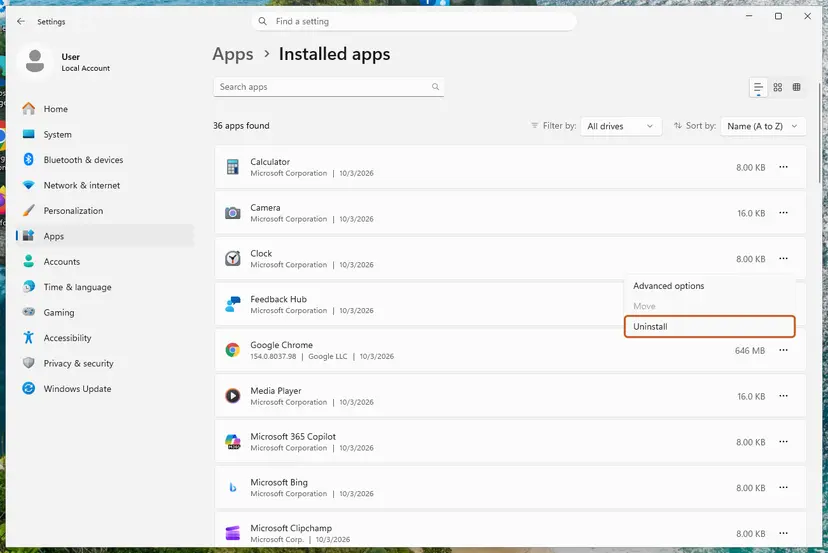
Leave Intel graphics, chipset, Wi-Fi, Bluetooth and Management Engine software alone: they do not use iqvw64e.sys. If the uninstaller asks whether to keep the network adapter driver, keep it. The general steps are in Uninstall a program or app in Windows.
It worked if: After the restart no "A driver cannot load on this device" window appears, and your network still works.
If not: If the window still names iqvw64e.sys and no Intel network tool is left, go to Fix 3. If you need the tool back, use Fix 2.
Fix 2. Install Intel's current Ethernet driver package for your adapter
10 minutesLow riskReaders who use Intel's adapter tools, for example on a workstation or server board with an Intel network card.
Intel's advisory says iqvw64e.sys version 1.3.1.0 and later fixes CVE-2015-2291, shipped since Intel Ethernet Adapters Connections CD 20.1. Microsoft's first advice for a blocked driver is likewise an updated driver from the maker. Installing the current package replaces the old file.
- Uninstall the old Intel network tool first (Fix 1), so its driver is not left behind.
- Find the adapter name: press Win + X, open Device Manager and expand Network adapters. Note the Intel Ethernet entry.
- Open Intel's Download Center at intel.com and search for that adapter's Windows driver package (Intel's advisory names it Intel Ethernet Adapters Connections CD).
- Download the package for your Windows version and run it.
- Restart, then check whether the message still appears at sign-in.
On a Dell, HP, Lenovo or similar PC, the maker's support page for your exact model is the safer source: it lists the Intel network driver tested for that PC. Get the model with Win + R, msinfo32 and the System Model line.
We could not confirm whether Windows' blocklist also stops some versions newer than 1.3.1.0. The test after installing, with Memory integrity on, is the only reliable check.
It worked if: The Intel tool works and no iqvw64e.sys window appears at sign-in.
If not: If the new package still triggers the window, keep the tool off at startup (Fix 4) and ask Intel or your PC maker for a driver Windows accepts.
Fix 3. Check the version and location of iqvw64e.sys
3 minutesNo riskReaders who see the message but have no Intel network tool installed, or want to know which copy is blocked.
A copy installed by Intel software sits in the Windows drivers folder and has an Intel version number. The known exploit loads the file from a temporary folder instead. Where the file sits tells you whether this is leftover software or something to scan for.
- Press Win + E, paste
C:\Windows\System32\driversinto the address bar and press Enter. - Find iqvw64e.sys, right-click it, choose Properties and open the Details tab.
- Read File version and Copyright. A version below 1.3.1.0 is the affected one.
- If the file is not there, search This PC for
iqvw64e.sysand note where it is. - If it sits in a Temp, Downloads or unknown program folder, run a full Microsoft Defender scan.
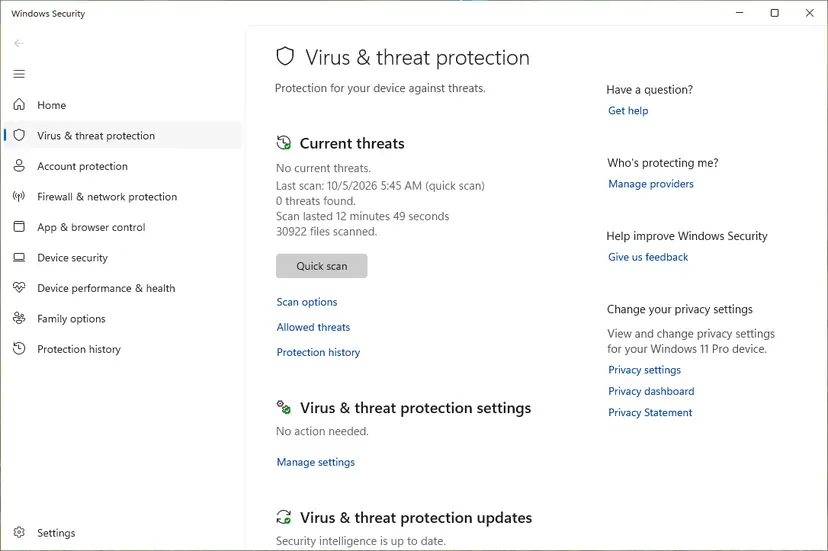
Full scan steps: How to scan for malware with Microsoft Defender. A copy in the drivers folder with Intel details and an old version is most likely a leftover from Intel software: remove its entry with Fix 6.
It worked if: You know which copy Windows blocks and whether it belongs to Intel software.
If not: If Defender finds nothing and the file is an Intel copy, go to Fix 6 to remove the leftover entry.
Fix 4. Stop the Intel tool from starting with Windows, or hide the notice
3 minutesNo riskReaders who want to keep an old Intel tool installed for now without the window at every sign-in.
The window appears when something at sign-in asks for the driver. If the Intel tool does not start on its own, nothing asks. Protection stays on, and only the diagnostics that need iqvw64e.sys stay unavailable.
- Windows 11: open Settings > Apps > Startup. Windows 10: press Ctrl + Shift + Esc and select the Startup tab in Task Manager.
- Turn off every Intel network entry, for example Intel PROSet.
- Restart and sign in.
- If the window still appears once, tick Don't show this message again and select Close. That only hides the notice: the driver stays blocked.
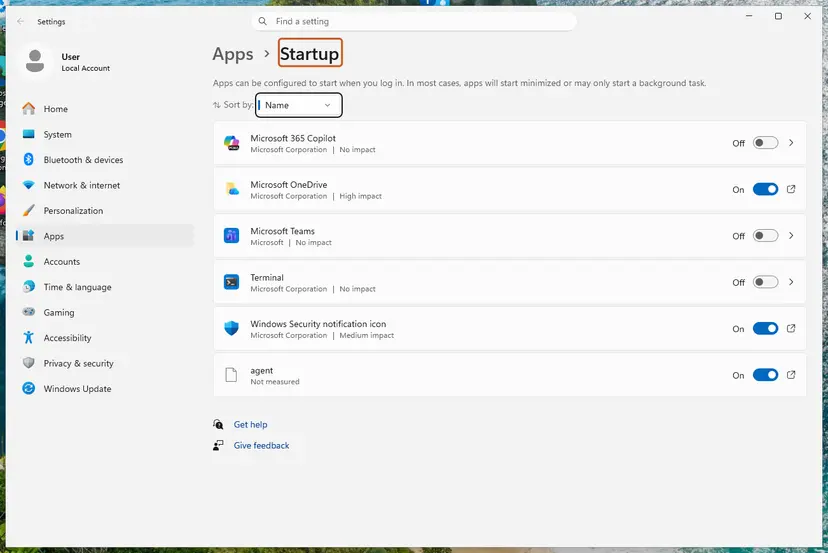
Full steps for both Windows versions: Stop apps from opening at startup.
It worked if: You sign in without the iqvw64e.sys window, and Memory integrity is still on.
If not: If the window keeps coming, a driver service loads the file, not the app: remove the tool (Fix 1) or the leftover entry (Fix 6).
Fix 5. Look for an updated Intel network driver in Windows Update optional updates
5 minutesNo riskReaders who need the Intel tool and found nothing newer on Intel's or the PC maker's site.
Microsoft names Windows Update as a place to look for an updated, compatible driver, and PC makers publish drivers there. We could not confirm that a replacement iqvw64e.sys is offered this way for every PC.
- Windows 11: open Settings > Windows Update > Advanced options > Optional updates. Windows 10: open Settings > Update & Security > Windows Update > View optional updates.
- Expand Driver updates and look for an Intel network entry.
- Tick only that entry, select Download & install and restart if asked.
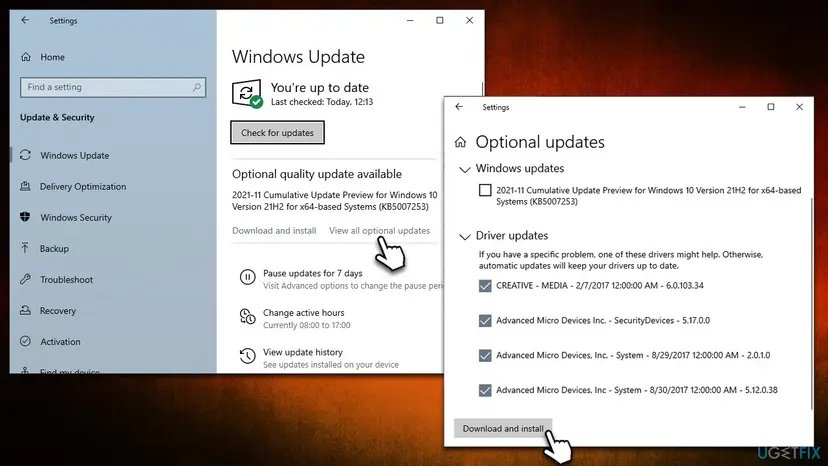
Updating one device driver through Device Manager is shown in Update, roll back or reinstall a driver.
It worked if: A newer Intel network driver installs and the message does not return.
If not: If nothing from Intel is offered, keep the tool off at startup (Fix 4) and contact your PC maker with your model.
Fix 6. Remove a leftover iqvw64e driver entry with Autoruns
10 minutesRead the warningAdvanced readers who see the window although no Intel network tool is installed any more.
An uninstaller can leave the driver's service entry behind, and Windows then tries to load the file at every start. Autoruns, a free Microsoft Sysinternals tool, lists every driver Windows tries to load and can delete that entry.
Deleting an entry in Autoruns removes its registry key. Deleting the wrong driver can stop a device or Windows from starting. Make a restore point or registry backup first: Back up the registry before editing it.
- Download Autoruns from Microsoft's Sysinternals page on learn.microsoft.com and extract the ZIP file.
- Right-click Autoruns64.exe, select Run as administrator, then Yes.
- Open the Drivers tab and type
iqvwinto the filter box. - Check that the entry's image path ends in
iqvw64e.sysand the publisher is Intel. - Right-click that entry, select Delete and confirm.
- Restart the PC.
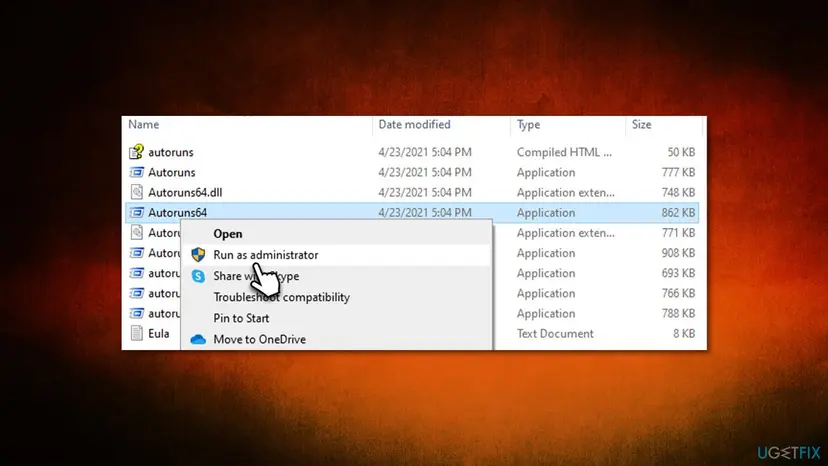
It worked if: No iqvw64e entry is left in Autoruns and the window no longer appears at sign-in.
If not: If the entry comes back after a restart, an Intel network program is still installed: check Installed apps again (Fix 1).
Fix 7. Only for one task: switch Memory integrity off, then straight back on
10 minutes plus two restartsRead the warningReaders who must run an old Intel diagnostic once and have no other way. Not a fix for the message.
Microsoft names turning Memory integrity off as the option when no updated driver exists. With an old iqvw64e.sys loaded, any program could use its flaw, so the protection must be on again as soon as the task is done.
While Memory integrity is off, the old Intel driver can load and any program on the PC could misuse it to reach the Windows kernel. On a Secured-core PC, Microsoft says turning Memory integrity off takes the device out of its Secured-core state. Back up important files first and do not browse or open downloads during the task.
- Type
Core isolationinto the taskbar search box and open it. Windows 11: Settings > Privacy & security > Windows Security > Device security > Core isolation details. Windows 10: Settings > Update & Security > Windows Security > Device security > Core isolation details. - Set Memory integrity to Off. If the page also shows a Microsoft Vulnerable Driver Blocklist switch, set it to Off too.
- Restart, run the Intel tool and finish the one task.
- Uninstall the tool again (Fix 1).
- Go back to Core isolation details, set both switches to On and restart.
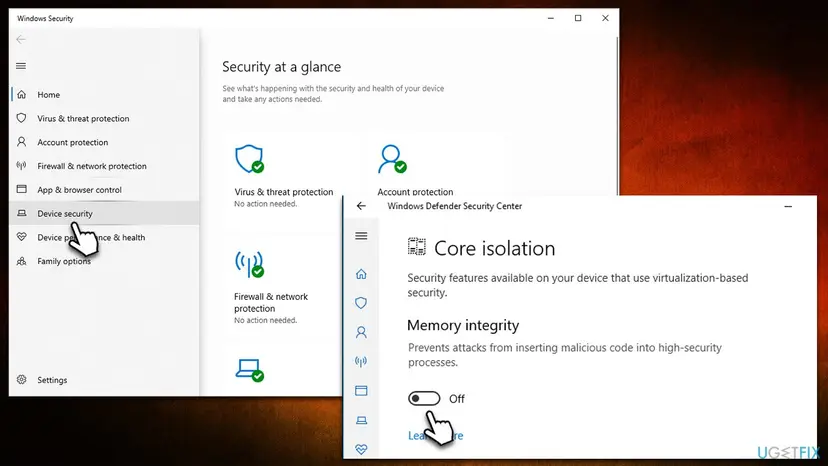
It worked if: The task is done, both switches show On again after the restart, and the Intel tool is gone.
If not: If Memory integrity will not turn back on, select Review incompatible drivers on the same page, remove the program behind each file (Fix 1, Fix 6) and try again.
The iqvw64e.sys window still appears: what to check and what to send support
The window itself is the most direct log: it names the driver Windows blocked. Microsoft notes that the driver name and company name in the notice are the only reliable details it has about the driver. If the window now names another file, the same approach applies to that file and its maker.
- Core isolation details lists incompatible drivers: select Review incompatible drivers to see each file and its published name. Remove the program that installed it.
- Your internet stopped working after Fix 1: the uninstaller also removed the adapter driver. Install the network driver from your PC or motherboard maker's support page; it does not need iqvw64e.sys.
- The file keeps returning in a Temp folder: something on the PC drops it there. Run a full scan with How to scan for malware with Microsoft Defender and treat it as a security incident.
- The Memory integrity switch is greyed out: an organisation manages the PC, or the hardware does not support it. That is not caused by iqvw64e.sys.
Your PC or motherboard model from msinfo32, your Windows version from winver, the Intel adapter name from Device Manager, the iqvw64e.sys file version from Fix 3 and a screenshot of the "A driver cannot load on this device" window.
Keep iqvw64e.sys from coming back
- Install network drivers from Intel or your PC maker's page for your exact model.
- Skip extra tools on old motherboard driver discs; install the plain adapter driver only.
- Check Core isolation once after installing any network or tuning software.
- Turn Memory integrity or the vulnerable driver blocklist off for good to keep an old tool working.
- Download iqvw64e.sys from file download sites.
- Use "driver updater" programs to look for this driver.
Microsoft updates the vulnerable driver blocklist through Windows updates, so the message can appear one day with no change on your side. That matches the reader's report after recent updates. Windows 10 left support on 14 October 2025, so a PC that stays on Windows 10 no longer gets those updates.
Frequently asked questions
What is iqvw64e.sys?
It is the 64-bit Intel Ethernet diagnostics driver, published by Intel Corporation. Intel's network adapter software uses it to test and query wired Intel network cards from Windows. It is not a Windows file and not the driver that runs your internet connection. Windows blocks old copies because versions before 1.3.1.0 have a published kernel flaw, CVE-2015-2291. The 32-bit version of the same driver is called iqvw32.sys.
Is iqvw64e.sys a virus?
No, a copy from Intel software is not a virus, and the message is Windows protecting you. The risk sits in the old driver: its flaw can give a program kernel rights, and attackers have brought this exact file onto PCs to do that. A copy in C:\Windows\System32\drivers with Intel details is almost always left over from Intel software. A copy in a Temp or Downloads folder is a reason to scan with How to scan for malware with Microsoft Defender at once.
How do I fix iqvw64e.sys "cannot load" on Windows 11?
Uninstall the Intel network tools you do not use in Settings > Apps > Installed apps and restart (Fix 1). That ends the message for most people. If you need the tool, install Intel's current Ethernet package (Fix 2) and switch it off at startup if the message stays (Fix 4). Keep Memory integrity on: it is what blocks the old driver, on purpose.
Will my internet stop working if iqvw64e.sys is blocked?
No. Iqvw64e.sys is only the diagnostics driver. Your network card runs on its own adapter driver, which Windows loads normally. What stops working are the Intel diagnostics and adapter tests that need iqvw64e.sys. If the internet does break after you uninstall Intel software, the uninstaller also removed the adapter driver: install it again from Intel or your PC maker's support page.
Where can I download iqvw64e.sys?
Do not download the file on its own. Intel ships it only inside its Ethernet driver packages, and the copies on file download sites are often the old, vulnerable version that attackers use. If you need Intel's adapter tools, install Intel's current Ethernet package from intel.com or your PC maker's driver page (Fix 2). Intel's advisory says versions 1.3.1.0 and later contain the fix.
Is iqvw64e.sys a "vulnerable driver"?
Yes, old versions are. Intel's advisory INTEL-SA-00051 lists iqvw64e.sys before 1.3.1.0 as affected by CVE-2015-2291, rated Important. The flaw lets a local program crash Windows or possibly run code with kernel rights. That is why Windows names it as a vulnerable driver in the message. Microsoft adds that such drivers are most likely not malicious; the danger is that other programs can misuse them.
Should I just turn Memory integrity off?
No, not to silence this message. Memory integrity keeps malicious code out of the most protected part of Windows, and it is what stops a flawed driver like this from being misused. Removing the old Intel tool takes five minutes and keeps both your PC and the protection. If you must run an old Intel diagnostic once, follow Fix 7 and turn the protection back on right after.
Should I uninstall the Windows update that started the message?
No. The update did not break anything: it enforced the vulnerable driver blocklist, which then caught the old Intel driver. Removing the update leaves the old driver and the missing security fixes on your PC, and the blocklist returns with the next update anyway. Remove or update the Intel tool instead (Fix 1 or Fix 2).
Will ticking "Don't show this message again" fix it?
It hides the window but fixes nothing. Iqvw64e.sys stays blocked, so Intel's adapter diagnostics still will not work. That is fine if you never use them, because your PC stays protected. If you never use them, uninstalling the tool (Fix 1) is cleaner than hiding the notice. If you do use them, install the current package (Fix 2).
What about pcdsrvc_x64 and other drivers in the same window?
They are the same kind of block for a different maker's driver. Windows shows every blocked vulnerable driver in this one "A driver cannot load on this device" window and names the file. We could not confirm the maker of pcdsrvc_x64 from an official source, so read the company name in the window or in Core isolation details. Then remove or update that maker's program the same way as Fix 1 and Fix 2.
Sources
- Microsoft Support: A driver can't load on this device (support.microsoft.com)
- Intel Security Center: INTEL-SA-00051, Intel Ethernet diagnostics driver for Windows (CVE-2015-2291) (intel.com)
- LOLDrivers: iqvw64e.sys (Intel), CVE-2015-2291 (loldrivers.io)
Did this fix work?
One click, no account. It tells the next reader which guides are worth their time.
Questions and experiences: Iqvw64e.sys "A driver cannot load on this device": how to fix it in Windows 11 and 10
Still broken, or found a fix we did not cover? Ask here: members and our editors answer. Reading is open; writing needs a free account.
…