
How to fix "You need a new app to open this me.blueone.win link" error in Windows?

Prefer to fix it yourself? The manual steps follow.
- 6methods
- 2 to 10 minutes
- Easy
Applies to Windows 11 and Windows 10 PCs where BlueMail (Blix Inc) was installed and then removed
6 methods in this guide
Hello. I recently installed the Blue Mail app but changed my mind and uninstalled it. Now every time I start my Windows PC I receive a message "You need a new app to open this me.blueone.win link." How do I fix this?
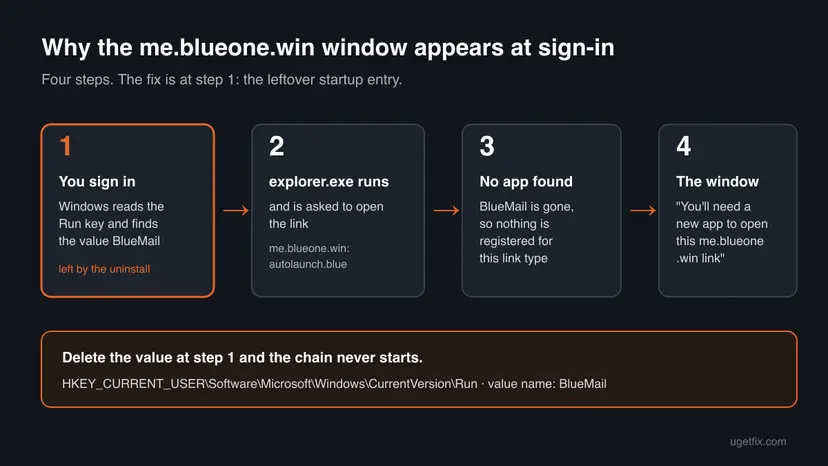
The window You'll need a new app to open this me.blueone.win link is a leftover of the BlueMail email app. A startup entry still asks Windows to open BlueMail at every sign-in, but the app is gone. Delete the BlueMail value from your account's Run key (Fix 1) and the window stops.
Nothing is broken and it is not a virus. When BlueMail was set to start with Windows, it added a value named BlueMail to your account's Run key. Uninstalling the app does not remove that value, so at each sign-in Windows tries to open a link that no app can handle. Delete the value with one command (Fix 1) or in Registry Editor (Fix 2), then restart.
| Error | You'll need a new app to open this me.blueone.win link, with the offer Look for an app in the Microsoft Store. Often searched as "You need a new app to open this me.blueone.win link". |
|---|---|
| Where it appears | A small Windows window right after you sign in or restart, before you open anything. |
| Main cause | A leftover startup value BlueMail under HKEY_CURRENT_USER\Software\Microsoft\Windows\CurrentVersion\Run that runs C:\Windows\explorer.exe me.blueone.win:autolaunch.blue. |
| Fastest fix | Delete that value (Fix 1, one command), then restart. |
| Also written as | me blueone win, me blueone win link, me.blueone.win link error, blueone win, me.blueone. |
| Affects | Windows 11 and Windows 10 PCs where the BlueMail app from Blix Inc was installed with automatic start and then removed. |
| Vendor status | BlueMail's help center documents the start-up setting but not this leftover. Microsoft documents the Run key and how to remove a broken startup entry from it. |
| Is it malware | No. The window is drawn by Windows, and the link belongs to a legitimate email app. |
| Time to fix | 2 minutes with Fix 1, up to 10 minutes if the leftover sits somewhere else. |
Facts checked on 15 October 2026. Steps written for Windows 11 (25H2 and 26H2) and Windows 10 22H2.
What "You need a new app to open this me.blueone.win link" means
me.blueone.win is not a website and not a program. It is a link type that the BlueMail email app registered on your PC, the same kind of thing as mailto: for email. BlueMail is made by Blix Inc and is sold in the Microsoft Store as Blue Mail - Email & Calendar. Its link type lets Windows start the app from a short command.
While BlueMail was installed, a startup entry used that link to open the app at every sign-in. When you remove BlueMail, the link type goes with it, but the startup entry often stays. Windows then has a link to open and no app for it, and Microsoft's design for that case is a window that offers to search the Microsoft Store.
| What you see or search for | What it is |
|---|---|
| You'll need a new app to open this me.blueone.win link | The title of the window on Windows 10 and Windows 11. Below it: Look for an app in the Microsoft Store, a box Always use this app and OK. |
| You need a new app to open this me.blueone.win link | The same text as most people type it into Google. |
| me blueone win, me blueone win link, blueone win | The same link name, written with spaces instead of dots. |
me.blueone.win:autolaunch.blue | The full link the leftover entry asks for. autolaunch tells BlueMail it was started by Windows, not by you. |
The Store offer will not fix it. It would only lead you to install BlueMail again. Close the window with Esc and remove the startup entry instead.
Causes of the me.blueone.win link error, ranked
Every case has the same second half: BlueMail is no longer installed for your account, so no app answers the link. The first half is the leftover that still sends it. Most often it is a Run value. Less often it is a shortcut or an entry in another place.
| Cause | How often | How to recognise it | Fix |
|---|---|---|---|
Value BlueMail left in HKCU\...\CurrentVersion\Run | Most reports | The window comes once, at every sign-in, after BlueMail was uninstalled. | Fix 1 or Fix 2 |
| The same value, still switched on in Startup apps | Same cause, other view | You prefer not to touch the registry. | Fix 3 |
| A shortcut in the Startup folder | Rare | No BlueMail value in the Run key, but the window still comes at sign-in. | Fix 4 |
| BlueMail still installed, or installed again, with automatic start on | Less often | BlueMail is in Installed apps, or you reinstalled it to try to fix the window. | Fix 5 |
| An entry for another account, in an all-users Run key or in a task | Rare | None of the above finds anything. | Fix 6 |
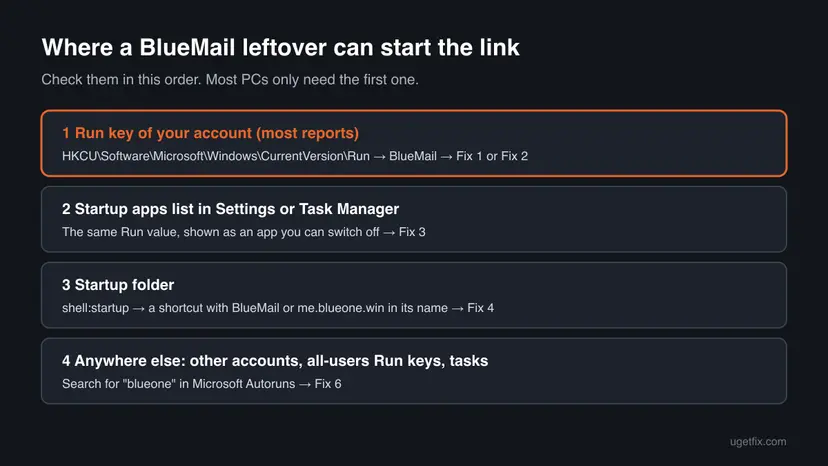
Owners on Windows 11 and Windows 10 forums report the same value in the same place, with the data C:\Windows\explorer.exe me.blueone.win:autolaunch.blue. One owner on Eleven Forum reports that reinstalling BlueMail and uninstalling it again did not help. Deleting the value did.
Is me.blueone.win a virus, and is it safe to delete?
The window is not malware. Windows draws it for any link type that has no app, and the link name belongs to BlueMail, a mail app listed in the Microsoft Store by its publisher, Blix Inc. The leftover value does nothing harmful. It only starts File Explorer with a link that leads nowhere.
- Delete the BlueMail value in your own account's Run key. Microsoft documents this key as the place where programs register to run at sign-in.
- Back up the key first, as each fix below shows.
- Scan the PC only if you see other signs, such as programs you did not install: How to scan for malware with Microsoft Defender.
- Do not install a "BlueOne" or "me.blueone.win" app from a download site. No such product exists.
- Do not use a registry cleaner for this. One value is the whole problem.
- Do not delete other values in the Run key. They start programs you still use.
How to stop the me.blueone.win link window
Fix 1 and Fix 2 remove the leftover value, one by command and one by mouse. Fix 3 switches it off without the registry. Fixes 4 to 6 are for the rare PC where the leftover sits somewhere else.
| What you see or have | Start with |
|---|---|
| The window comes at every sign-in and BlueMail is uninstalled. | Fix 1 |
| You prefer to click through Registry Editor rather than type commands. | Fix 2 |
| You do not want to edit the registry at all. | Fix 3 |
| Fix 1 says the value does not exist, but the window still comes. | Fix 4, then Fix 6 |
| BlueMail is still installed, or you reinstalled it. | Fix 5 |
Fix 1. Delete the BlueMail startup value with one command
2 minutesLow riskEveryone who removed BlueMail and now sees the window at sign-in. This is the fix that works for most readers.
The window comes from one value in your account's Run key. Microsoft documents that Windows runs every value in this key at each sign-in, so once the value is gone, nothing asks for the me.blueone.win link.
Deleting the wrong Run value stops a program you use from starting with Windows. Step 3 saves the whole Run key to a file so you can put it back. The general method is here: Back up the registry before editing it.
- Press Win + R, type
cmdand select OK. An administrator window is not needed: the key belongs to your own account. - List the startup values of your account. Look for a line that starts with BlueMail and contains
me.blueone.win.reg query "HKCU\Software\Microsoft\Windows\CurrentVersion\Run" - Save a backup of the key to your user folder.
reg export "HKCU\Software\Microsoft\Windows\CurrentVersion\Run" "%USERPROFILE%\run-key-backup.reg" /y - Delete the value. If step 2 showed another name, such as Blue Mail, type that name between the quotation marks.
reg delete "HKCU\Software\Microsoft\Windows\CurrentVersion\Run" /v "BlueMail" /f - Run the command from step 2 again. The BlueMail line should be gone.
- Restart the PC and sign in.
- Key
HKEY_CURRENT_USER\Software\Microsoft\Windows\CurrentVersion\Run- Value name
BlueMail(type REG_SZ)- Value data
C:\Windows\explorer.exe me.blueone.win:autolaunch.blue- Undo
reg import "%USERPROFILE%\run-key-backup.reg"
If step 2 lists no BlueMail line, or step 4 prints ERROR: The system was unable to find the specified registry key or value, the value is not in your account's Run key. Go to Fix 4.
It worked if: After the restart no window appears. reg query no longer lists BlueMail.
If not: If the value is gone and the window still comes, go to Fix 4. If the value comes back after a restart, BlueMail is still installed somewhere: go to Fix 5.
Fix 2. Delete the BlueMail value in Registry Editor
3 minutesLow riskYou prefer to see the value before you delete it, or Command Prompt is blocked on your PC.
This is the same change as Fix 1, made by mouse. Registry Editor shows the value's data, so you can confirm that it points to me.blueone.win before you delete anything.
Select the Run key and use File > Export before you delete the value. Delete only the one line named BlueMail. Step by step: Back up the registry before editing it.
- Press Win + R, type the command below and select OK. Select Yes when Windows asks for permission.
regedit - Paste this path into the address bar under the menu and press Enter.
HKEY_CURRENT_USER\Software\Microsoft\Windows\CurrentVersion\Run - Select File > Export, keep Selected branch, and save the file to your Documents folder.
- In the right pane, find BlueMail. Its Data column shows
C:\Windows\explorer.exe me.blueone.win:autolaunch.blue. - Right-click BlueMail and select Delete.
- Select Yes in the box Confirm Value Delete.
- Close Registry Editor and restart the PC.
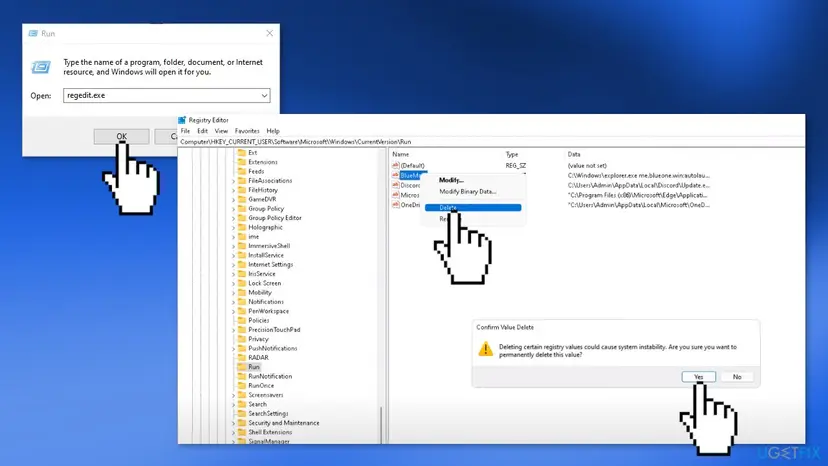
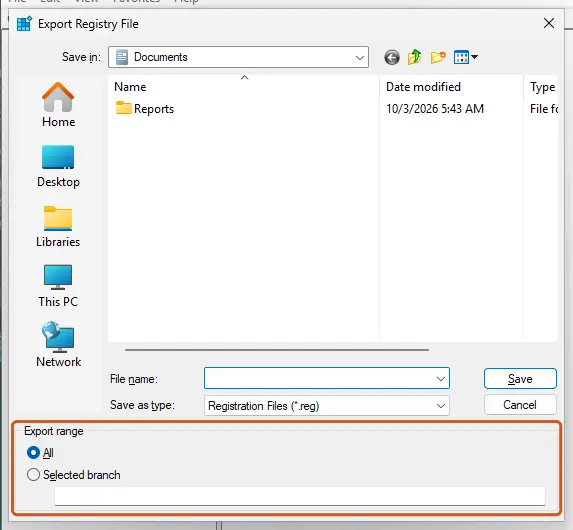
One owner on Eleven Forum first looked in CurrentVersion and found nothing. The value sits one level deeper, inside the Run key itself.
It worked if: The BlueMail line is gone from the Run key, and the window does not appear after the restart.
If not: If there is no BlueMail line, go to Fix 4. To undo, double-click the exported .reg file and confirm.
Fix 3. Switch the BlueMail entry off in Startup apps
3 minutesNo riskYou do not want to edit the registry, or you are not allowed to on this PC.
Microsoft Support lists your account's Run key among the places the startup list reads. Switching the entry off there stops Windows from running it, without deleting anything.
- Select Start > Settings > Apps > Startup. On Windows 10 the path is the same.
- Find BlueMail in the list and set its switch to Off.
- If it is not in Settings, right-click Start, select Task Manager, then Startup apps (on Windows 10, the Startup tab).
- Select BlueMail and select Disable. Step by step: Stop apps from opening at startup
- Restart the PC.
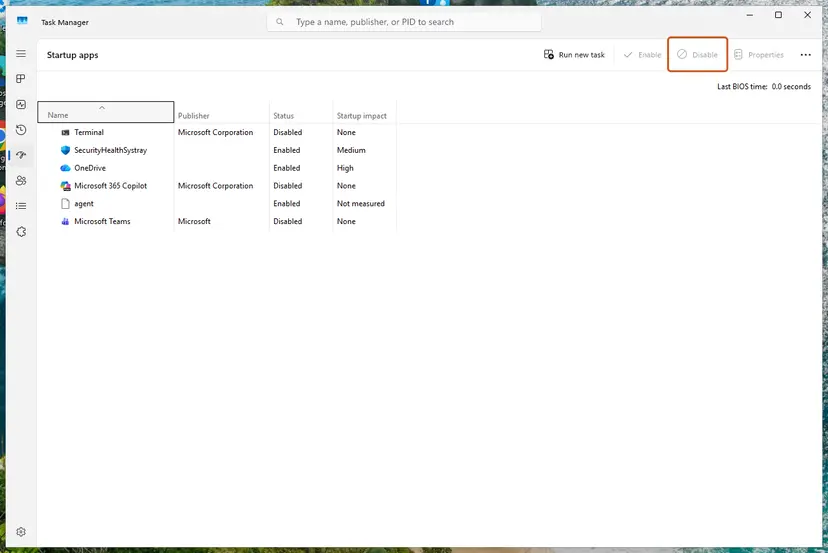
- The entry runs
explorer.exe, so the list may show Microsoft as its publisher. We could not confirm the exact name and icon on our test PC. - If Settings shows We couldn't find this app, Microsoft says to select the icon next to the switch: a window then names the registry location of the broken entry.
- Disabling keeps the value in the registry. It is the cautious choice. Fix 1 removes it for good.
One owner on Reddit reports that BlueMail was not active in the startup list and the window came anyway. If you see no entry here, go back to Fix 1: the command lists the value even when the startup list does not.
It worked if: BlueMail shows Disabled or Off, and no window appears after the restart.
If not: If BlueMail is not in either list, use Fix 1. If it is listed and already off, go to Fix 4.
Fix 4. Remove a BlueMail shortcut from the Startup folder
3 minutesLow riskThe Run key has no BlueMail value, but the window still comes at sign-in.
Windows also starts every shortcut in your Startup folder at sign-in. A Ten Forums helper points to a file named me.blueone.win.lnk in connection with this window. We could not confirm that BlueMail creates it, so treat this as a check.
- Press Win + R, type the command below and select OK. File Explorer opens your Startup folder.
shell:startup - Look for a shortcut named BlueMail, Blue Mail or me.blueone.win.
- Right-click it, select Properties, and check that Target mentions
me.blueone.winor BlueMail. - Delete the shortcut. It goes to the Recycle Bin, so you can restore it.
- Repeat with the Startup folder for all users. Windows asks for administrator permission to delete there.
shell:common startup - Restart the PC.
Microsoft Support gives the two folders as %userprofile%\AppData\Roaming\Microsoft\Windows\Start Menu\Programs\Startup for your account and %ProgramData%\Microsoft\Windows\Start Menu\Programs\Startup for all users.
It worked if: The shortcut is gone and the window does not appear at the next sign-in.
If not: If both folders are empty of BlueMail, go to Fix 6.
Fix 5. Turn off BlueMail's own start-up setting before you uninstall it
5 minutesNo riskBlueMail is still installed, you reinstalled it to make the window stop, or the Run value comes back after Fix 1.
While BlueMail is installed it can write the Run value again. A Microsoft Q&A user reports that the value returned at each start after an update, even with the setting disabled. Turning the setting off and then uninstalling removes the writer before you remove the value.
- Open BlueMail.
- BlueMail's help center gives the path Settings > Global Settings > Advanced Features.
- Turn off Launch app on system startup. Some versions offer a list with Enabled, Minimized and Disabled: choose Disabled.
- Close BlueMail completely.
- If you do not want the app, open Settings > Apps > Installed apps, select the three dots beside Blue Mail - Email & Calendar and select Uninstall. Step by step: Uninstall a program or app in Windows
- Run Fix 1 to delete any value that is still there, then restart.
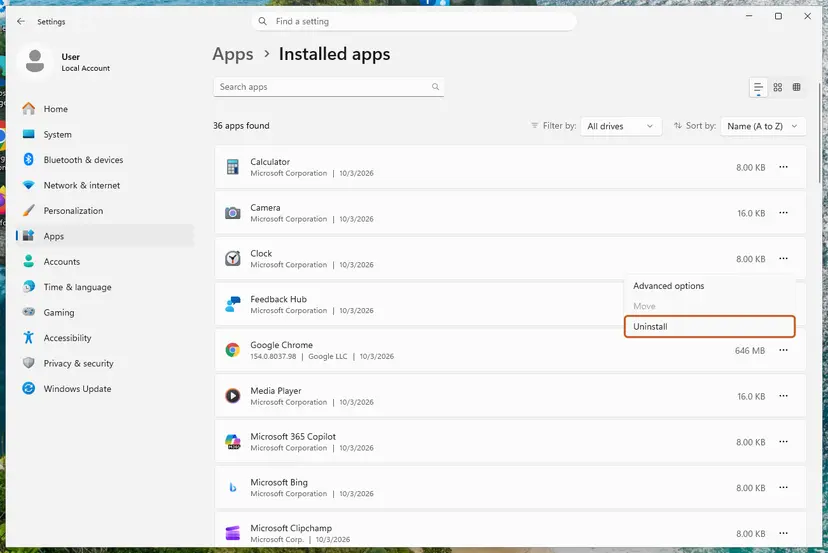
Installing BlueMail again makes the window stop only while the app is there. Its own uninstall leaves the value behind again, as the Eleven Forum owner found. Always finish with Fix 1.
It worked if: BlueMail is gone from Installed apps, no BlueMail value is in the Run key, and nothing appears at sign-in.
If not: If you keep BlueMail and it still starts on its own, contact BlueMail support from its help center. The setting is theirs.
Fix 6. Find any remaining BlueMail entry with Microsoft Autoruns
10 minutesLow riskFixes 1 to 4 found nothing, or the PC has several user accounts.
Autoruns is Microsoft's Sysinternals tool that lists every place a program can start from, including Run keys, Startup folders, scheduled tasks and other accounts. Searching it for blueone finds the entry wherever it is.
- Download Autoruns from its page on Microsoft Learn (learn.microsoft.com/sysinternals), unzip it and run Autoruns64.exe. Accept the licence.
- Wait until the status bar says the scan is finished.
- Press Ctrl + F, type
blueoneand select Find Next. Repeat withBlueMail. - For each hit, read the Image Path and Location columns.
- Clear the check box of the entry to disable it. Use Entry > Delete only when you are sure.
- To check another account, open the User menu and select it.
- Restart the PC.
- Microsoft's page says a cleared check box disables the entry, and Delete removes it. Disabling is reversible.
- A hit under
HKLM\Software\Microsoft\Windows\CurrentVersion\Runbelongs to all users. Autoruns needs Run as administrator to change it. - Do not clear entries you do not recognise. This fix is only about BlueMail.
It worked if: Autoruns shows no entry with blueone or BlueMail, and the window stays away after the restart.
If not: If Autoruns finds nothing and the window still comes, read the section below.
The me.blueone.win window still appears: what to check
There is no log for this window. Windows does not record which entry asked for a link, and we found no Event Viewer entry for it. The Run key is the evidence, so start there again.
| Check | How |
|---|---|
| Is the value back? | Run reg query "HKCU\Software\Microsoft\Windows\CurrentVersion\Run" after a restart. If BlueMail is listed again, something reinstalls it: see Fix 5. |
| Is BlueMail still installed? | Settings > Apps > Installed apps, search for mail. Also check the Blix app Blix - Blue Mail Teams. |
| Is it another account? | Sign in with the other account, or use the User menu in Autoruns (Fix 6). |
| Is the text exactly the same? | If the window names another link, such as ms-cortana2, the cause is a different app. See the guide below. |
A window that names another link has the same mechanism with a different caller. For Cortana's retired link see How to fix the ms-cortana2 link message.
A system file check, resetting default apps or a Windows update does not remove a startup value that an app wrote for your account. No Windows file is damaged. Only the leftover entry has to go.
Keep the me.blueone.win window from coming back
- Before you remove any app that starts with Windows, turn off its own start-up option first.
- After an uninstall, look at Settings > Apps > Startup for entries of the removed app.
- Keep the
.regbackup from Fix 1 until you are sure the other startup programs still work.
- Do not tick Always use this app and select OK in the window. It only opens the Store.
- Do not reinstall BlueMail just to silence the window.
- Do not run registry cleaners to find this one value.
Windows 10 left support on 14 October 2025. The fixes work the same there, but if the PC is still on Windows 10, plan the move to Windows 11 or Extended Security Updates.
Frequently asked questions
What is me.blueone.win (me.blueone.win que es, c'est quoi, cosa è, とは)?
It is the link type of the BlueMail email app by Blix Inc, not a website and not a separate program. Windows uses such link types to start apps, the way mailto: starts your mail program. The window you see, You'll need a new app to open this me.blueone.win link, means a startup entry still uses that link while BlueMail is no longer installed. Readers who search "me.blueone.win que es", "me.blueone.win c'est quoi", "me.blueone.win cosa è" or "me.blueone.winとは" ask the same thing. The answer is the same in every language: delete the BlueMail value from the Run key (Fix 1).
What is blueone win, and is there a BlueOne app?
"blueone win" is the link name typed with spaces. There is no app called BlueOne for Windows. The name me.blueone.win is an internal identifier of BlueMail for Windows, and the Microsoft Store lists the app as Blue Mail - Email & Calendar by Blix Inc. If a site offers a "BlueOne" download to fix the window, do not use it. The window does not need any app. It needs one leftover startup value removed, which takes two minutes with Fix 1.
How do I fix the me.blueone.win error at startup?
Open Command Prompt and run reg delete "HKCU\Software\Microsoft\Windows\CurrentVersion\Run" /v "BlueMail" /f after backing up the key, as Fix 1 shows. Then restart. If you prefer the mouse, open Registry Editor, go to HKEY_CURRENT_USER\Software\Microsoft\Windows\CurrentVersion\Run, right-click BlueMail and select Delete (Fix 2). If you do not want to touch the registry, switch BlueMail off in Settings > Apps > Startup (Fix 3). Owners on Windows 10 and Windows 11 forums report that deleting the value ends the window.
Is the me.blueone.win link a virus?
No. The window is the standard Windows prompt for a link type that has no app, and the link belongs to BlueMail, a mail app its publisher lists in the Microsoft Store. The leftover value only starts File Explorer with a link that leads nowhere. It does not download anything or change other settings. The real risk is answering the prompt with a download from an unknown site. If you see other signs of an infection, such as programs you did not install, scan the PC with Microsoft Defender: How to scan for malware with Microsoft Defender.
Why does the window appear after I uninstalled BlueMail?
Because the uninstall removes the app and its link type, but not the startup value the app wrote while it ran. That value is named BlueMail and runs C:\Windows\explorer.exe me.blueone.win:autolaunch.blue at each sign-in. Microsoft documents that Windows runs every value in this Run key when you sign in. With BlueMail gone, the link has no app, and Windows asks you to find one. The fix is to remove the leftover value.
Will reinstalling BlueMail fix the me.blueone.win link?
Only while BlueMail stays installed. With the app back, the link has an app again and BlueMail simply opens at sign-in. Once you uninstall it again, the value stays behind and the window returns. An owner on Eleven Forum reports exactly that: reinstalling and uninstalling did not help, deleting the value did. If you want to keep BlueMail, turn off Launch app on system startup in its settings (Fix 5). If you do not, uninstall it and delete the value (Fix 1).
I cannot find BlueMail in the registry. Where is it?
Make sure you are in the Run key itself, not in CurrentVersion above it: the full path is HKEY_CURRENT_USER\Software\Microsoft\Windows\CurrentVersion\Run. The value may also be spelled Blue Mail with a space. If it is truly absent, check the Startup folder with shell:startup (Fix 4). On a PC with several accounts, the value belongs to the account that used BlueMail. Microsoft Autoruns finds it anywhere: search for blueone (Fix 6).
Is it safe to delete the BlueMail value from the Run key?
Yes. The value only starts BlueMail at sign-in, and BlueMail is no longer there. Deleting it changes nothing else on the PC. Microsoft still advises a backup before any registry change, so Fix 1 exports the Run key to a file first, and reg import puts it back. Delete only the BlueMail line. The other values in the same key start programs you still use, such as OneDrive or your browser.
How do I stop BlueMail from starting with Windows if I keep it?
Use the app's own setting. BlueMail's help center gives the path Settings > Global Settings > Advanced Features and the switch Launch app on system startup, with the choices Enabled, Minimized and Disabled. You can also switch BlueMail off in Settings > Apps > Startup (Fix 3). One Microsoft Q&A user reports that an update put the Run value back although the setting was disabled. If that happens to you, report it to BlueMail support, since the setting belongs to their app.
Does the me.blueone.win window appear on Windows 10 too?
Yes. Reports come from both Windows 10 22H2 and Windows 11, and the Run key, Registry Editor and Startup apps work the same on both. On Windows 10 the Task Manager tab is called Startup, and Apps > Apps & features holds the uninstall list. Windows 10 left support on 14 October 2025, so the fix still works there, but the PC no longer gets regular security updates without Extended Security Updates.
Sources
- Microsoft Learn: Run and RunOnce Registry Keys (learn.microsoft.com)
- Microsoft Support: Configure Startup applications in Windows (including "We couldn't find this app") (support.microsoft.com)
- Microsoft Learn: Launch the default Windows app for a URI (learn.microsoft.com)
Did this fix work?
One click, no account. It tells the next reader which guides are worth their time.
Questions and experiences: fix "You need a new app to open this me.blueone.win link" error in Windows
Still broken, or found a fix we did not cover? Ask here: members and our editors answer. Reading is open; writing needs a free account.
…