
How to fix "Get an app to open this ms-cortana2 link" message when copying files in Windows?

Prefer to fix it yourself? The manual steps follow.
- 7methods
- 2 to 15 minutes
- Easy
Applies to Windows 11 and Windows 10; most reports come from Lenovo laptops with Lenovo Hotkeys
7 methods in this guide
- What the message means
- Why copying triggers it
- Causes, ranked
- Do not reinstall Cortana
- The fixes
- 1. Find the trigger
- 2. Remove Lenovo Hotkeys
- 3. Stop the Lenovo key service
- 4. Fn and Ctrl in firmware
- 5. Reassign the key or button
- 6. Find a background program
- 7. Add an empty handler
- Still there: what to report
- Keep it from coming back
- FAQ
Every now and then, I get a strange message saying "Get an app to open this ms-cortana2 link" when I'm doing simple things like copying files or text. I'm not using Cortana, so I don't understand why this keeps popping up. Is there a way to stop it?
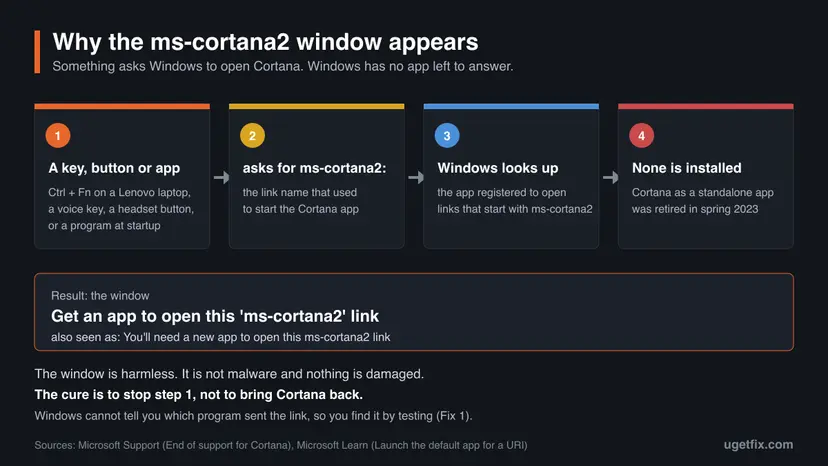
The window Get an app to open this 'ms-cortana2' link appears because a key, a button or a program asks Windows to open Cortana, and Microsoft retired the Cortana app in spring 2023. Nothing is damaged. Find what sends the link, most often Ctrl + Fn on a Lenovo laptop, and stop it there.
Copying is not the cause. Your finger holds Fn together with Ctrl, and on many Lenovo laptops that pair is an old Cortana shortcut. Cortana is gone, so Windows asks for an app. Confirm it with the test in Fix 1, then stop Lenovo Hotkeys from starting or uninstall it (Fix 2). Do not install Cortana from a download site: Microsoft retired the app.
| Error | Get an app to open this 'ms-cortana2' link. Also shown as You'll need a new app to open this ms-cortana2 link. |
|---|---|
| Where it appears | A small Windows window on top of whatever you are doing: while you copy or paste, switch tabs, press a special key, or right after sign-in. |
| Main cause | A shortcut or program still calls ms-cortana2:, the link that used to start Cortana. No app is registered for it any more. |
| Fastest fix | Find the trigger (Fix 1). On a Lenovo laptop, stop or uninstall Lenovo Hotkeys (Fix 2). |
| Also written as | ms cortana 2, ms-cortana 2 link, ms cortana2, mscortana2, ms cortana 2 pop up, ms cortana 2 link error. |
| Affects | Windows 11 and Windows 10 PCs where the Cortana app is no longer installed. Common on new Lenovo laptops. |
| Vendor status | Microsoft: Cortana in Windows as a standalone app was retired in spring 2023 (deprecation announced June 2023). We found no Microsoft or Lenovo article that addresses this window. |
| Is it malware | No. It is the standard Windows window for a link type that has no app. |
| Time to fix | 2 minutes to find the trigger, 5 to 15 minutes to stop it. |
Facts checked on 14 October 2026. Steps written for Windows 11 (25H2 and 26H2) and Windows 10 22H2.
What "Get an app to open this ms-cortana2 link" means
ms-cortana2 is not a program and not a second version of Cortana. It is a link type, the same kind of thing as mailto: for email or ms-settings: for the Settings app. A program that wanted to start Cortana did not run a file. It asked Windows to open a link that starts with ms-cortana2:, and Windows started the app registered for that link type.
Microsoft Learn describes what happens when no such app exists: Windows offers the user a way to search the Microsoft Store for one. That offer is the window you see. Microsoft Support states that Cortana voice assistance in Windows as a standalone app was retired in spring 2023, so on a current PC nothing answers the link.
| What you may see or search for | What it is |
|---|---|
| Get an app to open this 'ms-cortana2' link | The wording in the Microsoft Q&A reports from Windows 11. |
| You'll need a new app to open this ms-cortana2 link | Another wording of the same window. We could not confirm from a Microsoft page which Windows build shows which text. |
| ms cortana 2, ms-cortana 2, ms cortana2, mscortana2 | The same link name, typed with a space or without the hyphen. |
| ms cortana 2 pop up, ms cortana 2 link error, ms cortana 2 error | The same window. It is a prompt, not an error code, and no file is broken. |
Windows is working as designed. A caller asks for Cortana, Cortana is no longer there, and Windows says so. The caller is what you fix.
Why it appears when you copy files or text, and why Lenovo laptops
Copying has nothing to do with Cortana. The link is sent by the keys you hold while you copy. On many Lenovo laptops the Fn key sits directly beside the left Ctrl key. When you reach for Ctrl + C or Ctrl + V, the same finger often lands on both keys.
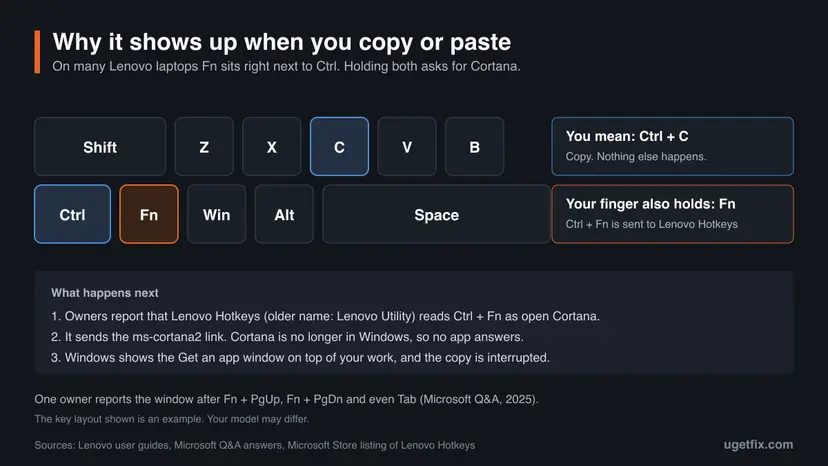
Owners of Lenovo laptops report that the pair Ctrl + Fn opens Cortana. A 2023 question on Microsoft Q&A describes exactly that on a Lenovo laptop, and a 2025 question describes the ms-cortana2 window on a new Lenovo laptop. The answer there, from an independent advisor, names Lenovo Hotkeys as the likely sender.
- Lenovo Hotkeys is Lenovo's app for the special keys. Its Microsoft Store page calls it an upgrade of Lenovo Utility that shows the hotkey status on screen.
- Lenovo's user guides for IdeaPad models also list a voice key, used with Fn, that opens "Cortana or Lenovo Voice Assistant (if installed)". A newer Yoga guide says the key "opens an associated voice app or voice service".
- Lenovo's guides do not document Ctrl + Fn as a Cortana shortcut. That part comes from owners' reports and from an independent project on GitHub that patches Lenovo Hotkeys 4.0.44.0 to remove it.
- We could not confirm whether a newer version of Lenovo Hotkeys has dropped the shortcut.
The same window appears on any PC where something calls the link. If your PC is not a Lenovo, the test in Fix 1 still tells you where to look.
Causes of the ms-cortana2 link window, ranked
Every case has two halves. The second half is the same for everyone: no app is registered for the link. The first half, the caller, differs. Most often it is a key pair. Less often it is a single button. Rarely it is a program that starts with Windows.
| Cause | How often | How to recognise it | Fix |
|---|---|---|---|
| Ctrl + Fn handled by Lenovo Hotkeys or Lenovo Utility | Most reports | Lenovo laptop. The window comes while you copy, paste, or use other Ctrl or Fn shortcuts. | Fix 2, then Fix 3 or Fix 4 |
| A voice or assistant key, the Copilot key, or a button on a keyboard, mouse or headset | Less often | The window follows one particular key or button every time. | Fix 5 |
| A program or service that starts with Windows | Rare | The window appears with your hands off the keyboard, at sign-in or at random. | Fix 6 |
| Windows key + C on Windows 10 with the Cortana shortcut turned on | Rare | Windows 10 only. Microsoft lists the shortcut as off by default. | Fix 5 |
| A stuck or worn Fn or Ctrl key | Rare | The window repeats on its own and stops when you use an external keyboard. | See the section after the fixes |
Older answers tell you to remove the Cortana package with PowerShell. On a PC that already shows this window, Cortana is already gone, and that is why the window appears. Reinstalling it from a file found online is not the fix either: see the section below.
Do not download "Cortana 2" or reinstall Cortana to silence the window
The window invites you to look for an app, and search engines suggest "ms cortana 2 download". There is no product called Cortana 2 for Windows. The number belongs to the link name. Microsoft's list of deprecated Windows features says that Cortana in Windows as a standalone app is deprecated, and Microsoft Support says it was retired.
- Close the window with Esc or by selecting outside it.
- Stop the key, button or program that sends the link.
- Use what Microsoft names as current ways to get help: Microsoft Copilot, and voice access in Windows 11.
- Do not install Cortana from an
.appx,.msixbundleor.exefile offered by a download site. Microsoft does not publish one, so you cannot know what the file contains. - Do not install an Android "Cortana" package on a PC. It is a different, discontinued phone app.
- Do not pay for a tool that promises to repair the ms-cortana2 link. Nothing is broken.
Even a working copy of the old app would only replace one interruption with another. In the 2023 Microsoft Q&A report, Cortana opened on Ctrl + Fn and showed the notice "Cortana in Windows as a standalone app is deprecated".
How to stop the ms-cortana2 link window
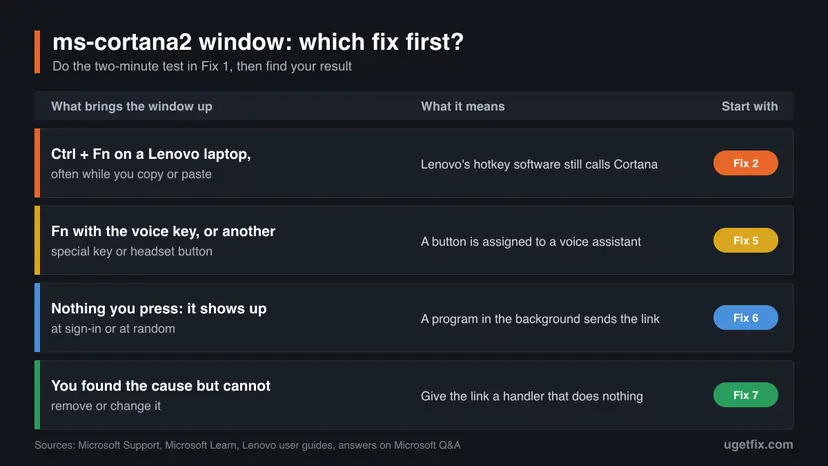
Fix 1 is a two-minute test that tells you what sends the link. Fixes 2 to 4 are for Lenovo laptops, where the sender is the Ctrl + Fn pair. Fix 5 covers single keys and buttons, Fix 6 a program in the background. Fix 7 is the last resort when the sender cannot be removed.
| What you see or have | Start with |
|---|---|
| You do not know what brings the window up. | Fix 1 |
| Lenovo laptop, and the window comes while you copy, paste or use Fn keys. | Fix 2 |
| Lenovo laptop, and you want to keep Lenovo Hotkeys and its on-screen display. | Fix 4, then Fix 7 |
| One special key, the Copilot key or a headset button brings it up every time. | Fix 5 |
| The window appears on its own, with no key pressed. | Fix 6 |
| A work PC where you cannot uninstall apps or change services. | Fix 7, or your administrator |
Fix 1. Find the key, button or program that sends the link
2 minutesNo riskEveryone should start here, because the right fix depends on what calls the link.
Windows does not name the program that asked for the link, and we found no log that records it. A short series of presses shows which key or device brings the window up, and that points to one of the fixes below.
- When the window is open, press Esc or select anywhere outside it. Do not follow its offer to search the Microsoft Store.
- Press Win + R, type the link name with a colon and select OK. If the same window opens, no app is registered for the link on this PC, and you are on the right page.
ms-cortana2: - Close the window. Hold the left Ctrl key and tap Fn. Then hold Fn and tap Ctrl.
- Hold Fn and press each key of the top row that shows a microphone, a voice or an assistant symbol.
- Press Windows key + C. If your keyboard has a Copilot key, press it too.
- Press the assistant or call button on a connected headset, earbuds, external keyboard or mouse.
- If nothing you press brings the window up, note when it appears on its own: at sign-in, after sleep, or when a certain program starts.
| Result of the test | Go to |
|---|---|
| Ctrl + Fn brings the window up | Fix 2 |
| One key or button brings it up | Fix 5 |
| No key does, it appears on its own | Fix 6 |
| Step 2 opens Cortana instead of the window | Cortana is still installed. See the FAQ on Windows 10. |
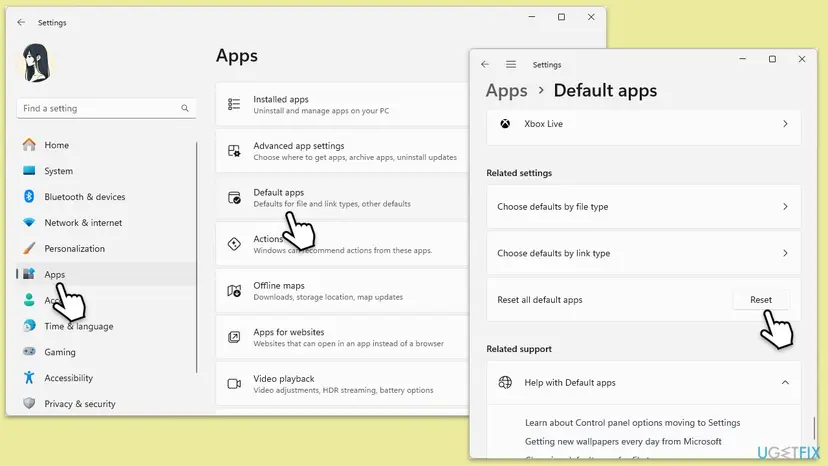
Open Settings > Apps > Default apps and type ms-cortana2 in the box under Set a default for a file type or link type. On a PC with this problem you should find no app assigned to it.
It worked if: You can bring the window up on purpose with one key pair, one button, or you know that it comes with no key pressed.
If not: If you cannot reproduce it at all, wait for the next time it appears and write down the last keys you pressed, then return to the table above.
Fix 2. Stop Lenovo Hotkeys from starting, or uninstall it
5 minutesLow riskCtrl + Fn brings the window up on a Lenovo laptop.
Owners and a Microsoft Q&A advisor point to Lenovo Hotkeys, or the older Lenovo Utility, as the program that turns Ctrl + Fn into a call for Cortana. When that program is not running, nothing sends the link.
The Microsoft Store page says Lenovo Hotkeys provides the on-screen display that shows the hotkey status. Owners report that some of those overlays disappear without it. You can install the app again from the Microsoft Store at any time.
- Press Ctrl + Shift + Esc to open Task Manager and select Startup apps (on Windows 10, the Startup tab).
- Find Lenovo Hotkeys or Lenovo Utility, select it and select Disable. Step by step: Stop apps from opening at startup
- Restart the PC and press Ctrl + Fn. If the window stays away, you are done and the app remains installed.
- If the window still appears, press Win + I and open Apps > Installed apps (on Windows 10, Apps > Apps & features).
- Type
Lenovoin the search box, select the three dots beside Lenovo Hotkeys or Lenovo Utility and select Uninstall. Step by step: Uninstall a program or app in Windows - Restart the PC and press Ctrl + Fn again.
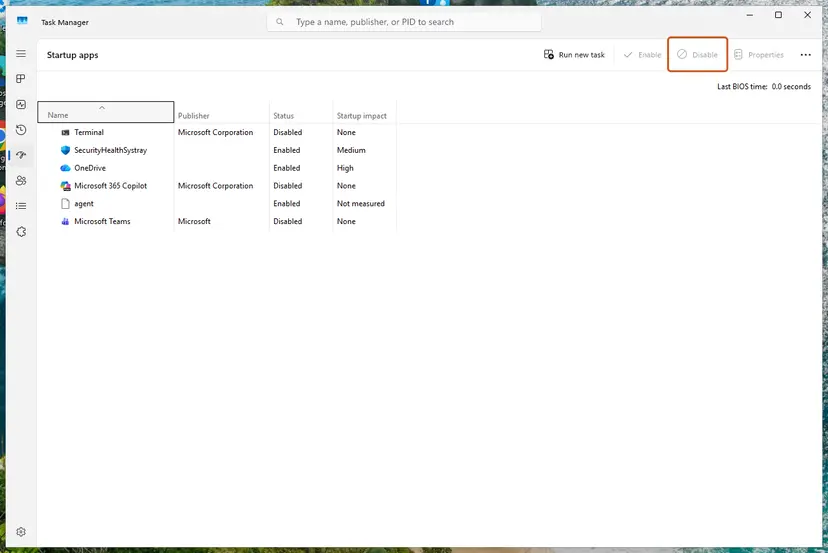
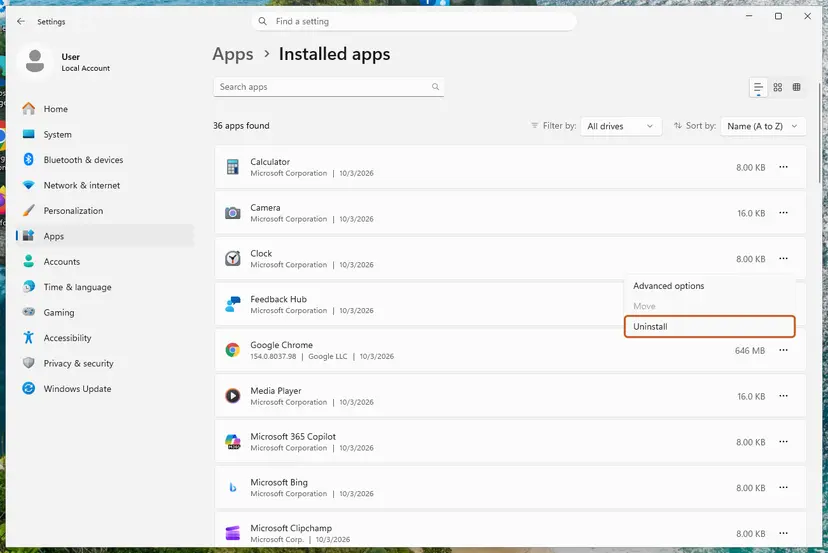
Check the volume, brightness and microphone keys after the restart. We could not confirm from Lenovo's documents which keys depend on the app on which model, so test the ones you use.
It worked if: Ctrl + Fn does nothing, and copying with Ctrl + C no longer brings the window up.
If not: If neither app is installed, or the window survives the uninstall, go to Fix 3. To get the app back, search the Microsoft Store for Lenovo Hotkeys.
Fix 3. Turn off the Lenovo Fn and function keys service
5 minutesLow riskThe Lenovo laptop has no Lenovo Hotkeys app, or uninstalling it did not stop the window.
The advisor's answer on Microsoft Q&A names a second sender: the Lenovo Fn and function keys service. A service runs without an app window and without a startup entry, so Fix 2 does not touch it.
- Press Win + R, type the command below and select OK.
services.msc - Find Lenovo Fn and function keys service in the list. If it is not there, this fix does not apply to your model.
- Double-click it and write down the current Startup type, so that you can put it back.
- Select Stop, set Startup type to Disabled and select OK.
- Press Ctrl + Fn to test, then check the special keys you use every day.
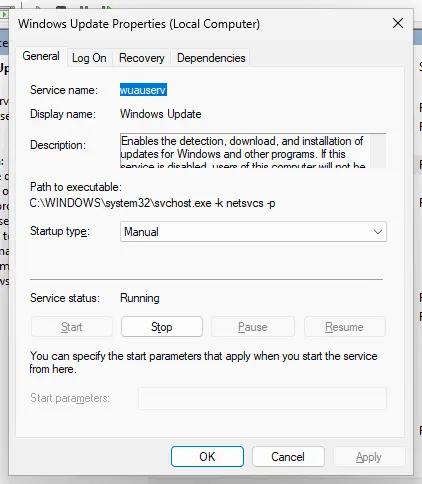
The service name says what it does: it serves the Fn and function keys. If brightness, volume, the microphone key or the keyboard backlight stop responding, set Startup type back to the value you wrote down and select Start. More on services: Check and restart Windows services
The answer that suggests this step does not say that it was confirmed on the asker's laptop, and results differ between models. Treat it as a test you can undo in a minute.
It worked if: The window no longer appears on Ctrl + Fn and your special keys still work.
If not: If the special keys stop working, undo the change. If the window is still there, go to Fix 4 or straight to Fix 7.
Fix 4. Change how Fn and Ctrl behave in the Lenovo firmware
10 minutesLow riskYou want to keep Lenovo Hotkeys and only stop hitting Fn by accident.
Lenovo's user guides for LOQ, Legion and IdeaPad Gaming models describe a firmware setting, Fool Proof Fn Ctrl, that lets Fn stand in for Ctrl in Ctrl shortcuts. With it enabled, a finger that lands on Fn instead of Ctrl still copies and pastes.
- Save your work and open the UEFI/BIOS setup utility the way your model's user guide describes.
- Select Configuration.
- Change Fool Proof Fn Ctrl to Enabled.
- Select Exit > Exit Saving Changes.
- In Windows, test Fn + C and Fn + V in a text editor, then press Ctrl + Fn together.
- Lenovo's guide gives the example that Fn + A then selects all text, the same as Ctrl + A.
- The setting is not present on every model. If Configuration has no such line, your firmware does not offer it.
- ThinkPad firmware has a different option, Fn and Ctrl Key swap, under Config > Keyboard/Mouse. It exchanges the two keys. It does not remove any shortcut.
- We could not confirm that either option stops the Ctrl + Fn call for Cortana. Lenovo's guides do not mention that shortcut at all.
Firmware setup holds settings that decide whether the PC starts. Change only the one line named here, and leave by the save option, not by switching the PC off.
It worked if: Fn + C copies and Fn + V pastes. If the window also stops appearing on Ctrl + Fn, you need nothing more.
If not: If the window still appears when both keys are down, keep the setting if you like it and add Fix 7, or return to Fix 2.
Fix 5. Reassign the voice key, the Copilot key or a device button
5 to 10 minutesNo riskOne particular key or button brings the window up every time, and it is not Ctrl + Fn.
A key or button made in the Cortana years can still be assigned to her. Pointing it at something that exists, or at nothing, removes the caller without touching Windows.
- For the Copilot key: press Win + R, type the address below and select OK. Microsoft Support also gives the path Settings > Bluetooth & devices > Keyboard.
ms-settings:personalization-textinput-copilot-hardwarekey - Open the list Customize Copilot key on keyboard and choose Search, Copilot or Custom. The options offered depend on your account and installed apps.
- For a keyboard, mouse or headset with its own software: open that software and look through the button assignments for Cortana or voice assistant.
- Assign the button to another action, or to none, and save.
- For a Bluetooth headset without software: disconnect it, use the PC for a while, and see whether the window stays away.
- Press the key or button again to test.
| Key | What Microsoft or Lenovo says it does | What you can do |
|---|---|---|
| Windows key + C, Windows 11 | Opens Microsoft Copilot or Microsoft 365 Copilot. When Copilot is unavailable or disabled, it opens or closes Windows search. | Nothing needed. On a current Windows 11 it does not call Cortana. |
| Windows key + C, Windows 10 | "Open Cortana in listening mode". Microsoft adds: "This shortcut is turned off by default." | Leave it off. If you turned it on and Cortana is gone, use Fix 7. |
| Copilot key | Opens Copilot, or Windows search when Copilot is unavailable. | Choose its target in Customize Copilot key on keyboard. |
| Lenovo voice key with Fn | "Open Cortana or Lenovo Voice Assistant (if installed)." | Lenovo documents no setting for it. Avoid the key, or use Fix 7. |
We found no device maker's document that names the ms-cortana2 link, so the headset and mouse steps are a test, not a known cause. If the window stops while the device is disconnected, check its maker's app or support page for the button assignment.
Microsoft notes one catch for the Copilot key: when Copilot is turned on in the taskbar settings, that choice overrides the option selected in Customize Copilot key on keyboard.
It worked if: The key or button opens what you chose, or does nothing, and the window does not appear.
If not: If the button cannot be reassigned, use Fix 7. If no single key is responsible after all, go to Fix 6.
Fix 6. Find the program that calls the link in the background
15 to 30 minutesLow riskThe window appears with no key pressed: at sign-in, after sleep, or at random.
A Microsoft community support specialist answering this problem on Microsoft Q&A gives the likely cause as an application that calls ms-cortana2, which is no longer in service, and recommends a clean boot to find it. A clean boot starts Windows without other companies' services and startup apps.
First try the short way. Open Task Manager, select Startup apps and disable entries you do not need, starting with assistant, voice, keyboard and vendor utilities. Restart and watch. If the window is gone, turn the entries back on one at a time until it returns.
- Open System Configuration. Select Search on the taskbar, type msconfig and select System Configuration from the results.
- Hide Microsoft services. On the Services tab, select the Hide all Microsoft services check box. Only services from other companies stay in the list.
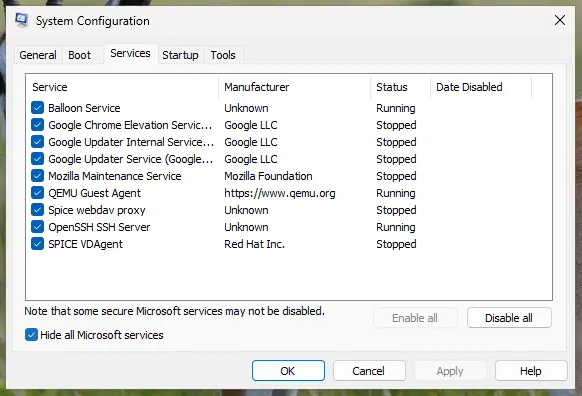
With Hide all Microsoft services ticked, only third-party services stay in the list. Screenshot: Windows 11 26H2. - Disable the remaining services. Select Disable all, then select Apply.
- Open Task Manager. On the Startup tab of System Configuration, select Open Task Manager.
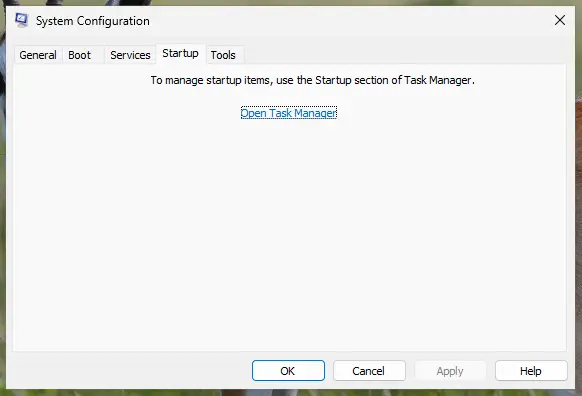
The Startup tab only links to Task Manager. Screenshot: Windows 11 26H2. - Disable the startup apps. On the Startup apps tab in Task Manager, select each item whose status is Enabled and select Disable. Write down or take a screenshot of the items you disable: you need the list to turn them back on.
Select an app, then Disable. Screenshot: Windows 11 26H2. - Confirm the changes. Close Task Manager. On the Startup tab of System Configuration, select OK.
- Restart and test. Restart the PC. Windows now starts in a clean boot environment: try again the thing that failed (run the app, install the update, uninstall the program).
These steps were written for Windows 11 25H2 and 26H2. The full page with the other versions and what each result means: How to perform a clean boot in Windows
- If the window does not appear in a clean boot, a disabled service or startup app sends the link. Turn half of them back on, restart, and repeat until one item is left.
- Hide the Microsoft services before you select Disable all. The specialist's answer warns that disabling them too can leave you unable to use the system.
- When you have the name, update that program from its maker, change the setting that calls a voice assistant, or uninstall it.
- Return to normal startup when you finish, as the last step of How to perform a clean boot in Windows describes.
It worked if: The window stays away in the clean boot and returns when one particular service or startup app is turned back on.
If not: If the window appears even in a clean boot, the sender is a key after all: repeat Fix 1 with every device disconnected, then use Fix 7.
Fix 7. Give the ms-cortana2 link a handler that does nothing
10 minutesRead the warningYou know the sender but cannot remove or change it, or you want to keep Lenovo Hotkeys as it is.
The window appears only because no app is registered for the link type. Microsoft documents how a link type is registered in the registry. If you register a command that starts and ends at once, Windows has something to run and has no reason to ask.
A wrong registry entry can break how links and files open for your account. Export the key HKEY_CURRENT_USER\Software\Classes before you start: Back up the registry before editing it. The commands below add one new key and change nothing that exists. The last command in this fix removes it again.
- Press Win + R, type
cmdand select OK to open Command Prompt. An administrator window is not needed: the key belongs to your own account. Use Command Prompt, not PowerShell, which reads the quotation marks differently. - Create the key and name it. Paste the line and press Enter.
reg add "HKCU\Software\Classes\ms-cortana2" /ve /d "URL:ms-cortana2" /f - Add the empty value that marks the key as a link type.
reg add "HKCU\Software\Classes\ms-cortana2" /v "URL Protocol" /d "" /f - Add the command to run.
reg add "HKCU\Software\Classes\ms-cortana2\shell\open\command" /ve /d "\"C:\Windows\System32\cmd.exe\" /c exit" /f - Press Win + R, type
ms-cortana2:and select OK. If Windows asks how to open the link, choose Windows Command Processor and confirm that it should always be used. - Press the key or button that used to bring the window up.
- Key
HKEY_CURRENT_USER\Software\Classes\ms-cortana2- (Default)
URL:ms-cortana2- URL Protocol
- An empty string. Microsoft: without this value the handler does not launch.
- shell\open\command, (Default)
"C:\Windows\System32\cmd.exe" /c exit- Undo
reg delete "HKCU\Software\Classes\ms-cortana2" /f
- The command line deliberately has no
%1. Microsoft warns that a handler receives the text of the link and must treat it as untrusted, so this handler receives nothing. - A black console window may flash for a moment each time the link is called. That is the command starting and ending.
- Microsoft Learn says to store changes for the signed-in user under
HKEY_CURRENT_USER\Software\Classes, and that these settings take priority over the defaults for all users.
The registration follows Microsoft's document for link types. We did not confirm it on a Lenovo laptop with the Ctrl + Fn shortcut, and we could not confirm how every Windows 11 build treats a link sent by a Store app. If the window still appears, run the undo command.
It worked if: The link runs silently, or with a brief flash of a console window, and the Get an app window no longer appears.
If not: Run the undo command so that no unused key is left behind, then follow the section below on what to report to Lenovo or Microsoft.
The ms-cortana2 window still appears: what to check and what to report
There is no log to read for this problem. We found no Event Viewer entry that records which program asked for a link, and Microsoft's documents on link types describe none. What you learned in Fix 1 is the evidence.
| Collect | Where to find it |
|---|---|
| PC model and machine type | The label under the laptop, or Settings > System > About. |
| Windows version and build | Press Win + R, type winver, select OK. |
| The exact keys or button | Your notes from Fix 1. |
| Version of Lenovo Hotkeys or Lenovo Utility | Settings > Apps > Installed apps, the three dots beside the app, Advanced options. |
| Whether Cortana is installed | In PowerShell: Get-AppxPackage -Name Microsoft.549981C3F5F10. No output means it is not installed. The package name comes from an accepted Microsoft Q&A answer. |
- Lenovo laptop: send these facts to Lenovo support and ask whether a newer hotkey package for your model removes the Cortana shortcut. The call comes from Lenovo's software, so Lenovo is the one who can remove it.
- Any PC: report it in the Feedback Hub app (Win + F), so that Microsoft sees how many PCs still call the retired link.
- Work PC: tell your administrator the key pair and the app name. Uninstalling the app or adding the handler from Fix 7 can be rolled out centrally.
If the window opens again and again with your hands off the keyboard, and Fix 6 found no program, a Fn or Ctrl key may be stuck or worn. Connect an external keyboard and work with it for an hour. If the window stops, the built-in keyboard needs cleaning or service. No setting cures a key that stays pressed.
Running a system file check, resetting default apps or rebuilding the search index does not help here. Those repairs fix damaged Windows parts, and in this case no part is damaged: an app that Microsoft retired is absent on purpose.
Keep the ms-cortana2 window from coming back
- After a large Windows or Lenovo update, press Ctrl + Fn once. An update can reinstall Lenovo Hotkeys or turn its startup entry back on.
- Keep a note of what you changed (startup entry, service, firmware setting or registry key), so that you can repeat or undo it.
- Set the Copilot key to a target you use, so that no key points at a missing app.
- On a new laptop, run the test from Fix 1 before you blame your typing.
- Do not install Cortana from unofficial packages to make the window go away.
- Do not use registry cleaners or "link repair" tools for this. There is no broken entry to clean.
- Do not delete keys under
Explorer\AppKeyor other system keys on the advice of old guides. We found no Microsoft document that ties them to this window.
Windows 10 left support on 14 October 2025. If the window appears on a Windows 10 PC, the same fixes apply, but Microsoft no longer changes how Cortana or its shortcuts behave there.
Frequently asked questions
What is ms-cortana2 (ms cortana 2)?
It is the name of a link type, not a program. Windows apps start each other through links such as ms-settings: for Settings or mailto: for email. ms-cortana2: was the link that started the Cortana app. Microsoft retired Cortana in Windows as a standalone app in spring 2023, so on a current PC no app is registered for the link. When a key or program still asks for it, Windows shows the window that offers to find an app. There is no product called Cortana 2 for Windows.
What is the ms cortana 2 link error, and is something broken?
Nothing is broken. The text Get an app to open this 'ms-cortana2' link is not an error code. It is the standard Windows prompt for a link type that has no app, and Microsoft Learn describes it as the default behaviour: Windows offers a way to search the Store. The prompt tells you two things. Something on the PC still calls Cortana, and Cortana is not installed. Only the first can be fixed, by finding the caller with the test in Fix 1.
Is the ms-cortana2 pop up a virus?
No. The window is drawn by Windows itself, and the link name belongs to Microsoft's own retired assistant. The usual sender is ordinary vendor software, most often Lenovo Hotkeys reacting to Ctrl + Fn. The risk starts only if you answer the prompt by downloading a "Cortana" installer from a third-party site, because Microsoft does not publish one. If you see other signs of an infection, such as unknown programs or browser redirects, scan the PC: How to scan for malware with Microsoft Defender. The window alone is not such a sign.
Why do I get it when I copy files or text?
Because of the keys, not the copying. To copy you hold Ctrl, and on many Lenovo laptops Fn sits right beside it. When both are down, Lenovo's hotkey software treats the pair as a Cortana shortcut, by owners' reports, and sends the link. The window then takes the focus away from your work, so the copy seems to fail. One owner on Microsoft Q&A also reports it after Fn + PgUp, Fn + PgDn and Tab. Fix 2 removes the sender, and Fix 4 makes an accidental Fn press act as Ctrl.
How do I disable the ms-cortana 2 link?
You cannot switch the link off in Settings, because nothing is registered for it. You disable what calls it. On a Lenovo laptop, stop Lenovo Hotkeys from starting or uninstall it (Fix 2), or turn off the Lenovo Fn and function keys service (Fix 3). For a single key or button, reassign it (Fix 5). When the caller cannot be removed, register an empty handler for the link in the registry, so that Windows has something to run and stops asking (Fix 7).
Why does a new Lenovo laptop show an ms cortana 2 error?
New Lenovo laptops come with a current Windows 11, where the retired Cortana app is no longer present, and with Lenovo's hotkey software, which by owners' reports still maps Ctrl + Fn to Cortana. The two do not match, and the window is the result. Lenovo's IdeaPad user guides still describe a voice key that opens "Cortana or Lenovo Voice Assistant (if installed)". We could not confirm whether Lenovo has released a hotkey version without the Cortana shortcut, so ask Lenovo support for your exact model.
Can I download Cortana 2 or reinstall Cortana to make the message stop?
No, and you should not try with files from download sites. Microsoft's own pages say that Cortana in Windows as a standalone app is deprecated and was retired in spring 2023. Microsoft publishes no installer, so a package offered elsewhere is unofficial, and you cannot verify what it contains. Searches for "ms cortana 2 download" also lead to an old Android app, which does nothing on a PC. Even a working old Cortana would open with a deprecation notice every time you pressed Ctrl + Fn.
Does the ms-cortana2 window appear on Windows 10?
It can, when Cortana has been removed from that PC. Windows 10 keeps one more possible sender: Microsoft lists Windows key + C as "Open Cortana in listening mode" and notes that the shortcut is turned off by default. If the test in Fix 1 opens Cortana instead of the window, the app is still installed and shows its deprecation notice. In that case the caller is the same and Fix 2 still applies. Windows 10 left support on 14 October 2025.
Will re-registering apps, SFC or rebuilding the search index fix it?
No. Those were the methods of older guides, and none of them addresses the cause. Re-registering apps repairs the registration of apps that are installed, and Cortana is not. The system file check and DISM replace damaged Windows files, and no file is damaged here. The search index has no part in opening links. Resetting default apps does not bring a handler back for a retired app either. The window stops when the caller stops, or when the link gets a handler.
What replaced Cortana, and what does Windows key + C do now?
Microsoft does not name one replacement. Its end of support page points to voice access in Windows 11, which lets you control the PC and write text with your voice, to Microsoft Copilot, and to Copilot in Microsoft 365 apps. On Windows 11, Microsoft's shortcut list says Windows key + C opens Microsoft Copilot or Microsoft 365 Copilot, and opens or closes Windows search when Copilot is unavailable or disabled. So on a current Windows 11 PC that shortcut is not what sends the ms-cortana2 link.
Sources
- Microsoft Support: End of support for Cortana (support.microsoft.com)
- Microsoft Learn: Deprecated features in the Windows client (Cortana in Windows, June 2023) (learn.microsoft.com)
- Microsoft Learn: Launch the default Windows app for a URI (learn.microsoft.com)
Did this fix work?
One click, no account. It tells the next reader which guides are worth their time.
Questions and experiences: fix "Get an app to open this ms-cortana2 link" message when copying files in Windows
Still broken, or found a fix we did not cover? Ask here: members and our editors answer. Reading is open; writing needs a free account.
…