
How to fix the intelppm.sys blue screen (BSOD) in Windows

Prefer to fix it yourself? The manual steps follow.
- 7methods
- 15 to 60 minutes
- Intermediate
Applies to Windows 11 and Windows 10 PCs with an Intel processor
7 methods in this guide
Hello. My Windows PC keeps crashing because of the intelppm.sys blue screen error. How do I tackle this error?
intelppm.sys is the Processor Device Driver that Microsoft ships with Windows to put Intel CPU cores to sleep when they are idle. When a blue screen names it, the processor usually failed while changing its power state. Update the BIOS and return the CPU to Intel's default settings first.
intelppm.sys is a Windows driver, not a virus, and it is rarely broken itself. It is named because the CPU crashed while going idle. Install the newest BIOS from your PC or motherboard maker (Fix 1); on 13th and 14th Gen Intel desktops it must carry microcode 0x12F or later. Then remove any undervolt or overclock (Fix 2).
| Error | A stop screen (blue, or black on Windows 11 24H2 and later) with What failed: intelppm.sys. The stop code above it varies: often HYPERVISOR_ERROR, also KMODE_EXCEPTION_NOT_HANDLED and others. |
|---|---|
| Where it appears | Often when the PC is idle or under light load: on the desktop, in a menu, while a video plays. The PC freezes, shows the stop screen and restarts. |
| Main cause | The processor becomes unstable while it changes voltage or sleep state: outdated BIOS microcode, an undervolt or overclock, or a degraded 13th or 14th Gen Intel desktop CPU. |
| Fastest fix | Update the BIOS and load Intel's default settings (Fix 1), then remove tuning tools and profiles (Fix 2). |
| Also written as | intelppm, intelppm sys, intelppm.sys failed, intelppm!HvRequestIdle, intelppm!unknown_function, the service key HKEY_LOCAL_MACHINE\SYSTEM\CurrentControlSet\Services\intelppm. |
| Who makes it | Microsoft. The file properties read Processor Device Driver, Microsoft Corporation, version 10.0.26100.x on Windows 11 24H2 and later. It is installed by cpu.inf. |
| Vendor status | Intel confirmed the Vmin Shift Instability of 13th and 14th Gen desktop CPUs, recommends BIOS with microcode 0x12F or later, and extended the warranty to 5 years from purchase. |
| Where the cause is logged | C:\Windows\Minidump (one .dmp per crash) and Event Viewer, Windows Logs > System, source BugCheck, event ID 1001. |
| Time to fix | 15 to 30 minutes for a BIOS update. A full stability check takes an hour or more. |
Facts checked on 15 October 2026. Steps written for Windows 11 (25H2 and 26H2) and Windows 10 22H2.
What intelppm.sys is and why a blue screen names it
intelppm.sys sits in C:\Windows\System32\drivers. Its file properties name it Processor Device Driver from Microsoft Corporation, part of the Microsoft Windows Operating System. The PPM in the name stands for processor power management: Windows calls it every time an Intel core has nothing to do and should drop into a low-power sleep state.
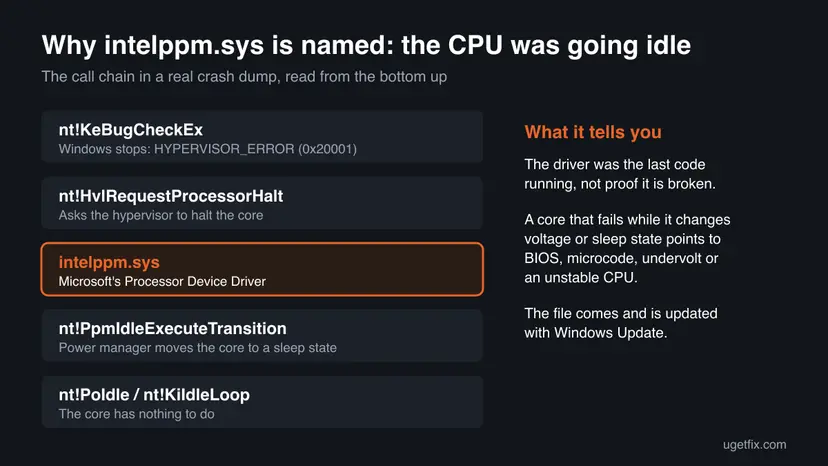
Because it runs thousands of times a second on every core, it is often the code that happens to be running when the processor misbehaves. A dump posted on Microsoft Q&A from an Intel Core i9-14900K shows exactly that: the core was in its idle loop, Windows asked intelppm.sys to change the sleep state, and the hypervisor then stopped the PC.
| What you see | What it means |
|---|---|
| What failed: intelppm.sys on the stop screen | The last driver running at the crash was the processor power driver |
| HYPERVISOR_ERROR (0x00020001) with intelppm.sys | The Windows hypervisor hit a fatal error while the core went idle. It runs when Memory integrity, Hyper-V, WSL or another virtualization feature is on |
intelppm!HvRequestIdle or intelppm!unknown_function in WinDbg | The function inside intelppm.sys that asked the hypervisor to idle the core |
| KMODE_EXCEPTION_NOT_HANDLED with intelppm.sys | A kernel exception inside the idle path. Same causes, same fixes |
intelppm in Registry Editor | The service entry that loads the driver. Changing it is a test only, see Fix 7 |
The genuine file is part of Windows and is updated by Windows Update. Do not download intelppm.sys from DLL or driver sites.
Why intelppm.sys crashes: the causes, most common first
Since the driver itself is a stable Windows file, look at what happens around it. Intel's own root-cause report says affected 13th and 14th Gen desktop CPUs received elevated voltage requests from microcode and BIOS code, especially during idle and light activity. That is exactly the moment intelppm.sys is working.
| How often | Cause | Sign | Fix |
|---|---|---|---|
| Most often | 13th or 14th Gen Intel Core desktop CPU on an old BIOS (Vmin Shift Instability) | Core i5, i7 or i9 of the 13000 or 14000 series, desktop, BIOS older than late 2024 | Fix 1 |
| Often | Undervolt, overclock, motherboard power limits above Intel's defaults, a memory profile | ThrottleStop, Intel XTU or the board's auto-overclock was used | Fix 2 |
| Often | A Windows update or preview build that changed the idle or hypervisor path | Crashes started the day after an update | Fix 3 |
| Less often | Outdated chipset or the PC maker's Intel power software on a laptop | Laptop or Core Ultra, HYPERVISOR_ERROR every time | Fix 4 |
| Rarely | Failing RAM or a CPU already damaged | Random stop codes, crashes in many programs | Fix 5 |
| Rarely | Damaged Windows files | SFC reports files it could not repair | Fix 6 |
Old guides tell you to rename the file to intelppm.sys.bak. Windows protects it, and system file repair or the next update puts it back. If the real fault is the CPU, the crash simply moves to another driver.
Check what the crash really says
Before you change the BIOS, write down three things: the stop code, the processor model and whether the crashes happen when the PC is idle. They pick your first fix in the table under the methods.
- Press Win + R, type
msinfo32and press Enter. Note Processor and BIOS Version/Date. - Press Win + R, type
eventvwr.mscand press Enter. Open Windows Logs > System and find the newest BugCheck event, ID 1001. It holds the stop code. - Open
C:\Windows\Minidumpin File Explorer. One.dmpfile is written per crash, named by date. - For details, install WinDbg from Terminal with
winget install Microsoft.WinDbg, open the newest dump as administrator and run!analyze -v. - Read BUGCHECK_CODE, IMAGE_NAME and FAILURE_BUCKET_ID.
intelppm.syswith20001means HYPERVISOR_ERROR in the idle path.
How to fix the intelppm.sys blue screen
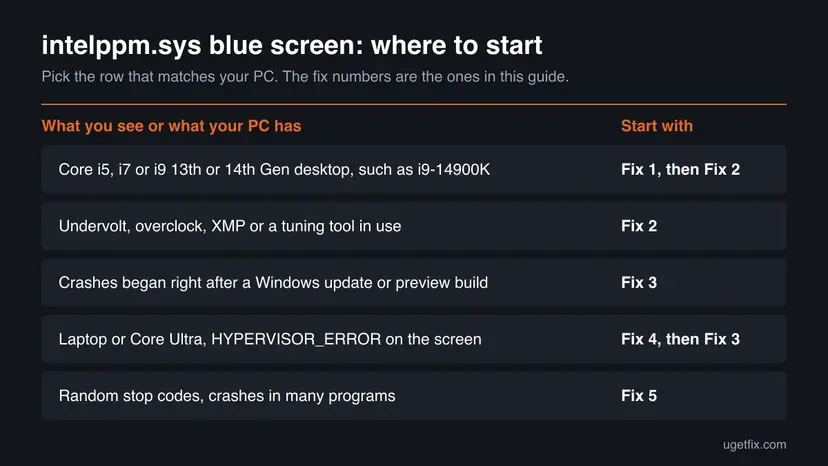
Fixes 1 and 2 treat the processor, which is where this crash usually starts. Fix 3 is for crashes that began with an update. Fix 4 is for laptops. Fixes 5 to 7 are the checks for when the cause is still unknown.
| What you see or what your PC has | Start with | Then |
|---|---|---|
| Core i5, i7 or i9 13th or 14th Gen desktop processor | Fix 1 | Fix 2 |
| Undervolt, overclock, XMP or a tuning tool in use | Fix 2 | Fix 1 |
| Crashes began right after a Windows update or a preview build | Fix 3 | Fix 1 |
| Laptop or Core Ultra, HYPERVISOR_ERROR on the screen | Fix 4 | Fix 3 |
| Random stop codes, crashes in many programs | Fix 5 | Fix 6 |
Fix 1. Update the BIOS so the CPU gets Intel's fixed microcode
15 to 30 minutesRead the warningEvery Intel PC, and above all 13th and 14th Gen Core i5, i7 and i9 desktop processors.
Intel traced the instability of these CPUs to microcode and BIOS code asking for high voltage during idle and light load. Microcode reaches the CPU only through a BIOS update, and intelppm.sys is the driver running in those idle moments.
A BIOS update that is interrupted can leave the PC unable to start. Plug a laptop into power, do not switch off during the update, and note your custom BIOS settings first, because the update usually resets them. Your files are not touched.
- Press Win + R, type
msinfo32and press Enter. Note System Model (or BaseBoard Product on a self-built PC) and BIOS Version/Date. - Open the support page of your PC or motherboard maker, search for that exact model and open the BIOS downloads.
- Pick the newest BIOS. For a 13th or 14th Gen desktop CPU its notes should mention microcode 0x12F or later.
- Follow the maker's own instructions to flash it, usually from a USB drive inside the BIOS menu.
- After the update, open the BIOS and load the defaults the maker labels Intel Default Settings or Intel Baseline Profile, if offered.
- Start Windows and use the PC normally, including idle time, for a day.
- Affected
- Intel Core 13th and 14th Gen desktop processors. Intel states the mobile chips of those generations, Lunar Lake and Arrow Lake are not affected.
- Microcode
- 0x125 (June 2024), 0x129, 0x12B (idle voltage, September 2024), 0x12F (2025). Intel now recommends 0x12F or later.
- Warranty
- Intel extended it by two years, to five years from the original purchase date, for eligible processors.
It worked if: The BIOS screen or msinfo32 shows the new BIOS date, and the PC idles for a day without a stop screen.
If not: If you also use tuning tools or a memory profile, go to Fix 2. If crashes continue on the new BIOS with default settings, the CPU may already be degraded: see Fix 5 and the section on warranty.
Fix 2. Remove undervolts, overclocks and power limits above Intel's defaults
15 minutesLow riskYou used ThrottleStop, Intel XTU, a motherboard auto-overclock, an undervolt or an XMP or EXPO memory profile.
An undervolt that is stable under load can fail when the core drops to a low-power state, which is exactly when intelppm.sys runs. Intel asks owners to keep the Intel default settings in the BIOS.
- Open the tuning tool you used and reset every profile to default, then turn off its start with Windows: Stop apps from opening at startup
- Uninstall tools you no longer need, such as ThrottleStop or Intel XTU: Uninstall a program or app in Windows
- Restart into the BIOS and load the optimized or default settings.
- Choose the Intel default power profile if your board offers one, and turn off any multicore enhancement or auto-overclock option.
- Turn off the XMP or EXPO memory profile for the test period.
- Save, start Windows and leave the PC idle and in light use for several hours.
If the crashes stop, re-enable the memory profile first and test for a day. Leave the undervolt off: it is the setting most tied to idle crashes.
It worked if: No new file in C:\Windows\Minidump after a day of normal use with idle periods.
If not: If the crashes began after an update, go to Fix 3. On a laptop, go to Fix 4.
Fix 3. Remove the Windows update or preview build that started the crashes
15 minutesLow riskThe blue screens started right after a Windows update, or you joined the Release Preview or Insider channel.
intelppm.sys and the hypervisor are serviced by Windows Update. A user on Microsoft Q&A traced reproducible HYPERVISOR_ERROR crashes in intelppm!HvRequestIdle to a preview build, and another user reported that only rolling it back helped.
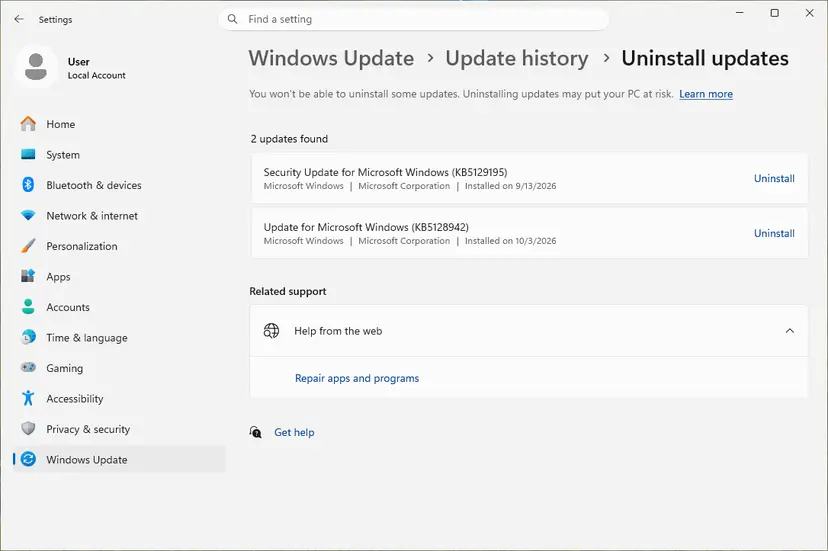
- Open Settings > Windows Update > Update history and note the KB number and the date of the newest update.
- Compare that date with the first crash in Event Viewer (BugCheck, ID 1001).
- If they match, uninstall that update. Step by step: How to uninstall a Windows update
- If you are in the Windows Insider Program, open Settings > Windows Update > Windows Insider Program and stop getting preview builds.
- Pause updates for one or two weeks and check whether Microsoft lists a known issue for your build.
It worked if: The PC runs through the days that used to crash, and the stop code does not return.
If not: Install the update again later, since it carries security fixes. If the crash came back without any update, go to Fix 4 or Fix 5.
Fix 4. Update the chipset and the PC maker's Intel power software
20 minutesLow riskA laptop, a Core Ultra processor, or HYPERVISOR_ERROR with intelppm.sys on every crash.
Laptops pair intelppm.sys with the maker's Intel power packages, such as Intel Dynamic Tuning, which steer the same sleep and voltage states. Mismatched versions after a Windows reset or an upgrade are a common source of idle crashes.
- Open the support page of your laptop or PC model and list the newest chipset, Intel Dynamic Tuning or Intel Innovation Platform Framework and Intel Management Engine downloads.
- Install the chipset package first, then the power packages, in the order the maker gives.
- Open Device Manager and check System devices and Processors for yellow warning marks: Update, roll back or reinstall a driver
- If a driver arrived just before the crashes, roll it back on its Driver tab instead.
- Restart and use the PC with idle periods for a day.

The Processors list in Device Manager uses Windows' own intelppm.sys. Searching for a newer driver there finds nothing, so skip it and use the maker's packages.
It worked if: No warning marks in Device Manager and no HYPERVISOR_ERROR during a full day of normal use.
If not: Go to Fix 3 if the crashes started with an update, otherwise test the hardware in Fix 5.
Fix 5. Test the memory and the processor's stability
60 minutes or moreLow riskCrashes continue on a new BIOS with default settings, or stop codes change from crash to crash.
Damaged RAM or a CPU that has already degraded will crash in many places, and the idle driver is simply one of them. A test separates a software fault from a part that needs replacing.
- Test the RAM with the tool built into Windows: How to test your RAM with Windows Memory Diagnostic
- Check the stop codes of the last crashes in Event Viewer. Many different codes, such as MEMORY_MANAGEMENT or WHEA_UNCORRECTABLE_ERROR, point to hardware.
- Check whether games or programs crash on their own with messages about decompression or video memory.
- On a 13th or 14th Gen desktop that still crashes on the newest BIOS and Intel defaults, contact Intel or the seller for the processor warranty.
- Keep the dump files and the BIOS version for the claim.
It worked if: The memory test reports no errors, and the crashes stopped after Fix 1 or 2.
If not: If the memory test finds errors, replace the RAM. If it finds none and crashes go on, repair Windows in Fix 6 and then contact support.
Fix 6. Repair Windows system files
20 minutesNo riskSFC has not run on this PC, or someone renamed or replaced intelppm.sys.
intelppm.sys is a protected Windows file, so DISM and SFC can put back a clean copy. This undoes the rename trick from old guides and rules out a damaged file.
- Right-click Start and select Terminal (Admin).
- Run
DISM.exe /Online /Cleanup-Image /RestoreHealth, thensfc /scannow. Step by step with screenshots: Run DISM and SFC to repair Windows system files - Restart the PC when SFC is done.
It worked if: SFC reports that it found no integrity violations or that it repaired them.
If not: If crashes continue, collect the dumps as described in the section on reporting the crash.
Fix 7. Turn off the intelppm service in the registry, only as a short test
10 minutesRead the warningEverything above failed and you want to prove that the idle path is involved before contacting support.
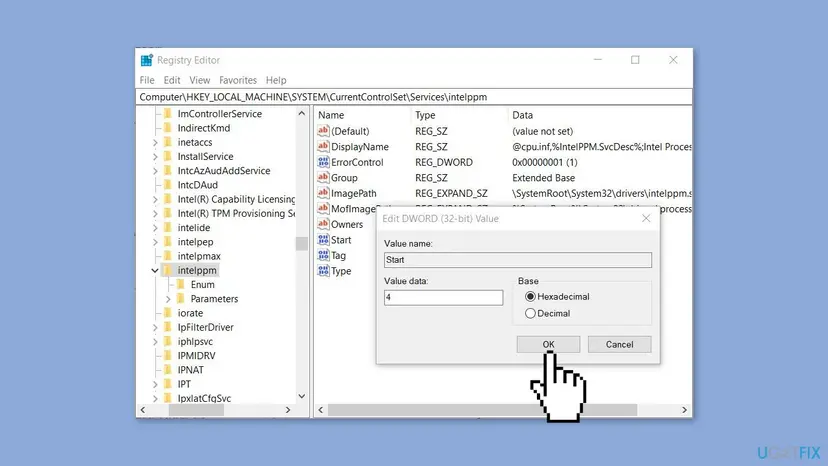
Setting Start to 4 stops intelppm.sys from loading, so Windows no longer uses it to manage the cores' idle states. If the crashes stop, you have proved the fault lies in that path, which helps the PC maker or Intel.
The processor loses its normal idle power management, so it may run warmer and drain a laptop battery faster. No files are lost. Back up the key first, note the current Start value, and set it back after the test: Back up the registry before editing it
- Press Win + R, type
regeditand press Enter. - Go to
HKEY_LOCAL_MACHINE\SYSTEM\CurrentControlSet\Services\intelppm. - Export the key with File > Export and note the current value of Start.
- Double-click Start, set Value data to
4and select OK. - Restart and use the PC for a day.
- Set Start back to the value you noted, or import the exported file, and restart.
It worked if: With Start at 4 the PC runs a day without the stop screen, which points to the processor's idle states.
If not: If it still crashes with intelppm.sys switched off, the fault is elsewhere: send the dumps to your PC maker. In both cases restore the original value.
Still crashing: what to send and to whom
intelppm.sys is a Microsoft file, but the fix for this crash usually comes from the BIOS maker or the processor warranty. Collect the facts once and send them to the right place.
- The three newest
.dmpfiles fromC:\Windows\Minidump, zipped. - The processor, the BIOS version and date, and the Windows build from
msinfo32. - When it crashes: idle, light use, a game, after sleep.
- Which of the fixes above you tried, and the result of the registry test in Fix 7.
| Where to report | When |
|---|---|
| Intel support, or the shop that sold the CPU | 13th or 14th Gen desktop CPU still crashing on BIOS with 0x12F and default settings |
| Your PC or laptop maker | Laptops, prebuilt PCs, a BIOS that has no 0x12F update |
| Microsoft Q&A or Feedback Hub | Crashes that started with one Windows build and stop when it is removed |
How to keep the intelppm.sys blue screen from coming back
- Check for new BIOS releases from your board or PC maker twice a year.
- Keep Intel's default power settings on 13th and 14th Gen desktop CPUs.
- Install chipset and power software from the PC maker's page.
- Leave Memory integrity and other Windows protections on.
- Rename, delete or replace intelppm.sys.
- Download driver files from DLL or driver sites.
- Leave the registry test from Fix 7 in place for good.
- Run undervolting tools on a CPU that has crashed this way.
Windows 10 left support on 14 October 2025. Older Windows 7 PCs are long out of support too, and their intelppm.sys crashes cannot be fixed by Microsoft any more. Windows 11 with a current BIOS is the setup that still gets fixes.
Frequently asked questions
What is intelppm.sys?
intelppm.sys is the Processor Device Driver of Windows, made by Microsoft and stored in C:\Windows\System32\drivers. It manages the power states of Intel processor cores, putting them to sleep when they are idle and waking them up again. Windows installs it on every PC with an Intel CPU through cpu.inf, and Windows Update keeps it current. You do not need to download or install it yourself.
Is intelppm.sys a virus?
No. The genuine file is a signed Microsoft driver. Right-click C:\Windows\System32\drivers\intelppm.sys, select Properties and open the Details tab: it should read Processor Device Driver and Microsoft Corporation. A file with that name anywhere else, or without Microsoft's signature, deserves a scan with Microsoft Defender. The blue screen itself is almost never caused by malware.
What does intelppm.sys failed mean?
It means the stop screen's What failed line named intelppm.sys, so this driver was running when Windows stopped. It does not prove the driver is broken. In most dumps the core was going idle, and the fault lies in the voltage the BIOS and the processor chose at that moment. That is why the BIOS update and default settings in Fixes 1 and 2 help most readers.
Why do I get HYPERVISOR_ERROR with intelppm.sys?
HYPERVISOR_ERROR, bug check 0x20001, means the Windows hypervisor hit a fatal error. It runs when Memory integrity, Hyper-V, WSL or a similar feature is on. When the core goes idle, intelppm.sys asks the hypervisor to halt it, and an unstable core fails right there. Dumps then show intelppm!HvRequestIdle or intelppm!unknown_function. Fixes 1, 3 and 4 apply. Turning off Memory integrity is not a fix and leaves the PC less protected.
Can I fix intelppm.sys in regedit?
Only as a test. In Registry Editor the driver's service key is HKEY_LOCAL_MACHINE\SYSTEM\CurrentControlSet\Services\intelppm. Setting its Start value to 4 stops the driver from loading, as described in Fix 7. If the crashes stop, the processor's idle path is involved. Do not leave it that way: the CPU loses its normal idle power management, so put the original value back once you know the result.
Is the intelppm.sys crash a sign my Intel CPU is damaged?
Sometimes. Intel confirmed that some 13th and 14th Gen Core desktop processors degrade under elevated voltage and temperature, which it calls Vmin Shift Instability. Microcode 0x12F or later in a BIOS update prevents further damage but does not repair a chip that has already shifted. If crashes continue on the new BIOS with Intel's default settings, ask Intel or the seller about the extended five-year warranty.
How do I fix KMODE_EXCEPTION_NOT_HANDLED intelppm.sys?
Treat it like the other intelppm.sys crashes. The stop code differs, but the driver was again running in the processor's idle path. Update the BIOS (Fix 1), remove undervolts and overclocks (Fix 2) and check for a fresh Windows update (Fix 3). If the stop codes keep changing between crashes, test the RAM and the processor in Fix 5.
Does the intelppm.sys blue screen happen on Windows 11 and Windows 7?
It appears on Windows 7, 10 and 11, because all of them use the same kind of processor power driver. On Windows 11 24H2 and later the stop screen is black rather than blue, but it carries the same What failed line. Windows 7 and Windows 10 no longer get Microsoft fixes, so on those systems only the BIOS and settings fixes remain.
Can I delete or rename intelppm.sys?
Do not. The file is protected by Windows, and System File Checker or the next cumulative update restores it. Renaming it can also leave the processor without its idle power management, so it runs hotter. If the cause is an unstable CPU, the blue screen simply returns with another driver named. The registry test in Fix 7 is the safer way to check the driver's role.
What does intelppm.sys синий экран mean?
It is Russian for the intelppm.sys blue screen, the same crash this page covers. Readers searching in other languages, such as écran bleu in French, face the same Microsoft driver and the same causes. The fixes above apply to every language version of Windows. The menu names differ by language, but the file path, the registry key and the commands are the same everywhere.
Sources
- Intel Support: Intel Core 13th and 14th Gen Desktop Processor Vmin Shift Instability Issue, latest information (with the linked root-cause update) (intel.com)
- Microsoft Q&A: BSOD help, 0x20001 intelppm unknown_function (full WinDbg analysis) (learn.microsoft.com)
- Microsoft Q&A: Reproducible HYPERVISOR_ERROR BSOD on Windows 11, intelppm!HvRequestIdle (learn.microsoft.com)
Did this fix work?
One click, no account. It tells the next reader which guides are worth their time.
Questions and experiences: fix the intelppm.sys blue screen (BSOD) in Windows
Still broken, or found a fix we did not cover? Ask here: members and our editors answer. Reading is open; writing needs a free account.
…