
How to fix MSI Afterburner "Failed to start scanning" error in Windows?

Prefer to fix it yourself? The manual steps follow.
- 7methods
- 5 to 30 minutes
- Easy
Applies to Windows 11, Windows 10; MSI Afterburner 4.6.x with the OC Scanner on GeForce graphics cards
7 methods in this guide
I have an issue with MSI Afterburner. After building my new PC (everything seems to work fine), I cannot run OC in MSI Afterburner. Every time I try, it comes up with the "Failed to start scanning" message. Any tips, please?
"Failed to start scanning!" means the MSI Overclocking Scanner could not even begin its test, so no overclock was tried and nothing on the card changed. Most often another program or a Windows permission blocks the scanner's access to the GeForce card. Allow access to the GPU performance counters in the NVIDIA Control Panel first, then close every other tuning tool.
Open the NVIDIA Control Panel, select Desktop > Enable Developer Settings, go to Developer > Manage GPU Performance Counters and choose Allow access to the GPU performance counters to all users (Fix 1). Then close every other tuning, RGB or overlay program and run the scan again (Fix 2). On a laptop, make sure Afterburner controls the GeForce chip (Fix 3). If the message comes from the setup window instead, see Fix 5.
| Error | Failed to start scanning! in the status area of the MSI Overclocking Scanner window, often with a time stamp in front of it. |
|---|---|
| Where it appears | Right after you select Scan in the OC Scanner of MSI Afterburner. The scan stops at once and the card keeps its old settings. |
| Main cause | The scanner cannot get to the card: Windows keeps the GPU performance counters for administrators only, or another tuning tool already holds the card. |
| Fastest fix | Allow access to the GPU performance counters to all users in the NVIDIA Control Panel, then run the scan again (Fix 1). |
| Also written as | "Failed to start scannning!" (with three n), "OC scanner failed to start scanning", "MSI overclocking scanner failed to start scanning", "afterburner failed to start scanning". |
| Affects | MSI Afterburner on Windows 11 and Windows 10. The reports we read are from desktop and laptop PCs with GeForce cards. |
| Current version | MSI lists Afterburner 4.6.6 (Final) and 4.6.7 (Beta), both released in September 2026. Only msi.com and Guru3D distribute the genuine files. |
| MSI's status | MSI has published no description of this message and no fix for it. Its page says only that OC Scanner finds the highest stable overclock for your card. |
| Time to fix | About 5 minutes for Fix 1 and Fix 2. A clean reinstall of Afterburner or of the driver takes 15 to 30 minutes. |
Facts checked on 15 October 2026. Steps written for Windows 11 (25H2 and 26H2) and Windows 10 22H2.
What "Failed to start scanning!" in the MSI Overclocking Scanner means
OC Scanner is the automatic overclocking tool built into MSI Afterburner. You start it from the main window of Afterburner, and it opens a window called MSI Overclocking Scanner. When you select Scan, it tries higher clocks step by step and tests each one.
The line "Failed to start scanning!" means that the very first step failed: the scanner could not take control of the card for its test. It is not a crash and not a sign of a damaged card. No clock offset was applied, so your card runs exactly as it did before.
- Same error, other spellings: "Failed to start scannning!" with three n is how many people type it, and searches also use "OC scanner", "MSI overclocking scanner" and "afterburner" alone.
- Different messages: "Scan failed with code 3" and "results are considered unstable" appear after a scan has started. "Error opening file for writing" comes from the setup program. Each is answered below.
- Not the same as Afterburner not opening: if the program window itself never appears, see the FAQ at the end.
Why the OC Scanner fails to start scanning
Most often the scanner is denied access to the card's performance counters. Less often another program already controls the card, or a laptop hands the job to the wrong graphics chip. Rarely the cause is an old Afterburner build or a damaged driver install.
| Cause | How often | How to tell | Fix |
|---|---|---|---|
| The NVIDIA Control Panel restricts the GPU performance counters to administrators. | Most often | Developer > Manage GPU Performance Counters shows the restrict option selected, which is the default. | Fix 1 |
| Another tuning, monitoring, RGB or overlay tool holds the card. | Often | EVGA Precision X1, ASUS GPU Tweak, the NVIDIA app overlay or a hardware monitor runs in the tray. | Fix 2 |
| On a laptop, Afterburner points at the integrated chip or the clocks are locked. | Often on laptops | The Core Clock slider does not move, or Afterburner shows an Intel or AMD chip as GPU1. | Fix 3 |
| An old beta build or a damaged Afterburner install. | Sometimes | The error began after an update, or the beta build has passed its end date. | Fix 4, Fix 5 |
| A damaged or half-updated GeForce driver. | Rarely | Other tools also fail to read clocks, or the error began with a new driver. | Fix 6, Fix 7 |
MSI and the Afterburner developers have not published a list of causes for this message. The order above comes from the user reports we read and from what each setting controls. Treat the order as a report, not as an MSI statement.
How to fix MSI Afterburner "Failed to start scanning"
Fixes 1 and 2 solve most cases on a desktop PC and take a few minutes. Fix 3 is for laptops. Fixes 4 and 5 repair Afterburner itself, and Fixes 6 and 7 deal with the driver and other software.
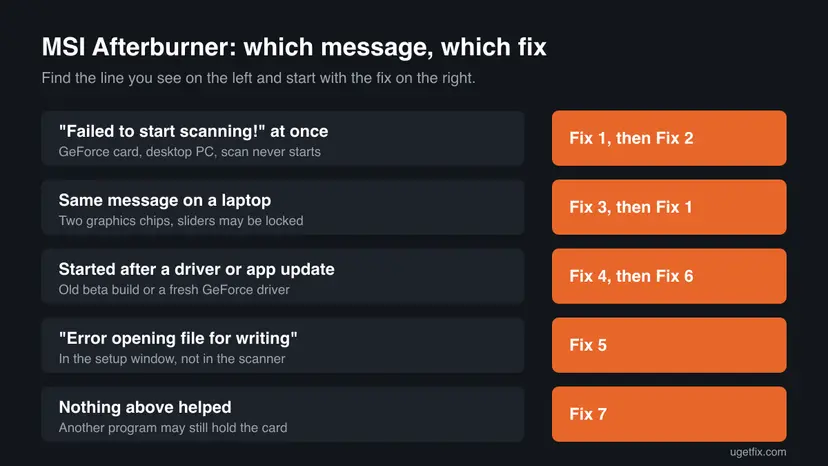
| What you see or have | Start with |
|---|---|
| "Failed to start scanning!" right after Scan, desktop PC with a GeForce card. | Fix 1, then Fix 2 |
| The same message on a laptop, or the Core Clock slider does not move. | Fix 3, then Fix 1 |
| The error began after an Afterburner or GeForce driver update. | Fix 4, then Fix 6 |
| "Error opening file for writing" while you install or update Afterburner. | Fix 5 |
| Every fix above failed. | Fix 7 |
Fix 1. Allow access to the GPU performance counters in the NVIDIA Control Panel
3 minutesLow riskYou have a GeForce card and the scan fails the moment you select Scan.
The scanner reads the card's performance counters while it tests each clock. The NVIDIA Control Panel keeps these counters for administrators only by default, and users report that the error goes away once all users may read them.
- Close MSI Afterburner.
- Right-click the desktop and open NVIDIA Control Panel. In Windows 11 it may sit under Show more options.
- In the menu bar select Desktop > Enable Developer Settings.
- In the left column, under the new Developer heading, select Manage GPU Performance Counters.
- Choose Allow access to the GPU performance counters to all users and select Apply.
- Open MSI Afterburner, select OC Scanner and then Scan.
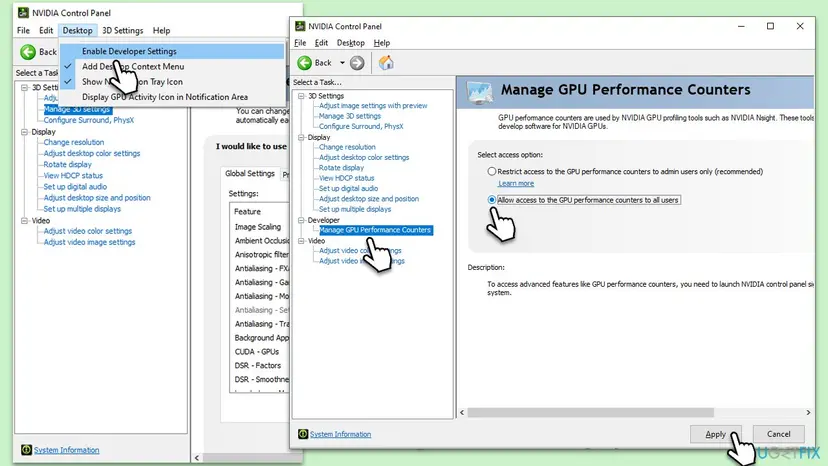
The NVIDIA Control Panel marks Restrict access to the GPU performance counters to admin users only (recommended) as the safer choice. When the scan has finished and you have saved the result to a profile, select that option again. Afterburner keeps the saved overclock.
It worked if: The scanner shows its progress and the curve starts to change instead of stopping at once.
If not: If the message is the same, keep this setting for now and go on to Fix 2.
Fix 2. Close every other tuning, overlay and monitoring program, then scan again
5 minutesNo riskAnother program that reads or changes the graphics card runs at the same time as Afterburner.
Only one program can steer the card's clocks during a test. Users on NVIDIA's forum report the same failure in EVGA Precision X1's scanner, which points to a shared cause: something else holding the card or its scanning interface.
- Save your work and restart Windows, so no earlier scan or tool is left half running.
- Press Ctrl + Shift + Esc to open Task Manager.
- On Processes, select each GPU tool that runs and select End task: other overclocking tools such as EVGA Precision X1 or ASUS GPU Tweak, RGB lighting tools, hardware monitors and game overlays.
- Close games, browsers with video and screen recorders as well.
- Leave MSI Afterburner and RivaTuner Statistics Server running, open OC Scanner and select Scan.
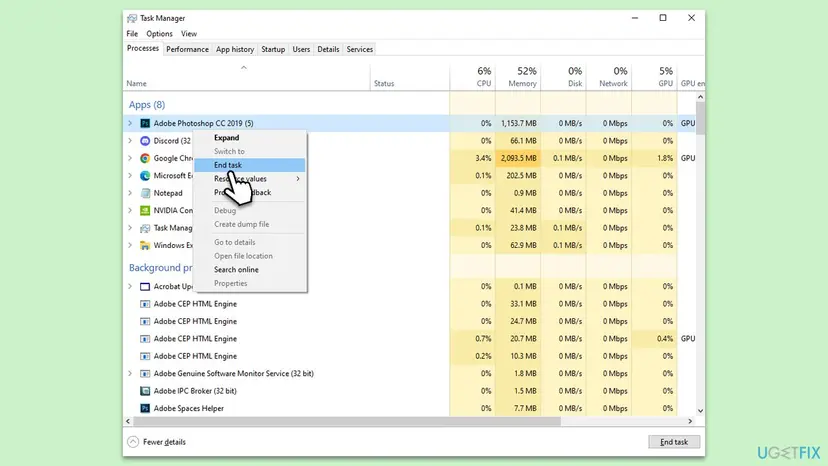
If a tool starts again with Windows, stop it from starting for one test: Stop apps from opening at startup More about closing programs: Close a frozen app (Task Manager, Force Quit)
It worked if: The scan runs for several minutes and ends with a result line instead of the failure message.
If not: On a laptop go to Fix 3. On a desktop go to Fix 4.
Fix 3. On a laptop, point Afterburner at the GeForce chip and plug in the charger
5 minutesNo riskThe error appears on a laptop with Intel or AMD graphics next to the GeForce chip.
A laptop has two graphics chips, and Afterburner can show the integrated one as GPU1. The scanner then has no NVIDIA chip to scan. Some laptop makers also lock the clocks, and then no tool can change them.
- Connect the charger. Many laptops limit the graphics chip on battery.
- Open Settings > System > Power & battery and set Power mode to Best performance.
- In MSI Afterburner, select the gear icon to open Settings.
- On the General tab, open the list for the master graphics processor and choose the NVIDIA GeForce chip, then select OK.
- Move the Core Clock slider by a small step and select Apply.
- If the slider moves, set it back with Reset and run OC Scanner again.
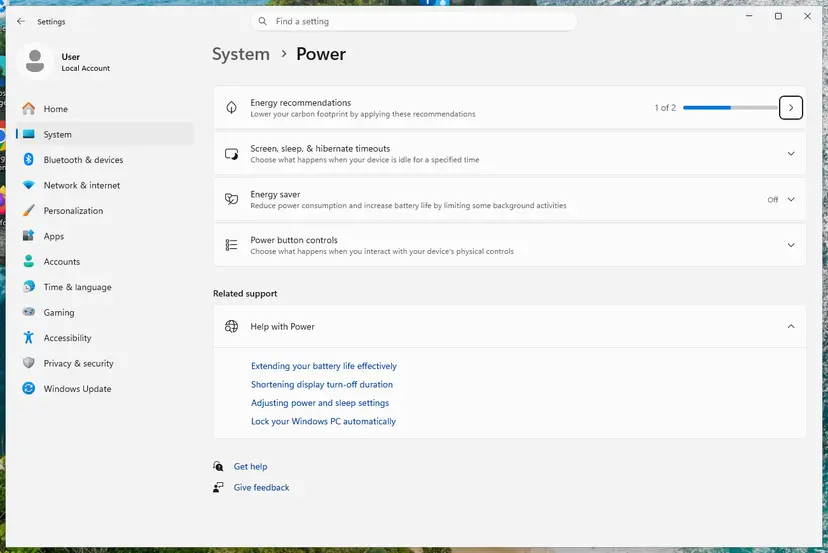
In the Afterburner versions we have used, the list on the General tab is called Master graphics processor selection. We could not confirm the label in version 4.6.6. If the Core Clock slider does not move at all, the laptop maker has locked the clocks: that is a limit of the laptop, not a fault you can repair. More on power modes: Change the power mode
It worked if: Afterburner names the GeForce chip at the top, the Core Clock slider moves and the scan starts.
If not: If the slider is locked, the scanner cannot work on this laptop. Otherwise go back to Fix 1, then Fix 4.
Fix 4. Install the current final build of MSI Afterburner cleanly
15 minutesLow riskThe error began after an update, you run a beta build, or Fixes 1 to 3 did not help.
Guru3D, which builds Afterburner with MSI, notes that beta builds can expire and recommends a final build. For problems after an update it advises a full uninstall of Afterburner and RTSS, with the profiles removed, then a clean install.
Removing the profiles deletes your saved fan curves and overclocks. Write down the values you want to keep before you start.
- Right-click the Afterburner and RivaTuner icons in the tray and close both programs.
- Open Settings > Apps > Installed apps and uninstall MSI Afterburner. When it asks whether to keep your settings, choose to remove them.
- Uninstall RivaTuner Statistics Server in the same way and restart the PC.
- Download the final build from msi.com or Guru3D. MSI warns that other sites offer fake copies.
- Unpack the ZIP file, run the setup file and install Afterburner with RivaTuner Statistics Server.
- Open Afterburner and run OC Scanner before you install any other GPU tool.
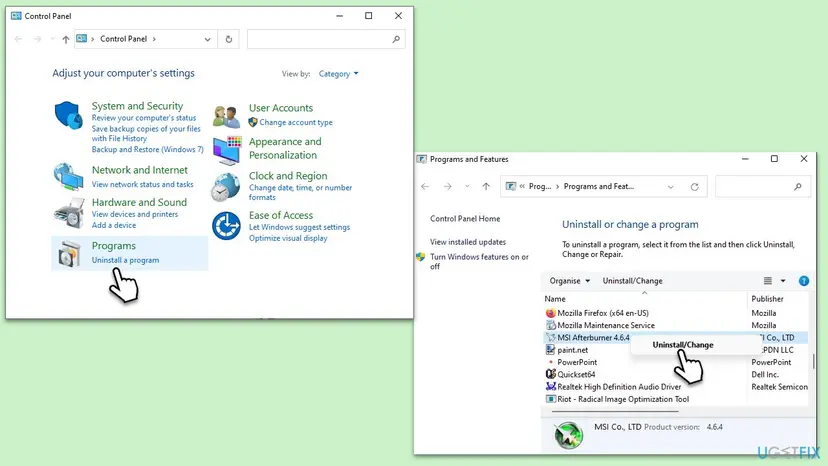
Both ways to uninstall a program on Windows 11 and Windows 10: Uninstall a program or app in Windows
It worked if: Afterburner opens with its default settings and the OC Scanner window starts a scan.
If not: If setup stops with "Error opening file for writing", do Fix 5. Otherwise go to Fix 6.
Fix 5. Fix "Error opening file for writing" when you install or update Afterburner
10 minutesLow riskThe Afterburner or RivaTuner setup stops with "Error opening file for writing" and a file path.
Setup shows this when it cannot replace a file that is still open. With Afterburner the usual holder is Afterburner itself, RivaTuner Statistics Server or the RTCore64.sys driver that Afterburner loads to read the hardware.
- Leave the error window open and note the path it names.
- Close MSI Afterburner and RivaTuner Statistics Server from the tray.
- Press Ctrl + Shift + Esc and end
MSIAfterburner.exeandRTSS.exeon the Details tab if they still run. - Go back to the setup window and select Retry.
- If it fails again, select Abort, restart Windows and run the setup file with Run as administrator before anything else starts.
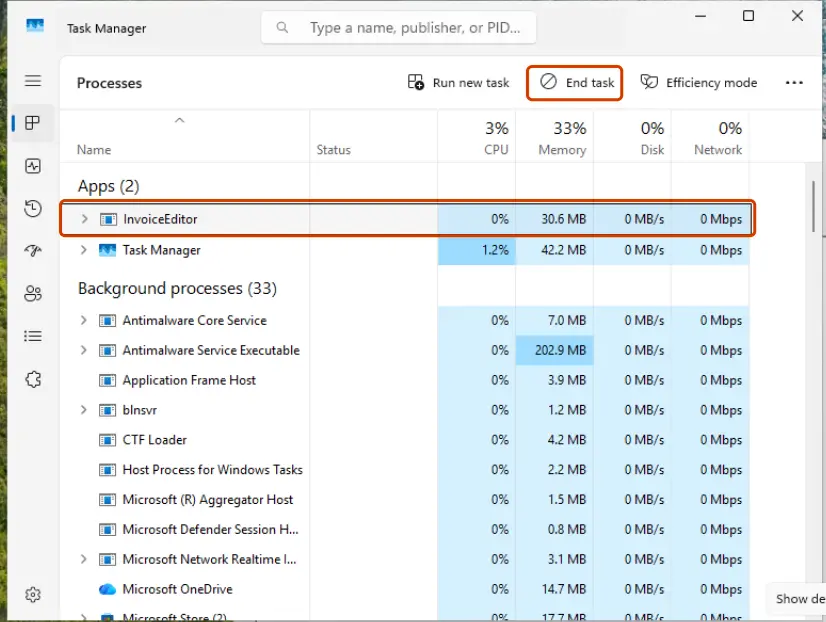
How to start a setup file with administrator rights: How to run a program as administrator or in compatibility mode If the path points to a game folder or a protected folder, let your antivirus finish its scan of the setup file first, then select Retry.
It worked if: Setup copies the file, runs to the end and Afterburner starts.
If not: Restart in a clean boot (Fix 7) and run the setup file again there.
Fix 6. Reinstall the GeForce driver cleanly
20 minutesLow riskThe error began with a new GeForce driver, or other tools also fail to read the clocks.
Afterburner and its scanner talk to the card through the NVIDIA driver. A half-updated or damaged driver can refuse the requests the scanner makes, while games still run.
- Download the current driver for your card from NVIDIA's driver page and keep the file on the disk.
- Run it, choose Custom (Advanced) and tick Perform a clean installation.
- Restart the PC when the installer finishes.
- Repeat Fix 1, because a clean install can set the performance counters back to the default.
To check the driver version or roll back to the previous driver in Device Manager: Update, roll back or reinstall a driver
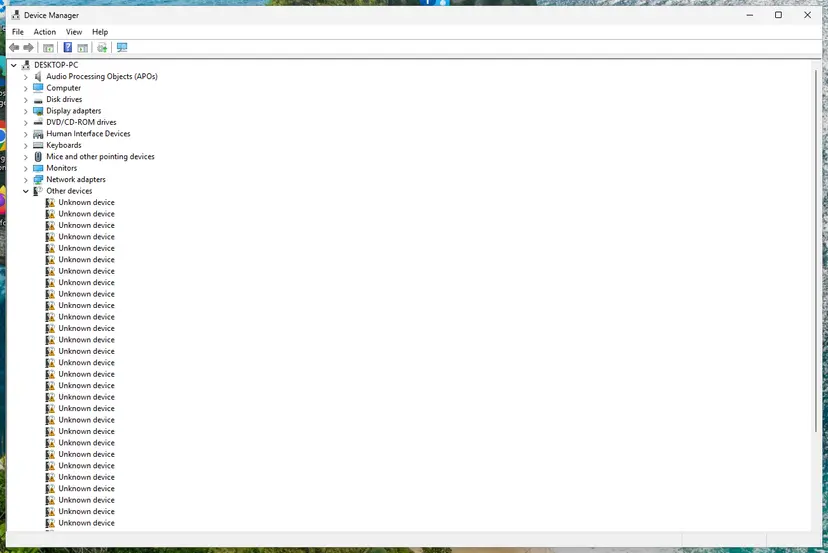
It worked if: Device Manager shows the new driver version and the scan starts.
If not: Go on to Fix 7 to find a program that still blocks the scanner.
Fix 7. Run the scan in a clean boot
15 minutesLow riskEvery fix above failed and you cannot tell which program interferes.
A clean boot starts Windows with Microsoft services only. If the scan works there, a program or service you use every day blocks it, and you can find it by turning items back on in groups.
- Set up a clean boot with the procedure below and restart.
- Start MSI Afterburner by hand and run OC Scanner.
- If the scan works, turn the services back on half at a time until the error returns.
- Undo the clean boot when you are done, as the procedure shows.
- Open System Configuration. Select Search on the taskbar, type msconfig and select System Configuration from the results.
- Hide Microsoft services. On the Services tab, select the Hide all Microsoft services check box. Only services from other companies stay in the list.
- Disable the remaining services. Select Disable all, then select Apply.
- Open Task Manager. On the Startup tab of System Configuration, select Open Task Manager.
- Disable the startup apps. On the Startup apps tab in Task Manager, select each item whose status is Enabled and select Disable. Write down or take a screenshot of the items you disable: you need the list to turn them back on.
- Confirm the changes. Close Task Manager. On the Startup tab of System Configuration, select OK.
- Restart and test. Restart the PC. Windows now starts in a clean boot environment: try again the thing that failed (run the app, install the update, uninstall the program).
These steps were written for Windows 11 25H2 and 26H2. The full page with the other versions and what each result means: How to perform a clean boot in Windows
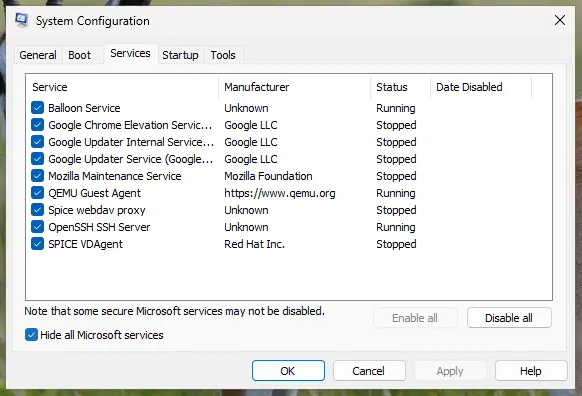
It worked if: The scan runs in the clean boot, and the item that brings the error back is the one to remove or keep closed.
If not: If it fails even in a clean boot, read the section below on what to check and when to stop.
If the scanner still fails to start: what to check and what to send
OC Scanner writes its result and failure lines in its own window, and MSI has not documented a separate log for it. Before you ask for help, collect what you can see, because a forum answer without these details is a guess.
- What to post on the MSI or Guru3D forum: the Afterburner version as shown in Installed apps, the card model, the driver version from Device Manager, desktop or laptop, and a screenshot of the scanner window with the failure line.
- Scan failed with code 3 and other codes: these appear after the scan has started. MSI has not published what the numbers mean, so post the exact code with the details above.
- Manual overclock still works: if the Core Clock slider applies and holds, the card is fine. You can raise the clock by hand in small steps and test each step in a game.
- When it is the hardware: a locked laptop, an old card the scanner does not list, or a card that crashes at stock clocks. No setting in Windows changes these.
The scanner only saves you the time of finding an overclock by hand. A card that cannot run it loses no performance it had before.
How to keep OC Scanner working after updates
- Download Afterburner only from msi.com or Guru3D, and prefer the final build.
- Run one tuning tool at a time and close the rest before a scan.
- Save the scan result to a profile slot, so you do not need to scan after every driver update.
- Check the performance counter setting again after a clean driver install.
- Run two overclocking tools that start with Windows.
- Keep an expired beta build when a final build is out.
- Leave the counters open to all users after the scan if you do not need them.
A scan result depends on temperature, so a summer scan and a winter scan can differ. If games crash after a scan, lower the offset a little or run the scanner's test again.
Frequently asked questions
Why does MSI Afterburner say failed to start scanning?
Because the OC Scanner could not take control of the graphics card for its first test. The most common reasons are that the NVIDIA Control Panel restricts the GPU performance counters to administrators, or that another tuning, RGB or overlay program is using the card. On laptops, Afterburner may point at the integrated chip. Allow the counters for all users (Fix 1), close other tools (Fix 2) and on a laptop select the GeForce chip (Fix 3). Nothing on the card changes when this message appears.
How do I fix OC scanner failed to start scanning?
Start with the two quick fixes. Open the NVIDIA Control Panel, select Desktop > Enable Developer Settings, then Developer > Manage GPU Performance Counters, and choose to allow access for all users. Then restart, close every other GPU tool and run the scan again. If that does not help, install the current final build of Afterburner cleanly with the profiles removed, then reinstall the GeForce driver. Users report that the counter setting alone solves most cases.
Is MSI overclocking scanner failed to start scanning a different error from the Afterburner one?
No, it is the same message. MSI Overclocking Scanner is the title of the window that the OC Scanner button in MSI Afterburner opens, so people search for it under both names. The fixes are the same: allow the GPU performance counters, close other tuning tools and check that Afterburner controls the GeForce chip.
How do I fix MSI Afterburner error opening file for writing?
This message comes from the setup program, not from the scanner. It means a file setup wants to replace is still in use. Close MSI Afterburner and RivaTuner Statistics Server from the tray, end MSIAfterburner.exe and RTSS.exe in Task Manager if they still run, and select Retry. If it fails again, select Abort, restart Windows and run the setup file as administrator before anything else starts. Fix 5 has the steps.
Why does Afterburner fail to start scanning on my laptop?
A gaming laptop has two graphics chips, and Afterburner may control the integrated Intel or AMD chip instead of the GeForce one. Some laptop makers also lock the clocks of the GeForce chip. Plug in the charger, set Windows to Best performance, choose the GeForce chip in Afterburner's General settings and check whether the Core Clock slider moves. If the slider does not move, the clocks are locked and OC Scanner cannot work on that laptop.
What does MSI Afterburner scan failed with code 3 mean?
It means the scan started but stopped before it could finish. MSI has not published what code 3 or the other codes stand for, so we cannot tell you the exact reason. Users on NVIDIA's forum report it next to crashes and driver resets during the test. Close other tools, make sure the card is not already overclocked, set the clocks back with Reset and scan again. If the code repeats, post it with your card and driver version on the MSI forum.
What does OC scanner results are considered unstable mean?
It means the scan finished, but the test of the result failed, so the scanner does not trust the overclock it found. Do not apply that result. Make sure nothing else runs, let the card cool down, reset the clocks and scan again. If the warning comes back, the card has little headroom. You can still raise the clock by hand in small steps and test each one in a game.
Why is MSI Afterburner not opening at all?
That is a different problem from the scanner message. Afterburner may already run hidden in the tray, a broken RivaTuner Statistics Server install may hold it, or security software may block the RTCore64.sys driver it needs. Look for the icon in the hidden tray icons first. If it is not there, do the clean reinstall in Fix 4. A message such as failed to initialize display driver wrapper points to the graphics driver, so reinstall it as in Fix 6.
Does OC Scanner work with AMD graphics cards?
MSI's page says Afterburner works with cards of all brands, but it does not say which cards the OC Scanner supports. Every report of this message that we read came from a GeForce card, and the fixes on this page use NVIDIA settings. We could not confirm whether the scanner runs on current AMD Radeon cards. For a Radeon card, the overclocking tools in AMD Software are the safer place to start.
Can OC Scanner damage my graphics card?
The scanner raises clocks step by step and tests each step, within the limits the card and its driver allow. The usual risk of a bad result is a game crash or a driver reset, not damage. Keep the result only if games run stable for some time, and press Reset in Afterburner to return to the stock clocks whenever you want.
Sources
Did this fix work?
One click, no account. It tells the next reader which guides are worth their time.
Questions and experiences: fix MSI Afterburner "Failed to start scanning" error in Windows
Still broken, or found a fix we did not cover? Ask here: members and our editors answer. Reading is open; writing needs a free account.
…