
How to reset OneDrive in Windows
A reset clears OneDrive's settings and makes it sync everything again from the start. It fixes many sync problems and does not delete your files.
- Time
- 5 minutes, then a full sync in the background
- Level
- Easy
- You need
- Nothing.
Before you start
- If you sync only some folders, note which ones. You have to choose them again after the reset.
- The full sync after a reset can take a long time if you have many files. Leave the PC on and connected.
Windows 11 and 10
Steps written for Windows 11 25H2 and 26H2, Windows 10 22H2.
These steps reset the OneDrive sync app, the one that keeps a OneDrive folder on your PC.
Open the Run box
Press the Windows key and R at the same time.
Reset the Microsoft Store cache
Type the command below and select OK. A blank Command Prompt window opens and closes, then the Microsoft Store opens. Close it. This is the first step in Microsoft's instructions. If OneDrive still does not sync, continue.
wsreset.exeRun the OneDrive reset command
Press the Windows key and R again. Copy the command below, paste it into the box and select OK.
%localappdata%\Microsoft\OneDrive\onedrive.exe /reset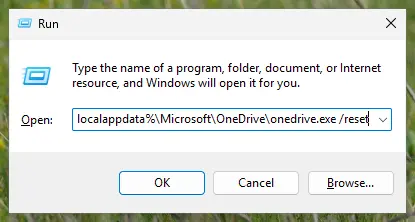
Type the reset command in the Run box and select OK. Screenshot: Windows 11 26H2 If Windows cannot find it, try the second path
If you see a message that starts with Windows cannot find, open the Run box again and use this command instead.
C:\Program Files\Microsoft OneDrive\onedrive.exe /resetIf that fails too, try the third path
If you still see Windows cannot find, use this command. If none of the three works, the OneDrive sync app is not installed on this PC.
C:\Program Files (x86)\Microsoft OneDrive\onedrive.exe /resetStart OneDrive again
Select Start, type OneDrive in the search box and select the OneDrive desktop app. OneDrive then starts a full sync.
OneDrive Store app
Steps written for Windows 11 25H2 and 26H2, Windows 10 22H2.
Use these steps for the OneDrive app that was installed from the Microsoft Store. That app shows your OneDrive but does not back up or sync files.
Find the app
Select Start and type the text below.
apps:onedriveOpen its settings
Select App settings.
Reset the app
Scroll down the list and select Reset.
What a reset keeps and what it resets
| Kept | Reset |
|---|---|
| Your files, on the PC and in OneDrive. Microsoft states that you do not lose files or data. | All OneDrive settings. |
| All sync connections, for personal and for work or school accounts. They are disconnected. | |
| Your choice of folders to sync, if you had picked only some. | |
| The sync state: OneDrive performs a full sync after the reset. |
During the reset OneDrive deletes its DAT file and stores its settings and logs. When it restarts, it loads the settings and builds the file again.
After the reset
Wait until the full sync has finished. If you had chosen to sync only some folders, choose them again in OneDrive's settings, once for every account (personal, and work or school). There is no way to undo a reset, and none is needed: it only makes OneDrive set itself up again.
If OneDrive still does not sync
If none of the three commands was found, you have only the Store app or no OneDrive app at all. Microsoft's page "Which OneDrive app?" explains the difference: the Store app does not back up or sync files. Install the OneDrive sync app from the OneDrive website if you need syncing.
If files went missing while sync was broken, look in the OneDrive recycle bin and version history: see Restore deleted or older files in OneDrive. To reset only the Microsoft Store, see Reset the Microsoft Store.
Used in 24 guides
How to fix "We can't get to this file right now because computer syncing is paused"?
Fix: this application failed to start because no Qt platform plugin could be initialized
What are brown box icons on my pictures and how to remove them in Windows?
How to fix "Error 0x800701AA: The cloud operation was not completed" in Windows?
How to fix OneDrive Sync error 0x8004deea in Windows?
How to fix OneDrive error 0x8004def4 in Windows?
How to fix OneDrive error 0x8004da9a in Windows?
How to fix OneDrive error 0x8004e4c3 in Windows?
How to fix OneDrive error 0x8007018b in Windows?
DesktopWindowXamlSource: what the empty taskbar window is and how to remove it
How to fix OneNote error code 0xE0001075 in Windows?
How to fix OneDriveSetup.exe - Entry Point not Found error in Windows?
How to fix Couldn't start Files on Demand error code 0xffffffea in OneDrive?
How to fix Office apps sign-in error code 53003 in Windows?
How to fix "No Network Connection [2603]: Please check your network settings" in OneDrive?
How to fix OneDrive error code 0x8004e4bf in Windows?
How to fix OneDrive error code 0x8004de25 in Windows?
How to fix Proxy Authentication error 2606 in OneDrive?
How to fix "The data area passed to a system call is too small" error in Windows?
How to fix "Cloud Files Diagnostic Event Listener" failed to start with error 0xC0000022?
How to fix OneDrive error “Connecting to d.docs.live.net” when opening Microsoft Office files?
How to fix OneDrive.exe - Bad Image error in Windows?
How to fix OneDrive error code 0x8004e4be in Windows?
How to fix OneDrive error 0x8007017C in Windows?
Sources
- Microsoft Support: Reset OneDrive (Windows steps, the Store app, what a reset does) (read Oct 11, 2026)
- Microsoft Support: Which OneDrive app? (sync app and Store app) (read Oct 11, 2026)