
How to fix OneNote error code 0xE0001075 in Windows?

Prefer to fix it yourself? The manual steps follow.
- 7methods
- 5 to 30 minutes
- Easy
Applies to OneNote for Windows 10 (the Microsoft Store app) and OneNote for Microsoft 365, OneNote 2024, 2021 and 2016 on Windows 11 and Windows 10, with notebooks on OneDrive
7 methods in this guide
I can't get into OneNote on my Windows 11 laptop. I'm receiving the error message, "Something went wrong and we can't do what you asked. We're sorry. Error 0xE0001075." What can I do to fix this?
OneNote error 0xE0001075 stops the app from opening or signing in, and it almost always points to the Microsoft account behind your notebooks, not to a broken PC. Sign in to OneDrive and OneNote on the web first: if the account is frozen or OneNote online shows an error, fix that and the app follows.
Error 0xE0001075 means OneNote could not reach your notebooks through your Microsoft account. Sign in at onedrive.live.com and onenote.com/notebooks first (Fix 1): a frozen OneDrive or an error there is the most common cause. Then make sure OneDrive is not turned off on the PC (Fix 2) and that OneNote uses the account that owns the notebooks (Fix 3). The sync error 0xE0001475 starts with the same check, then Fix 5.
| Error | Something went wrong and we can't do what you asked. We're sorry. Error: 0xE0001075. |
|---|---|
| Where it appears | When you open OneNote or sign in to it, most often in OneNote for Windows 10, the Microsoft Store app. Your notebooks do not load. |
| Main cause | The Microsoft account cannot serve the notebooks: a frozen OneDrive, OneDrive turned off on the PC, or OneNote signed in with another account. |
| Fastest fix | Sign in at onedrive.live.com and onenote.com/notebooks and clear any account problem shown there (Fix 1). |
| Also written as | 0xe0001075, Error code 0xE0001075, "Something went wrong" Error:0xE0001075. The sync message with 0xE0001475 and a tag such as 4paox or 4wi4a is a related but different error. |
| Affects | OneNote on Windows 11 and Windows 10 with notebooks on OneDrive. Windows 10 left support on 14 October 2025. |
| Vendor status | Microsoft publishes no page for 0xE0001075 or 0xE0001475. OneNote for Windows 10 reached end of support on 14 October 2025 and moves to read-only mode. |
| Risk of data loss | Notes that have not synced yet live only on this PC. Microsoft warns that signing out or reinstalling during sync trouble can lose them. |
| Time to fix | 5 minutes when the account is the cause. Up to a day when a frozen OneDrive has to be reactivated. |
Facts checked on 15 October 2026. Steps written for Windows 11 (25H2 and 26H2) and Windows 10 22H2.
What OneNote error code 0xE0001075 means
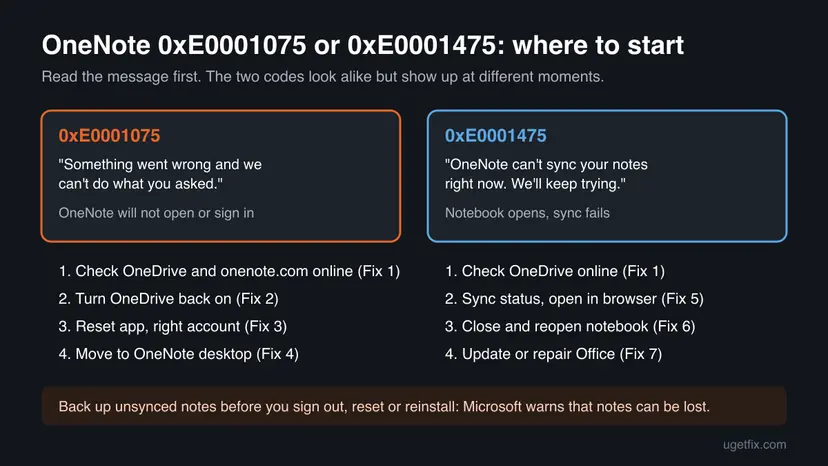
The window reads: Something went wrong and we can't do what you asked. We're sorry. Under it you see Error: 0xE0001075. It appears when OneNote starts or right after you sign in, before any notebook opens. The question in Microsoft's community thread about it was marked as the same problem by more than 400 people, mostly with OneNote for Windows 10.
Microsoft has no documentation page that names this code. The answer accepted in that thread, and marked helpful by more than 400 readers, ties it to the account side: the OneDrive account was frozen, onenote.com showed an error, or OneDrive was turned off on the PC. That fits what the message says. OneNote keeps notebooks in OneDrive, so when OneDrive refuses the account, OneNote has nothing to open.
| Code | Message | When you see it |
|---|---|---|
| 0xE0001075 | Something went wrong and we can't do what you asked. We're sorry. | OneNote opens or signs in, and no notebook loads |
| 0xE0001475 | OneNote can't sync your notes right now. We'll keep trying. | Notebooks open, but changes do not reach other devices; a short tag such as 4paox or 4wi4a follows the code |
Both codes come from the OneNote service talking to OneDrive, so the first check is the same. After that they split: 0xE0001075 is about getting into the app, 0xE0001475 is about one notebook syncing. The short tag after 0xE0001475, such as 4paox, is a diagnostic tag that changes between reports; the fixes do not depend on it.
Why OneNote shows 0xE0001075: causes ranked
The ranking follows the accepted answer and the replies in Microsoft's community thread, and Microsoft's own page on OneNote sync problems for the sync variant.
| How often | Cause | Typical sign | Fix |
|---|---|---|---|
| Most often | The OneDrive account is frozen, locked or has a problem | onedrive.live.com shows a notice about the account instead of your files | Fix 1 |
| Often | OneDrive was turned off, removed or blocked on the PC | No OneDrive cloud icon near the clock, or a tweak tool disabled it | Fix 2 |
| Often | OneNote is signed in with a different Microsoft account than the one that owns the notebooks | onenote.com shows your notebooks under another address | Fix 3 |
| Less often | The OneNote for Windows 10 app has stale data, or it no longer gets updates | Everything works on the web, only the Store app fails | Fix 3, then Fix 4 |
| Sync variant (0xE0001475) | One notebook lost its sync connection or the service is busy | The app opens, the notebook shows a sync warning | Fix 5 and Fix 6 |
| Rarely | Damaged or old Office files | Other Office apps misbehave too | Fix 7 |
Microsoft's sync troubleshooting page warns that signing out of OneNote, or removing and reinstalling it, while notes are not synced can lose data. If OneNote still opens on any device, copy recent pages that may not have synced into a Word file or an email first.
How to fix OneNote error code 0xE0001075 in Windows
Fixes 1 to 3 cover the account causes behind most reports of 0xE0001075. Fix 4 is the long-term answer for OneNote for Windows 10. Fixes 5 and 6 are for the sync error 0xE0001475, and Fix 7 is the general Office repair.
| What you see or have | Start with |
|---|---|
| 0xE0001075 when OneNote starts or after sign-in | Fix 1 |
| OneDrive is missing, uninstalled or was turned off with a tweak tool | Fix 2 |
| You have more than one Microsoft account | Fix 3 |
| You use OneNote for Windows 10, the Store app | Fix 3, then Fix 4 |
| "OneNote can't sync your notes right now" with 0xE0001475 | Fix 1, then Fix 5 |
| One notebook stays out of sync after Fix 5 | Fix 6 |
Fix 1. Sign in to OneDrive and OneNote on the web and clear any account problem
5 minutesNo riskEveryone with 0xE0001075 or 0xE0001475. It takes two minutes and shows whether the problem is the account or the PC.
OneNote stores notebooks in OneDrive. If OneDrive has frozen or locked the account, the app gets a refusal it can only report as a vague error; the web pages show the real reason in words.
- In a browser, open
https://onedrive.live.comand sign in with the Microsoft account you use for OneNote. - Read the page. If it says the account is frozen, locked or needs attention, follow the steps it shows to reactivate it.
- Open
https://www.onenote.com/notebookswith the same account. - Check that your notebooks are listed and that no error message appears.
- Open one notebook in the browser and check that your latest pages are there.
- Go back to the OneNote app on the PC, close it and open it again.
In the Microsoft community thread, one user who found a frozen account reported that it took up to 24 hours to be unfrozen. We could not confirm a fixed time with Microsoft. Until then, use OneNote on the web if it works.
If notebooks open on the web but not in the app, the account is fine and the problem sits on this PC: go on to Fix 2 and Fix 3. If the web shows the same error, Microsoft's page suggests checking the Microsoft 365 service status for an outage before you change anything on the PC.
It worked if: OneDrive shows your files, onenote.com lists your notebooks, and the app opens them after a restart.
If not: If the web works and the app does not, go to Fix 2. If onenote.com shows your notebooks under a different address, go to Fix 3.
Fix 2. Turn OneDrive back on if it was disabled on the PC
10 minutesLow riskOneDrive was uninstalled, stopped from starting, or blocked by a privacy or tweak tool, and OneNote broke after that.
The accepted answer in Microsoft's thread names a disabled OneDrive as a cause and says to enable it and restart. OneNote's notebooks live in OneDrive, so a PC that blocks OneDrive can leave OneNote unable to load them.
- Look for the OneDrive cloud icon near the clock. If it is there and shows no error, skip to Fix 3.
- Press Win, type OneDrive and open it. If it is not found, install it again from Microsoft's OneDrive download page.
- Sign in with the same Microsoft account you use for OneNote.
- Press Ctrl + Shift + Esc, open Startup apps and make sure Microsoft OneDrive is Enabled.
- If you used a tool that disables OneDrive, undo that setting in the tool.
- Restart the PC and open OneNote.
We could not confirm on a Microsoft page which exact OneDrive switch triggers 0xE0001075; the link comes from user reports. If OneDrive itself shows errors after you turn it back on, reset it: How to reset OneDrive in Windows.
It worked if: The OneDrive icon is back near the clock, signed in, and OneNote opens your notebooks.
If not: If OneDrive works and OneNote still shows 0xE0001075, go to Fix 3.
Fix 3. Reset OneNote and sign in with the account that owns the notebooks
10 minutesRead the warningYou have more than one Microsoft account, or onenote.com showed your notebooks under another address. This reset is for OneNote for Windows 10, the Store app.
One reply in Microsoft's thread found the app was linked to a second email address. Resetting the Store app clears its saved sign-in, so it asks which account to use and loads the notebooks from the right one.
Reset removes OneNote's data on this PC, including the saved sign-in and any notes that have not synced. Notebooks already in OneDrive are not touched. Check in Fix 1 that your latest pages are visible on onenote.com before you reset.
- In a browser at onenote.com/notebooks, note which address shows your notebooks.
- Close OneNote.
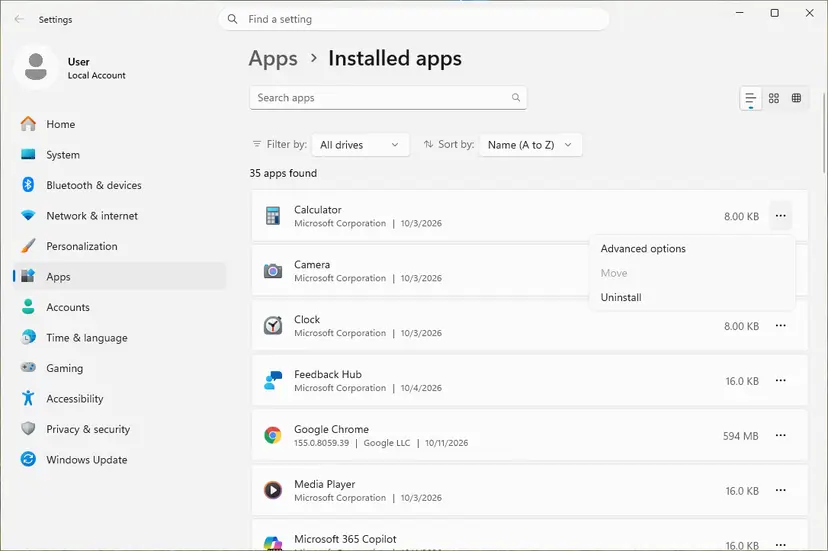
- Open Installed apps. Select Start > Settings > Apps > Installed apps.
- Open the app's advanced options. Find the app in the list, select the three dots next to it and select Advanced options. Some apps do not have this option: for those, see the section about desktop programs below.
The three dots next to an app open Advanced options. Screenshot: Windows 11 26H2. - Repair first. On the page that opens, select Repair if it is there. The app's data stays. Open the app and check whether it works.
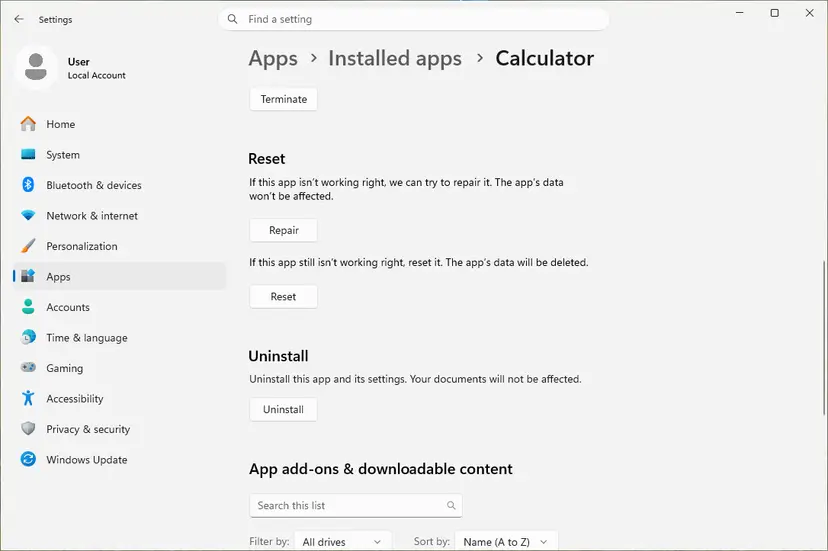
Repair keeps the app data. Reset deletes it. Screenshot: Windows 11 26H2. - Reset if Repair did not help. Select Reset. This deletes the app's data on this PC, including sign-in details and settings. Open the app and set it up again.
These steps were written for Windows 11 25H2 and 26H2. The full page with the other versions and what each result means: How to repair or reset an app in Windows
- Open OneNote again and sign in with the address you noted, not another one.
- If the notebooks do not show, select More notebooks or Open and pick them from OneDrive.
It worked if: OneNote asks for an account, you sign in with the right one, and the notebook list loads without 0xE0001075.
If not: If the Store app still fails, move to the OneNote desktop app with Fix 4. In OneNote for Microsoft 365, switch the account under File > Account > Switch account instead of a reset.
Fix 4. Move from OneNote for Windows 10 to the OneNote desktop app
15 minutesLow riskYou use OneNote for Windows 10 (the Store app with no File menu), and the web works but the app does not.
Microsoft ended support for OneNote for Windows 10 on 14 October 2025 and says it moves into read-only mode. Its errors will not be fixed any more. The desktop app, OneNote for Microsoft 365 or the free OneNote download, opens the same OneDrive notebooks.
- Check that your notebooks open on onenote.com/notebooks (Fix 1). The move uses the copies in OneDrive.
- If you have Microsoft 365, OneNote is already part of it: press Win, type OneNote and open the app with the purple icon that has a File menu.
- If you do not, download OneNote for Windows from
https://www.onenote.com/download. - Sign in with the account that owns the notebooks.
- Select File > Open and open each notebook from OneDrive.
- When every notebook is open and up to date, you can uninstall OneNote for Windows 10.
OneNote for Windows 10 has a notebook list on the left and a settings button with three dots, but no File menu. The desktop OneNote has File, Home and Insert tabs like Word.
It worked if: The desktop OneNote opens your notebooks and syncs them with no error message.
If not: If the desktop app shows a sync error such as 0xE0001475, go to Fix 5.
Fix 5. Fix sync error 0xE0001475: check sync status and compare with OneNote on the web
10 minutesLow riskThe notebook opens but OneNote says OneNote can't sync your notes right now. We'll keep trying. with Error code 0xE0001475.
Microsoft's sync page says to sync by hand and then open the notebook at onenote.com. That one test shows whether the server or this copy of OneNote is the problem, which decides the next step.
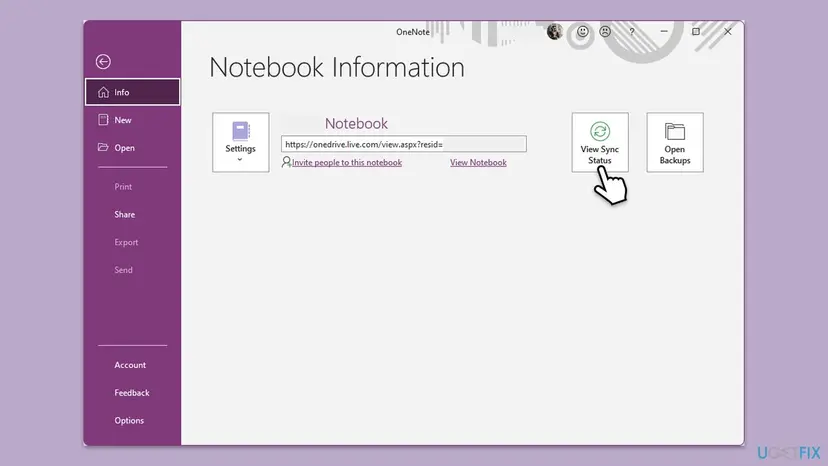
- In OneNote, select File, stay on the Info tab and select View Sync Status.
- In Shared Notebook Synchronization, select Sync Now next to the notebook, or Sync All.
- Read any error shown next to the notebook. A yellow triangle marks a section that does not sync.
- On the Info tab, right-click the web address under the notebook's name and select Copy.
- Paste it into the browser's address box and press Enter.
- Compare the pages in the browser with the ones in the app.
- The browser shows the latest pages: the server is fine. Go to Fix 6 to reset this app's connection to the notebook.
- The browser shows old pages: the newest notes are still on the device where you wrote them. Open OneNote there and sync it first.
- The browser shows an error: the problem is on the account or service side. Go back to Fix 1 and check the Microsoft 365 service status.
- Only one section fails: Microsoft suggests a new section, copying (not moving) the pages into it, then Shift + F9 to sync.
It worked if: The sync status shows no error and the notebook icon has no warning.
If not: If the browser shows the latest pages but the app still fails, go to Fix 6.
Fix 6. Close and reopen the notebook that will not sync
10 minutesRead the warningFix 5 showed that the notebook is fine on the web, but the app still shows 0xE0001475 for it.
Microsoft says closing and reopening a notebook can reset the sync connection between the app and the OneNote service. It also covers the busy and authentication errors that look like sync errors.
Before you close a notebook that is not fully synced, copy the recent pages that are missing on the web into a new page elsewhere, a Word file or an email. Closing the notebook drops the local copy.
- In OneNote, select File and stay on the Info tab.
- Right-click the web address under the notebook's name and select Copy.
- Select Settings next to the notebook name, then Close.
- Paste the address into the browser and press Enter.
- When the notebook opens in OneNote for the web, select Open in Desktop App on the ribbon.
- Wait until the notebook has fully loaded in the app before you edit.
It worked if: The notebook loads again, and View Sync Status shows it synced.
If not: If the error comes back, update or repair Office with Fix 7, then repeat this fix.
Fix 7. Update OneNote, then repair Office
10 to 30 minutesLow riskThe account and the web are fine, and the error stays in the desktop OneNote that comes with Microsoft 365 or Office.
Microsoft's sync page tells you to install Office updates first, and some OneNote sync errors only clear after an update. A repair replaces damaged program files without touching your notebooks.
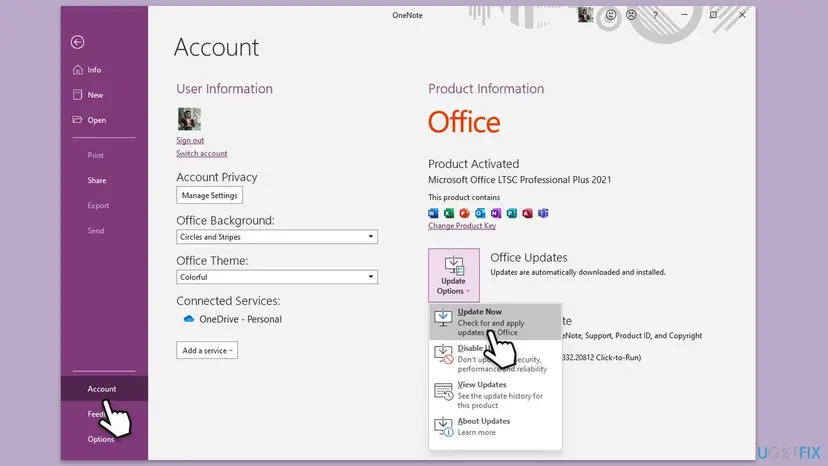
- In OneNote, select File > Account.
- Under Product Information, select Update Options > Update Now.
- Wait for the update to finish, then open OneNote again.
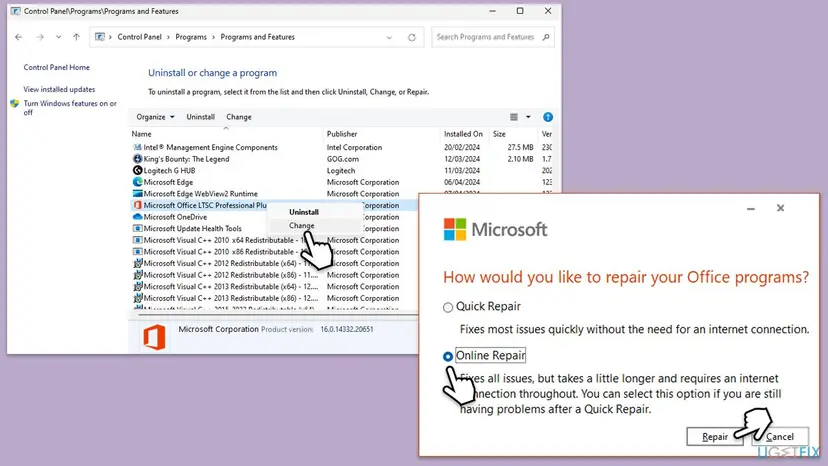
If OneNote is up to date and the error stays, repair Office. Quick Repair works offline; Online Repair reinstalls Office and takes longer. Step by step: How to repair Microsoft 365 or Office.
It worked if: OneNote opens on the latest build and the notebooks sync without an error.
If not: If nothing here helps, collect the details in the next section and contact Microsoft support.
OneNote still shows 0xE0001075 or 0xE0001475: what to collect
These errors are decided between OneNote and the Microsoft account service, so there is no useful Windows log to read. The useful details are in OneNote itself and on the web. Collect them before you ask Microsoft support.
- The full error text and code, including the tag after 0xE0001475 such as 4paox.
- Which app you use: OneNote for Windows 10 or the desktop OneNote, and its version from File > Account > About OneNote.
- Whether onedrive.live.com and onenote.com/notebooks work with the same account.
- What File > Info > View Sync Status shows next to each notebook.
- Whether the same notebook syncs on a phone or another PC.
Microsoft's sync page also offers the OneNote Diagnostics Tool, which collects diagnostic information for the installed OneNote and sends it to Microsoft securely. It is available in English only.
If onenote.com shows the same error in every browser and on every device, the PC is not the cause. Then it is the account or the service, and only Microsoft support or, for a work account, your IT admin can clear it. Notebooks on SharePoint are always a matter for the admin.
How to avoid OneNote error 0xE0001075 next time
- Use one Microsoft account for OneNote everywhere, and sign in to new devices with that one.
- Leave OneDrive installed and signed in; tools that strip OneDrive from Windows can break OneNote.
- Sign in to onedrive.live.com from time to time and act on any notice about the account.
- Move from OneNote for Windows 10 to the desktop OneNote, now that the Store app is out of support.
- Let a notebook finish syncing before you close the laptop, especially after long notes.
- Turn on File > Options > Sync > Sync notebooks automatically in the desktop OneNote.
None of this changes how the service works, but it removes the causes on your side that show up most in reports of these two codes.
Frequently asked questions
What does OneNote error code 0xE0001075 mean?
It means OneNote could not get to your notebooks through your Microsoft account, so it stopped with "Something went wrong and we can't do what you asked. We're sorry." Microsoft has no page that names the code. The answer accepted in Microsoft's community thread, marked helpful by more than 400 people, ties it to a frozen OneDrive account, an error on onenote.com or OneDrive turned off on the PC. Start by signing in to both sites in a browser (Fix 1).
What is OneNote error code 0xE0001475 with 4paox?
It is a sync error, not a start-up error. The full message is "OneNote can't sync your notes right now. We'll keep trying." with Error code 0xE0001475 and a short tag such as 4paox or 4wi4a. The notebook opens, but changes do not reach OneDrive. Check the account online (Fix 1), then use View Sync Status and open the notebook at onenote.com to see whether the server or the app is the problem (Fix 5).
What does "Something went wrong and we can't do what you asked" mean in OneNote?
It is OneNote's general message when a request to the Microsoft service fails. The code under it tells you what kind. With 0xE0001075 it appears when the app opens or signs in, and points to the account or OneDrive. The same wording appears with other codes in other Microsoft apps, so always read the code. On this page, Fixes 1 to 3 cover it, and Fix 4 covers OneNote for Windows 10, which no longer gets updates.
Is 0xE0001075 the same error as 0xE0001475?
No, though people often type one for the other. 0xE0001075 stops OneNote at start or sign-in. 0xE0001475 appears inside a notebook that opens but does not sync. Both involve the link between OneNote and OneDrive, so Fix 1 is the first step for both. After that, 0xE0001075 continues with Fixes 2 to 4, and 0xE0001475 with Fixes 5 and 6.
Why does OneNote say it can't connect to the server or can't sync?
Microsoft's sync page lists a few reasons: a weak internet connection, an outage of OneDrive or Microsoft 365, or an authentication problem that looks like a server error. For notebooks on SharePoint or a work OneDrive, the admin has to check the server side. Open the notebook at onenote.com: if it works there, the problem is this copy of OneNote, and closing and reopening the notebook usually resets the connection (Fix 6).
What does "OneNote needs to set itself up" mean?
It is a setup screen that users report after a reset or a new install of OneNote. We could not confirm on a Microsoft page what exactly triggers it, or that it is tied to error 0xE0001075. If the setup fails and the error follows, the cause is usually the same account problem: sign in at onedrive.live.com and onenote.com first (Fix 1), then let OneNote finish setting up with the account that owns your notebooks (Fix 3).
Will I lose my notes if I reset or reinstall OneNote?
Notes that already synced to OneDrive stay safe, because they live there. Notes that did not sync yet are stored only on this PC, and a reset, a reinstall or signing out can delete them. Microsoft's sync page warns about exactly this. Before Fix 3 or Fix 6, check on onenote.com which pages are missing, and copy those pages from the app into a Word file or an email if the app still opens.
Does OneNote for Windows 10 still work after October 2025?
Microsoft ended support for OneNote for Windows 10 on 14 October 2025 and says the app moves into read-only mode. It gets no more fixes, so errors such as 0xE0001075 in it will not be patched. Your notebooks are in OneDrive, so you lose nothing by moving: install the desktop OneNote, sign in with the same account and open the notebooks there (Fix 4).
Should I delete the OneNote cache folder to fix 0xE0001075?
We do not recommend it as a first step. The old version of this guide suggested emptying the cache folder under AppData, but Microsoft's sync page does not list it, and the folder can hold changes that have not reached OneDrive yet. Deleting it can lose those notes. The account checks and the close and reopen route (Fix 6) reach the same result with less risk.
Sources
- Microsoft Support: Fix issues when you can't sync OneNote (manual sync, OneNote on the web test, close and reopen, sign-out warning, Diagnostics Tool) (support.microsoft.com)
- Microsoft Q&A: Why am I getting Error: 0xE0001075 when I try to open OneNote in Windows 10? (accepted answer: frozen OneDrive, onenote.com, OneDrive disabled; second account) (learn.microsoft.com)
- Microsoft Support: What is happening to OneNote for Windows 10 (end of support on 14 October 2025, read-only mode) (support.microsoft.com)
Did this fix work?
One click, no account. It tells the next reader which guides are worth their time.
Questions and experiences: fix OneNote error code 0xE0001075 in Windows
Still broken, or found a fix we did not cover? Ask here: members and our editors answer. Reading is open; writing needs a free account.
…