
How to fix .NET Framework error 0x800713ec in Windows?

Prefer to fix it yourself? The manual steps follow.
- 8methods
- 5 to 30 minutes
- Easy
Applies to Windows 11 and Windows 10: .NET Framework 4.x installers and programs that bundle them
8 methods in this guide
Hi. I am trying to install an app that requires .NET Framework, but I am unable to, because I keep getting the error 0x800713ec - Asia while doing so. Please advise, I would be grateful.
Error 0x800713ec, often shown as "0x800713ec - Asia", comes from the .NET Framework installer and means it decided your PC does not meet its requirements. On Windows 10 and 11 that most often means a program tried to install an older .NET Framework 4.x than Windows already has. Check that .NET Framework 4.8 is turned on first (Fix 1).
0x800713ec is .NET Framework setup return code 5100: "The user's computer does not meet system requirements." The word Asia that often follows it means nothing about your region. On Windows 10 and 11 the usual reason is that the program bundles an old .NET 4.x installer while Windows already has .NET Framework 4.8 or later. Check that it is turned on (Fix 1), then install the program without its old .NET package or get its newer version.
| Error | 0x800713ec, usually shown as 0x800713ec - Asia in a setup window. |
|---|---|
| Where it appears | When a program's setup, or a .NET Framework 4.x installer you started yourself, stops before anything is installed. |
| Main cause | The installer is for an older .NET Framework 4.x than the one built into Windows. Microsoft says you cannot install an earlier 4.x over a later one. |
| Fastest fix | Confirm .NET Framework 4.8 Advanced Services is on in Windows Features, then skip the program's old .NET package (Fix 1). |
| Also written as | 0x800713EC, 0x800713ec Asia, 0x800713ec - Asia, return code 5100 or 0x13EC in the setup log. |
| What the number means | 0x8007 marks a Windows error code and 13EC is 5100. Microsoft lists 5100 as "The user's computer does not meet system requirements." |
| Affects | Windows 11 and Windows 10. Windows 10 left support on 14 October 2025. |
| Microsoft's status | Not a bug: a documented block of the .NET Framework installer. Microsoft lists the block messages and what to do for each. |
| Time to fix | 2 minutes for the check in Fix 1, up to 30 minutes for the repairs at the end. |
Facts checked on 15 October 2026. Steps written for Windows 11 (25H2 and 26H2) and Windows 10 22H2.
What .NET Framework error 0x800713ec means
The code has two parts. 0x8007 says a normal Windows error number is packed inside, and 13EC is that number in hexadecimal: 5100. Microsoft's deployment guide for the .NET Framework installer lists return code 5100 as The user's computer does not meet system requirements. So the installer did not crash. It checked your PC, found a reason not to continue, and stopped on purpose.
The word Asia after the code confuses almost everyone. It has nothing to do with your region, language or time zone. It appears to be a wrong text that some setup programs show next to this code. We could not find a Microsoft explanation for it, so treat 0x800713ec - Asia and plain 0x800713ec as the same error.
| What you see | Where | What it tells you |
|---|---|---|
| Setup Failed | Title or first line of the window of a program's installer | The program's setup ran the .NET Framework installer and that installer refused. |
| 0x800713ec - Asia | The next line in the same window | The .NET installer returned 5100: your PC does not meet what that package requires. |
| 0x800713EC or 5100 | The setup log in your %temp% folder | The same result. The log also holds the exact block message. |
| .NET Framework 4.x or a later version is already installed on this computer. | A .NET Framework installer you started yourself | The clearest form of the same block: nothing needs installing. |
If you searched in another language, for example "apa artinya", "jelaskan", "apa penyebab ini", "ini yang muncul", "como corrigir isso?" or "co zrobić dalej": this page explains the Windows setup error 0x800713ec. It means the .NET Framework installer will not run on your PC, and the fixes below show what to do.
Why the .NET Framework installer stops with 0x800713ec
Return code 5100 covers every case where setup decides not to continue, so the code alone does not name the cause. Microsoft's list of blocked .NET Framework installations shows the possible reasons. On a current Windows 10 or 11 PC, one of them is far more common than the rest.
| Cause | How often | How to tell | Fix |
|---|---|---|---|
| The program bundles an installer for .NET 4.5.2, 4.6.x, 4.7.x or 4.8, and Windows already has the same or a later 4.x. | Most often | The program names an old .NET version, and Windows Features shows .NET Framework 4.8 Advanced Services. | Fix 1 |
| The package does not fit this Windows version, or it is the small web installer without the parts your Windows needs. | Sometimes | Setup says the redistributable does not apply to this operating system. | Fix 2 |
| The program really needs .NET Framework 3.5, which is a Windows feature and not a separate installer. | Sometimes | The program names .NET 2.0, 3.0 or 3.5. | Fix 3 |
| A restart or a required Windows update is pending. | Sometimes | Windows Update shows Restart now or pending updates. | Fix 4 |
| Setup runs without administrator rights or in compatibility mode. | Rarely | Setup mentions privileges or Program Compatibility Mode. | Fix 5 |
| Drive C: is almost full. | Rarely (users report it) | Less than a few GB free on C:. | Fix 6 |
| Damaged .NET files or a corrupted component store. | Rarely | Setup says the component store has been corrupted, or Fix 1 to 6 change nothing. | Fix 7 and 8 |
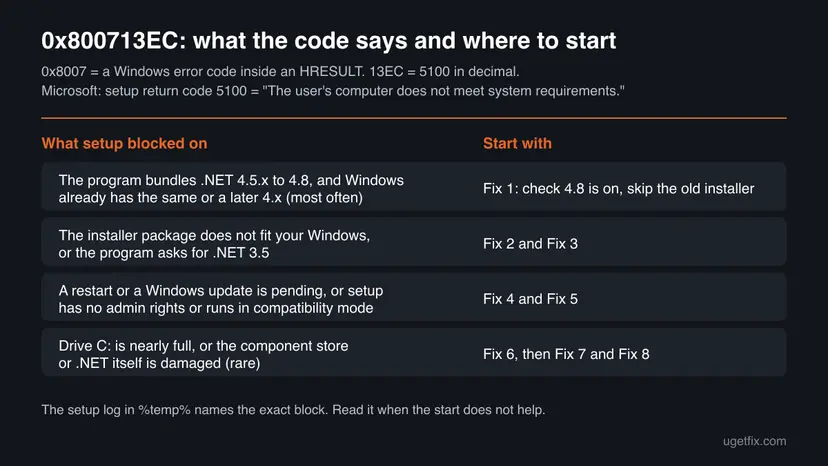
Microsoft explains that .NET Framework 4.x versions are in-place updates and that on Windows 8 and later .NET Framework is part of the operating system. You cannot install an older 4.x on top of a newer one, and you cannot uninstall the built-in one. The fix is to let the program use what Windows already has.
How to fix .NET Framework error 0x800713ec
Fix 1 solves the most common case in two minutes and changes nothing on the PC. Fixes 2 and 3 cover a program that needs a different .NET package. Fixes 4 to 6 clear the conditions setup checks, and Fixes 7 and 8 repair damaged files.
| What you see or have | Start with |
|---|---|
| A program asks for .NET Framework 4.5.2, 4.6, 4.7 or 4.8 and its setup shows 0x800713ec - Asia. | Fix 1 |
| You started a .NET Framework 4.x installer yourself, or setup says the package does not apply to this operating system. | Fix 2 |
| The program asks for .NET Framework 2.0, 3.0 or 3.5. | Fix 3 |
| Windows Update waits for a restart or shows pending updates. | Fix 4 |
| Setup mentions privileges or compatibility mode, or you run it from a shortcut with changed settings. | Fix 5 |
| Drive C: is nearly full. | Fix 6 |
| Nothing above fits, or other .NET programs also fail. | Fix 7, then Fix 8 |
Fix 1. Check that .NET Framework 4.8 is on, then skip the program's old .NET package
2 to 5 minutesNo riskA program's setup stops with 0x800713ec - Asia while it installs its .NET Framework prerequisite. This is the most common case on Windows 10 and 11.
Microsoft says you cannot install an earlier .NET Framework 4.x on a system that already has a later one, and that on Windows 8 and later .NET Framework is an operating system component. A program built for 4.5.2 to 4.8 runs on the 4.8 or later that Windows already has, so its own old installer is not needed.
- Select Start, type
Windows Featuresand open Turn Windows features on or off. You can also open Control Panel > Programs > Programs and Features and select Turn Windows features on or off on the left. - Find .NET Framework 4.8 Advanced Services. A filled or ticked box means .NET Framework 4.8 or later is on.
- If the box is empty, select it and select OK. You do not need to turn on ASP.NET 4.8 or WCF Services for a normal program.
- Close the program's setup. Start it again and look for an option to skip prerequisites, or select Continue or Ignore if it offers one after the .NET step.
- If the program comes as a folder or a ZIP with a separate
.msifile next tosetup.exe, run the.msifile: it usually skips the bundled .NET package. - Start the program. If it opens, the fix worked and the old .NET package was never needed.
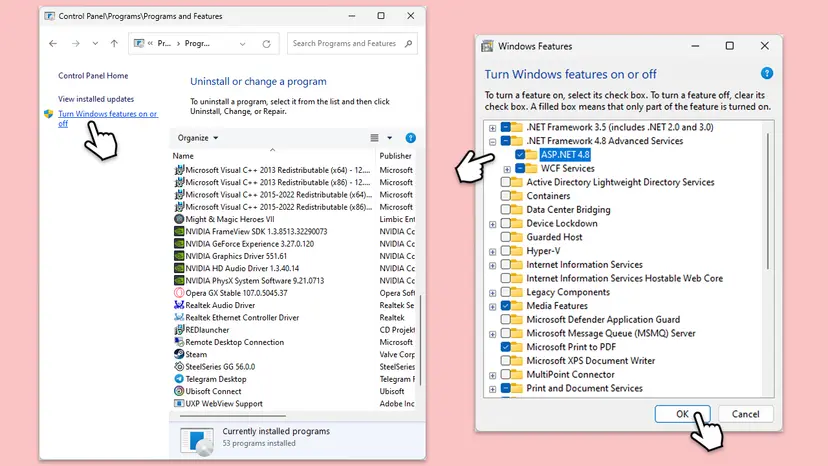
Not every program lets you skip its .NET step. If yours does not, its maker usually has a newer version or a separate download without the bundled .NET installer: that is Fix 2.
It worked if: The program installs past the .NET step, or it was already installed and starts normally.
If not: Get the program's newer version or the matching .NET package with Fix 2.
Fix 2. Install the program's newer version, or Microsoft's offline .NET Framework 4.8.1 installer
10 minutesLow riskThe program cannot skip its .NET step, you started an old .NET 4.x installer yourself, or setup says the package does not apply to this operating system.
Microsoft's advice for the message that a .NET redistributable does not apply to this operating system is to run the offline installer of the right version, because the small web installer can lack the parts for your Windows. A program's newer release usually targets a .NET version Windows already has.
- Open the maker's website and download the latest version of the program. Many old installers bundle .NET 4.5.2 or 4.6.1, while current versions do not.
- If you need .NET Framework itself, open dotnet.microsoft.com, go to Download .NET Framework and select .NET Framework 4.8.1, the newest version on that page.
- Under Runtime, choose the offline installer. Do not download the Developer Pack: it is for programmers.
- Run the downloaded file. If it says .NET Framework 4.8.1 or a later version is already installed, nothing is missing: go back to Fix 1.
- Restart the PC when setup asks, then run the program's setup again.
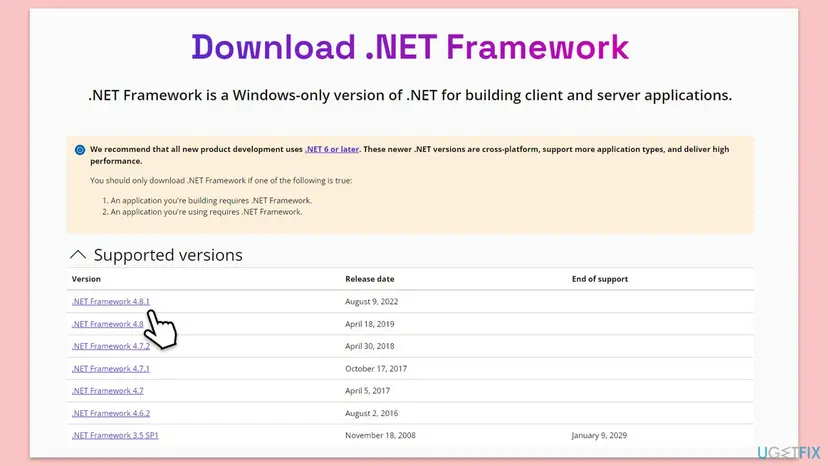
Download .NET Framework only from Microsoft. Copies on other sites can be old, repackaged or unsafe, and they cannot get past the same requirement check.
It worked if: Setup ends with a success or with a message that the same or a later version is already installed.
If not: If the program names .NET 2.0, 3.0 or 3.5, use Fix 3. Otherwise clear a pending restart with Fix 4.
Fix 3. Turn on .NET Framework 3.5 if the program asks for it
5 to 10 minutesLow riskThe program or its setup names .NET Framework 2.0, 3.0 or 3.5.
.NET Framework 3.5 is not a 4.x update and is not replaced by 4.8. On Windows 10 and 11 it is a Windows feature that you turn on, so an old 3.5 installer bundled with a program can fail the same requirement check.
- Open Turn Windows features on or off as in Fix 1.
- Select .NET Framework 3.5 (includes .NET 2.0 and 3.0) and select OK.
- Choose Let Windows Update download the files for you if Windows asks.
- Wait for Windows completed the requested changes and restart if asked.
- Run the program's setup again.
If turning on .NET 3.5 fails with its own code, such as 0x80072EE6 or 0x800F0906, follow our guide on .NET Framework error 0x80072EE6, which also covers installing 3.5 from Windows media.
It worked if: The .NET Framework 3.5 box is filled in Windows Features and the program installs.
If not: Install pending updates and restart with Fix 4.
Fix 4. Restart the PC and install all pending Windows updates
10 to 30 minutesLow riskWindows Update shows Restart now or waiting updates, or you installed something just before the error.
Two of Microsoft's block messages are a restart left over from a previous installation and a required update that must come first. Both stop setup before anything is installed, and the program's setup then reports only the code.
- Save your work and restart the PC once, even if Windows does not ask.
- Open Settings > Windows Update and select Check for updates. On Windows 10 it is Settings > Update & Security > Windows Update.
- Install everything offered, including updates under Advanced options > Optional updates that mention .NET Framework.
- Restart again when the updates ask for it. Microsoft notes you may have to restart more than once.
- Run the program's setup again.
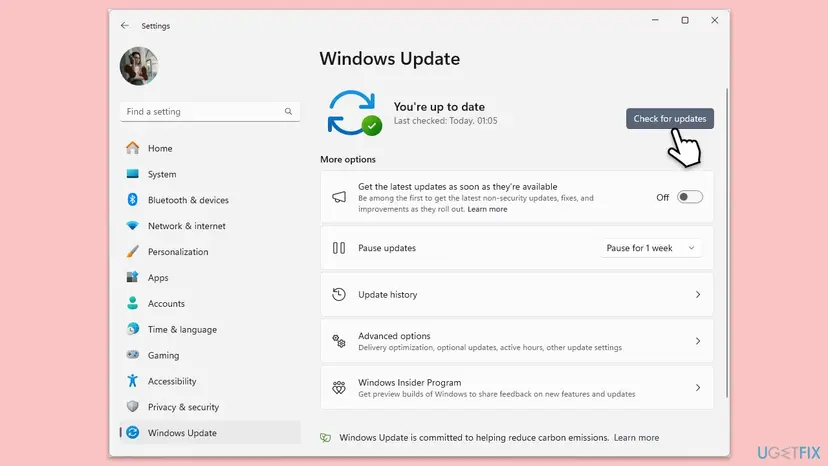
It worked if: Windows Update shows You're up to date with no restart pending, and setup continues.
If not: Run setup as administrator and outside compatibility mode with Fix 5.
Fix 5. Run setup as administrator and not in compatibility mode
5 minutesLow riskYou use a standard account, setup was started from a shortcut with changed settings, or an earlier setup attempt was cancelled.
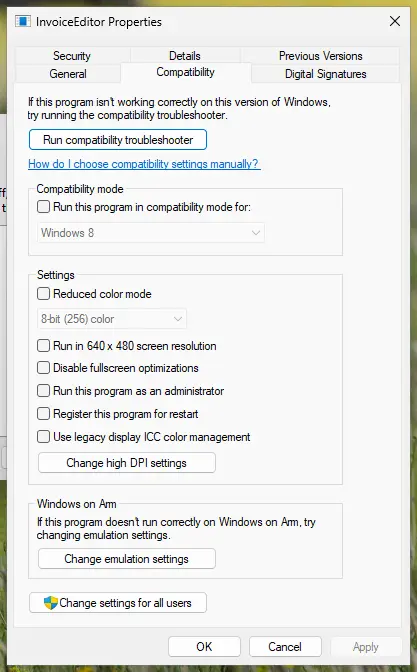
Microsoft lists two more blocks: setup needs an administrator, and the .NET Framework installer cannot run in Program Compatibility Mode. The Program Compatibility Assistant can switch that mode on by itself after an earlier failed or cancelled attempt.
- Right-click the program's
setup.exeand select Run as administrator. Select Yes in the User Account Control window. - If it fails again, right-click
setup.exe, select Properties and open the Compatibility tab. - Clear Run this program in compatibility mode for and select OK.
- Select Change settings for all users at the bottom of the same tab, clear the same box there too, and select OK.
- Run setup as administrator again.
Microsoft's fix for a stuck compatibility setting is to delete the .NET Framework setup entries under HKEY_CURRENT_USER\SOFTWARE\Microsoft\Windows NT\CurrentVersion\AppCompatFlags\Layers and HKEY_CURRENT_USER\SOFTWARE\Microsoft\Windows NT\CurrentVersion\AppCompatFlags\Compatibility Assistant\Persisted. A wrong deletion can affect other programs, so back up first with Back up the registry before editing it and delete only entries whose name is a .NET Framework installer file.
It worked if: Setup runs past the .NET step without the code.
If not: Check free space on drive C: with Fix 6.
Fix 6. Free up space on drive C:
10 minutesLow riskDrive C: has only a few GB free.
Users report that 0x800713ec - Asia went away after they freed disk space, because setup counts space on the system drive as a requirement. We could not confirm a fixed minimum from Microsoft today, so treat this as a check, not the main fix.
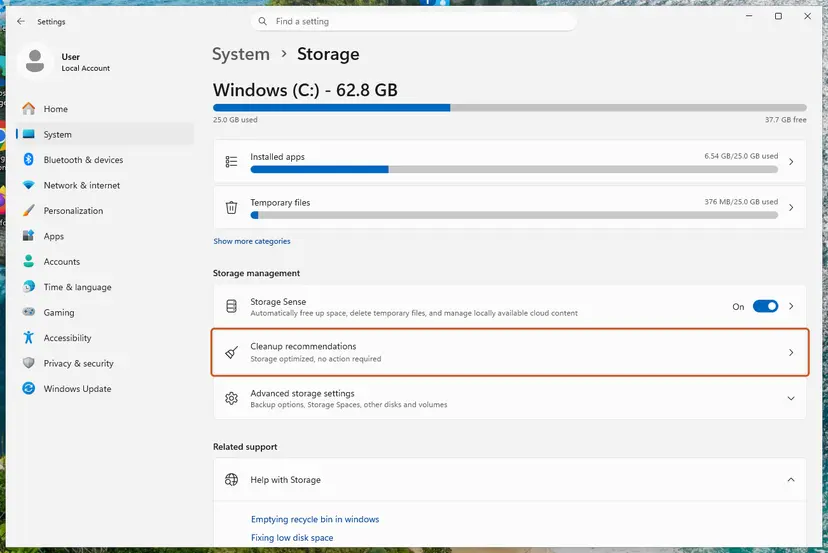
- Open Storage settings. Select Start > Settings > System > Storage. The top of the page shows how full the drive is and what uses the space.
- Open Cleanup recommendations. Under Storage management, select Cleanup recommendations.
- Clean up what Windows suggests. Open each group (Temporary files, Large or unused files, Files synced to the cloud, Unused apps), check the items you do not need and select Clean up in that group.
These steps were written for Windows 11 (screenshots: 26H2). The full page with the other versions and what each result means: Free up disk space and delete temporary files
It worked if: Drive C: has several GB free and setup continues.
If not: Repair the installed .NET Framework with Fix 7.
Fix 7. Run the Microsoft .NET Framework Repair Tool
10 minutesLow riskFix 1 to 6 did not help, or other programs that use .NET also fail to start.
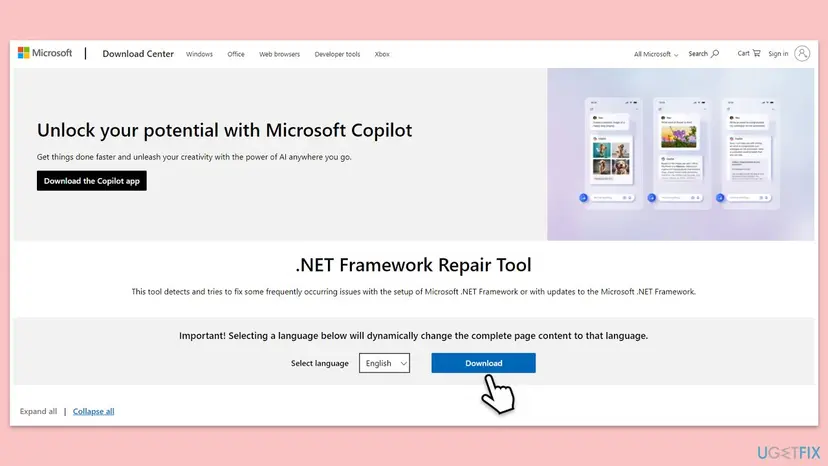
Microsoft's repair tool checks for common problems with .NET Framework setup and updates, and fixes damaged registration of the built-in .NET. If the installed 4.x is half broken, setup can misread what is there.
- Download the .NET Framework Repair Tool from Microsoft's Download Center (
https://aka.ms/DotnetRepairTool). - Run the downloaded file, accept the licence terms and select Next.
- Let the tool check the PC and apply the changes it recommends, then select Finish.
- Restart the PC and run the program's setup again.
Visual C++ and .NET repair together, step by step: How to repair Microsoft Visual C++ Redistributable and .NET Framework
It worked if: The tool reports that it applied changes or found nothing to fix, and setup continues after a restart.
If not: Repair Windows system files with Fix 8.
Fix 8. Repair Windows system files with SFC and DISM
20 to 30 minutesLow riskSetup says the component store has been corrupted, or nothing above worked.
On Windows 10 and 11 .NET Framework lives in the Windows component store. Microsoft's answer to the block message about a corrupted component store is DISM, which repairs that store; SFC then repairs the system files.
- Open an elevated command window. Right-click Start and select Terminal (Admin), or type cmd in the search box, right-click Command Prompt and select Run as administrator. Select Yes when Windows asks for permission.
- Run DISM first. Type the command below and press Enter. DISM downloads clean copies of damaged components from Windows Update, so it can take several minutes. Wait until it says The operation completed successfully.
DISM.exe /Online /Cleanup-Image /RestoreHealth - Run System File Checker. In the same window, type the command below and press Enter. Do not close the window until the verification reaches 100%.
sfc /scannow - Read the result and restart. Compare the last message with the table below this guide, then restart the PC so that repaired files are loaded.
These steps were written for Windows 11 24H2 and 25H2. The full page with the other versions and what each result means: Run DISM and SFC to repair Windows system files
It worked if: DISM and SFC report that they repaired the damage or found none, and setup continues.
If not: Read the setup log as shown in the next section.
If error 0x800713ec is still there
The program's setup shows only the code, but the .NET installer writes the real reason to a log. Microsoft says the log goes to the temporary folder by default, with a name based on the package, as an HTML file unless the name ends in .txt.
- Press Win + R, type
%temp%and select OK. - Sort by Date modified and open the newest file whose name mentions .NET Framework, or the setup log of your program.
- Search for
5100,0x13ECorBlockingand read the message near it. - Compare the message with the table of causes above and use the fix it points to.
| Message in the log | What to do |
|---|---|
| .NET Framework 4.x or a later version is already installed on this computer. | Nothing is missing. Fix 1. |
| The redistributable does not apply to this operating system. | Wrong package. Fix 2. |
| Setup cannot continue because a previous installation requires your computer to be restarted. | Fix 4. |
| The update corresponding to KB<number> needs to be installed before you can install this product. | Install that update, Fix 4. |
| You do not have sufficient privileges to complete this operation for all users of this computer. | Fix 5. |
| .NET Framework Setup cannot be run in Program Compatibility Mode. | Fix 5. |
| .NET Framework 4.x has not been installed because the component store has been corrupted. | Fix 8. |
| Other applications on your computer are not compatible with this program. | Microsoft says a preview or RC version of .NET is the most likely cause: uninstall it and run setup again. |
For support from the program's maker, send the code, the program's version, your Windows version from winver and the block message from the log. 0x800713ec is never a hardware fault or a licence problem: it is always the installer's own decision.
Windows 10 reached the end of support on 14 October 2025. The fixes work the same on Windows 10 22H2, but without Extended Security Updates the PC no longer gets security fixes.
How to keep error 0x800713ec from coming back
- Download the newest version of a program, not an old installer from a disc or an archive.
- Keep Windows updated: .NET Framework updates come with it.
- Restart before you install programs if Windows Update waits for a restart.
- Do not try to uninstall the .NET Framework that comes with Windows: Microsoft says it is part of the operating system.
- Do not download .NET Framework from sites other than Microsoft.
- Do not run installers in compatibility mode unless their maker asks you to.
Frequently asked questions
What does 0x800713ec mean?
It is the .NET Framework installer's return code 5100 written as a Windows error code: 0x8007 marks a Windows error and 13EC is 5100 in hexadecimal. Microsoft describes 5100 as "The user's computer does not meet system requirements." Setup checked the PC and refused to continue. On Windows 10 and 11 this is most often because Windows already has a newer .NET Framework 4.x than the one the program tries to install, so start with Fix 1.
What does Asia mean in 0x800713ec - Asia?
Nothing you need to act on. The word appears next to the code in many program installers, but it has nothing to do with your region, keyboard, language or time zone, and changing them does not help. We could not find a Microsoft explanation for the text, so we treat it as a wrong message. The code 0x800713ec is what matters, and the fixes on this page apply to both spellings.
What should I do first when I see 0x800713ec?
Open Turn Windows features on or off and check that .NET Framework 4.8 Advanced Services is on (Fix 1). If it is, your PC already has what most programs need, and the error only means the program's bundled .NET installer is older. Skip that step in the program's setup or download a newer version of the program. If the program asks for .NET 3.5 instead, turn that feature on (Fix 3).
Why can I not install .NET Framework 4.5.2 or 4.7.2 on Windows 10 or 11?
Because a later version is already there. Microsoft explains that .NET Framework 4.x versions are in-place updates, so an earlier 4.x cannot be installed on a system with a later one. Its example: on Windows 10 Fall Creators Update you cannot install 4.6.2, because 4.7.1 comes with the system. A program that asks for 4.5.2 to 4.8 runs on the newer built-in version.
Does 0x800713ec happen on Windows 10?
Yes. The code and its causes are the same on Windows 10 and Windows 11, because both include .NET Framework 4.8 or later as part of the system and both block older 4.x installers. The menus differ only slightly, and each fix gives both paths where they differ. Windows 10 reached the end of support on 14 October 2025, but the fixes still work on Windows 10 22H2.
Should I uninstall .NET Framework and install it again?
No. On Windows 8 and later, Microsoft says .NET Framework is an operating system component and cannot be uninstalled on its own; its updates only show under Installed updates. Removing them can break other programs. If the built-in .NET seems damaged, use Microsoft's .NET Framework Repair Tool (Fix 7) and SFC and DISM (Fix 8) instead.
Can a full disk cause 0x800713ec?
Users report that it can: some people saw 0x800713ec - Asia go away after freeing space on drive C:. Microsoft's description of code 5100 only says the PC does not meet the requirements, and we could not confirm a minimum size today. Checking free space takes a minute, so it is worth doing when Fix 1 to 5 change nothing (Fix 6).
Where can I see the real reason for 0x800713ec?
In the .NET setup log. Microsoft says the installer writes it to the temporary folder by default. Press Win + R, type %temp%, sort by date and open the newest log of the .NET installer or of your program. Search for 5100, 0x13EC or Blocking. The message near it names the block, such as a later version already installed or a restart pending, and the table above shows the fix.
Will the .NET Framework Repair Tool fix 0x800713ec?
Sometimes, but rarely first. The tool repairs a damaged .NET Framework installation and setup problems, while 0x800713ec usually means setup found nothing wrong and simply refused an older package. Use it when Fix 1 to 6 did not help or when other .NET programs also fail. It is a Microsoft download, and the steps are in How to repair Microsoft Visual C++ Redistributable and .NET Framework.
Sources
- Microsoft Learn: .NET Framework deployment guide for developers (installer return codes, 5100, log options) (learn.microsoft.com)
- Microsoft Learn: Troubleshoot blocked .NET Framework installations and uninstallations (learn.microsoft.com)
- Microsoft Q&A: Error code 0x800713ec-Asia (.NET Framework 4.5.2 prerequisite) (learn.microsoft.com)
Did this fix work?
One click, no account. It tells the next reader which guides are worth their time.
Questions and experiences: fix .NET Framework error 0x800713ec in Windows
Still broken, or found a fix we did not cover? Ask here: members and our editors answer. Reading is open; writing needs a free account.
…