
How to fix CLR20r3 error in Windows?

Prefer to fix it yourself? The manual steps follow.
- 7methods
- 5 minutes to read the report, 10 to 30 minutes to fix
- Intermediate
Applies to Windows 11, Windows 10, Windows 7, Windows Server
7 methods in this guide
Hello. I recently installed a new program on my Windows computer, but whenever I try to launch it, I receive the CLR20R3 error. Is there anything I can do?
CLR20r3 is the name Windows Error Reporting gives to the crash of a program built on .NET Framework, not a fault of Windows. Line P1 of the report names the program and line P9 names the error, so read those two first. Most often the fix is an update or reinstall of that program.
CLR20r3 means one .NET program crashed. Open the report (Fix 1) and read two lines: P1 is the program that crashed and P9 is the error type. A missing file or a bug in P9 points to updating or reinstalling that program from its maker (Fix 2). A configuration error points to its settings (Fix 3). Only when several programs crash is .NET Framework itself worth repairing (Fix 4).
| Error | Event Name: CLR20r3 (also shown as Problem Event Name: CLR20r3) with a problem signature of lines P1 to P10. |
|---|---|
| Where it appears | In Event Viewer under Windows Logs > Application as a Windows Error Reporting entry, in Reliability Monitor, and on Windows 7 in the details of the "has stopped working" window. It appears when a .NET program closes or fails to start. |
| Main cause | An error inside the program named on line P1 that its code did not catch: a missing or mismatched file, damaged settings, missing access rights or a plain bug. Line P9 names the error type. |
| Fastest fix | Read lines P1 and P9 (Fix 1), then update or reinstall the program from P1 (Fix 2). |
| Also written as | CLR20R3, clr20r3, CLR20r3 error, Event Name: CLR20r3, Problem Event Name: CLR20r3, EventType clr20r3, Fault bucket type 0 Event Name CLR20r3. |
| Logged together with | Event 1026 from .NET Runtime and event 1000 from Application Error at the same moment. Event 1026 holds the full error text. |
| Affects | Programs on .NET Framework 2.0 to 4.8.1, on Windows 11, Windows 10, Windows 7 and Windows Server, including Server 2008 R2. The report looks the same on all of them. |
| Vendor status | Not a Windows bug and not one fixed problem. Microsoft's Q&A threads show CLR20r3 for very different programs and errors; the cause is always in the line P9 of that one report. |
| Time to fix | About 5 minutes to read the report. The repair takes from a few minutes (resetting settings) to half an hour (a reinstall or a .NET repair). |
Facts checked on 15 October 2026. Steps written for Windows 11 (25H2 and 26H2) and Windows 10 22H2.
What the CLR20r3 error means and how to read its problem signature
CLR stands for Common Language Runtime, the engine that runs .NET Framework programs. When such a program hits an error, called an exception, that its own code does not catch, the runtime ends the program. Windows Error Reporting then files a crash report under the event name CLR20r3. The name stayed the same for .NET Framework 4 programs: one report on Microsoft Q&A shows CLR20r3 for a program on .NET Framework 4.8.
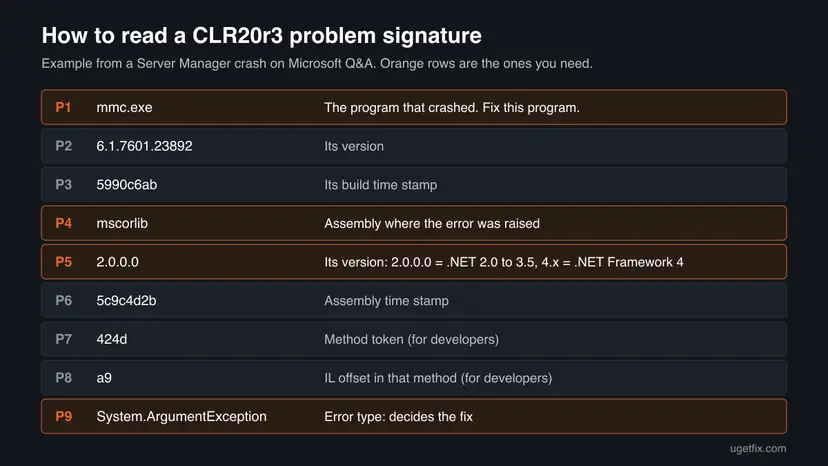
A CLR20r3 report from Windows Server 2008 R2, as posted on Microsoft Q&A (shortened)
Fault bucket , type 0
Event Name: CLR20r3
Response: Not available
Cab Id: 0

Problem signature:
P1: mmc.exe
P2: 6.1.7601.23892
P3: 5990c6ab
P4: mscorlib
P5: 2.0.0.0
P6: 5c9c4d2b
P7: 424d
P8: a9
P9: System.ArgumentException
P10:- P1 is the program file that crashed. Here it is
mmc.exe, the console that runs Server Manager. This is the program to fix, not Windows. - P2 and P3 are that program's version and build stamp. Its maker needs them.
- P4 is the part of code, called an assembly, where the error was raised.
mscorlibis the core library of .NET, so the error surfaced inside .NET while the program was using it. That alone does not mean .NET is damaged. - P5 is the version of that assembly. For mscorlib,
2.0.0.0means the program runs on the older .NET 2.0 to 3.5 runtime, and4.xmeans .NET Framework 4. - P6 to P8 point to the exact method and position in the code. Only a developer can use them.
- P9 is the error type. It decides the fix.
System.IO.FileNotFoundExceptionmeans a file was missing;System.ArgumentExceptionmeans the program passed a wrong value.
The lines Fault bucket, Response: Not available and Cab Id: 0 only say that Windows has no stored answer for this crash. People search for "clr20r3 not available" as if a file were missing, but nothing is. Read P1 and P9 instead.
Why the CLR20r3 error happens: causes ranked
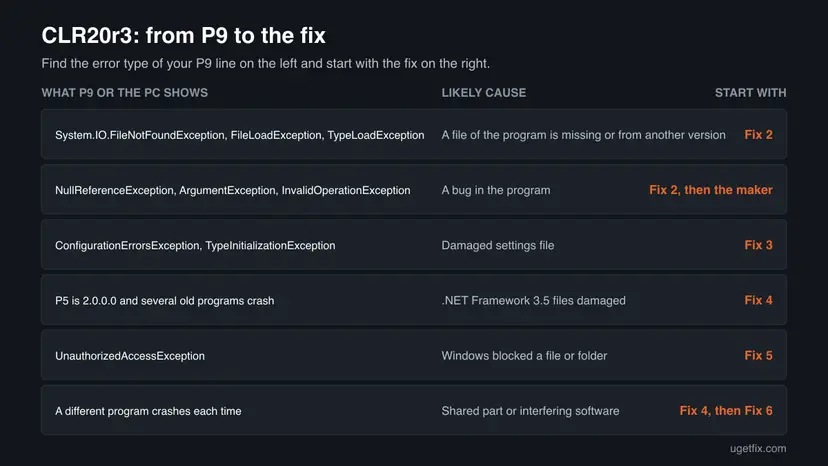
We have no counts of how often each cause occurs. The order below follows the reports we read on Microsoft Q&A and the error types they show: problems inside the program first, damaged .NET files rarely. Line P9 tells them apart.
| Cause | P9 shows | Other signs | Fix |
|---|---|---|---|
| A file of the program is missing, damaged or from another version. | System.IO.FileNotFoundException, FileLoadException, TypeLoadException, MissingMethodException | Started after an install, an update or a copy of the program folder. | Fix 2 |
| A bug in the program. | NullReferenceException, ArgumentException, InvalidOperationException, System.Exception | Same crash at the same moment every time, often on other PCs too. | Fix 2 |
| The program's settings file is damaged. | ConfigurationErrorsException, TypeInitializationException | Started after a power cut, a forced shutdown or a full disk. | Fix 3 |
| .NET Framework files are damaged or a needed version is off. | Errors in several programs, P4 is mscorlib or System each time | Several .NET programs crash, not only one. | Fix 4 |
| Windows refuses the program a file or folder. | UnauthorizedAccessException, IOException | Works when started as administrator. | Fix 5 |
| Another program interferes. | Changes from crash to crash, or AccessViolationException | The crash stops in a clean boot. | Fix 6 |
| Damaged Windows system files. | Errors in many programs, not only .NET ones | Windows tools such as Server Manager crash too. | Fix 7 |
Windows shortens long names in the signature. On Microsoft Q&A one report shows P9 as System.Windows.Markup.XamlParse, which is the start of XamlParseException. That type only says that building a window failed, so open event 1026 in Fix 1 to see the real error under it.
How to fix the CLR20r3 error
Fix 1 takes five minutes and tells you which of the others is yours. Fixes 2 and 3 solve most single program crashes. Fixes 4 to 7 are for crashes that hit several programs or keep coming back. You do not need to try them all.
| What you see or have | Start with |
|---|---|
| You only saw CLR20r3 and do not know the program or the error. | Fix 1 |
| One newly installed or updated program crashes at start, P9 names a missing file or an error in its code. | Fix 2 |
P9 names ConfigurationErrorsException, or the program crashed after a power cut. | Fix 3 |
Several .NET programs crash, or an old program with P5 2.0.0.0 stopped working. | Fix 4 |
P9 names UnauthorizedAccessException, or the program works as administrator. | Fix 5 |
| The P9 error changes from crash to crash. | Fix 6 |
| Windows' own tools, such as Server Manager, crash too. | Fix 7 |
Fix 1. Open the CLR20r3 report and read lines P1 and P9
5 minutesNo riskEveryone who saw CLR20r3 and does not yet know which program and error it is.
CLR20r3 is only the report's name. Lines P1 and P9 say which program failed and why, and the .NET Runtime event logged at the same second holds the full error text. Without them every fix below is a guess.
- Press Win + R, type
eventvwrand select OK. - Expand Windows Logs and select Application.
- Select Find in the right pane, type
CLR20r3and select Find Next. - Read the entry from Windows Error Reporting on the General tab. Note the values after P1 and P9.
- Look at the entries logged in the same second. Open the one from .NET Runtime with event ID 1026 and read its Exception Info lines.
- Select Copy in the event window and paste both texts into Notepad. You will need them if the fixes below do not help.
Reliability Monitor shows the same report in a friendlier list. Press Win + R, type perfmon /rel and select OK, then select the red crash icon for the day and View technical details. There the lines are called Problem Signature 01 to 09 instead of P1 to P9.
PowerShell: the last five CLR20r3 reports
Get-WinEvent -FilterHashtable @{ LogName='Application'; ProviderName='Windows Error Reporting' } -MaxEvents 200 |
  Where-Object { $_.Message -match 'CLR20r3' } |
Select-Object -First 5 | Format-List TimeCreated, Message- Same P1 every time? The problem belongs to that program. Use the chooser table above.
- A P1 you never start? Updaters, tray tools and background services also run on .NET. The file name tells you which one, and Fix 2 still applies.
- A different P1 each time? Go to Fix 4 and then Fix 6.
It worked if: You know the program file on line P1 and the error type on line P9, ideally with the full Exception Info text of event 1026.
If not: If no CLR20r3 entry exists, the crash was not a .NET one. Look for event 1000 from Application Error at the same time and follow the module it names.
Fix 2. Update, repair or reinstall the program named on line P1
15 to 30 minutesLow riskP9 names a missing file, a wrong version or an error in the program's own code, or the program is new and has never worked.
In one Microsoft Q&A report the error was a FileNotFoundException in a server program. A missing or mismatched program file is fixed only by putting the program's files back, and a bug only by a newer version from its maker.
- Look up the program file from line P1. If you do not recognise it, search the name in File Explorer or check Task Manager > Details next time it runs.
- Check for an update in the program's Help or About menu, or on the maker's website.
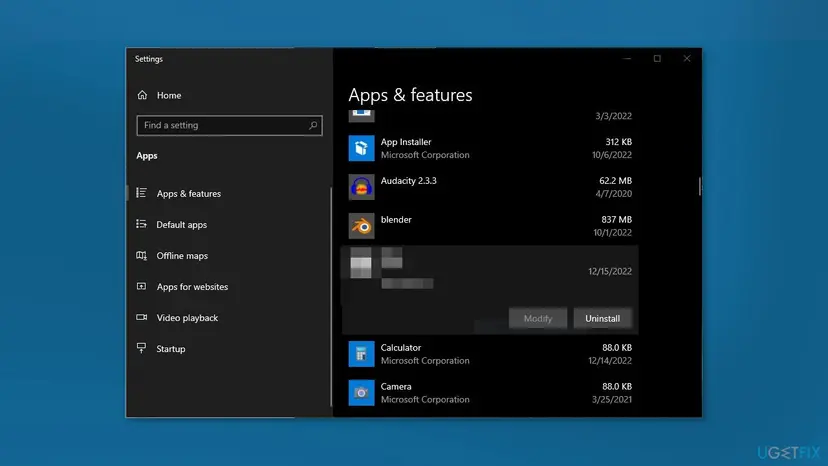
- If no update exists, press Win + I and open Apps > Installed apps (Windows 10: Apps > Apps & features).
- Select the three dots next to the program. If Modify or Repair is offered, run it first.
- If that does not help, select Uninstall and restart the PC.
- Download the newest version from the maker's own website, not from a download portal, and install it.
- Start the program and check Event Viewer for a new CLR20r3 entry.
Every way to remove a program, also from Control Panel: Uninstall a program or app in Windows A Store app has Repair and Reset buttons instead: How to repair or reset an app in Windows
Accounting, design and database tools keep data in their own folders. Use the program's own backup or export before you uninstall it.
It worked if: The program starts and stays open, and no new CLR20r3 entry appears for it.
If not: If the same P9 comes back after a clean install from the maker, the bug is in the program: send the copied report to its support (see below). If P9 names a configuration error, go to Fix 3.
Fix 3. Reset the program's damaged settings file
10 minutesLow riskP9 names ConfigurationErrorsException or TypeInitializationException, or the crash began after a power cut or a full disk.
A .NET Framework program reads its settings file the moment it starts. If that file is cut off or damaged, the program crashes before any window opens, and a reinstall often leaves the file in place.
- Close the program and check in Task Manager that it no longer runs.
- Press Win + R, type
%LocalAppData%and press Enter. - Open the folder named after the program's maker. Look for a folder that starts with the program file name, such as
Program.exe_Url_followed by random letters. - Rename that folder by adding
.oldat the end. Do not delete it. - Repeat steps 2 to 4 with
%AppData%, because some programs keep their settings there. - Start the program. It creates new settings with default values.
Renaming resets preferences such as window sizes, recent files or a saved server address. Your documents are not in this folder. To undo, delete the new folder and remove .old from the old one.
It worked if: The program opens with default settings, and no new CLR20r3 entry appears.
If not: If it still crashes, put the old folder back and reinstall the program (Fix 2). A settings file in the install folder, named like Program.exe.config, comes back only with a reinstall.
Fix 4. Repair .NET Framework, including .NET Framework 3.5
20 minutesLow riskSeveral .NET programs crash, P4 is mscorlib or System in each report, or an old program whose P5 is 2.0.0.0 stopped working.
When many programs fail at once, the shared part they all use is the likely common factor. Programs whose P5 reads 2.0.0.0 run on the .NET 3.5 runtime, which Windows 10 and 11 keep as a separate optional feature.
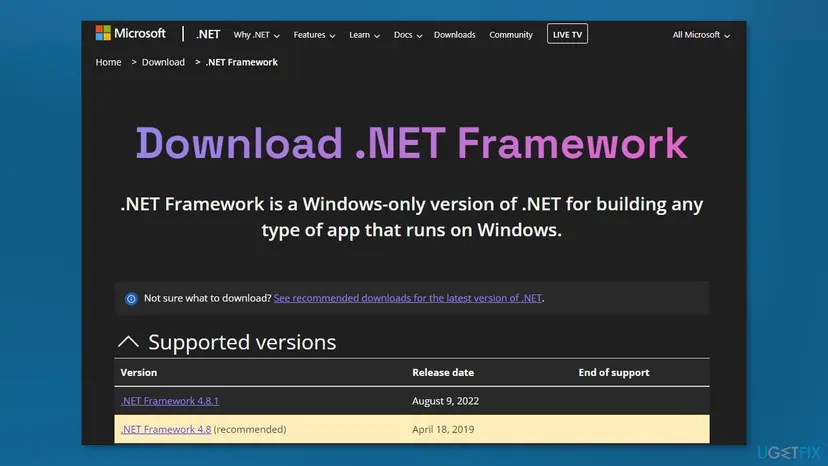
- Run the .NET Framework Repair Tool. Download the Microsoft .NET Framework Repair Tool and run NetFxRepairTool.exe. The wizard looks for setup problems, asks for your consent before it applies fixes, then repairs the installed .NET Framework versions. The tool is in English only.
- Turn on .NET Framework 3.5 if a program asks for it. Select Start, search for Windows Features and open it. In Turn Windows features on or off, select the .NET Framework 3.5 (includes .NET 2.0 and 3.0) check box and select OK. Windows downloads the files, so stay online.
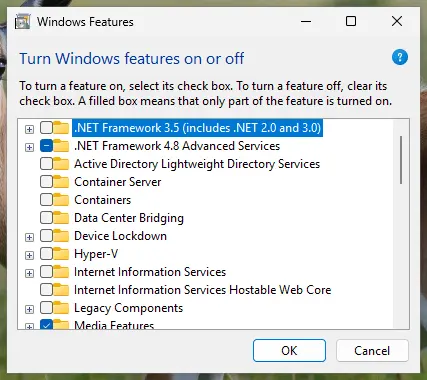
.NET Framework 3.5 is turned on in Windows Features. Screenshot: Windows 11 26H2. - Restart and test. Restart the PC and start the program that showed the error.
These steps were written for Windows 11 25H2 and 26H2, Windows 10 22H2. The full page with the other versions and what each result means: How to repair Microsoft Visual C++ Redistributable and .NET Framework
- Do not uninstall .NET Framework 4.8 or 4.8.1. It is part of Windows 10 and Windows 11, and removing it is not offered.
- For P5 2.0.0.0 programs: turn .NET Framework 3.5 (includes .NET 2.0 and 3.0) off in Windows Features, restart, then turn it on again. This puts its files back.
- Newer .NET programs (.NET 6, 8 and later) do not use .NET Framework. If the maker says the program needs one of them, install the matching .NET Desktop Runtime from dotnet.microsoft.com.
All steps, including Visual C++: How to repair Microsoft Visual C++ Redistributable and .NET Framework A related crash report has its own guide: .NET Runtime error 1026.
It worked if: The Repair Tool finishes without new problems, and the programs that crashed start again after a restart.
If not: If only one program still crashes, go back to Fix 2 for it. If many still crash, try Fix 6 and then Fix 7.
Fix 5. Run the program as administrator or in compatibility mode
5 minutesLow riskP9 names UnauthorizedAccessException or IOException, or the program is old and was made for Windows 7 or earlier.
UnauthorizedAccessException means Windows refused the program a file or folder, often because an old program writes into its own install folder. Compatibility mode makes Windows report an older version to programs that check it.
- Right-click the program's shortcut and select Run as administrator once, as a test.
- If that helps, check the maker's site for a version that does not need it.
- If not, right-click the shortcut, select Properties and open the Compatibility tab.
- Tick Run this program in compatibility mode for and pick the Windows version the program was made for.
- Select OK and start the program again.
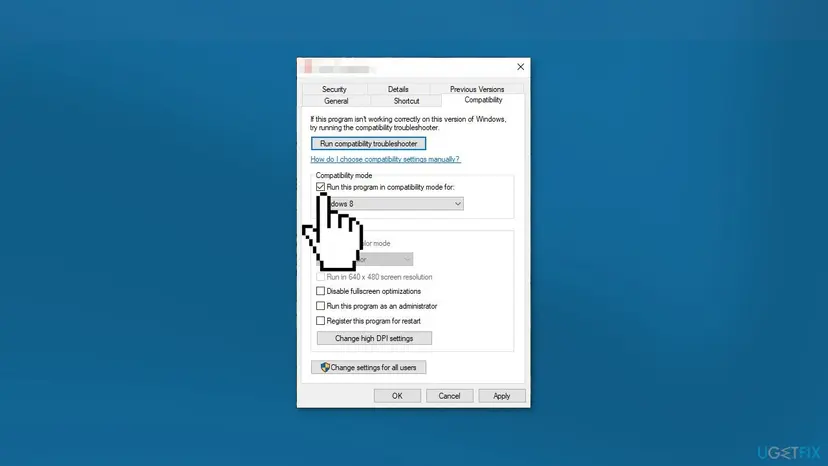
All options of the tab and how to undo them: How to run a program as administrator or in compatibility mode
It worked if: The program opens, and no new CLR20r3 entry with UnauthorizedAccessException appears.
If not: Clear the compatibility setting again so it does not hide other problems, and go to Fix 6.
Fix 6. Find a program that interferes with a clean boot
20 minutesLow riskThe P9 error changes from crash to crash, or P9 names AccessViolationException.
Overlays, monitoring tools and some security programs load themselves into other processes. A clean boot starts Windows without them, so if the crash stops, one of them is the cause.
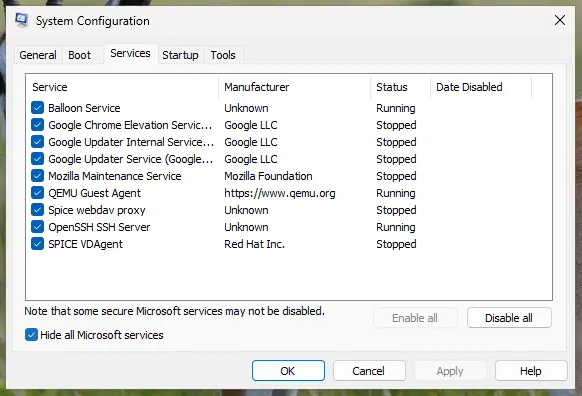
- Do a clean boot with the steps in How to perform a clean boot in Windows: third-party services and startup apps off.
- Start the program that crashed. If it works, turn half of the services back on and restart.
- Repeat with smaller halves until the crash returns. The last group you turned on holds the culprit.
- Update or remove that program, then return to a normal start.
If a security program is the culprit, do not leave it off. Pause it for one test with Turn off Microsoft Defender protection for a moment, turn it back on, and ask its maker to allow the program.
It worked if: The program runs in a clean boot, and you find the service or startup app that makes it crash.
If not: If the program crashes in a clean boot too, nothing else interferes. Go to Fix 7, then send the report to the maker.
Fix 7. Repair Windows system files with DISM and SFC
20 to 40 minutesNo riskWindows' own tools crash too, or Fixes 2 to 6 did not help and several programs are affected.
.NET Framework 4.8 is part of Windows 10 and 11, so damaged Windows files can damage it too. DISM restores the Windows image and SFC then replaces bad system files from it.
- Open an elevated command window. Right-click Start and select Terminal (Admin), or type cmd in the search box, right-click Command Prompt and select Run as administrator. Select Yes when Windows asks for permission.
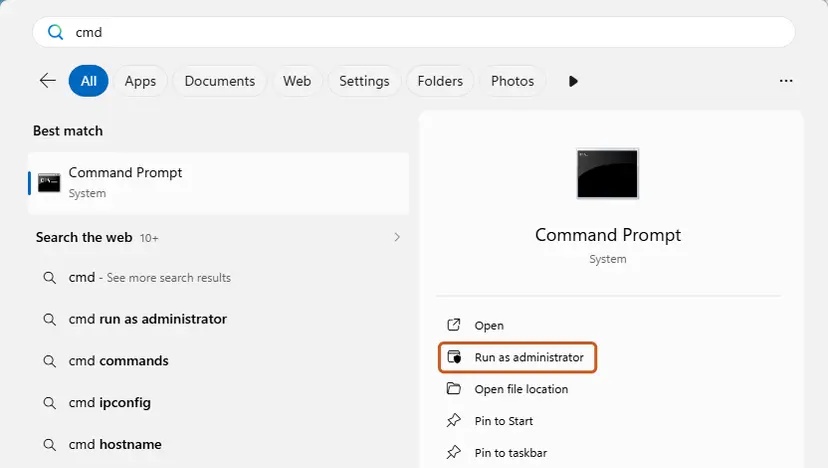
Search for cmd and choose Run as administrator. Screenshot: Windows 11 26H2. - Run DISM first. Type the command below and press Enter. DISM downloads clean copies of damaged components from Windows Update, so it can take several minutes. Wait until it says The operation completed successfully.
DISM.exe /Online /Cleanup-Image /RestoreHealth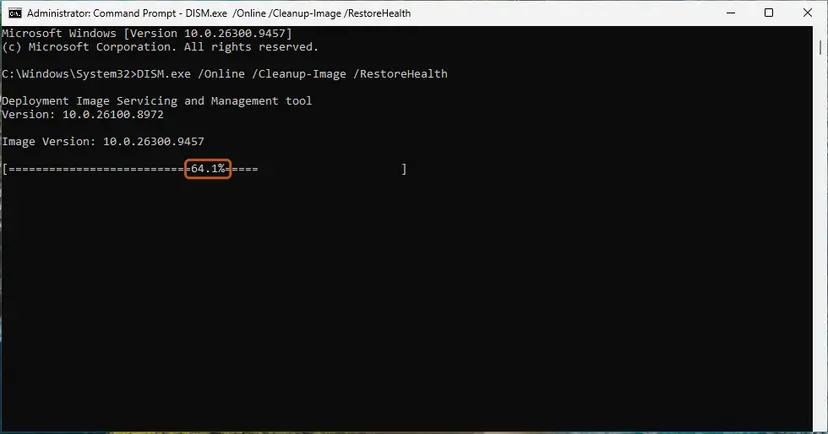
DISM /RestoreHealth running. Screenshot: Windows 11 26H2. - Run System File Checker. In the same window, type the command below and press Enter. Do not close the window until the verification reaches 100%.
sfc /scannow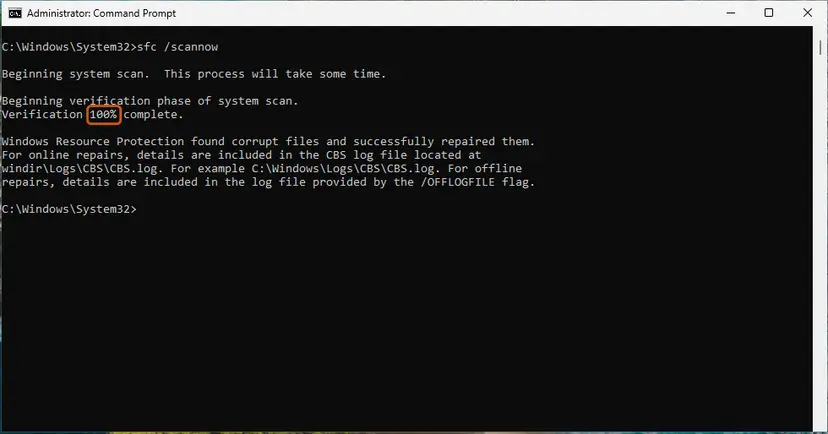
sfc /scannow at 100%. Screenshot: Windows 11 26H2. - Read the result and restart. Compare the last message with the table below this guide, then restart the PC so that repaired files are loaded.
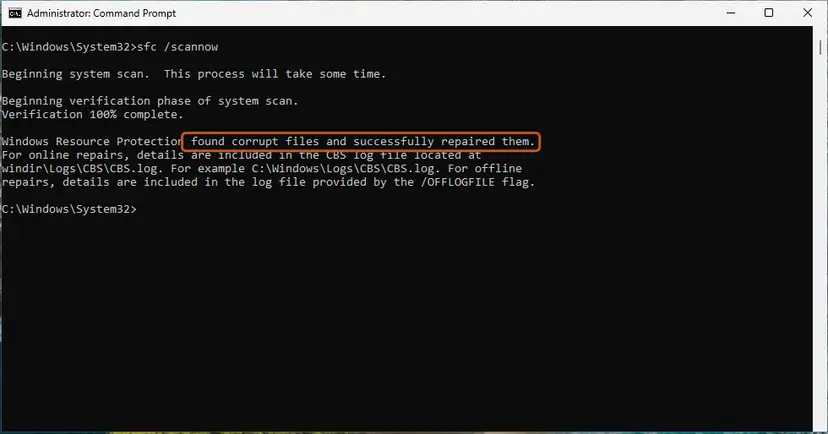
The result line tells you what SFC did. Screenshot: Windows 11 26H2.
These steps were written for Windows 11 24H2 and 25H2. The full page with the other versions and what each result means: Run DISM and SFC to repair Windows system files
DISM /RestoreHealth does not exist there. In the Server 2008 R2 thread on Microsoft Q&A, the advice was the System Update Readiness Tool (KB947821), with its result in %SYSTEMROOT%\Logs\CBS\CheckSUR.log.
It worked if: SFC reports that it found no integrity violations or that it repaired them, and the crashes stop after a restart.
If not: If SFC cannot repair some files, run DISM again and restart. If the crashes continue, see the next section.
If CLR20r3 keeps coming back: what to send and to whom
When the same P9 comes back after a clean install, the bug is almost always inside the program. Only its maker can fix it, and they need the report itself. Lines P7 and P8 point a developer to the exact place in the code.
- The full CLR20r3 report, all lines P1 to P10.
- Event 1026 from .NET Runtime of the same second, with all Exception Info and "at" lines.
- The report files. The report names a folder under
C:\ProgramData\Microsoft\Windows\WER\or%LocalAppData%\Microsoft\Windows\WER\ReportArchive\, starting withAppCrash_and the program name. - What you did when it crashed, and your Windows version (press Win + R and type
winver). - What you already tried: reinstall, settings reset, clean boot.
| What the report shows | Who to ask |
|---|---|
| The same P1 and P9 every time. | The program's maker. |
| P4 is mscorlib or System in many different programs. | Microsoft Support, after Fix 4 and Fix 7. |
| P1 is a Windows tool, such as mmc.exe for Server Manager. | Microsoft Support or Microsoft Q&A. |
CLR20r3 is almost never a sign of failing hardware. A rare exception is a .NET program that crashes at random places together with blue screens. That can point to faulty memory: test it with How to test your RAM with Windows Memory Diagnostic before you replace anything.
How to keep the CLR20r3 error from coming back
- Install programs from their maker. Repacked installers and copied program folders often miss files, which leads to FileNotFoundException.
- Update the program itself. Most CLR20r3 crashes are fixed by the program's maker, not by Microsoft.
- Keep Windows updated. .NET Framework fixes arrive through Windows Update. Windows 10 left support on 14 October 2025, so a Windows 10 PC without extended updates no longer gets them.
- Keep free space on the system drive and shut down properly, so settings files are not cut off (Fix 3).
One old CLR20r3 entry for a tool you never use needs no action. Start looking when the same P1 crashes again and again, or a program you need will not start.
Frequently asked questions
What is the CLR20r3 error?
It is the name Windows Error Reporting gives to the crash of a program built on .NET Framework. The program hit an error its code did not handle, and the .NET runtime ended it. The report lists lines P1 to P10: P1 is the program, P4 and P5 the code where the error surfaced, and P9 the error type. The event itself is not something to repair. The cause sits in the program on line P1, and P9 tells you which fix to start with.
Is CLR20r3 a virus or a Windows bug?
Neither, in most cases. The reports on Microsoft Q&A show CLR20r3 for many unrelated programs, from server tools to vendor services, each with its own error on line P9. It is a crash report, not malware. If P1 names a program you do not know and cannot find in Installed apps, check where the file lives and run a scan with How to scan for malware with Microsoft Defender, but treat that as a separate check.
How do I fix CLR20r3 on Windows 7?
The report and the steps are the same as on Windows 10 and 11: read P1 and P9, then update or reinstall the program, reset its settings or repair .NET Framework. Two things differ. DISM /RestoreHealth does not exist on Windows 7, so the System Update Readiness Tool (KB947821) takes its place. And Windows 7 has had no security updates since January 2020, so new versions of many programs no longer support it. If the maker's newest version needs Windows 10 or 11, that is the real fix.
Why does Server Manager crash with CLR20r3 on Windows Server 2008 R2?
In a Microsoft Q&A report, Server Manager on Server 2008 R2 SP1 crashed with P1 mmc.exe, P4 mscorlib 2.0.0.0 and P9 System.ArgumentException. Server Manager there runs inside MMC on the .NET 2.0 runtime. The advice was the System Update Readiness Tool, KB947821, and its log CheckSUR.log. The person who asked said later that it fixed itself after a few restarts. Server 2008 R2 is long out of support, so a move to a supported version is the lasting fix.
What does "Problem Event Name: CLR20r3" mean?
It is the same report as Event Name: CLR20r3, shown in another window. Reliability Monitor and the Windows 7 "has stopped working" details call it Problem Event Name and number the lines Problem Signature 01 to 09 instead of P1 to P9. Problem Signature 01 is the program and Problem Signature 09 is the error type. Read them the way Fix 1 describes.
What does "Fault bucket, type 0, Response: Not available" mean?
These lines describe how Windows filed the report. Fault bucket is a group of matching crashes, and Response: Not available means Windows has no stored answer for it. Cab Id: 0 means no extra data package was sent. None of these lines is a cause or a missing file. They appear in nearly every CLR20r3 report. Skip them and read P1 and P9.
Does CLR20r3 look different on Windows 10 and Windows 11?
No. The report, its lines and the steps on this page are the same on Windows 10, Windows 11 and Windows Server. Only menu paths differ slightly: Installed apps on Windows 11 is Apps & features on Windows 10. Windows 11 already includes .NET Framework 4.8.1. Windows 10 left support on 14 October 2025, so .NET fixes no longer reach a Windows 10 PC without extended updates.
Should I uninstall .NET Framework to fix CLR20r3?
No. .NET Framework 4.8 and 4.8.1 are part of Windows 10 and Windows 11 and cannot be removed like a normal program. Older guides say to download and install the latest .NET Framework, but on Windows 11 it is already there. Run the .NET Framework Repair Tool instead, and for programs on the old runtime turn .NET Framework 3.5 off and on in Windows Features (Fix 4).
CLR20r3 ошибка как исправить: is there help in Russian?
This page is in English, but the error is the same on Russian Windows: the line names stay CLR20r3 and P1 to P9, and the error types on line P9 stay in English, such as System.IO.FileNotFoundException. Follow Fix 1 to read lines P1 and P9, then go to the fix that the chooser table names. The steps and the menu names match the Russian labels one to one.
Sources
- Microsoft Q&A: Server Manager won't open, CLR20r3 on Server 2008 R2 SP1 (full problem signature and the KB947821 advice) (learn.microsoft.com)
- Microsoft Q&A: The application service reported an error "Event name: CLR20r3" (FileNotFoundException and a .NET Framework 4.8 report) (learn.microsoft.com)
- Stack Overflow: Deciphering the .NET clr20r3 exception parameters P1..P10 (stackoverflow.com)
Did this fix work?
One click, no account. It tells the next reader which guides are worth their time.
Questions and experiences: fix CLR20r3 error in Windows
Still broken, or found a fix we did not cover? Ask here: members and our editors answer. Reading is open; writing needs a free account.
…