
How to fix ucrtbase.dll application error on Windows?

Prefer to fix it yourself? The manual steps follow.
- 7methods
- 10 to 40 minutes
- Easy
Applies to Windows 11 and Windows 10; any program or game that crashes with ucrtbase.dll as the faulting module, or that asks for ucrtbase.dll or ucrtbased.dll
7 methods in this guide
Hey. I have an issue: the game crashes randomly. It seems that ucrtbase.dll causes the application crash. The information about the app crash names this faulty file, and I don't know what can be done to fix it. Can you explain this issue and how to fix the error?
A ucrtbase.dll application error means a program crashed while it was running code of the Universal C Runtime, a part of Windows. The DLL is usually the place of the crash, not its cause. Read the crash record first, then update or repair the program that crashed.
Open the crash record in Event Viewer or Reliability Monitor and note which program crashed and the exception code (Fix 1). Then update, repair or reinstall that program (Fix 2), because the crash almost always starts in the program. If many programs crash, install Windows updates and run SFC and DISM (Fix 3 and 4). Never download ucrtbase.dll from a DLL site: Windows 10 and 11 always use their own copy.
| Error | Event Viewer, Application Error: "Faulting module name: ucrtbase.dll", usually with "Exception code: 0xc0000409". Less often: ucrtbase.dll not found, or ucrtbased.dll was not found. |
|---|---|
| Where it appears | A program or game closes without a message, or shows its own crash window. The name ucrtbase.dll is visible only in Event Viewer, Reliability Monitor or the program's crash report. |
| Main cause | The program that crashed hit a fatal error in its own code or data and asked Windows to stop it. The C runtime in ucrtbase.dll is where that stop happens. |
| Fastest fix | Update or repair the program named as the faulting application (Fix 2). |
| Also written as | ucrtbase.dll error, ucrtbase.dll crash, ucrtbase.dll crashing, faulting module name: ucrtbase.dll, ucrtbase dll, ucrtbase, urctbase.dll. |
| The file | C:\Windows\System32\ucrtbase.dll (64-bit) and C:\Windows\SysWOW64\ucrtbase.dll (32-bit). The Universal C Runtime, a Windows component. |
| Affects | Windows 11 and Windows 10. On both, the runtime version matches the Windows version and changes only with Windows updates. |
| Microsoft's status | Not a known Windows bug. Microsoft calls the Universal CRT an operating system component, shipped with Windows 10 and later. |
| Do not | Download ucrtbase.dll from a DLL site, copy it into a program folder or run regsvr32 on it. |
| Time to fix | 10 minutes to read the record and update the program. Up to 40 minutes with Windows updates and a system file repair. |
Facts checked on 15 October 2026. Steps written for Windows 11 (25H2 and 26H2) and Windows 10 22H2.
What the ucrtbase.dll application error means
ucrtbase.dll is the Universal C Runtime, or UCRT. It holds the basic functions of the C language that almost every program for Windows uses: memory, text, files, maths. Microsoft states that the UCRT is an operating system component, included as part of Windows 10 or later and Windows Server 2016 or later.
Because so many programs use these functions, a crash of almost any program can happen while ucrtbase.dll is running. Windows then writes this DLL as the faulting module. That tells you where the crash happened, not who caused it. A program that passes broken data to a runtime function crashes inside the runtime.
Event Viewer, Windows Logs > Application, source Application Error (example record)
Faulting application name: Game.exe, version: 1.2.0.0
Faulting module name: ucrtbase.dll, version: 10.0.xxxxx.xxxx
Exception code: 0xc0000409
Faulting application path: C:\Games\Game\Game.exe
Faulting module path: C:\Windows\System32\ucrtbase.dll- Faulting application name
- The program that crashed. This is the program to update or repair.
- Faulting module name
- ucrtbase.dll, the place of the crash. Its version starts with 10.0 and follows your Windows build.
- Exception code 0xc0000409
- Microsoft's __fastfail reference: the code tells Windows Error Reporting that the process is corrupted and should be ended at once. No error handler in the program runs.
- Faulting module path
- Should be
C:\Windows\System32orC:\Windows\SysWOW64. Any other folder is worth a look (see the download section).
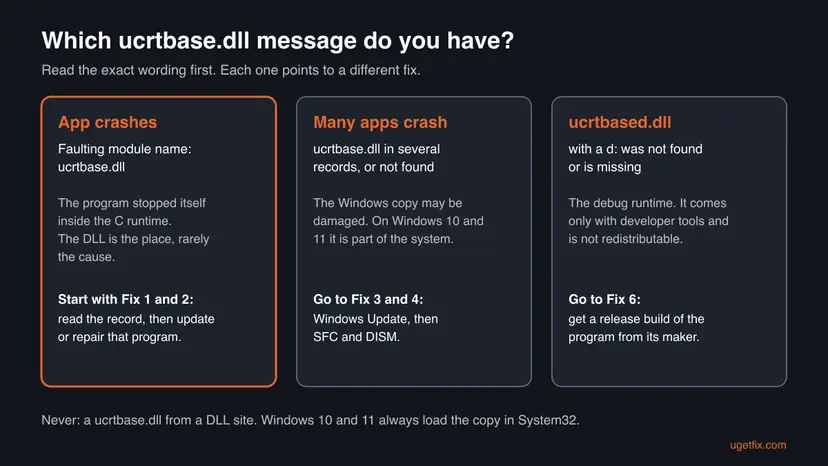
- ucrtbase.dll crash or crashing: the record above. A single program or game closes. Start with Fix 1 and Fix 2.
- ucrtbase.dll not found: a program cannot start because Windows did not load the file. On Windows 10 and 11 that points to damaged system files or a very old program. Fix 3 and Fix 4.
- ucrtbased.dll was not found: a different file, the debug version of the runtime. Fix 6.
What causes ucrtbase.dll crashes, from most to least common
Most often the crashing program itself has a bug, a damaged file, a broken mod or a bad setting, and it stops inside the runtime. Less often Windows is out of date or its own system files are damaged, and then several programs fail. Rarely the cause is a debug build of a program, a recent change to the PC, or failing hardware.
| Cause | How often | How to tell | Fix |
|---|---|---|---|
| The program or game has a bug, damaged files, a mod or a corrupted setting. | Most often | Only one program crashes. The record names it as the faulting application. | Fix 1, Fix 2 |
| Windows is behind on updates, so the runtime is older than the program expects. | Sometimes | Pending updates in Windows Update, or a program that was just updated. | Fix 3 |
| Windows system files, ucrtbase.dll among them, are damaged. | Sometimes | Several unrelated programs crash with the same module, or the file is reported missing. | Fix 4 |
| The program's own Visual C++ libraries are damaged. | Sometimes | The record or the crash report also names vcruntime140.dll or msvcp140.dll. | Fix 5 |
| The program is a debug build that needs ucrtbased.dll. | Rarely | The message names ucrtbased.dll with a d. | Fix 6 |
| A recent driver, update or program changed the system. | Rarely | Crashes started on a known day. | Fix 7 |
| Memory or disk errors. | Rarely | Crashes in many programs at random, blue screens, different faulting modules. | After the fixes |
It said the error shows up because ucrtbase.dll was deleted or not installed. On Windows 10 and 11 that is rare: the file is part of Windows and is protected like other system files. The usual case, a program crashing inside the file, is not a missing file at all, so a new copy of the DLL does not help.
ucrtbase.dll download: why a new copy does not help
Searching for a download of the file leads to DLL sites. On Windows 10 and Windows 11 such a file does nothing useful, and Microsoft's deployment documentation says why. The Universal CRT in the system directory is always used, even if a program brings a newer copy of its own, because it is a core operating system component.
- It is never loaded. A ucrtbase.dll placed next to a program's .exe file is ignored on Windows 10 and 11. The crash stays the same.
- It cannot replace the system copy safely. The copies in System32 and SysWOW64 belong to Windows and are updated by Windows Update. Overwriting them by hand breaks that.
- Its origin is unknown. A DLL from a download site can be modified. You cannot see who built it from the name.
- The real fixes are free. Windows Update brings the current runtime, and SFC and DISM restore a damaged one.
When the record shows ucrtbase.dll in a program's own folder or in Downloads, somebody put it there. Windows 10 and 11 should still use the system copy, so it is not the cause of the crash. Check where it came from with a full scan: How to scan for malware with Microsoft Defender
Microsoft offers separate copies of the runtime only for older Windows versions: as Windows updates, and for developers inside the Windows SDK. For an ordinary user on Windows 10 or 11 there is no separate download, because Windows already contains it.
How to fix the ucrtbase.dll application error
Fix 1 shows which program crashed, and Fix 2 repairs it, which solves the error for most readers. Fixes 3 and 4 repair Windows when many programs crash. Fix 5 covers the Visual C++ libraries, Fix 6 the debug file ucrtbased.dll, and Fix 7 a recent change.
| What you see or have | Start with |
|---|---|
| A program or game closes and you do not know why. | Fix 1 |
| Event Viewer names one program as the faulting application. | Fix 2 |
| Several unrelated programs crash with ucrtbase.dll, or Windows has pending updates. | Fix 3 |
| A program says ucrtbase.dll is missing or not found. | Fix 4 |
| The crash report also names vcruntime140.dll or msvcp140.dll. | Fix 5 |
| The message names ucrtbased.dll. | Fix 6 |
| Crashes started after a driver, update or program was installed. | Fix 7 |
Fix 1. Read the crash record in Event Viewer or Reliability Monitor
5 minutesNo riskYou saw ucrtbase.dll named somewhere, or a program closes without a message and you want to know why.
The record names the faulting application, its version and the exception code. Those three facts tell you which program to repair and whether Windows itself is involved, so you do not repair the wrong thing.
- Press Win + X and select Event Viewer.
- In the left pane, open Windows Logs and select Application.
- In the right pane, select Filter Current Log, type
1000in the event ID box and select OK. - Select the newest Application Error entry at the time of the crash.
- On the General tab, read Faulting application name, Faulting module name and Exception code. Write them down.
- Look through older entries. Note whether the same program appears every time, or many different ones.
- For a simpler view, press Win + R, type
perfmon /reland press Enter to open Reliability Monitor. - Select a day with a red mark and double-click the Stopped working entry for the program.
- Read the same fields under Problem signature. Fault Module Name should say ucrtbase.dll.
| What you find | What it means | Next |
|---|---|---|
| The same program every time | The program is the cause. | Fix 2 |
| Many different programs | Windows or hardware is more likely. | Fix 3, Fix 4 |
Exception code 0xc0000409 | The program asked to be ended after a fatal error. Microsoft's reference calls the process corrupted. | Fix 2 |
| Faulting module path outside System32 or SysWOW64 | A stray copy of the file. | The download section above, then Fix 2 |
It worked if: You know the name and version of the program that crashed and how often it happens.
If not: If no Application Error entry exists for the crash, the program closed itself cleanly. Look for its own crash log in its folder and go to Fix 2.
Fix 2. Update, repair or reinstall the program that crashes
10 to 20 minutesLow riskThe record names the same program or game as the faulting application every time.
A crash inside ucrtbase.dll with code 0xc0000409 means the program detected corrupted state and ended itself. The fault is in its code, files or data, so a vendor patch or a clean copy of its files is what removes it.
- Check the program's site, launcher or patch notes for a newer version and install it. Vendors fix crashes of this kind in updates.
- If you use mods, plug-ins or add-ons, start the program once without them.
- Repair the program's files by the route in the table below.
- If repair does not help, back up its settings or saves, then uninstall it, restart and install the current version.
- Start the program and use it the way that used to crash.
| The program came from | What to do |
|---|---|
| Steam, Epic, EA app, Ubisoft Connect, Battle.net | Verify or repair the game files: How to verify game files in Steam, Epic Games, Xbox app, EA app, Battle.net and GOG Galaxy |
| The Microsoft Store | Use Repair, then Reset, in the app's advanced options: How to repair or reset an app in Windows |
| Microsoft 365 or Office | Run Quick Repair, then Online Repair: How to repair Microsoft 365 or Office |
| A setup file from the vendor's website | Run the current installer over the existing installation, or reinstall: Uninstall a program or app in Windows |
Find out where it keeps saves and settings. Verifying files keeps them; a full removal may not. If you are unsure, copy the program's data folder first: Back up your files (Windows Backup, File History, Time Machine)
If the crash keeps coming back with the newest version, report it to the program's maker. Give them the full Event Viewer record from Fix 1. The faulting application version and the exception code are what their developers need.
It worked if: The program runs past the point where it used to crash, and no new Application Error entry appears.
If not: If the same crash continues and other programs crash too, update Windows with Fix 3.
Fix 3. Install all Windows updates to update the runtime
15 to 30 minutesNo riskSeveral programs crash, Windows Update shows pending updates, or a program was updated recently and now crashes.
Microsoft states that on Windows 10 and 11 the Universal CRT version matches the version of the operating system, and that the only way to update it further is to update Windows. A program built against a newer runtime needs an up-to-date Windows.
- Windows 11: open Settings > Windows Update. Windows 10: open Settings > Update & Security > Windows Update.
- Select Check for updates.
- Install everything offered, including cumulative updates.
- Restart the PC, even if Windows does not ask for it.
- Check for updates again until none are left, then test the program.
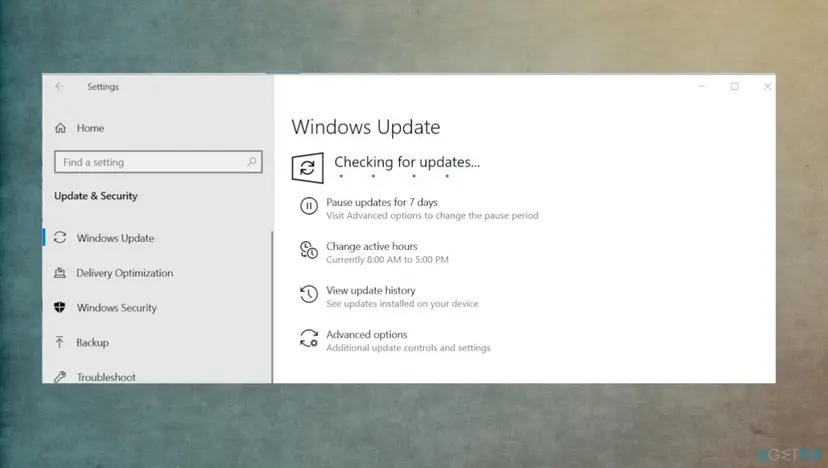
Windows 10 left support on 14 October 2025. A PC without paid extended updates no longer gets runtime fixes. If a newer program crashes on Windows 10 22H2 and runs elsewhere, this may be why.
If an update fails to install, that is a separate problem to solve first. Step by step: Reset Windows Update components
It worked if: Windows Update reports that you are up to date, and the program no longer crashes.
If not: If Windows is current and several programs still crash, repair the system files with Fix 4.
Fix 4. Repair Windows system files with SFC and DISM
20 minutesNo riskSeveral unrelated programs crash with ucrtbase.dll, or a program reports that ucrtbase.dll is missing or not found.
On Windows 10 and 11 ucrtbase.dll is an operating system file, so the system file checker covers it. DISM first repairs the store that SFC copies good files from, then SFC replaces a damaged runtime in System32 and SysWOW64.
- Open an elevated command window. Right-click Start and select Terminal (Admin), or type cmd in the search box, right-click Command Prompt and select Run as administrator. Select Yes when Windows asks for permission.
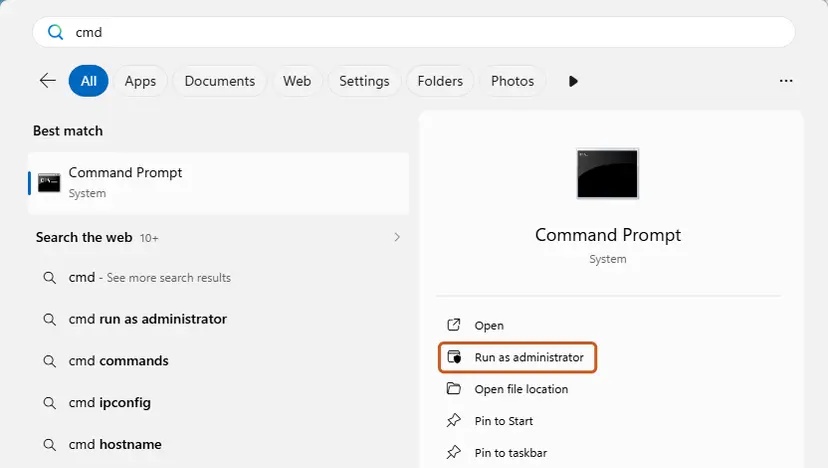
Search for cmd and choose Run as administrator. Screenshot: Windows 11 26H2. - Run DISM first. Type the command below and press Enter. DISM downloads clean copies of damaged components from Windows Update, so it can take several minutes. Wait until it says The operation completed successfully.
DISM.exe /Online /Cleanup-Image /RestoreHealth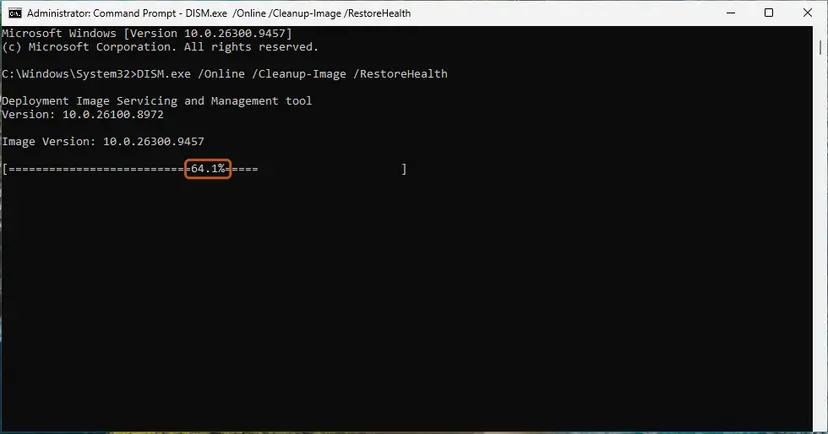
DISM /RestoreHealth running. Screenshot: Windows 11 26H2. - Run System File Checker. In the same window, type the command below and press Enter. Do not close the window until the verification reaches 100%.
sfc /scannow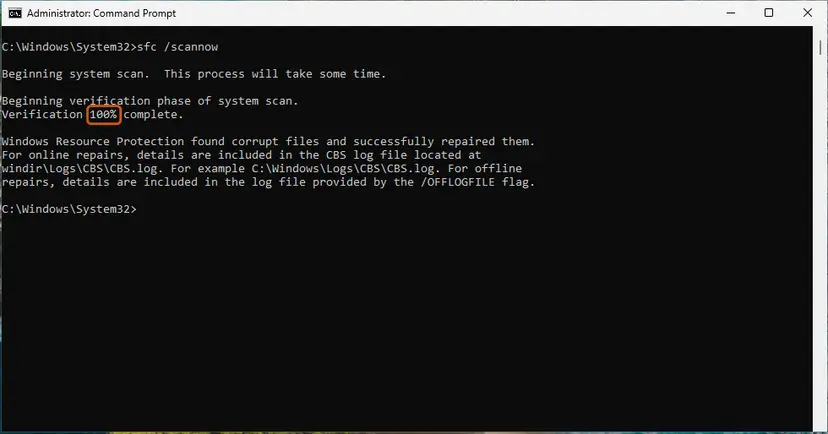
sfc /scannow at 100%. Screenshot: Windows 11 26H2. - Read the result and restart. Compare the last message with the table below this guide, then restart the PC so that repaired files are loaded.
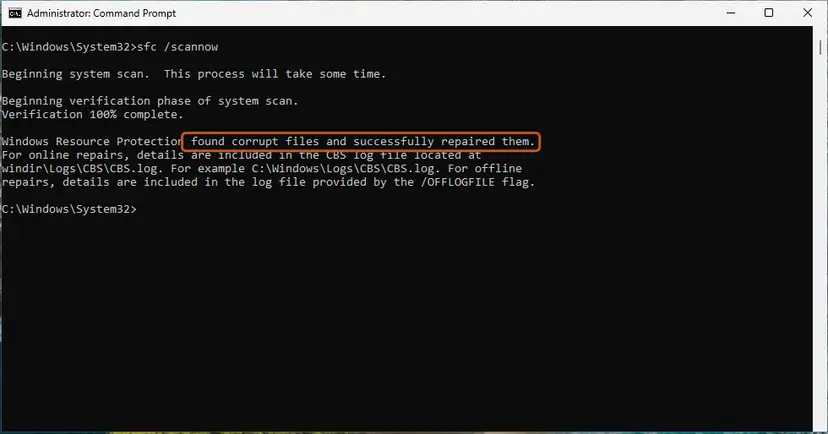
The result line tells you what SFC did. Screenshot: Windows 11 26H2.
These steps were written for Windows 11 24H2 and 25H2. The full page with the other versions and what each result means: Run DISM and SFC to repair Windows system files
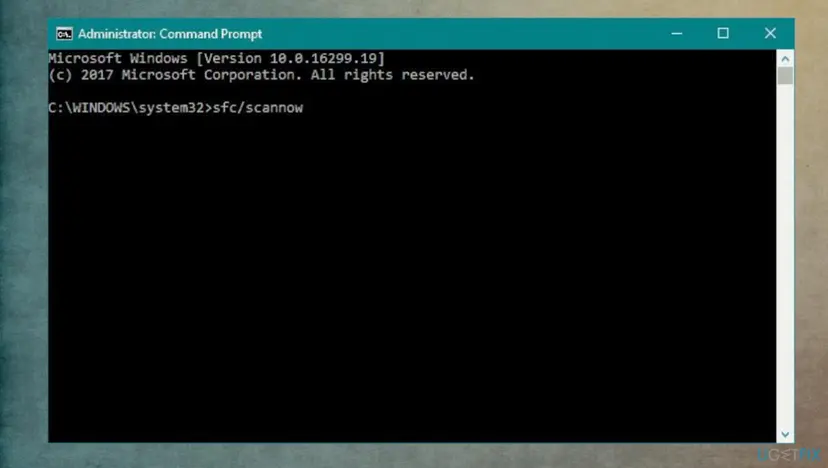
- When the scan ends, read its last line. "Windows Resource Protection did not find any integrity violations" means the system copy is fine.
- If it found and repaired files, restart the PC and test the program.
- If it could not repair some files, run the DISM command from the procedure again, restart and run SFC once more.
It worked if: SFC reports no integrity violations, or that it repaired the files, and the programs start without the crash.
If not: If only one program still fails, go back to Fix 2. If the record names Visual C++ files as well, try Fix 5.
Fix 5. Repair the Microsoft Visual C++ Redistributable
5 minutesNo riskThe crash report or another error box also names vcruntime140.dll, vcruntime140_1.dll or msvcp140.dll.
Programs built with Visual Studio 2015 or later use ucrtbase.dll together with the Visual C++ libraries. Microsoft calls the Universal CRT a fundamental dependency of those libraries, so a damaged Visual C++ package can make a crash surface inside the runtime.
- Open Programs and Features. Type control panel in the search box on the taskbar and select Control Panel. Select Programs > Programs and Features.
- Find the installed versions. Look for the entries that start with Microsoft Visual C++. Each one shows a year and an architecture, x64 or x86. Several entries side by side are normal: older versions stay installed next to newer ones.
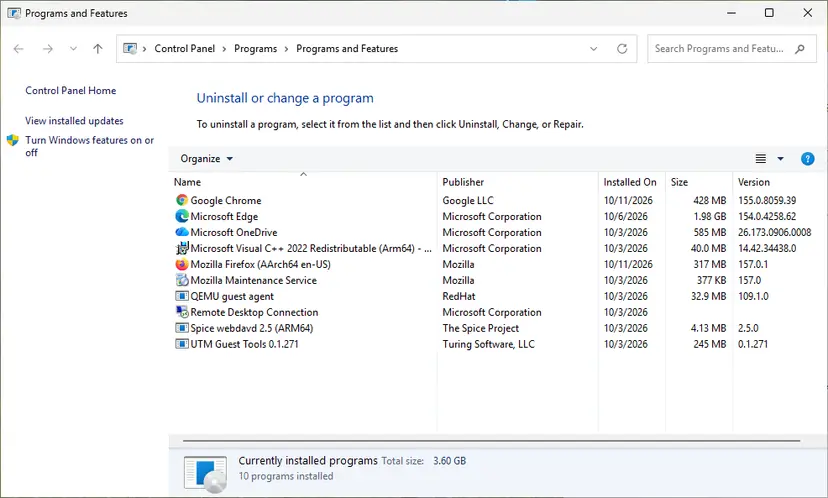
Each Visual C++ version is its own entry in Programs and Features. Screenshot: Windows 11 26H2. - Repair each Visual C++ entry. Right-click an entry and select Change, then select Repair in the window that opens. Do the same for every Microsoft Visual C++ entry.
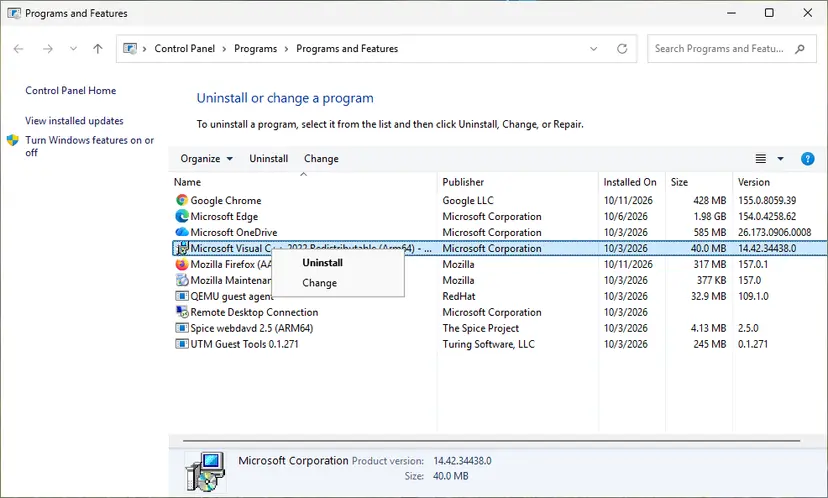
Right-click the entry and select Change to reach the repair option. Screenshot: Windows 11 26H2.
These steps were written for Windows 11 25H2 and 26H2, Windows 10 22H2. The full page with the other versions and what each result means: How to repair Microsoft Visual C++ Redistributable and .NET Framework
- Repair the newest Microsoft Visual C++ v14 Redistributable (x64) entry, or its 2015-2022 form.
- Repair the (x86) entry of the same version.
- Restart the PC and test the program.
A missing vcruntime file has its own guide with Microsoft's download links: VCRUNTIME140_1.dll was not found. The Visual C++ package does not replace ucrtbase.dll on Windows 10 and 11, because Windows already has it.
It worked if: Both repairs end with Setup Successful, and the program no longer crashes.
If not: If the program still crashes, try Fix 7 if the problem started on a known day.
Fix 6. ucrtbased.dll was not found: get a release build of the program
10 minutesNo riskThe message names ucrtbased.dll, with a d before the dot, as missing or not found.
ucrtbased.dll is the debug version of the runtime. Microsoft's library list marks it as not redistributable, so only a debug build of a program needs it, and only PCs with developer tools have it.
- Note which program shows the message and where you got it.
- Download the normal release version from the program's official site or store. A finished program should not ask for ucrtbased.dll.
- If the program came from a friend, a course or a forum, ask its author for a release build.
- If you build the program yourself in Visual Studio, switch the configuration from Debug to Release and build again.
- Run the release build on the PC that showed the error.
| File | What it is | Who has it |
|---|---|---|
ucrtbase.dll | The release Universal CRT, linked with /MD. | Every Windows 10 and 11 PC. |
ucrtbased.dll | The debug Universal CRT, linked with /MDd. Not redistributable. | PCs with Visual Studio or the Windows SDK. |
Microsoft does not allow the debug runtime to be redistributed, and a DLL site copy is of unknown origin. Install Visual Studio with the C++ workload only if you are the developer and need to debug.
It worked if: The release build starts without asking for ucrtbased.dll.
If not: If no release build exists, the program's author has to provide one. No Windows setting can replace the missing debug file.
Fix 7. Undo a recent change with System Restore
20 to 30 minutesLow riskCrashes started on a known day after a driver, Windows update or program was installed, and a restore point exists from before.
If the crash began right after a change to the system, returning system files, drivers and installed programs to that earlier state removes the change without guessing which one it was.
- Open System Restore. Press Windows+R, type the command below and press Enter. You can also open Control Panel > Recovery > Open System Restore. If a first page opens, select Next.
rstrui.exe - Choose a restore point. Select a restore point from a time before the problem started. The Description often names the event, such as a driver or app install. If the one you need is missing, select Show more restore points (shown only when there are more).
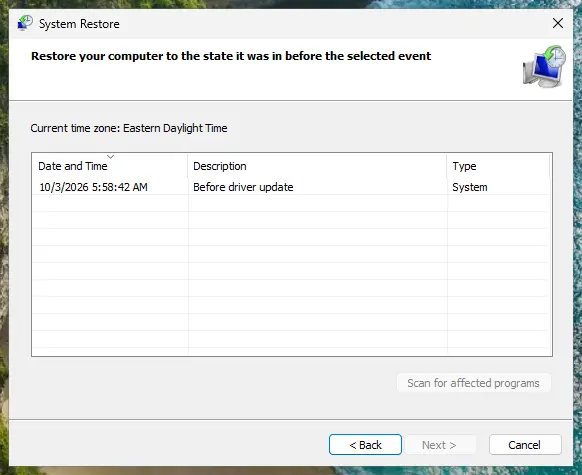
Pick a restore point from before the problem started. Screenshot: Windows 11 26H2. - See what will change. Select Scan for affected programs. The upper list shows programs and drivers that will be removed; the lower list shows those that might come back and may need to be reinstalled. Select Close.
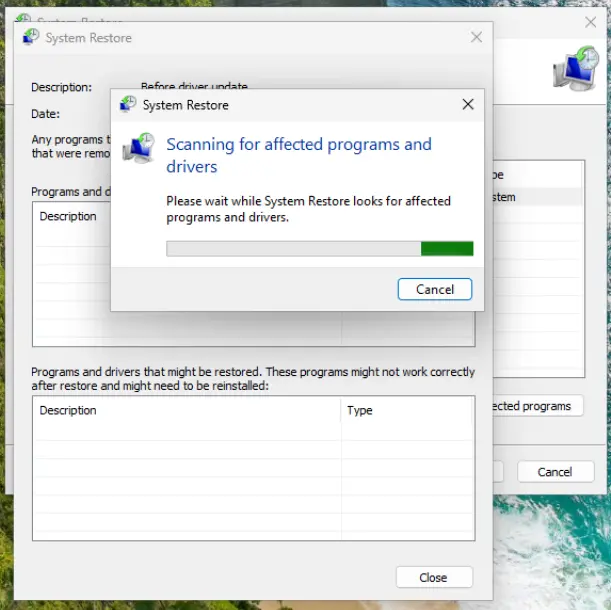
The scan lists programs and drivers the restore removes or brings back. Screenshot: Windows 11 26H2. - Start the restore. Select Next, check the summary and select Finish. Windows restarts and applies the restore point. Do not turn the PC off.
- Check the result. After sign-in Windows reports whether the restore succeeded. Check whether the problem is gone.
These steps were written for Windows 11 and Windows 10 (the steps are the same). The full page with the other versions and what each result means: Undo recent changes with System Restore
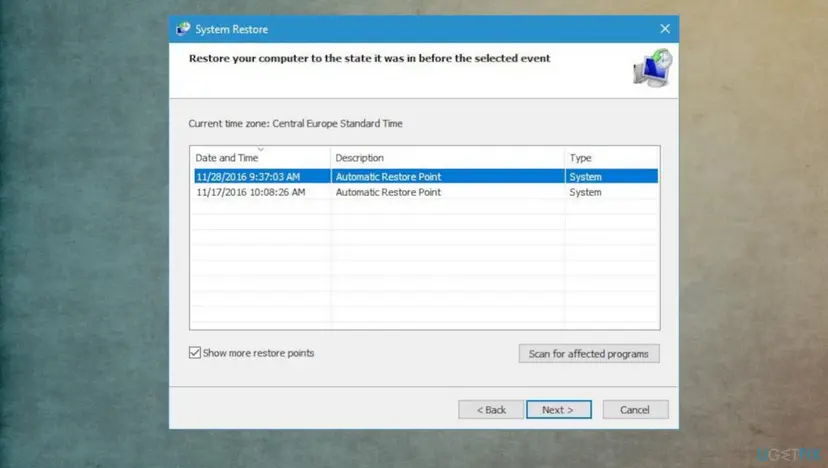
- Pick the newest restore point dated before the first crash.
- Select Scan for affected programs and note what will be removed, so you can reinstall it later.
- Finish the wizard, let the PC restart and test the program.
It worked if: After the restart Windows reports that System Restore completed, and the program runs.
If not: If no restore point exists or the crash continues, collect the facts described in the next section.
If the ucrtbase.dll crash is still there: what to check and what to send
When one program keeps crashing after all seven fixes, the cause is almost certainly in that program, and only its maker can fix it. Your job is to give them a complete report.
- What to send to the program's support: the full Event Viewer record from Fix 1 (copy it with Copy > Copy Details as Text), the program version, your Windows version and edition, and what you did right before the crash.
- A crash dump if they ask: Windows Error Reporting keeps reports that Reliability Monitor can show under View technical details. Send only what the vendor asks for.
- When it is likely hardware: many different programs crash at random, the faulting module changes between crashes, or blue screens appear too. Test the memory: How to test your RAM with Windows Memory Diagnostic, and check the disk: Check a disk for errors (chkdsk).
- When it is not this error any more: a record with another faulting module, or a box naming a different DLL, is a new problem with its own cause.
Reinstalling Windows replaces ucrtbase.dll with a fresh copy, but SFC and DISM already do that. It helps only when several programs crash and Fix 3 and Fix 4 failed. Keep-your-files option: Reinstall Windows without losing files
How to keep ucrtbase.dll crashes from coming back
- Keep Windows updated, because that is the only way the runtime is updated on Windows 10 and 11.
- Keep programs and games on their current version and install vendor patches.
- Update mods and plug-ins together with the program they belong to.
- Note the date of the first crash; it makes System Restore and support requests much easier.
- Do not download ucrtbase.dll or ucrtbased.dll from DLL sites.
- Do not copy runtime files into System32, SysWOW64 or program folders.
- Do not run regsvr32 on ucrtbase.dll; it is not a component to register.
- Do not let cleanup tools delete files from Windows folders.
If a program you build yourself crashes in ucrtbase.dll, run it under the Visual Studio debugger in a Debug configuration. The debug runtime, ucrtbased.dll, checks parameters and reports the exact call that failed, which the release crash record cannot show.
Frequently asked questions
What is ucrtbase.dll?
It is the Universal C Runtime, the library of standard C functions that programs built with Visual Studio 2015 or later use. Microsoft describes it as a Windows operating system component that is part of Windows 10 and later and Windows Server 2016 and later. The 64-bit copy is in C:\Windows\System32 and the 32-bit copy in C:\Windows\SysWOW64. It is not a virus and not part of any single program. Its version follows your Windows build and changes with Windows updates.
Why does ucrtbase.dll keep crashing my game?
In most cases the game crashes, not the DLL. The game passed bad data to a runtime function or detected corrupted memory, and the stop happened inside ucrtbase.dll. With exception code 0xc0000409 the process ended itself because its state was considered corrupted. Update the game, verify its files, start it once without mods and check the vendor's known issues. If other games and programs crash too, install Windows updates and run SFC and DISM.
What does faulting module name ucrtbase.dll mean?
It is a line in the Application Error record in Event Viewer. It names the module that was running when the program crashed. For ucrtbase.dll that means the crash happened in Windows' C runtime while it worked for the program. The line above it, the faulting application name, tells you which program to repair. The exception code and the faulting module path below it tell you the kind of crash and whether the system copy of the file was used.
Where can I download ucrtbase.dll?
You do not need to, and you should not. On Windows 10 and 11 the file is part of Windows. Microsoft's deployment documentation says the copy in the system directory is always used, even when a program brings its own copy. A file from a DLL site therefore does not change the crash and may carry malware. If the system copy is damaged, SFC and DISM restore it, and Windows Update brings the current version. Developers find redistributable copies for older Windows in the Windows SDK.
What is ucrtbased.dll and why is it not found?
ucrtbased.dll is the debug version of the Universal C Runtime. Microsoft's list of runtime library files marks it as not redistributable, so it exists only on PCs with Visual Studio or the Windows SDK. A program that asks for it was built in a Debug configuration and was not meant to be shared. Get the release version from the program's maker, or, if you are the developer, build a Release configuration. Copying the debug file to another PC is not allowed.
Does the ucrtbase.dll crash happen on Windows 11?
Yes, in the same way as on Windows 10. Windows 11 also includes the Universal CRT as part of the system, in the same folders. The record, the causes and the fixes are the same. On Windows 11 the runtime version follows the Windows 11 build, so installing all cumulative updates keeps it current. If a crash began right after a feature update to a new Windows 11 version, check whether the program's maker has released an update for that version.
Can I fix ucrtbase.dll with regsvr32?
No. The earlier version of this guide suggested regsvr32 ucrtbase.dll, but the command is meant for components that programs find through the registry. Microsoft describes ucrtbase.dll as an operating system component that Windows loads from the system directory, so registering it changes nothing. Use Windows Update and SFC and DISM to repair the runtime itself, and repair the crashing program.
Will reinstalling the Visual C++ Redistributable fix ucrtbase.dll?
Sometimes it helps, but not because of ucrtbase.dll itself. Microsoft explains that the Visual C++ Redistributable installs the Universal CRT only on PCs that do not have one, and Windows 10 and 11 always have one. A repair of the Visual C++ package fixes the program's vcruntime and msvcp libraries, which work together with the runtime. Try it when the crash report names those files too. For the runtime itself, Windows Update and SFC are the right tools.
Is a ucrtbase.dll crash a sign of a hardware problem?
Usually not. When one program always crashes in the same module, the cause is that program. Hardware becomes likely when many unrelated programs crash at random, the faulting module changes from crash to crash, or blue screens appear as well. Faulty memory corrupts data that any program may then pass to the runtime. In that case run Windows Memory Diagnostic and a disk check before you reinstall anything.
Sources
- Microsoft Learn: Universal CRT deployment (learn.microsoft.com)
- Microsoft Learn: C runtime (CRT) and C++ standard library (STL) lib files (ucrtbase.dll and ucrtbased.dll) (learn.microsoft.com)
- Microsoft Learn: __fastfail (exception code 0xC0000409) (learn.microsoft.com)
Did this fix work?
One click, no account. It tells the next reader which guides are worth their time.
Questions and experiences: fix ucrtbase.dll application error on Windows
Still broken, or found a fix we did not cover? Ask here: members and our editors answer. Reading is open; writing needs a free account.
…