
How to fix Prototype 2 crashing on startup in Windows 11 and 10

Prefer to fix it yourself? The manual steps follow.
- 6methods
- 5 to 30 minutes
- Easy
Applies to Prototype 2 for PC (Steam app 115320, also the retail and German Low Violence versions) on Windows 11 and Windows 10
6 methods in this guide
Hello. I wanted to play Prototype 2, but it keeps crashing when I start the game. What do I do?
Prototype 2 is a 2012 game made for Windows 7, and on today's PCs it often closes to the desktop seconds after you press Play. The two known causes are a CPU with more than 8 threads and certain USB input devices. Start by letting Steam install the September 2025 update and verifying the files, then limit the threads the game can see.
Prototype 2 crashing on startup is almost always an old engine meeting new hardware. First let Steam update the game and verify its files (Fix 1): the September 2025 update changed the game files and seemingly fixed one launch crash. If it still closes, limit Windows to 4 processors for the session (Fix 2) or add the community crash fix (Fix 3).
| Error | No error message. The screen goes black for a moment or the logo shows, then the game closes back to the desktop. |
|---|---|
| Where it appears | At launch, on the first loading screen, or when you start or load a game. Steam shows the game as running for a few seconds, then as stopped. |
| Main cause | A CPU with more than 8 threads, which the 2012 engine cannot handle, and on some PCs a keyboard or USB device that the game's input code trips over. |
| Fastest fix | Update and verify the game in Steam (Fix 1), then set Number of processors to 4 in System Configuration (Fix 2). |
| Also written as | Prototype 2 crash on startup, not launching, won't launch on Steam, crashing in the first few seconds, stuck on the loading screen. |
| Affects | Windows 11 and Windows 10 PCs with modern multi-core CPUs. The official requirements list only Windows XP, Vista and 7. |
| Vendor status | Activision updated the Steam version on 29 September 2025 without patch notes we could find. No Activision support page for this crash exists that we could find. |
| Save and settings folder | %USERPROFILE%\Documents\Activision\Prototype 2\. The fixes below do not touch it. |
| Time to fix | 5 minutes for Fixes 1 and 2, 10 minutes for the community fix. |
Facts checked on 15 October 2026. Steps written for Windows 11 (25H2 and 26H2) and Windows 10 22H2, with the Steam version of Prototype 2.
What Prototype 2 crashing on startup means on Windows 11 and 10
Prototype 2 came out in 2012. Its system requirements name Windows XP and Vista as the minimum and Windows 7 as recommended, with a quad-core CPU at most. Windows 10 and Windows 11 are not on the list, and the engine was never built for the 12, 16 or 24 threads of a current processor.
So when the game closes without a word on Windows 11, nothing is broken on your PC. The game hits a limit it was written with and quits before it can show an error box. That is why there is no code to search for, only the crash itself.
- Crash in the first few seconds, after a black screen: most often the input device problem (Fix 4) or files that need the 2025 update (Fix 1).
- Crash on the logo, the menu or when you press New Game or Load: most often the thread count (Fix 2 or Fix 3).
- Steam says Running, then Stopped, and no window opens: missing runtimes or a broken mod install (Fix 5 and Fix 1).
Windows 10 left Microsoft support on 14 October 2025. The fixes on this page work the same way on Windows 10 22H2 and on Windows 11.
Why Prototype 2 crashes in the first few seconds, most common cause first
PCGamingWiki, which keeps the list of known PC issues for the game, names two launch crashes. The table ranks them with the less common causes and ties each one to a fix.
| How often | Cause | How to spot it | Fix |
|---|---|---|---|
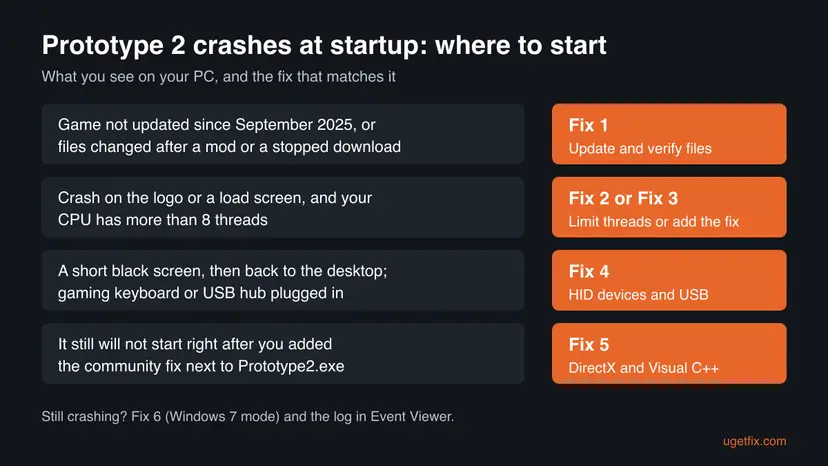
| Most often | The CPU has more than 8 threads | Crash on the logo, the menu or a load screen; a recent Intel or AMD processor | Fix 2 or Fix 3 |
| Often | An old copy of the game files, or files changed by a mod | Not updated since September 2025, or a mod was added before that update | Fix 1 |
| Sometimes | A keyboard or device with extra USB ports confuses the game's input code | Short black screen, then the desktop; a gaming keyboard, USB hub or many HID devices | Fix 4 |
| Sometimes | DirectX 9 or Visual C++ runtime files are missing | Nothing opens at all, often after adding the community fix | Fix 5 |
| Rarely | Windows settings that do not suit a Windows 7 game | Other fixes did not help; screen scaling above 100 % | Fix 6 |
The old advice to update the graphics driver does no harm, but no known Prototype 2 launch crash is tied to the driver. If every game on the PC crashes, look at the driver first; if only Prototype 2 does, start with the table.
How to fix Prototype 2 crashing on startup
Fix 1 costs nothing and covers the 2025 update. Fixes 2 and 3 are two ways to solve the thread count crash: one changes a Windows setting for a while, the other adds a small file to the game folder. Fixes 4 to 6 cover input devices, runtimes and the compatibility settings.
| What you see or what your PC has | Start with |
|---|---|
| The game was not updated since September 2025, or you added a mod | Fix 1 |
| Crash on the logo, the menu or when you load a save, on a CPU with more than 8 threads | Fix 2, then Fix 3 for a lasting fix |
| A black screen for a second, then the desktop, with a gaming keyboard or USB hub plugged in | Fix 4 |
| Steam shows Running, then Stopped, and no window opens | Fix 5 |
| Nothing above helped | Fix 6, then the log in the Still crashing section |
Fix 1. Let Steam update Prototype 2 and verify the game files
5 to 10 minutesNo riskEveryone, first. It matters most if you have not played since September 2025 or added a mod.
Activision updated the Steam version of Prototype 2 on 29 September 2025, and PCGamingWiki reports that it seemingly fixed the crash caused by some keyboards. A verify also replaces game files that a mod or a stopped download changed.
- Open Steam and go to Library. If Prototype 2 shows Update or a queued download, let it finish.
- Right-click PROTOTYPE 2 and select Properties.
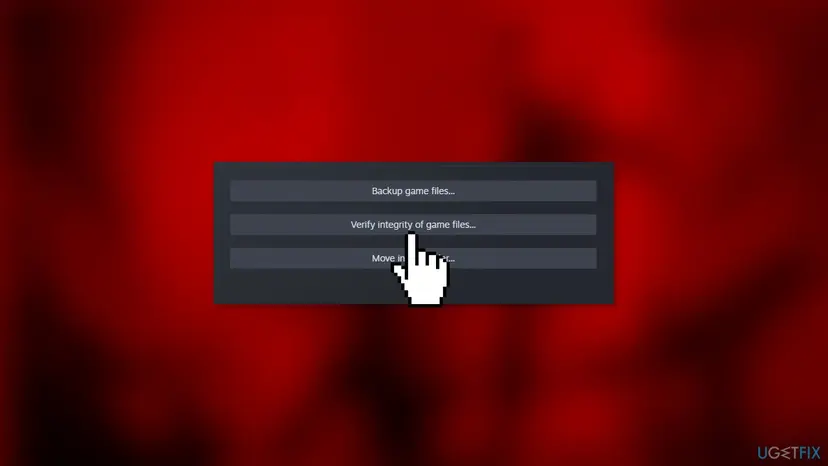
- Open Installed Files and select Verify integrity of game files.
- Wait for Steam to check the files and download any that failed, then start the game.
Steps for other launchers and the full Steam path: How to verify game files in Steam, Epic Games, Xbox app, EA app, Battle.net and GOG Galaxy. A verify only checks the game's own files. Files you added yourself, such as a mod, stay in the folder, so remove them by hand if the crash started after you added them.
It worked if: Steam reports that all files were validated, or downloads the failed ones, and the game reaches the main menu.
If not: If it still closes on the logo or a load screen, limit the threads it can see in Fix 2.
Fix 2. Limit Windows to 4 processors while you play
5 minutes plus two restartsLow riskYour CPU has more than 8 threads and the game closes on the logo, the menu or a load screen.
PCGamingWiki confirms that Prototype 2 may crash on a CPU with more than 8 threads. System Configuration can start Windows with fewer processors, so the game never sees the threads it cannot handle.
- Press Win + R, type
msconfigand press Enter. - Open the Boot tab and select Advanced options.
- Select the Number of processors check box and choose 4 in the list.
- Select OK, then OK again, and restart the PC.
- Start Prototype 2 and play.
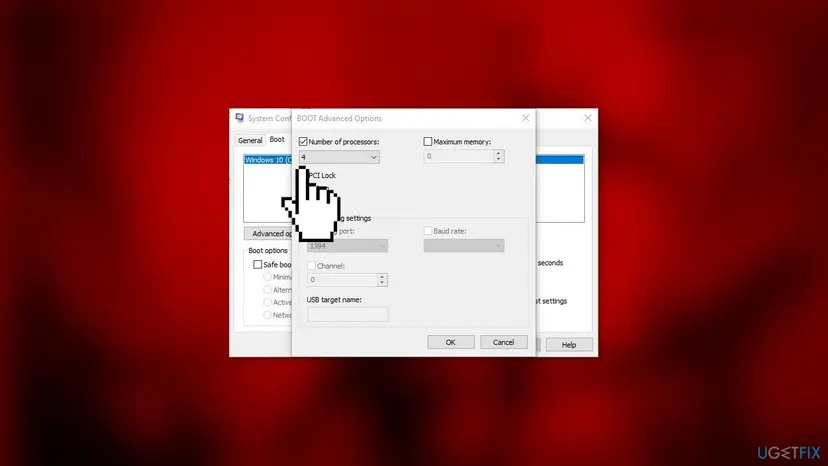
Windows now runs on only 4 processors for everything, so other programs get slower. When you stop playing, open msconfig again, clear the Number of processors check box, select OK and restart.
To find your thread count, open Task Manager with Ctrl + Shift + Esc, go to Performance > CPU and read Logical processors. PCGamingWiki also lists turning off threads above 8 in the BIOS, but that is harder to undo, so try this first.
It worked if: After the restart the game passes the logo and the first loading screen, and New Game or Load works.
If not: If it works but you do not want to switch the setting every time, use the community fix in Fix 3. If it still crashes, go to Fix 4.
Fix 3. Add the Prototype2Fix community patch to the game folder
10 minutesLow riskThe thread limit in Fix 2 helped, and you want a lasting fix that leaves Windows alone.
Prototype2Fix is a small plugin by the modder emoose that loads with the game. Its author says it prevents the launch and load screen crash caused by too many CPU cores and threads, and the frame rate drops caused by too many HID devices.
- Open the Prototype2Fix page on Nexus Mods and download the file from its Files tab. Version 1.6 is from January 2024.
- In Steam, right-click PROTOTYPE 2 and select Manage > Browse local files. On a default install this is
C:\Program Files (x86)\Steam\steamapps\common\Prototype 2. - Write down the names of the files inside the ZIP, so you can remove them later.
- Extract all of them into that folder, next to
Prototype2.exe. - Leave
prototype_fix.inias it is for the first test, and start the game from Steam as usual. - If you used Fix 2, undo the processor limit in
msconfigfirst, then test again.
PCGamingWiki reports that the plugin seemingly never got updated for the 29 September 2025 game update. With it, character movement may drift and some of its fixes may stop working. If that happens, delete the files you added and use Fix 2 instead.
The plugin turns on a borderless window and turns off DPI scaling for the game by default. Both can be changed in prototype_fix.ini. If anything goes wrong, its prototype_fix.log file in the same folder says what it did.
It worked if: The game starts with Windows on all its threads, and the folder now holds a prototype_fix.log file.
If not: If the game will not open at all after adding the files, install its runtimes in Fix 5. If movement drifts, remove the files and go back to Fix 2.
Fix 4. Disable HID-compliant consumer control devices or unplug USB devices
10 minutesLow riskThe screen goes black for a moment, then you are back on the desktop, and a gaming keyboard or USB hub is plugged in.
PCGamingWiki reports that some keyboards, especially devices with extra USB ports, make Prototype 2 crash while it loads. The game reads every input device, and one of these extra entries trips it up.
- Unplug USB devices you do not need to play, such as a hub, a second keyboard or a drawing tablet, and start the game.
- If it now starts, plug them back in one at a time after the game reaches the menu, to find the one that causes it.
- To keep a device plugged in instead, press Win + X and select Device Manager.
- Expand Human Interface Devices.
- Right-click the first HID-compliant consumer control device and select Disable device, then Yes.
- Start the game. If it still crashes, disable the next HID-compliant consumer control device and test again.
- After playing, right-click each disabled entry and select Enable device.
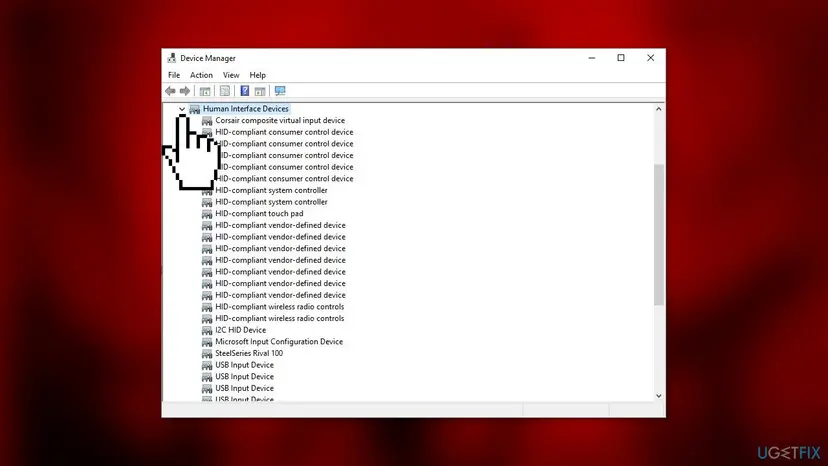
Disable only HID-compliant consumer control device, not HID-compliant device. These entries usually carry media and volume keys, so those keys may stop working until you enable the entry again.
It worked if: The game passes the black screen and reaches the menu with your mouse and keyboard still working.
If not: Enable the entries again. If the game still closes with every extra device unplugged, the cause is elsewhere: go to Fix 5.
Fix 5. Install the game's DirectX files and the Visual C++ runtime
5 minutesNo riskSteam shows the game as running, then stopped, and no window ever opens, or this started after Fix 3.
Prototype 2 is a Direct3D 9.0c game and ships the DirectX 9 files it needs in its own folder, as Windows 11 and Windows 10 do not install them all. The author of Prototype2Fix names these files and the 32-bit Visual C++ runtime as the fix when the game will not launch.
- In Steam, right-click PROTOTYPE 2 and select Manage > Browse local files.
- Open the
redistfolder, thenDirectX. - Double-click
DXSETUP.exe, select Yes in the permission prompt, and follow the installer to the end. - Install or repair the x86 Visual C++ Redistributable as described below, then restart the PC.
Install the x86 package even on 64-bit Windows, as the author of the fix advises. Where to get it and how to repair the versions already on the PC: How to repair Microsoft Visual C++ Redistributable and .NET Framework.
It worked if: The DirectX installer ends with a message that the installation is complete, and the game window opens.
If not: If no window opens still, try the compatibility settings in Fix 6.
Fix 6. Run Prototype2.exe in Windows 7 compatibility mode as administrator
3 minutesNo riskFixes 1 to 5 did not help, or text and menus look wrong on a screen with scaling above 100 %.
Windows 7 is the system the game was made for. Compatibility mode makes Windows answer the game's version checks as Windows 7 would; we could not confirm it fixes this crash, but it is quick and easy to undo.
- In Steam, right-click PROTOTYPE 2 and select Manage > Browse local files.
- Right-click
Prototype2.exeand select Properties. On Windows 11 it may be under Show more options. - Open the Compatibility tab.
- Select Run this program in compatibility mode for and choose Windows 7.
- Select Run this program as an administrator, then Apply and OK.
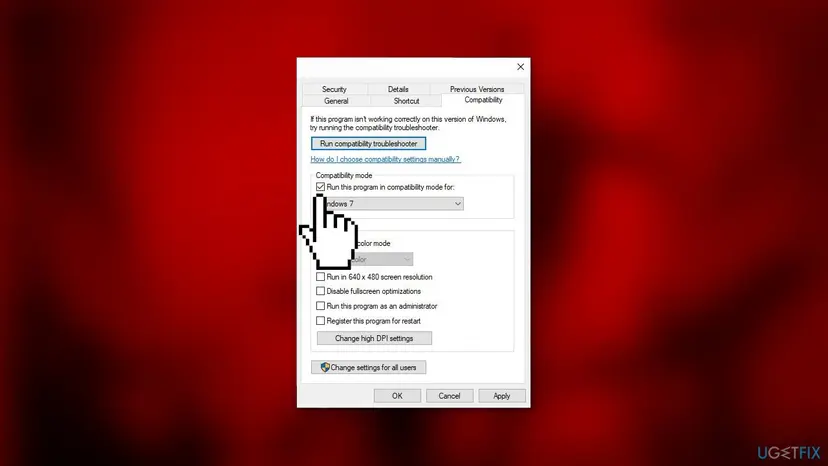
Every option on this tab, and how to undo it: How to run a program as administrator or in compatibility mode. If you use the community fix, leave the high DPI settings alone: the fix already turns off DPI scaling for the game.
It worked if: The game starts from Steam after a permission prompt and reaches the menu.
If not: Clear both check boxes again and read the crash entry in Event Viewer, as the next section shows.
Prototype 2 still crashes at startup: read the crash in Event Viewer
Prototype 2 writes no crash report of its own, but Windows records every crash of Prototype2.exe. The entry names the file that failed, which tells you which fix to look at again.
- Press Win + X and select Event Viewer.
- Open Windows Logs > Application.
- Find the newest Error with the source Application Error at the time the game closed.
- Read Faulting application name (it should be
Prototype2.exe) and Faulting module name.
- The module is a DirectX file: run
DXSETUP.exeagain (Fix 5). - The module is a file from Prototype2Fix: remove the files you added (Fix 3) and use Fix 2.
- The module is an overlay, recorder or RGB tool: close that program and test again.
- No entry at all: the game was closed by something else, such as security software. Check its log, and if you pause it for one test, turn it back on right after: Turn off Microsoft Defender protection for a moment.
If the whole PC freezes or restarts, or other games crash too, that points at hardware or the driver rather than Prototype 2. Copy the Event Viewer entry, your Windows version from winver and your CPU model if you ask in the Steam discussions.
When Prototype 2 starts but crashes or hangs later
Some problems look like a startup crash but come later. PCGamingWiki lists these, with the workarounds players use. Most are marked there as not fully confirmed.
| What happens | What to do |
|---|---|
| Stuck on a gray screen after Alt + Tab | Press Alt + Tab two more times, or run the game in a window |
| Mission Operation Flytrap cannot be finished | In Task Manager, right-click prototype2.exe, set its affinity to one CPU and restart the mission; allow all CPUs again after it |
| Slower and slower after long play, then a crash | A memory leak; Alt + Tab out and back frees some memory for a while |
| No voices in cutscenes | Set Options > Audio sound system to TV instead of Home Theater |
| Stuck on the loading screen when starting a game | The thread count crash again: Fix 2 or Fix 3 |
How to keep Prototype 2 from crashing at startup again
- Let Steam keep the game updated, and verify the files after any update that changes how it behaves.
- Keep a note of every file you add to the game folder. A later update can make an old mod the cause of a new crash.
- If you limit processors in
msconfig, set a reminder to undo it, or move to the community fix. - Plug a new keyboard, hub or controller in after the game reaches the menu the first time, so you know whether it causes trouble.
- Back up
%USERPROFILE%\Documents\Activision\Prototype 2\before trying mods.
The game has not changed much since 2012, so a working setup usually stays working until Steam or Windows changes something. If it breaks right after a Windows update, start again at Fix 1.
Frequently asked questions
Why does Prototype 2 crash on startup on Windows 11?
Prototype 2 was made in 2012 for Windows 7 and older, and its engine cannot handle a CPU with more than 8 threads. Most Windows 11 PCs have more, so the game closes on the logo or the first loading screen. Some keyboards and USB devices cause a second launch crash. Windows 11 itself is not the problem, which is why the fixes are the same on Windows 10. Start with the Steam update and file check, then limit the threads the game can see.
Why is Prototype 2 not launching on Windows 11 at all?
If no window opens and Steam shows the game as running for a few seconds, the game cannot load its runtime files or a file in its folder is broken. Verify the game files in Steam first (Fix 1). Then run DXSETUP.exe from the game's redist\DirectX folder and install the x86 Visual C++ Redistributable (Fix 5). If you added the community fix just before this started, remove its files and test again.
Did the 2025 Steam update fix Prototype 2 crashes?
Partly. Activision updated the Steam version on 29 September 2025, and we found no patch notes for it. PCGamingWiki reports that the update seemingly fixed the crash caused by some keyboards and USB devices. It lists no fix for the crash on CPUs with more than 8 threads, so Fix 2 or Fix 3 may still be needed. The update also seems to clash with the older community fix, which can make movement drift.
Is Prototype2Fix safe to use?
Prototype2Fix is a small plugin published on Nexus Mods by the modder emoose, and Nexus marks its file as scanned and safe to use. It does not change Windows: it only loads with the game from the game folder. You remove it by deleting the files you added. The real risk is compatibility, since PCGamingWiki reports it was not updated for the September 2025 game update.
Is it bad to leave Number of processors set to 4?
It does no damage, but Windows then uses only 4 processors for everything until you change it back. Games, video exports and browsers with many tabs get slower. That is why PCGamingWiki and we advise clearing the setting in msconfig and restarting when you finish playing. If you play often, the community fix in Fix 3 avoids switching back and forth.
Will disabling HID-compliant consumer control devices break my keyboard or mouse?
Normally no. These entries carry extra functions such as media and volume keys, not the normal keys or the mouse pointer. Some devices list several, so a feature such as a volume wheel may stop until you enable the entry again. PCGamingWiki warns that this may accidentally disable an input device. Disable one entry at a time, test the game, and enable them all again in Device Manager when you are done.
Does the same fix work for Prototype 1 crashing?
The first Prototype game has the same kind of problems on new PCs, and the author of Prototype2Fix made a separate version of the fix for Prototype 1, also on Nexus Mods. The thread limit in msconfig and the Steam file check work the same way. This page covers Prototype 2; the steps are close, but use the plugin made for the game you play.
Will these fixes delete my Prototype 2 saves?
No. The game keeps its saves and settings in %USERPROFILE%\Documents\Activision\Prototype 2\, outside the install folder. Verifying files, adding the community fix and changing compatibility settings do not touch that folder. If you want to be safe before trying mods, copy the folder to another drive or a USB stick first. Copy it back to the same place if a save ever goes missing.
Does updating the graphics driver fix Prototype 2 crashing?
Not for the known startup crashes. Neither PCGamingWiki nor the author of the community fix ties the launch crash to the graphics driver. A current driver is still good practice, and it can help if other games crash as well. If only Prototype 2 crashes, the thread count, the game files and input devices are the better places to start.
Sources
Did this fix work?
One click, no account. It tells the next reader which guides are worth their time.
Questions and experiences: fix Prototype 2 crashing on startup in Windows 11 and 10
Still broken, or found a fix we did not cover? Ask here: members and our editors answer. Reading is open; writing needs a free account.
…