
How to fix api-ms-win-core-windowserrorreporting-l1-1-1.dll is missing on Windows?

Prefer to fix it yourself? The manual steps follow.
- 7methods
- 5 to 60 minutes
- Beginner
Applies to Windows 11, Windows 10 (all versions, including LTSB 2016), Windows 8.1 and Windows 7; games and programs built with recent Visual Studio tools
7 methods in this guide
- What the error means
- Causes, ranked
- Do not download the DLL
- The fixes
- 1. Check your Windows build
- 2. Update to 22H2 or Windows 11
- 3. Program version for your Windows
- 4. Remove copied DLL files
- 5. Reinstall the program
- 6. Repair Visual C++
- 7. Repair Windows with DISM, SFC
- Still there: what to check
- Keep it from coming back
- FAQ
Hello. Every time I try opening any game on Windows 10, I receive an error that says that api-ms-win-core-windowserrorreporting-l1-1-1.dll is missing. Thus, I can't play any games on my computer, and it is very frustrating. Any solutions to this problem, please?
api-ms-win-core-windowserrorreporting-l1-1-1.dll is not a normal file but a Windows API set name, which Windows itself maps to the code behind it. Microsoft lists it from Windows 10 build 16299 (version 1709) onward. So the error almost always means the app needs a newer Windows: check your build first, then update.
Press Win + R, type winver and read the OS Build. If it is below 16299, or you run Windows 7 or 8.1, your Windows does not have this API set: update Windows 10 to 22H2 or move to Windows 11 (Fix 1 and Fix 2). On a newer build, delete any copy you added by hand and reinstall the app. Never download this DLL from a DLL site.
| Error | "The program can't start because api-ms-win-core-windowserrorreporting-l1-1-1.dll is missing from your computer." in a System Error window. |
|---|---|
| Where it appears | The moment a game or program starts, in a small window titled with the program's name and System Error. |
| Main cause | Windows older than Windows 10 build 16299 (version 1709). Microsoft lists this API set only from that build on. |
| Fastest fix | Check the build with winver and update Windows 10 to 22H2 or move to Windows 11 (Fix 1 and Fix 2). |
| Also written as | api ms win core windowserrorreporting l1 1 1 dll, api-ms-win-core-windowserrorreporting-l1-1-1, with or without .dll. |
| What it is | An API set contract for Windows Error Reporting functions such as WerRegisterCustomMetadata, not a file on disk. |
| Affects | Windows 7, 8.1, Windows 10 1507 to 1703, Windows 10 LTSB 2016 and Windows Server 2016. Not Windows 11 or Windows 10 22H2, unless Windows is damaged. |
| Vendor status | Microsoft says an API set name identifies a contract, not a file, and there is not necessarily a file with that name on the PC. |
| Do not | Download the DLL from a DLL site or copy it into System32, SysWOW64 or the game folder. |
| Time to fix | 5 minutes to check. 30 to 60 minutes for a Windows feature update. |
Facts checked on 15 October 2026. Steps written for Windows 11 (25H2 and 26H2) and Windows 10 22H2.
What api-ms-win-core-windowserrorreporting-l1-1-1.dll is and what the missing error means
Most DLL errors name a real file. This one does not. Names that start with api-ms-win- are API sets: Microsoft's labels for a group of Windows functions. Microsoft Learn explains that an API set name identifies a contract, not a file, and that at run time Windows looks the name up in its API set schema and routes the program to the DLL that really holds the code.
- Full name
- api-ms-win-core-windowserrorreporting-l1-1-1, an API set of Windows Error Reporting (WER).
- Functions in it
WerRegisterAdditionalProcess,WerRegisterCustomMetadata,WerRegisterExcludedMemoryBlockand their Unregister partners, which let a program add details to its own crash reports.- Since
- Windows 10 build 10.0.16299 (version 1709), according to Microsoft's list of APIs present on all Windows devices.
- Who provides it
- Windows itself. Microsoft says there does not need to be a file with the contract name on disk.
So when the window says the file is missing, the real message is: this Windows does not know the contract the program asked for. Microsoft writes that if the contract is not mapped on the device, loading it fails. On an old Windows the contract is simply not there, and no single file can add the Windows functions behind it.
- The full window:
XXX.exe - System Errorwith the text "The program can't start because api-ms-win-core-windowserrorreporting-l1-1-1.dll is missing from your computer." and "Try reinstalling the program to fix this problem." - Other spellings people search: api ms win core windowserrorreporting l1 1 1 dll, or the name without .dll. Windows ignores upper and lower case, so they all mean the same contract.
- Neighbour names: the same kind of window can name
api-ms-win-core-libraryloader-l1-1-1.dll,api-ms-win-core-version-l1-1-1.dllorapi-ms-win-core-winrt-error-l1-1-1.dll. They are API sets too, and the build check below applies to them in the same way. - Why games: programs built with current Visual Studio tools and the Windows 10 SDK can call these crash reporting functions. On an older Windows the program stops before its first screen.
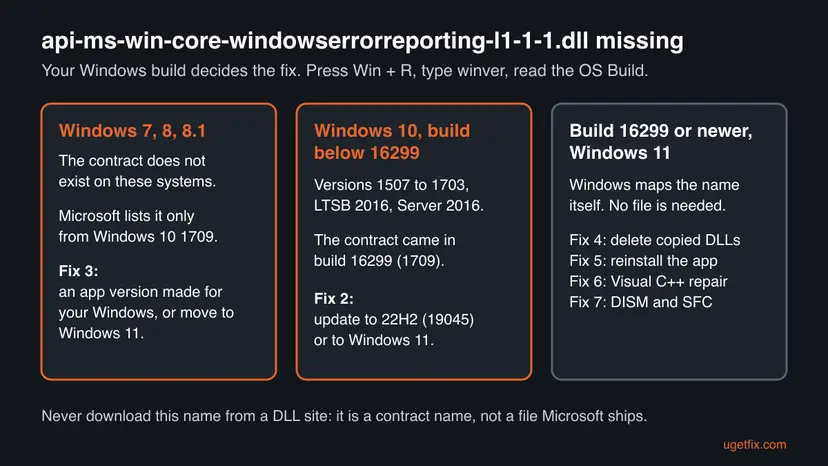
What causes the api-ms-win-core-windowserrorreporting-l1-1-1.dll error, from most to least common
Most often the PC runs a Windows older than build 16299, usually an old Windows 10 that stopped updating, Windows 10 LTSB 2016, Windows 8.1 or Windows 7. Less often someone already copied a DLL with this name into a game folder, and the copy now confuses the program. Rarely the program itself or Windows' own files are damaged.
| Cause | How often | How to tell | Fix |
|---|---|---|---|
| Windows 10 older than build 16299 (versions 1507, 1511, 1607, 1703), including LTSB 2016 and Server 2016. | Most often | winver shows an OS Build below 16299. | Fix 1, Fix 2 |
| Windows 7, 8 or 8.1. | Often | winver shows Windows 7, 8 or 8.1, build 7601 or 9600. | Fix 3 |
| A DLL with this name copied by hand from a DLL site. | Sometimes | A file named api-ms-win-core-windowserrorreporting-l1-1-1.dll sits in the game or program folder. | Fix 4 |
| A damaged or incomplete program install. | Sometimes | A current Windows, and only one program shows the error. | Fix 5 |
| The next missing name is a C runtime file, not this API set. | Sometimes | After an update the window names api-ms-win-crt-... or vcruntime140.dll instead. | Fix 6 |
| Damaged Windows system files. | Rarely | A current build, several programs fail, or SFC finds errors. | Fix 7 |
Reinstalling the program, as the window suggests, rarely helps on an old Windows: the program is fine, Windows lacks the contract. The same goes for compatibility mode, which changes how Windows reports itself to the program but cannot add functions Windows does not have.
api-ms-win-core-windowserrorreporting-l1-1-1.dll download: why it does not fix the error
The most searched form of this error ends in the word download. Microsoft does not publish this name as a file you can get on its own, and its documentation says there is not necessarily a file with an API set name anywhere on the PC. A file from a DLL site can only be a forwarder taken from another system, or something worse.
- It cannot add the functions. The API set points to code inside Windows. On a Windows that is too old, that code does not exist, so a copied file leads to another error or a crash.
- Unknown builder. A DLL from a website runs inside every program that loads it. Nobody checks who built it.
- It hides the real cause. The window goes away for one name, then the next API set name appears.
- The genuine route is free. Windows Update and the Windows 11 upgrade bring the contract with Windows itself.
If the window names a C runtime file such as api-ms-win-crt-runtime-l1-1-0.dll or ucrtbase.dll, the cause is a different one. Our page on ucrtbase.dll and the Universal C Runtime explains that case, and Fix 6 below repairs it.
How to fix api-ms-win-core-windowserrorreporting-l1-1-1.dll is missing
Fix 1 tells you which group you are in, and takes a minute. Fix 2 and Fix 3 solve the error for most readers, because the cause is an old Windows. Fixes 4 to 7 are for PCs that already run Windows 10 build 16299 or newer, or Windows 11.
| What you see or have | Start with |
|---|---|
| You do not know your Windows version or build. | Fix 1 |
| Windows 10 with an OS Build below 16299, or Windows 10 LTSB 2016. | Fix 2 |
| Windows 7, 8 or 8.1, or a PC that cannot install a newer Windows. | Fix 3 |
| You copied a DLL with this name into the program folder earlier. | Fix 4 |
| Windows 11 or Windows 10 build 16299 or newer, and only one program fails. | Fix 5 |
| The window now names an api-ms-win-crt file or vcruntime140.dll. | Fix 6 |
| A current Windows and several programs fail. | Fix 7 |
Fix 1. Check your Windows version and OS build with winver
1 minuteNo riskEveryone, first. It decides which fix you need.
Microsoft lists this API set from Windows 10 build 10.0.16299 on. Your build number shows at once whether your Windows can know the contract at all.
- Press Win + R, type
winverand press Enter. - Read the line with Version and OS Build, for example
Version 22H2 (OS Build 19045.xxxx). - If the first number of the OS Build is below 16299, go to Fix 2.
- If the window says Windows 7, Windows 8 or Windows 8.1, go to Fix 3.
- If the build is 16299 or higher, or the window says Windows 11, go to Fix 4.
- For more detail, press Win + I and open System > About. Under Windows specifications you see Edition, Version and OS build.
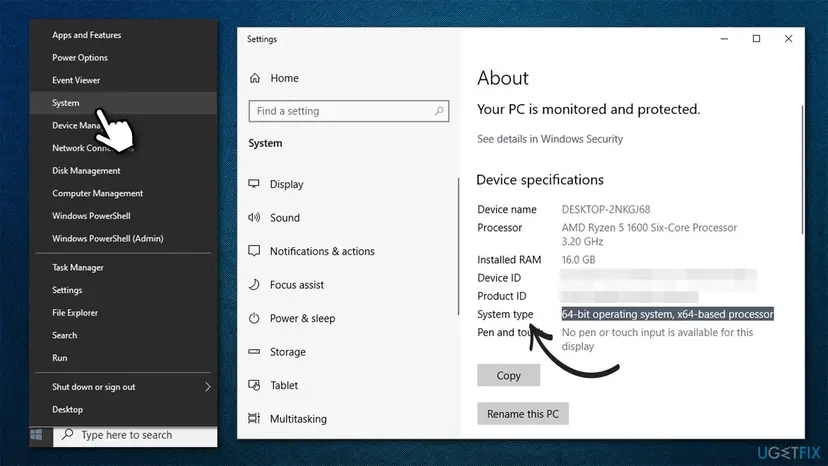
Windows 10 Enterprise LTSB 2016 and Windows Server 2016 are build 14393. They never move past it with normal updates, so they lack this API set even when fully patched.
It worked if: You know your Windows version and build, and which of the next fixes is yours.
If not: If winver does not open, use Settings > System > About as in the last step.
Fix 2. Update Windows 10 to version 22H2 or upgrade to Windows 11
30 to 60 minutesLow riskWindows 10 with an OS Build below 16299, for example version 1507, 1511, 1607 or 1703.
The API set came with build 16299. A feature update to Windows 10 22H2 (build 19045) or to Windows 11 brings it, so the program finds the crash reporting functions it asks for.
- Back up your important files first: Back up your files (Windows Backup, File History, Time Machine)
- Press Win + I, open Update & Security > Windows Update and select Check for updates.
- Install everything offered, including Feature update to Windows 10, version 22H2 when it appears, and restart.
- If Windows Update offers no feature update, install it by hand from Microsoft's page: Install an update from the Microsoft Update Catalog
- If your PC meets the Windows 11 requirements, Windows Update may offer Upgrade to Windows 11. That is the better target, as Windows 10 left support on 14 October 2025.
- After the last restart, run
winveragain and check that the OS Build is 16299 or higher. - Start the game or program.
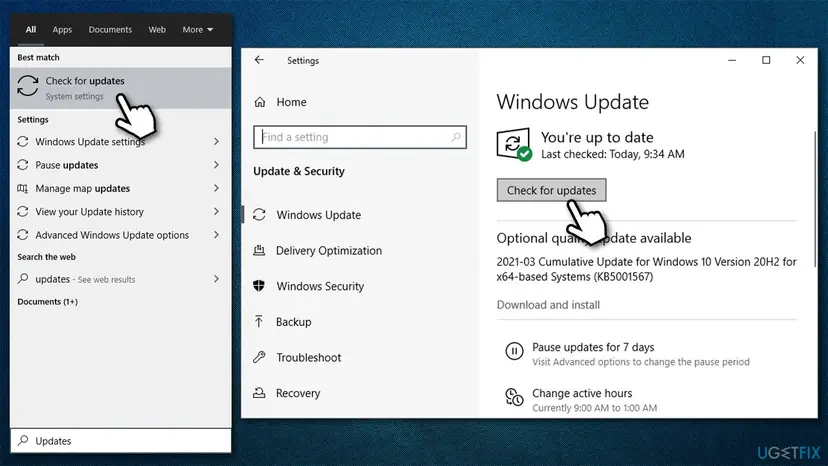
An old Windows 10 that stopped updating often has a stuck update store. Reset it, then try again: Reset Windows Update components
It worked if: winver shows build 19045 or a Windows 11 build, and the program starts without the System Error window.
If not: If the PC cannot take a newer Windows, for example LTSB 2016 kept for a reason, use Fix 3.
Fix 3. Use a program version made for your Windows, or move to Windows 11
10 to 30 minutesLow riskWindows 7, 8 or 8.1, Windows 10 LTSB 2016, or a PC that cannot be updated.
Microsoft's list starts this API set at Windows 10 build 16299, so a program that needs it cannot run on an older system. Either the program must be a version that does not need it, or Windows must be newer.
- Open the program's or game's page at its maker or store and read System requirements. Look for the minimum Windows version.
- If it says Windows 10 64-bit or later, the program will not run on your Windows. Plan the move to Windows 11 or a current Windows 10.
- If the maker offers an older release or a legacy build for your Windows, uninstall the current one: Uninstall a program or app in Windows
- Install the older release from the maker's own site or store, never from a mirror.
- Start the program.
Windows 7 and 8.1 get no security updates, and Windows 10 left regular support on 14 October 2025. An old program version can bring old security holes too. Use it only offline when you can, and back up your files before you reinstall Windows: Back up your files (Windows Backup, File History, Time Machine)
It worked if: The older program version starts, or the program starts after the move to a newer Windows.
If not: If no older release exists, the program cannot run on this Windows. Ask the maker which Windows it needs.
Fix 4. Delete any api-ms-win-core DLL you copied into the program folder
5 minutesLow riskWindows 11 or a current Windows 10, and you or a fix tool copied a DLL with this name into the game or program folder.
Microsoft says an API set needs no file on disk. A stray copy from a DLL site next to the program can stop Windows from routing the name to its own code, or bring the next error.
- Right-click the program's shortcut and select Open file location.
- Look for files that start with
api-ms-win-core-and that you added yourself, such asapi-ms-win-core-windowserrorreporting-l1-1-1.dll. - Move them to a folder on the desktop instead of deleting them at once.
- Start the program. If it runs, delete the moved files.
- If you copied such a file into
C:\Windows\System32orC:\Windows\SysWOW64, do not delete Windows files by hand. Run DISM and SFC in Fix 7 instead. - Scan the PC for anything else that came with the download: How to scan for malware with Microsoft Defender
It worked if: The program starts, and no api-ms-win-core file you added is left in its folder.
If not: If the program still names the DLL, reinstall it cleanly with Fix 5.
Fix 5. Reinstall the game or program cleanly, or verify its files
10 to 20 minutesLow riskWindows 11 or Windows 10 build 16299 or newer, and only one program shows the error.
On a current Windows the API set exists, so the problem is more likely in the program's own files, such as a damaged install or a leftover from a mod or crack fix. A clean install replaces them.
- For a Steam, Epic, EA, Ubisoft or GOG game, verify the game files in the launcher first: How to verify game files in Steam, Epic Games, Xbox app, EA app, Battle.net and GOG Galaxy
- If that does not help, uninstall the program from Settings > Apps > Installed apps: Uninstall a program or app in Windows
- Delete the leftover folder in
C:\Program Filesor the game library folder if one remains. - Restart the PC.
- Install the current version from the maker's own site or the launcher, then start it.
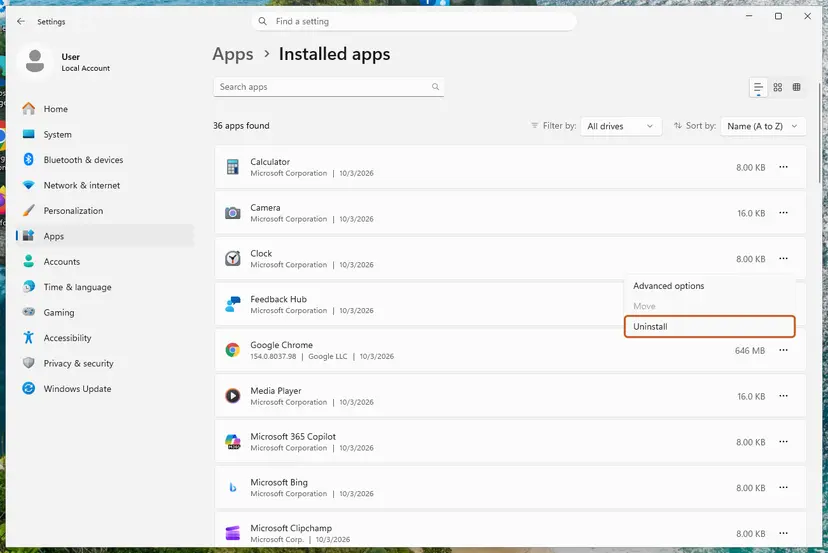
It worked if: The program installs fresh and opens without naming the API set.
If not: If the window now names a different file, read it: an api-ms-win-crt name or vcruntime140.dll leads to Fix 6. Otherwise go to Fix 7.
Fix 6. Repair the Visual C++ Redistributable when a C runtime file is named
15 minutesNo riskThe window names api-ms-win-crt-..., ucrtbase.dll, vcruntime140.dll or msvcp140.dll, often after Fix 2 cleared the first error.
Programs made with Visual Studio need the Visual C++ runtime as well. Microsoft's list ties the WER API set to Windows itself, not to this package, so this fix is for the next name in line, not for windowserrorreporting itself.
- Open Programs and Features. Type control panel in the search box on the taskbar and select Control Panel. Select Programs > Programs and Features.
- Find the installed versions. Look for the entries that start with Microsoft Visual C++. Each one shows a year and an architecture, x64 or x86. Several entries side by side are normal: older versions stay installed next to newer ones.
- Repair each Visual C++ entry. Right-click an entry and select Change, then select Repair in the window that opens. Do the same for every Microsoft Visual C++ entry.
- Install the latest supported version. Download the latest Visual C++ v14 Redistributable from Microsoft: Visual C++ Redistributable latest supported downloads and run it. On a 64-bit PC install both X64 and X86, because 32-bit programs need the x86 package. On an ARM64 PC install ARM64. This one version serves programs built with Visual Studio 2017 to 2026.
These steps were written for Windows 11 25H2 and 26H2, Windows 10 22H2. The full page with the other versions and what each result means: How to repair Microsoft Visual C++ Redistributable and .NET Framework
Install both the x64 and the x86 package on a 64-bit Windows: many games still ship 32-bit parts. If the error names vcruntime140.dll, our page on vcruntime140.dll has the details.
It worked if: Programs and Features lists a current Microsoft Visual C++ 2015-2022 Redistributable for x64 and x86, and the program starts.
If not: If a C runtime name still appears, run DISM and SFC with Fix 7.
Fix 7. Repair Windows system files with DISM and SFC
15 to 30 minutesNo riskWindows 11 or Windows 10 build 16299 or newer, and several programs fail, or you copied DLLs into System32.
On a current build, Windows maps the API set through its own schema and system DLLs. If those files are damaged, the mapping fails. DISM repairs the store of clean copies, then SFC puts them back.
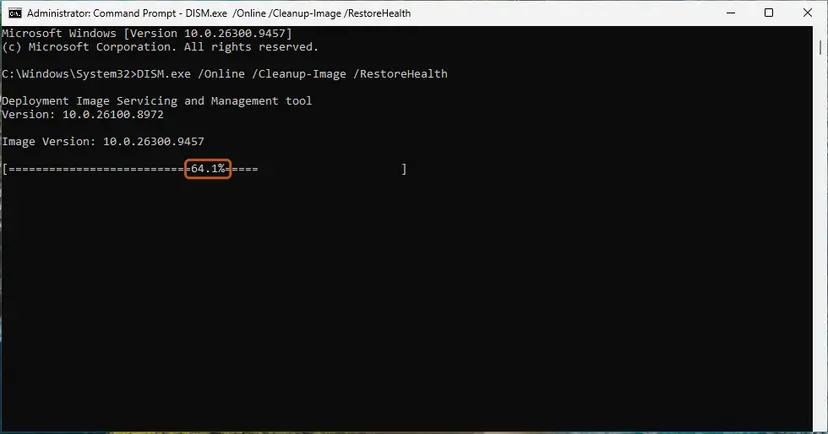
- Open an elevated command window. Right-click Start and select Terminal (Admin), or type cmd in the search box, right-click Command Prompt and select Run as administrator. Select Yes when Windows asks for permission.
- Run DISM first. Type the command below and press Enter. DISM downloads clean copies of damaged components from Windows Update, so it can take several minutes. Wait until it says The operation completed successfully.
DISM.exe /Online /Cleanup-Image /RestoreHealth - Run System File Checker. In the same window, type the command below and press Enter. Do not close the window until the verification reaches 100%.
sfc /scannow - Read the result and restart. Compare the last message with the table below this guide, then restart the PC so that repaired files are loaded.
These steps were written for Windows 11 24H2 and 25H2. The full page with the other versions and what each result means: Run DISM and SFC to repair Windows system files
- Restart the PC after the scans.
- Start the program again.
It worked if: SFC reports no integrity violations or a successful repair, and the program starts after the restart.
If not: If SFC cannot repair some files, collect the details under "If the error is still there" below.
If the api-ms-win-core-windowserrorreporting-l1-1-1.dll error is still there
When the window survives the fixes that fit your PC, stop changing things and collect facts. The program's maker can tell you which Windows its build needs, and the Windows logs show which module failed.
- The exact message: the full text of the System Error window, including the program's .exe name in the title.
- Your Windows version and build: the line from
winver, and the Edition from Settings > System > About. - The Windows log: open Event Viewer > Windows Logs > Application and look for Application Error or SideBySide entries at the time of the window.
- What you tried: the fixes from this page and their result.
- Where the program came from: the official store or site, or somewhere else. Modified or cracked builds often carry their own broken DLLs.
If SFC repairs files and they are damaged again days later, check the disk with Check a disk for errors (chkdsk). If Windows cannot be repaired, a reinstall that keeps your files is the last step: Reinstall Windows without losing files
How to keep API set errors from coming back
- Keep Windows on a supported version: Windows 11, or Windows 10 22H2 while you plan the move.
- Read a game's system requirements before you buy or install it.
- Install programs only from the maker's site or an official store.
- Keep the Visual C++ Redistributable packages installed and current.
- Do not download api-ms-win files or any other Windows DLL from a DLL site.
- Do not copy DLL files into System32, SysWOW64 or game folders by hand.
- Do not pause Windows Update for months on a PC you game on.
- Do not run cleanup tools that delete DLL files they call unused.
API set names will keep appearing in error windows, because each new Windows adds contracts. The rule stays the same: a name that starts with api-ms-win- is fixed by a newer or repaired Windows, not by a file.
Frequently asked questions
What is api-ms-win-core-windowserrorreporting-l1-1-1.dll?
It is the name of a Windows API set, a label for a group of Windows Error Reporting functions such as WerRegisterCustomMetadata and WerRegisterExcludedMemoryBlock. Programs use them to add details to their own crash reports. Microsoft explains that an API set name identifies a contract, not a file, and that Windows routes it to the DLL that holds the code. Microsoft lists this contract from Windows 10 build 16299 onward.
Where can I download api-ms-win-core-windowserrorreporting-l1-1-1.dll?
Nowhere safely, and you do not need to. Microsoft does not publish it as a file, and its documentation says there is not necessarily a file with that name on the PC. Windows provides the contract itself from build 16299 on. A copy from a DLL site cannot add the missing Windows functions on an older system and has an unknown builder. Update Windows instead, as in Fix 2.
Can I fix this error on Windows 7?
Not with a file or a runtime package. Microsoft's list starts this API set at Windows 10 build 16299, so Windows 7 does not have it, and the same holds for the related api-ms-win-core-winrt-error-l1-1-1.dll name. Your choices are a program version that still supports Windows 7, or a newer Windows. Windows 7 gets no security updates, so moving to Windows 11 is the better choice where the PC allows it.
I have Windows 10. Why does it say the file is missing?
Most likely your Windows 10 is older than version 1709, build 16299. Early versions such as 1507, 1607 and 1703, and the long-term editions LTSB 2016 and Server 2016 on build 14393, lack this API set. Run winver to check. If the build is lower, update to Windows 10 22H2 or to Windows 11. If it is 16299 or higher, follow Fix 4 to Fix 7.
Will installing Visual C++ or the Universal C Runtime fix it?
Usually not for this name. The earlier version of this guide suggested both, but Microsoft's list ties the Windows Error Reporting API set to Windows itself. The Visual C++ Redistributable and the Universal C Runtime bring C runtime files such as ucrtbase.dll and the api-ms-win-crt names. Repair them when the window names one of those, as in Fix 6, often after a Windows update cleared the first error.
Does compatibility mode help?
No, not for this error. Compatibility mode changes how Windows describes itself to a program and adjusts some behaviour, but it cannot add Windows functions that are missing. On a Windows older than build 16299 the program still cannot find the API set. On a newer build, compatibility mode is not needed for it. The earlier version of this guide listed it as a fix, and we dropped it for that reason.
Dependency Walker shows api-ms-win-core-windowserrorreporting-l1-1-1.dll as not found. Is my PC broken?
Not necessarily. Users report that older dependency checkers list many api-ms-win names as missing on PCs that run fine. Microsoft explains why: an API set is resolved by Windows at run time, and there need not be a file with that name on disk, so a tool that searches for files cannot find it. What matters is whether the program starts. If it does, nothing is wrong.
I see this error in Wine on Linux or a Steam Deck. Does this page apply?
Only partly. Wine provides its own versions of Windows API sets, and its source tree has a module with this name. Users report the error with older Wine builds. Update Wine or switch to a newer Proton version in the game's Steam properties first. The Windows steps on this page, such as winver and DISM, do not apply there. We could not confirm which Wine version first added this API set.
The error names api-ms-win-core-version-l1-1-1.dll or another api-ms-win-core name. Same fix?
Yes, the method is the same. Names like api-ms-win-core-version-l1-1-1.dll, api-ms-win-core-com-l1-1-1.dll or api-ms-win-core-memory-l1-1-6.dll are API sets too, and each one exists only from a certain Windows build. Check your build with winver, update to Windows 10 22H2 or Windows 11, and never download them. On a current Windows that still names one, reinstall the program and run DISM and SFC.
Sources
Did this fix work?
One click, no account. It tells the next reader which guides are worth their time.
Questions and experiences: fix api-ms-win-core-windowserrorreporting-l1-1-1.dll is missing on Windows
Still broken, or found a fix we did not cover? Ask here: members and our editors answer. Reading is open; writing needs a free account.
…