
How to fix Forza Horizon 5 error 0xc0000005 in Windows?

Prefer to fix it yourself? The manual steps follow.
- 9methods
- 5 minutes to read the log, 10 to 30 minutes for the fix
- Intermediate
Applies to Forza Horizon 5 from the Xbox app, Microsoft Store, PC Game Pass and Steam; the same steps help Forza Horizon 6
9 methods in this guide
- What the error means
- Causes, most common first
- The fixes
- 1. Read the crash entry
- 2. Turn off overlays and tools
- 3. Update the graphics driver
- 4. Repair the game files
- 5. Repair Gaming Services
- 6. Repair Visual C++
- 7. Find conflicting software
- 8. Test memory and overclock
- 9. Update and repair Windows
- If it still crashes
- Keep it from returning
- FAQ
I was excited to finally get my hands on Forza Horizon 5, and, to my disappointment, I couldn't play it properly. It crashes every ten to thirty minutes. There are no freezes or error messages; it simply stops working and disappears from my screen. I checked the Event Viewer and saw that every crash comes with the 0xc0000005 error. Any ideas?
Forza Horizon 5 error 0xc0000005 is an access violation: the game read or wrote memory it may not use, so Windows closed it without a message. Most often an overlay, a background tool or the graphics driver is the cause. Read the faulting module in Event Viewer first, then turn off overlays.
0xc0000005 means Forza Horizon 5 crashed on a memory access, and Windows logged it as an Application Error. Open Event Viewer and read the faulting module (Fix 1). If it is an overlay or a tool, turn off overlays such as Discord, GeForce Overlay and RivaTuner (Fix 2). If it is a graphics driver file, update the driver (Fix 3). If it is the game itself, repair or verify the game (Fix 4).
| Error | Exception code 0xc0000005 (STATUS_ACCESS_VIOLATION) in an Application Error entry for ForzaHorizon5.exe. |
|---|---|
| Where it appears | Not on screen. The game closes to the desktop, and the code is only in Event Viewer > Windows Logs > Application, Event ID 1000. |
| Main cause | An overlay or background tool that hooks into the game, an outdated graphics driver, or damaged game files. Less often faulty or overclocked RAM. |
| Fastest fix | Turn off every overlay and close monitoring, RGB and audio tools Forza Support lists as conflicting (Fix 2). |
| Also written as | 0xC0000005, 0xc00005, exception access violation, Forza Horizon 5 crash to desktop with no error. |
| Affects | Forza Horizon 5 on Windows 11 and Windows 10, both the Xbox app and Steam versions. Windows 10 left support on 14 October 2025. |
| Vendor status | Not listed as a known game bug. Forza Support names 0xc0000005 among the Event Viewer codes to report to Windows support and the Feedback Hub. |
| Time to fix | 5 minutes for Fixes 1 and 2. 10 to 30 minutes for a driver update or a file check. Up to an hour for a memory test. |
Facts checked on 15 October 2026. Steps written for Windows 11 (25H2 and 26H2) and Windows 10 22H2.
What error 0xc0000005 means in Forza Horizon 5
0xc0000005 is the Windows status code for an access violation. A process tried to read, write or run memory it had no right to use, and Windows stopped it. In Forza Horizon 5 you rarely see this code on screen: the game simply vanishes to the desktop, at start or after ten or thirty minutes of driving.
Windows writes every such crash to the Application log. That entry is where the code is, and it also names the file in which the crash happened. Forza Support's own crash page tells players to look for exactly this entry when the game closes with no message.
Log Name:      Application
Source:        Application Error
Event ID:      1000
Faulting application name: ForzaHorizon5.exe
Faulting module name: <file>.dll
Exception code: 0xc0000005- 0xc0000005 and 0xC0000005 are the same code; Event Viewer writes it in lower case.
- 0xc00005, a common search on Windows 11, is a shortened spelling of the same code. Windows itself always writes eight digits after 0x.
- Exception access violation is the name of the code in crash reporters and debuggers. Our EXCEPTION_ACCESS_VIOLATION guide covers it for any program.
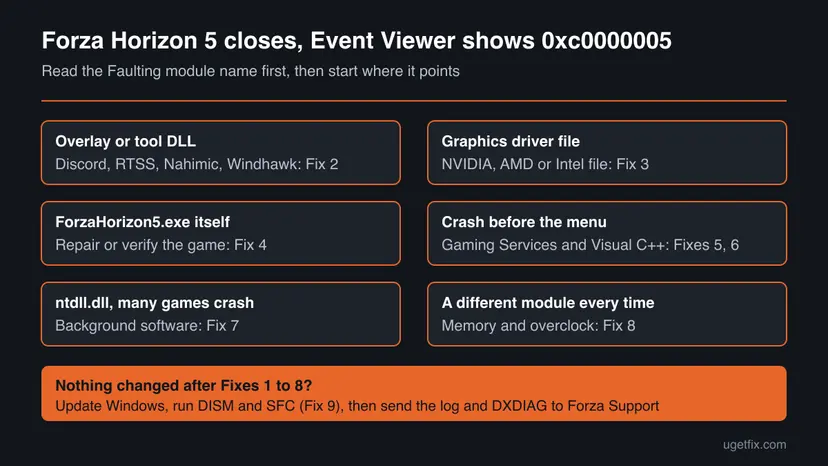
0xc0000005 is the same for every crash of this kind. The Faulting module name tells you which file broke the rule: an overlay DLL, a graphics driver file or the game itself. That one line decides which fix below you start with.
Why Forza Horizon 5 crashes with 0xc0000005
Forza Support keeps a long list of programs that can make its games crash or fail to start. Most of them inject code into the game, which is the classic way to cause an access violation. That is why the order below starts with overlays and tools and ends with Windows and hardware.
| How often | Cause | Signs | Fix |
|---|---|---|---|
| Most often | An overlay or background tool loaded into the game: Discord, GeForce Overlay, RivaTuner, OBS, Wallpaper Engine, Nahimic and others. | The faulting module is a DLL of that tool, or crashes stop when the tool is closed. | Fix 2 |
| Often | An outdated or damaged graphics driver. | The module is a driver file of NVIDIA, AMD or Intel; crashes in heavy scenes. | Fix 3 |
| Often | Damaged or incomplete game files after an update. | The module is ForzaHorizon5.exe itself, or the crash happens at the same place. | Fix 4 |
| Less often | A broken Gaming Services app or Visual C++ runtime. | The game closes before the menu, other Xbox app games also fail. | Fixes 5, 6 |
| Less often | Security software or a system tweak tool that blocks the game. | Crashes at launch; Sophos or Windhawk is installed. | Fix 7 |
| Rarely | Faulty RAM, an unstable memory profile or an overclock. | A different module every time, other games crash too, sometimes blue screens. | Fix 8 |
| Rarely | Damaged Windows files or a missing Windows update. | Built-in Windows apps crash too. | Fix 9 |
The Windows Update troubleshooter and a reset of the Windows Update components do not touch a game crash: they fix updates that fail to install. Check Disk finds file system errors, not memory access faults. Neither is on this page as a fix.
How to fix Forza Horizon 5 error 0xc0000005
Fix 1 tells you which file crashed. Fixes 2 to 4 solve most crashes of this game. Fixes 5 and 6 are for crashes before the menu, Fixes 7 to 9 for crashes that remain. Play for at least half an hour after each fix, since the crash can take that long.
| What you see or have | Start with |
|---|---|
| You have not read the Event Viewer entry yet | Fix 1 |
| The module is a DLL of Discord, RivaTuner, OBS, Nahimic or another tool | Fix 2 |
| The module is a graphics driver file | Fix 3 |
| The module is ForzaHorizon5.exe, or the crash started after a game update | Fix 4 |
| The game closes before the main menu | Fix 5, then Fix 6 |
| Sophos, another security suite or Windhawk is installed | Fix 7 |
| A different module every time, other games crash too | Fix 8 |
Fix 1. Read the faulting module of the crash in Event Viewer
5 minutesNo riskEveryone, before any other fix. It takes five minutes.
The game shows no message, but Windows logs each crash with the file that caused it. Forza Support asks for this entry too. Knowing the module lets you skip fixes that cannot help.
- Start Forza Horizon 5 and let it crash, or note the time of the last crash.
- Press Win + S, type
Event Viewerand open it. - Open Windows Logs > Application.
- Select the Date and Time column to sort, and find the Application Error entry at the time of the crash.
- Check that Faulting application name is
ForzaHorizon5.exeand Exception code is0xc0000005. - Note the Faulting module name and its path, then compare it with the chooser table above.
- Keep the entry: select it and choose Save Selected Events in the right pane, in case you contact support later.
A DLL in a tool's folder, such as Discord or RivaTuner, points to Fix 2. A file in C:\Windows\System32 with an NVIDIA, AMD or Intel name points to Fix 3. ForzaHorizon5.exe itself points to Fix 4. ntdll.dll is where many crashes surface, so it rarely names the cause: go to Fix 2 and Fix 7.
It worked if: You know the file that crashed and which fix to start with.
If not: If there is no Application Error entry, the game was closed by something else. Start with Fix 2 anyway, it is the most common cause.
Fix 2. Turn off overlays and close the tools that conflict with Forza
5 to 10 minutesLow riskAny crash, and first of all when the module belongs to an overlay, capture, monitoring, RGB or audio tool.
Overlays draw on top of the game by loading their own code into its process. Forza Support says such apps are not always compatible with Forza and can cause crashes, even when they only run in the background.
- In Discord, open User Settings > Game Overlay and turn off Enable in-game overlay.
- In the NVIDIA app or GeForce Experience, turn off the in-game overlay; in AMD Software, turn off its in-game overlay.
- Close MSI Afterburner and RivaTuner Statistics Server, EVGA Precision and Fraps from the system tray.
- Close OBS and XSplit. If you stream, set the source to Display Capture, as Forza Support advises.
- Close Logitech G Hub, Wallpaper Engine, WeMod and audio tools such as Nahimic, Sonic Audio or A-Volute Sound Studio.
- Close power and tuning tools: MSI Dragon Center, Ryzen Master and similar.
- Start Forza Horizon 5 and play past the point where it crashed before.
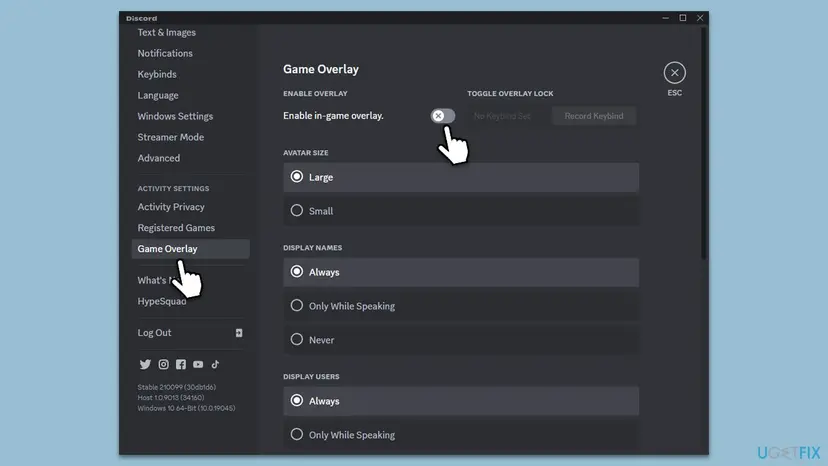
If the crashes stop, start the tools again one at a time and play after each. When the crash returns, keep that tool closed while you play, or update it and check its maker's notes about Forza.
It worked if: Forza Horizon 5 runs for longer than before, and no new Application Error entry with 0xc0000005 appears.
If not: If the crash stays with every tool closed, update the graphics driver in Fix 3.
Fix 3. Install the newest graphics driver
10 to 15 minutesLow riskThe faulting module is a driver file, or the driver is several months old.
Forza Support lists a current graphics driver as a basic step for any crash. A driver that does not match the game's current version can crash inside the game process, which Windows reports as an access violation.
Download the driver from NVIDIA, AMD or Intel directly. If the crashes began right after a new driver, a clean reinstall of the same driver or the previous version is the test. Step by step: Update, roll back or reinstall a driver.
- Open Device Manager. Right-click Start and select Device Manager.
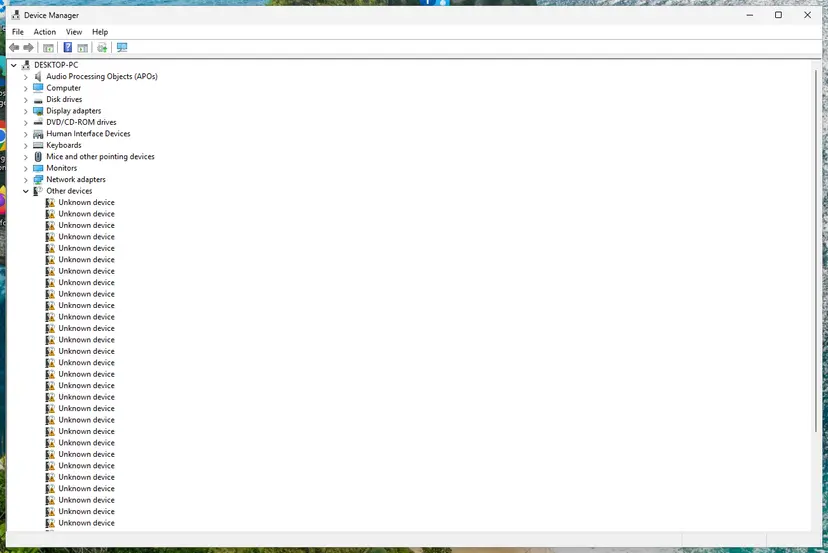
Device Manager lists devices by category; a yellow warning sign marks a device with a problem. Screenshot: Windows 11 26H2. - Open the device's Driver tab. Expand the category (for example Display adapters), right-click the device, select Properties and open the Driver tab. Driver Date and Driver Version show what is installed now.
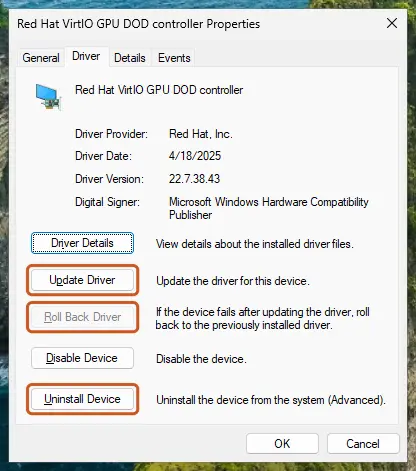
The Driver tab holds all three actions: update, roll back, uninstall. Screenshot: Windows 11 26H2. - Update the driver. Select Update Driver and let Windows search automatically. To use a driver you downloaded from the device maker, select Browse my computer for drivers instead and point to the unpacked folder.
- Or roll back the driver. If the problem started after a driver update, select Roll Back Driver, choose a reason and select Yes. The button is greyed out when Windows has no earlier driver to return to.
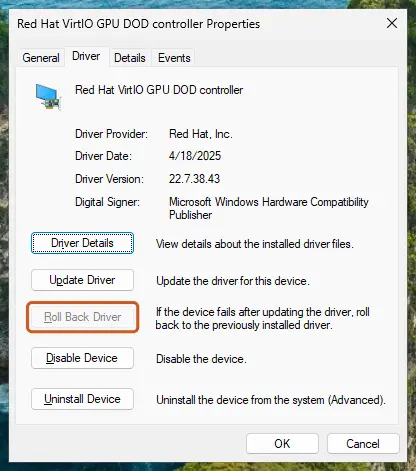
Roll Back Driver is greyed out here because there is no earlier driver. Screenshot: Windows 11 26H2.
These steps were written for Windows 11 24H2 and later. The full page with the other versions and what each result means: Update, roll back or reinstall a driver
It worked if: The driver version in Device Manager or the vendor's app shows the new number, and the game runs past the old crash point.
If not: If the module is still a driver file, reinstall the driver cleanly. If the module is the game, go to Fix 4.
Fix 4. Repair the game and check its files
10 to 30 minutesRead the warningThe faulting module is ForzaHorizon5.exe, or the crash began after a game update.
A broken download or an interrupted update leaves damaged game data, and the game crashes when it loads that part. The launcher compares every file with the original and downloads what is wrong.
Repair and Verify keep your files. Reset deletes the app data on this PC, as Forza Support's reset step does for the game and the Store. Start the game online once first so progress can sync to your Xbox profile, and use Reset only if Repair and Verify did not help.
- Xbox app: open My Library, select Forza Horizon 5, select More options (three dots), then Manage > Files > Verify and repair.
- Steam: right-click the game in Library, select Properties > Installed Files > Verify integrity of game files.
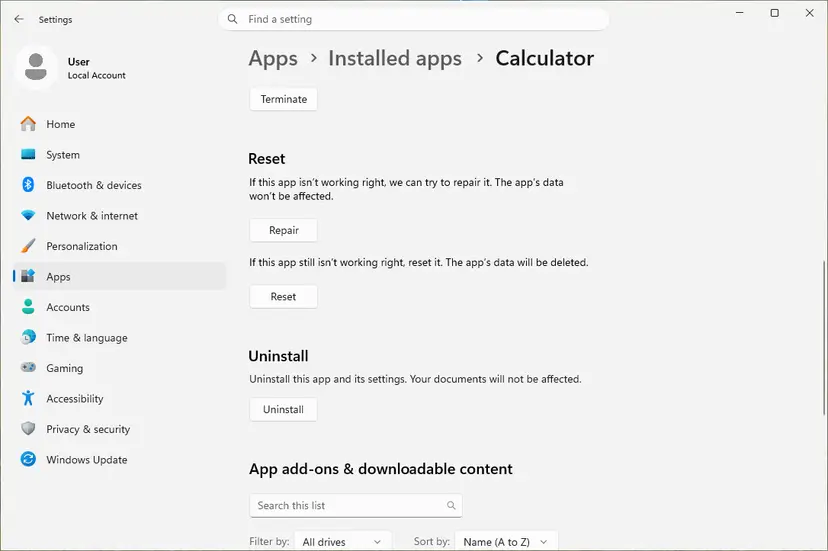
- Xbox app or Microsoft Store only: open Settings > Apps > Installed apps, select the three dots next to Forza Horizon 5 and choose Advanced options.
- Select Repair and test the game.
- If it still crashes, return and select Reset, then do the same for Microsoft Store.
Launcher steps for every store: How to verify game files in Steam, Epic Games, Xbox app, EA app, Battle.net and GOG Galaxy. If the check finds nothing and the crash stays, uninstall the game and install it again, which is Forza Support's last step for damaged files.
It worked if: The launcher reports that the files were checked or repaired, and the game starts and runs past the old crash point.
If not: If the game closes before the menu, go to Fix 5. If it crashes later in play, go to Fix 7.
Fix 5. Repair or reinstall Gaming Services
10 minutesLow riskYou play the Xbox app or Game Pass version and the game closes at launch or before the menu.
Gaming Services is the Windows component that starts and licenses Xbox app games. Forza Support lists its repair and reinstall in its PC crash steps; for Forza Horizon 6 it says even Steam players need a current Gaming Services.
- Open Settings > Apps > Installed apps, find Gaming Services, open Advanced options and select Repair. Test the game.
- If that did not help, right-click Start and select Terminal (Admin) on Windows 11 or Windows PowerShell (Admin) on Windows 10.
- Run the first command below to remove Gaming Services.
- Run the second command to open its Microsoft Store page, then select Get or Install and accept the User Account Control prompt.
- Restart the PC and start Forza Horizon 5.
get-appxpackage Microsoft.GamingServices | remove-AppxPackage -allusers
start ms-windows-store://pdp/?productid=9MWPM2CQNLHN
It worked if: Gaming Services shows as installed in Installed apps, and the game reaches the main menu.
If not: If the game still closes before the menu, repair the Visual C++ runtimes in Fix 6.
Fix 6. Repair the Microsoft Visual C++ runtimes
10 minutesLow riskThe game closes at launch, or the faulting module is msvcp140.dll, vcruntime140.dll or ucrtbase.dll.
Forza Horizon 5 loads the Visual C++ runtime libraries when it starts. Forza Support lists reinstalling them as a crash step, because a damaged runtime makes the game read bad memory even when its own files are fine.
- Open Programs and Features. Type control panel in the search box on the taskbar and select Control Panel. Select Programs > Programs and Features.
- Find the installed versions. Look for the entries that start with Microsoft Visual C++. Each one shows a year and an architecture, x64 or x86. Several entries side by side are normal: older versions stay installed next to newer ones.
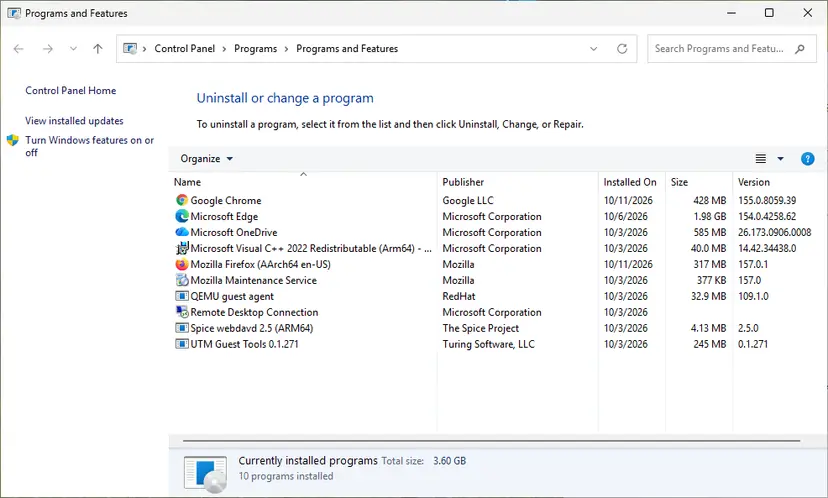
Each Visual C++ version is its own entry in Programs and Features. Screenshot: Windows 11 26H2. - Repair each Visual C++ entry. Right-click an entry and select Change, then select Repair in the window that opens. Do the same for every Microsoft Visual C++ entry.
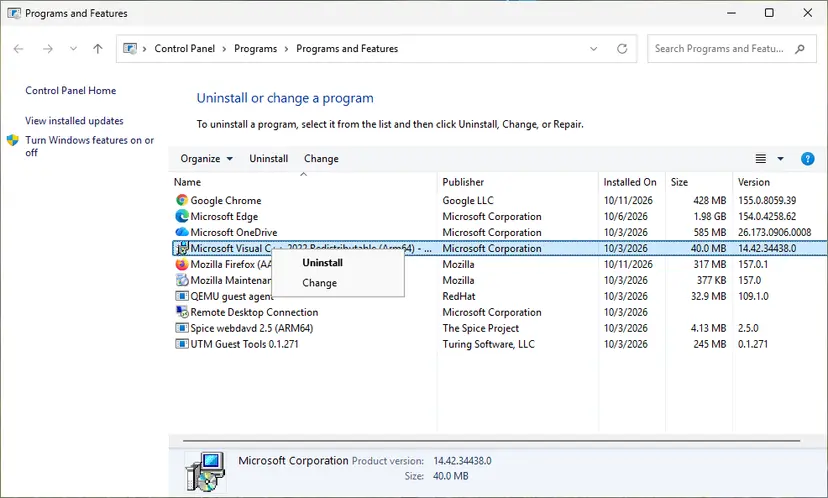
Right-click the entry and select Change to reach the repair option. Screenshot: Windows 11 26H2. - Install the latest supported version. Download the latest Visual C++ v14 Redistributable from Microsoft: Visual C++ Redistributable latest supported downloads and run it. On a 64-bit PC install both X64 and X86, because 32-bit programs need the x86 package. On an ARM64 PC install ARM64. This one version serves programs built with Visual Studio 2017 to 2026.
These steps were written for Windows 11 25H2 and 26H2, Windows 10 22H2. The full page with the other versions and what each result means: How to repair Microsoft Visual C++ Redistributable and .NET Framework
It worked if: Each Visual C++ entry reports that the repair finished, and the game starts after a restart.
If not: If the crash stays, look for software that blocks the game in Fix 7.
Fix 7. Find the background program that breaks the game
15 to 20 minutesLow riskCrashes remain after Fixes 2 to 6, the module is ntdll.dll, or Sophos or Windhawk is installed.
Forza Support says some security suites and system tools make the game crash or refuse to start, and names Trend Micro Maximum Security, Comodo, Sophos, Emsisoft, Avira, Avast, Bitdefender Firewall and AVG. A clean boot shows whether one of them is your cause.
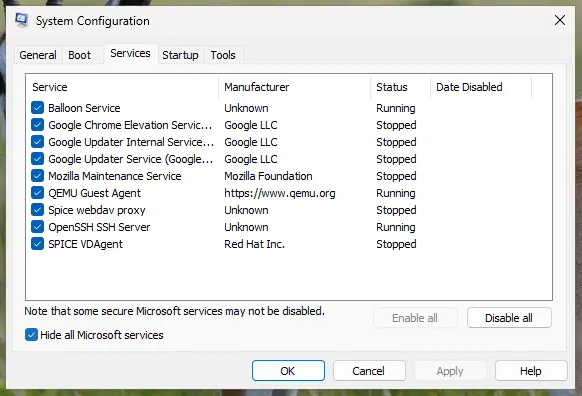
- Start Windows with a clean boot: only Microsoft services and no startup apps. Step by step: How to perform a clean boot in Windows.
- Play Forza Horizon 5 for at least half an hour.
- If it no longer crashes, turn services back on in small groups until the crash returns, and note the program.
- Sophos Home: open Sophos, go to Help > Troubleshooting > Local Exclusions > Add and add the game's
.exe, as Forza Support describes. - Windhawk: open Settings > Advanced settings > More advanced settings and add
ForzaHorizon5.exeto the Process exclusion list, then restart Windhawk. - For another security suite, add the game as an exception or update the suite. To test, pause it for one session only: Turn off Microsoft Defender protection for a moment.
- Undo the clean boot when you are done.
It worked if: The game runs in the clean boot, and you can name the program that crashes it.
If not: If it crashes even in a clean boot, test the memory in Fix 8.
Fix 8. Test the memory and remove overclocks
20 to 60 minutesNo riskA different module every time, other games crash too, or you use a memory profile (XMP or EXPO) or an overclock.
Forza Support asks players to run a memory test to rule out RAM. Faulty or unstable RAM corrupts addresses in memory, and the game then crashes in random places with 0xc0000005.
- Open Windows Memory Diagnostic. Press Windows + R, type mdsched.exe and select OK. You can also search for Windows Memory Diagnostic and open it from the results.
- Choose when to test. Select Restart now and check for problems (recommended) to test right away. Select Check for problems the next time I start my computer if you want to finish your work first: the test then runs at the next start.
- Let the test run. The PC restarts into a blue screen that shows the progress of the test. You do not have to do anything. When the test ends, the PC restarts by itself and Windows loads.
- Look for the notification. Sign in. After a short while Windows shows a notification with the result, also when no errors were found. If you missed it, read the result in Event Viewer.
- Open the System log. Press Windows + R, type eventvwr and select OK. In Event Viewer, expand Windows Logs and select System.
- Find the result. Right-click System and select Find. Type MemoryDiagnostics-Results and press Enter. Select the event that is found: its text says whether the test detected errors.
These steps were written for Windows 11 25H2 and 26H2, Windows 10 22H2. The full page with the other versions and what each result means: How to test your RAM with Windows Memory Diagnostic
- Set the memory profile in the BIOS back to its default speed for a few days of play.
- Remove any overclock of the graphics card or processor for the test.
- If you have a Samsung SSD, turn off RAPID mode in Samsung Magician: Forza Support links it to crashes.
It worked if: The memory test reports that no errors were detected, and the game runs at default speeds.
If not: If the test finds errors, test one RAM module at a time and replace the faulty one. No software fix stops crashes from bad RAM.
Fix 9. Update Windows and repair system files
20 to 40 minutesNo riskNothing above helped, or built-in Windows apps crash too.
Forza Support asks for the newest Windows updates before any ticket. The game loads Windows libraries such as ntdll.dll, so a damaged system file can crash it from outside its own code.
- Open Settings > Windows Update, select Check for updates and install everything.
- Shut the PC down fully and start it again.
- Run DISM and then SFC from an administrator terminal. Step by step: Run DISM and SFC to repair Windows system files.
- Restart and play the game.
It worked if: SFC reports that it repaired files or found no integrity violations, and the game no longer crashes.
If not: Read "If Forza Horizon 5 still crashes with 0xc0000005" below and contact Forza Support.
If Forza Horizon 5 still crashes with 0xc0000005
When every fix is done and the crash stays, the cause is either in the current game build or in your hardware. Forza Support asks for the event logs and a DXDIAG report with a ticket. For the 0xc0000005 code itself it also points to Windows support and the Feedback Hub.
- Save the Application Error entries of the crashes with Save Selected Events in Event Viewer.
- Press Win + R, type
dxdiag, select OK and then Save All Information. - Note what you were doing when it crashed and how long you had played.
- Open a ticket on Forza Support and attach both files.
Errors in the memory test, crashes in many games, blue screens or a PC that is hot to the touch point to hardware. Clean dust from the fans, check temperatures and test without overclocks. A software fix cannot help a failing RAM module or a graphics card that overheats.
How to keep Forza Horizon 5 from crashing again
Most 0xc0000005 crashes in this game come from something loaded into it. Keeping the game, the driver and Gaming Services current, and adding tools one at a time, makes the next crash easy to trace.
- Update the graphics driver after each big Forza update.
- Keep overlays off while you play, or turn on one at a time.
- Add Forza Horizon 5 as an exception in your security suite.
- Read the Event Viewer entry after the first crash.
- Run several overlays and monitoring tools at once.
- Keep an unstable memory profile or overclock.
- Download single DLL files from DLL sites.
- Turn your antivirus off for good to play.
Frequently asked questions
What does error 0xc0000005 mean in Forza Horizon 5?
It is the Windows code for an access violation: the game, or code loaded into it, used memory it had no right to use, so Windows closed it. You normally see no message. The game just disappears, and the code is in Event Viewer under Windows Logs, Application, as an Application Error for ForzaHorizon5.exe. The faulting module in the same entry tells you what crashed.
Why does Forza Horizon 5 crash with no error message?
An access violation ends the game process at once, before the game can draw an error window. That is why the reader sees the game vanish after ten or thirty minutes. Windows still records the crash. Open Event Viewer, Windows Logs, Application, and find the Application Error entry at the time of the crash, as in Fix 1.
I get 0xc0000005 in Forza Horizon 6. Are the fixes the same?
Mostly yes. Forza Horizon 6 also shows its own crash dialog with codes such as FHC01 for a graphics card crash, FHE01 for a game crash, FHD for out of video memory and FHF for out of system memory. Note that code too. Forza Support says Forza Horizon 6 needs a Gaming Services update before play, even on Steam, and does not support NVIDIA Pascal or AMD Polaris and Vega cards.
Is 0xc00005 on Windows 11 the same error?
Yes. 0xc00005 is a shortened spelling of 0xc0000005, which Windows always writes with eight digits after 0x. The code means the same on Windows 11 and Windows 10, and the fixes on this page are the same on both. Only some Settings paths differ, and the steps above name both where they do.
Which programs does Forza Support say conflict with the game?
Its PC crash page names overlays from Discord, NVIDIA and Fraps, and tools such as Logitech G Hub, MSI Afterburner with RivaTuner, EVGA Precision, OBS, XSplit, MacType, Wallpaper Engine, WeMod, Nahimic, Sonic Audio and A-Volute Sound Studio. It also names Windhawk and some security suites. Close them for a test, as Fix 2 and Fix 7 describe, and keep the culprit closed while you play.
Should I turn off my antivirus to stop the crashes?
No, not for good. Forza Support lists several security suites that can stop the game, but the safe fix is an exception for the game or an update of the suite. To test, pause protection for one session and turn it back on right after, as Fix 7 shows. If the suite is the cause, ask its maker for a fix.
Will a reset of Forza Horizon 5 delete my progress?
Reset in Advanced options deletes the game's local data on this PC. Repair, and Verify and repair in the Xbox app, keep your files, so try them first. Start the game online once before a reset so it can sync with your Xbox profile. If progress is missing afterwards, Forza Support has a lost progress page with the next steps.
Can a weak PC cause 0xc0000005 in Forza Horizon 5?
A PC below the minimum specification usually gets low frame rates or the game's own hardware errors, not an access violation. Still, an old graphics card without current driver support can crash more often. Check the game's specification on Forza Support, lower the graphics preset and cap the frame rate, then test. Overheating from dust can also make the system unstable.
Does reinstalling Windows fix Forza Horizon 5 error 0xc0000005?
It rarely needs to. The usual causes are an overlay, the driver, the game files or the RAM, and none of them changes after a Windows reinstall if you install the same tools again. Work through Fixes 1 to 9 first. Reinstall Windows only when the memory test is clean and many programs crash, not only this game.
Sources
Did this fix work?
One click, no account. It tells the next reader which guides are worth their time.
Questions and experiences: fix Forza Horizon 5 error 0xc0000005 in Windows
Still broken, or found a fix we did not cover? Ask here: members and our editors answer. Reading is open; writing needs a free account.
…