
How to fix Runtime error 216 on Windows?

Prefer to fix it yourself? The manual steps follow.
- 7methods
- 5 to 30 minutes
- Easy
Applies to Windows 11, Windows 10 and older Windows; any program built with Delphi, such as some music, file manager and diagnostic tools
7 methods in this guide
I've noticed that some of my files have disappeared. No one has access to my computer, so this activity seems strange. What is more, I often receive a Runtime Error 216. I am not sure what it is. Could you help me to fix this issue?
Runtime error 216 is a crash inside one program, not a Windows error: a program written in Delphi touched memory it may not use, and its own runtime stopped it. The number after at is only the memory address. Find out which program shows the box and when, then update or reinstall that program.
Error 216 means an access violation inside one program built with Delphi. It does not delete files and is not, by itself, a sign of a virus. Find the program that shows the box first (Fix 1), then install its latest version (Fix 2). If the box appears at Windows start with no program open, turn off that startup entry and scan the file with Microsoft Defender (Fix 6).
| Error | Runtime error 216 at 00403FBA, where the eight characters after at change from PC to PC and program to program. |
|---|---|
| Where it appears | In a small message box from one program: when it starts, while you use it, or most often when you close it. Sometimes right after Windows starts, from a program that opens at sign-in. |
| Main cause | A bug in that program, an outdated version, a broken plugin or settings file, or a damaged install. Embarcadero, the maker of Delphi, lists 216 as Access violation. |
| Fastest fix | Find the program (Fix 1) and install its latest version from the maker's site (Fix 2). |
| Also written as | run time error 216, runtime 216, error 216, runtime 216 error, runtime error 216 at address, runtime error 216 at 00401945, runtime error at 216. |
| What it is not | Not a Windows error code, not a Windows update problem, and not proof of malware. Windows 10 and Windows 11 show it the same way. |
| Vendor status | Embarcadero documents it as a fatal runtime error that ends the program at once. Only the program's own developer can fix the bug behind it; Microsoft's forum answer is to reinstall the program and contact its vendor. |
| Time to fix | About 5 minutes to find the program, 10 to 20 minutes to update or reinstall it. |
Facts checked on 15 October 2026. Steps written for Windows 11 (25H2 and 26H2) and Windows 10 22H2.
What runtime error 216 means
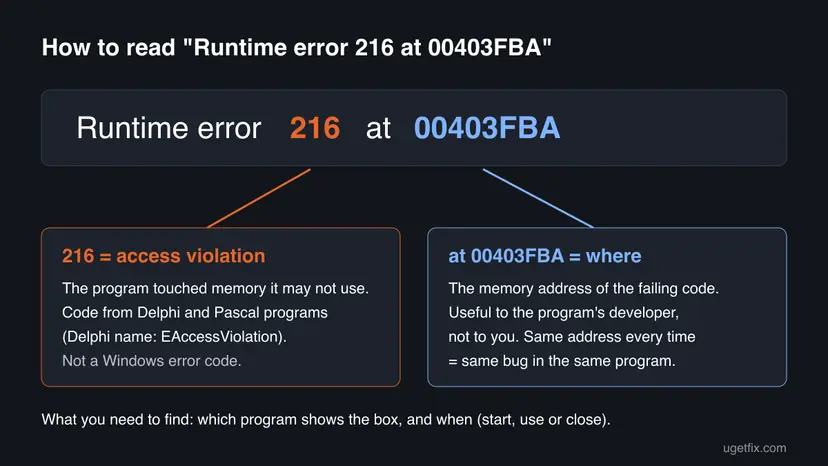
The message reads Runtime error 216 at followed by an address, for example Runtime error 216 at 00403FBA. It comes from the runtime library of Delphi, the programming tool from Embarcadero. Embarcadero's list of fatal errors gives number 216 the name Access violation and says fatal errors always end the program immediately.
An access violation means the program tried to read or write memory that it does not own, usually through a broken pointer or an object that was already freed. Windows stops that access, and the program's own code turns it into the number 216. So the error belongs to one program, never to Windows itself.
- runtime error 216, run time error 216, runtime 216 and error 216 are the same message. Search engines just split it differently.
- Runtime error 216 at address: the address, such as 00401945 or 00404F0C, is where the program crashed. Addresses that start with 0040 typically point into the program's own file, so the fault sits in that program rather than in Windows.
- In programs that use Delphi's full exception layer, the same fault normally shows as an Access violation message instead. The bare number appears when that layer is not running, which developer forums mostly report at start or at close.
- Error 216 with no word runtime can be something else entirely, such as an error in a game launcher or a car diagnostic tool. This page covers the runtime message from Windows programs.
Why runtime error 216 appears on Windows 10 and Windows 11
Most often the program has a bug that newer versions already fixed, or an old version that does not cope with a newer Windows. Less often a plugin, a settings file or the install itself is damaged. Rarely the cause is outside the program: another program that interferes, or memory that is failing.
| Cause | How often | How to tell | Fix |
|---|---|---|---|
| A bug in the program version you have. | Most often | Always the same program, often the same address, often when you close it. | Fix 2 |
| A plugin, add-on or settings file the program loads. | Often | It started after you added a plugin or changed a setting; a fresh user profile works. | Fix 3 |
| A damaged or half-updated install. | Sometimes | It started after an interrupted update or a disk problem. | Fix 4 |
| An old program on a newer Windows. | Sometimes | The program is many years old and the maker no longer updates it. | Fix 5 |
| A program that starts with Windows, known or unknown. | Sometimes | The box appears after sign-in, before you open anything. | Fix 6 |
| Another program that hooks into it, such as an overlay or a security tool. | Rarely | It disappears in a clean boot. | Fix 7 |
| Faulty memory (RAM). | Rarely | Many different programs crash with different errors, not only 216. | Still not fixed |
Not by itself. Old pages tied error 216 to one backdoor from 1999 because that malware was also written in Delphi, so a broken copy could show the same message. Any Delphi program can show it, and almost all of them are ordinary software. Treat it as malware only when the box comes from a file you do not recognize (Fix 6).
How to fix runtime error 216
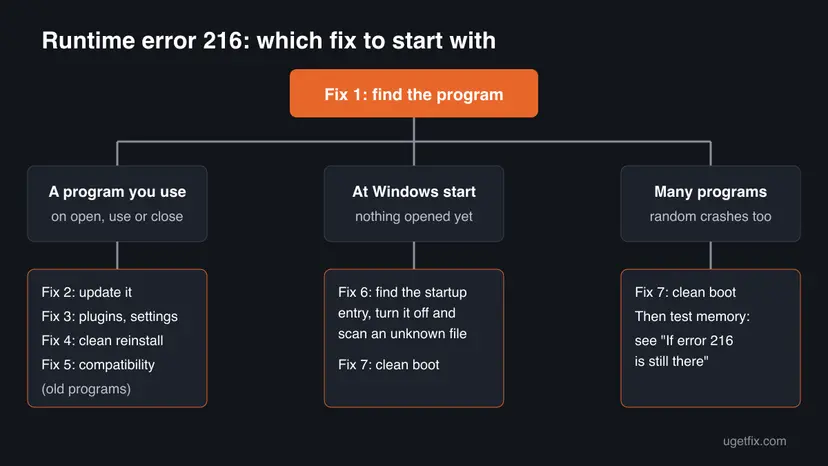
Fix 1 finds the program and the moment of the crash, and it decides everything else. Fixes 2 to 5 repair that program. Fix 6 is for a box that appears at Windows start. Fix 7 finds another program that interferes.
| What you see or have | Start with |
|---|---|
| You do not know which program shows the box. | Fix 1 |
| The box comes from a program you use, when it opens, works or closes. | Fix 2 |
| It started after you added a plugin, skin or add-on, or changed settings. | Fix 3 |
| Updating did not help, or the last update was interrupted. | Fix 4 |
| The program is old and its maker no longer updates it. | Fix 5 |
| The box appears right after Windows starts, before you open anything. | Fix 6 |
| Several programs crash, or nothing above helped. | Fix 7 |
Fix 1. Find the program that shows runtime error 216 and when it happens
5 minutesNo riskEveryone. The message itself does not name the program, so this comes first.
Error 216 is raised inside one program, and every other fix depends on knowing which one. The moment of the crash, at start, during use or at close, also points to the cause.
- Leave the error box open and do not select OK yet.
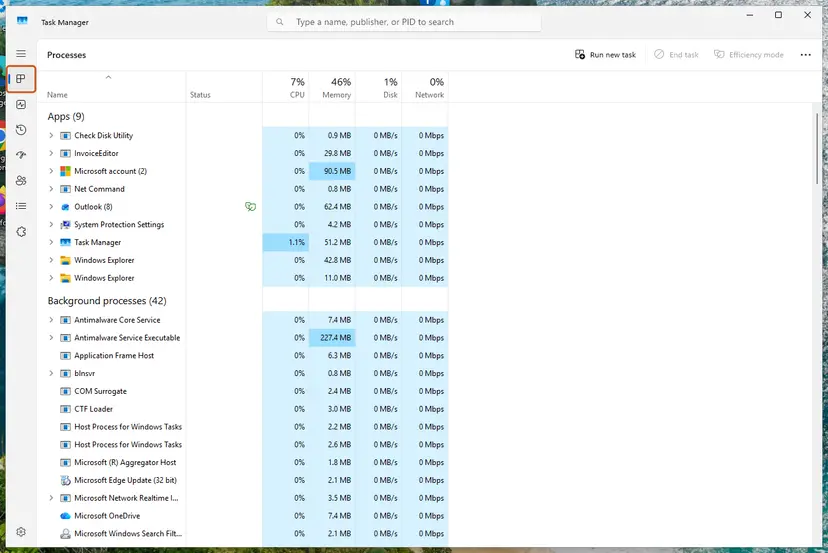
- Press Ctrl + Shift + Esc to open Task Manager, then select Processes.
- Under Apps, select the arrow next to each program: the error window is listed under the program it belongs to.
- Right-click that program and select Open file location. Note the file name and folder of the
.exefile. - Write down when the box appeared: when the program started, during a certain action, or when you closed it.
- Write down the full message with the address, for example
Runtime error 216 at 00401945.
If the program closes too fast to see it, check the time it happened in Event Viewer > Windows Logs > Application. An Application Error event at that time names the file under Faulting application name. Some Delphi programs exit without such an event, so an empty log does not rule anything out.
It worked if: You know the program's name, where its file is, and at which moment it crashes.
If not: If you see the box right after sign-in and cannot tell where it comes from, go to Fix 6.
Fix 2. Install the latest version of that program from its maker
10 minutesLow riskThe box comes from a program you know and use, such as a music tool, a file manager or a diagnostic tool.
An access violation is a bug in the program's code, and no Windows setting can repair code. Makers of Delphi programs fix these crashes in new builds, so the version you have is the first suspect.
- Open the program, if it starts, and look in Help > About for its version number.
- Go to the maker's own site and compare it with the newest version, including the version notes.
- Look in the notes for words such as access violation, crash on exit or error 216.
- Download the installer only from the maker's site or the Microsoft Store page of the program.
- Close the program, run the installer and keep your settings when it asks.
- Restart the PC and repeat the action that showed the error.
Users on the forums of FL Studio and Total Commander have reported error 216 with certain versions and plugins. In such cases the maker's forum or support page is the best place to see whether your version is known to crash.
It worked if: The program opens, works and closes without the box.
If not: If the newest version shows it too, the trigger is probably a plugin or settings file. Go to Fix 3.
Fix 3. Remove the newest plugins and reset the program's settings
10 minutesRead the warningThe error started after you added a plugin, skin or add-on, imported settings, or after a crash that may have damaged a settings file.
A plugin runs inside the program's memory, so its bug crashes the whole program with the program's own error number. A damaged settings file can make the program read data that is not there.
Resetting settings can remove your layout, presets, licence files or saved lists. Copy the program's settings folder to a safe place before you rename or delete anything, so you can put it back.
- Close the program fully, including its icon near the clock.
- Press Win + R, type
%appdata%and press Enter. Look for a folder with the program's or the maker's name. - Copy that folder to your Desktop as a backup.
- In the program's plugin or add-on folder, move the plugins you added most recently to a folder on your Desktop.
- Start the program. If the error is gone, put the plugins back one by one to find the one that crashes.
- If the error stays, rename the program's settings folder in
%appdata%, for example by adding.old, and start the program again with fresh settings.
Many programs also offer a safe mode or a reset option in their settings or at start. Check the maker's help pages for the exact way, because each program stores its plugins and settings in its own place.
It worked if: The program starts and closes normally with no plugins or with fresh settings, and you know which plugin or file caused it.
If not: Put the backup folder back and go to Fix 4.
Fix 4. Uninstall the program, restart and install it again
15 minutesLow riskUpdating and fresh settings did not help, or an update was interrupted.
A missing or damaged file next to the program can make it call code that is not there, which ends in an access violation. Microsoft's forum answer to error 216 is the same: reinstall the program and contact its maker if it persists.
- Back up any projects or data you keep inside the program's folder.
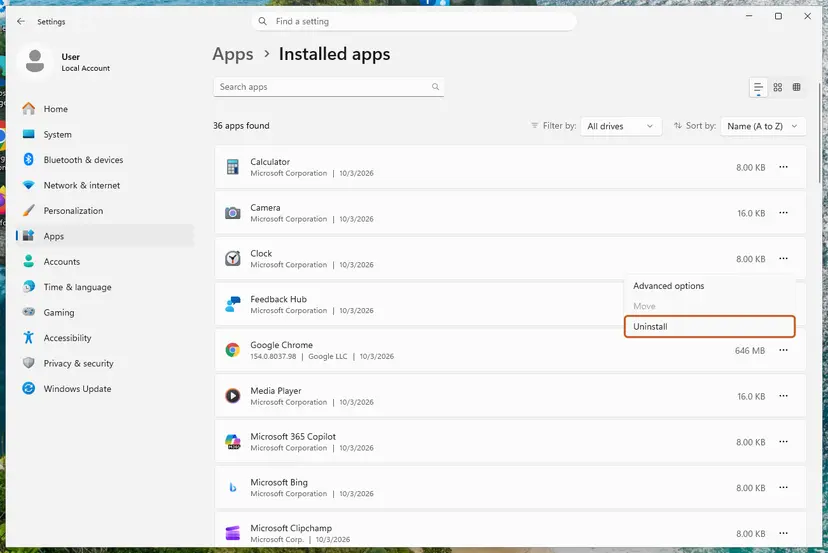
- Uninstall the program. Step by step: Uninstall a program or app in Windows.
- Restart the PC.
- Check that the program's folder under
C:\Program FilesorC:\Program Files (x86)is gone. Delete it only if it holds nothing of yours. - Install the newest version from the maker's site, into the folder it suggests.
It worked if: The fresh install starts and closes with no error.
If not: If the program is old and has no newer version, go to Fix 5. If a fresh install still crashes, send the maker the details from the last section of this page.
Fix 5. Run an old program in compatibility mode
5 minutesNo riskThe program is from the Windows XP or Windows 7 era and its maker no longer updates it.
Compatibility mode makes Windows behave in a few ways like an older version for that one program. It does not fix a bug in the code, but it can help an old program that crashes because Windows 10 or 11 reports itself differently.
- Right-click the program's shortcut or
.exefile and select Properties. - Select the Compatibility tab.
- Select Run this program in compatibility mode for and choose Windows 7.
- Select OK and start the program. If it still crashes, try Windows XP (Service Pack 3).
- If nothing changes, clear the box again so the program runs normally.
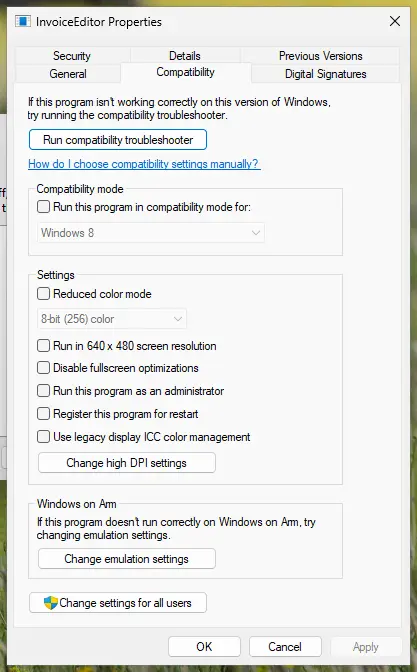
Full steps for both Windows versions: How to run a program as administrator or in compatibility mode. We found no source that says running as administrator fixes error 216, so do not leave a program elevated just for this test.
It worked if: The old program runs and closes without the box.
If not: Clear the compatibility setting and look for a maintained replacement. An old program with a memory bug cannot be repaired from outside.
Fix 6. Stop the program that shows error 216 at Windows start and scan it
15 minutesLow riskThe box appears right after you sign in, before you open any program, or you do not recognize the file Fix 1 found.
A program that starts with Windows can crash with error 216 before you see its window. Turning off its startup entry shows whether it is the source. A file you do not recognize also deserves a malware scan.
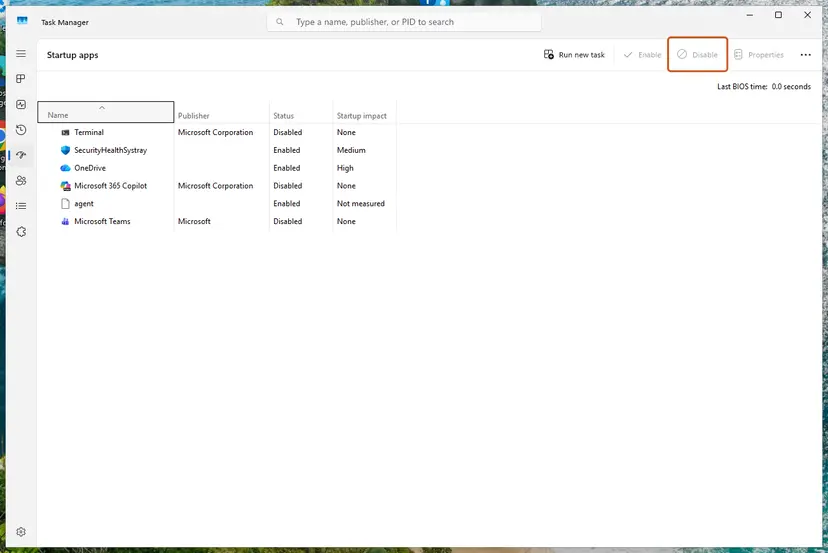
- Open Task Manager with Ctrl + Shift + Esc and select Startup apps.
- Note the entries you do not recognize or that were added recently, and the publisher shown next to each.
- Select one entry and select Disable. Restart the PC.
- Repeat one entry at a time until the box no longer appears. The last entry you disabled is the source.
- If that entry has no publisher or you do not know it, right-click it, select Open file location, and keep the folder open.
- Scan that file and the whole PC with Microsoft Defender. Step by step: How to scan for malware with Microsoft Defender.
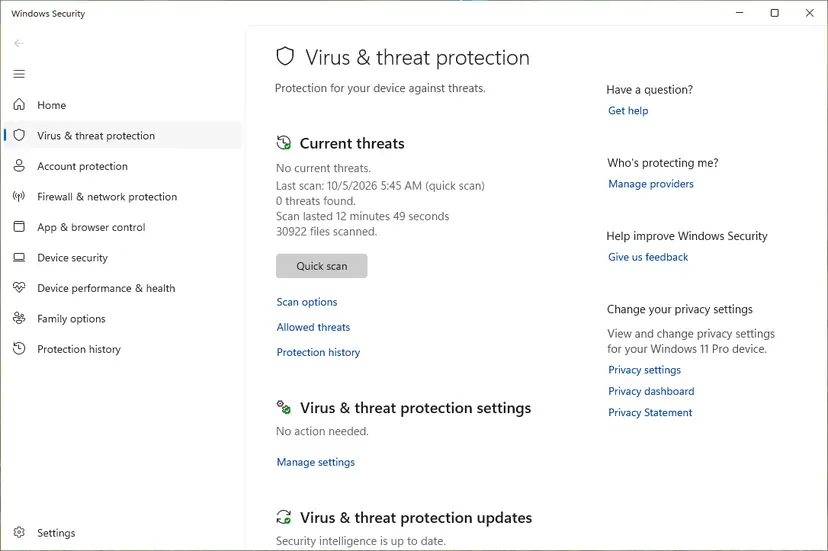
If Defender finds a threat, follow its steps to remove it and change your important passwords from another device. If files really went missing, check Recycle Bin and File History first: error 216 itself does not delete files.
It worked if: Windows starts without the box, and Defender reports no threats or has removed them.
If not: If the box still appears with all startup entries off, a service or another program is involved. Go to Fix 7.
Fix 7. Find a program that interferes with a clean boot
20 minutesLow riskThe error appears in more than one program, or none of the fixes above helped.
Overlays, screen recorders, security tools and similar programs load code into other programs. If that code is buggy, the host program crashes with its own error 216. Microsoft's forum answer suggests testing in a clean boot state.
A clean boot starts Windows with Microsoft services only and no startup apps. If the program then works, turn the other services back on in groups until the error returns. Step by step: How to perform a clean boot in Windows.
- Open System Configuration. Select Search on the taskbar, type msconfig and select System Configuration from the results.
- Hide Microsoft services. On the Services tab, select the Hide all Microsoft services check box. Only services from other companies stay in the list.
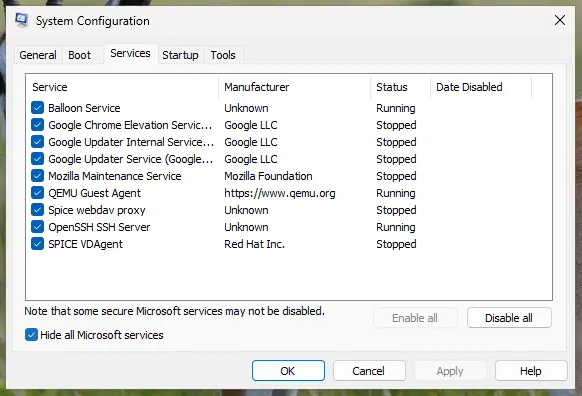
With Hide all Microsoft services ticked, only third-party services stay in the list. Screenshot: Windows 11 26H2. - Disable the remaining services. Select Disable all, then select Apply.
- Open Task Manager. On the Startup tab of System Configuration, select Open Task Manager.
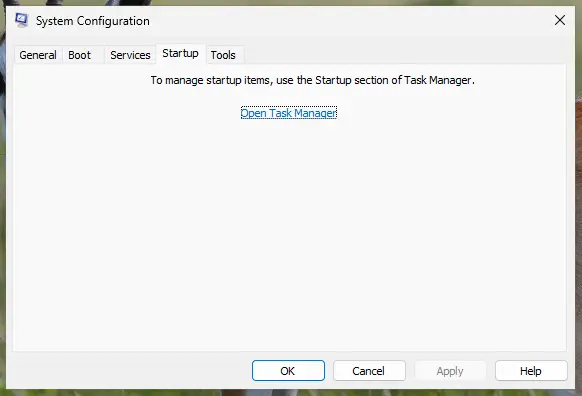
The Startup tab only links to Task Manager. Screenshot: Windows 11 26H2. - Disable the startup apps. On the Startup apps tab in Task Manager, select each item whose status is Enabled and select Disable. Write down or take a screenshot of the items you disable: you need the list to turn them back on.
Select an app, then Disable. Screenshot: Windows 11 26H2.
These steps were written for Windows 11 25H2 and 26H2. The full page with the other versions and what each result means: How to perform a clean boot in Windows
When you are done, go back to System Configuration and select Normal startup, or Windows keeps starting without your other programs.
It worked if: The program works in a clean boot, and turning services back on in groups shows which one brings error 216 back.
If not: If the error appears even in a clean boot, go to the next section and send the details to the program's maker.
If runtime error 216 is still there
An access violation inside a program can only be fixed by its developer. Send the maker of the program these facts, through its support page or forum:
- The full message, such as
Runtime error 216 at 00401945, and whether the address is the same every time. - The program's version from Help > About, and how you installed it.
- The exact moment: at start, during which action, or when closing.
- The plugins or add-ons you use, and whether the error happens with fresh settings (Fix 3).
- Your Windows version from Settings > System > About.
Windows 10 left support on 14 October 2025, but error 216 does not depend on the Windows version. A fix from the program's maker helps on both Windows 10 and Windows 11.
If many unrelated programs crash with different errors, and Windows sometimes stops with a blue screen, test the memory. Step by step: How to test your RAM with Windows Memory Diagnostic. One program that always shows error 216 is a software bug, not a hardware fault.
How to stop runtime error 216 from coming back
- Keep programs updated from their maker's site.
- Add plugins one at a time, so you know which one changed things.
- Back up a program's settings folder before big changes.
- Replace very old programs that are no longer updated.
- Download a program or a fix tool from a site that is not its maker's.
- Run a program as administrator just to hide a crash.
- Use a registry cleaner for this error: it does not touch a program's code.
- Keep startup entries you do not recognize.
Frequently asked questions
What is runtime error 216?
It is an access violation in a program built with Delphi. Embarcadero, the maker of Delphi, lists 216 among fatal errors with the name Access violation, and fatal errors end the program at once. The program tried to use memory that it does not own, and Windows stopped it. The fault is inside that one program. Find which program shows the box, then update or reinstall it.
What does runtime error 216 at address mean, for example at 00401945?
The address is the place in memory where the program's code failed. Values that start with 0040, such as 00401945 or 00404F0C, typically point into the program's own file, so the bug is in that program. The address is useful to the program's developer, who can match it to a line of code. For you, it mainly tells you whether the same crash repeats: the same address each time means the same bug.
How do I fix runtime error 216 on Windows 10?
The steps are the same as on Windows 11, because the error comes from the program, not from Windows. Find the program with Task Manager (Fix 1), install its newest version (Fix 2), then reset its plugins and settings or reinstall it (Fixes 3 and 4). Windows 10 left support on 14 October 2025, so an old program may also be a reason to check for a maintained replacement.
Does runtime error 216 appear on Windows 11 too?
Yes. Any program built with Delphi can show it on Windows 11, Windows 10 or older versions. Windows 11 does not cause the error, and no Windows update is known to fix it. If it started right after you moved to Windows 11, the program is probably old: check for a newer version first and try compatibility mode as in Fix 5.
Is runtime error 216 a virus?
Not by itself. Older pages claimed it always means a backdoor from 1999, but that malware simply happened to be written in Delphi too. Today error 216 almost always comes from an ordinary program with a bug. Check the file with Fix 1 and Fix 6: if it is a program you installed and know, it is a bug. If the file is unknown and starts with Windows, scan it with Microsoft Defender.
Why does runtime error 216 appear when I close a program?
Closing is the most common moment developers report. While a Delphi program shuts down, it frees its objects and units in order, and its full exception layer is already gone near the end. If some code then touches memory that was already freed, the program can show only the bare runtime error number. This is a bug for the maker to fix. A newer version or removing a plugin often avoids it.
What is delphi runtime error 216 for developers?
In Delphi it is the fatal error mapped to EAccessViolation. When SysUtils is active, it normally appears as an exception you can catch and debug. The bare runtime error appears when it is not, which developers mostly see during unit initialization or finalization. Look for objects freed twice, interfaces released after their objects, and threads or components still running at shutdown. This page is written for people who use such programs.
Will SFC, a registry cleaner or a Windows update fix error 216?
We found nothing that links them to this error. Error 216 is raised inside a program's own code, and system file repair, registry cleaning or a Windows update do not change that code. Spend the time on the program itself: its version, plugins, settings and install. Run SFC only if other Windows parts also misbehave.
Is runtime error 216 the same as error 216 in a game or another app?
No. The runtime error with an address comes from Delphi programs. Other software uses the number 216 for unrelated problems, for example an error code in a game launcher or a car diagnostic tool. Those are not covered here. If your message does not say Runtime error 216 at and an address, search for the exact text of your message and the program's name.
Sources
- Embarcadero DocWiki: Fatal errors (RAD Studio, Delphi runtime error numbers) (docwiki.embarcadero.com)
- Microsoft Q&A: runtime error 216 at 00403FBA if I run Xlaunchpad for Windows (learn.microsoft.com)
Did this fix work?
One click, no account. It tells the next reader which guides are worth their time.
Questions and experiences: fix Runtime error 216 on Windows
Still broken, or found a fix we did not cover? Ask here: members and our editors answer. Reading is open; writing needs a free account.
…