
How to fix Discord error "A fatal Javascript error occurred" in Windows?

Prefer to fix it yourself? The manual steps follow.
- 8methods
- 5 to 20 minutes
- Easy
Applies to Discord desktop app for Windows 11 and Windows 10 (64-bit), Stable, PTB and Canary builds
8 methods in this guide
Every time I try to open Discord on my PC, I get a pop-up saying "A fatal JavaScript error occurred." Is this something wrong with Windows or Discord?
"A fatal Javascript error occured" is a box from the Discord desktop app's own start-up code: something stopped Discord from loading its main parts, and it quits. Windows itself is almost never the problem. Close every Discord process first, then delete Discord's two AppData folders and install it again, which is Discord Support's own fix.
It is Discord, not Windows. Read the first Error: line in the box, then close every Discord process in Task Manager and start it again (Fix 1). If the box comes back, delete %AppData%\discord and %LocalAppData%\Discord, restart the PC and install Discord fresh from discord.com (Fix 2). Your messages and servers are stored on your account, so they come back after you sign in.
| Error | A fatal Javascript error occured (Discord's own spelling), or A JavaScript error occurred in the main process followed by Uncaught exception: and a list of at lines. |
|---|---|
| Where it appears | In a Windows message box titled Discord (or DiscordPTB, DiscordCanary) when the desktop app starts, right after an update, or at the end of setup. Clicking OK closes Discord. |
| Main cause | Discord's start-up could not load or update its own files: a damaged or half-finished update, a copy of Discord still running, or a blocked file. |
| Fastest fix | End every Discord process in Task Manager and start again (Fix 1). If it returns: delete both Discord folders in AppData and reinstall (Fix 2). |
| Also written as | a fatal javascript error occured discord, discord fatal javascript error, discord javascript error, discord java script error, "javascript error occurred in the main process", discord uncaught exception. |
| Affects | The Discord desktop app on Windows 11 and Windows 10, 64-bit. Discord dropped Windows 7, 8 and 8.1 on 15 March 2024 and 32-bit Windows on 15 June 2024. |
| Discord's status | Not a single bug with a patch date. Discord Support lists the JavaScript error with one fix: delete both AppData folders, then reinstall. Check discordstatus.com to rule out an outage. |
| Not the cause | JavaScript in your web browser, the Java runtime, your internet speed or your Discord account. The browser version of Discord keeps working. |
| Time to fix | 2 minutes for Fix 1. About 10 to 15 minutes for a clean reinstall, most of it the download. |
| Where the cause is written | In the box itself: the first Error: line and the file paths in the at lines. For setup failures also %LocalAppData%\SquirrelTemp\SquirrelSetup.log. |
Facts checked on 14 October 2026. Steps written for Windows 11 (25H2 and 26H2) and Windows 10 22H2 with the Discord desktop app (Stable, PTB and Canary).
What "A fatal Javascript error occured" means in Discord
The Discord desktop app is built on Electron, a framework that runs a web app inside its own copy of Chromium. Electron's documentation says each app has a single main process, which runs in a Node.js environment and controls the app's lifecycle. Discord's start-up code, the part that checks for updates and loads the rest of the app, runs there.
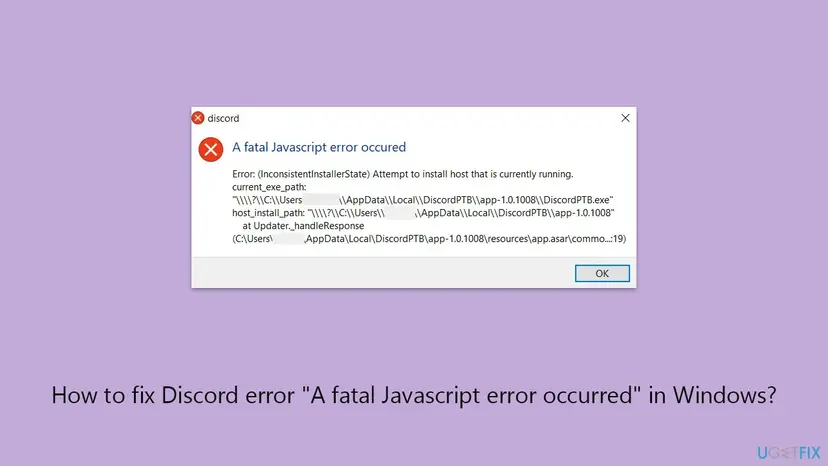
When that code hits a problem it cannot handle, you get one of two boxes. Their titles are fixed text in the code, which is why everyone sees the same words with only the details changing.
| Title in the box | Who shows it | What happens next |
|---|---|---|
| A fatal Javascript error occured | Discord's start-up code. In the published bootstrap code it is shown when the updater reports an unhandled exception or an InconsistentInstallerState, or when loading discord_desktop_core fails. | Discord quits as soon as you click OK. Nothing opens. |
A JavaScript error occurred in the main process, then Uncaught exception: | The catch-all handler for any error nobody caught. Electron prints it as Uncaught Exception:; Discord's own handler uses Uncaught exception: with a small e. | Electron's code shows the box without quitting, so Discord can sit in Task Manager with no window, or close when you click OK. |
"Occured" with one r is how the title is spelled in Discord's code, so both spellings are searched. "Javascript", "JavaScript" and "java script" are the same thing. "Java error" is not: Java is a different language that Discord does not use.
How to read the error box and pick the right fix
The title only says who caught the problem. The useful part is below it. Before you click OK, take a picture of the whole box with Win + Shift + S, because the text disappears with the box and the next fix depends on it.
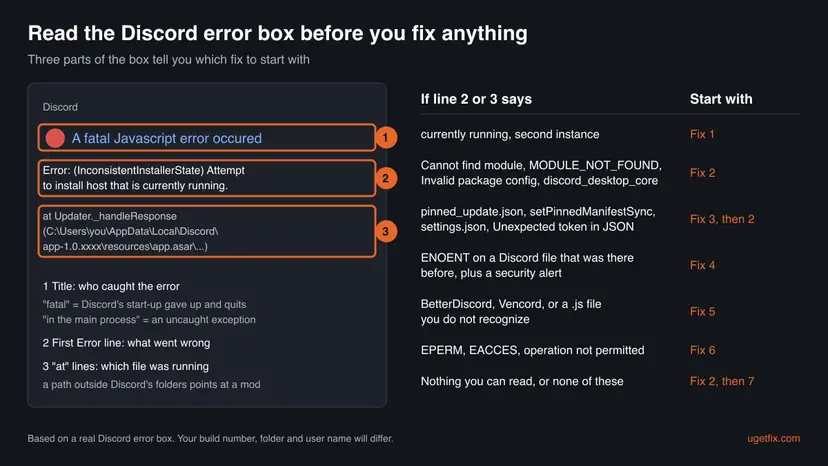
| If the box says | What it means | Start with |
|---|---|---|
InconsistentInstallerState, Attempt to install host that is currently running | The updater tried to replace the Discord build that is running right now. | Fix 1 |
Cannot find module or MODULE_NOT_FOUND, often with discord_desktop_core | Node.js could not find a file Discord needs. A module folder is missing or half-downloaded. | Fix 2 |
Invalid package config | Node.js calls this ERR_INVALID_PACKAGE_CONFIG: a package.json file failed parsing. A Discord file is damaged. | Fix 2 |
pinned_update.json, setPinnedManifestSync, settings.json, Unexpected token in JSON | Discord's settings file is damaged, or it points at an update file that is gone. | Fix 3, then Fix 2 |
ENOENT (no such file or directory) on a Discord file, plus a warning from your security app | A file that should be there was removed, often by a security tool or a cleanup app. | Fix 4 |
A path or name that is not Discord's: BetterDiscord, Vencord, an odd .js file in discord_desktop_core | Something changed Discord's own code: a client mod, or malware. | Fix 5 |
EPERM (operation not permitted) or EACCES (permission denied) | Windows refused Discord access to its own folder. | Fix 6 |
Each at line names a function and a file. Paths under AppData\Local\Discord\app-1.0.xxxx belong to Discord. A path that points to a mod folder, a download folder or a file name you never installed is the first thing to look at.
What causes the Discord fatal JavaScript error, from most to least common
Most often Discord's own files are damaged or out of step after an update that did not finish. Less often a copy of Discord is still running, a settings file points at something missing, or security software removed a file. Rarely a mod, malware, folder permissions or another program is behind it.
| Cause | How often | How to tell | Fix |
|---|---|---|---|
An update or install stopped half way: missing or damaged files in %LocalAppData%\Discord | Most often | Cannot find module, Invalid package config, discord_desktop_core, or the error started right after an update or a PC crash | Fix 2 |
| Discord is still running in the tray or in the background during start-up or setup | Often | currently running, or Task Manager shows Discord with no window | Fix 1 |
settings.json is damaged or asks for a pinned_update.json file that is gone | Less often | The at lines name appUpdater.js, setPinnedManifestSync or settings.json | Fix 3 |
| Security software or a cleanup tool quarantined or deleted a Discord file | Less often | ENOENT on a Discord file, and an entry in Protection history or your antivirus log | Fix 4 |
A client mod or injected code changed discord_desktop_core | Rarely | A mod's name or a strange file in the at lines | Fix 5 |
| Wrong folder permissions, for example after installing or starting Discord as administrator or for all users | Rarely | EPERM or EACCES | Fix 6 |
| A damaged Windows user profile or other software hooking into apps | Rarely | Discord fails in every way above but works in a new Windows account or in a clean boot | Fixes 7 and 8 |
How to fix "A fatal Javascript error occured" in Discord
Fix 1 takes two minutes and Fix 2 is Discord Support's own fix, so most readers can stop there. Fixes 3 to 6 match a specific word in the error box. Fixes 7 and 8 are tests for when nothing in the box points anywhere.
| What you see | Start with |
|---|---|
currently running, or Discord is in Task Manager but no window opens | Fix 1 |
Cannot find module, Invalid package config, discord_desktop_core, or the box appeared after an update | Fix 2 |
pinned_update.json, settings.json, setPinnedManifestSync | Fix 3 |
Your antivirus warned about a Discord file, or ENOENT on a file that was there | Fix 4 |
A mod's name or a file you do not recognize in the at lines | Fix 5 |
EPERM or EACCES | Fix 6 |
| You reinstalled cleanly and the box still appears | Fix 7, then Fix 8 |
Fix 1. Close every Discord process and start Discord again
2 minutesNo riskEveryone first, and especially when the box says currently running.
Discord keeps running in the notification area after you close its window, and its updater replaces the app's files at start-up. If an old copy is still running, the update collides with it. That is what Attempt to install host that is currently running reports.
- Click OK in the error box after you have taken a picture of it.
- Open the hidden icons arrow in the notification area. If the Discord icon is there, right-click it and choose the option to quit Discord.
- Press Ctrl + Shift + Esc to open Task Manager and select Processes.
- Find every Discord entry, under Apps and under Background processes. Select each one and choose End task. Discord often runs as several entries.
- Restart the PC. Discord Support's own steps include a restart, and it also clears a stuck updater.
- Start Discord once from the Start menu and wait for the update screen to finish before you click anything.
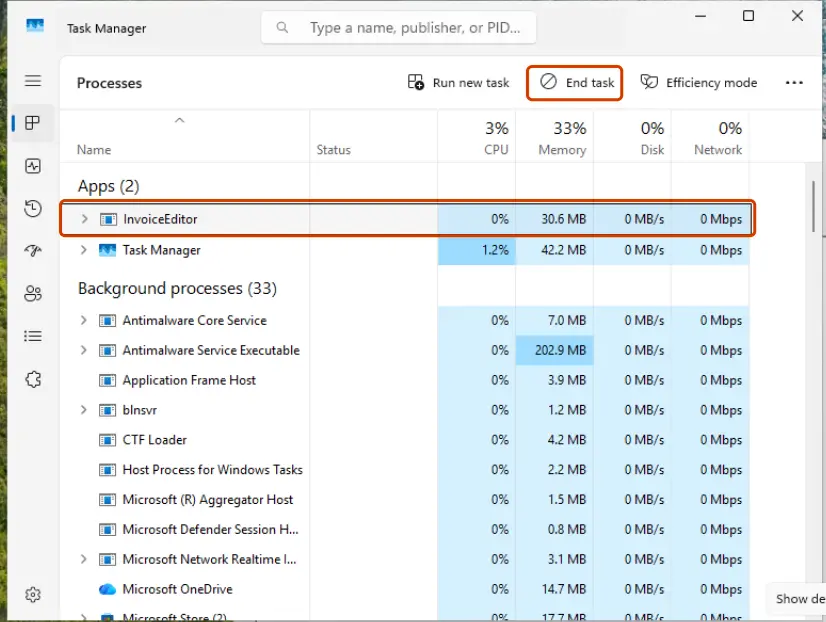
Step by step with Task Manager: Close a frozen app (Task Manager, Force Quit).
It worked if: The Discord update screen appears, finishes, and the app opens to your servers with no error box.
If not: If the same box appears again, go to Fix 2. If it names settings or pinned_update, go to Fix 3 first.
Fix 2. Delete Discord's two AppData folders and reinstall it
15 minutesLow riskThe error came back after Fix 1, or names a missing module or a damaged package.
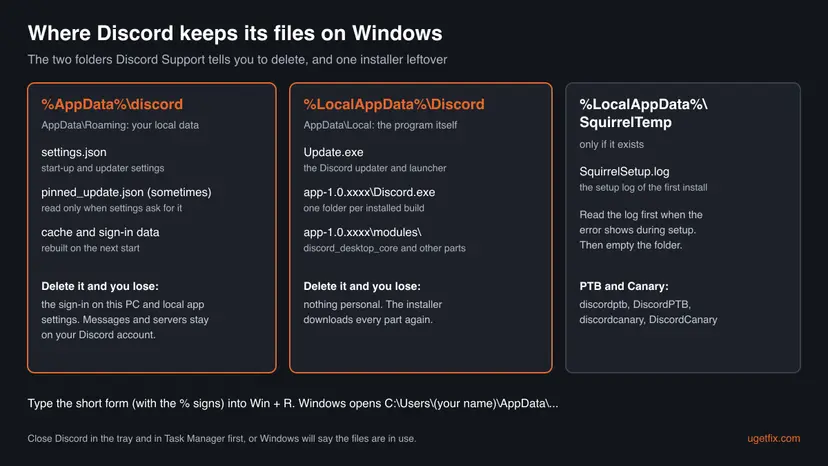
This is the fix Discord Support gives for the JavaScript error. Discord installs per user in your AppData folders, and a normal uninstall can leave both behind, so a reinstall would load the same damaged files again.
Deleting %AppData%\discord signs you out on this PC and resets local app settings such as keybinds and the startup option. Messages, servers and friends are on your Discord account and are not touched. Have your password and two-factor codes ready before you start.
- Close every Discord process as in Fix 1. If any Discord entry stays in Task Manager, Windows will refuse to delete the folders.
- Optional: uninstall Discord. Windows 11: Settings > Apps > Installed apps, the ... next to Discord, then Uninstall. Windows 10: Settings > Apps > Apps & features.
- Press Win + R, type the line below and press Enter. Select the discord folder and delete it.
%appdata% - Press Win + R again, type the line below and press Enter. Delete the Discord folder there too.
%localappdata% - In the same Local folder, open SquirrelTemp if it exists and delete what is inside. It holds leftovers from earlier setup runs.
- Empty the Recycle Bin and restart the PC.
- Download a fresh installer from
https://discord.com/download. Run DiscordSetup.exe with a normal double-click and let it finish and open Discord. - Sign in. Discord downloads its modules again on the first start, so wait until the update screen closes.
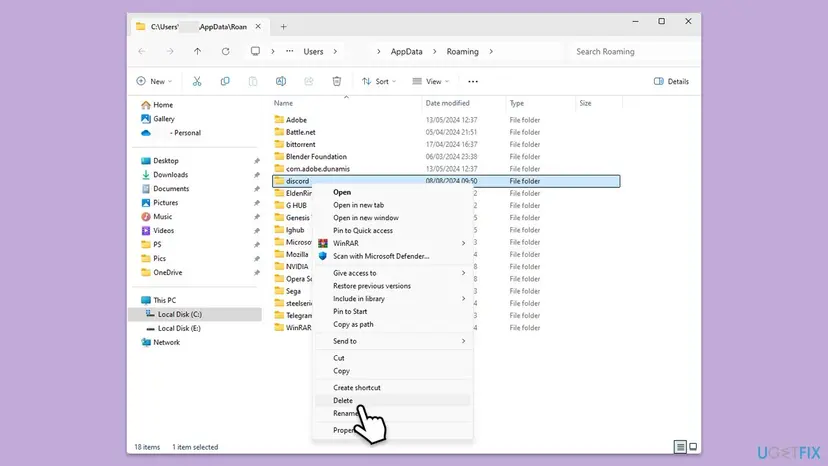
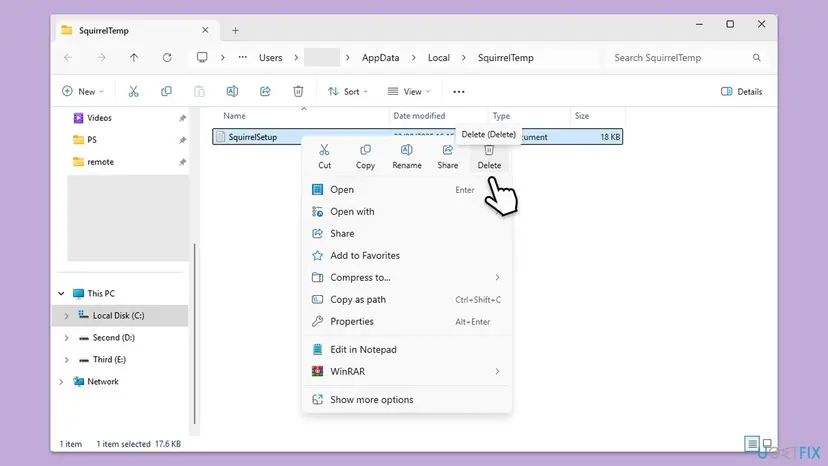
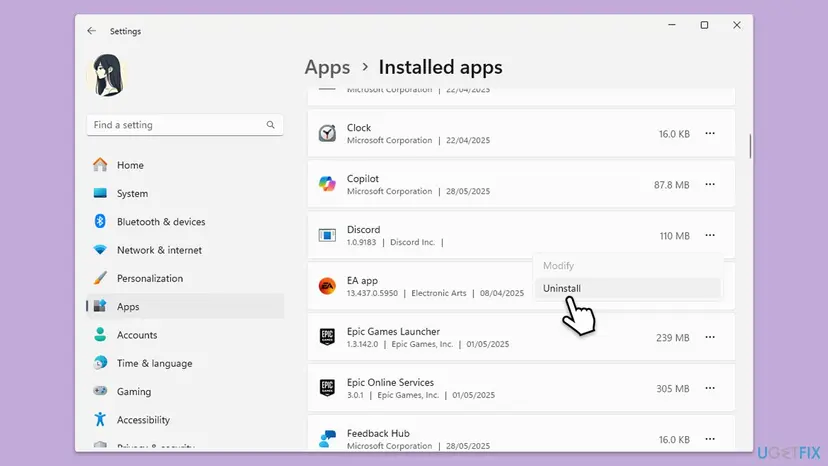
General uninstall steps for Windows 11 and 10: Uninstall a program or app in Windows. Use PTB or Canary? Their folders are discordptb and DiscordPTB, or discordcanary and DiscordCanary, and the same steps apply.
It worked if: Setup finishes, the update screen runs once, and Discord opens to the sign-in screen without the error box.
If not: If Windows says a file is in use, go back to Fix 1. If the box still appears on a fresh install, read its Error line again and go to Fix 4, 5 or 6.
Fix 3. Rename Discord's settings file when the error names it
3 minutesLow riskThe at lines mention settings.json, pinned_update.json or setPinnedManifestSync.
In Discord's published start-up code, a setting called USE_PINNED_UPDATE_MANIFEST makes the updater read pinned_update.json before anything else. If that file is gone, start-up fails. If settings.json is missing, the code simply starts with default settings, so renaming it is safe.
- Close every Discord process as in Fix 1.
- Press Win + R, type this and press Enter:
%appdata%\discord - If you cannot see file extensions, turn them on. Windows 11: View > Show > File name extensions. Windows 10: the View tab, File name extensions.
- Rename
settings.jsontosettings.json.old. Keep it: it is your way back. - If
pinned_update.jsonis in the same folder, rename it topinned_update.json.oldas well. - Start Discord and let it update.
Discord does not document these files. We read their role from public copies of Discord's start-up code, and newer builds may handle them differently. If renaming changes nothing, Fix 2 removes this folder anyway.
It worked if: Discord starts with default app settings, finishes its update and opens. You may need to set your startup and window options again.
If not: Put the old names back if you want your settings, then do the full clean reinstall in Fix 2.
Fix 4. Check whether security software removed a Discord file
10 minutesLow riskYour antivirus showed an alert, or the box shows ENOENT on a Discord file.
If a security tool quarantines one file of a Discord module, the start-up code cannot load it and stops with this box. A reinstall then fails the same way if the tool removes the file again. Checking the tool's history tells you instead of guessing.
- Open Windows Security from the Start menu and select Protection history.
- Look for entries from the day Discord broke whose path is under
AppData\Local\DiscordorAppData\Roaming\discord. - If an entry is there, do not restore it blindly. Do the clean reinstall in Fix 2 so you get fresh files straight from discord.com, which Defender scans again.
- If the fresh install is quarantined again, open Virus & threat protection > Manage settings and use Submit a sample manually to send the file to Microsoft for a second look.
- With another antivirus, open its quarantine or history page and look for Discord paths in the same way.
- To test once, pause real-time protection, start Discord, and turn protection back on right away: Turn off Microsoft Defender protection for a moment.
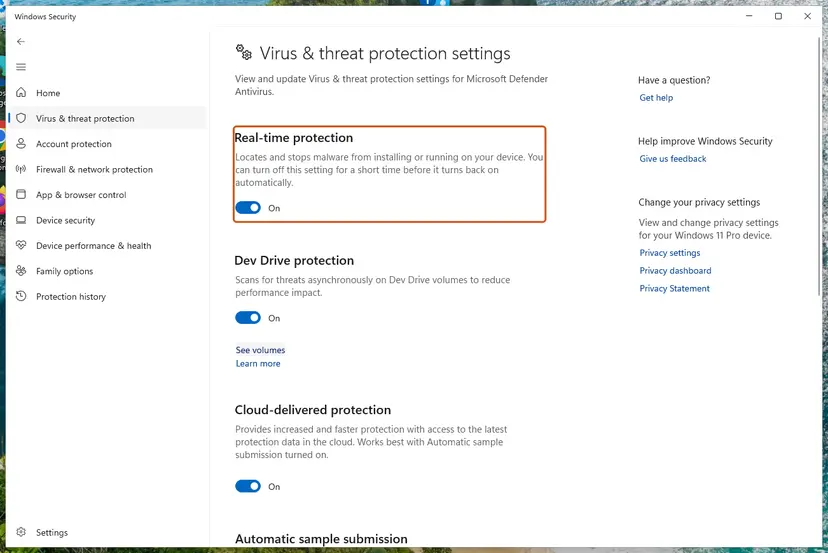
Microsoft warns that an exclusion means Defender no longer checks those files. Never exclude your whole AppData folder to make Discord start. Discord's folders are where token-stealing malware puts its code, as the next fix explains.
It worked if: Protection history shows nothing about Discord, or the fresh install starts and stays out of quarantine.
If not: If the history names a file you do not recognize, treat it as Fix 5. If it is clean, go to Fix 6.
Fix 5. Remove a client mod or injected code from Discord
20 minutesLow riskThe at lines name a mod, or a file you never installed inside discord_desktop_core.
Client mods and some malware work by changing discord_desktop_core, the module Discord loads at start-up. Palo Alto Networks Unit 42 describes a stealer that kills Discord, writes its own script into that module and restarts it with Update.exe. Broken changed code ends in this error box.
- Read the
atlines in your picture of the box. Note any name that is not Discord, such as a mod, or a file with a random name. - If you installed a client mod yourself, remove it with its own installer, or just do Fix 2. A fresh install replaces
discord_desktop_corewith Discord's own copy. - If you never installed a mod, assume the change is malicious. Run a full scan and then a Microsoft Defender Offline scan: How to scan for malware with Microsoft Defender.
- After the scan is clean, do the clean reinstall in Fix 2.
- Then, from a phone or another PC you trust, change your Discord password and turn on two-factor authentication. Stealers of this kind are built to take your sign-in.
It worked if: The scan finds nothing or removes the threat, the fresh Discord install opens, and the at lines no longer name a foreign file.
If not: If the scan keeps finding the same threat after removal, the source is still on the PC. Run Microsoft Defender Offline again, and get help from a security specialist before you sign in to Discord on that PC.
Fix 6. Start Discord once as administrator to test folder permissions
5 minutesLow riskThe box shows EPERM, EACCES, or operation not permitted.
Node.js describes EPERM as an operation that needs elevated privileges and EACCES as access forbidden by file permissions. A run as administrator shows whether permissions are the block. Discord installs per user, so it should not need this every day.
- Close every Discord process as in Fix 1.
- Type Discord in the Start menu, right-click it and choose Run as administrator.
- Select Yes in User Account Control.
- If Discord now opens, the problem is permissions. Close it, then do Fix 2 while signed in to your normal Windows account, so the new folders belong to you.
- Do not set Discord to always run as administrator. Use it once, as a test only.
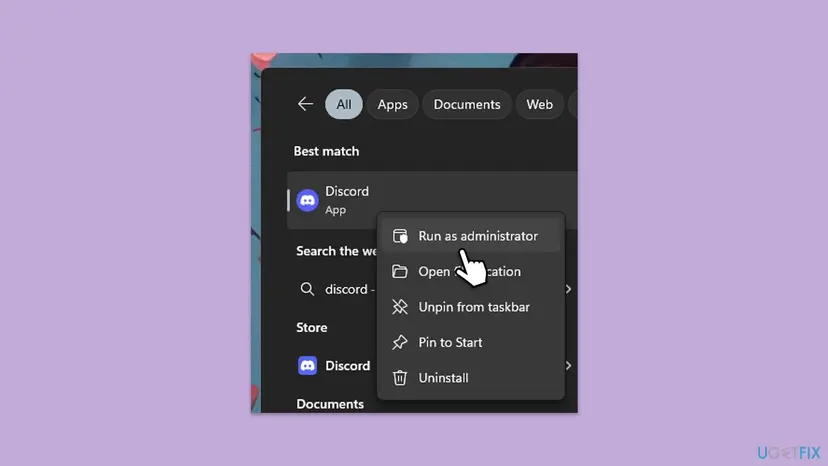
How to run a program as administrator on Windows 11 and 10: How to run a program as administrator or in compatibility mode. Older Discord help pages also suggest compatibility mode for Windows 7 or 8, but Discord has not supported those versions since 15 March 2024, so we do not recommend it.
It worked if: Discord opens as administrator, and after the clean reinstall it also opens normally without elevation.
If not: If it fails as administrator too, permissions are not the cause. Go to Fix 7.
Fix 7. Test Discord in a new Windows user account
15 minutesNo riskYou reinstalled cleanly and nothing in the box points to a cause.
Discord keeps everything inside your user profile. A new account has fresh AppData folders and no programs that start with your sign-in, so it separates a problem in your profile from one in Windows or other software.
- Create a local test account and sign in to it: Create a new user account to test a problem.
- Download Discord from discord.com in the new account and install it there.
- If Discord works in the new account, the cause is in your old profile. Repeat Fix 2 carefully there, or move to the new account.
- If Discord fails in the new account too, the cause is system-wide. Go to Fix 8.
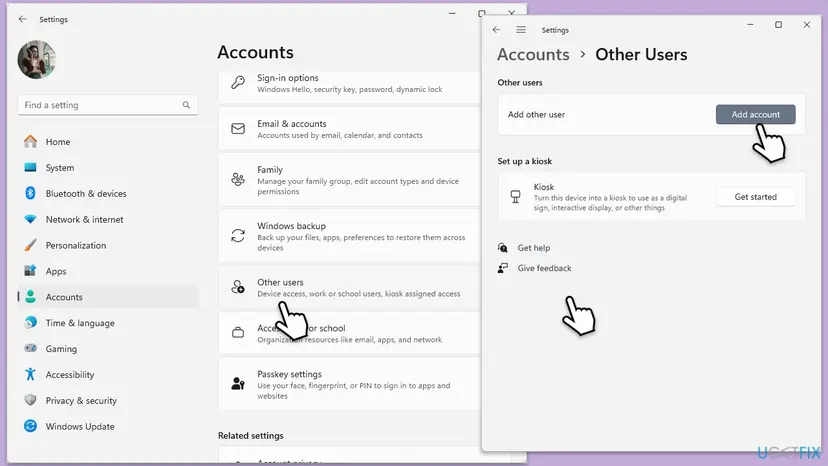
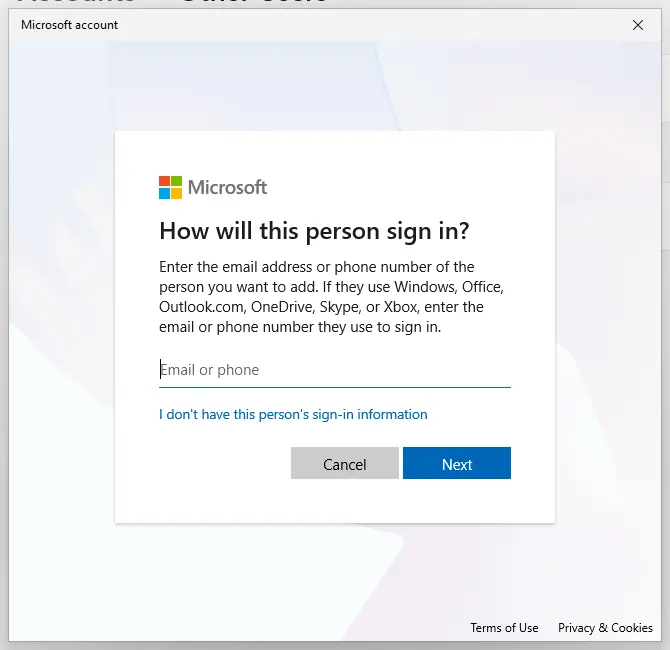
It worked if: You know whether the error follows your Windows profile or happens in every account.
If not: If it fails everywhere, continue with the clean boot in Fix 8.
Fix 8. Find conflicting software with a clean boot
20 minutesLow riskDiscord fails in every Windows account even after a clean reinstall.
Overlays, game boosters and some security suites load into other programs at start-up. A clean boot starts Windows with only Microsoft services, so if Discord opens then, one of the switched-off programs is the cause.
- Open System Configuration. Select Search on the taskbar, type msconfig and select System Configuration from the results.
- Hide Microsoft services. On the Services tab, select the Hide all Microsoft services check box. Only services from other companies stay in the list.
- Disable the remaining services. Select Disable all, then select Apply.
- Open Task Manager. On the Startup tab of System Configuration, select Open Task Manager.
- Disable the startup apps. On the Startup apps tab in Task Manager, select each item whose status is Enabled and select Disable. Write down or take a screenshot of the items you disable: you need the list to turn them back on.
- Confirm the changes. Close Task Manager. On the Startup tab of System Configuration, select OK.
- Restart and test. Restart the PC. Windows now starts in a clean boot environment: try again the thing that failed (run the app, install the update, uninstall the program).
These steps were written for Windows 11 25H2 and 26H2. The full page with the other versions and what each result means: How to perform a clean boot in Windows
When Discord opens in the clean boot, turn the services back on in small groups and restart each time. The group that brings the error back holds the program to update or remove.
It worked if: Discord opens in a clean boot, and you find the one program that brings the error back.
If not: If it fails even in a clean boot, collect the details in the next section and contact Discord Support.
Still getting the Discord JavaScript error? What to collect and send
Discord Support asks you to contact it at dis.gd/contact if the error stays after the clean reinstall. A good report saves a round of questions. Check discordstatus.com first: an outage shows up there.
- The whole error box: your picture of the title, the
Error:line and everyatline. - Your Discord build: the version shown under Discord in Installed apps, for example
1.0.9183, and whether it is Stable, PTB or Canary. - The setup log, if the box appeared during setup:
%LocalAppData%\SquirrelTemp\SquirrelSetup.log. Squirrel's documentation names this file as the log of the first install. - Your Windows version: press Win + R, type
winver, press Enter. - What you already tried, in order, including Fixes 1 and 2 and the result of the new account test.
If many programs crash with random errors, not only Discord, test the memory with How to test your RAM with Windows Memory Diagnostic and check the disk. One app showing one clear Error line is a software problem.
How to keep the fatal JavaScript error from coming back
- Let the Discord update screen finish before you close the window or shut down the PC.
- Quit Discord from the notification area before you install a new copy or update Windows.
- Download Discord only from
discord.com/download. - Keep Windows 11 or Windows 10 64-bit up to date. Windows 10 left Microsoft support on 14 October 2025, so plan a move to Windows 11.
- Do not let cleanup tools delete files inside
AppData\Local\Discord. - Do not install client mods or run scripts that promise free Nitro or themes.
- Do not keep Discord set to run as administrator.
- Do not exclude AppData from your antivirus.
If you need Discord while you work on the desktop app, open it in your browser at discord.com/app. It uses the same account and does not depend on the files in AppData.
Frequently asked questions
Is the fatal JavaScript error in Discord a virus or a problem with Windows?
Usually neither. The box comes from Discord's own start-up code, and the most common reasons are a damaged update or a copy of Discord still running, which Fixes 1 and 2 clear. Windows only matters when it blocks Discord's folders. A virus is a real but rare cause: some Discord token stealers change the discord_desktop_core module, and a broken change can end in this box. If the at lines name a file you never installed, run a Microsoft Defender scan before you reinstall (Fix 5).
Will I lose my messages or servers if I delete the Discord folders?
No. Messages, servers, friends and Nitro are stored on your Discord account, not on your PC. Deleting %AppData%\discord signs you out on this computer and resets local app settings, such as keybinds, startup behavior and some voice settings. Deleting %LocalAppData%\Discord removes only the program, which the installer downloads again. Make sure you know your password and have your two-factor codes before you start, because you will need to sign in again.
Is "discord java error" the same as the JavaScript error?
People often search it that way, but Java and JavaScript are different languages. Discord does not use Java, and installing or updating Java will not change anything. If your box says JavaScript, follow the fixes on this page. If you really see an error from Java, it comes from another program, such as a game or launcher that uses Java, and Discord is not involved. Check the title bar of the error box to see which program showed it.
Does the Discord fatal JavaScript error happen on Windows 11?
Yes. The error comes from the Discord app, so it looks the same on Windows 11 and Windows 10, and the fixes are the same. The only differences are the menu names in Settings, which the steps give for both. Discord needs 64-bit Windows 10 or later: it dropped Windows 7, 8 and 8.1 on 15 March 2024 and 32-bit Windows on 15 June 2024. Windows 10 itself left Microsoft support on 14 October 2025.
Can I use Discord while the desktop app shows this error?
Yes. Open discord.com/app in Chrome, Edge or Firefox and sign in with the same account. The browser version does not use the desktop app's files, so the error does not affect it. You can also install the PTB test build from discord.com/download. It installs to separate discordptb and DiscordPTB folders, so it often starts while the Stable build is broken. Discord says test builds have more bugs, so use PTB as a stopgap only.
Why does the error come back after I reinstall Discord?
A normal uninstall can leave %AppData%\discord and %LocalAppData%\Discord in place, and the next install picks up the same damaged files. Delete both folders as in Fix 2. Other reasons it returns: a Discord process was still running during setup, security software removes the same file again (Fix 4), or a mod or malware rewrites discord_desktop_core after every install (Fix 5). The Error line in the new box tells you which one it is.
Should I keep Discord set to run as administrator?
No. Discord installs into your own user folders and does not need administrator rights in normal use. Starting it as administrator once is a useful test for EPERM or EACCES errors (Fix 6). If it works, reinstall Discord as your normal user so the folders belong to you, and start it normally. A program that always runs elevated can change more of your system if something goes wrong inside it, so keep elevation for tests.
What does "Uncaught exception" mean in a Discord error?
It means an error happened in Discord's code and nothing in that code was written to handle it, so the last safety net caught it. That safety net is the box titled A JavaScript error occurred in the main process. Everything after Uncaught exception: is the stack trace: first the error itself, then the at lines listing the functions and files that were running. Read the first line and the file paths, then use the table under "Read the error box" to pick a fix.
What does a Discord "fatal error" without JavaScript in the title mean?
This page covers the two JavaScript boxes Discord shows at start-up. Discord also shows other messages, such as an installation failed message during setup or a banner that says the installation is corrupt. Discord Support's answer for a corrupt installation is the same clean reinstall as Fix 2: close every Discord process, delete both AppData folders, restart and install again. If your box has a different title, search for its exact title and Error line.
Sources
Did this fix work?
One click, no account. It tells the next reader which guides are worth their time.
Questions and experiences: fix Discord error "A fatal Javascript error occurred" in Windows
Still broken, or found a fix we did not cover? Ask here: members and our editors answer. Reading is open; writing needs a free account.
…