
How to fix FIFA 23 Error: Unable to Save Personal Settings 1?

Prefer to fix it yourself? The manual steps follow.
- 7methods
- 3 minutes for Fix 1 and Fix 2, up to an hour if the game files must be repaired
- Easy
Applies to FIFA 23 on Windows PC (EA app or Steam), and the same message in EA SPORTS FC 24 and FC 25
7 methods in this guide
Hello. I can't log in when I launch FIFA 23, and I receive the "Unable to Save Personal Settings 1" error. How do I fix this?
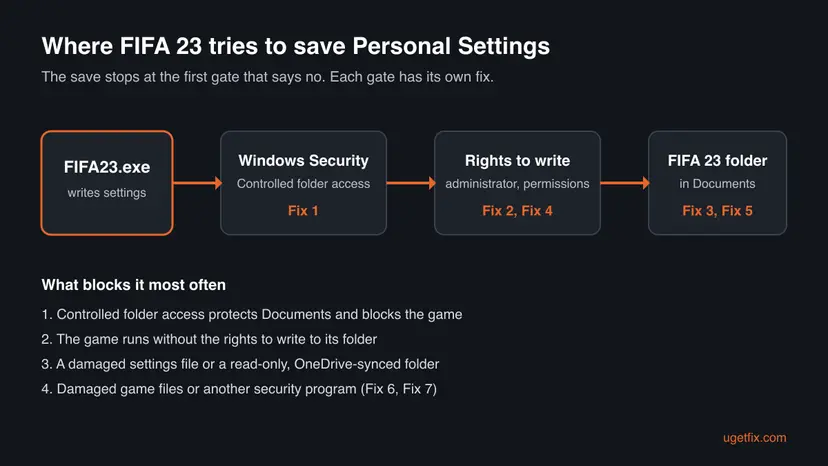
"Unable to save Personal Settings 1" means FIFA 23 could not write its settings file to the FIFA 23 folder in your Documents. On PC this is almost always Windows blocking the write, not a broken game. Allow FIFA23.exe through Controlled folder access first.
FIFA 23 shows this message when it cannot save to Documents\FIFA 23. Open Windows Security > Virus & threat protection > Manage ransomware protection and, if Controlled folder access is on, add FIFA23.exe as an allowed app (Fix 1). If it is off, run the game as administrator (Fix 2), then rename the FIFA 23 folder so the game builds a fresh one (Fix 3).
| Error | Unable to save Personal Settings 1, shown by FIFA 23 at start or after you change a setting. Retry fails again, and players report that continuing without saving does not help either. |
|---|---|
| Where it appears | On the first screens after the game loads, before the main menu. On PC the save goes to Documents\FIFA 23, or OneDrive\Documents\FIFA 23 when OneDrive backs up Documents. |
| Main cause | Windows will not let the game write to that folder. Most often Controlled folder access, which protects Documents by default. |
| Fastest fix | Allow FIFA23.exe through Controlled folder access in Windows Security (Fix 1). It keeps the protection on. |
| Also written as | unable to save personal settings 1, Personal Settings 1 failed to load, FIFA 23 settings not saving, FIFA 23 profile not saving. |
| Affects | FIFA 23 on PC, and the same message in EA SPORTS FC 24 and FC 25, including the trial. Players also report it on Xbox. |
| EA's status | No EA fix or patch note for this message that we could find. The FC 25 thread on EA Forums had no staff answer when we read it. |
| Time to fix | 2 to 5 minutes for Fix 1 to Fix 3. Up to an hour when the EA app or Steam must repair the game files. |
Facts checked on 15 October 2026. Steps written for Windows 11 (25H2 and 26H2) and Windows 10 22H2, with the Windows Security steps read from Microsoft Support.
What "Unable to save Personal Settings 1" means in FIFA 23
FIFA 23 keeps your controls, camera, audio and other choices in a profile it calls Personal Settings. On PC it writes that profile to a folder named FIFA 23 inside your Documents folder. "Unable to save Personal Settings 1" is the message the game shows when that write fails. EA has not explained the number 1, and we could not confirm what it refers to.
Because the game cannot store your profile, it often will not let you into online modes or past the first screens. The reader above could not log in at all. Others report the game lets them play only Kick Off, or that the message comes back every time they open a menu.
| What you see | What it usually means |
|---|---|
| The message at every start, Retry fails | Windows blocks the write: Controlled folder access or missing rights |
| A Windows Security notice that an app was blocked | Controlled folder access stopped FIFA23.exe, so Fix 1 is the cure |
| The message started after a crash or a power cut | The settings file in Documents\FIFA 23 is damaged |
| Settings save, but are gone at the next start | The folder is read-only or a sync tool puts back an old copy |
| The same message in FC 24 or FC 25 | The same cause: EA's newer games save the same way |
Why FIFA 23 cannot save Personal Settings, from the most common cause to the rarest
Most often Windows Security is the reason. Microsoft says Controlled folder access protects Documents, Pictures, Videos, Music and Desktop by default and blocks apps it does not trust from changing files there. A game is not on its trusted list until you add it. Less often the game simply lacks the rights to write, or the settings file itself is damaged. Rarely, damaged game files or another security program are to blame.
| Cause | How common | Fix |
|---|---|---|
Controlled folder access blocks FIFA23.exe from Documents | Most common | Fix 1 |
| The game runs without the rights to write to its folder | Common | Fix 2 |
A damaged settings file in Documents\FIFA 23 | Common after a crash | Fix 3 |
Wrong permissions or a read-only FIFA 23 folder | Less common | Fix 4 |
| OneDrive syncs Documents and holds or replaces the file | Less common | Fix 5 |
| Damaged or incomplete game files | Rare | Fix 6 |
| A third-party antivirus with its own folder shield | Rare | Fix 7 |
If Windows Security showed an "App is blocked" notice when the game started, go straight to Fix 1. Microsoft names that notice as the sign that Controlled folder access stopped an app from saving.
How to fix Unable to save Personal Settings 1 in FIFA 23
The fixes are ordered by how often they work and how little they cost. Test the game after each one. Fix 1 and Fix 2 take a few minutes and change nothing in your saves; Fix 3 needs a backup first.
| What you see or what your PC has | Start with |
|---|---|
| Controlled folder access is on, or you saw an "App is blocked" notice | Fix 1 |
| Controlled folder access is off | Fix 2 |
| The message began after a crash, a power cut or a mod | Fix 3 |
| Settings save but are gone next time | Fix 4, then Fix 5 |
| Your Documents folder is inside OneDrive | Fix 5 |
| Nothing above helped, or other EA games fail too | Fix 6, then Fix 7 |
Fix 1. Allow FIFA23.exe through Controlled folder access
3 minutesNo riskAnyone with Controlled folder access turned on, or who saw a blocked app notice when the game started.
Microsoft says Controlled folder access lets only trusted apps change files in protected folders, and Documents is one of them by default. If an app cannot save to a folder, Microsoft says the app is blocked from saving there. Allowing only FIFA 23 keeps the ransomware protection on for everything else.
- Open Start, type Windows Security and open it.
- Select Virus & threat protection, then Manage ransomware protection under Ransomware protection.
- Look at Controlled folder access. If it is Off, this is not your cause: go to Fix 2.
- Select Allow an app through Controlled folder access and choose Yes in the User Account Control prompt.
- Select Add an allowed app > Browse all apps.
- Go to the game folder and pick
FIFA23.exe. The EA app installs games underC:\Program Files\EA Gamesby default; Steam copies sit understeamapps\commonin your Steam library. - If you play the trial, add
FIFA23_Trial.exeas well. Then start the game again.
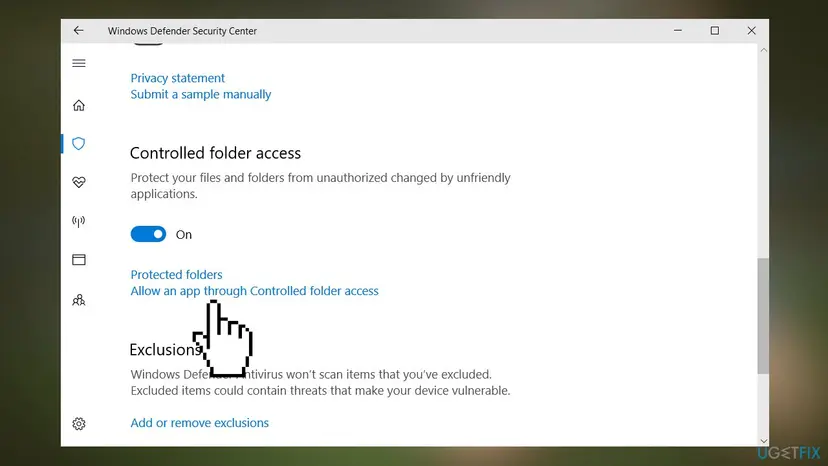
Do not turn Controlled folder access off to make the game save. Microsoft calls it a powerful tool against ransomware; one allowed app is all FIFA 23 needs.
It worked if: The message does not appear, and a changed setting is still there after you restart the game.
If not: If the message stays, or the feature was off, go to Fix 2.
Fix 2. Run FIFA 23 as administrator
3 minutesLow riskControlled folder access is off or already allows the game, and the message still appears.
A game started without administrator rights can be refused when it writes to a folder whose permissions changed. Players on the EA FC 24 Steam forum report that ticking Run this program as an administrator for the game file ended the message for them.
- Close FIFA 23, the EA app and Steam.
- Open the game folder and right-click
FIFA23.exe, then select Properties. - Open the Compatibility tab and tick Run this program as an administrator.
- Select Apply and OK, then start the game from the EA app or Steam as usual.
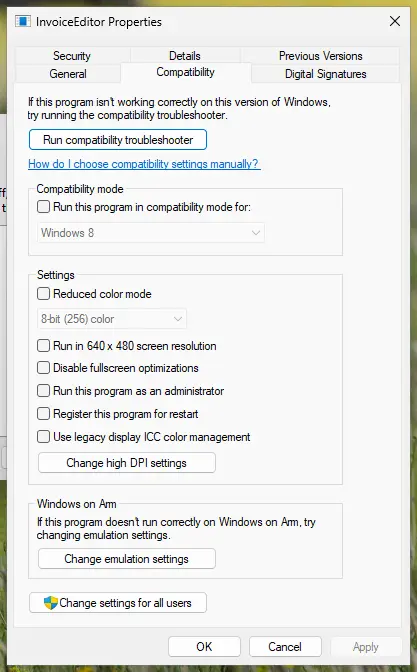
The full steps, and how to undo them, are here: How to run a program as administrator or in compatibility mode. Run a program as administrator only when it came from the EA app or Steam.
It worked if: Windows asks for permission when the game starts, and the settings save without the message.
If not: Untick the box again if nothing changed, and go to Fix 3.
Fix 3. Rename the FIFA 23 folder in Documents so the game makes a new one
5 minutesRead the warningThe message started after a crash, a power cut, a forced shutdown or a mod.
A settings file that was only half written cannot be read or replaced, so every save attempt fails. When the FIFA 23 folder is missing, the game creates a new one with default settings at the next start.
The FIFA 23 folder can hold local saves, such as Career Mode files, as well as settings. Rename the folder instead of deleting it, so you can copy your saves back. Ultimate Team progress is stored online and is not touched.
- Close FIFA 23 and the EA app or Steam.
- Open File Explorer and paste this in the address bar:
%USERPROFILE%\Documents - If there is no
FIFA 23folder there, open%USERPROFILE%\OneDrive\Documentsinstead. - Right-click the
FIFA 23folder, select Rename and call itFIFA 23 old. - Start the game. It builds a new
FIFA 23folder and asks you to set your options again. - To get local saves back, copy the save files from
FIFA 23 oldinto the new folder with the game closed.
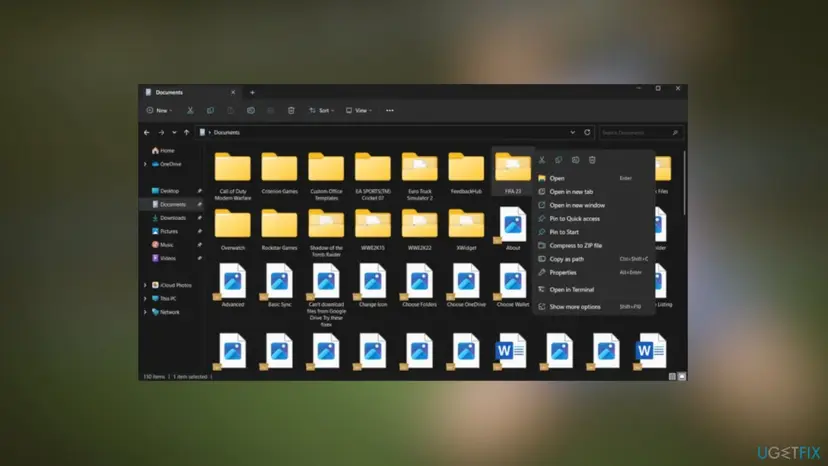
It worked if: The game starts with default settings, and a change you make is still there after a restart.
If not: If the new folder is not created or the message returns, go to Fix 4.
Fix 4. Give your account full control of the FIFA 23 folder and clear Read-only
5 minutesLow riskSettings seem to save but are gone next time, or the folder came from another PC or an old Windows install.
A folder copied from another PC or restored from a backup can keep permissions that do not include your current account. The game then can read the folder but not write to it.
- Right-click the
FIFA 23folder in Documents and select Properties. - On the General tab, clear Read-only if it is ticked, select Apply and choose to apply it to all subfolders and files.
- Open the Security tab and select Edit.
- Select your own user name in Group or user names. If it is not listed, select Add, type your user name and select OK.
- Tick Allow for Full control, then select Apply and OK.
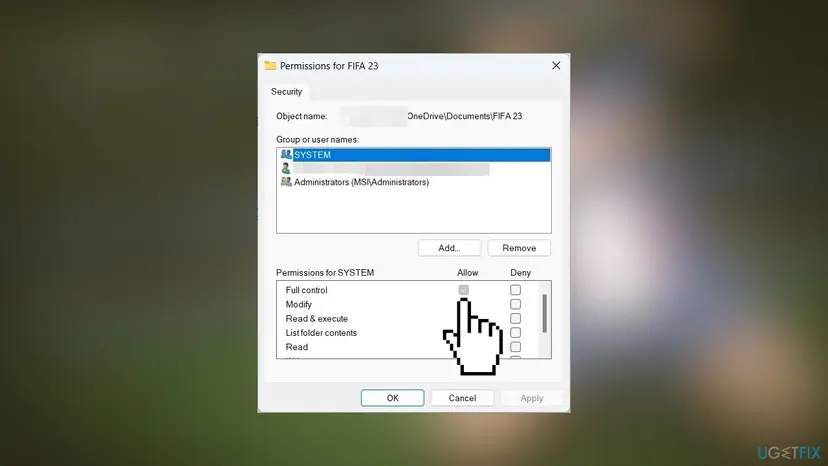
Give the right to your own account. The old advice was to change the Administrators group, but the game runs under your account unless you start it as administrator.
It worked if: Read-only stays cleared, and your account shows Full control on the Security tab.
If not: If your Documents folder is in OneDrive, go to Fix 5. Otherwise go to Fix 6.
Fix 5. Pause OneDrive sync for one test when Documents is in OneDrive
5 minutesNo riskThe folder path starts with OneDrive\Documents, as in the picture above.
When OneDrive backs up Documents, the game's folder lives in OneDrive and is synced while the game writes to it. A file that is being uploaded, or that exists only online, can be unavailable at the moment the game saves.
- Select the OneDrive cloud icon in the notification area of the taskbar.
- Select the gear icon, then Pause syncing and pick 2 hours.
- Right-click the
FIFA 23folder and select Always keep on this device. - Start FIFA 23 and change a setting. If the message is gone, OneDrive was involved.
- Select the OneDrive icon again and choose Resume syncing when you finish playing.
If the test proves OneDrive is the cause, keep Always keep on this device set on the folder. Do not delete the cloud copy: it is your backup of local saves.
It worked if: The settings save while sync is paused, and still save after Always keep on this device is set.
If not: Resume syncing and go to Fix 6.
Fix 6. Repair FIFA 23 in the EA app or verify it in Steam
15 to 60 minutesLow riskEverything above failed, or the game also crashes or shows missing files.
A damaged game file can make the game fail before it reaches the save. A repair compares the installed files with the originals and downloads only what is damaged or missing, without touching Documents\FIFA 23.
- In the EA app, open Library, select the three-dot menu on the FIFA 23 tile and choose Repair.
- In Steam, right-click FIFA 23, select Properties > Installed Files and Verify integrity of game files.
- Wait until the launcher says it has finished, then start the game.
Steps for every launcher: How to verify game files in Steam, Epic Games, Xbox app, EA app, Battle.net and GOG Galaxy.
It worked if: The repair finishes without errors, and the game reaches the main menu without the message.
If not: If the repair changes nothing, another program may block the save: go to Fix 7.
Fix 7. Test with a clean boot and check a third-party antivirus
15 minutesLow riskNothing else worked, or you use another antivirus, a backup tool or a folder guard.
Some antivirus products have their own folder shield that works like Controlled folder access and blocks unknown apps from Documents. A clean boot starts Windows with Microsoft services only, which shows whether another program blocks the save.
- Do a clean boot as described in How to perform a clean boot in Windows and keep a note of what you turn off.
- Start FIFA 23 and change a setting.
- If it now saves, turn the services and startup apps back on in halves until the message returns. The last group holds the cause.
- Return to normal startup when you finish, as the procedure explains.
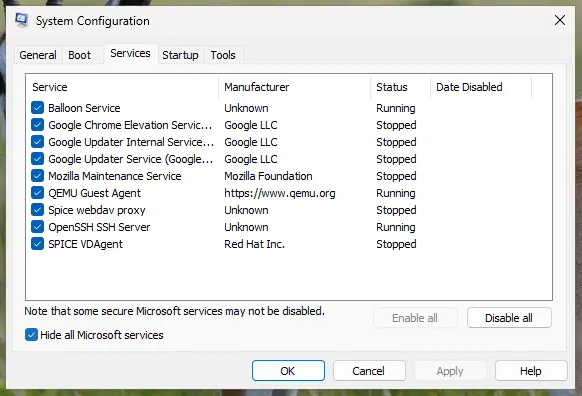
If the cause is your antivirus, add FIFA23.exe as a trusted app in its folder or ransomware shield. Pause protection for one test only, then turn it back on: Turn off Microsoft Defender protection for a moment.
It worked if: The game saves in the clean boot, and you know which program blocked it.
If not: Read the next section and contact EA with what you found.
If FIFA 23 still cannot save Personal Settings: where to look
Windows writes down every write it blocks, so check before you reinstall the game. The two places below tell you whether Windows or the game is at fault.
| Where to look | What to look for |
|---|---|
| A Windows Security notice when the game saves | Microsoft says Controlled folder access shows a notice for every blocked app; add the exact file it names |
Documents\FIFA 23 | Whether the folder's date changes after you change a setting; if not, nothing reaches the disk |
| Free space on drive C: | A full system drive also stops every save |
- Send to EA: the exact message, where you bought the game and the folder path of
FIFA 23. - Signs it is not your PC: the same message on a second PC with the same EA account. Then EA support has to check the account.
- On a console: the PC fixes do not apply. Check that the console's storage is not full and that you are signed in to the profile that owns the game.
How to keep FIFA 23 saving its settings
- Keep
FIFA23.exeon the Controlled folder access allowed list after updates; add it again if a reinstall moves it. - Close the game from its menu so it finishes writing before you shut down.
- Keep a copy of the
FIFA 23folder when your saves matter. - Keep the game folder on this device if Documents is in OneDrive.
- Do not turn off Controlled folder access or your antivirus to make one game work.
- Do not delete the
FIFA 23folder without a copy: local saves are inside. - Do not use cracked copies or repacks: they are not supported and often carry malware.
- Do not copy a settings folder from another PC without fixing its permissions (Fix 4).
Frequently asked questions
What does "Unable to save Personal Settings 1" mean in FIFA 23?
It means the game could not write your Personal Settings profile, which holds your controls, camera and audio choices, to its folder. On PC that folder is Documents\FIFA 23. The message is not a server error and not a code you can look up; it says the save to your own disk failed. The most common reason is Controlled folder access in Windows Security, which protects Documents by default and blocks apps it does not trust, so allowing FIFA23.exe there is the first fix.
Where is the FIFA 23 settings file on PC?
FIFA 23 keeps its settings and local saves in a folder named FIFA 23 inside your Documents folder: %USERPROFILE%\Documents\FIFA 23. When OneDrive backs up Documents, the same folder is at %USERPROFILE%\OneDrive\Documents\FIFA 23. We could not confirm from EA the exact name of every file inside it, so treat the whole folder as the settings location. Close the game before you open, copy or rename it, and rename rather than delete it so local saves are kept.
Where is the FIFA 23 config file?
The configuration the game changes from its own menus is kept in the same Documents\FIFA 23 folder as your settings, not in the game's install folder under Program Files or steamapps. If the game cannot save there, it shows "Unable to save Personal Settings 1". Editing files in that folder by hand is not needed for this error. If you want a clean start, rename the folder to FIFA 23 old as Fix 3 describes, and the game creates a new one with default values at the next start.
How do I fix Unable to save Personal Settings 1 on Xbox?
This page covers the PC game, and the PC fixes do not apply on Xbox. Players report the same message on Xbox One. Check that the console's storage is not full, that you are signed in to the profile that owns the game and that the console is online, then restart the console fully. We could not find an EA fix for consoles. If the message stays, contact EA support with your gamertag and the exact message, because a profile problem can only be checked on EA's side.
Does the same fix work in EA SPORTS FC 24 and FC 25?
Yes, the same message appears in EA SPORTS FC 24 and FC 25, including the FC 25 trial, and they save the same way to a game folder in Documents. Use the same fixes with the newer file name: for example, allow the FC game's .exe file through Controlled folder access and look for its own folder in Documents. A player on the FC 24 Steam forum reported that running the game file as administrator ended the message after a firewall change had not helped.
Will renaming the FIFA 23 folder delete my progress?
Renaming does not delete anything: the old folder stays next to the new one as FIFA 23 old. Local saves such as Career Mode files can be inside it, so copy them back into the new folder with the game closed once the game saves again. Ultimate Team progress lives on EA's servers and is not affected. Deleting the folder, which the old advice suggested, does remove local saves, so always rename it first.
Should I allow FIFA 23 through the Windows firewall?
The firewall controls network traffic, and this message is about writing to your disk, so a firewall rule does not fix it. If FIFA 23 also cannot connect to EA's online services, that is a separate problem with its own fixes. Keep the firewall on. The setting that does matter here is Controlled folder access in Windows Security, which decides which apps may write to Documents.
Is it safe to turn off Controlled folder access to fix FIFA 23?
It works, but it is not a safe fix. Microsoft describes Controlled folder access as a strong protection against ransomware for your Documents, Pictures and Desktop. Turning it off removes that protection for every program. Add only FIFA23.exe as an allowed app instead, which gives the game what it needs and keeps the rest of your files protected.
Do these fixes work with a FitGirl repack or a cracked copy?
No. This page is about the legitimate game from the EA app or Steam. Repacks and cracked copies replace game files, are not supported by EA and often carry malware, so no fix here is written for them. If a download like that is on your PC, scan it with Microsoft Defender and remove it.
Does this error appear on Windows 11?
Yes. Controlled folder access works the same way on Windows 11 as on Windows 10, and on PCs where OneDrive backs up Documents the game folder sits in OneDrive, which Fix 5 covers. All fixes on this page apply to Windows 11 25H2 and 26H2 and to Windows 10 22H2. Windows 10 left support on 14 October 2025, so keep Windows Security updated if you still use it.
Sources
- Microsoft Support: Virus and threat protection in the Windows Security app (Controlled folder access) (support.microsoft.com)
- EA Forums: Unable to save Personal Settings 1, FC 25 Technical Issues (user report) (forums.ea.com)
- Steam Community: EA SPORTS FC 24, unable to save personal settings (user report) (steamcommunity.com)
Did this fix work?
One click, no account. It tells the next reader which guides are worth their time.
Questions and experiences: fix FIFA 23 Error: Unable to Save Personal Settings 1
Still broken, or found a fix we did not cover? Ask here: members and our editors answer. Reading is open; writing needs a free account.
…