
How to fix "The system cannot find the path specified" in uTorrent?

Prefer to fix it yourself? The manual steps follow.
8 methods in this guide
Unfortunately, I am unable to use uTorrent. Every time I try to download a torrent file, I receive "The system cannot find the path specified" error. I have already attempted to re-launch the program, but it does not help. Do you have any solutions?
In uTorrent, Error: The system cannot find the path specified. is Windows error 3: a folder or drive in the save path is not there. The file itself is not the problem. Right-click the torrent, choose Open Containing Folder, and see whether Windows can open that folder.
The folder uTorrent saves into, or the drive it is on, does not exist right now. Open the torrent's folder from the right-click menu (Fix 1). If it will not open, bring the drive back or recreate the folder. If the files were moved on purpose, point the torrent at the new folder with Advanced > Set Download Location (Fix 2).
| Error | Error: The system cannot find the path specified. shown by uTorrent next to a torrent that stops. |
|---|---|
| Where it appears | In the uTorrent window, on the torrent that cannot write its files, when it starts, resumes or begins to download. |
| Main cause | A folder or drive in the saved download path is missing: disconnected disk, moved or renamed folder, a typo in the path or a path that is too long. |
| Fastest fix | Open the torrent's folder from the right-click menu, recreate or reconnect what is missing, then restart the torrent (Fix 1). |
| Also written as | the system cannot find the path, error cannot find the path, system cannot find the path specified (WriteToDisk), (Preallocate); a related message says the file specified. |
| Windows code | ERROR_PATH_NOT_FOUND, code 3 (0x3). Microsoft's text is the same sentence uTorrent shows. |
| Affects | uTorrent on Windows 11 and Windows 10. It is a Windows file path error, not a network or tracker error. |
| Vendor status | We found no uTorrent notice or version that fixes it. Microsoft documents the 260 character path limit. |
| Time to fix | About 5 minutes when a drive or folder is missing; up to 20 minutes if you move the files. |
Facts checked on 16 October 2026. Steps written for Windows 11 (25H2 and 26H2) and Windows 10 22H2.
What "The system cannot find the path specified" means in uTorrent
uTorrent does not make this message up. Microsoft's list of Win32 error codes defines code 3, named ERROR_PATH_NOT_FOUND. Its text is The system cannot find the path specified. uTorrent asked Windows to open or create a file, and Windows answered that a folder or the drive in front of the file name does not exist.
The wording matters because two codes look alike. Code 2, ERROR_FILE_NOT_FOUND, says The system cannot find the file specified. That one means the folder exists but the file in it does not. Your message says path, so look at folders and drives first.
| Message | Windows code | What is missing | Where to look |
|---|---|---|---|
| The system cannot find the path specified | 3 (0x3) | A drive or a folder in the path | Fixes 1 to 4 |
| The system cannot find the file specified | 2 (0x2) | The file itself, inside a folder that exists | Fix 5, then Fix 1 |
- Users also see the same text with a word in brackets after it, such as (WriteToDisk) or (Preallocate). Those brackets name the step that failed, and we found no Microsoft or uTorrent page that explains them, so treat them as a clue, not a separate error.
- The message says Windows 10 in older guides only because that was the system when they were written. Windows 11 uses the same code and the same text.
Why uTorrent cannot find the path: causes ranked
Most often the folder or the drive that uTorrent saved into is no longer there: an external disk is unplugged, a drive got another letter, or someone renamed or deleted the folder. Less often the torrent is fine but its path is wrong or too long. Rarely it is a permission or a disk problem.
| Cause | How often | How to tell | Fix |
|---|---|---|---|
| The drive is disconnected or has another letter; the folder was renamed or deleted. | Most often | Open Containing Folder gives a Windows error, or the drive is missing in This PC. | Fix 1 |
| You moved the downloaded files, the torrent still points at the old folder. | Often | The folder exists but is empty or has another name than the torrent expects. | Fix 2 |
| The default download folder in Preferences has a typo, a stray dot or a space at the end. | Sometimes | Every new torrent fails at once, not one old torrent. | Fix 3 |
| Folder plus file name pass the 260 character Windows limit. | Sometimes | Only torrents with deep folders and long names fail. | Fix 4 |
| The torrent entry itself is stuck. | Sometimes | The folder is fine and Fixes 1 to 4 did nothing. | Fix 5 |
| Your account cannot write into the folder. | Rarely | Users report it after a Windows reinstall or a moved profile. | Fix 6 |
| The disk has file system errors or keeps disconnecting. | Rarely | The path works, then fails again; chkdsk reports errors. | Fix 7 |
| A broken uTorrent install. | Rarely | The same fault on every folder and every drive. | Fix 8 |
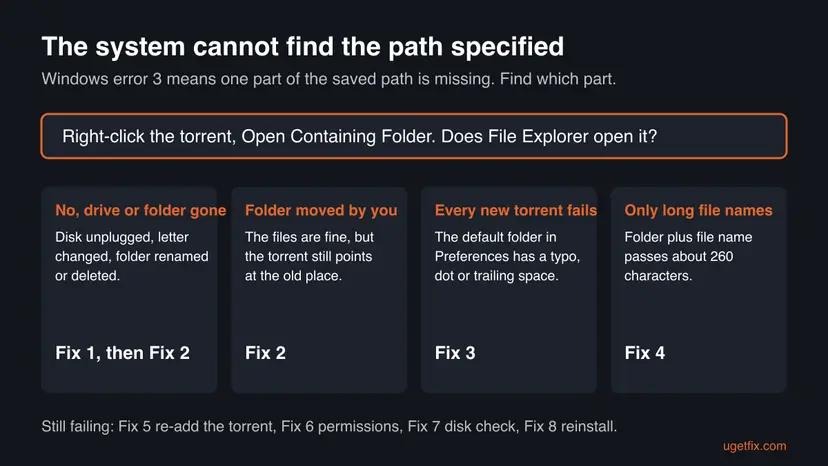
In the Windows API a path is limited to MAX_PATH, 260 characters, counting the drive letter, the colon, the backslash and an end marker. Since Windows 10 version 1607 an app can opt in to longer paths, but only if the setting is on and the app declares it. We could not confirm that uTorrent does, so keep paths short.
How to fix "The system cannot find the path specified" in uTorrent
Fix 1 shows whether the folder exists and solves most cases. Fixes 2 to 4 repair the path itself. Fixes 5 to 8 are for a stuck torrent, permissions, a faulty disk and a damaged install.
| What you see or have | Start with |
|---|---|
| You do not know which folder fails, or the torrent was saved on an external or network drive. | Fix 1 |
| You moved or renamed the download folder yourself. | Fix 2 |
| Every new torrent fails the same way. | Fix 3 |
| Only torrents with long names or deep folders fail. | Fix 4 |
| The folder opens fine and the torrent still shows the error. | Fix 5 |
| The folder opens but you cannot create a file in it. | Fix 6 |
| The drive disconnects or Windows reports file system errors. | Fix 7 |
Fix 1. Check that the download folder and its drive exist, then restart the torrent
5 minutesNo riskEveryone. It shows in one minute which part of the path is gone.
Error 3 means a folder or drive in the path is missing, so seeing the real folder tells you which of the other fixes you need. A closed and reopened client also picks up a drive you reconnected.
- Close uTorrent completely: right-click its icon in the notification area next to the clock and choose Exit. Wait a few seconds.
- Press Win + E, open This PC and check that the drive of your download folder is listed. Plug in or unlock an external disk, or reconnect the network drive, if it is missing.
- Open the folder you save into. If it was renamed or deleted, restore it from the Recycle Bin or create it again with exactly the old name.
- Start uTorrent, right-click the torrent that failed and choose Open Containing Folder. File Explorer should open that folder.
- Right-click the torrent again, choose Stop, then Start. If it shows Checking or downloading, it found the files.
A USB disk can get a new drive letter when you plug in another device first. Check the disk by its name, and note that uTorrent still has the old letter in its path.
It worked if: The folder opens in File Explorer and the torrent moves from the error to checking or downloading.
If not: If the folder is gone for good or the files are somewhere else, go to Fix 2. If the folder opens but the error stays, go to Fix 3.
Fix 2. Point the torrent at the folder that exists with Set Download Location
5 minutesLow riskYou moved, renamed or copied the downloaded files, or the old folder is gone for good.
Each torrent remembers its own save folder. Moving files does not change that memory, so the torrent keeps asking for the old path until you give it the new one.
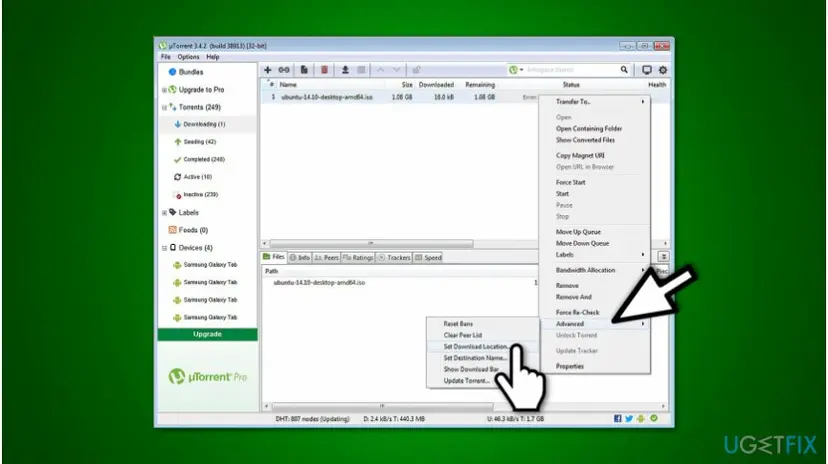
- In uTorrent, right-click the torrent that shows the error and choose Stop.
- Right-click it again and select Advanced > Set Download Location.
- In the window that opens, pick the folder that already holds the downloaded files, or a new short folder such as
C:\Torrents, and click Select Folder. - Right-click the torrent and choose Force Re-Check if you moved existing files, so uTorrent compares them with the torrent.
- Right-click the torrent and choose Start.
Users report that for a partly downloaded torrent you select the folder that contains the torrent's own folder, not the inside of it. If the check finds 0 percent, you picked one level too deep or too high.
It worked if: The torrent checks its files and continues from the percentage it had, without the path error.
If not: If the error comes back for every new torrent, the default folder is wrong: go to Fix 3. If it fails only for some names, go to Fix 4.
Fix 3. Correct the default download folder in Preferences
5 minutesLow riskEvery new torrent fails at once, or you typed the folder path by hand.
A typo, an extra dot or a space at the end of a typed path points at a folder that cannot exist, so Windows answers with error 3 for every torrent that uses it.
- In uTorrent open Options > Preferences and select Directories. The labels can differ slightly between uTorrent versions.
- Look at the folder box for new downloads. Read the path letter by letter for an extra dot, a double backslash or a space at the end.
- Click the browse button next to the box, pick the folder in the window instead of typing it, and confirm.
- Check the other folder boxes on the same page, for completed downloads and for torrent files, the same way.
- Click OK, then add a small test torrent from a source you trust.
The advice to hunt for dots and spaces comes from older guides and from user reports. We found no Microsoft or uTorrent page that describes it for this error, so it is a check, not a proven cause.
It worked if: The new torrent starts to download into the chosen folder.
If not: If the path looks right and still fails, go to Fix 4 and count its length.
Fix 4. Shorten the folder path below the Windows limit
10 minutesLow riskOnly torrents with long names, deep folders or long file names fail.
Windows counts the whole path, drive letter and file name included, against a limit of 260 characters. A torrent that unpacks into several named folders can pass it even when the download folder itself is short.
| Part of the path | Example | Counts toward 260 |
|---|---|---|
| Drive and first backslash | D:\ | 3 |
| Your download folder | Torrents\ | 9 |
| Folders inside the torrent | Some Long Release Name 2026\Disc 1\ | varies |
| File name and extension | 01 Track name.flac | varies |
| End marker added by Windows | invisible | 1 |
- Right-click the torrent and choose Open Containing Folder, click the File Explorer address bar and copy the path.
- Paste it into PowerShell inside quotes, followed by
.Length, to count the characters. Add the longest file name inside the torrent to that number. - If the total is near or above 260, create a short folder in the root of a drive, for example
C:\Torrents. - Right-click the torrent, choose Stop, then Advanced > Set Download Location, select the short folder and click Select Folder.
- Right-click the torrent and choose Start.
Count a path in PowerShell
("D:\Torrents\Some Long Release Name 2026\Disc 1\01 Track name.flac").LengthDo not turn on LongPathsEnabled in the registry for this. Microsoft says the setting only helps apps that declare long path support in their manifest, and we could not confirm that uTorrent does.
It worked if: The torrent starts without the error from the short folder.
If not: If it still fails, the torrent entry may be stuck: go to Fix 5.
Fix 5. Remove the failing torrent and add it again
5 minutesRead the warningThe folder opens, the path is short and one torrent still shows the error.
A torrent entry keeps its saved path and state in uTorrent's own list. Removing the entry and adding the torrent again with a folder that exists writes a clean path.
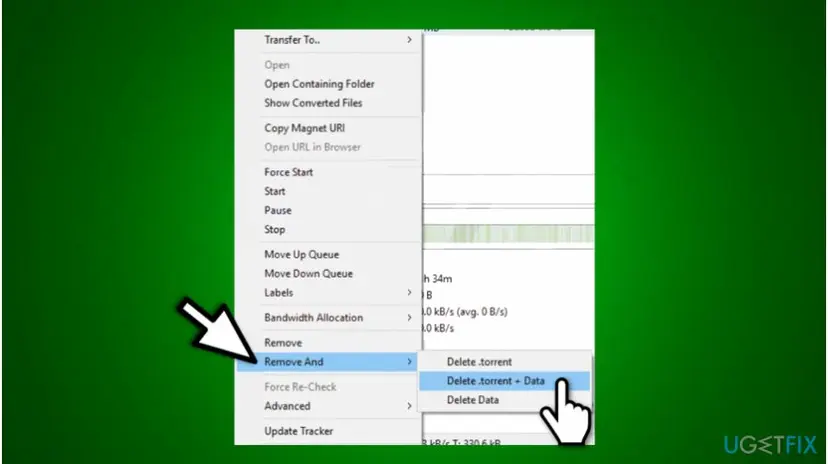
That choice deletes the torrent file and every file it downloaded. If you want to keep the files, use plain Remove and keep your copy of the .torrent file. Copy anything important to another folder first.
- Note the torrent name and where its .torrent file is stored. Copy any downloaded files you need to a safe folder.
- Right-click the torrent. Choose Remove to keep the files, or Remove And > Delete .torrent + Data to clear everything.
- Open the .torrent file again, or add the torrent from where you got it.
- In the add window pick a folder that exists, such as
C:\Torrents, and confirm. - If you kept the files, point the new torrent to their folder and choose Force Re-Check.
It worked if: The torrent appears once, with a valid folder, and starts or checks its files.
If not: If new torrents still fail, check permissions in Fix 6.
Fix 6. Check that your account can write into the download folder
10 minutesLow riskThe folder opens in File Explorer, but you cannot create a file or folder in it.
A missing permission usually gives an access error, not a missing path, so this is rare. Users report that a folder carried over after a Windows reinstall lost its rights, and the fix was to give back write rights.
- Open the download folder in File Explorer and try to create a new folder inside it. If that works, permissions are not the problem.
- If it fails, right-click the download folder and select Properties > Security.
- Select your user name and read the Allow column. Modify and Write should be ticked.
- Select Edit, pick your user name, tick Modify, and click Apply and OK. Windows asks for administrator approval.
- Restart uTorrent and start the torrent again.
Step by step for testing with higher rights: How to run a program as administrator or in compatibility mode. Use it only for a test, and not as a lasting setting.
It worked if: You can create a folder inside the download folder, and the torrent writes its files.
If not: If rights are fine, check the disk in Fix 7.
Fix 7. Scan the drive for file system errors
15 minutesLow riskThe folder works, then fails again later, or the drive is external and disconnects.
A drive with file system errors or a loose cable can drop out of Windows for a moment. uTorrent then loses the path in the middle of a download.
- Open Command Prompt as administrator.
- Type the command below and press Enter. Replace E: with the letter of your download drive. This scan only reports; it does not change anything.
chkdsk E: - Read the last lines. A clean result says Windows found no problems.
- If errors are listed, copy your files to another disk before running a repair.
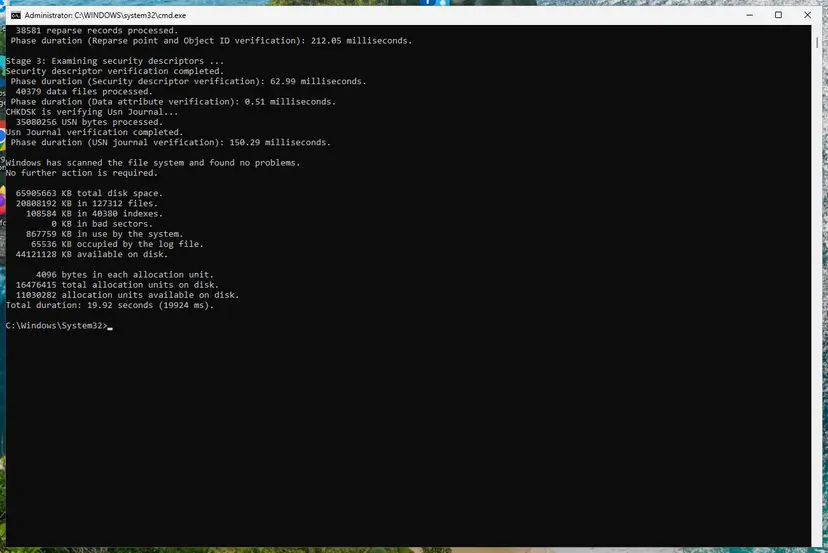
Step by step with the repair option: Check a disk for errors (chkdsk).
It worked if: chkdsk reports no problems, or it names the errors that explain the lost path.
If not: If the disk is clean and the cable is fine, reinstall uTorrent in Fix 8.
Fix 8. Reinstall uTorrent from the official site
10 minutesRead the warningEvery folder and every drive fails and Fixes 1 to 7 changed nothing.
Old guides blame a bug in the newest version. We found no vendor notice for that, so a clean install from the maker's site is the safe test; older builds from other sites are not.
We could not confirm what the uninstaller keeps. Write down the torrents you want to keep and copy the downloaded files to another folder first.
- Close uTorrent from the notification area icon.
- Remove it in Settings > Apps > Installed apps (Windows 11) or Apps & features (Windows 10).
- Restart Windows.
- Download the installer from the official site, utorrent.com, and run it.
- Add your torrent again, choose an existing short folder, and start it.
Step by step for removing a program: Uninstall a program or app in Windows.
It worked if: A fresh uTorrent window downloads into the chosen folder without the error.
If not: Send the support steps from the next section to uTorrent. The cause is then outside this fix list.
If the path error is still there
We found no log file documented for this error, so the message next to the torrent is the whole record. Collect these facts before you ask for help, on the uTorrent forum or anywhere else.
- The exact text of the error, including a word in brackets after it.
- The full save path of the failing torrent, from Open Containing Folder.
- Whether the folder is on an external, a network or the system drive.
- What File Explorer shows when you open that folder.
- Your uTorrent version, from Help > About uTorrent.
- The result of
chkdskfor the drive.
Windows 10 left support on 14 October 2025, but this error is not tied to the Windows version: Windows 10 and 11 use the same code 3.
Hardware is the cause only when the drive disappears from This PC on its own or chkdsk reports bad sectors. Then back up and replace the drive or the cable.
How to stop the path error from coming back
- Save torrents into a short folder in the root of a drive, such as
C:\Torrents. - Plug the external disk in before you start uTorrent.
- Change a torrent's folder with Set Download Location, not by moving files.
- Pick folders with the browse button, not by typing.
- Move or rename a download folder while torrents still use it.
- Use a drive letter that changes with every USB device.
- Nest the download folder deep inside other long folders.
- Delete the data of a torrent you still seed.
Frequently asked questions
What does "The system cannot find the path specified" mean in uTorrent?
It means Windows could not find a folder or drive in the path uTorrent tried to use. Microsoft defines it as Win32 error code 3, ERROR_PATH_NOT_FOUND. The file itself is not the issue: a folder in front of it is missing, renamed, too long or on a drive that is not connected. Open the torrent's folder with Open Containing Folder to see which part is gone, then use Fix 1 or Fix 2.
What is the difference between "cannot find the path" and "cannot find the file specified" in uTorrent?
The path message, code 3, means a drive or a folder is missing. The file message, code 2, means the folder is there but the file inside it is not. For the file message, check that the downloaded file was not deleted, renamed or moved by an antivirus or cleaner, and use Force Re-Check. For the path message, start with the folder and the drive in Fix 1.
Why does uTorrent say the system cannot find the path for every new torrent?
The default download folder is probably wrong. A typo, a stray dot, a space at the end or a deleted folder in Preferences breaks every torrent that uses it. Open Options, Preferences, Directories, choose the folder with the browse button instead of typing it, and add a small test torrent. Fix 3 has the steps.
Is this error caused by a virus or by uTorrent being broken?
Usually neither. The error describes a path that does not exist, and we found no vendor notice that ties it to a faulty version. Missing folders, disconnected drives and long paths explain nearly all cases. Reinstall uTorrent only after Fixes 1 to 7, and only from the official site, because installers from other sites are a bigger risk than this error.
Is the path limit 256 or 260 characters?
Microsoft documents MAX_PATH as 260 characters. That count includes the drive letter, the colon, the backslash and an end marker, which leaves about 256 characters for the folder and file names. Older guides use the 256 figure for that reason. Since Windows 10 version 1607 apps can opt in to longer paths, but only if they declare it, and we could not confirm that uTorrent does.
Will Delete .torrent + Data remove my downloaded files?
Yes. The Remove And menu offers choices that delete the torrent file, the downloaded data or both. Delete .torrent + Data erases both, and the data cannot be restored from uTorrent afterward. If you want to keep your files, use plain Remove and keep your copy of the .torrent file, as Fix 5 explains.
Can I download to an external drive without this error?
Yes, if the drive is connected and has the same letter every time. The error appears when the disk is unplugged, asleep or has a new letter. Plug it in before you start uTorrent. If the letter keeps changing, set a fixed letter in Disk Management, or repoint the torrents with Set Download Location (Fix 2).
Does reinstalling Windows or running SFC fix it?
We found nothing that links this error to damaged Windows files. It is raised when a path in the torrent's settings does not exist, so a Windows reinstall changes nothing unless it also recreates the folder. Check the folder first, then the path, and use a system file check only if other apps show file errors too.
Does restarting uTorrent fix the path error?
It helps only if the cause was temporary, for example a drive you plugged in after uTorrent had started. Then a full exit from the notification area icon and a new start is enough. If the folder is really missing or the path is wrong, the error returns after the restart. Do the check in Fix 1 first.
Sources
- Microsoft Learn: MS-ERREF Win32 error codes (ERROR_PATH_NOT_FOUND 0x3) (learn.microsoft.com)
- Microsoft Learn: Maximum Path Length Limitation (learn.microsoft.com)
- uTorrent Community Forums: Error: The System Cannot Find The Path Specified (WriteToDisk), user reports (forum.utorrent.com)
Did this fix work?
One click, no account. It tells the next reader which guides are worth their time.
Questions and experiences: fix "The system cannot find the path specified" in uTorrent
Still broken, or found a fix we did not cover? Ask here: members and our editors answer. Reading is open; writing needs a free account.
…