
How to fix "Minimum requirements not met" error on Steam?

Prefer to fix it yourself? The manual steps follow.
- 7methods
- 2 minutes to read the check, 5 to 30 minutes for the fixes
- Easy
Applies to Steam games that check the PC before they start, on Windows 11 and Windows 10
7 methods in this guide
Hello. I installed a game on Steam, but when I tried to launch it, I received a message "Minimum requirements not met." Can anything be done to fix this?
"Minimum requirements not met" is a check inside the game, not a Steam error: the game compared your PC with its own minimum and found one part too low. Often it is memory Windows cannot use, or the game looked at the weak built-in graphics instead of the real card. Read which part the message names first.
The game measured your PC and found one part below its minimum. If the window offers Yes or Continue, Fix 1: continue once and see how it runs. If not, read the part it names and compare it with the store page (Fix 2). A memory figure like 6016 MB on an 8 GB PC means Windows cannot use all of it (Fix 3); a graphics line often means the game saw the built-in GPU (Fix 4).
| Error | A window from the game, for example: "Your system doesn't meet the minimum requirements for this game. Physical memory is below minimum requirements (6016 MB). Do you wish to continue anyway?" |
|---|---|
| Where it appears | Right after you press Play in Steam, before the game's menu. The game draws it, so the wording changes from game to game. |
| Main cause | One part (memory, graphics card, video memory, processor or Windows version) is below the minimum the game checks for, or the game reads a lower figure than the PC really has. |
| Fastest fix | If the window has Yes or Continue, choose it and test the game (Fix 1). Otherwise compare the named part with the store page (Fix 2). |
| Also written as | Minimum specifications not met, Your system appears to not meet the minimum, Your computer doesn't meet the minimum requirements, The system does not meet the minimum memory requirement to run the application. |
| Not the same message | "Your account does not meet the requirements to use this feature" is Steam's limited account rule: spend $5.00 USD in the Steam store. It has nothing to do with your PC. |
| Vendor status | Not a Steam bug. Each publisher writes its own check, and the minimum is listed under System Requirements on the game's store page. |
| Affects | Any Steam game with a start-up hardware check, on Windows 11 and Windows 10. Windows 10 support ended on 14 October 2025, and newer games may list Windows 11 as the minimum. |
| Time to fix | 2 minutes for Fixes 1 and 2. 5 to 30 minutes for drivers, graphics settings and verifying files. |
Facts checked on 15 October 2026. Steps written for the Steam client on Windows 11 (25H2 and 26H2) and Windows 10 22H2, read against Steam Support and Microsoft Support.
What "Minimum requirements not met" means and who shows it
Steam itself does not block a game because of your hardware. The store page lists Minimum and Recommended specifications, and Steam lets you buy and install the game either way. The check you hit is part of the game: when it starts, it reads your memory, graphics card, processor and Windows version and compares them with a list the publisher wrote.
Most games name the part that failed. A reader's message read word for word: "Your system doesn't meet the minimum requirements for this game. Physical memory is below minimum requirements (6016 MB). Do you wish to continue anyway?" That line tells you two things: the problem is memory, and the game lets you go on.
| Text on screen | What it checks | Start with |
|---|---|---|
| Physical memory is below minimum requirements (6016 MB) | RAM that Windows can use | Fix 3 |
| The system does not meet the minimum memory requirement to run the application | RAM | Fix 3 |
| Minimum specifications not met (reported for Sunset Overdrive) | Usually graphics card or memory | Fix 2, then Fix 4 |
| Your system appears to not meet the minimum (reported for Metro Exodus) | Graphics card, processor or memory | Fix 1, then Fix 2 |
| Your system doesn't meet the minimum requirements (reported for Serious Sam 4) | Whatever part is named below the line | Fix 1, then Fix 2 |
| Your account does not meet the requirements to use this feature | Your Steam account, not your PC | See the account section |
When the window asks "Do you wish to continue anyway?", the game only warns you. It will try to run, maybe slowly. When it has only OK or Quit, the publisher made the check a hard stop, and only a real or a correctly read part gets you past it.
What causes the minimum requirements error, from most to least likely
The order below is ours, from what readers describe and the queries that bring them here; no publisher gives numbers. The first two causes are about a PC that is fine but is read wrong, which is why they come before "buy a new part".
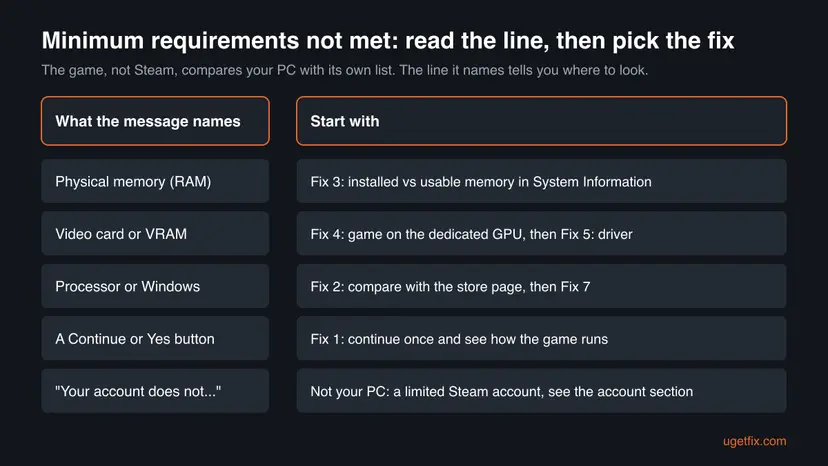
| Cause | How to tell | Fix |
|---|---|---|
| Usable memory is lower than installed memory. Microsoft says Windows "may be unable to use all the physical memory that is installed". | The message names memory and a figure like 6016 MB on a PC sold with 8 GB. | Fix 3 |
| The game read the built-in graphics, not the dedicated card of a laptop or a PC with two GPUs. | The message names the video card or video memory, and your PC has an NVIDIA or AMD card. | Fix 4 |
| An old or generic graphics driver, so the game cannot read the card's name, memory or DirectX level. | The card shows as Microsoft Basic Display Adapter, or the driver is years old. | Fix 5 |
| The PC really is below the minimum. | The store page lists more RAM, a newer card or Windows 11. | Fix 1 or Fix 2 |
| Damaged game files that hold the check or its settings. | It began after a crash or a failed update; the PC used to pass. | Fix 6 |
| An older game that misreads a new Windows version. | The game is from before Windows 10 and names the operating system. | Fix 7 |
Turning the Steam overlay on or off and running Steam.exe in compatibility mode do not change what a game reads from your hardware. The check belongs to the game, so the fixes on this page work on the game and on Windows.
"Your account does not meet the requirements" on Steam is a different problem
Many people land here with the Steam message "Your account does not meet the requirements to use this feature". It appears when you add a friend, open the Market or trade, not when a game starts. Steam Support explains it on its Limited User Accounts page: Steam restricts some community features "until an account has spent at least $5.00 USD in Steam".
- What counts: adding $5 USD or more to your Steam Wallet, buying games worth $5 USD or more, a Steam Wallet card, or buying a Steam gift of that value.
- What does not count: a retail game key, free demos, Free to Play games, free weekends, money from Market sales, and gifts you received.
- Other currencies: Steam converts each purchase to USD with the daily rate of the day you bought it.
- Adding friends now: a limited account can still accept invites and use a Quick Invite link from the Add a Friend page.
- It was fine and now it is limited: Steam says a refund to your bank or a chargeback lowers your total, and a total below $5 USD limits the account again.
If your account shows a lock or ban notice instead, that is a restricted account, a different rule. Steam Support says the notice on the account tells you "what's restricted and why".
How to fix "Minimum requirements not met" on Steam
Fixes 1 and 2 take two minutes and tell you whether the PC is really too weak. Fixes 3 to 5 cover the common case where the PC is fine but the game reads it wrong. Fixes 6 and 7 repair the game itself.
| What you see or have | Start with |
|---|---|
| The window asks "Do you wish to continue anyway?" or has a Continue button. | Fix 1 |
| You do not know your PC's parts, or the game is new. | Fix 2 |
| It names physical memory and a figure a little under 8 GB, such as 6016 MB. | Fix 3 |
| It names the video card or video memory, and you have a gaming laptop or two graphics chips. | Fix 4, then Fix 5 |
| The PC passed before and the game crashed or updated. | Fix 6 |
| An older game that names the operating system. | Fix 7 |
Fix 1. Read the line the game names and continue once if it lets you
2 minutesNo riskThe message asks "Do you wish to continue anyway?" or offers a Continue or Yes button.
Many games show the minimum check as a warning and still start. A PC slightly under the line, such as 6016 MB against an 8 GB minimum, often runs the game at lower settings.
- Read the whole window and write down the part it names and the figure in brackets.
- Select Yes or Continue.
- In the game's options, set the graphics preset to Low and the resolution to your screen's own resolution or lower.
- Play for a few minutes and watch for stutter, long loading or a crash.
- If you want to see the message again later, it usually comes back at the next start: that is normal for a warning.
It worked if: The game reaches its menu and runs, perhaps at lower settings, and you know which part it judged too low.
If not: If the window has no Continue button or the game crashes, compare your PC with the store page in Fix 2.
Fix 2. Compare your PC with the game's System Requirements on the Steam store page
5 minutesNo riskThe window is a hard stop, or you are not sure what your PC has.
The game checks against its own minimum. Once you put the two lists side by side, you know whether the part is truly too low or whether the game misread it.
- In Steam, open the game's store page and scroll to System Requirements. Read the Minimum column.
- Press Win + R, type
msinfo32and press Enter. Note Processor, Installed Physical Memory (RAM) and Total Physical Memory. - Press Win + R, type
dxdiagand press Enter. Allow it to check drivers if it asks. - On the System tab note the Windows version and DirectX Version.
- On the Display tab (and Render if there is one) note the card's Name and its memory.
- Compare each line with the Minimum column.
Microsoft says the System Information tool reports the most accurate memory figures, and it shows two of them. Installed Physical Memory (RAM) is what is in the PC. Total Physical Memory is what Windows is using, and it "may differ" from what is installed.
It worked if: You have a short list: each part, what the game wants and what you have, and you know which one fails.
If not: If memory is the short part go to Fix 3. If the card is, go to Fix 4. If every part is above the minimum, go to Fix 5.
Fix 3. Find out why Windows can use less memory than is installed
10 minutesLow riskThe message names physical memory, or Total Physical Memory in Fix 2 is well below the installed amount.
A game reads the memory Windows can use, not the label on the box. Microsoft says Windows may be unable to use all installed memory because of the memory configuration, which is why an 8 GB PC can report about 6 GB.
- Open Task Manager with Ctrl + Shift + Esc, select Performance and then Memory.
- Read the total at the top right and Hardware reserved at the bottom. A large reserved figure on a laptop usually belongs to the built-in graphics, which borrow system memory.
- Check Slots used. If it says 1 of 2, one module may be missing or not seated.
- If the reserved amount looks too large, look in your PC maker's firmware settings for the graphics memory size. Change it only if the maker documents the setting.
- Run a memory test to rule out a failing module: How to test your RAM with Windows Memory Diagnostic
- If the installed amount itself is below the minimum, more RAM is the real fix.
6016 MB is a little under 6 GB. Most games that print this line ask for 8 GB, so they stop or warn. We could not confirm a vendor figure for how much memory a given laptop's graphics reserve; the maker's manual is the place to check.
It worked if: Total Physical Memory and Task Manager now show close to the installed amount, or you know that the PC needs more RAM.
If not: If the memory is fine and the message names graphics, go to Fix 4.
Fix 4. Make the game use the dedicated graphics card instead of the built-in one
5 minutesNo riskA laptop or PC with both built-in graphics and an NVIDIA or AMD card, and the message names the video card or video memory.
A game that reads the first graphics chip it finds sees the built-in one, with shared memory and a low score. Telling Windows to run the game on the high performance GPU makes it read the real card.
- Find the game's .exe: in Steam right-click the game and select Manage > Browse local files.
- Open Settings > System > Display > Graphics (on Windows 10: Settings > System > Display > Graphics settings).
- Add the game's .exe as a desktop app with Browse or Add desktop app.
- Select the game in the list and open Options.
- Choose High performance, the entry that names your NVIDIA or AMD card, and select Save.
- Start the game again from the Steam Library.
On a laptop, plug in the charger before you test. Some laptops keep the dedicated card asleep on battery, and the game then sees only the built-in chip.
It worked if: The game no longer names the video card, or it names the dedicated card with its own memory.
If not: If the dedicated card is not listed or the driver is old, update it in Fix 5.
Fix 5. Update or reinstall the graphics driver
10 to 15 minutesLow riskdxdiag shows Microsoft Basic Display Adapter, an old driver date, or the game names the card even though it meets the minimum.
Without the maker's driver, Windows reports a generic adapter with no video memory and a low DirectX feature level. The game's check then fails even on a strong card.
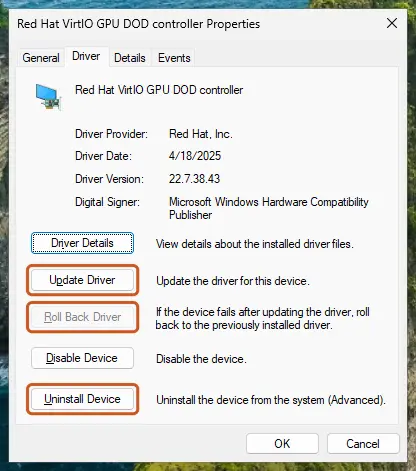
Get the newest driver for your card from NVIDIA, AMD or Intel, or through Device Manager. Step by step: Update, roll back or reinstall a driver
- Open Device Manager. Right-click Start and select Device Manager.
- Open the device's Driver tab. Expand the category (for example Display adapters), right-click the device, select Properties and open the Driver tab. Driver Date and Driver Version show what is installed now.
- Update the driver. Select Update Driver and let Windows search automatically. To use a driver you downloaded from the device maker, select Browse my computer for drivers instead and point to the unpacked folder.
These steps were written for Windows 11 24H2 and later. The full page with the other versions and what each result means: Update, roll back or reinstall a driver
It worked if: dxdiag shows the card's real name and memory, and the game starts or names a different part.
If not: If the PC passed before and the error is new, repair the game files with Fix 6.
Fix 6. Verify the game files in Steam and reinstall if they keep failing
5 to 30 minutesLow riskThe game worked before, and the message began after a crash, an update or a cleaning program.
The check and its settings live in the game's files. A damaged settings file or launcher can report a wrong result, and Steam replaces only the files that fail.
- Restart and open Steam. Restart your computer and launch Steam.
- Open the game's menu. Right-click the game in your Library, or open the game's Library page and select the gear icon on the far right.
- Open Properties. Select Properties in the menu.
- Verify the files. Select the Installed Files tab and select Verify integrity of game files.
- Wait for the result. Steam checks the game's files. This can take several minutes.
These steps were written for Steam on Windows. The full page with the other versions and what each result means: How to verify game files in Steam, Epic Games, Xbox app, EA app, Battle.net and GOG Galaxy
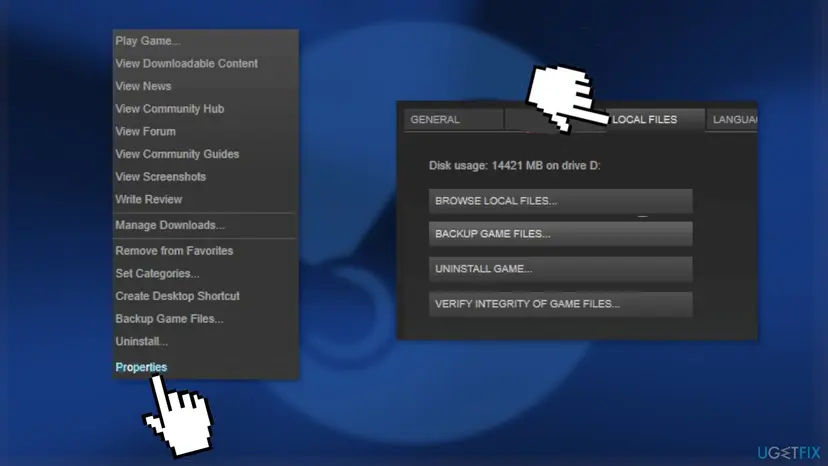
If verifying finds nothing and the error stays, uninstall the game with Manage > Uninstall, delete what is left in its folder and install it again.
It worked if: Steam reports that all files are validated or reacquires the bad ones, and the game starts.
If not: If the game is old and names the Windows version, try Fix 7.
Fix 7. Run an older game in compatibility mode for an earlier Windows
5 minutesLow riskA game from before Windows 10 that says your operating system does not meet the minimum.
Some old checks read the Windows version number and do not know newer ones. Compatibility mode reports an older version to that game only.
- In Steam right-click the game and select Manage > Browse local files.
- Right-click the game's .exe file, not Steam.exe, and select Properties.
- Open the Compatibility tab and tick Run this program in compatibility mode for.
- Choose Windows 8 or Windows 7, select Apply and OK.
- Start the game from the Steam Library.
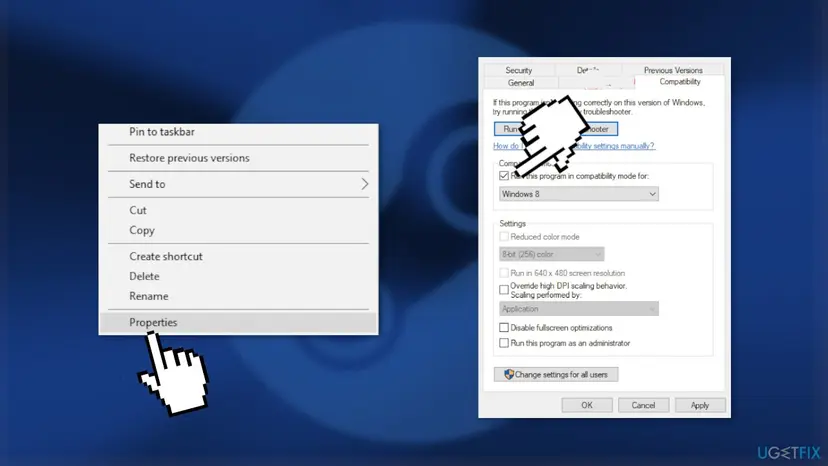
Step by step, with Windows 11 pictures: How to run a program as administrator or in compatibility mode
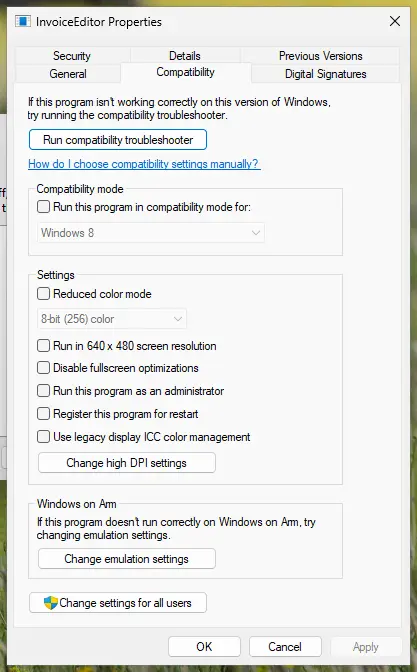
It worked if: The game no longer names the operating system and reaches its menu.
If not: Clear the box again so it does not cause other problems, and read the next section.
If the game still says your PC does not meet the minimum requirements
The check writes no log you can read in Windows. What helps the publisher is the exact text and your real specifications. Prepare these before you ask:
- Take a screenshot of the message with the figure in brackets.
- In
dxdiagselect Save All Information and keep the text file. - Note the two memory lines from
msinfo32. - In the Steam Library select the game, open its Support link and send the three items to the publisher.
- When it is the hardware: the store page asks for more than the PC has. No setting changes that; a refund request in Steam Support is an option if you bought it recently.
- When it is a failing part: the memory test in Fix 3 reports errors, or the installed memory drops after a restart.
- When it is not a legal copy: a copy from outside Steam may fail checks for its own reasons. No fix here applies.
How to avoid the minimum requirements message with your next game
- Before you buy, compare the store page's Minimum column with the
msinfo32anddxdiagfigures from Fix 2. - On a laptop with two graphics chips, add every new game to High performance in the Windows graphics settings.
- Keep the graphics driver from the card's maker current, and update it before a big new release.
- Look at Total Physical Memory, not the label: 8 GB installed is not always 8 GB usable.
- Check whether the game lists Windows 11 as the minimum. Windows 10 lost support on 14 October 2025, and new titles drop it.
These habits do not raise your hardware, but they stop the cases where a good PC is read as a weak one.
Frequently asked questions
Can I play if my PC doesn't meet the minimum requirements on Steam?
Often yes, when the game only warns you. If the window asks "Do you wish to continue anyway?", choose Yes and lower the graphics settings. The game may run slowly or crash in heavy scenes, but it may also run well, because a minimum is a publisher's estimate. If the window has only OK or Quit, the publisher made it a hard stop, and you cannot pass it without the part it asks for. Steam itself does not stop you from buying or installing a game that is above your PC.
What does "Physical memory is below minimum requirements (6016 MB)" mean?
It means Windows reports about 6 GB of usable memory and the game wants more, most often 8 GB. On many PCs sold with 8 GB, part of the memory is reserved, often by the built-in graphics, so Windows can use only around 6 GB. Open msinfo32 and compare Installed Physical Memory (RAM) with Total Physical Memory. If installed is 8 GB, Fix 3 explains why the rest is missing. If installed is 6 GB, the PC is really below the line, and Fix 1 lets you try anyway.
Why does Steam say my account does not meet the requirements?
That message is about your account, not your PC. Steam Support says it restricts some community features "until an account has spent at least $5.00 USD in Steam". Adding friends, the Market, trading and profile levels are among them. Adding $5 USD to your Steam Wallet or buying games worth $5 USD unlocks them. Retail keys, free games, demos and gifts you received do not count. Until then, you can still accept friend invites and use a Quick Invite link.
How do I fix "Minimum specifications not met" in Sunset Overdrive?
Treat it like the other versions of this check. Read which part the window names and compare it with the Minimum column on the game's Steam store page (Fix 2). Readers who search for this title usually have a laptop with two graphics chips, so try Fix 4 next: set the game's .exe to High performance in the Windows graphics settings and plug in the charger. Then update the graphics driver. We could not confirm a fix from the publisher for this game in particular.
Metro Exodus or Serious Sam 4 says my system does not meet the minimum. What now?
Both games show the check at start-up, and users report that they offer a way to continue. Choose it and test the game at the Low preset (Fix 1). If performance is poor or the game stops, compare your parts with the store page and check that the game runs on the dedicated graphics card (Fixes 2 and 4). We could not confirm the exact wording of each game's window, so go by the part it names, not by the title.
Does turning off the Steam overlay or editing the registry fix it?
We found no source that links either one to a game's hardware check. The overlay is Steam's in-game layer, and it does not change what a game reads about your memory or graphics card. The old registry edit changed Direct3D and DirectDraw keys that force software drawing; on a normal PC they are already at the default, and editing them blindly can break other programs. Work through the fixes on this page instead, since they act on the part the game reads.
Can I add more RAM to pass the memory check?
Yes, if the installed amount is below the game's minimum and your PC has a free slot or replaceable modules. Look at Slots used in Task Manager under Performance > Memory, and the module type in your PC maker's manual. Many thin laptops have memory soldered to the board, and then it cannot be upgraded. If installed memory is already 8 GB and only usable memory is low, adding more is not the first step: find out what reserves it (Fix 3).
The error still shows after all the fixes. What else can I do?
If the error keeps coming back, your PC most likely really is below the line for that part, or the game misreads it in a way only the publisher can fix. Send the publisher the screenshot, the dxdiag file and the two memory figures, through the game's Support link in Steam. If you bought the game recently, you can ask Steam Support for a refund. Running the game with lower settings, as in Fix 1, is the only workaround when the check is just a warning.
Is this page about other "does not meet the requirements" messages?
No. This page covers the start-up check of Steam games and Steam's account rule. Searches such as "bet type does not meet the requirements" come from betting sites, and "not enough resources to load the model with the current settings" comes from programs that run AI models on your PC. Those messages follow their own rules, set by the site or program that shows them. We do not help with pirated copies of games either: such a copy has no Steam licence behind it, and no fix here applies to it.
Sources
- Steam Support: Limited User Accounts (the $5.00 USD rule and what it restricts) (help.steampowered.com)
- Microsoft Support: Components of the user interface report slightly different values for the total physical memory (Installed Physical Memory and Total Physical Memory in System Information) (support.microsoft.com)
- Steam Support: Restricted Steam Account (help.steampowered.com)
Did this fix work?
One click, no account. It tells the next reader which guides are worth their time.
Questions and experiences: fix "Minimum requirements not met" error on Steam
Still broken, or found a fix we did not cover? Ask here: members and our editors answer. Reading is open; writing needs a free account.
…