
How to fix "JavaScript error occurred in the main process" error?

Prefer to fix it yourself? The manual steps follow.
- 8methods
- 5 to 20 minutes
- Easy
Applies to Electron desktop apps (Discord, Slack, classic Microsoft Teams, code editors, game launchers) on Windows 11, Windows 10 and macOS
8 methods in this guide
Hey. I need some tips on how to fix the "A JavaScript error occurred in the main process" error on Mac and on Windows. I get it on my Windows laptop, but my girlfriend gets the same pop-up on her Mac. I do not know what to do. I've tried to reinstall the program that triggers this on her device, since it was Teams for Mac, I think, but that did not work. Any ideas?
"A JavaScript error occurred in the main process" is a box from an app built on Electron, such as Discord, Slack, an old Teams or a game launcher: the app's own start-up code failed. Windows and macOS are almost never the cause. Close every copy of the app, then clear its data folder and reinstall it from the maker.
The box comes from the app you just opened, not from Windows or macOS. Take a picture of it, close every copy of the app and start it again (Fix 1). If it returns, delete the app's data folder (Fix 2) and reinstall it from the maker's site (Fix 3). On Teams, the path in the box usually means the retired classic Teams: install the new Teams instead (Fix 4).
| Error | A JavaScript error occurred in the main process, then Uncaught Exception: and an error line, followed by a list of at lines. |
|---|---|
| Where it appears | In a box titled Error (Windows) or a plain alert (Mac) when a desktop app starts, updates or closes. Seen with Discord, Slack, classic Teams, code editors and game launchers. |
| Main cause | The app's own files or settings are damaged or out of step, often after an update that did not finish, or a second copy of the app is still running. |
| Fastest fix | Close every copy of the app in Task Manager and start it again (Fix 1). If it returns, clear its data folder and reinstall (Fixes 2 and 3). |
| Also written as | a javascript error in the main process, java script error occured in the main process, javascript error occurred in main process, javascript application error. |
| Who shows it | Electron, the framework these apps are built on. The title is fixed text in Electron's code, which is why it looks the same in every app. |
| Affects | Windows 11, Windows 10 and macOS alike. The operating system only shows the box; the app is the one that failed. |
| Vendor status | No single bug or patch. Microsoft ended classic Teams on 1 July 2025, so Teams boxes with classic paths are fixed by moving to the new Teams. |
| Time to fix | 2 minutes for Fix 1. About 10 to 15 minutes for a clean reinstall, most of it the download. |
Facts checked on 15 October 2026. Steps written for Windows 11 (25H2 and 26H2) and Windows 10 22H2, with the macOS steps for Mac users.
What "A JavaScript error occurred in the main process" means
Discord, Slack, the old Microsoft Teams, many code editors and some game launchers are built on Electron, a framework that runs a web app on your desktop. Each Electron app has one main process, the part that starts the app, opens its windows and updates it.
We read Electron's own start-up code. When an error in that main process is not handled by the app, Electron catches it, writes Uncaught Exception: in front of the error details and shows them in a box titled A JavaScript error occurred in the main process. The same code says it does not quit on such an error, so the app can hang on after you click OK.
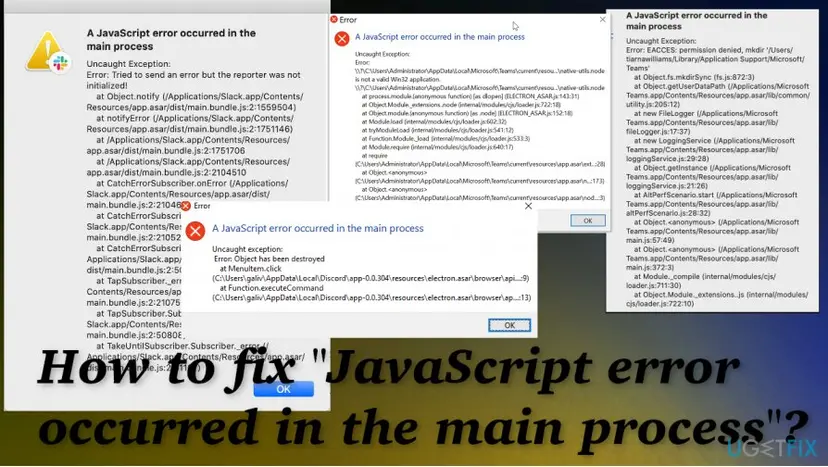
The title only says that Electron caught an error. It does not say what went wrong. The useful part is the first Error: line and the file paths in the at lines, so take a picture before you click OK. "Javascript", "java script" and "occured" are the same search; Java is a different language and is not involved.
How to read the error box and find the program behind it
Press Win + Shift + S on Windows or Cmd + Shift + 4 on a Mac and capture the whole box. Then look at three things: the title, the first Error: line and the paths in the at lines. The paths name the program, even when the box itself does not.
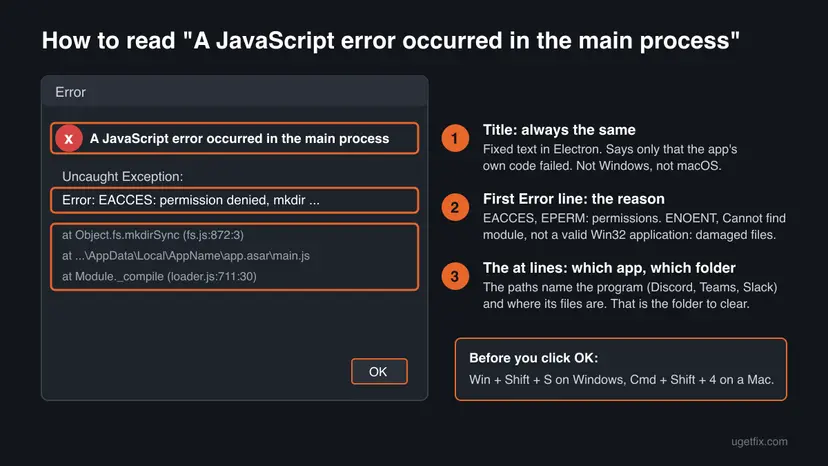
| If the box says | What it means | Start with |
|---|---|---|
Object has been destroyed, or the box appears when you close the app | The app tried to use a window that was already closed. A bug in that version, usually harmless. | Fix 1, then update the app |
Cannot find module, ENOENT, is not a valid Win32 application | A file the app needs is missing or damaged, often after an update that stopped half way. | Fix 2, then Fix 3 |
Unexpected token or JSON in the error, a settings or config file in the paths | A settings file of the app is damaged. | Fix 2 |
Paths under AppData\Local\Microsoft\Teams or /Microsoft/Teams | The box comes from classic Teams, which Microsoft has retired. | Fix 4 |
EACCES: permission denied or EPERM | The app may not write to its own folder. | Fix 5 |
A file or folder name you never installed in the at lines | Something changed the app's code: a mod, or malware. | Fix 7 |
What causes the JavaScript error in the main process, from most to least common
Most often the app's own files or settings are damaged, usually by an update that did not finish or a PC that shut down during one. Less often a second copy of the app is still running, the app is an old version that no longer works, or it lacks permission to its folder. Rarely, malware or other software is behind it.
| Cause | How often | How to tell | Fix |
|---|---|---|---|
| A copy of the app still runs in the tray or in the background | Often | Task Manager shows the app with no window, or the box appeared right after an update | Fix 1 |
| Damaged cache or settings in the app's data folder | Most often | Unexpected token, JSON, settings, or the error started after a crash | Fix 2 |
| Missing or damaged program files after a failed update | Most often | Cannot find module, ENOENT, not a valid Win32 application | Fix 3 |
| Classic Teams, retired by Microsoft on 1 July 2025 | Often, for Teams | Paths under Microsoft\Teams with current or app.asar | Fix 4 |
| No permission to the app's folder | Less often | EACCES or EPERM | Fix 5 |
| Injected code from a mod or malware | Rarely | Unknown file names in the at lines | Fix 7 |
| Another program hooking into the app | Rarely | A clean reinstall fails the same way | Fix 8 |
Windows updates and macOS updates do not cause this box directly. They can only matter when they stop an app update half way, which is the damaged files case above.
How to fix "A JavaScript error occurred in the main process"
Fixes 1 to 3 work for any Electron app and clear most cases. Fix 4 is for Teams, Fix 5 for permission errors and Fix 6 for Mac users. Fixes 7 and 8 are for when the box keeps coming back after a clean reinstall.
| What you see | Start with |
|---|---|
| The box appeared once, after an update or a crash | Fix 1 |
| It comes back every time you open the app | Fix 2, then Fix 3 |
Cannot find module, ENOENT or not a valid Win32 application | Fix 3 |
| The paths name Microsoft Teams | Fix 4 |
EACCES or EPERM | Fix 5 |
| You see it on a Mac | Fix 6 |
A file name you do not recognize in the at lines | Fix 7 |
Fix 1. Close every copy of the app and start it again
2 minutesNo riskEveryone first, especially when the box appeared right after an update.
Electron apps keep running in the notification area after you close the window, and they update their own files at start-up. If an old copy is still running, the update and the start-up collide. Electron also keeps the app open after the error, so a broken copy can linger.
- Take a picture of the box, then click OK.
- Open the hidden icons arrow in the notification area. If the app's icon is there, right-click it and choose Quit or Exit.
- Press Ctrl + Shift + Esc to open Task Manager and select Processes.
- Find every entry of the app, under Apps and under Background processes. Select each one and choose End task.
- Restart the PC so any stuck updater is gone too.
- Open the app once from the Start menu and wait until its update screen finishes.
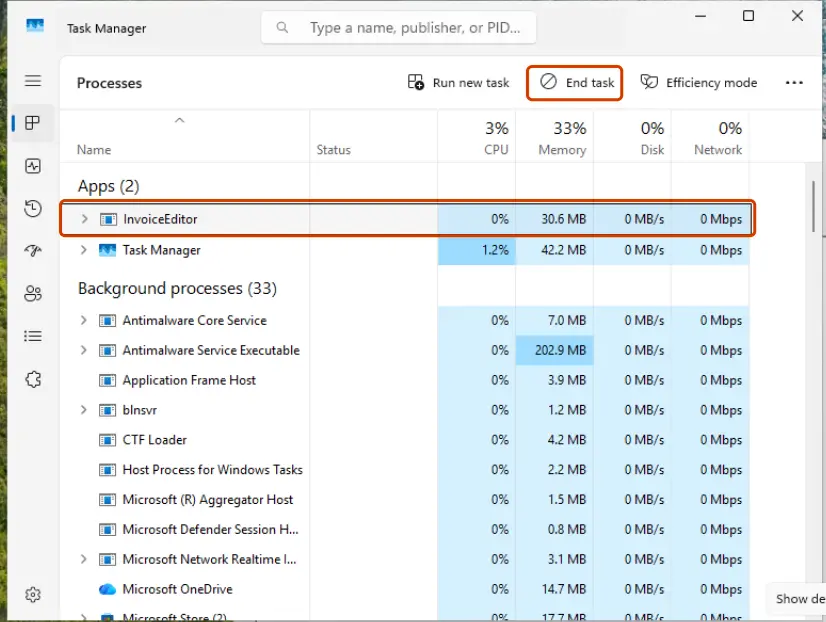
Step by step with Task Manager: Close a frozen app (Task Manager, Force Quit).
It worked if: The app opens normally and the box does not appear again.
If not: If the same box returns on the next start, go to Fix 2.
Fix 2. Delete the app's data folder so it rebuilds its cache and settings
5 minutesLow riskThe box comes back on every start, or names a settings or JSON file.
Electron apps keep their cache and settings in a folder under your user profile, separate from the program. A damaged file there stops start-up each time. Microsoft gives this exact step for the Teams desktop app: quit Teams, delete its cache folder, start again.
The app signs you out on this PC and forgets local settings such as start-up and window options. Chats, servers, files and channels are stored on your account online and are not deleted. Have your password and two-factor codes ready.
- Close every copy of the app as in Fix 1.
- Press Win + R, type the line below and press Enter. Most Electron apps keep their data here.
%appdata% - Find the folder with the app's name, for example discord or Slack. Microsoft's classic Teams used
%appdata%\Microsoft\Teams. - Rename the folder by adding
.oldto its name. Renaming keeps a way back; delete it later once the app works. - Start the app, sign in and wait until it has rebuilt its data.
Using the new Teams? Microsoft's steps are to reset the app in Settings > Apps > Installed apps, or to delete %userprofile%\appdata\local\Packages\MSTeams_8wekyb3d8bbwe\LocalCache\Microsoft\MSTeams. For Discord, see our Discord fatal JavaScript error guide, which names both of its folders.
It worked if: The app opens to its sign-in screen without the error box and keeps working after a restart.
If not: If you cannot find the folder, or the box still appears, do the clean reinstall in Fix 3.
Fix 3. Uninstall the app, remove its leftovers and install a fresh copy from the maker
15 minutesLow riskThe box names a missing module, a missing file or a file that is not a valid Win32 application.
Many Electron apps install per user into %LocalAppData% and keep data in %AppData%. A normal uninstall can leave both behind, so a new install loads the same damaged files. Removing them first makes the reinstall really fresh.
- Close every copy of the app as in Fix 1.
- Windows 11: open Settings > Apps > Installed apps, select the ... next to the app and choose Uninstall. Windows 10: Settings > Apps > Apps & features.
- Press Win + R, type this and press Enter. Delete the app's folder if it is still there.
%localappdata% - Press Win + R again, open
%appdata%and delete the app's folder there too, or the.oldcopy from Fix 2. - Restart the PC.
- Download the installer from the maker's own site or the Microsoft Store, never from a download portal, and install it with a normal double-click.
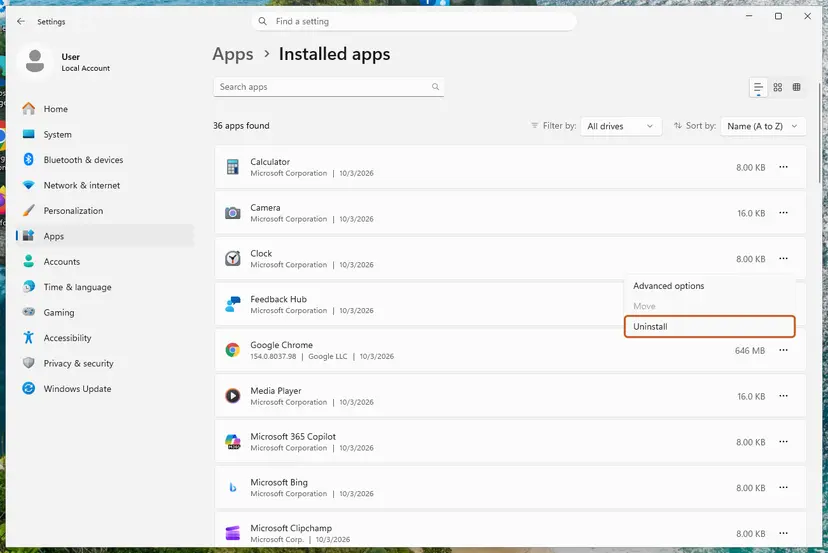
Step by step for Windows 11 and 10: Uninstall a program or app in Windows.
It worked if: Setup finishes, the app downloads its updates once and opens without the box.
If not: If Windows says a file is in use, go back to Fix 1. If the box names Teams, go to Fix 4; if it says EACCES or EPERM, go to Fix 5.
Fix 4. Replace classic Microsoft Teams with the new Teams
15 minutesLow riskThe paths in the box point to a Microsoft Teams folder.
Microsoft ended support for classic Teams on 1 July 2024 and its availability on 1 July 2025: after that date the classic client no longer works. Reinstalling classic Teams brings the same broken client back, which is why the reader's Mac reinstall did not help.
- Quit Teams: right-click its icon on the taskbar and select Quit.
- In Settings > Apps > Installed apps, uninstall Microsoft Teams classic and any Teams Machine-Wide Installer entry.
- Install the new Microsoft Teams from Microsoft's Teams download page or the Microsoft Store.
- Start the new Teams and sign in with your work, school or personal account.
- If the new Teams misbehaves, reset it: Installed apps, the ... next to Microsoft Teams, Advanced options, then Reset.
- No permission to install apps on a work PC? Use Teams on the web in a supported browser and ask your IT department.
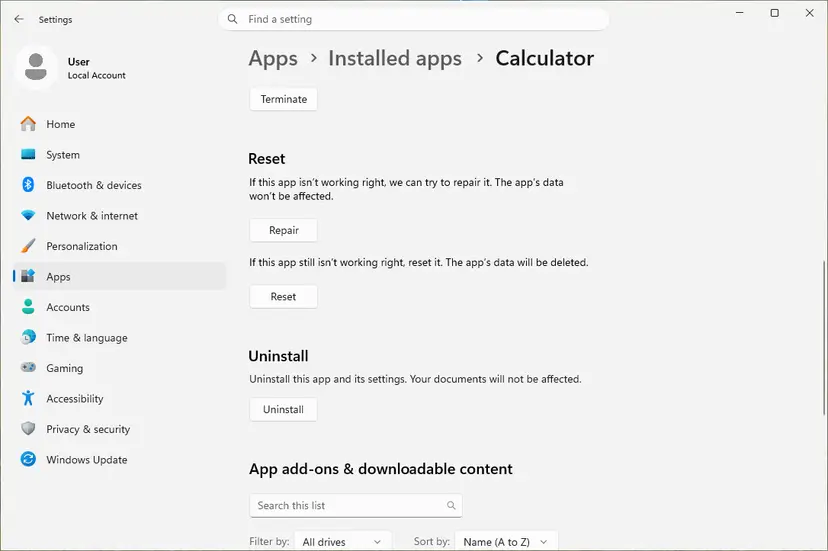
Reset deletes the app's local data, including your personal settings. General steps: How to repair or reset an app in Windows.
It worked if: The new Teams opens, signs you in and shows your chats with no JavaScript box.
If not: If your organization blocks the new Teams, only your IT department can fix it. Use the web app meanwhile.
Fix 5. Test the app once as administrator when the box says EACCES or EPERM
5 minutesLow riskThe Error line says EACCES, EPERM, permission denied or operation not permitted.
EACCES: permission denied means the app may not create or change a file in its own folder. One run as administrator shows whether permissions are the block. It is a test, not a fix to keep.
- Close every copy of the app as in Fix 1.
- Type the app's name in the Start menu, right-click it and choose Run as administrator.
- Select Yes in User Account Control.
- If the app now opens, close it and do Fix 3 while signed in to your normal account, so the new folders belong to you.
- Do not set the app to always run as administrator.
How to run a program as administrator once: How to run a program as administrator or in compatibility mode. If the app was ever installed or started as administrator or for all users, its folders may belong to another account, which the clean reinstall in Fix 3 resets.
It worked if: The app opens as administrator, and after the clean reinstall it also opens normally.
If not: If it fails as administrator too, permissions are not the cause. Go to Fix 7.
Fix 6. Fix the error on a Mac: remove the app's data and install the right build
10 minutesLow riskYou see the box on a Mac, for example with Teams or Slack.
On a Mac, Electron apps keep their data in your Library folder, and dragging the app to the Trash leaves it behind. A reinstall then loads the same damaged data. Checking the build also catches an app made for another kind of Mac.
- Quit the app: right-click its icon in the Dock and select Quit, or press Cmd + Q.
- In Finder, press Cmd + Shift + G and open
~/Library/Application Support. Move the folder with the app's name to the Trash. - For Teams, Microsoft's paths are
~/Library/Application Support/Microsoft/Teamsfor classic Teams, and~/Library/Group Containers/UBF8T346G9.com.microsoft.teamsand~/Library/Containers/com.microsoft.teams2for the new Teams. - Open the Apple menu, About This Mac, then System Report. On newer macOS, select More Info first.
- Under Software, select Applications, find the app and read its Kind line to see which build is installed.
- Delete the app and install the current version from the App Store or the maker's site.
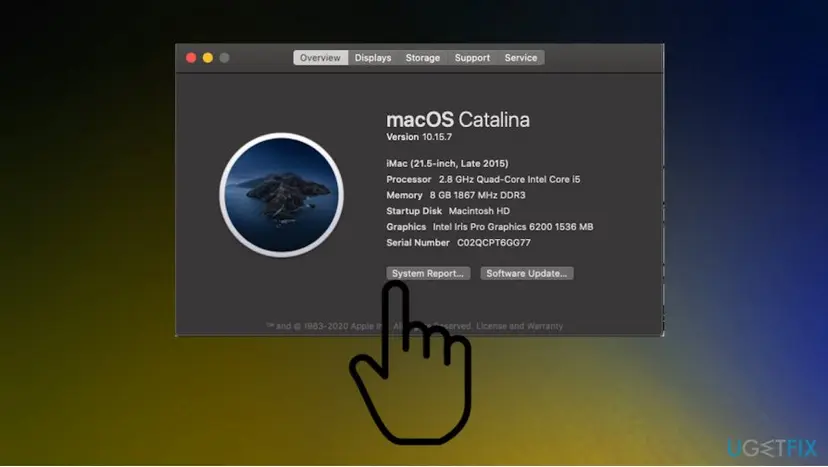
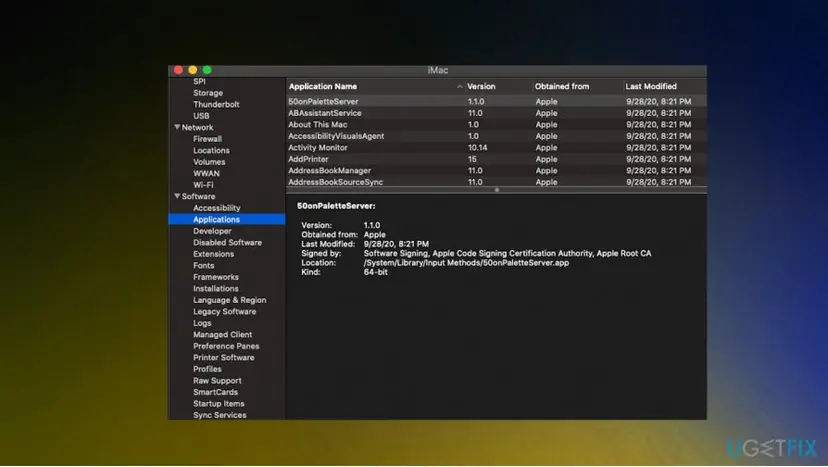
It worked if: The app opens on the Mac without the box, and signs you in again.
If not: If the box says EACCES on a folder in Library, the folder belongs to another user. Delete it from an administrator account, then install again.
Fix 7. Scan for malware when the box names files you never installed
20 minutesLow riskThe at lines name a file, mod or folder you do not recognize.
Some malware and client mods work by changing an Electron app's start-up code. When the changed code breaks, the app ends in this box. A reinstall alone does not help if the malware writes its code back.
- Write down every name in the
atlines that is not the app's own folder. - If you installed a mod or theme yourself, remove it, then do Fix 3.
- If you did not, run a full scan and then a Microsoft Defender Offline scan: How to scan for malware with Microsoft Defender.
- When the scan is clean, do the clean reinstall in Fix 3.
- From a phone or another device you trust, change the app's password and turn on two-factor sign-in.
It worked if: The scan finds nothing or removes the threat, and the fresh install no longer shows foreign names in the box.
If not: If the same threat comes back after removal, get help from a security specialist before you sign in on that PC.
Fix 8. Find conflicting software with a clean boot
20 minutesLow riskThe box returns even after a clean reinstall and a clean scan.
Overlays, game boosters and some security suites load into other programs. A clean boot starts Windows with Microsoft services only, so if the app opens then, one of the switched-off programs is the cause.
- Open System Configuration. Select Search on the taskbar, type msconfig and select System Configuration from the results.
- Hide Microsoft services. On the Services tab, select the Hide all Microsoft services check box. Only services from other companies stay in the list.
- Disable the remaining services. Select Disable all, then select Apply.
- Open Task Manager. On the Startup tab of System Configuration, select Open Task Manager.
- Disable the startup apps. On the Startup apps tab in Task Manager, select each item whose status is Enabled and select Disable. Write down or take a screenshot of the items you disable: you need the list to turn them back on.
- Confirm the changes. Close Task Manager. On the Startup tab of System Configuration, select OK.
- Restart and test. Restart the PC. Windows now starts in a clean boot environment: try again the thing that failed (run the app, install the update, uninstall the program).
These steps were written for Windows 11 25H2 and 26H2. The full page with the other versions and what each result means: How to perform a clean boot in Windows
When the app opens in the clean boot, turn services back on in small groups and restart each time. The group that brings the box back holds the program to update or remove.
It worked if: The app opens in a clean boot, and you find the one program that brings the error back.
If not: If it fails even in a clean boot, collect the details in the next section and contact the app's support.
Still getting the JavaScript error in the main process? What to collect and send
If the box survives a clean reinstall, the app's maker has to look at it. A complete report saves a round of questions.
- The whole box: your picture of the title, the
Error:line and everyatline. - The app and its version, from Installed apps on Windows or the Kind and Version lines in System Report on a Mac.
- Your system: press Win + R, type
winverand press Enter, or open About This Mac. - When it appears: at start-up, after an update, or when you close the app.
- What you tried, in order, including Fixes 1 to 3.
If many different programs crash with random errors, not only one Electron app, test the memory with How to test your RAM with Windows Memory Diagnostic and check the disk. One app showing one clear Error line is a software problem.
How to keep the JavaScript error from coming back
- Let an app's update screen finish before you close it or shut down the PC.
- Quit apps from the notification area or the Dock before you reinstall them.
- Download apps only from the maker's site, the Microsoft Store or the App Store.
- Keep Windows up to date. Windows 10 left Microsoft support on 14 October 2025, so plan the move to Windows 11.
- Do not let cleanup tools delete files inside an app's AppData or Library folders.
- Do not keep using classic Teams; it stopped working on 1 July 2025.
- Do not set apps to always run as administrator.
- Do not install mods or scripts that promise free features.
If you need the app right away while you fix the desktop version, most of these apps have a web version, such as Teams on the web or Discord in the browser. They use the same account and do not depend on the files on your PC.
Frequently asked questions
Is "A JavaScript error occurred in the main process" a virus?
Usually not. The box is Electron's standard message for an error that the app's code did not handle, and the usual reasons are damaged app files or a copy of the app still running. Malware is a rare cause: some malware changes an Electron app's start-up code, and a broken change ends in this box. Look at the at lines. If they name only the app's own folders, follow Fixes 1 to 3. If they name files you never installed, scan first (Fix 7).
Is this a Windows 10 or Windows 11 problem?
No. The box looks the same on Windows 11, Windows 10 and macOS, because it comes from the app, not from the operating system. The fixes are the same on both Windows versions; only the Settings menu names differ, and the steps give both. Windows matters only when it blocks the app's folder, which shows as EACCES or EPERM in the box (Fix 5). Windows 10 left Microsoft support on 14 October 2025, so newer app versions may drop it over time.
Why do I get the same error on a Mac?
The apps that show it, such as Slack, Discord and the old Teams, run the same Electron code on Windows and macOS. So the same title appears on both, with Mac paths such as /Applications/Slack.app in the at lines. The fix is the same idea: quit the app, remove its folder in ~/Library/Application Support, and install the current version. For Teams on a Mac, Microsoft's own paths are in Fix 6, and classic Teams no longer works at all.
Does this error mean Java is broken on my PC?
No. JavaScript and Java are two different languages that only share part of a name. Electron apps run JavaScript inside the app itself, so you do not need to install, update or remove Java, and doing so changes nothing. Searches such as "java script error occurred in the main process" or "java error occurred in the main process" all mean the same Electron box. Check the box's paths to see which app showed it, and start with Fix 1.
What should I do if Valorant, League of Legends or the Riot Client shows this error?
The title is Electron's fixed text, so the box comes from a launcher window built on it, not from the game itself. Close every Riot process in Task Manager and restart the PC (Fix 1). If it returns, uninstall the launcher in Installed apps, delete its leftover folder that the at lines point to, and install it again from Riot's own site (Fix 3). We could not confirm Riot's folder layout for this page, so follow the paths in your box.
Cursor, DMM Game Player or another app shows the box. Do the same fixes work?
Yes, as long as the box has this exact title, because then the app runs on Electron. The at lines tell you where its files are, usually under %LocalAppData% and %AppData% on Windows or ~/Library/Application Support on a Mac. Close every copy, rename its data folder, then reinstall from the maker's site (Fixes 1 to 3). Code editors also load extensions at start-up, so if the paths name an extension, remove that extension first.
Will I lose my chats or files if I delete the app's data folder?
Not for apps that keep your data online, such as Teams, Slack and Discord. Their chats, servers, channels and files live on your account and come back when you sign in. You lose local things: the sign-in on this PC, start-up and window settings, and sometimes downloaded media in the cache. Apps that keep work only on your PC, such as some editors, may also store unsaved data there. That is why Fix 2 renames the folder instead of deleting it.
What does "Uncaught Exception" mean in this error?
It means an error happened in the app's main process and none of the app's code was written to handle it. Electron then catches it as a last safety net and shows the box. Everything after Uncaught Exception: is the stack trace: first the error itself, then the at lines that list the functions and files that were running. Read the first line to learn the reason and the paths to learn which app and folder are involved.
Can I click OK and keep using the app?
Sometimes. Electron's code shows the box without quitting the app, so it can keep running after you click OK, especially when the error appeared while closing a window. But the part that failed is not working, so the app may hang, lose settings or not update. If the box appeared once, restart the app cleanly (Fix 1). If it appears again, do not ignore it: clear the data folder and reinstall (Fixes 2 and 3).
I still use Windows 7. Can I fix the error there?
Probably not for long. Windows 7 has been out of support for years, and current versions of many Electron apps no longer install on it. Discord, for example, dropped Windows 7, 8 and 8.1 in March 2024. On an old app version the error can come from a bug that was only fixed in versions your Windows cannot run. Try Fixes 1 to 3 once. If that fails, use the app's web version in a browser or move to a supported Windows.
Sources
- Electron source code: lib/browser/init.ts (uncaughtException handler and error box) (github.com)
- Microsoft Learn: Clear the Teams client cache (learn.microsoft.com)
- Microsoft Learn: End of availability for classic Teams client (learn.microsoft.com)
Did this fix work?
One click, no account. It tells the next reader which guides are worth their time.
Questions and experiences: fix "JavaScript error occurred in the main process" error
Still broken, or found a fix we did not cover? Ask here: members and our editors answer. Reading is open; writing needs a free account.
…