
How to fix "Your graphics card does not support DirectX 11 features" error?

Prefer to fix it yourself? The manual steps follow.
- 4methods
- 5 to 30 minutes
- Easy
Applies to PC games that need DirectX 11, such as Rainbow Six Siege, FIFA, PES 2020 and Unity engine games, on Windows 11 and Windows 10
4 methods in this guide
Hi, every time I try to launch a game, I receive a "Your graphics card does not support DirectX 11 features" error. This is weird because I know my GPU definitely supports it. Please help me find a solution, as I can't play the game at all.
The game asked the graphics adapter it was given for DirectX 11 and got no answer. Windows 10 and 11 already include DirectX 11, so reinstalling DirectX does not help. Check Feature Levels in dxdiag first, then make the game run on your dedicated card with its maker's driver.
The game could not create a DirectX 11 device on the graphics adapter it is running on. Open dxdiag and read Feature Levels: if the list starts at 11_0 or higher, your card is fine and the game is on the wrong GPU or a generic driver. Set the game to High performance (Fix 1) and install the card maker's driver (Fix 2). Below 11_0, only a newer card helps.
| Error | "Your graphics card does not support DirectX 11 features." A small box titled Error creating DX11 graphics with one OK button. |
|---|---|
| Where it appears | Right after you start the game, before its window opens. It is shown by the game, not by Windows or the graphics driver. |
| Main cause | The game lands on a graphics adapter that cannot give it a Direct3D 11 device: the integrated chip of a laptop, a card running on Microsoft Basic Display Adapter, or a card made before DirectX 11. |
| Fastest fix | Set the game to High performance in Windows graphics settings (Fix 1), then install the driver from NVIDIA, AMD or Intel (Fix 2). |
| Also written as | GPU does not support DirectX 11.0 which is required; This title requires a graphics device compatible with DirectX 11; Your video card or driver does not support DirectX 11; No valid DX11 video card found. |
| Affects | Windows 11 and Windows 10 PCs. Players report it in Rainbow Six Siege, FIFA 18 and 19, PES 2020 and other DirectX 11 games. |
| Vendor status | Not a Windows bug. Microsoft says DirectX 11.3 and 12 ship with Windows 10 and 11, are updated only by Windows Update, and have no stand-alone package. |
| The real test | dxdiag, Display tab, Feature Levels. Microsoft defines feature level 11_0 as the Direct3D 11 feature set. |
| Not the fix | The DirectX End-User Runtime. Microsoft says it makes no change to your version of DirectX or Direct3D 11. |
| Time to fix | 5 minutes for the GPU setting, 10 to 15 minutes for a driver, longer for a Windows update. |
Facts checked on 15 October 2026. Steps written for Windows 11 (25H2 and 26H2) and Windows 10 22H2.
What "Your graphics card does not support DirectX 11 features" means
A DirectX 11 game starts by asking the graphics adapter for a Direct3D 11 device at feature level 11_0. Microsoft's documentation says that if creating the device works, the hardware has that feature level, and if it fails, the program can try a lower level or exit. This game chose to exit and show the box.
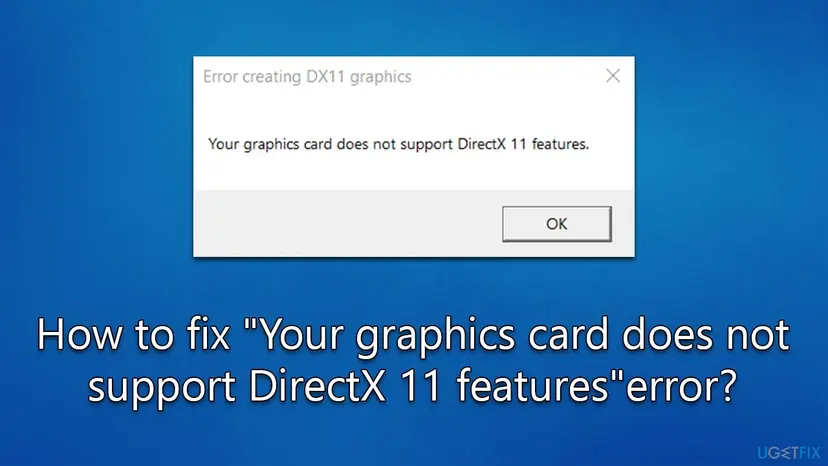
So the message does not mean DirectX is missing. Microsoft states that Windows 10 and Windows 11 include DirectX 11.3 and DirectX 12. What failed is the adapter the game was handed: often not your real graphics card at all, but an integrated chip or a generic driver.
| What you see | Who shows it | What it tells you |
|---|---|---|
| "Error creating DX11 graphics" with "Your graphics card does not support DirectX 11 features." | Rainbow Six Siege and other games, by player reports | The Direct3D 11 device could not be created on the active GPU. |
| "GPU does not support DirectX 11.0 which is required" | FIFA 18 and 19, by player reports | The same check, worded by the game. |
| "This title requires a graphics device compatible with DirectX 11" | PES 2020, in a Microsoft Q&A thread | The same check. The game will not start below feature level 11_0. |
| "Failed to initialize graphics. Make sure you have DirectX 11 installed, have up to date drivers for your graphics card and have not disabled 3D acceleration in display settings. InitializeEngineGraphics failed" | Games built on the Unity engine | The engine could not open a DirectX 11 device. Its three hints point at the driver and a disabled adapter, not at a DirectX download. |
| "Your video card or driver does not support DirectX 11" and "No valid DX11 video card found" | Other games, also in Russian translations | Same meaning. The word "driver" in the first one is the better hint. |
Every NVIDIA GeForce, AMD Radeon and Intel graphics chip from the last ten years or more reaches feature level 11_0. When such a card shows this box, the game is not talking to it. That is why Fixes 1 and 2 work far more often than any DirectX repair.
Why the game says your card lacks DirectX 11, most common cause first
The table ranks the causes by how often they come up in the reports we read, with the fix for each. The first two cover most PCs whose card is newer than about 2010.
| How often | Cause | How to spot it | Fix |
|---|---|---|---|
| Most often | The game runs on the integrated GPU of a laptop, such as one with a GeForce MX130 next to Intel graphics | dxdiag shows Intel or AMD integrated graphics on the first display tab; on a desktop, the monitor cable is in the motherboard | Fix 1 |
| Often | The graphics card has no proper driver, or is disabled | dxdiag or Device Manager shows Microsoft Basic Display Adapter, or the card has a down arrow icon in Device Manager | Fix 2 |
| Sometimes | The card really was made before DirectX 11 | Feature Levels in dxdiag starts at 10_1, 10_0 or 9_3 | A newer card |
| Sometimes | Windows is missing updates after a reinstall or a long break | Windows Update shows pending or failed updates | Fix 3 |
| Rarely | Damaged game files after a patch | It worked before on the same PC | Fix 4 |
Users also report the box when they start a game through Remote Desktop or inside a virtual machine. Both give the game a virtual display adapter instead of the real card. Start the game at the PC itself before you try anything else.
Check whether your graphics card supports DirectX 11 with dxdiag
The DirectX Diagnostic Tool is built into Windows and settles the question in one minute. The line to read is Feature Levels, not the DirectX version on the first tab.
- Press Win + R, type
dxdiagand press Enter. If Windows asks whether to check that drivers are digitally signed, select Yes. - On the System tab, DirectX Version shows DirectX 12 on every Windows 10 and 11 PC. This line describes Windows, not your card, so move on.
- Open the Display tab (on some PCs Display 1). Read Name under Device: it must be your real graphics card, not Microsoft Basic Display Adapter.
- Under Drivers, read Feature Levels. The first value is the highest your card reaches.
- If the first value is 11_0, 11_1 or any 12_x, the card supports DirectX 11 features. If it is 10_1 or lower, it does not.
- If there is a second display tab, check it too. On a laptop the dedicated card is often on Display 2 or on a Render tab.
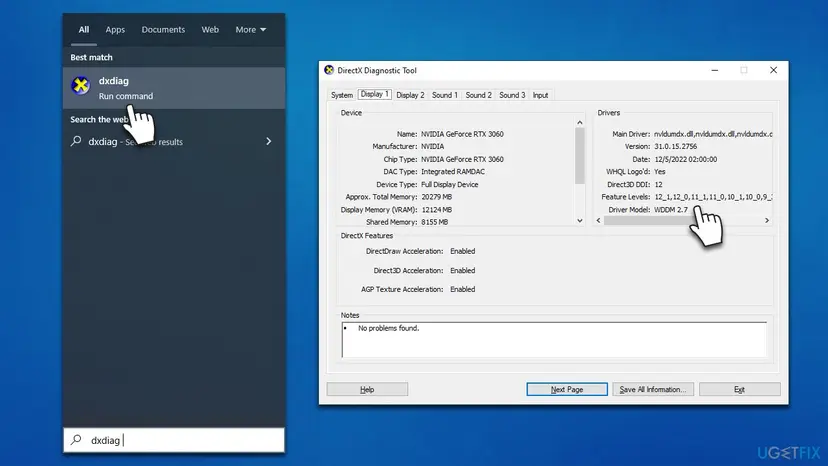
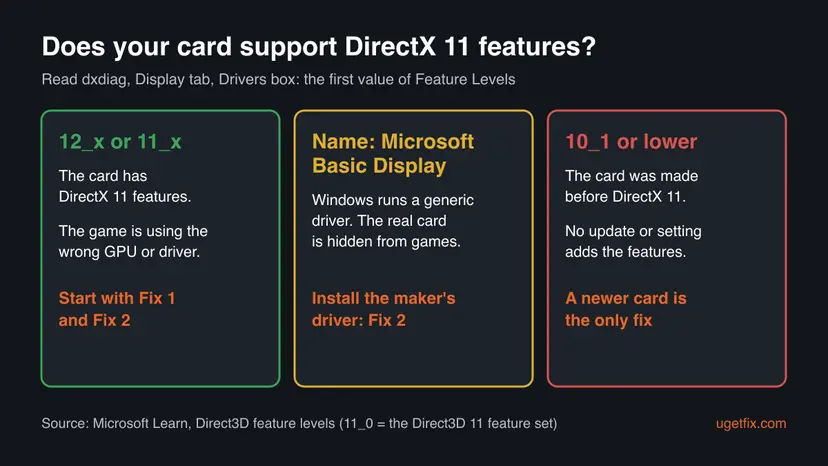
Microsoft's feature level documentation says the DirectX 12 interface only goes down to feature level 11_0. So if Direct3D DDI shows 12 for the real card, that card reaches at least 11_0 and can run DirectX 11 games.
How to fix "Your graphics card does not support DirectX 11 features"
Start with Fix 1 if you have a laptop or two graphics chips, and with Fix 2 if dxdiag showed Microsoft Basic Display Adapter. Fix 3 and Fix 4 are for PCs where the card and driver already look right.
| What you see or what your PC has | Start with |
|---|---|
| A laptop, or a desktop with both integrated and dedicated graphics | Fix 1 |
| dxdiag shows Microsoft Basic Display Adapter, or the card is missing or disabled in Device Manager | Fix 2 |
| The Unity message about drivers and 3D acceleration | Fix 2 |
| Card and driver look right, but Windows has pending updates | Fix 3 |
| The game worked before and broke after a patch | Fix 4 |
| Feature Levels start at 10_1 or lower | Still broken section: hardware limit |
Fix 1. Make the game run on the dedicated graphics card
5 minutesNo riskLaptops with integrated and dedicated graphics, and desktops whose monitor may be plugged into the motherboard.
Windows picks a GPU per app on PCs with two graphics chips. If the game starts on an old integrated chip, it can fail the 11_0 check even though the dedicated card would pass. Windows and the NVIDIA Control Panel both let you force the faster card.
- Close the game. Open Settings with Win + I.
- Go to System > Display > Graphics. On Windows 10 it is System > Display > Graphics settings.
- Find the game under Custom options for apps. If it is missing, select Browse next to Add desktop app and choose the game's .exe file.
- Select the game, then Options.
- Under Graphics preference, select High performance. Your dedicated card's name shows next to it.
- Select Save and start the game again.
With an NVIDIA card you can set the same thing in the NVIDIA Control Panel. Right-click the desktop, open NVIDIA Control Panel, select Manage 3D settings, and on Global Settings set Preferred graphics processor to High-performance NVIDIA processor. The Program Settings tab does it for one game only.
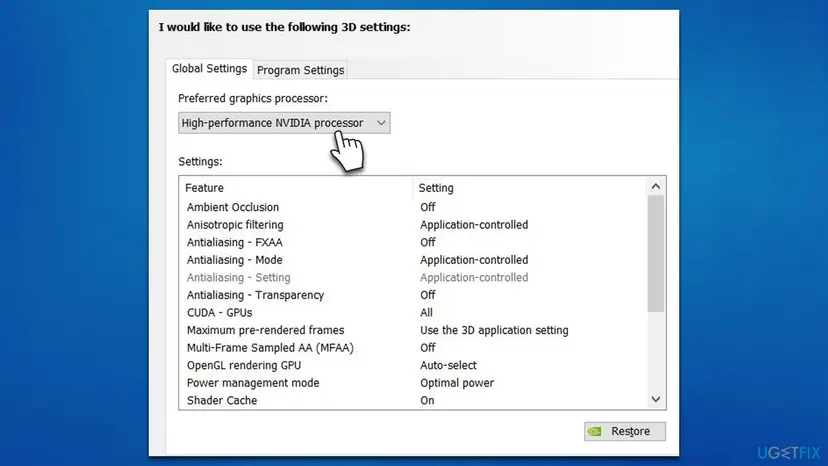
Plug the monitor into the ports on the graphics card, not the ones on the motherboard. The motherboard ports run on the processor's integrated graphics, and a game started there can show this box.
It worked if: The game window opens. In Task Manager, the GPU engine column (right-click the column headers to add it) shows the game on the dedicated card.
If not: If High performance lists the same integrated chip, or the NVIDIA Control Panel is missing, Windows does not see the dedicated card. Go to Fix 2.
Fix 2. Enable the graphics card and install its maker's driver
10 to 15 minutesLow riskdxdiag shows Microsoft Basic Display Adapter, the card is disabled or missing in Device Manager, or you see the Unity message about drivers and 3D acceleration.
Microsoft Basic Display Adapter is the generic driver Windows uses when the card's own driver is missing. Games cannot reach the card's Direct3D 11 hardware through it, so they report the card as unsupported.
- Right-click Start and select Device Manager.
- Expand Display adapters. If your card has a small down arrow on its icon, right-click it and select Enable device.
- If the list shows only Microsoft Basic Display Adapter, or an old driver, download the current driver from the card maker: NVIDIA, AMD or Intel. For a laptop, the laptop maker's support page has the version tested for that model.
- For a clean start, right-click the card, select Uninstall device, tick Delete the driver software for this device (on some builds Attempt to remove the driver for this device) and select Uninstall.
- Restart the PC and run the driver installer you downloaded.
- Open dxdiag again and confirm that Name shows your card and Feature Levels starts at 11_0 or higher.
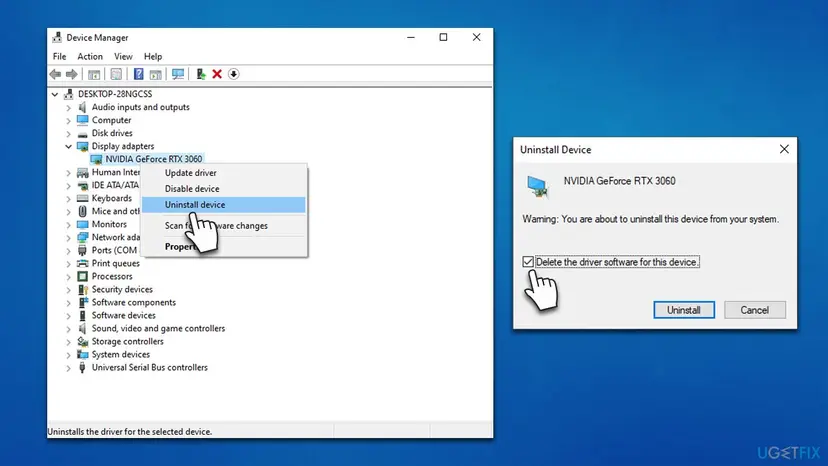
Device Manager can also update or roll back a driver. Step by step: Update, roll back or reinstall a driver.
- Open Device Manager. Right-click Start and select Device Manager.
- Open the device's Driver tab. Expand the category (for example Display adapters), right-click the device, select Properties and open the Driver tab. Driver Date and Driver Version show what is installed now.
- Update the driver. Select Update Driver and let Windows search automatically. To use a driver you downloaded from the device maker, select Browse my computer for drivers instead and point to the unpacked folder.
These steps were written for Windows 11 24H2 and later. The full page with the other versions and what each result means: Update, roll back or reinstall a driver
It worked if: dxdiag shows the real card name with Feature Levels from 11_0 up, and the game starts.
If not: If the driver installer says no compatible hardware was found, the card may be too old for current drivers. Read the still-broken section. Otherwise go to Fix 3.
Fix 3. Install all Windows updates
15 to 60 minutesLow riskA fresh Windows install, a PC that was offline for months, or Windows Update showing failed updates.
Microsoft says Direct3D 11 on Windows 10 and 11 is updated only through Windows Update and has no stand-alone package. Updates also bring the display driver Windows offers for your card when no maker driver is installed.
- On Windows 11, open Settings > Windows Update and select Check for updates.
- On Windows 10, open Settings > Update & Security > Windows Update and select Check for updates.
- Install everything offered. Under Advanced options > Optional updates, install any display driver listed for your card.
- Restart the PC and start the game.
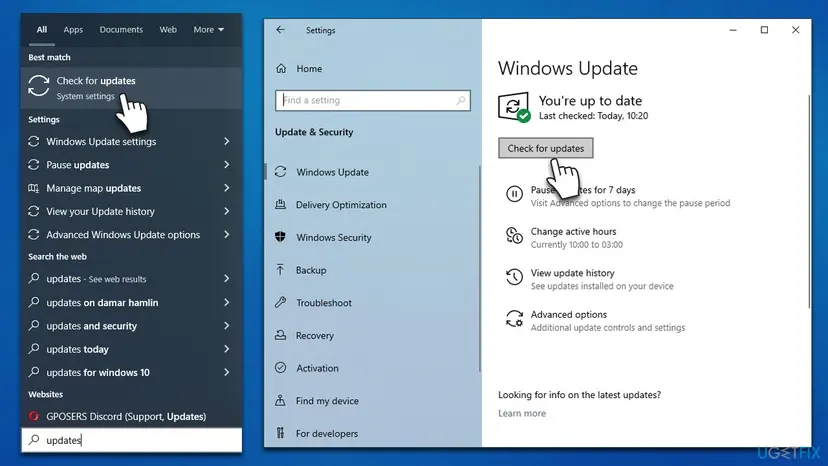
Windows 10 reached the end of support on 14 October 2025, and 22H2 is its last version. If Windows Update refuses to install, the manual route is here: Install an update from the Microsoft Update Catalog.
It worked if: Windows Update says you are up to date, and the game opens after the restart.
If not: If Windows is current and dxdiag looks right, check the game's files in Fix 4.
Fix 4. Verify the game's files
5 to 20 minutesNo riskThe game ran before on this PC and the box appeared after a patch, a moved install folder or a crash during an update.
A damaged graphics settings file or engine file can make the game ask for the wrong adapter or fail its DirectX 11 start. The launcher's file check compares every file with the server and downloads what is broken.
Steam, the Epic Games Launcher, Ubisoft Connect, EA app and the Xbox app all have a file check. Step by step for each launcher: How to verify game files in Steam, Epic Games, Xbox app, EA app, Battle.net and GOG Galaxy.
- Restart and open Steam. Restart your computer and launch Steam.
- Open the game's menu. Right-click the game in your Library, or open the game's Library page and select the gear icon on the far right.
- Open Properties. Select Properties in the menu.
- Verify the files. Select the Installed Files tab and select Verify integrity of game files.
- Wait for the result. Steam checks the game's files. This can take several minutes.
These steps were written for Steam on Windows. The full page with the other versions and what each result means: How to verify game files in Steam, Epic Games, Xbox app, EA app, Battle.net and GOG Galaxy
It worked if: The launcher reports that all files were validated or that it replaced some, and the game starts.
If not: If the files were fine, collect the dxdiag report as described below and send it to the game's support.
Still broken: when the card really lacks DirectX 11
If dxdiag shows your real card with its maker's driver and Feature Levels starts at 10_1, 10_0 or 9_3, the card was built before DirectX 11. Microsoft's documentation is plain here: new 11 features will not run on older hardware, and a feature level depends on the GPU installed.
- No software adds the features. Microsoft says the DirectX End-User Runtime makes no change to your version of DirectX or Direct3D 11, and that to upgrade DirectX further you upgrade the operating system, not the card.
- Your options are a newer graphics card, a cloud gaming service that offers the game, or a game with lower requirements.
- Before you buy, compare the game's minimum graphics line on its store page with the new card.
If the card does reach 11_0 and the box still appears, collect evidence for the game's support. In dxdiag select Save All Information and keep the text file. Add your Windows version from winver and say whether you start the game through Remote Desktop, a virtual machine or a streaming tool.
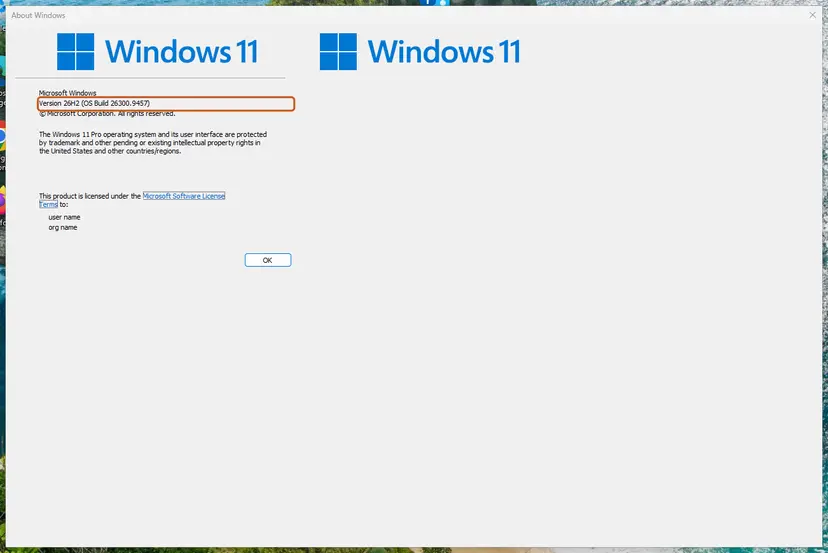
Microsoft says DirectX 11.3 and 12 come with Windows 10 and 11 and have no stand-alone package. A site that offers a separate DirectX 11 download is not offering Microsoft's DirectX, and the file can carry unwanted software.
How to avoid the DirectX 11 error with the next game
Most cases come back after a driver reset or a Windows reinstall. A few habits stop that.
- Install the GPU maker's driver right after every Windows reinstall, before the first game.
- On a laptop, set each new game to High performance in Windows graphics settings.
- Plug the monitor into the graphics card, not the motherboard.
- Compare the store page's graphics line with dxdiag's Name and Feature Levels before you buy.
- Do not trust the DirectX version on dxdiag's System tab as proof that your card is ready.
- Do not install DirectX packages or driver updaters from third-party sites.
- Do not start games through Remote Desktop and expect the real card to be used.
Frequently asked questions
What does "Your graphics card does not support DirectX 11 features" mean?
It means the game asked the graphics adapter for a Direct3D 11 device at feature level 11_0 and the request failed. It does not mean DirectX is missing: Windows 10 and 11 include DirectX 11.3 and 12. On a modern card the usual reasons are that the game runs on an integrated chip or on Microsoft Basic Display Adapter. Only when dxdiag shows Feature Levels below 11_0 is the card itself too old.
How do I check if my graphics card supports DirectX 11?
Press Win + R, type dxdiag and open the Display tab. Under Drivers, read Feature Levels. If the list starts at 11_0, 11_1 or any 12_x value, the card supports DirectX 11 features. If it starts at 10_1 or lower, it does not. Also check Name: if it says Microsoft Basic Display Adapter, Windows cannot see your real card yet and the feature levels shown are not your card's.
How do I get DirectX 11 on Windows 10 or 11?
You already have it. Microsoft says DirectX 11.3 and DirectX 12 are included with Windows 10 and Windows 11, updates come through Windows Update, and there is no stand-alone package. What you may be missing is a graphics card that reaches feature level 11_0, or the driver that lets games use it. Install all Windows updates and the card maker's driver instead of searching for a DirectX 11 download.
Is there a DirectX 11 repair tool?
Not for this error. The DirectX End-User Runtime on Microsoft's site restores old helper files that some games need, such as d3dx9_35.dll, and fixes "file is missing" messages. Microsoft notes that it makes no change to your version of DirectX or Direct3D 11. The Direct3D 11 runtime itself is a Windows component repaired by Windows Update. If you suspect damaged system files, run Run DISM and SFC to repair Windows system files, but this box is almost always about the GPU or driver.
Why does the error appear when my GPU is new?
Because the game is not using your new GPU. Laptops with a dedicated card, such as a GeForce MX130 next to Intel graphics, start many programs on the integrated chip. A missing driver makes even a new card show up as Microsoft Basic Display Adapter. Remote Desktop and virtual machines give the game a virtual adapter. Set the game to High performance (Fix 1) and install the maker's driver (Fix 2).
What does "This title requires a graphics device compatible with DirectX 11" mean?
It is the same check with different wording, seen for example in PES 2020. The game needs a graphics device at Direct3D feature level 11_0 and did not get one. The fixes are the same: check Feature Levels in dxdiag, move the game to the dedicated GPU, and install the card maker's driver. If the card starts below 11_0, the game cannot run on it.
What does "GPU does not support DirectX 11.0 which is required" mean?
Players report this wording in FIFA 18 and FIFA 19. The "11.0" refers to feature level 11_0, the Direct3D 11 feature set. As with the other versions of the message, check which adapter the game is using in dxdiag, set the game to High performance, and install the latest driver. Integrated graphics on older laptops is the most common case reported for these games.
How do I fix "Failed to initialize graphics" with "InitializeEngineGraphics failed"?
This is the Unity engine's version of the error. Its three hints are worth following in order: DirectX 11 is already in Windows 10 and 11, so focus on the driver and the adapter. Open Device Manager, make sure the card is enabled under Display adapters, and install the maker's driver (Fix 2). "Disabled 3D acceleration" in practice means a disabled card or Microsoft Basic Display Adapter.
What does "A supported DirectX 8.0 compatible graphics card was not found" mean?
That message comes from much older games built for DirectX 8, not from DirectX 11 games, so this page only partly applies. The causes overlap: a disabled card or a generic driver hides the GPU from the game. Check Device Manager and install the maker's driver. Very old games can also need compatibility mode; step by step: How to run a program as administrator or in compatibility mode.
Does this page help with ID3D12Device11 or the Agility SDK?
No. ID3D12Device11 is a programming interface in the DirectX 12 headers, and the Agility SDK is a package developers ship with their games. Those searches are about writing software, while this page is about a game that will not start. If you are a player who saw a DirectX 12 message instead, the matching guide is DirectX 12 is not supported on your system.
Sources
- Microsoft Learn: Direct3D feature levels (learn.microsoft.com)
- Microsoft Support: How to install the latest version of DirectX (support.microsoft.com)
Did this fix work?
One click, no account. It tells the next reader which guides are worth their time.
Questions and experiences: fix "Your graphics card does not support DirectX 11 features" error
Still broken, or found a fix we did not cover? Ask here: members and our editors answer. Reading is open; writing needs a free account.
…