
How to fix Windows 10 activation error code 0xC004F034?

Prefer to fix it yourself? The manual steps follow.
- 6methods
- 5 to 20 minutes
- Easy
Applies to Windows 11 and Windows 10 Home, Pro and Education after a key change, an upgrade, a reset or a new PC setup, and PCs with a volume (KMS) licence
6 methods in this guide
I upgraded from Windows 8.1 to Windows 10, but I get error code 0xC004F034 when I try to activate. I can't see an option to phone in for activation. Could you please help?
Error 0xC004F034 means Windows could not activate with the licence it has. Microsoft says it usually comes from a product key that is not valid or belongs to another version of Windows. Check that your key matches your edition first, then run the Activation troubleshooter.
Microsoft says 0xC004F034 appears when the product key is not valid or is for a different version of Windows. Check your edition in Settings > System > About, then enter a key for that exact edition under Change product key (Fix 1). On a new, reset or upgraded PC with a digital licence, run the Troubleshoot button on the Activation page instead (Fix 2). A work PC with a KMS licence needs your IT team (Fix 6).
| Error | 0xC004F034, shown as Error code: 0xC004F034 on the Activation page, or as Notification Reason: 0xC004F034 in the slmgr /dli output. |
|---|---|
| Where it appears | Settings > System > Activation on Windows 11 (Windows 10: Settings > Update & Security > Activation), after Change product key, after an upgrade, or shortly after first setup of a new PC. |
| Main cause | A product key that is not valid, or a key for another edition of Windows (a Home key on Pro, for example). On organisation PCs, a KMS server that cannot be reached. |
| Fastest fix | Enter a valid key that matches your installed edition (Fix 1). With a digital licence: the Activation troubleshooter (Fix 2). |
| Also written as | 0xc004f034, c004f034, "error code 0xc004f034", "License Status: Notification, Notification Reason: 0xC004F034". |
| Affects | Windows 11 and Windows 10. Microsoft lists the same code and the same advice for both. Windows 10 left support on 14 October 2025. |
| Vendor status | Not a bug. Microsoft lists it among the most common activation errors. Dell says new PCs can also show it when the activation handshake needs an update that has not installed yet. |
| What does not help | Turning off the antivirus or firewall for good, deleting random system files, or a generic key from a website. |
| Time to fix | 5 minutes with the right key. Up to a day when you wait for activation servers or for an IT team. |
Facts checked on 15 October 2026. Steps written for Windows 11 (25H2 and 26H2) and Windows 10 22H2.
What Windows activation error 0xC004F034 means
Microsoft's own list of the most common activation errors puts 0xC004F034 near the top. Its explanation is short: you might see the error if you entered a product key that is not valid, or a key for a different version of Windows. Its advice is to enter a valid key that matches the version and edition installed on the device. If the PC connects to a Key Management Service (KMS) server, Microsoft says to contact your organisation's support person.
In plain words, Windows tried to activate and the licence it was given did not fit. That can be a typo, a key for Windows 10 Home on a PC that runs Pro, a key that was already used or blocked, or a company volume licence that can no longer reach its server. The error says nothing about your hardware or your files.
| Where you see it | What you see | What it tells you |
|---|---|---|
| Settings > System > Activation (Windows 10: Settings > Update & Security > Activation) | Windows is not activated, with Error code: 0xC004F034 | Activation was tried and the key or licence was refused. |
| The Enter a product key window after Change product key | The key is refused with 0xC004F034 | The key you typed does not fit this edition or is not valid. |
Output of slmgr /dli in Command Prompt | License Status: Notification, Notification Reason: 0xC004F034 | Windows runs unlicensed and is in the notification state, with this code as the reason. |
| A new PC, right after the first setup screens | Error code: 0xC004F034 on the Activation page | Dell links this to an activation handshake that needs a Windows update first. |
Many pages still say 0xC004F034 means Microsoft's servers are overloaded, which people saw during the first Windows 10 upgrade wave in 2015. Microsoft's current advice puts the key and the edition first. Busy servers are still possible, but check the key before you wait.
Why error 0xC004F034 appears, from most to least common
The order below follows Microsoft's and Dell's descriptions. Each cause has one fix, so start with the row that fits your PC.
| Cause | How often | How to tell | Fix |
|---|---|---|---|
| The key is not valid, mistyped, or for another edition (Home key on Pro, Pro key on Education). | Most often | Settings > System > About shows an edition that does not match the key's packaging or receipt. | Fix 1 |
| A new, reset or upgraded PC whose digital licence has not been picked up yet. | Often | You never typed a key; the PC was activated before, or is new from the maker. | Fix 2 |
| The activation handshake needs a Windows update that has not installed yet. | Sometimes, on new PCs | Windows Update shows pending updates, or updates fail to install. | Fix 3 |
| The PC cannot reach the activation service, or the service is busy. | Sometimes | No internet, a VPN or a proxy is active, or the error clears on its own later. | Fix 4 |
| Online activation keeps failing with a genuine retail key. | Rarely | Your key is right for the edition and the troubleshooter did not help. | Fix 5 |
| The PC holds a volume (KMS) licence and cannot reach its organisation's KMS server. | On work, school and second-hand PCs | slmgr /dli shows a channel such as VOLUME_KMSCLIENT. | Fix 6 |
Users also report the code on PCs that were activated with an unofficial activation tool, when that activation stops working and the licence falls back to the notification state. Those tools are not a fix. The way out is a genuine key or digital licence, as in Fix 1 and Fix 6.
How to fix Windows activation error 0xC004F034
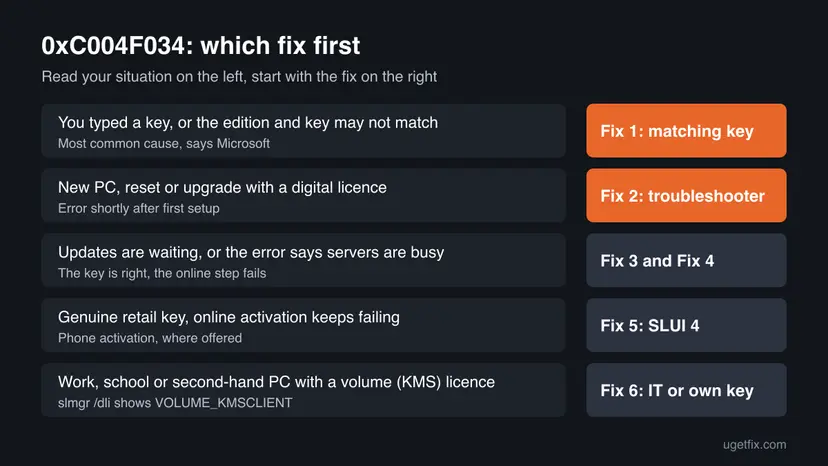
Fix 1 solves the error for most readers, because Microsoft names the wrong key or edition as the cause. Fix 2 is for a digital licence, Fixes 3 to 5 are for a right key that still fails online, and Fix 6 is for organisation PCs with a volume licence.
| What you see or have | Start with |
|---|---|
| You typed a key, or you are not sure the key and the edition match. | Fix 1 |
| A new PC, a reset or an upgrade, and you never entered a key. | Fix 2 |
| A new PC with updates waiting, or updates that fail. | Fix 3 |
| The right key, but activation fails online or says servers are busy. | Fix 4 |
| Online activation keeps failing with a genuine retail key. | Fix 5 |
A work, school or second-hand PC, or slmgr /dli shows VOLUME_KMSCLIENT. | Fix 6 |
Fix 1. Check your Windows edition and enter a product key that matches it
5 minutesNo riskEveryone who typed a key, bought one separately, or is not sure the key fits the installed edition. This is the fix for most readers.
Microsoft's advice for 0xC004F034 is to enter a valid key that matches the version and edition installed on the device. A Home key cannot activate Pro and a Pro key cannot activate Education, however often you retry.
- Open Settings > System > About and read Edition under Windows specifications.
- Compare it with the edition on your key's receipt, box or email (Home, Pro, Education).
- Open Start, type cmd, right-click Command Prompt and select Run as administrator.
- Type
slmgr /dliand press Enter; note the Description line and the Partial Product Key. - Open Settings > System > Activation (Windows 10: Settings > Update & Security > Activation).
- Select Change next to Change product key, approve the prompt and type the 25-character key for your edition.
- Select Next, then Activate, and restart the PC.
The same from an administrator Command Prompt
slmgr /ipk XXXXX-XXXXX-XXXXX-XXXXX-XXXXX
slmgr /ato
slmgr /dli
The slmgr commands that change the licence need an elevated window. Step by step: How to run a program as administrator or in compatibility mode
If your key is for Pro and the PC runs Home, entering the Pro key under Change product key usually starts the upgrade to Pro. If the key is for Home and the PC runs Pro, it will not activate: you need a Pro licence, or a clean install of Home. Back up your files before changing edition.
It worked if: The Activation page shows Active or Windows is activated, and slmgr /dli shows License Status: Licensed.
If not: If you never had a key and the PC was activated before, go to Fix 2. If the key matches and still fails, try Fix 3 and Fix 4.
Fix 2. Run the Activation troubleshooter to restore a digital licence
5 minutesNo riskA new PC right after first setup, a PC after a reset or reinstall, or an upgrade from an older Windows, with no key typed.
Dell says this error on new PCs is usually solved with the Windows Activation troubleshooter. It looks up the digital licence for your hardware and, after a hardware change, can use the licence linked to your Microsoft account.
- Sign in with an account that has administrator rights; Dell notes the tool needs one.
- Open Settings > System > Activation (Windows 10: Settings > Update & Security > Activation).
- Expand Activation state if needed and select Troubleshoot.
- Follow the steps; if asked, select I changed hardware on this device recently and sign in with your Microsoft account.
- Restart the PC, then open the Activation page again.
Dell says Windows 8 Home and Windows 10 Education need a restart after the troubleshooter before you try to activate again. Restart on every edition to be safe.
It worked if: The troubleshooter reports that Windows is activated, or the Activation page shows Active after the restart.
If not: If the troubleshooter cannot find a licence, you need a key for your edition (Fix 1). If it fails with an online error, try Fix 3.
Fix 3. Install pending Windows updates, then activate again
15 to 30 minutesLow riskA new or freshly reset PC, especially when Windows Update shows updates waiting or failing.
Dell explains that the activation process can need a specific Windows update to complete the activation handshake. When that update is missing, activation fails with 0xC004F034 even with a valid licence.
- Open Settings > Windows Update (Windows 10: Settings > Update & Security > Windows Update).
- Select Check for updates and install everything offered, including optional quality updates.
- Restart the PC when asked, then check for updates again until none are left.
- Open the Activation page and select Troubleshoot, or run
slmgr /atoin an administrator Command Prompt.
If updates fail to download or install, resetting the Windows Update components clears the download cache in C:\Windows\SoftwareDistribution. Step by step: Reset Windows Update components
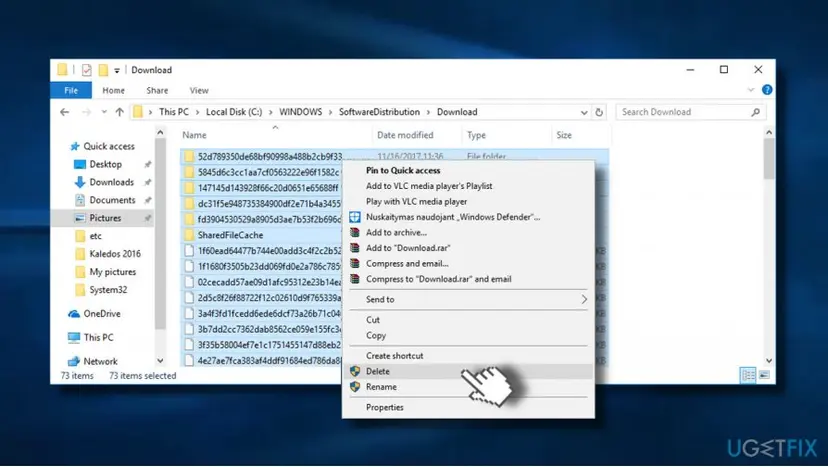
It worked if: Windows Update says you are up to date, and activation goes through on the next try.
If not: If updates install but activation still fails online, go to Fix 4.
Fix 4. Check the connection, turn off a VPN or proxy, and retry later
5 minutes, plus waitingNo riskThe key is right for the edition, and activation fails online or the message mentions busy servers.
Activation needs to reach Microsoft's activation service. Dell notes that investigating this error can point to busy activation servers, and a VPN or proxy can block the request.
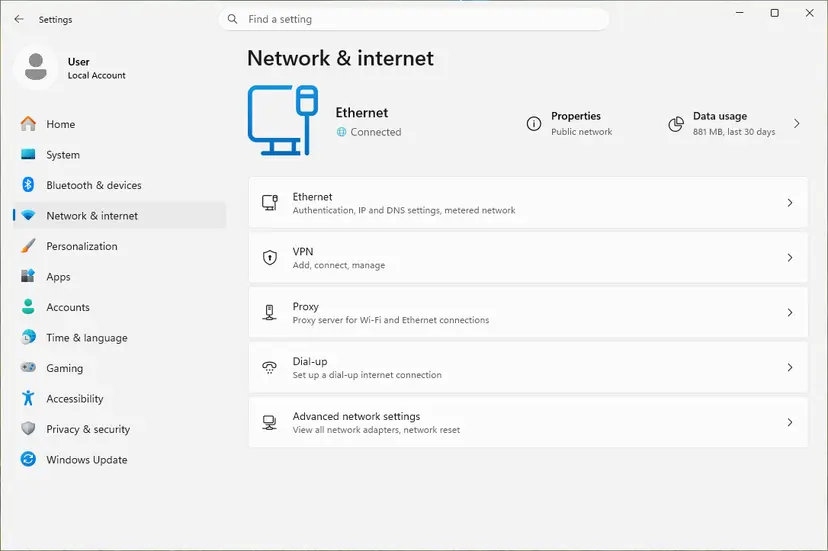
- Open Settings > Network & internet and check that it says Connected.
- Disconnect any VPN app and turn off a manual proxy under Settings > Network & internet > Proxy.
- Try activation again from the Activation page.
- If it still fails, wait a few hours and try again; turn the VPN back on afterwards.
It worked if: Activation succeeds on a later try and the Activation page shows Active.
If not: If it still fails after a day with a genuine retail key, try Fix 5.
Fix 5. Activate by phone with SLUI 4
10 minutesNo riskYou have a genuine retail key that matches the edition, and online activation keeps failing.
Phone activation does not use the online activation request, so it can work when the online step keeps failing. It does not help when the key itself is wrong for the edition.
- Press Win + R, type
slui 4and press Enter. - Pick your country or region from the list and select Next.
- Call the number shown and give the installation ID read out on the screen.
- Type the confirmation ID you are given and select Activate Windows.
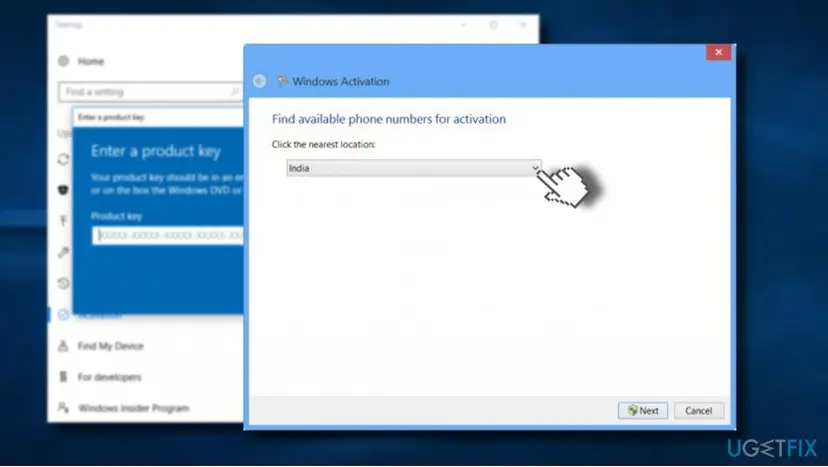
The reader above found no phone option, and users report the same on some Windows 11 builds and editions. We could not confirm on which builds Microsoft still offers it. If slui 4 opens nothing, use Fix 2 or contact Microsoft's activation support.
It worked if: The window confirms that Windows is activated.
If not: If the phone option is missing or the call cannot activate the key, contact Microsoft support with proof of purchase.
Fix 6. Work, school or second-hand PC: ask the IT team or use your own licence
5 minutes, plus the replyNo riskThe PC belongs or belonged to an organisation, or slmgr /dli shows a VOLUME_KMSCLIENT channel.
Microsoft says that a PC connecting to a KMS server should be activated through the organisation's support person. A KMS licence only works while it can reach that organisation's server, which a home network cannot.
- Run
slmgr /dliand note the Description line. - If it says VOLUME_KMSCLIENT and the PC is managed by work or school, send the output and a screenshot of the error to your IT team.
- If the PC is yours now, or was bought second-hand, buy a licence for the installed edition.
- Enter that key under Settings > System > Activation > Change product key, as in Fix 1.
Generic KMS client keys only work with an organisation's own KMS server, and unofficial activation tools break Microsoft's licence terms and can carry malware. Neither gives a lasting activation on a home PC.
It worked if: The IT team activates the PC, or your own key turns the Activation page to Active.
If not: If a genuine key you bought still fails, ask the seller for a valid key or a refund and contact Microsoft support with the receipt.
If error 0xC004F034 is still there
Collect these facts before you contact Microsoft, the PC maker or the key's seller. They answer the first questions support will ask.
| What to check | Where | What it tells you |
|---|---|---|
| Installed edition | Settings > System > About > Windows specifications | The edition your key must match. |
| Licence channel and status | slmgr /dli in Command Prompt | RETAIL, OEM or VOLUME channel, the partial key and Notification Reason. |
| Activation state | Settings > System > Activation | Whether a digital licence is linked to your Microsoft account. |
| Proof of purchase | Receipt, box or seller email | Needed for Microsoft support or a refund from the seller. |
If the code changes after a new key, read the new code instead; it names the next problem. A key that keeps failing on the right edition is often one that was already used or blocked, and only the seller or Microsoft can replace it. This error is never a sign of a hardware fault.
How to avoid error 0xC004F034 next time
Most cases come from a key that does not fit the edition, so the habits below are about the licence.
- Check the edition in Settings > System > About before you buy or enter a key.
- Link your digital licence to your Microsoft account so a reset or new drive activates again.
- Install all pending updates on a new PC before you try to activate.
- Keep the receipt or email of every key you buy.
- Buy cheap keys from unknown sellers; they are often volume or used keys.
- Install a key for another edition and expect it to activate.
- Use activator tools or generic KMS keys from websites.
- Turn off the firewall or antivirus for good to make activation pass.
Frequently asked questions
What does error code 0xC004F034 mean?
It means Windows could not activate with the licence it was given. Microsoft says you might see it after entering a product key that is not valid or a key for a different version of Windows. On a PC that activates through an organisation's KMS server, it also appears when that server cannot be used, and Microsoft then points you to the organisation's support person. It is not a hardware problem and does not affect your files.
What is "License Status: Notification, Notification Reason: 0xC004F034"?
It is how the slmgr /dli or slmgr /dlv command reports the same problem. Notification means Windows is not activated and runs in its notification state, with reminders and some personalisation locked. Notification Reason: 0xC004F034 says why: the licence on the PC was refused. Read the Description line in the same output. RETAIL or OEM points to Fix 1 and Fix 2, VOLUME_KMSCLIENT points to Fix 6.
How do I fix 0xC004F034 on Windows 11?
The fixes are the same as on Windows 10, because Microsoft gives the same explanation for both. Check your edition under Settings > System > About, then enter a matching key under Settings > System > Activation > Change product key (Fix 1). With a digital licence, select Troubleshoot on the same page (Fix 2). Only the menu paths differ between the two versions.
I upgraded from Windows 7 or 8.1 and get 0xC004F034. What now?
Run the Activation troubleshooter first (Fix 2), after installing all pending updates (Fix 3). The upgrade should carry over a digital licence when the old Windows was activated. If the old Windows was not genuine, or the troubleshooter finds no licence, you need a key for the edition you now run. Note that Windows 10 itself left support on 14 October 2025.
Is 0xC004F034 caused by Microsoft's servers being busy?
Sometimes, but not most often. Busy servers were a common explanation during the first Windows 10 upgrade wave, and Dell still mentions busy activation servers for new PCs. Microsoft's current list of activation errors names a key that is not valid or for another edition first. Check the key and the edition before you decide to wait, then retry later if they match (Fix 4).
Can I still use Windows if it is not activated?
Yes, Windows keeps working, but it shows activation reminders and locks personalisation settings such as the wallpaper and colours. Your files and programs stay as they are. Activation is still required by the licence terms, so fix it with a genuine key or digital licence rather than leaving it. The error does not delete anything.
Will a generic or KMS key from the internet fix 0xC004F034?
No. Generic KMS client keys are meant for organisations that run their own KMS server, and on a home PC they lead back to this kind of error. Activator tools that promise free activation break Microsoft's licence terms, can carry malware, and users report that the activation later falls back to the notification state. Use your own key or digital licence.
Why can't I find the phone activation option?
Phone activation through slui 4 is not offered on every PC. Users report that some Windows 11 builds and some licence types show no phone option at all, and we could not confirm which ones still have it. If the window does not open or shows no numbers, use the Activation troubleshooter (Fix 2) or contact Microsoft support with your proof of purchase.
I searched in another language. Can this page help?
Yes. Searches such as "đây là gì" (what is this) or "bu ne demek" (what does it mean) lead here because the code is the same in every language of Windows. The short answer: 0xC004F034 means the product key does not fit your Windows edition or could not be used. Enter a key for your exact edition (Fix 1), or run the Activation troubleshooter (Fix 2).
Sources
- Microsoft Support: Get help with Windows activation errors (support.microsoft.com)
- Dell: Windows will not activate error code 0xC004F034 (article 000129709) (dell.com)
Did this fix work?
One click, no account. It tells the next reader which guides are worth their time.
Questions and experiences: fix Windows 10 activation error code 0xC004F034
Still broken, or found a fix we did not cover? Ask here: members and our editors answer. Reading is open; writing needs a free account.
…