
How to fix Windows update error code (-2147024864)?

Prefer to fix it yourself? The manual steps follow.
- 6methods
- 5 to 40 minutes
- Easy to intermediate
Applies to Microsoft Defender Antivirus security intelligence (definition) updates in Windows Security, Windows Update and MpCmdRun.exe on Windows 11 and Windows 10
6 methods in this guide
I've been trying to update Windows for over a week now and I still can't do it. This is a protection definition update, so I'd say it should be important. The error code I'm getting is -2147024864, with the message "Protection definition update failed."
Error code -2147024864 appears in Windows Security under Protection definition update failed. It is 0x80070020, a sharing violation: Microsoft Defender could not replace a file because another process held it. Restart, then select Check for updates again, and install the update by hand if it fails once more.
-2147024864 is 0x80070020: a file Defender needs is in use by another process, so the definition update stops. Restart the PC and select Check for updates in Virus & threat protection (Fix 1). If it fails again, download mpam-feX64.exe from Microsoft and run it (Fix 2). Still failing: clear Defender's definition cache with MpCmdRun (Fix 3) and check that no other antivirus holds the files (Fix 4).
| Error | Protection definition update failed. with Error code: : -2147024864, the decimal form of 0x80070020. |
|---|---|
| Where it appears | Windows Security > Virus & threat protection > Protection updates, under Security intelligence, after an update attempt. Windows Update can show the same update, KB2267602, as failed. |
| Main cause | A sharing violation: Defender could not open or replace a definition file because another process held it at that moment. |
| Fastest fix | Restart the PC, then select Check for updates in Protection updates (Fix 1). If that fails, run Microsoft's mpam-feX64.exe (Fix 2). |
| Also written as | -2147024864, 0x80070020, 80070020, ERROR_SHARING_VIOLATION, "The process cannot access the file because it is being used by another process." |
| Affects | Microsoft Defender Antivirus on Windows 11 and Windows 10, including 22H2. It is not tied to one Windows version or one definition version. |
| Vendor status | Not a known issue. Microsoft's Defender troubleshooting page for Protection definition update failed lists other codes, not this one. Microsoft ties 0x80070020 in updates to non-Microsoft filter drivers such as antivirus. |
| Latest definitions | On 15 October 2026 Microsoft listed security intelligence 1.461.34.0, engine 1.1.26090.9 and platform 4.18.26090.9. |
| Time to fix | 5 minutes for Fix 1 and Fix 2, up to 40 minutes when the Windows Update path needs a reset. |
Facts checked on 15 October 2026. Steps written for Windows 11 (25H2 and 26H2) and Windows 10 22H2.
What error code -2147024864 means in a protection definition update
The number is a Windows error shown in decimal. Written in hex it is 0x80070020. The 0x8007 part says it is a plain Windows error, and 0020 is error 32, ERROR_SHARING_VIOLATION. Windows' text for it is "The process cannot access the file because it is being used by another process."
So the update did not fail because the download was bad or Microsoft's servers were down. Defender had the new definitions, tried to open or replace a file, and found another process holding it. That is why the same update often installs on the second try.
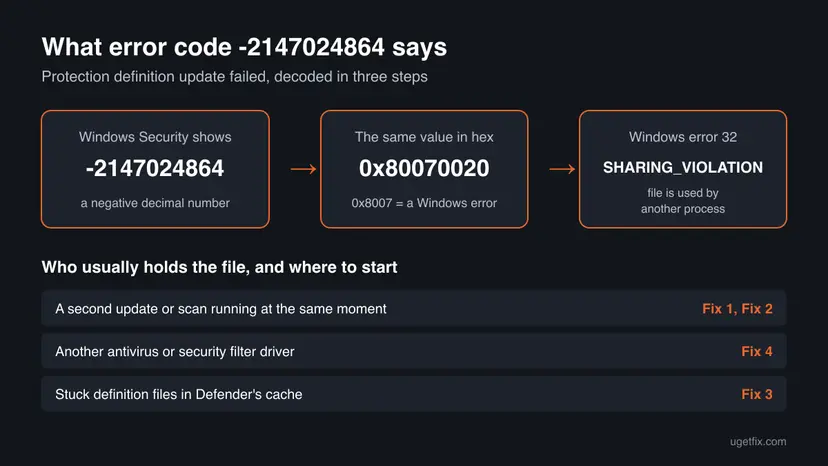
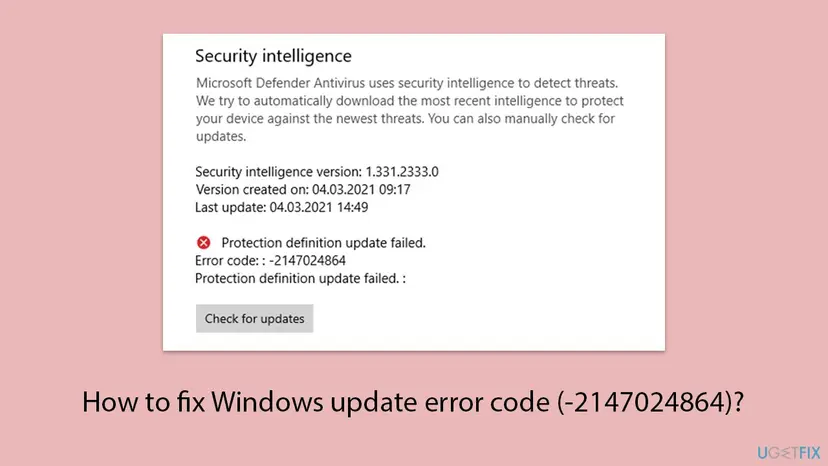
- The exact text. Windows Security prints Protection definition update failed., then Error code: : -2147024864, then Protection definition update failed. : once more. The double colon is how Windows shows it, not a typo.
- It is a Defender update, not a Windows feature update. Many people search "Windows update error" because Windows Update offers these updates too, as Security Intelligence Update for Microsoft Defender Antivirus - KB2267602.
- Protection still works with older definitions. Defender keeps scanning with the last version it has. The panel shows that version and its date, so you can see how old it is.
Why the protection definition update fails with -2147024864, from most to least likely
Microsoft has not published a cause for this code on Defender updates. The ranking below follows what error 32 means and what Microsoft says about 0x80070020 in Windows updates. Most often a second update or scan held the file for a moment. Less often another security program locks Defender's files. Rarely the definition cache or the Windows Update path is damaged.
| Cause | How often | How to tell | Fix |
|---|---|---|---|
| A second update, a scan or a pending restart held the file at the same moment. | Most often | It failed once or twice, and Windows Update shows other updates waiting or asks for a restart. | Fix 1, Fix 2 |
| Stuck files in Defender's definition cache, often after an interrupted update. | Sometimes | Every attempt fails with the same code, even after a restart. | Fix 3 |
| Another antivirus or a security filter driver locks the files. Microsoft names non-Microsoft filter drivers as the cause of 0x80070020 in updates. | Sometimes | Another security program is installed now or was installed before, or a backup or encryption tool watches every file. | Fix 4 |
| The Windows Update path is broken: its services or cache, a proxy, or a firewall rule. | Rarely | The manual file in Fix 2 installs, but updates through Windows Update keep failing. | Fix 5 |
| Damaged Windows system files. | Rarely | Other Windows parts fail as well. | Fix 6 |
Older guides list a lost connection as a cause. A download that cannot reach Microsoft gives other codes, such as 0x8024402c or 0x80072efd, which Microsoft lists for this same message. -2147024864 is about a file on your PC.
How to fix protection definition update failed error -2147024864
Fix 1 and Fix 2 take five minutes each and end most cases. Fix 3 clears the definition cache. Fix 4 finds a program that holds the files. Fix 5 and Fix 6 are generic repairs for when the update path or Windows itself is damaged.
| What you see or what your PC has | Start with |
|---|---|
| It failed once or twice, or Windows asks for a restart | Fix 1 |
| It fails after every restart | Fix 2, then Fix 3 |
| Another antivirus, backup or encryption tool is installed | Fix 4 |
| The manual file installs, but Windows Update keeps failing on KB2267602 | Fix 5 |
| Nothing above helped, or other parts of Windows fail too | Fix 6 |
Fix 1. Restart Windows, then check for protection updates again
5 minutesNo riskEveryone. Most of all when it failed once or twice, or Windows Update has updates waiting.
A sharing violation means something held the file at that moment. A restart closes every process and finishes pending installs, so the file is free when Defender tries again.
- Save your work. Select Start > Power > Restart. If the menu shows Update and restart, use that, so pending updates finish first.
- After the restart, select Start, type Windows Security and open the app.
- Select Virus & threat protection.
- Under Virus & threat protection updates, select Protection updates.
- Select Check for updates and wait until the check ends. Do not start a scan in the meantime.
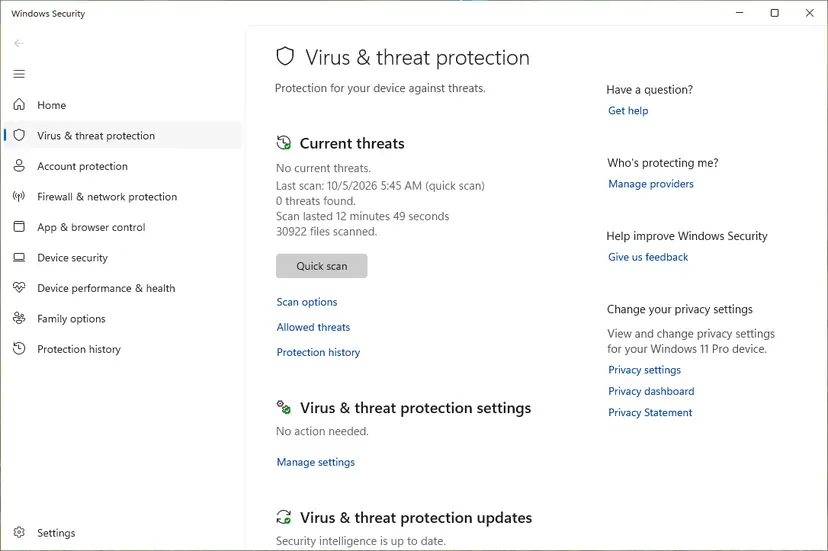
It worked if: The panel shows Security intelligence is up to date, a new version number and today's date under Last update.
If not: If the same code comes back, install the update by hand with Fix 2.
Fix 2. Install the latest security intelligence update by hand
5 minutesNo riskFix 1 did not help, or the update has failed for days.
Microsoft's first check for a failed definition update is whether the manual package installs. It bypasses Windows Update and its queue, so it also tells you which path is broken.
- Open Microsoft's page Latest security intelligence updates for Microsoft Defender Antivirus (link in the sources).
- In the table, find Microsoft Defender Antivirus for Windows 11, Windows 10, Windows 8.1, and Windows Server and select 64-bit. Select ARM on an ARM PC, and 32-bit only on a 32-bit Windows 10.
- Run the downloaded file,
mpam-feX64.exeormpam-fe.exe. Microsoft says you simply launch it to install the latest security intelligence. - Wait a minute, then open Windows Security > Virus & threat protection > Protection updates and read the version and date.
On 15 October 2026 Microsoft listed security intelligence 1.461.34.0 as the newest. New versions come out several times a day, so any version from today is fine.
It worked if: Protection updates shows today's date and a version close to the one on Microsoft's page.
If not: If the file runs but the version does not change, clear the cache with Fix 3. If it installs but automatic updates keep failing later, go to Fix 5.
Fix 3. Clear Defender's definition cache and download fresh definitions with MpCmdRun
10 minutesLow riskThe update fails after every restart, and the manual file did not change the version.
Microsoft gives these commands to clear the current cache and trigger an update. Removing the dynamic signatures deletes the small extra files Defender downloads between full updates, which an interrupted update can leave locked or half written.
- Select Start, type cmd, right-click Command Prompt and select Run as administrator. Select Yes in User Account Control.
- Go to the Defender folder. MpCmdRun is not found without this step.
cd /d "%ProgramFiles%\Windows Defender" - Remove the dynamic signatures, as on Microsoft's update page.
MpCmdRun.exe -RemoveDefinitions -DynamicSignatures - Download fresh definitions straight from Microsoft's malware center, the route Microsoft's troubleshooting page uses.
MpCmdRun.exe -SignatureUpdate -MMPC - If the update still fails, remove all definitions and update once more. Defender has no definitions for the minute between the two commands.
MpCmdRun.exe -RemoveDefinitions -All MpCmdRun.exe -SignatureUpdate - Restart the PC and check Protection updates.
Microsoft's own command first looks for the newest platform folder under %ProgramData%\Microsoft\Windows Defender\Platform\ and falls back to %ProgramFiles%\Windows Defender. The fallback works on every PC, so we use it here.
It worked if: MpCmdRun ends without an error code, and Protection updates shows a new version with today's date.
If not: If MpCmdRun prints hr=0x80070020, something still holds the files. Find it with Fix 4. If -SignatureUpdate -MMPC works but Check for updates fails, the Windows Update path is the problem: Fix 5.
Fix 4. Find the program that holds Defender's files: another antivirus or a clean boot
20 minutesLow riskAnother antivirus, a backup, sync or encryption tool is installed, or the error comes back after Fix 3.
Microsoft says 0x80070020 in updates is caused by non-Microsoft filter drivers such as antivirus, and gives a clean boot as the first step. A clean boot starts Windows with only Microsoft services, so if the update works then, a third-party program held the file.
- Open Windows Security > Virus & threat protection. If the page names another program as your antivirus, Defender is switched off and cannot update at all. Microsoft writes that updates cannot occur while Defender is disabled.
- If you want Defender, uninstall the other antivirus fully and restart: Uninstall a program or app in Windows
- If no other antivirus is active, start Windows with Microsoft services only, then run Fix 1 again.
- Open System Configuration. Select Search on the taskbar, type msconfig and select System Configuration from the results.
- Hide Microsoft services. On the Services tab, select the Hide all Microsoft services check box. Only services from other companies stay in the list.
- Disable the remaining services. Select Disable all, then select Apply.
- Open Task Manager. On the Startup tab of System Configuration, select Open Task Manager.
- Disable the startup apps. On the Startup apps tab in Task Manager, select each item whose status is Enabled and select Disable. Write down or take a screenshot of the items you disable: you need the list to turn them back on.
- Confirm the changes. Close Task Manager. On the Startup tab of System Configuration, select OK.
- Restart and test. Restart the PC. Windows now starts in a clean boot environment: try again the thing that failed (run the app, install the update, uninstall the program).
These steps were written for Windows 11 25H2 and 26H2. The full page with the other versions and what each result means: How to perform a clean boot in Windows
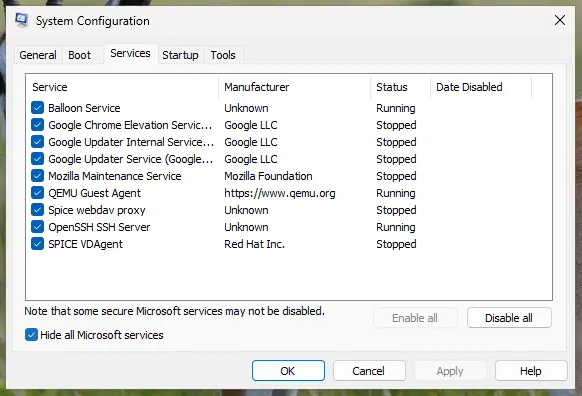
- If the update works in the clean boot: turn the services back on in halves and restart each time, until the error returns. The last group holds the culprit. Update or remove that program.
- To see the exact process: Microsoft suggests Process Monitor from Sysinternals for 0x80070020. Start the capture, run Check for updates, stop the capture and filter for
SHARING VIOLATION. The process name is listed next to the file. - Undo the clean boot when you are done, as the last steps of the procedure show. Otherwise your startup programs stay off.
It worked if: The update installs in the clean boot, or Process Monitor names the process that holds the file.
If not: If the update fails even with only Microsoft services running, repair the Windows Update path with Fix 5.
Fix 5. Repair the Windows Update path: troubleshooter, services and update cache
20 minutesLow riskThe manual file from Fix 2 installs, but automatic updates and KB2267602 in Windows Update keep failing.
Microsoft's Defender page says that when the manual update works, the problem can be the Windows Update service, a WSUS server or the update source. On a home PC that means the services or the update cache.
- Run the built-in Windows Update check: Run the Windows Update troubleshooter
- Press Win + R, type
services.mscand press Enter. - Right-click Windows Update and select Restart. If it is not running, double-click it, set Startup type to Manual, select Start and OK.
- Do the same for Background Intelligent Transfer Service and Cryptographic Services. More detail: Check and restart Windows services
- Open Windows Security > Protection updates and select Check for updates.
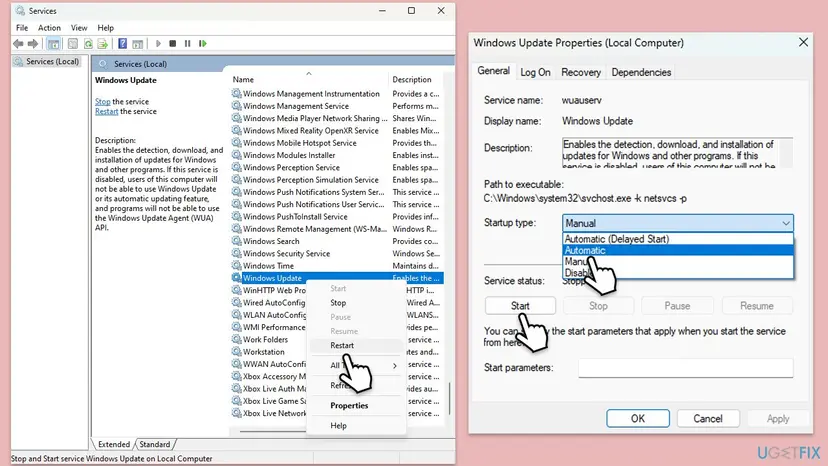
If that does not help, reset the update cache. It stops the update services, renames SoftwareDistribution and catroot2, and starts the services again: Reset Windows Update components
- Work or school PC. Microsoft's page notes that a WSUS server without approved security intelligence updates breaks this path. Look for
WUServerunderHKEY_LOCAL_MACHINE\SOFTWARE\Policies\Microsoft\Windows\WindowsUpdate. If it is there, ask your IT team. Do not change it. - Proxy or firewall. Microsoft's first check is that the update URLs are reachable through the firewall or proxy. On a home PC this matters only if you set up a proxy or a firewall program yourself.
It worked if: Windows Update installs Security Intelligence Update for Microsoft Defender Antivirus - KB2267602, and Check for updates in Windows Security works again.
If not: If updates still fail after the reset, repair Windows files with Fix 6.
Fix 6. Repair Windows system files, then repair Windows in place
20 to 90 minutesLow riskFixes 1 to 5 did not help, or other Windows parts fail as well.
Defender updates depend on Windows services and system files. DISM and SFC repair the files, and a repair install replaces Windows while keeping apps and files.
- Open an elevated command window. Right-click Start and select Terminal (Admin), or type cmd in the search box, right-click Command Prompt and select Run as administrator. Select Yes when Windows asks for permission.
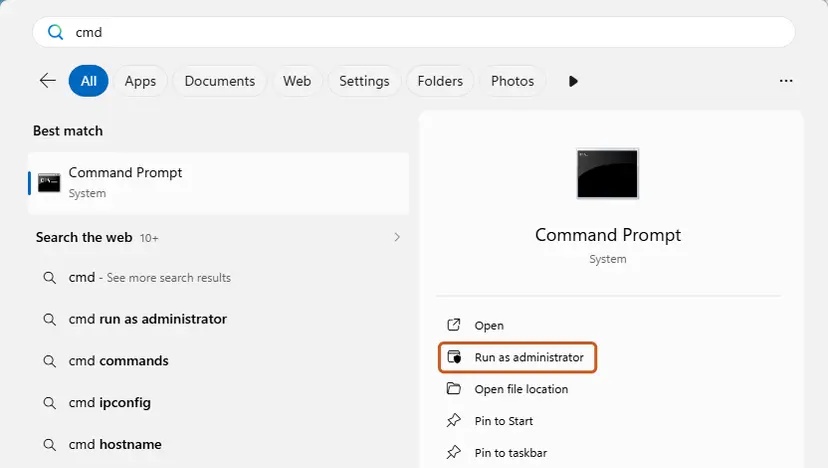
Search for cmd and choose Run as administrator. Screenshot: Windows 11 26H2. - Run DISM first. Type the command below and press Enter. DISM downloads clean copies of damaged components from Windows Update, so it can take several minutes. Wait until it says The operation completed successfully.
DISM.exe /Online /Cleanup-Image /RestoreHealth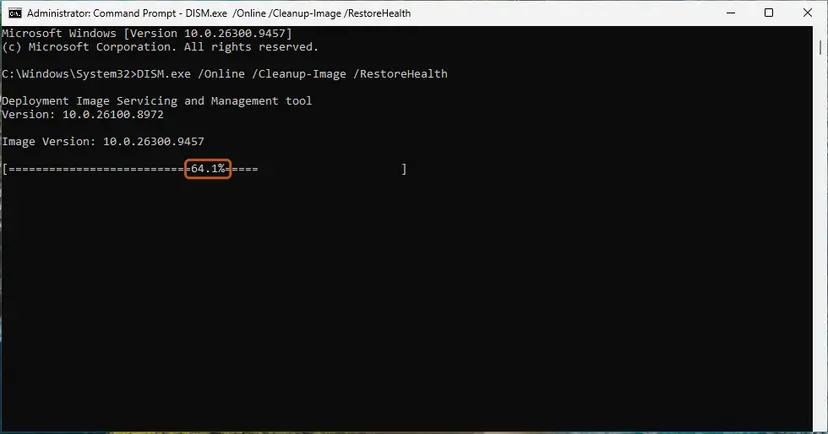
DISM /RestoreHealth running. Screenshot: Windows 11 26H2. - Run System File Checker. In the same window, type the command below and press Enter. Do not close the window until the verification reaches 100%.
sfc /scannow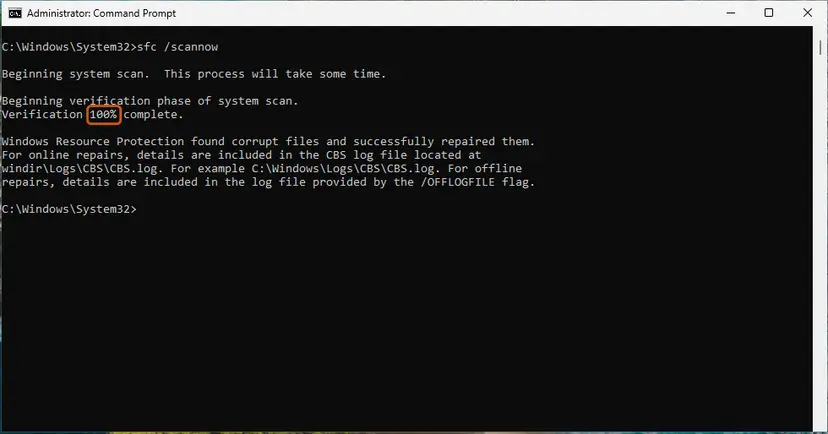
sfc /scannow at 100%. Screenshot: Windows 11 26H2. - Read the result and restart. Compare the last message with the table below this guide, then restart the PC so that repaired files are loaded.
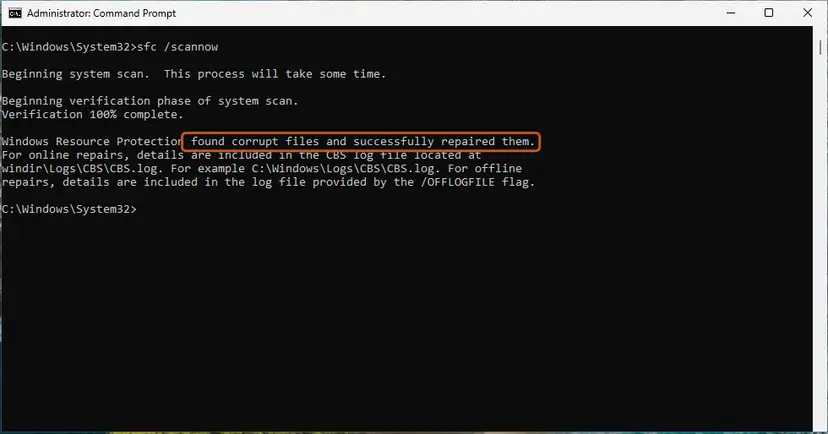
The result line tells you what SFC did. Screenshot: Windows 11 26H2.
These steps were written for Windows 11 24H2 and 25H2. The full page with the other versions and what each result means: Run DISM and SFC to repair Windows system files
- Restart and run Fix 1 again.
- If it still fails on Windows 11, open Settings > System > Recovery and select Reinstall now next to Fix problems using Windows Update.
- Keep the PC plugged in and online until it restarts into Windows, then run Fix 1 once more.
Windows 10 and other routes: Reinstall Windows without losing files. Windows 10 left support on 14 October 2025. Microsoft still publishes Defender definitions for it, but Windows itself gets no fixes without Extended Security Updates.
It worked if: SFC reports no integrity violations or repaired files, and Protection updates installs the newest version.
If not: If the error is still there on a repaired Windows, collect the logs in the next section and contact Microsoft support.
If -2147024864 is still there: the logs to read and what to send
When nothing helps, stop changing settings and collect what Windows wrote down. The file name in the logs tells you more than the error code does.
| Where | What to look for |
|---|---|
| Event Viewer: Applications and Services Logs > Microsoft > Windows > Windows Defender > Operational | Warnings and errors at the time of the failed update. Note the error and any file or source it names. |
MpCmdRun.log in your Temp folder, for example C:\Users\<you>\AppData\Local\Temp\MpCmdRun.log | Each MpCmdRun command from Fix 3, its time and its result. |
| Process Monitor from Sysinternals | The process name next to a SHARING VIOLATION result while you run Check for updates. |
- What to send to Microsoft support: the exact message, the version and date shown in Protection updates, the output of the MpCmdRun commands, the Windows build from
winver, and the name of any other security program. - On a work or school PC: send the same to your IT team. Updates may come from their server, which you cannot fix yourself.
Almost never. A sharing violation is about a running process, not about the disk. Suspect the drive only if SFC finds new damage after every repair. Then check it: Check a disk for errors (chkdsk)
How to keep protection definition updates from failing
- Restart when Windows Update asks, so installs do not pile up and hold files.
- Use one antivirus at a time, and remove a trial completely when you stop using it.
- Let Defender update itself. It checks several times a day without you.
- If an update fails once, wait for the next one or restart before you try tools.
- Do not turn off Microsoft Defender Firewall to make an update install. The firewall does not hold files, and the PC stays exposed.
- Do not reset permissions on
C:\Windows\System32withicacls. It changes protected settings on thousands of files and does not fix a file in use. - Do not delete files in the Defender folders by hand. Use the MpCmdRun commands in Fix 3.
- Do not change update policies on a work or school PC.
Frequently asked questions
What does error code -2147024864 mean?
It means a file was in use by another process. The number is the decimal form of 0x80070020, Windows error 32, ERROR_SHARING_VIOLATION, which Windows explains as "The process cannot access the file because it is being used by another process." In Windows Security it appears with Protection definition update failed. Microsoft Defender had new definitions but could not replace a file, because something else held it at that moment. It is not a virus and does not mean the PC is unprotected: Defender keeps working with the definitions it already has.
Why does the protection definition update keep failing?
With this code, something keeps the definition files busy. Most often it is a second update, a scan or a pending restart, and a restart followed by Check for updates fixes it (Fix 1). If it fails after every restart, the cache may hold stuck files, which the MpCmdRun commands in Fix 3 clear. If another antivirus, backup or encryption tool is installed, it may lock the files, and a clean boot shows it (Fix 4). Other codes with the same message, such as 0x8024402c or 0x80072efd, point to the connection instead.
How do I fix a definition update error in Windows Security?
Start with the simplest step: restart the PC, open Windows Security > Virus & threat protection > Protection updates and select Check for updates. If it fails again, download mpam-feX64.exe from Microsoft's security intelligence page and run it. That installs the same definitions without Windows Update. If the version still does not change, run MpCmdRun.exe -RemoveDefinitions -DynamicSignatures and then MpCmdRun.exe -SignatureUpdate -MMPC in an administrator Command Prompt. These three steps, Fix 1 to Fix 3, end most definition update errors with this code.
Is it safe to ignore a failed protection definition update?
For a day, yes. Defender keeps protecting the PC with the last definitions it installed, and Windows Security shows their version and date. Microsoft releases new definitions several times a day, so a PC that misses updates for a week or more falls behind on new threats. If the date under Last update is older than a few days, fix it. The manual download in Fix 2 takes five minutes and is the quickest way to catch up.
Does this error affect Windows 10 22H2?
Yes, it appears on Windows 10 22H2 and on Windows 11 alike, because Defender updates work the same way on both. The fixes on this page apply to both versions, and the menu paths in Windows Security are the same. Windows 10 left support on 14 October 2025. Microsoft still publishes Defender definitions for it, so the error is worth fixing, but Windows itself gets no security fixes without Extended Security Updates. The repair install in Fix 6 differs between the two versions.
Should I turn off the firewall or my antivirus to install the update?
No. Turning off Microsoft Defender Firewall does nothing for this code, because the firewall does not hold files on disk, and it leaves the PC open while it is off. If you suspect another antivirus holds Defender's files, test with a clean boot first (Fix 4). If you must pause a security program for one attempt, turn it back on right after: Turn off Microsoft Defender protection for a moment. If you want Defender as your antivirus, uninstall the other program fully instead.
What does "protection check failed" mean?
We could not find that exact message in Windows Security. People who search for it usually mean Protection definition update failed, the message on this page, or the warning that protection updates are out of date. If your message carries the code -2147024864 or 0x80070020, the fixes here apply. If it shows another code, the cause is different: Microsoft lists codes such as 0x80070422 (a service is disabled) and 0x80072efd (no connection) for the same message.
Is -2147024864 the same as 0x80070020 in Windows Update?
Yes, it is the same number. Windows Security shows it in decimal and Windows Update shows it in hex. In Windows Update, 0x80070020 can also hit cumulative or feature updates, and Microsoft ties it there to non-Microsoft filter drivers such as antivirus. The clean boot in Fix 4 and the update reset in Fix 5 help in both cases. Fix 2 and Fix 3 only concern Defender definitions.
What if the message is in another language?
The code does not change with the language of Windows. -2147024864 means a file in use on a Thai, German or English Windows alike, and the fixes work the same, although the menu names are translated. Some readers search the question in their own language, for example in Thai. This page is in English. Look for Virus & threat protection and Protection updates under their translated names in Windows Security.
Sources
- Microsoft Learn: Troubleshoot Microsoft Defender Antivirus Security intelligence not getting updated (Protection definition update failed, listed codes, MpCmdRun -SignatureUpdate -MMPC, WSUS and KB2267602) (learn.microsoft.com)
- Microsoft Security Intelligence: Latest security intelligence updates for Microsoft Defender Antivirus (mpam-fe.exe, cache clearing commands, versions of 15 October 2026) (microsoft.com)
- Microsoft Learn: Common Windows Update errors (0x80070020, non-Microsoft filter drivers, clean boot, Process Monitor) (learn.microsoft.com)
Did this fix work?
One click, no account. It tells the next reader which guides are worth their time.
Questions and experiences: fix Windows update error code (-2147024864)
Still broken, or found a fix we did not cover? Ask here: members and our editors answer. Reading is open; writing needs a free account.
…