
How to fix Windows update error 0x800700a1?

Prefer to fix it yourself? The manual steps follow.
- 7methods
- 5 minutes to 2 hours
- Intermediate
Applies to Windows 11 and Windows 10: updates in Settings > Windows Update, .msu files run in the Windows Update Standalone Installer, and SCCM or MDT task sequences that stop with 0x800700a1
7 methods in this guide
Hello, I was trying to update Windows to the latest version, but I received error 0x800700a1. I even tried to download and install the update manually, to no avail. Any tips would be appreciated.
Error 0x800700a1 means Windows Update or the update installer was sent to a folder that does not exist: Win32 error 161, "The specified path is invalid." Most often the temporary folder or the update cache is missing, moved or broken. Check where TEMP points first, then empty C:\Windows\Temp.
0x800700a1 is Win32 error 161, "The specified path is invalid": the update looked for a folder or drive that is not there. Check that the TEMP and TMP variables point to folders that exist (Fix 1), then empty or recreate C:\Windows\Temp (Fix 2). If it still fails, rebuild the update cache (Fix 3) and check the update service (Fix 4). A repair install that keeps your files is the last resort (Fix 7).
| Error | 0x800700a1: Win32 error 161, ERROR_BAD_PATHNAME, "The specified path is invalid." |
|---|---|
| Where it appears | Settings > Windows Update while an update downloads or installs, the Windows Update Standalone Installer when you run a .msu file, and the System log in Event Viewer. |
| Main cause | A folder the update writes to is missing or points to a drive that is gone: the TEMP folder, C:\Windows\Temp or the update cache in C:\Windows\SoftwareDistribution. |
| Fastest fix | Check the TEMP and TMP variables (Fix 1), then empty C:\Windows\Temp (Fix 2). Both take about 5 minutes. |
| Also written as | 800700a1, 800700A1, 0x800700A1, error 161, 0xA1, "The specified path is invalid", "Installer encountered an error: 0x800700a1". |
| Affects | Windows 11, Windows 10, older Windows Server versions, and SCCM or MDT deployments. The code is not tied to one update. |
| Microsoft's status | No known issue for this code that we could find. Microsoft documents only the general meaning of error 161. |
| Time to fix | 5 minutes for Fixes 1 and 2. About 30 minutes for the cache, the service and SFC. 1 to 2 hours for a repair install. |
| Where the cause is logged | Event Viewer > Windows Logs > System: "The Windows Update service terminated with the following error: The specified path is invalid." For a task sequence, smsts.log. |
Facts checked on 15 October 2026. Steps written for Windows 11 (25H2 and 26H2) and Windows 10 22H2.
What Windows update error 0x800700a1 means
0x800700a1 is an ordinary Windows system error in the eight-digit form that Windows Update prints. The first half, 0x8007, marks a Win32 error wrapped for the update components. The second half, 00A1, is 161 in decimal, and Microsoft's list of system error codes gives 161 the text "The specified path is invalid." The constant is ERROR_BAD_PATHNAME.
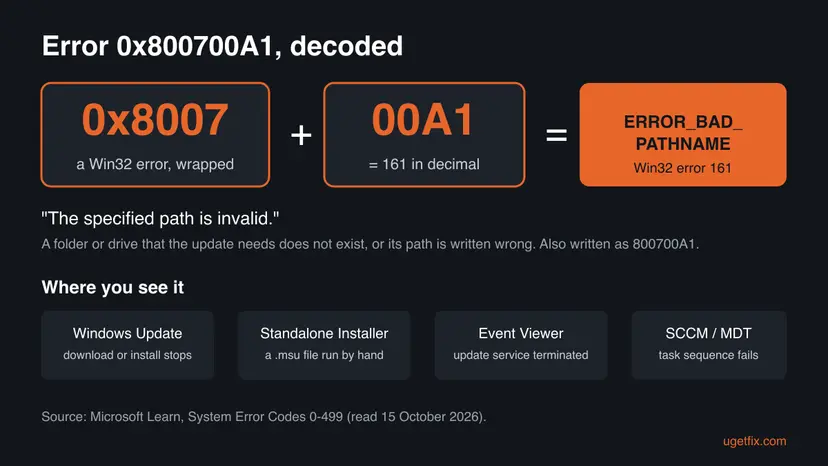
So the message is about a folder, not about the update itself. Somewhere in the chain, a path points to a folder that does not exist, to a drive letter that is gone, or is written in a form Windows cannot read. The fixes below check those folders one by one, starting with the ones an update uses first.
| What you see | Where | What it tells you |
|---|---|---|
| A failed update with 0x800700a1 under its name | Settings > Windows Update, or Update history | The download or the install stopped. The page does not say which folder. |
| Installer encountered an error: 0x800700a1 The specified path is invalid. | Windows Update Standalone Installer, after you double-click a .msu file | The manual install fails too, so the problem is on the PC, not in the download. |
| The Windows Update service terminated with the following error: The specified path is invalid. | Event Viewer > Windows Logs > System, source Service Control Manager | The update service itself stopped on a bad path. Go to Fix 4. |
| A task sequence that stops with 0x800700A1 | SCCM (Configuration Manager) or MDT, often at Install Operating System | A deployment path is wrong. See the section for work PCs below. |
Why error 0x800700a1 happens, from most to least likely
Microsoft has not published a cause for this code in Windows Update. The ranking below follows what the code says, a bad path, and the one solved case we read, where emptying C:\Windows\Temp let the update install. Each cause points to the fix that matches it.
| Cause | How often | How to tell | Fix |
|---|---|---|---|
| The TEMP or TMP variable points to a folder or drive that no longer exists, for example after a drive was removed or a cleaner tool changed it. | Often | echo %TEMP% shows a path that File Explorer cannot open. | Fix 1 |
C:\Windows\Temp is missing, full of old files or has a locked item. Windows Update runs as the system account and unpacks there. | Often | The folder is missing or holds thousands of old files. | Fix 2 |
The update cache in C:\Windows\SoftwareDistribution is damaged, or was moved to another drive with a link that now points nowhere. | Sometimes | dir /aL shows SoftwareDistribution as a junction. | Fix 3 |
| The Windows Update or BITS service has a broken setting, so the service cannot start. | Rarely | Event Viewer shows the service terminated with "The specified path is invalid". | Fix 4 |
| Damaged system files. | Rarely | SFC or DISM finds and repairs files. | Fix 5 |
| Damage that no single repair reaches. | Last | Every fix above failed. | Fix 7 |
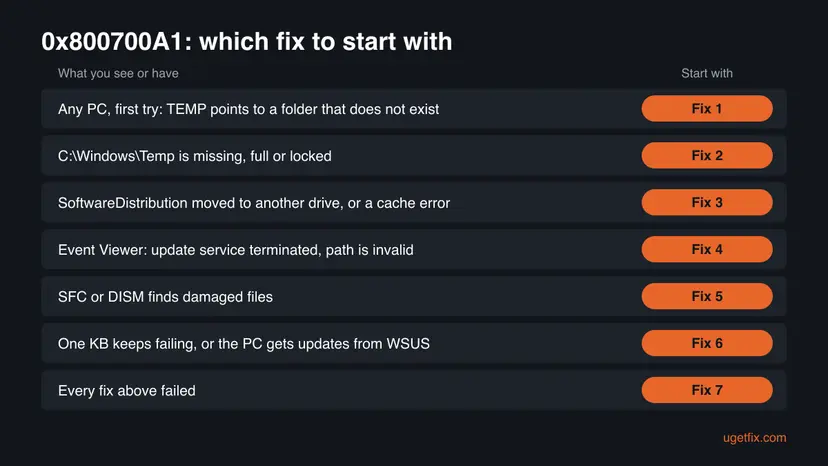
Most pages about this code start with the troubleshooter and SFC. Neither checks where TEMP points or whether a folder is missing, which is exactly what error 161 is about. Start with the folders, and keep the general repairs for later.
How to fix Windows update error 0x800700a1
Fixes 1 and 2 take five minutes and change nothing important, so everybody starts there. Fixes 3 and 4 repair the update cache and the update service. Fixes 5 and 6 are the general repairs. Fix 7 rebuilds Windows and keeps your files and apps.
| What you see or have | Start with |
|---|---|
| Any PC, first try, or you removed a drive or used a cleaner tool. | Fix 1 |
C:\Windows\Temp is missing or holds many old files. | Fix 2 |
| You moved SoftwareDistribution to another drive, or other update errors came first. | Fix 3 |
| Event Viewer says the Windows Update service terminated with "The specified path is invalid". | Fix 4 |
| SFC or DISM finds damaged files. | Fix 5 |
| One KB keeps failing, or the PC gets updates from WSUS. | Fix 6 |
| Every other fix failed. | Fix 7 |
Fix 1. Check that the TEMP and TMP folders exist
5 minutesLow riskAlways first, and above all after you removed a drive, moved user folders or used a cleaner or tuning tool.
Installers unpack update files into the folder that TEMP and TMP name. If that folder or its drive is gone, every attempt ends with "The specified path is invalid", whether you use Windows Update or a .msu file.
- Press Win + R, type
cmdand press Enter. - Show where the two variables point.
echo %TEMP% echo %TMP% - Copy each path into the address bar of File Explorer and press Enter. If the folder opens, this cause is ruled out.
- If a path does not open, press Win + R, type
sysdm.cpland press Enter. Open the Advanced tab and select Environment Variables. - Under User variables, set TEMP and TMP to
%USERPROFILE%\AppData\Local\Temp. - Under System variables, set TEMP and TMP to
%SystemRoot%\TEMP. - Select OK in every window, restart the PC and try the update again.
| Variable | Where | Default value |
|---|---|---|
| TEMP and TMP | User variables | %USERPROFILE%\AppData\Local\Temp |
| TEMP and TMP | System variables | %SystemRoot%\TEMP, which is C:\Windows\Temp |
A path such as D:\Temp on a drive that is no longer connected is the classic case. Put the default value back rather than creating a new folder on another drive.
It worked if: Both paths open in File Explorer, and after the restart the update downloads and installs without 0x800700a1.
If not: If the paths are fine, empty the system temporary folder in Fix 2.
Fix 2. Empty or recreate C:\Windows\Temp
5 minutesLow riskThe TEMP check was clean, the folder is missing, or it holds a large pile of old files.
Windows Update runs under the system account, which uses C:\Windows\Temp, not your own TEMP folder. In the solved KB3205401 case on Server Fault, emptying this folder was the only step that let the update install.
- Close open programs and restart the PC once, so fewer files are in use.
- Press Win + R, type
%windir%\Tempand press Enter. Select Continue if Windows asks for permission. - If Windows says the location is not available, the folder is missing. Open Terminal (Admin) or Command Prompt as administrator and create it.
md %windir%\Temp - If the folder opens, press Ctrl + A to select everything, then press Delete.
- When Windows says a file is in use, tick Do this for all current items and select Skip.
- Restart the PC and try the update again from Settings > Windows Update.
Only delete the contents, never the Temp folder itself. A few files stay because they are in use, which is normal. If you want the general clean-up of temporary files as well: Free up disk space and delete temporary files
It worked if: The folder exists and holds only a few files, and the update installs after the restart.
If not: If the error comes back, rebuild the update cache in Fix 3.
Fix 3. Check the update cache folder and reset Windows Update
15 minutesLow riskFixes 1 and 2 did not help, you moved SoftwareDistribution to another drive, or the PC had other update errors before this one.
Windows Update keeps its downloads and its database in C:\Windows\SoftwareDistribution. If that folder was replaced by a link to a drive that is gone, every path inside it is invalid. A reset gives Windows a new, empty cache at the default place.
- Right-click Start and select Terminal (Admin). On Windows 10, search for
cmdand select Run as administrator. - List the links inside the Windows folder.
dir /aL %windir% - If SoftwareDistribution appears in the list with JUNCTION or SYMLINKD, note the target in brackets. If that drive or folder is gone, the link is the cause.
- Reset the update components with the steps below. They stop the services, rename the cache folders and start the services again, so Windows creates a normal folder.
- Open Command Prompt as administrator. Type cmd in the search box, right-click Command Prompt and select Run as administrator. Select Yes when Windows asks for permission.
- Stop the update services. Type the commands below and press Enter after each one. If Windows says that other services depend on Cryptographic Services, it stops them too. A message that a service is not started is fine.
net stop wuauserv net stop bits net stop cryptsvc - Delete the download queue files. This clears the list of downloads that the Background Intelligent Transfer Service keeps. If Windows says it cannot find the files, continue.
del "%ALLUSERSPROFILE%\Application Data\Microsoft\Network\Downloader\qmgr*.dat" - Rename the update cache folders. Renaming keeps a copy in case you need it; Windows creates new, empty folders when the services start again. If you get Access is denied, a service is still running: repeat the previous step.
ren %systemroot%\SoftwareDistribution SoftwareDistribution.old ren %systemroot%\System32\catroot2 catroot2.old - Start the services again. Type the commands below and press Enter after each one. The requested service has already been started is fine: Windows started it on its own.
net start cryptsvc net start bits net start wuauserv - Restart and check for updates. Restart the PC. Then select Start > Settings > Windows Update > Check for updates. The first check can take longer than usual because everything is downloaded again.
These steps were written for Windows 11 and Windows 10 (the steps are the same). The full page with the other versions and what each result means: Reset Windows Update components

If Windows cannot rename a SoftwareDistribution link because its target is gone, reconnect the drive once and try again, or ask for help before you delete it. We did not test the removal of a broken link, so we do not give a command for it.
Then run the built-in troubleshooter once, which checks the same components: Run the Windows Update troubleshooter
It worked if: dir /aL no longer lists SoftwareDistribution, the update downloads again from the start and installs.
If not: If the error comes back, check the update service in Fix 4.
Fix 4. Check that the Windows Update and BITS services can start
10 minutesLow riskEvent Viewer shows "The Windows Update service terminated with the following error: The specified path is invalid", or the update never starts.
This Event Viewer message means the service itself stopped on a bad path, before any download. Checking its settings shows whether the service points to the right program and runs as it should.
- Right-click Start and select Event Viewer. Open Windows Logs > System.
- In the right pane select Filter Current Log, type
7023in the event ID box and select OK. Read the newest entries for Windows Update or Background Intelligent Transfer Service. - Open Terminal (Admin) or Command Prompt as administrator.
- Show the settings of both services.
sc qc wuauserv sc qc bits - Check that BINARY_PATH_NAME starts with
C:\Windows\system32\svchost.exe -k netsvcsfor both, and that START_TYPE is not DISABLED. - If a service is disabled, set it back to Manual in Services and start it, as shown below. If the path is different, do not edit the registry by hand: go to Fix 5 and then Fix 7.
- Open Services. Press Windows+R, type the command below and press Enter. You can also type Services in the search box on the taskbar and open the app.
services.msc - Find the service. The list is sorted by Name. Click any row and type the first letter of the service to jump to it. Check the Status column (Running or empty) and the Startup Type column.
- Restart the service. Right-click the service and select Restart. If the service is not running, select Start instead. Wait until the progress window closes.
- Open its properties to change the startup type. Only if your guide says so: double-click the service. The General tab shows the Service name (used in commands), the Startup type and the Service status.
- Set the startup type and apply. Choose the type from the Startup type list (Automatic, Automatic (Delayed Start), Manual or Disabled), select Apply, then Start if the service should run now, and OK.
These steps were written for Windows 11 and Windows 10 (the steps are the same). The full page with the other versions and what each result means: Check and restart Windows services
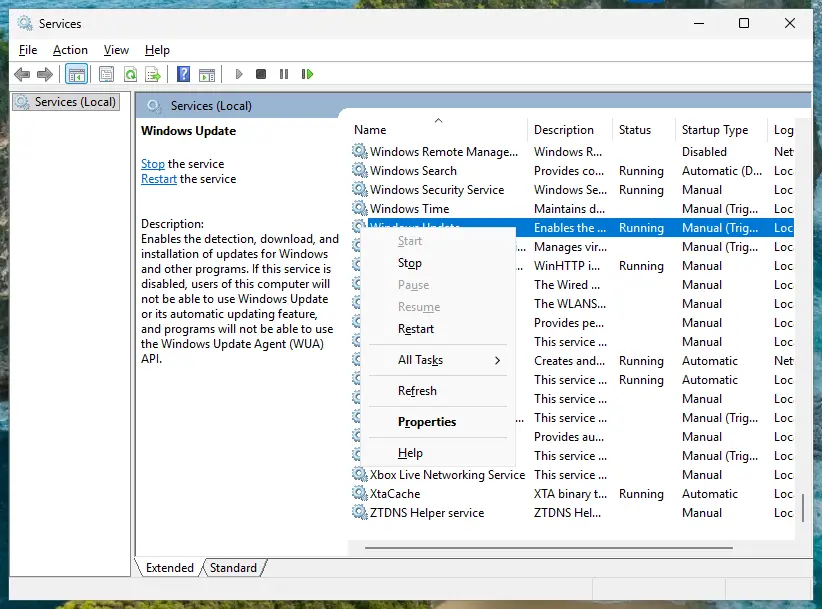
It worked if: Both services start without an error, no new 7023 event appears, and the update installs.
If not: If a service still stops with the same message, repair system files in Fix 5.
Fix 5. Repair system files with SFC and DISM
30 minutesLow riskThe folders and services look fine, or Fix 4 found a service setting you should not edit by hand.
Damaged system files can break the update components that build the paths. SFC and DISM put back the original files from Windows' own store. This is a general repair, so it comes after the checks that are specific to error 161.
- Open an elevated command window. Right-click Start and select Terminal (Admin), or type cmd in the search box, right-click Command Prompt and select Run as administrator. Select Yes when Windows asks for permission.
- Run DISM first. Type the command below and press Enter. DISM downloads clean copies of damaged components from Windows Update, so it can take several minutes. Wait until it says The operation completed successfully.
DISM.exe /Online /Cleanup-Image /RestoreHealth - Run System File Checker. In the same window, type the command below and press Enter. Do not close the window until the verification reaches 100%.
sfc /scannow - Read the result and restart. Compare the last message with the table below this guide, then restart the PC so that repaired files are loaded.
These steps were written for Windows 11 24H2 and 25H2. The full page with the other versions and what each result means: Run DISM and SFC to repair Windows system files
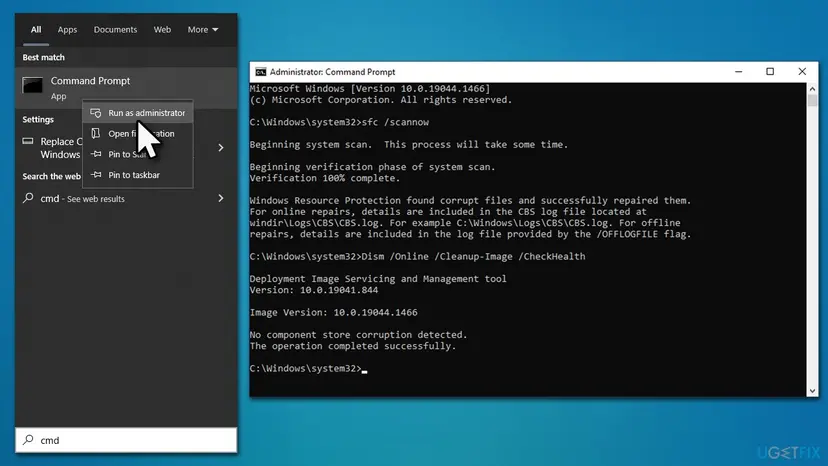
It worked if: SFC finds no integrity violations, DISM reports no corruption, and the update installs after the restart.
If not: If one update keeps failing, install it by hand in Fix 6.
Fix 6. Install the update by hand from the Microsoft Update Catalog
20 to 40 minutesLow riskOne KB keeps failing, or the PC gets updates from a company WSUS server.
A manual install skips the Windows Update download chain. In the solved Server Fault case the update failed from WSUS and installed after it came from Microsoft Update directly, once C:\Windows\Temp was empty.
- Check your Windows version. Press Windows key + R, type winver and press Enter. Note the version (for example 25H2) and the OS build.
- Find the KB number. Open Settings > Windows Update. A failed or pending update is listed with its KB number; earlier ones are under Update history.
- Check the processor type. Open Settings > System > About and look at System type: an x64-based PC needs the x64 file, an ARM-based PC (for example Snapdragon) needs the arm64 file.
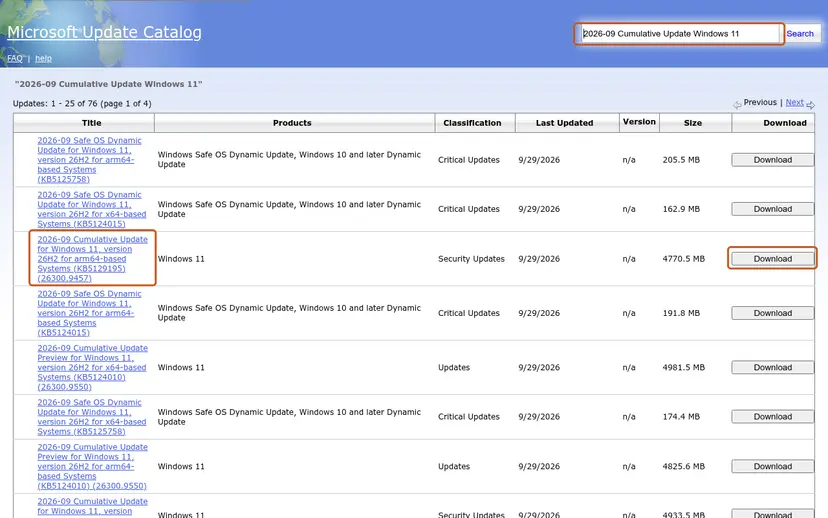
- Search the catalog. Open the Microsoft Update Catalog at catalog.update.microsoft.com in your browser, type the KB number (for example KB5124010) in the search box and press Enter.
- Pick the right row. Find the row whose title names your Windows version and your processor type (x64-based or arm64-based) and select Download on that row.
- Download every file listed. A window lists one or more .msu links. Download all of them into one empty folder, for example C:\packages. On Windows 11 24H2 and later the list can include earlier checkpoint updates that the new one needs.
- Install a single file. If there is only one file, double-click it and confirm the installation in the Windows Update Standalone Installer.
- Install several files with DISM. If there are several files, open an elevated Terminal or Command Prompt and run DISM with the newest file. DISM finds the other files in the same folder and installs them in the right order.
DISM /Online /Add-Package /PackagePath:C:\packages\<newest-file>.msu - Restart. Restart the PC when the installation finishes, then run winver again: the OS build should have changed.
These steps were written for Windows 11 24H2 and later; Windows 10 22H2. The full page with the other versions and what each result means: Install an update from the Microsoft Update Catalog
- Save the file to a short local path, such as
C:\packages. A network share or a drive that may disconnect gives the installer another path to lose. - The same error by hand. The download was never the problem. Go back to Fixes 1 and 2, then go to Fix 7.
It worked if: The installer says the update installed, and after the restart winver shows the new build.
If not: If the Standalone Installer shows 0x800700a1 again, go to Fix 7.
Fix 7. Reinstall Windows over itself and keep your files and apps
1 to 2 hoursLow riskEvery other fix failed, or Fix 4 showed a service path that is wrong.
A repair install writes a fresh copy of Windows, with default folders, services and variables, and keeps apps, files and settings. It resets every path that error 161 could be about at once.
Both routes below are built to keep your files, apps and settings. Copy your important files to another drive before you start all the same, and keep a laptop on mains power: Back up your files (Windows Backup, File History, Time Machine)
- Open Recovery in Settings. Open Settings > System > Recovery. Next to Fix problems using Windows Update, select Reinstall now. This keeps your apps, files and settings.
- Start the reinstall. Choose whether the PC may restart on its own 15 minutes after the installation, then select OK.
- Wait and restart. Windows Update downloads and installs a repair copy of your current Windows version. Keep the PC plugged in and online, and restart it when asked.
These steps were written for Windows 11 22H2 and later. The full page with the other versions and what each result means: Reinstall Windows without losing files
On Windows 10 22H2, or when Reinstall now is missing, use installation media. On Windows 10 the Media Creation Tool offers Upgrade this PC now. On Windows 11, download the ISO from Microsoft's software download page, right-click it, select Mount and run setup.exe. Check that Keep personal files and apps is chosen before you select Install.
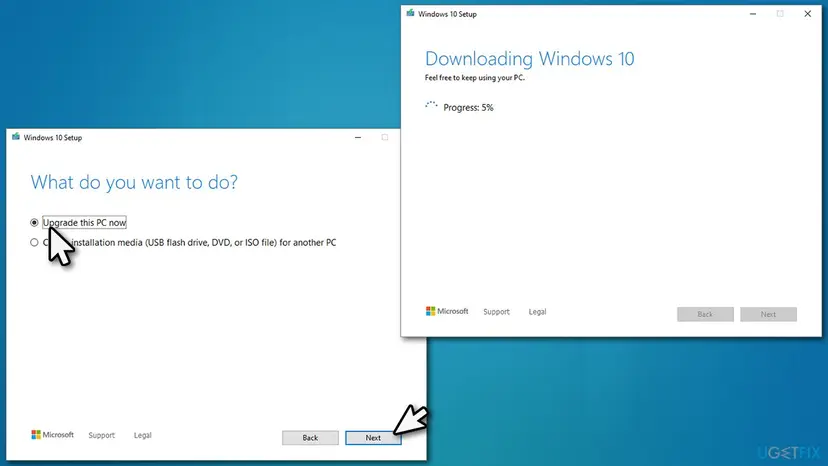
Windows 10 left support on 14 October 2025. If the PC can run Windows 11, the same repair install is the moment to move to it.
It worked if: Windows starts with a current build, Windows Update installs the newest update, and Update history shows no new 0x800700a1 entry.
If not: If setup itself fails, collect the logs from the next section and ask for help with them.
If 0x800700a1 is still there: logs, work PCs and SCCM
When the error survives every fix, the next step is a person who reads update logs. Microsoft Q&A and the Sysnative Windows Update forum both take such cases. Collect the logs right after a failed attempt, so the times match.
PowerShell (administrator): write the Windows Update log to the desktop
Get-WindowsUpdateLog- What to send: WindowsUpdate.log from the desktop, the newest 7023 events from Event Viewer, the output of
echo %TEMP%andwinver, the KB number and what you already tried. - One test with the antivirus paused. If you use an antivirus other than Microsoft Defender, pause it for one attempt and turn it back on right after: Turn off Microsoft Defender protection for a moment
- A work or school PC. Updates may come from your organization's WSUS or Configuration Manager server, and its settings decide the paths. Send the logs to your IT team before a repair install.
- Is it hardware? A path error is not a hardware fault by itself. If drives disappear and come back, or chkdsk reports errors, check the drive: Check a disk for errors (chkdsk)
In Configuration Manager the code can stop a task sequence, often at the Install Operating System step. The one report we read was about a single hardware model while all other models worked, and it had no answer. We could not confirm a cause. Read smsts.log for the path printed just before the error, and check that the target disk has the drive letter the task sequence expects.
How to keep error 0x800700a1 from coming back
- Keep TEMP, TMP and the Windows folders on the system drive at their default places.
- Empty temporary files now and then with Windows' own tools.
- Restart soon after Windows asks, so an update can finish.
- Install the monthly update each month instead of letting many pile up.
- Keep a copy of your files on another drive before a repair install.
- Do not point TEMP to a USB stick, a network share or a drive you sometimes disconnect.
- Do not move SoftwareDistribution or WinSxS to another drive with links.
- Do not let cleaner or tuning tools change environment variables or services.
- Do not delete the C:\Windows\Temp folder itself, only its contents.
- Do not download update files from sites other than Microsoft's.
Each point follows from what the code means. Error 161 appears when a path that Windows was given cannot be used. Anything that moves, removes or redirects the folders an update needs brings the same error back with the next update.
Frequently asked questions
What does error 0x800700a1 mean?
It means Windows was given a folder path it cannot use. The code is Win32 error 161 in the form Windows Update prints, and Microsoft's text for 161 reads "The specified path is invalid". The folder may be missing, may sit on a drive that is no longer connected, or may be written wrongly. With updates, the usual suspects are the TEMP folder, C:\Windows\Temp and the update cache, which is why Fixes 1 to 3 check them first.
What does "The Windows Update service terminated with the following error: The specified path is invalid" mean?
It is the Event Viewer form of the same error. Service Control Manager writes it to the System log when the Windows Update service stops on a path it cannot use. It points at the service or its working folders rather than at one update. Check the TEMP folders and C:\Windows\Temp first, because the service needs them, then check the service settings with sc qc wuauserv as in Fix 4. If the service path is wrong, a repair install is safer than a registry edit.
Why does the manual install fail with 0x800700a1 too?
Because the bad path is on the PC, not in the download. The Windows Update Standalone Installer unpacks the .msu file into a temporary folder, just like Windows Update does. If that folder is missing, the manual install shows "Installer encountered an error: 0x800700a1" with "The specified path is invalid". Fix the TEMP variables and C:\Windows\Temp first, save the .msu file to a short local path such as C:\packages, and run it again.
What is SCCM error 0x800700a1?
It is the same Win32 error 161 inside a Configuration Manager or MDT task sequence. It means a path that the sequence uses, such as a package location or the target drive, could not be used. The one report we read failed at the Install Operating System step on one hardware model only, and it had no published answer, so we could not confirm a cause. Read smsts.log for the path just before the error and check the drive letter of the target disk.
Is 800700a1 the same as 0x800700a1?
Yes. Some tools and logs drop the 0x prefix, and some write the letters in upper case, as 800700A1. All of them are the same error: Win32 error 161, "The specified path is invalid." Searches for the short form land on the same causes and the same fixes. Every fix on this page applies, starting with the TEMP check in Fix 1.
Is 0x800700aa or 0x800700ea the same error?
No. The last two digits change the meaning. 0x800700aa is Win32 error 170, "The requested resource is in use", which often shows up as "Failed to start repair solution" in the Windows Update troubleshooter. We have a separate guide to error 0x800700aa. 0x800700ea is Win32 error 234, "More data is available", a different problem again. Check the exact code on your screen before you follow any guide.
Can the Microsoft Store show 0x800700a1?
Users report the code in the Microsoft Store as well, for example when an app download stops. The meaning is the same: a folder the download needs cannot be used. Fixes 1 and 2 apply as they are. If they do not help, reset the Store app, which empties its own cache: Reset the Microsoft Store. We did not read a solved Store case, so we cannot say which cause is most common there.
Will a repair install delete my files or programs?
Not when you keep personal files and apps. Reinstall now in Settings > System > Recovery on Windows 11, Upgrade this PC now in the Windows 10 Media Creation Tool and setup.exe from mounted media are all built to keep your files, apps and settings. With setup.exe, check that Keep personal files and apps is chosen before you select Install. Back up your important files anyway, because a repair install is a large operation, and some apps may ask you to sign in again.
I searched in French or on a work computer. Does this page apply?
Yes, if your screen shows 0x800700a1. Windows prints the same code in every language, and the commands on this page are typed the same way everywhere, only the menu names are translated. On a work computer (ordinateur d'entreprise), updates may be managed by your IT team through WSUS or Configuration Manager. Try Fixes 1 and 2, which change nothing the IT team controls, and send them the logs before you try a repair install.
Sources
- Microsoft Learn: System Error Codes (0-499), ERROR_BAD_PATHNAME 161 (0xA1), "The specified path is invalid." (learn.microsoft.com)
- Server Fault: How to fix windows update error 800700A1? (KB3205401, solved by emptying C:\Windows\Temp and installing from Microsoft Update) (serverfault.com)
- windows-noob.com: TS Windows 10 failing with error 0x800700a1 (user report, SCCM task sequence, no answer) (windows-noob.com)
Did this fix work?
One click, no account. It tells the next reader which guides are worth their time.
Questions and experiences: fix Windows update error 0x800700a1
Still broken, or found a fix we did not cover? Ask here: members and our editors answer. Reading is open; writing needs a free account.
…