
How to fix "Epic Games Launcher setup wizard ended prematurely" error in Windows?

Prefer to fix it yourself? The manual steps follow.
- 9methods
- 5 minutes for Fixes 1 and 2, up to 30 minutes if you clear an old install
- Easy
Applies to First installs and reinstalls of the Epic Games Launcher on 64-bit Windows 11 and Windows 10
9 methods in this guide
- What the error means
- Causes, ranked
- The fixes
- 1. Install from the Store
- 2. Install with msiexec
- 3. Clear old install records
- 4. Delete leftover folders
- 5. 32-bit or old Windows
- 6. Folder rights, drive check
- 7. Antivirus during setup
- 8. Clean boot install
- 9. Update Windows, driver
- Still broken: read the log
- Prevent it
- FAQ
I'm attempting to download the Epic Games Launcher for the first time, but every time I try to install it, the setup wizard fails and displays the message: "The Epic Games Launcher Setup Wizard ended prematurely because of an error. Your system has not been modified. To install this program at a later time, run this Setup Wizard again." Please help me to fix this.
"The Epic Games Launcher Setup Wizard ended prematurely" means the Windows Installer package stopped before it changed anything on your PC. Epic's own first fix is to install the launcher from the Microsoft Store instead. If that fails, run the same installer with msiexec /i from an administrator Command Prompt.
The installer stopped and rolled back, so nothing is broken. Open the Microsoft Store, search for Epic Games Store and select Install (Fix 1). If the Store is not an option, keep the downloaded installer in Downloads, open Command Prompt as administrator and run msiexec /i followed by the installer's path (Fix 2). If the launcher was on this PC before, clear the old install first (Fixes 3 and 4).
| Error | The Epic Games Launcher Setup Wizard ended prematurely, with the text "because of an error. Your system has not been modified." A close variant says the Setup Wizard was interrupted before completing the installation. |
|---|---|
| Where it appears | In the Epic Games Launcher Setup window, after you double-click the downloaded EpicInstaller file, usually a few seconds after the progress bar starts. The only button left is Finish. |
| Main cause | The Windows Installer package could not finish. Epic names a previous installation that was not fully removed, missing write access to the install folder, background apps and antivirus programs. |
| Fastest fix | Install Epic Games Store from the Microsoft Store (Fix 1), or run msiexec /i "path to installer" in an administrator Command Prompt (Fix 2). |
| Also written as | setup wizard ended prematurely, Epic Games Launcher ended prematurely, "Setup Wizard was interrupted", Epic Games Launcher setup failed, can't install Epic Games Launcher. |
| Affects | 64-bit Windows 11 and Windows 10. On Windows 7, Windows 8 and 32-bit Windows the standard installer does not work at all; Epic offers a legacy version. Windows 10 left Microsoft support on 14 October 2025. |
| Epic's status | A known install error with its own Epic support article. Epic lists two methods for it (Microsoft Store, then Command Prompt) and points to Microsoft's install troubleshooter for leftovers of an older version. |
| Is anything changed? | No. Windows Installer rolled the install back, as the message says: your system has not been modified. Running setup again is safe. |
| Time to fix | 5 minutes for the Store or the command. Clearing an old install and a clean boot take 15 to 30 minutes. |
Facts checked on 15 October 2026. Steps written for the Epic Games Launcher installer (EpicInstaller .msi) on Windows 11 (25H2 and 26H2) and Windows 10 22H2, read against Epic Games Store Support's two install articles and Microsoft Learn's msiexec reference.
What "The Epic Games Launcher Setup Wizard ended prematurely" means
The Epic Games Launcher comes as a Windows Installer package, a .msi file named like EpicInstaller-17.2.0.msi. Windows Installer runs it as a transaction: when one step fails, it undoes every step before it. That is why the full message reads: "The Epic Games Launcher Setup Wizard ended prematurely because of an error. Your system has not been modified. To install this program at a later time, run Setup Wizard again. Click the Finish button to exit the Setup Wizard."
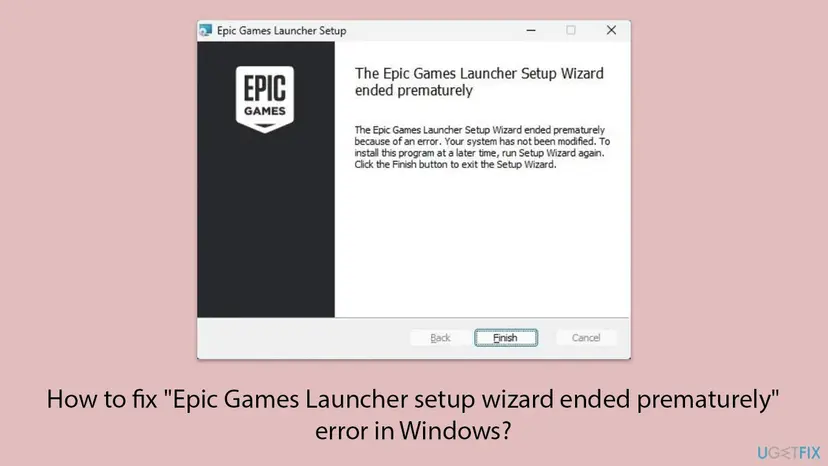
- It does not name the cause. The message is the same for a blocked folder, an old install and an antivirus block. The cause is only written in an install log (see the section after the fixes).
- "Setup Wizard was interrupted" is the same family of failure. Windows Installer shows it when the install is stopped part of the way, for example by another program.
- Running it again unchanged rarely helps. The message suggests you run setup again later, but the cause is still there. Change one thing from the fixes below first.
- It is about the launcher, not a game. Once the launcher is installed, game install errors have their own codes, such as LS-0013 for games that will not start.
Why you can't install the Epic Games Launcher: causes from most to least likely
Epic publishes no numbers on how often each cause appears. The order below follows Epic's two support articles, which start with the Microsoft Store and the Command Prompt install, and then cover old installs, folder access and security software.
| Cause | How to tell | Fix |
|---|---|---|
| The installer runs without the rights it needs or cannot reach its own path. | A first install on a PC where you are not sure the wizard got administrator rights. | Fixes 1 and 2 |
| A previous installation was not fully removed. Epic: Microsoft's troubleshooter "will also fix" this error. | The launcher was installed here before, or you saw "The older version of Epic Games Launcher cannot be removed". | Fixes 3 and 4 |
| Windows 7, Windows 8 or 32-bit Windows. The standard installer does not support them. | Settings > System > About shows a 32-bit operating system, or the PC runs an older Windows. | Fix 5 |
| No write access to the install folder or errors on the drive. | You chose another drive or folder, or the drive has given errors before. | Fix 6 |
| Antivirus interference. Epic has confirmed 360 Total Security; others may be affected. | A third-party security suite runs, or it showed a warning during setup. | Fix 7 |
| Background apps, or Windows and drivers that are far behind. | Nothing above fits, or other installers fail as well. | Fixes 8 and 9 |
Many guides tell you to right-click the installer and pick Run as administrator. A .msi file usually has no such entry, which is why Epic uses an administrator Command Prompt with msiexec /i instead. Ticking Safe boot in System Configuration is not a clean boot either: it starts Safe Mode, which is not what an install test needs.
How to fix "The Epic Games Launcher Setup Wizard ended prematurely"
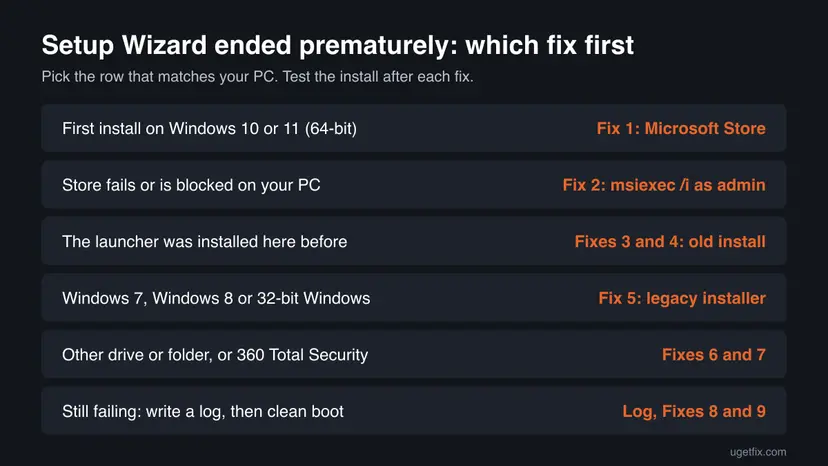
Try the installs in order and stop when one works. Fixes 1 and 2 are the two methods Epic gives for this exact message. Fixes 3 to 7 remove the reason the installer stops, then you install again with Fix 2.
| What you see or what your PC has | Start with |
|---|---|
| A first install on 64-bit Windows 11 or Windows 10. | Fix 1 |
| The Microsoft Store is blocked, missing or fails as well. | Fix 2 |
| The launcher was installed on this PC before. | Fix 3 |
| "The older version of Epic Games Launcher cannot be removed." | Fix 3 |
| Windows 7, Windows 8, or a 32-bit Windows. | Fix 5 |
| You install to another drive or a folder you created yourself. | Fix 6 |
| 360 Total Security or another third-party antivirus is installed. | Fix 7 |
Fix 1. Install the Epic Games Store app from the Microsoft Store
5 minutesNo riskEveryone on Windows 11 or Windows 10, first. It skips the downloaded .msi file completely.
Epic's article for this exact message starts here. The Microsoft Store installs the launcher with its own installer service, so whatever stops the .msi wizard on your PC does not come into play.
- Close the failed setup window with Finish.
- Press the Windows key, type Microsoft Store and open it.
- In the Store's search box at the top, type Epic Games Store.
- Open the Epic Games Store result published by Epic Games and select Install (or Get).
- When it finishes, select Open, or start Epic Games Launcher from the Start menu, and sign in.
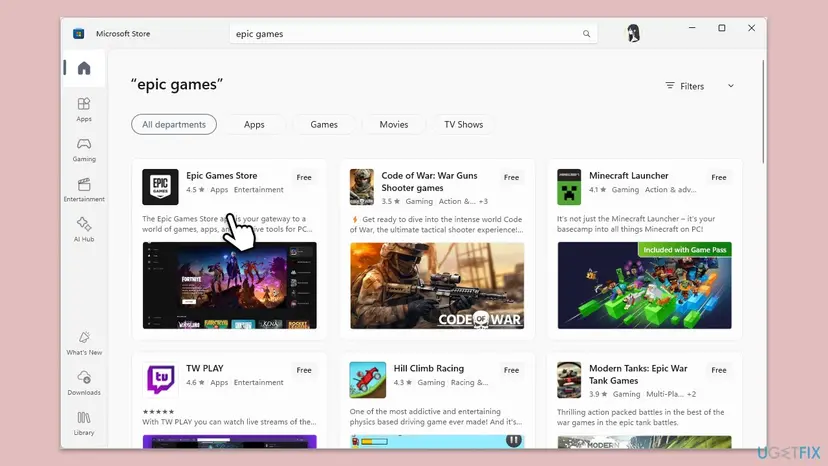
If the Store itself will not open or gets stuck on downloads, reset it first: Reset the Microsoft Store.
It worked if: The Store shows Open instead of Install, and the Epic Games Launcher starts with its sign-in screen.
If not: If the Store install fails or the Store is blocked on a work PC, use the Command Prompt install in Fix 2.
Fix 2. Run the installer with msiexec /i from an administrator Command Prompt
5 minutesLow riskThe Microsoft Store is not an option, or Fix 1 failed. Also the install to repeat after Fixes 3 to 9.
This is Epic's second method. msiexec is the Windows Installer program itself, and started from an administrator Command Prompt it runs the whole package with full rights from a path it can read.
- Download the latest Epic Games Launcher installer from the Epic Games website.
- Press Win + E and open your Downloads folder. Leave the installer there: Epic warns that moving it breaks the path in the next steps.
- Hold Shift, right-click the installer file and select Copy as path.
- Press the Windows key and type
cmd. Right-click Command Prompt and select Run as administrator, then Yes. - Type
msiexec /iand a space, but do not press Enter yet. - Right-click in the window to paste the path. It should look like
msiexec /i "C:\Users\YourName\Downloads\EpicInstaller.msi". - Press Enter and follow the setup window that opens.
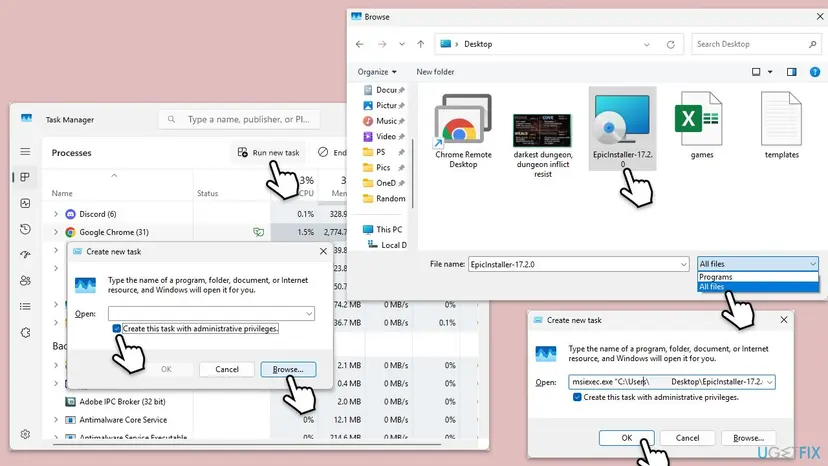
Press Ctrl + Shift + Esc, select Run new task, tick Create this task with administrative privileges, and type msiexec.exe /i followed by the installer's path in quotes. Select OK.
It worked if: The setup wizard runs to its last page, says the installation is complete, and the launcher appears in the Start menu.
If not: If the wizard ends prematurely again, clear any earlier installation with Fix 3, then repeat this fix.
Fix 3. Remove a broken earlier installation with Microsoft's Program Install and Uninstall troubleshooter
10 minutesLow riskThe launcher was installed on this PC before, or you saw "The older version of Epic Games Launcher cannot be removed".
Windows Installer checks for an older copy before it installs a new one. When the old copy's records are broken, the new setup stops. Epic points to Microsoft's troubleshooter and says it also fixes the Setup Wizard ended prematurely error.
- Press Win + I, open Apps > Installed apps (Windows 10: Apps > Apps & features) and look for Epic Games Launcher. If it is listed, select Uninstall. Step by step: Uninstall a program or app in Windows.
- If it cannot be removed, open Microsoft's page Fix problems that block programs from being installed or removed and select Download troubleshooter.
- Open the downloaded
MicrosoftProgram_Install_and_Uninstall.meta.diagcabfile and select Next. - Answer its questions: say whether installing or uninstalling is the problem, pick Epic Games Launcher if it is listed, and let it apply its fixes.
- Restart the PC and install again with Fix 2.
Microsoft says the troubleshooter fixes problems such as corrupted registry keys and incomplete uninstall data. It works for desktop programs, not for Store apps.
It worked if: The troubleshooter reports the problem as fixed, Epic Games Launcher is gone from the list, and a new install completes.
If not: If folders of the old launcher are still on the disk, remove them with Fix 4.
Fix 4. Delete the leftover launcher folders, but keep your games
10 minutesRead the warningThe troubleshooter did not help, or an earlier install was interrupted and left folders behind.
A half-installed launcher can leave its program folder and its settings in place. The new installer then meets files it did not expect and stops. Deleting only the launcher's own folders gives the installer a clean start.
Epic games install by default into the same Epic Games folder, for example C:\Program Files\Epic Games\Fortnite. Delete only the Launcher folder inside it, never the whole Epic Games folder, or you will have to download every game again. If you are unsure, copy the folder to another drive first, as in Back up your files (Windows Backup, File History, Time Machine).
- Exit the launcher if it runs: open the arrow in the taskbar's corner, right-click the Epic Games icon and select Exit.
- Press Win + E and open
C:\Program Files\Epic GamesandC:\Program Files (x86)\Epic Games, whichever exists. - Delete the Launcher folder inside it. Leave the game folders alone.
- Press Win + R, type
%localappdata%and press Enter. - Delete the EpicGamesLauncher folder. It holds the launcher's settings, cache and logs, not games.
- Empty the Recycle Bin, restart the PC and install again with Fix 2.
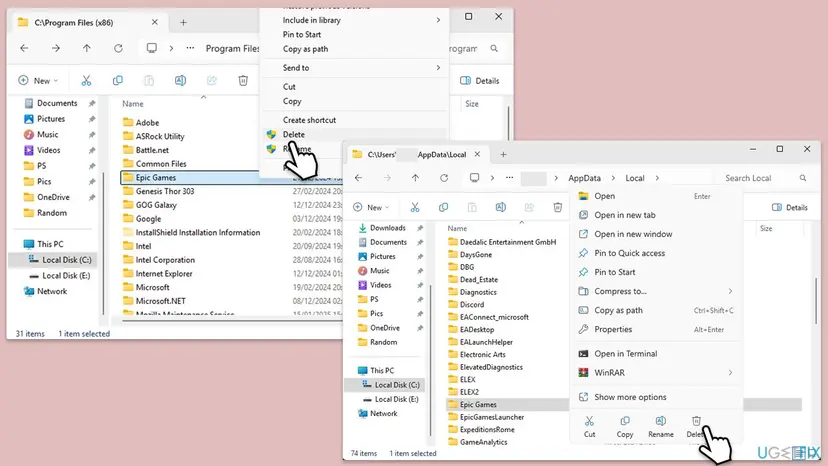
It worked if: Both folders are gone, and the next install with Fix 2 reaches the end of the wizard.
If not: If you are on an older or 32-bit Windows, see Fix 5. Otherwise check the folder rights in Fix 6.
Fix 5. Check that your Windows is 64-bit, or use Epic's legacy installer
3 minutesNo riskThe PC runs Windows 7, Windows 8 or a 32-bit edition of Windows 10, or you are not sure which you have.
Epic says the standard Epic Games Launcher installer does not work on Windows 7, Windows 8 or 32-bit Windows. On such a PC no fix on this page will make it install, so check this before you spend time on the rest.
- Press Win + I and open System > About (Windows 10: System > About as well).
- Under Device specifications, read System type.
- If it says 64-bit operating system and you run Windows 10 or 11, the standard installer is right: go on with Fix 6.
- If it says 32-bit operating system, or you run Windows 7 or 8, open Epic's help page "Can't install the Epic Games Launcher on Windows 7, Windows 8, or 32-bit Windows" and download the legacy launcher it links to.
The legacy launcher only lets you sign in and use what that older Windows can still run. Many current games need 64-bit Windows 10 or 11 anyway. Windows 10 itself left Microsoft support on 14 October 2025.
It worked if: You know which installer fits the PC, and on a 32-bit or older Windows the legacy launcher installs.
If not: If the PC is 64-bit Windows 10 or 11 and the error stays, check the install folder in Fix 6.
Fix 6. Check write access to the install folder and scan the drive for errors
10 minutesLow riskYou install to another drive or a folder you made yourself, or the drive has given errors before.
Epic lists both: the installer must be able to read and write in the folder you selected, and a damaged folder on the drive stops it as well. Either one makes Windows Installer fail and roll back.
- In File Explorer, go to the folder you chose for the launcher, for example
C:\Program Files. - Right-click the folder and select Properties, then the Security tab.
- Under Group or user names, select your user name.
- Check that Allow is ticked for both Read and Write in the Permissions box.
- To check the drive, right-click it in This PC, select Properties > Tools and, under Error checking, select Check.
- Install again with Fix 2.
If Windows finds errors and asks to repair the drive at the next restart, accept. More about the drive check: Check a disk for errors (chkdsk).
It worked if: Read and Write are allowed for your account, the drive check finds no errors or repairs them, and setup completes.
If not: If you use a third-party antivirus, go to Fix 7. Otherwise go to Fix 8.
Fix 7. Pause a third-party antivirus only for the install, then turn it back on
5 minutesLow risk360 Total Security or another third-party security suite is installed, or it showed a warning while setup ran.
Epic has confirmed that 360 Total Security can stop the launcher from installing and says other antivirus programs may do the same. Its advice is to pause the antivirus, install the launcher, and turn protection on again right away.
- Open your security program and check its quarantine or history for a blocked Epic Games file. Restore it only if it is the installer you downloaded from Epic.
- Pause the program's real-time protection for a short time, using its own tray icon or settings.
- Install the launcher with Fix 2.
- Turn protection back on as soon as setup has finished.
- Start the launcher once with protection on. If it is blocked now, add its folder as an exception in the security program.
Do not leave protection off, and do not browse or download anything else while it is paused. If you only use Microsoft Defender, the same short pause is described in Turn off Microsoft Defender protection for a moment.
It worked if: Setup completes while protection is paused, and the launcher still starts once protection is back on.
If not: If the wizard still ends prematurely, test without background apps in Fix 8.
Fix 8. Install in a clean boot without background apps
15 minutesLow riskGame launchers, tuning tools, overlays or other utilities start with Windows, and nothing above helped.
Epic's article on install problems starts with turning off background applications. A clean boot starts Windows with only Microsoft services, so a program that interferes with Windows Installer is not running while setup runs.
- Open System Configuration. Select Search on the taskbar, type msconfig and select System Configuration from the results.
- Hide Microsoft services. On the Services tab, select the Hide all Microsoft services check box. Only services from other companies stay in the list.
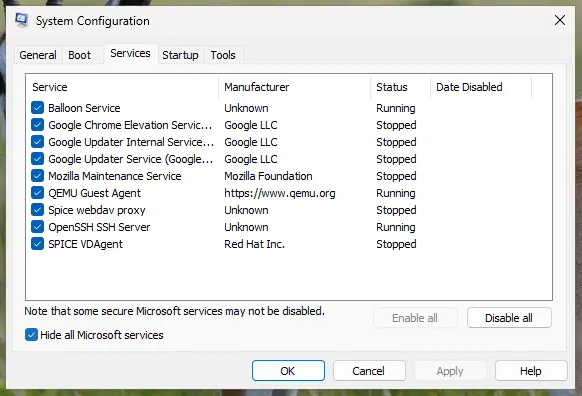
With Hide all Microsoft services ticked, only third-party services stay in the list. Screenshot: Windows 11 26H2. - Disable the remaining services. Select Disable all, then select Apply.
- Open Task Manager. On the Startup tab of System Configuration, select Open Task Manager.
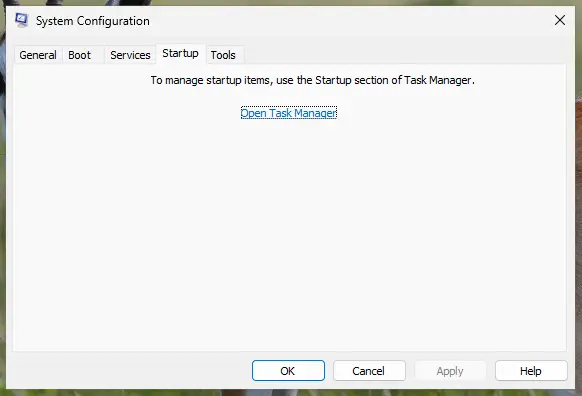
The Startup tab only links to Task Manager. Screenshot: Windows 11 26H2. - Disable the startup apps. On the Startup apps tab in Task Manager, select each item whose status is Enabled and select Disable. Write down or take a screenshot of the items you disable: you need the list to turn them back on.
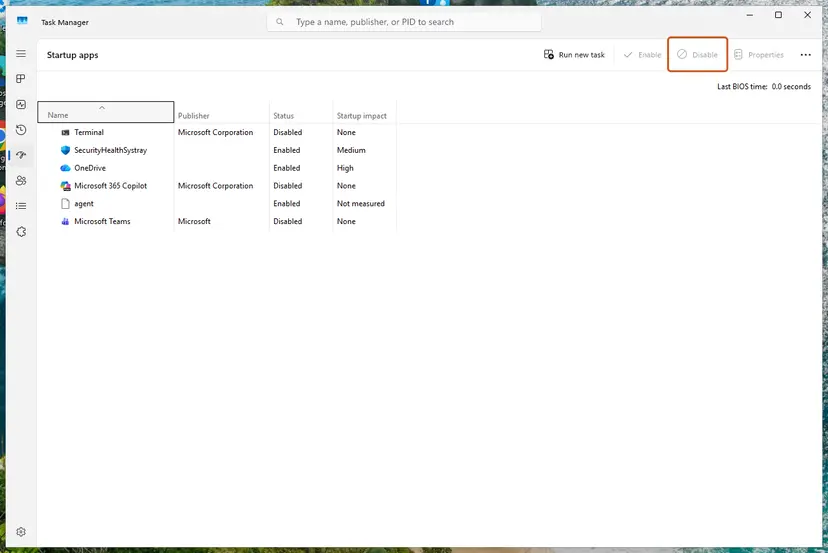
Select an app, then Disable. Screenshot: Windows 11 26H2. - Confirm the changes. Close Task Manager. On the Startup tab of System Configuration, select OK.
- Restart and test. Restart the PC. Windows now starts in a clean boot environment: try again the thing that failed (run the app, install the update, uninstall the program).
These steps were written for Windows 11 25H2 and 26H2. The full page with the other versions and what each result means: How to perform a clean boot in Windows
- After the clean boot restart, install the launcher with Fix 2.
- Open System Configuration again and turn the services and startup apps back on, then restart normally.
Leave Safe boot on the Boot tab unticked. The old version of this page ticked it, but that starts Safe Mode with a minimal set of drivers instead of a normal Windows without extra apps.
It worked if: The launcher installs during the clean boot and keeps working after a normal restart.
If not: If setup fails even in a clean boot, bring Windows up to date with Fix 9 and then read the install log.
Fix 9. Update Windows and the graphics driver, then try again
20 minutesLow riskWindows has updates waiting, or the PC has not been updated for months.
Epic's install article ends with keeping Windows up to date and having the latest graphics driver. It is a general step rather than a fix for this message, so it comes last, and the launcher needs a working graphics driver once it starts.
- Press Win + I and open Windows Update (Windows 10: Update & Security > Windows Update).
- Select Check for updates, install everything offered and restart.
- Get the newest graphics driver from your card's maker (NVIDIA, AMD or Intel). Step by step: Update, roll back or reinstall a driver.
- Restart and install the launcher with Fix 2.
It worked if: Windows Update says you are up to date and the next install reaches the end of the wizard.
If not: If it still fails, write an install log as described in the next section and send it to Epic Player Support.
Still not working: write an install log and send it to Epic Support
The setup window never says why it stopped, but Windows Installer can write every step to a log. Microsoft's msiexec reference gives the switch: /L*V followed by a file name logs all information, including verbose information. Run it from an administrator Command Prompt, as in Fix 2.
msiexec /i "C:\Users\YourName\Downloads\EpicInstaller.msi" /L*V "C:\epic-install.log"- Run the command above with your own installer path, and let the wizard fail once more.
- Open
C:\epic-install.login Notepad. - Press Ctrl + F and search for
error. Read the lines just above the first real error: they name the file, folder or action that failed. - A folder or "access" message points to Fix 6, an older product to Fixes 3 and 4, and a file locked by another program to Fixes 7 and 8.
- If you cannot read it, open the Epic help article for this message, select Contact us and attach the log and a screenshot.
- When it is the account: never. This error appears before you sign in, so your Epic account and purchases are not involved.
- When it is the PC: other
.msiinstallers fail too. Then the Windows Installer service or system files are damaged: Run DISM and SFC to repair Windows system files. - When it is hardware: a log that stops on read or write errors, together with a failing drive check in Fix 6, points to the disk.
How to avoid the Setup Wizard error next time
- Uninstall the launcher the normal way in Installed apps, never by deleting its folder, so Windows Installer keeps clean records.
- Keep the installer in Downloads and start it from there; a fresh download is better than an old copy on the desktop.
- Let setup finish. Do not shut down or sign out while the wizard runs.
- Keep security exceptions narrow and turn protection back on right after a paused install.
- Use the Microsoft Store version on a PC where installers often fail; it updates itself as well.
Frequently asked questions
What does "The Epic Games Launcher Setup Wizard ended prematurely" mean?
It means the Windows Installer package of the Epic Games Launcher hit an error and stopped. Windows Installer then undid every step it had already made, which is why the message adds that your system has not been modified. The message does not say what the error was. The most common reasons are an earlier installation that was not fully removed, missing rights to the install folder, and security or background programs. Epic's first fix is to install the launcher from the Microsoft Store.
Is it safe to run the Setup Wizard again after this error?
Yes. Windows Installer rolled the install back, so nothing half-installed is left that a new attempt could damage. Running the same file again in the same way usually ends with the same message, though. Change one thing first: install from the Microsoft Store, run the installer with msiexec /i from an administrator Command Prompt, or clear an earlier installation. Download the installer only from the Epic Games website or the Microsoft Store, never from a mirror site.
How do I fix error 2753 when installing Epic Games?
Error 2753 is a Windows Installer error number, not an Epic code, and Epic's install articles do not list it. It appears in the same situations as the Setup Wizard message: the installer could not finish one of its steps. Treat it the same way. Try the Microsoft Store version first, then clear the old installation with Microsoft's Program Install and Uninstall troubleshooter, delete the leftover Launcher folder and install again with msiexec /i. An install log names the exact file behind the number.
Is the Microsoft Store version the same Epic Games Launcher?
Yes. In the Microsoft Store it is listed as Epic Games Store, published by Epic Games, and it is free. It gives you the same launcher, your library, your purchases and your friends list after you sign in. Epic recommends it as the first method for this exact error. The difference is only how it gets onto the PC: the Store's own installer service puts it there instead of the downloaded .msi file.
Can I install the old Epic Games Launcher on Windows 7, Windows 8 or 32-bit Windows?
Not the standard one. Epic says the standard installer does not work on Windows 7, Windows 8 or any 32-bit Windows. For those, Epic's help page on installing on older Windows links a legacy version of the launcher. Check your Windows in Settings, System, About, under System type. Keep in mind that many current games need 64-bit Windows 10 or 11, and that Windows 10 left Microsoft support on 14 October 2025.
Will deleting the Epic Games folder delete my installed games?
It can. By default the launcher and the games share one folder, C:\Program Files\Epic Games, with the launcher in a Launcher subfolder and each game in its own folder. To clear a broken install, delete only the Launcher subfolder and the EpicGamesLauncher folder in %localappdata%. Leave the game folders in place. If you delete a game folder by mistake, that game has to be downloaded again in full.
Why does setup say the Setup Wizard was interrupted before completing?
That wording is Windows Installer's message for an install that was stopped part of the way, not one that failed on its own error. Something closed or blocked the installer: a security program, another installer running at the same time, or the window being cancelled. Close other setups, restart the PC and install again with msiexec /i from an administrator Command Prompt. If a third-party antivirus is installed, pause it only for the install.
Do I have to turn off my antivirus to install the Epic Games Launcher?
Usually not. Most installs succeed with protection on, through the Microsoft Store or the msiexec command. Epic has confirmed that 360 Total Security can block the launcher's installation and that other programs may too. In that case Epic says to pause the antivirus, run the installer and turn the antivirus back on right after. Never leave protection off, and never install an Epic installer that came from anywhere other than Epic or the Microsoft Store.
The Epic Games Launcher is running and I can't uninstall it. What do I do?
Exit it first. Open the arrow in the corner of the taskbar, right-click the Epic Games icon and select Exit. If it still runs, open Task Manager with Ctrl + Shift + Esc and end the EpicGamesLauncher process. Then uninstall it in Settings, Apps, Installed apps. If Windows says the older version cannot be removed, run Microsoft's Program Install and Uninstall troubleshooter and choose Uninstalling, as in Fix 3.
Sources
- Epic Games Store Support: "The Epic Games Launcher Setup Wizard ended prematurely" error message (epicgames.com)
- Epic Games Store Support: I can't install the Epic Games Launcher (epicgames.com)
- Microsoft Learn: msiexec (learn.microsoft.com)
Did this fix work?
One click, no account. It tells the next reader which guides are worth their time.
Questions and experiences: fix "Epic Games Launcher setup wizard ended prematurely" error in Windows
Still broken, or found a fix we did not cover? Ask here: members and our editors answer. Reading is open; writing needs a free account.
…