
How to fix socket error 10013 in Windows?

Prefer to fix it yourself? The manual steps follow.
- 7methods
- 5 to 30 minutes
- Intermediate
Applies to Windows 11 and Windows 10, and any program that opens network sockets on them: LocalSend, SecureCRT, Codex CLI, Python scripts, local web and game servers
7 methods in this guide
Hello, I tried running the ipconfig /renew command in an elevated Command Prompt and received an error which reads: Error: 10013, An attempt was made to access a socket in a way forbidden by its access permissions. Please advise how to resolve this, thank you.
Socket error 10013 is the Windows error WSAEACCES: a program asked for a network port or connection and Windows refused it. Most often today the port sits inside a block that Hyper-V, WSL or Docker reserved, or another program holds it exclusively. Check the excluded port ranges first, then move the app to a free port (Fix 1).
Error 10013 means Windows denied a program the socket it asked for, usually a local port. Open Terminal as administrator and run netsh interface ipv4 show excludedportrange protocol=tcp. If the program's port is inside a listed range, give the program another port (Fix 1) or restart the WinNAT service (Fix 2). If no range covers it, find who else holds the port (Fix 3). Turning off the firewall is not the fix.
| Error | WSAEACCES (10013). Microsoft's text: "Permission denied. An attempt was made to access a socket in a way forbidden by its access permissions." |
|---|---|
| Where it appears | When a program starts its own server or listener: LocalSend, a local web server, SSH port forwarding in SecureCRT, the Codex CLI sign-in, a Python script. Also in Command Prompt, for example after ipconfig /renew. |
| Main cause | The port is in an excluded port range that Windows reserved (often for Hyper-V, WSL, Docker or WinNAT), or another program bound it with exclusive access. |
| Fastest fix | Check netsh interface ipv4 show excludedportrange protocol=tcp and move the program to a port outside every range (Fix 1). |
| Also written as | WinError 10013, [Errno 10013], (os error 10013), errno=10013, "Unexpected socket error: 10013", "Socket error 10013 access denied", WSAGetLastError 10013. |
| Affects | Windows 11 and Windows 10. Windows 10 lost support on 14 October 2025, but the error and the fixes are the same on both. |
| Microsoft's status | Not a bug in general: 10013 is a normal Winsock answer. One documented bug, a second bind to an excluded port failing on Windows Server 2008 R2, 2012 and 2012 R2 (KB 3039044), was caused by tcpip.sys. |
| Time to fix | 5 minutes for Fixes 1 to 3. Reserving a port for good (Fix 4) takes about 10 minutes. |
| Where the cause is visible | In the output of netsh interface ipv4 show excludedportrange protocol=tcp and netstat -ano. We found no Microsoft page that names an Event Viewer entry for it. |
Facts checked on 15 October 2026. Steps written for Commands and paths read against Microsoft Learn on 15 October 2026 for Windows 11 25H2 and 26H2 and Windows 10 22H2.
What socket error 10013 means
A socket is the endpoint a program uses to talk over the network, and a port is the number on that endpoint. When a program asks Windows for a socket or a port and Windows says no for a reason of permission, the program gets error code 10013. Microsoft's list of Windows Sockets error codes names it WSAEACCES and describes it as "Permission denied. An attempt was made to access a socket in a way forbidden by its access permissions."
Microsoft gives two examples. A program sends to a broadcast address without first turning on broadcast permission. Or, when a program binds a port, another application, service or kernel mode driver is already bound to the same address with exclusive access. The second case is the one ordinary users meet. Despite the old name "raw socket error", the code is not limited to raw sockets: any socket can get it.
Error 10048 (WSAEADDRINUSE) says plainly that the address is already in use. Error 10013 says access is forbidden. You get 10013 when the port is reserved or held with exclusive access, which is why netstat often shows nothing on the port at all.
- Python:
PermissionError: [WinError 10013] An attempt was made to access a socket in a way forbidden by its access permissionsor, in older code,socket.error: [Errno 10013]. - Command-line tools:
(os error 10013), for example "failed to start login server: An attempt was made to access a socket in a way forbidden by its access permissions. (os error 10013)" when a tool starts a small sign-in server on your PC. - LocalSend:
SocketException: Failed to create server socket (OS Error: An attempt was made to access a socket in a way forbidden by its access permissions. errno=10013), address=0.0.0.0, port=53317. - Terminal and SSH programs: "Unexpected socket error: 10013 filename: unspecified line number: 0". Google links this wording to SecureCRT. We could not confirm it in the vendor's documentation.
- Programmers: the value 10013 returned by
WSAGetLastErrorafterbind,sendtoorconnect. - Not this error: Netflix error 10013 and the Event Viewer line "The internal error state is 10013" are different messages that only share the number. See the FAQ.
Why Windows refuses the socket
Microsoft does not publish how often each cause occurs. The order below follows what the sources show: Microsoft's own description of the code, Microsoft's article on excluded ports, and a long public bug report from LocalSend users on Windows 10 and 11 in 2026. The common thread is a port that looks free but is not available to your program.
| Cause | How often | How to tell | Fix |
|---|---|---|---|
| The port sits inside an excluded port range that Windows reserved, often while Hyper-V, WSL 2, Docker Desktop or WinNAT is installed. | Most often | netstat -ano shows nothing on the port, but the port is inside a range listed by netsh interface ipv4 show excludedportrange protocol=tcp. | Fix 1, Fix 2, Fix 4 |
| Another program or service is bound to the same address with exclusive access. | Often | netstat -ano shows a line in the LISTENING state on that port with a process ID. | Fix 3 |
| A firewall or security program blocks the program's connection. | Sometimes | Outgoing connections fail, for example mail, SSH or a game, and the program has no server port of its own. | Fix 5 |
| A damaged Winsock catalog, often after a VPN or security program was installed or removed. | Sometimes | Several programs and even ipconfig /renew report 10013. | Fix 6 |
| A recent change you cannot name: a driver, an update or a program. | Rarely | The error began on a known day and nothing above explains it. | Fix 7 |
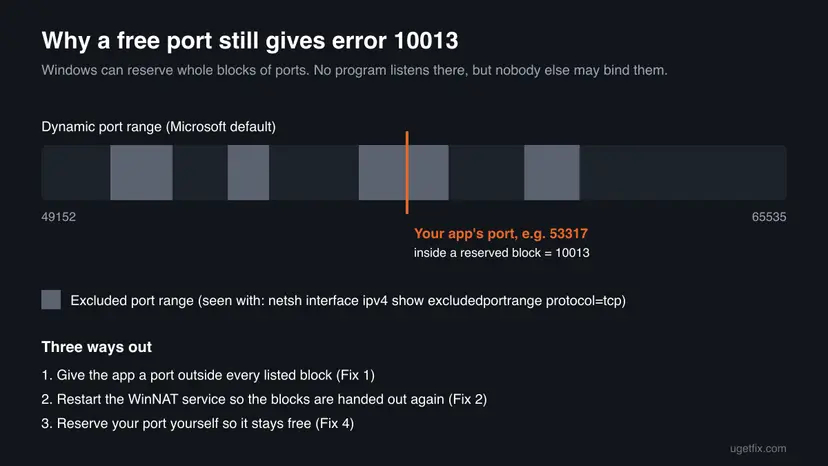
Microsoft gives the default dynamic port range as 49,152 to 65,535. That is where reserved blocks usually appear, and it is why apps with a default port in that range, such as LocalSend on 53317, are hit most. In the LocalSend report, one user showed blocks such as 53286 to 53385 in the list, and another showed 53272 to 53371. Both contain 53317.
How to fix socket error 10013
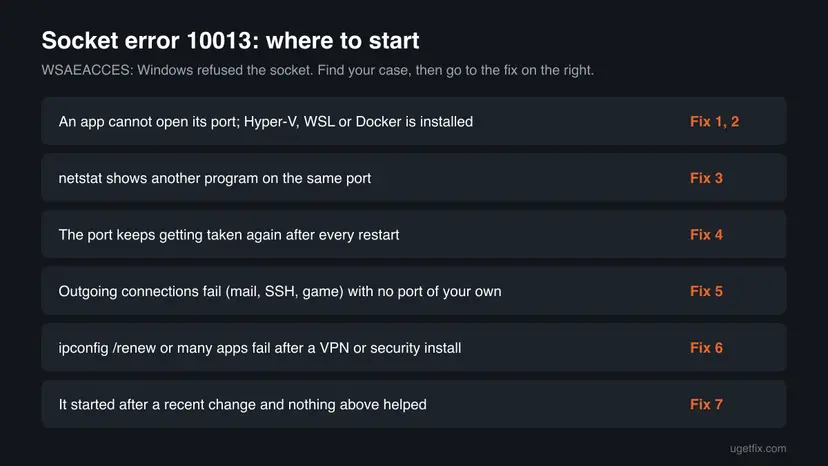
Fixes 1 to 4 deal with the port itself and solve the common cases. Fix 5 is for programs that fail on outgoing connections. Fixes 6 and 7 are general repairs for when many programs fail at once.
| What you see or have | Start with |
|---|---|
| A program cannot start its server or listener, and Hyper-V, WSL or Docker is installed. | Fix 1, then Fix 2 |
netstat -ano shows another process listening on the same port. | Fix 3 |
| The port is taken again after every restart of the PC. | Fix 4 |
| An outgoing connection fails: mail, SSH, a game, a sync client. | Fix 5 |
Many programs fail, or ipconfig /renew itself gives 10013. | Fix 6 |
| It started on a known day and nothing above helped. | Fix 7 |
Fix 1. Check the excluded port ranges and give the program a free port
5 minutesNo riskA program fails when it starts its own server or listener, and you can change the port in its settings.
Windows refuses any bind inside a reserved range, even when no program uses the port. A port outside every listed range is accepted at once, which is what LocalSend users report after moving from 53317 to 54000.
- Note the port the program uses. It is in the error text, in the program's settings or in its documentation.
- Right-click Start and select Terminal (Admin). On Windows 10 select Windows PowerShell (Admin) or open Command Prompt as administrator.
- Run the first command below and read the list of Start Port and End Port pairs.
- Check whether your port falls between a Start Port and an End Port. Lines with a
*are administered exclusions that someone added by hand. - Run the second command, with your port number, to see whether any process uses it.
- In the program's settings, choose a port that is outside every listed range and not shown by
netstat. Ports below 49152 are less likely to be reserved. - Restart the program. If other devices or programs connect to it, change the port on their side as well.
Show reserved TCP ports, then check one port (replace 53317 with yours)
netsh interface ipv4 show excludedportrange protocol=tcp
netstat -ano | findstr :53317If the program uses UDP, run the same command with protocol=udp. For IPv6, replace ipv4 with ipv6. A port can be free in one list and reserved in another.
- LocalSend: open Settings, change the port, restart the app and set the same port on the other devices. One user in the report found that 54000 worked while 53316 and 53318 did not, because they were in the same reserved block.
- Local web servers and scripts: start them with another port, for example
--port 8080or the setting your framework uses. - SSH port forwarding: change the local port of the forward in the session settings.
- Programs with a fixed port: if you cannot change the port, go to Fix 2 to free the block or Fix 4 to reserve the port.
It worked if: The program starts without the error and netstat -ano | findstr :<port> now shows it in the LISTENING state.
If not: If the port is not in any range, go to Fix 3. If it is in a range and you cannot change the port, go to Fix 2.
Fix 2. Restart the WinNAT service to release the reserved blocks
3 minutesLow riskThe port is inside an excluded range, Hyper-V, WSL 2 or Docker Desktop is installed, and the program's port cannot be changed.
The Windows NAT driver (WinNAT) serves the virtual networks of Hyper-V, WSL 2 and Docker, and users in the LocalSend report tie the reserved blocks to it. One user reports that restarting the winnat service removed the block and LocalSend started on its default port.
Running virtual machines, WSL distributions and Docker containers lose their network while WinNAT restarts. Save work inside them first. Nothing is deleted.
- Right-click Start and select Terminal (Admin), then confirm with Yes.
- Run the command below. It stops and starts the WinNAT service in one step.
- Run
netsh interface ipv4 show excludedportrange protocol=tcpagain and check whether your port is still inside a range. - Start the program that failed.
Restart WinNAT (PowerShell as administrator)
Restart-Service -Name winnat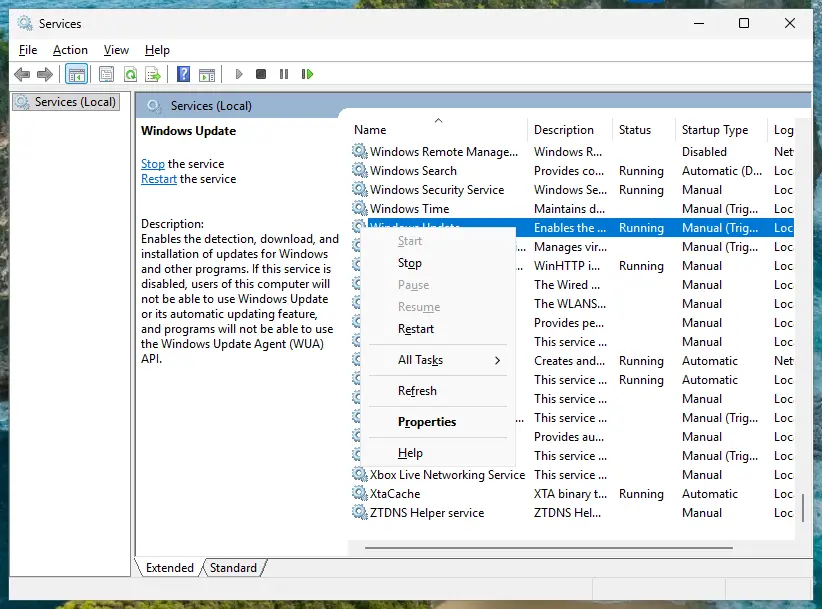
It worked if: Your port no longer falls inside a listed range and the program starts.
If not: Windows can reserve new blocks after the next restart. If the error returns after every boot, go to Fix 4. If the port was never in a range, go to Fix 3.
Fix 3. Find the program that already holds the port and stop it
5 minutesLow risknetstat -ano shows a process listening on the port your program needs.
Microsoft's description of 10013 names this case: another application, service or kernel mode driver is bound to the same address with exclusive access. Your program gets access only after that one lets go of the port.
- Open Terminal (Admin) and run the first command below with your port number.
- Note the number in the last column of the LISTENING line. That is the process ID (PID).
- Run the second command with that PID to see the program's name.
- Close that program in the normal way, or stop its service. If it is a program you need, change its port or your program's port instead.
- If the name is a web server such as IIS, run
iisreset /stopas administrator to stop it, andiisreset /startwhen you want it back. - Start the program that showed error 10013.
Who listens on the port, and which program it is (replace the numbers)
netstat -ano | findstr :8080
tasklist /FI "PID eq 1234"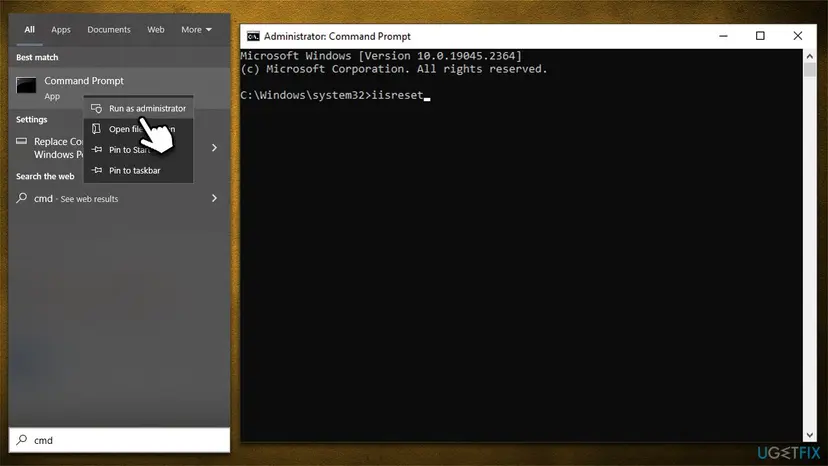
Do not end a process you do not recognise in Task Manager. Look the name up first: some ports are held by Windows services that other parts of the system need. Restarting a Windows service the safe way: Check and restart Windows services
It worked if: netstat no longer shows another process on the port, and your program starts and listens on it.
If not: If no process holds the port and no range covers it, the block is on the connection itself. Go to Fix 5.
Fix 4. Reserve the port for your program so Windows does not take it again
10 minutesLow riskThe port must stay fixed, and Fix 2 helps only until the next restart.
An administered exclusion added with netsh keeps a port out of the pool that Windows hands out, so automatic reservations cannot land on it. Microsoft documents the command and notes that the program can still bind the excluded port.
- Open Terminal (Admin).
- Stop WinNAT with the first command, so that no automatic block covers your port while you add the reservation.
- Add the exclusion with the second command, with your port as
startport. - Start WinNAT again with the third command.
- Run
netsh interface ipv4 show excludedportrange protocol=tcpand check that your port is listed with a*. - Start your program.
Reserve one TCP port (replace 53317 with yours)
Stop-Service -Name winnat
netsh int ipv4 add excludedportrange protocol=tcp startport=53317 numberofports=1
Start-Service -Name winnatEvery program except the one that binds first is now kept off this port. Reserve only the port your own program needs. To remove the reservation later, run the same netsh line with delete instead of add. On Windows Server 2008 R2, 2012 and 2012 R2, Microsoft documents that a second bind with SO_REUSEADDR to an excluded port fails with 10013.
It worked if: Your port appears in the list with a *, and the program starts after every restart of the PC.
If not: If netsh refuses the command, check that WinNAT is stopped and the Terminal is elevated. If the port is free and the error stays, go to Fix 5.
Fix 5. Allow the program in the firewall and test your security program once
10 minutesLow riskThe program fails on outgoing connections, for example mail, SSH, a game or a sync client, or only this PC is affected.
A firewall or security suite that blocks a program's socket can make Windows return an access error instead of a timeout. A short test shows whether the security program is the cause, and an allow rule fixes it without leaving protection off.
- Open your third-party firewall or security suite, if you have one, and look in its log for the program's name at the time of the error.
- If it was blocked, add the program to the allowed list there.
- If you use only Windows protection, open Start, type Windows Security, select Firewall & network protection > Allow an app through firewall and check that the program is allowed on your network type.
- If nothing is logged, pause the security program's protection for one test, run the program once, then turn protection back on, whatever the result.
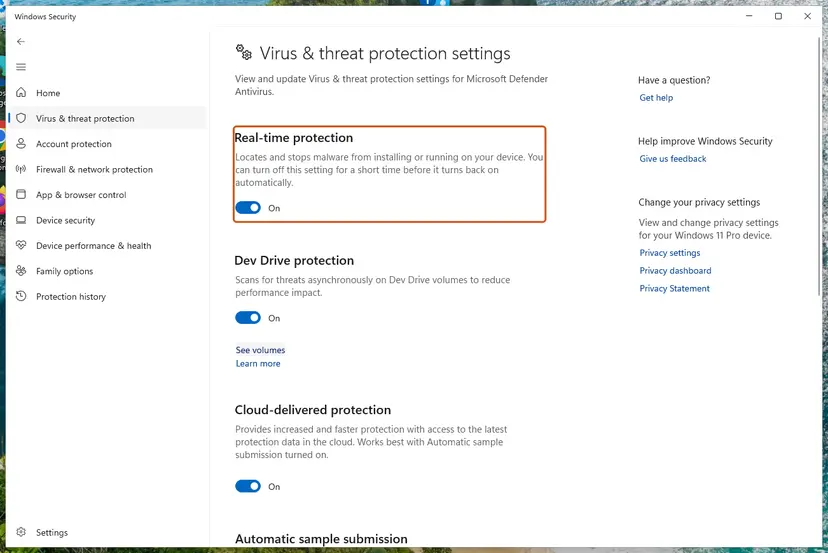
Do not turn the firewall or antivirus off as the fix. In the LocalSend report the error stayed with the app allowed through the firewall, so a firewall is often not the cause of port errors. Step by step for Defender: Turn off Microsoft Defender protection for a moment
It worked if: The program connects once it is allowed, and keeps working with protection turned back on.
If not: Turn protection back on. If many programs fail, go to Fix 6.
Fix 6. Reset Winsock and TCP/IP
10 minutesLow riskSeveral programs report 10013, ipconfig /renew fails with it, or it started after a VPN or security program was installed or removed.
VPN and security programs add themselves to the Windows sockets catalog. A Winsock reset returns that catalog to its default state. In the LocalSend report, users on Windows 11 report that netsh winsock reset and a restart cleared the error.
- Note any IP address or DNS server you entered by hand, because the TCP/IP reset can remove it.
- Open Terminal (Admin) and run the commands below one after the other.
- Restart the PC.
- Run the program again. If you came here from
ipconfig /renew, run that command again.
Reset the sockets catalog and TCP/IP
netsh winsock reset
netsh int ip reset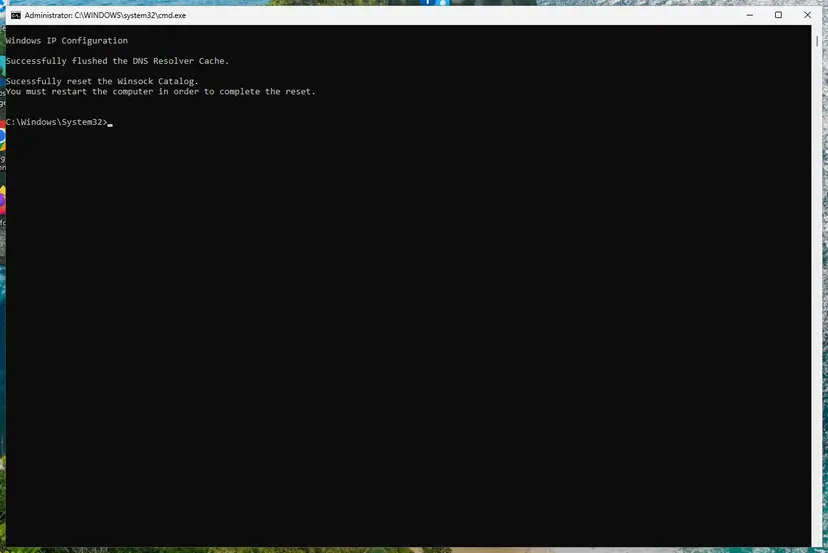
A VPN client may need to be repaired or reinstalled afterwards. The full reset, with the Network reset button in Settings: Reset the network and flush DNS
It worked if: After the restart the program and ipconfig /renew run without error 10013.
If not: If the error survives a Winsock reset, go to Fix 7.
Fix 7. Undo the change that started it with System Restore
30 minutesRead the warningThe error started on a known day, for example after an update, a driver or a new program, and nothing above helped.
System Restore takes system files, drivers and installed programs back to a restore point without touching your documents. If a recent install changed how Windows hands out ports or sockets, this removes it.
Programs and drivers installed after the restore point are removed. Your personal files are not touched, but save open work and note which programs you installed recently.
- Open System Restore. Press Windows+R, type the command below and press Enter. You can also open Control Panel > Recovery > Open System Restore. If a first page opens, select Next.
rstrui.exe - Choose a restore point. Select a restore point from a time before the problem started. The Description often names the event, such as a driver or app install. If the one you need is missing, select Show more restore points (shown only when there are more).
- See what will change. Select Scan for affected programs. The upper list shows programs and drivers that will be removed; the lower list shows those that might come back and may need to be reinstalled. Select Close.
- Start the restore. Select Next, check the summary and select Finish. Windows restarts and applies the restore point. Do not turn the PC off.
- Check the result. After sign-in Windows reports whether the restore succeeded. Check whether the problem is gone.
These steps were written for Windows 11 and Windows 10 (the steps are the same). The full page with the other versions and what each result means: Undo recent changes with System Restore
It worked if: After the restore the program starts without error 10013.
If not: Read the section below to collect what support needs.
If socket error 10013 is still there
We found no Event Viewer entry that Microsoft documents for this error. The facts that explain it are the port lists. Save them to a file and send them with your report to the program's developer or your IT department.
Save the facts to a text file on the desktop
netsh interface ipv4 show excludedportrange protocol=tcp > "%USERPROFILE%\Desktop\ports.txt"
netstat -ano >> "%USERPROFILE%\Desktop\ports.txt"- What to send: the full error text, the port, the program and its version, your Windows version, and the file above.
- Work PC: do not change ports or reservations on a managed PC. The reserved ranges there may be set by your administrator on purpose.
- When it is not your PC: if the error names a remote server and other people get it too, the server refused the connection. Only its owner can fix that.
- Hardware: 10013 is a permission answer from Windows, not a sign of a broken network card.
How to keep error 10013 from coming back
- Give your own servers and tools fixed ports below 49152 when you can.
- Reserve a port with
netsh(Fix 4) when a program must always use the same one. - Check the excluded port ranges after you install Hyper-V, WSL or Docker Desktop.
- Keep VPN and security programs updated, and uninstall them fully when you stop using them.
- Do not turn off the Windows firewall or your antivirus to make the error go away.
- Do not end unknown processes in Task Manager to free a port.
- Do not install "port fixer" or "network repair" programs: the commands on this page do the same job.
- Do not reserve large port ranges you do not need.
Frequently asked questions
What does error code 10013 mean?
It means Windows refused a program access to a socket. Microsoft names the code WSAEACCES. Its text reads "An attempt was made to access a socket in a way forbidden by its access permissions". In practice a program wanted a port that is reserved by Windows or held exclusively by another program, or a security program blocked the connection. The code says nothing about your internet connection, which can work fine for every other app. The fastest check is the list of excluded port ranges, shown with netsh interface ipv4 show excludedportrange protocol=tcp.
How do I fix WinError 10013 in Python?
Python raises PermissionError: [WinError 10013] when the socket call fails with WSAEACCES, so the fix is the same as for any other program. Check whether the port in your bind call is inside an excluded range, and use one outside it, for example 8080 instead of a port above 49152. If netstat -ano shows another process on the port, stop it or pick another port. If you send to a broadcast address, set the SO_BROADCAST option on the socket first: Microsoft names a broadcast without that permission as one cause of 10013.
What does "os error 10013" mean?
It is the same Windows error 10013 printed by a command-line tool in its own format. In Google's results for this spelling, most cases are tools that start a small local server for sign-in, such as the Codex CLI login, and fail with "failed to start login server". The tool could not open its local port. Check the excluded port ranges as in Fix 1, restart WinNAT as in Fix 2 if Hyper-V, WSL or Docker is installed, and run the sign-in again. If the tool lets you choose the port, choose one outside every listed range.
Why does LocalSend show error 10013?
Because its default port 53317 often falls inside a range that Windows reserved. In LocalSend's public bug report from 2026, users on Windows 10 and 11 show ranges such as 53286 to 53385 that contain 53317, while netstat shows the port as free. Users report three ways out: change the port in LocalSend's settings to one outside the ranges, such as 54000, on every device; restart the winnat service; or run netsh winsock reset and restart. The report is still open, so we found no fixed LocalSend version.
Does running the program as administrator fix error 10013?
Sometimes, but not in the most common case. Administrator rights do not let a program bind a port inside an excluded range or one held with exclusive access by another program. The reporter of the LocalSend bug ran the app as administrator and still got 10013. Running as administrator is still worth one try for tools that build their own network packets, but if it does not help, go back to Fix 1. Never set a program to always run as administrator just to hide this error.
Is socket error 10013 caused by the firewall?
Sometimes, but less often than many guides claim. A firewall or security suite that blocks a program's socket can produce the code, mostly for outgoing connections. For programs that fail when they open their own port, the cause is usually a reserved range or another program on the port, and the firewall plays no part. Allow the program in the firewall rather than turning the firewall off, and pause a security program only for one test, as in Fix 5.
Why does ipconfig /renew give error 10013?
We could not find a Microsoft page that explains this case. The message means the command could not get the socket it needed to ask for a new address. Users most often report it after a VPN or security program changed the network settings. Reset Winsock and TCP/IP as in Fix 6 and restart the PC, then run ipconfig /renew again. If it still fails, run it once with your VPN disconnected and your security program paused for a single test, then turn protection back on.
What is "The internal error state is 10013"?
It is a different message that only shares the number. Google pairs it with questions about TLS, the encryption of connections, so it concerns a failed secure connection logged in Event Viewer, not a program that cannot open a port. We did not research that event for this page, and the steps here do not apply to it. If you came here from Event Viewer, look at the event's source and ID before you change anything: such events are often harmless and appear without any visible problem.
Is Netflix error 10013 the same thing?
No. Netflix uses its own error codes, and its code 10013 is not the Windows socket error, even though the number matches. This page is about the Windows error WSAEACCES that programs report when Windows refuses them a socket. For the Netflix code, follow Netflix's own help page for that code. The same is true for "10013 in Word": Microsoft Word does not open network ports, so a 10013 there is not this error.
Sources
- Microsoft Learn: Windows Sockets Error Codes (WSAEACCES 10013, WSAEADDRINUSE 10048) (learn.microsoft.com)
- Microsoft Learn: Error 10013 (WSAEACCES) is returned when a second bind to an excluded port fails in Windows (KB 3039044) (learn.microsoft.com)
- LocalSend issue 2884: Windows socket error (errno 10013) on default port 53317 (user reports) (github.com)
Did this fix work?
One click, no account. It tells the next reader which guides are worth their time.
Questions and experiences: fix socket error 10013 in Windows
Still broken, or found a fix we did not cover? Ask here: members and our editors answer. Reading is open; writing needs a free account.
…