
How to fix “No Route” error in Discord?

Prefer to fix it yourself? The manual steps follow.
- 8methods
- 10 to 20 minutes
- Advanced
Applies to Discord desktop app on Windows 11 and Windows 10 when joining a voice channel or a private voice call; the first checks also apply to the browser version and to macOS
8 methods in this guide
Hello. When I try to connect with a voice channel on Discord in Windows, I get the “No route” error. How can I get this fixed?
No Route is a voice connection state in Discord. Discord's help says it means something on your side, such as a firewall or a VPN, is interfering with the connection to the voice server. Restart your PC, modem and router first, then check your VPN and your firewall.
Discord's help groups No Route with ICE Checking, RTC Connecting and Connecting: something on your end blocks the link to the voice server. Restart your PC, modem and router (Fix 1), then test without your VPN (Fix 2) and allow Discord through the firewall (Fix 3). If your network is a school or work one, Fix 7 explains why it may never work there.
| Error | No Route, a status Discord shows in place of a working voice connection. It is one of four connection states Discord's help lists together. |
|---|---|
| Where it appears | In the voice panel at the bottom left of Discord, after you join a voice channel or start a private voice call. It often follows RTC Connecting, a state users report seeing first. |
| Main cause | Something on your side blocks the voice connection. Discord's help names a firewall or antivirus and a VPN, and also lists an ISP outage and a work or school network that blocks Discord. |
| Fastest fix | Restart the modem, router and PC (Fix 1). Discord's help puts this first. If that fails, test with the VPN off (Fix 2). |
| Also written as | Discord no route, no route Discord error, Discord rute, RTC Connecting and No Route. |
| Affects | Discord on any system. The Windows fixes here are written for Windows 11 and Windows 10 22H2. |
| Discord's status | Not a known bug. Discord's help treats it as a problem on your end. A separate state, Waiting for Voice Server, is the one Discord says comes from its side. |
| Time to fix | 10 to 20 minutes. A school or work network can make it impossible without the network admin. |
Facts checked on 16 October 2026. Steps written for Discord's Voice Connection Errors article and its Voice and Video Troubleshooting Guide, and Microsoft's ipconfig reference, all read on 16 October 2026; the Windows steps apply to Windows 11 and Windows 10 22H2 with the Discord desktop app.
What “No Route” means in Discord and what it does not
Discord's help article on voice connection errors splits the voice errors into two groups by cause: something on your end or something on Discord's end. No Route is in the first group, together with ICE Checking, RTC Connecting and Connecting. The help says these errors generally mean something is interfering with the connection on your end, like a firewall or possibly a VPN.
The article does not define the words “No Route” and we found no other official definition, so we do not claim a technical meaning. What it gives is the group and the fix list. Users report that the page often shows RTC Connecting for a while and then changes to No Route.
| What the voice panel shows | What Discord's help says | Where to go |
|---|---|---|
| No Route, ICE Checking, RTC Connecting or Connecting | Something on your end interferes with the connection, such as a firewall or a VPN | Fix 1 to Fix 6 |
| Waiting for Voice Server | A rare state that Discord says comes from its side, usually a broad service problem | Check discordstatus.com and wait |
| Connected, but no sound, or others cannot hear you | A different problem: devices, volume, permissions | Not this guide |
Discord's help does not say which of its causes is the most common, and it does not describe how a firewall or a VPN produces this exact word. The order of the fixes below follows the order of Discord's own list, with the cheapest checks first.
What causes the Discord No Route error, from most to least likely
Discord's help lists six things to check, and they are ordered from cheap to costly. The first is a restart of the modem, router and computer, which the help says works more often than you would expect. The next ones are an outage at your internet provider, a firewall or antivirus that blocks Discord, and a VPN.
Network rules come after that. A work or school network can block Discord outright. The last item is the voice region of the server. Only a server admin can change it, and it matters when the problem exists in one server and not in others.
| Cause | How to tell | Who can fix it | Fix |
|---|---|---|---|
| Stale connection in the PC, modem or router | The problem started without any change, other apps are fine | You | Fix 1 |
| A VPN that does not pass UDP traffic | No Route appears only while the VPN is on | You | Fix 2 |
| Windows Firewall does not allow Discord | Appeared after a Windows or Discord reinstall, or on a PC with strict rules | You | Fix 3 |
| The Quality of Service packet priority setting in Discord | Other voice apps work, or your router handles priority tags poorly (users report this) | You | Fix 4 |
| Stale network addresses in Windows | Other devices on the same Wi-Fi connect to voice fine | You | Fix 5 |
| Voice region of one server | Only one server fails, other servers connect | A server admin | Fix 6 |
| Work, school or public network that blocks Discord | Works on a phone hotspot, fails on this network | The network admin | Fix 7 |
| Antivirus filtering the traffic | Appeared after an antivirus update or install | You, for a test only | Fix 8 |
| Internet outage at your provider | Many sites fail too, or the provider shows an outage | The provider | Check first |
How to fix “No Route” in Discord
Fix 1 is the one Discord's help lists first and the one that works for most readers. Fixes 2 to 5 are checks on your own PC. Fix 6 is for server admins, Fix 7 for school and work networks, and Fix 8 is a short antivirus test that you undo at once.
| What you see or have | Start with |
|---|---|
| You have changed nothing and Discord worked before. | Fix 1 |
| A VPN is connected, or a VPN app starts with Windows. | Fix 2 |
| Discord was just reinstalled, or the PC has strict firewall rules. | Fix 3 |
| Everything else works and only Discord voice shows No Route. | Fix 4, then Fix 5 |
| Only one server fails and you are its owner or admin. | Fix 6 |
| You are on a school, work or public network. | Fix 7 |
| You installed or updated an antivirus shortly before the error. | Fix 8 |
Fix 1. Restart the PC, modem and router, and reload Discord
10 minutesNo riskThe error appeared on its own and you have not changed anything on your network lately.
Discord's help lists this first. A fresh start clears a stuck connection in the PC, the modem or the router, which the voice link has to cross.
- Close Discord completely: right-click its icon in the system tray and select Quit Discord.
- Shut down the PC and the router. Unplug the power cable of the modem and the router.
- Wait about one minute, plug the modem in first, wait until its lights settle, then plug in the router.
- Start the PC, open Discord and join the voice channel again.
- If the app is already open, you can press Ctrl + R to refresh the client, which Discord's help names as a way to refresh it.
Discord's help also says to ask your internet provider whether there is an outage in your area. If many sites and apps fail at the same time, the cause is not Discord and a restart will not help until the provider fixes it.
It worked if: The voice panel shows Voice Connected and a green indicator, and you can hear the others.
If not: Go to Fix 2 and test without your VPN.
Fix 2. Turn off the VPN and test again
5 minutesNo riskA VPN is running now or starts with Windows.
Discord's help says a VPN may interfere and that Discord works only on VPNs that support UDP. A VPN that does not pass UDP can leave the voice link without a route.
- Open your VPN app and disconnect. Close the app if it keeps a filter running in the background.
- Press the Windows key, type network and select View network connections.
- Right-click your VPN adapter in the list and choose Disable.
- Join the voice channel in Discord and watch the voice panel.
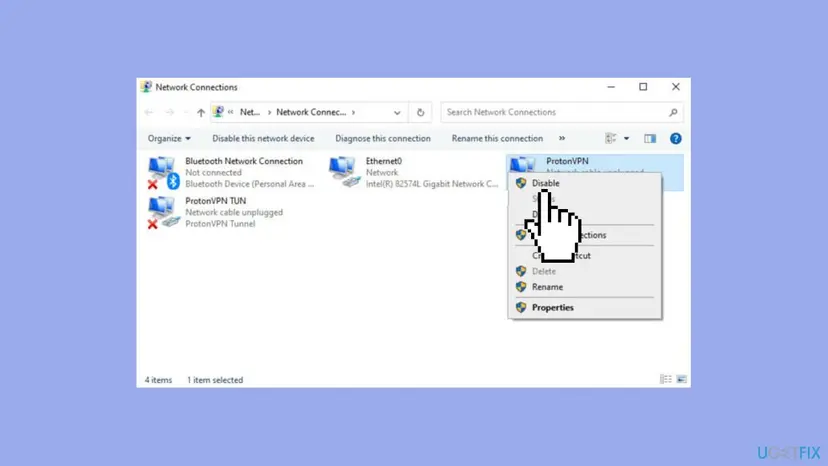
Then the VPN is the cause. Discord's help says to use a VPN that supports UDP. We could not confirm which VPN products support it, so check the provider's own page. To turn the adapter on again, right-click it in the same window and choose Enable.
It worked if: The voice channel connects while the VPN adapter is disabled.
If not: Enable the adapter again if you need it, then go to Fix 3.
Fix 3. Allow Discord through Windows Firewall
5 minutesLow riskDiscord was reinstalled recently, or Windows Firewall has custom rules on this PC.
Discord's help tells you to check that Discord is on the allow list of your firewall. A missing entry can stop the voice traffic while text chat still works.
- Press the Windows key, type firewall and open Windows Defender Firewall in Control Panel.
- Select Allow an app or feature through Windows Defender Firewall on the left.
- Select Change settings. Windows may ask for administrator permission.
- Find Discord in the list and tick both boxes, Private and Public. If Discord is not in the list, select Allow another app and add Discord from its install folder.
- Select OK, restart Discord and join the voice channel.
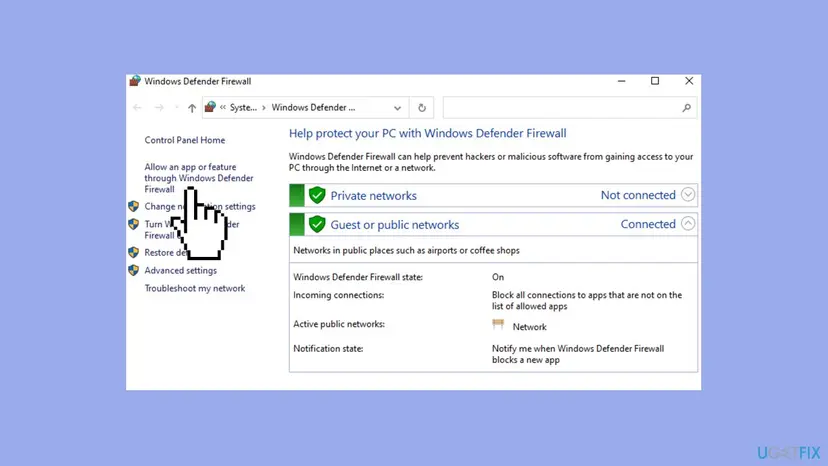
The screens in the picture are Windows 10. Windows 11 keeps the same Control Panel page, but we have not photographed it on 25H2, so the wording may differ slightly.
It worked if: Discord has ticked boxes in the allowed apps list, and the voice channel connects.
If not: Go to Fix 4. Do not turn the firewall off to solve this.
Fix 4. Turn off Quality of Service High Packet Priority in Discord
3 minutesNo riskFixes 1 to 3 did not help and other voice or video apps work on this PC.
Discord's help points to this setting for connection issues and says to turn it off when voice is choppy. The setting asks the network to treat Discord's voice packets with priority, which some networks handle badly (users report).
- Select the gear button next to your name at the bottom left of Discord to open User Settings.
- Select Voice & Video in the left menu.
- On the Voice tab, scroll down to Enable Quality of Service High Packet Priority and switch it off. Newer versions of the app word it as Ensure Quality of Service High Packet Priority.
- Restart Discord and join the voice channel.
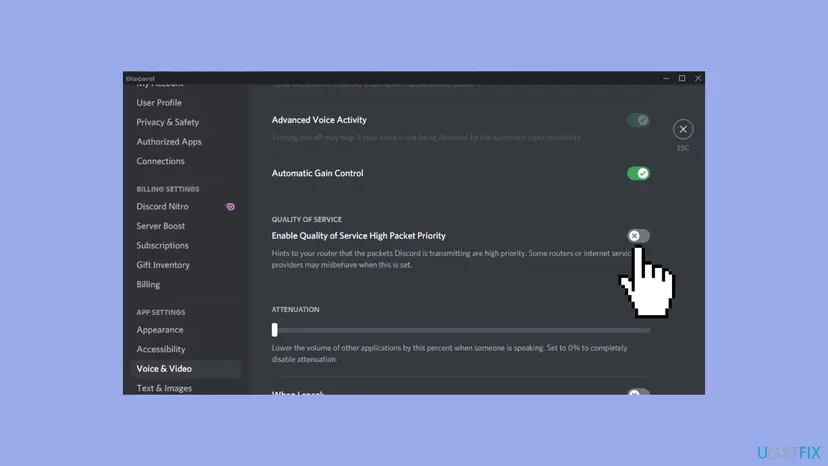
It worked if: After the restart, the toggle stays off and the voice channel connects.
If not: Leave the setting off and go to Fix 5.
Fix 5. Flush the DNS cache and renew the IP address
5 minutesLow riskOther devices on the same network connect to voice, and only this PC shows No Route.
Discord's help does not list this fix. Microsoft documents the commands: one clears the DNS cache, the other two release and renew the address your router gave the PC. Users report that it clears No Route in some cases.
- Press the Windows key, type cmd, right-click Command Prompt and select Run as administrator.
- Type the three commands below one by one and press Enter after each. Your connection drops for a moment after the first one.
- Wait until the connection is back, then restart Windows and join the voice channel.
ipconfig /release
ipconfig /flushdns
ipconfig /renew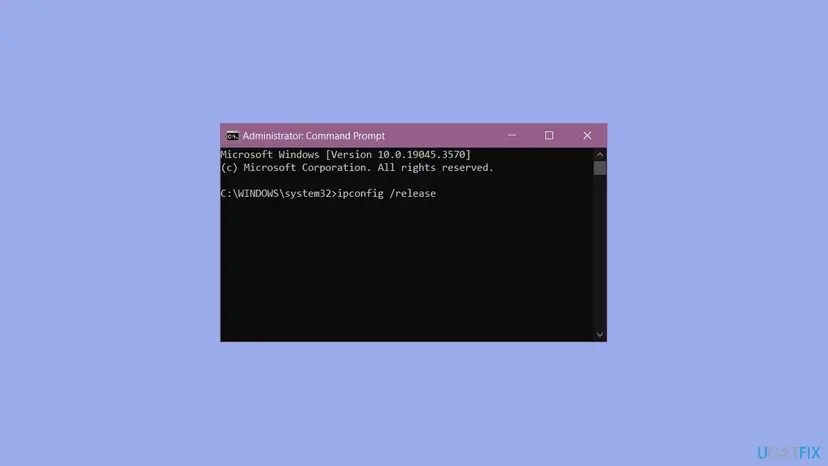
Microsoft's reference says that /release discards the address of the adapters that get it automatically and that /renew asks for a new one. /flushdns discards the cached address entries. For the longer reset with Winsock and TCP/IP, step by step: Reset the network and flush DNS.
Microsoft notes that /release disables TCP/IP on adapters set to obtain an address automatically. You are offline until /renew finishes, so type it at once. If the PC uses a fixed IP address, skip this fix and run only the flush command.
It worked if: The first command shows the new address, the connection returns, and Discord connects after the restart.
If not: Go to Fix 6 if you run the server, or to Fix 7 on a shared network.
Fix 6. Change the voice region of the server
3 minutesNo riskOnly one server or one call shows No Route and you can edit that channel.
Discord's help lists the region override as the sixth check. A different region sends the call to different voice servers, which can avoid a bad path from your network.
- Open the server, hover the voice channel and select the Edit Channel gear.
- Go to Overview and find Region Override.
- Pick another region than Automatic, for example the nearest one, and save.
- Join the voice channel again. Switch back to Automatic later if it makes no difference.
Discord's help adds that you can also change a voice region in private voice calls. If you are not the admin, ask the owner to change it, because the help says it is the admin who can do it.
It worked if: The channel connects with the new region and keeps working for several minutes.
If not: Switch the region back and go to Fix 7.
Fix 7. Check whether your network blocks Discord
10 minutesNo riskYou are on a school, work, hotel or other shared network, or on a network with a content filter.
Discord's help says that on a work or school network Discord could be blocked, and to check with your network admin. Only the admin can open the connection on such a network.
- Turn on the hotspot of your phone and connect the PC to it for a minute.
- Join the same voice channel. If it works there and fails on the first network, the network blocks the voice link.
- Ask the network admin whether Discord voice is allowed. Give the time of your tests and say that Discord's help article describes this block.
- If the admin refuses, there is no setting on your PC that can undo a block set on the network. Use another network for voice.
Do not install a tool to get around a school or work block. It can break the network rules and your account can be closed for it.
It worked if: Voice connects on the hotspot, which proves the other network was the cause.
If not: If it fails on the hotspot too, the cause is on your PC. Go to Fix 8.
Fix 8. Pause the antivirus for one test
5 minutesRead the warningThe error began soon after you installed or updated an antivirus or a security suite.
Discord's help says the antivirus should be allowlisted or temporarily disabled to test. A security suite with its own firewall can block the voice traffic even when Windows Firewall allows it.
Pause protection only for the test, with Discord as the only app you open. Turn it back on right after, and do not browse while it is off. If you use a third-party suite, its own off switch is in its window.
Step by step for Microsoft Defender: Turn off Microsoft Defender protection for a moment. Join the voice channel while protection is paused.
- Pause the protection using the procedure above or your suite's own switch.
- Join the voice channel in Discord.
- Turn the protection on again and write down the result.
- If voice worked only while it was paused, add Discord to the exclusions or allowed apps of that antivirus instead of leaving it off.
It worked if: If the antivirus was the cause, the channel connects within seconds with protection paused.
If not: Turn protection on again, then follow the Still broken section and contact Discord.
If No Route is still there: what to collect and what to tell Discord
When all the fixes fail, Discord's help asks you to contact its support team and to attach a screenshot of the console logs. Reading the log yourself is not needed. The help says to do it in the PTB or Canary client, which are Discord's test builds.
- Download the PTB or Canary client from discord.com/download and sign in.
- Join the voice channel or voice call where No Route appears.
- Press Ctrl + Shift + I to open Developer Tools and select the Console tab.
- Take a screenshot of the whole page with any error lines visible and send it to Discord support at dis.gd/support.
| What you find | What it tells you | What to do |
|---|---|---|
| Works on a phone hotspot, fails at home | Your home network, modem or provider is the cause | Call your provider, check the router's own settings |
| Works on your phone with the same Wi-Fi | The PC is the cause | Repeat Fix 2, Fix 3 and Fix 5 |
| Fails everywhere and discordstatus.com shows an incident | Discord is having trouble | Wait and test later |
| Fails only in one server | A voice region or channel setting | Fix 6 or ask the admin |
How to keep the Discord voice connection working
- Pick a VPN with UDP. Discord's help says Discord works only on VPNs that support UDP, so check this before you buy or change one.
- Keep Discord on the allow list. After a reinstall of Discord, check the firewall list again, because the entry can be created for the old copy.
- Do not leave protection off. Use an exclusion for Discord in your antivirus instead.
- Keep Discord up to date. Discord's help says you can reload the client with Ctrl + R and update it fully before you troubleshoot.
- Test on another network early. A phone hotspot answers within a minute whether your network or your PC is at fault.
Frequently asked questions
What does No Route mean on Discord?
It is one of the voice connection states that Discord's help groups as a problem on your end. The group also holds ICE Checking, RTC Connecting and Connecting, and the help says it generally means something is interfering with the connection, like a firewall or possibly a VPN. The help does not explain the word itself, so we do not claim an exact technical meaning. In practice it means your PC cannot set up a working link to the voice server.
Why does Discord say No Route when I join a voice channel?
Discord's help lists the causes it knows. They are a connection that needs a restart, an outage at your internet provider, and a firewall or antivirus that does not allow Discord. Others are a VPN without UDP, a work or school network that blocks Discord, and a voice region that fails from your network. Start with the restart, because the help puts it first, and then test without the VPN.
Is the Discord No Route error caused by Discord's servers?
Usually not, according to Discord's help. It puts No Route among the errors that come from your side. Discord lists a different state, Waiting for Voice Server, as the one that comes from its own servers and says it appears in rare cases when there are broad service problems. You can check discordstatus.com to see whether an incident is open before you change anything on your PC.
Does a VPN cause the No Route error?
It can. Discord's help tells you to check your VPN and says Discord only works on VPNs that have UDP. The simplest test is to disconnect the VPN and disable its adapter in Network Connections, then join the voice channel. If it works, the VPN is the cause, and you need a VPN that supports UDP or a different way to use it.
Should I turn off my firewall to fix No Route?
No. Discord's help asks you to check that Discord is allowlisted, which means allowing the app through the firewall, and only mentions disabling the antivirus as a temporary test. Turning the firewall off leaves the PC open. Add Discord to the allowed apps in Windows Defender Firewall as in Fix 3, and test a paused antivirus for a minute only if you must.
How do I fix Discord No Route on a school or work network?
Probably you cannot on your own. Discord's help says that on a work or school network Discord could be blocked and that you should check with the network admin. Test on a phone hotspot to prove the cause, then ask the admin to allow Discord voice. Do not install tools to bypass the block, because that can break the network rules.
Does the Quality of Service High Packet Priority setting cause No Route?
Discord's help names this setting among its connection and audio quality checks and says to turn it off when voice quality is poor. It does not say that the setting causes No Route. Users report that turning it off helped on networks that handle priority tags badly. It costs nothing to try, and you can turn it on again in Voice and Video settings.
What should I send to Discord support if nothing works?
Discord's help asks for a screenshot of your console logs. Install the PTB or Canary client, join the voice channel that fails, press Ctrl + Shift + I, open the Console tab and take a screenshot of the whole page with the error lines visible. Add your Windows version, whether you use a VPN and the results of your hotspot test, and send it through dis.gd/support.
Can I trust this guide?
The facts about the error come from Discord's own help articles and from Microsoft's reference for the ipconfig command, all read on 16 October 2026. Where the sources are silent, the text says so and marks user reports as reports. The guide was checked against the sources, not tested on a live No Route error, so the Windows 11 firewall screen is listed as not yet photographed.
Sources
- Discord Support: Voice Connection Errors (support.discord.com)
- Discord Support: Discord Voice and Video Troubleshooting Guide (support.discord.com)
- Microsoft Learn: ipconfig (learn.microsoft.com)
Did this fix work?
One click, no account. It tells the next reader which guides are worth their time.
Questions and experiences: fix “No Route” error in Discord
Still broken, or found a fix we did not cover? Ask here: members and our editors answer. Reading is open; writing needs a free account.
…