
How to fix Error 1068: The dependency service or group failed to start in Windows?

Prefer to fix it yourself? The manual steps follow.
- 8methods
- 5 minutes to find the dependency, 5 to 30 minutes to fix it
- Intermediate
Applies to Windows 11, Windows 10
8 methods in this guide
I can't start some services to make the wireless internet connection work. When I right-click on the Network Location Awareness service and select Start, it results in an error "Error 1068: The dependency service or group failed to start." Because of this, I can't use my internet, which of course is very annoying. Please help me.
Error 1068 means Windows tried to start a service, but a service or group it depends on would not start. The real error belongs to that dependency, not to the service you clicked. Find it with sc qc and net start first, then fix what stops it.
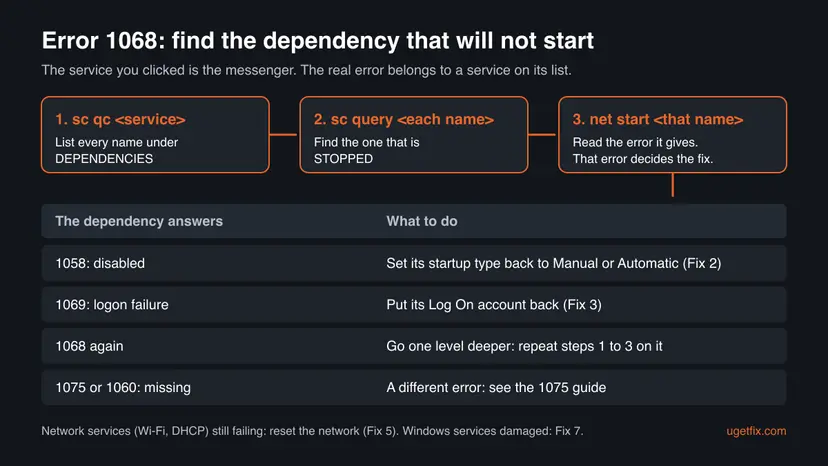
Open an administrator Command Prompt, run sc qc with the failing service's name and then sc query on each name under DEPENDENCIES. Start the one that shows STOPPED with net start and read its own error (Fix 1). Most often it is disabled, so set its startup type back to Manual or Automatic (Fix 2). A logon failure, a broken network chain or damaged Windows files come next.
| Error | Windows error 1068, ERROR_SERVICE_DEPENDENCY_FAIL, 0x42C: "The dependency service or group failed to start." |
|---|---|
| Where it appears | A Services dialog that starts with "Windows could not start the <name> service on Local Computer", the line "System error 1068 has occurred." after net start, and Service Control Manager errors in Event Viewer. |
| Main cause | A service on the dependency list exists but will not start, most often because it is set to Disabled. |
| Fastest fix | Find the stopped dependency with sc qc and sc query, start it with net start to see its own error (Fix 1), then set its startup type back (Fix 2). |
| Also written as | Error 1068, 1068 error, system error 1068, "the dependency service failed to start", and translated texts such as Fehler 1068, errore 1068, erreur 1068 or błąd 1068. |
| Services it hits | Any service with dependencies. Searches name Network Location Awareness, WLAN AutoConfig, Windows Defender Firewall, Security Center, Windows Connection Manager and Windows Media Player Network Sharing Service. |
| Related codes | 1058: the dependency is disabled. 1069: it failed to log on. 1075: the dependency does not exist at all (a different error). |
| Microsoft's status | Not a bug. It is a standard Windows error code, the same on Windows 10 and Windows 11. |
| Time to fix | 5 minutes to find the dependency. 5 minutes to turn it back on, up to 30 minutes for a network reset or a system file repair. |
Facts checked on 15 October 2026. Steps written for Windows 11 (25H2 and 26H2) and Windows 10 22H2.
What "Error 1068: The dependency service or group failed to start" means
Most Windows services need other services, drivers or a group of drivers to run first. That list is stored with each service and shown on the Dependencies tab in Services. When you start a service, Windows first starts everything on its list. If one of those dependencies is installed but will not start, Windows gives up and reports error 1068 for the service you clicked.
Microsoft's list of system error codes gives 1068 (0x42C) the text "The dependency service or group failed to start." The word group covers a load order group of drivers, shown in sc qc output with a + in front of its name. So the message is a pointer: the failure you need to fix sits one step further down the chain.
The two places you see it (the service name changes)
Windows could not start the Network Location Awareness service on Local Computer.
Error 1068: The dependency service or group failed to start.

C:\> net start NlaSvc
System error 1068 has occurred.
The dependency service or group failed to start.| Code | Microsoft's text | What it tells you |
|---|---|---|
| 1068 | The dependency service or group failed to start. | A dependency exists but did not start. Find it and read its own error. |
| 1058 | The service cannot be started, either because it is disabled or because it has no enabled devices associated with it. | The dependency is set to Disabled, or its device is off. Fix 2. |
| 1069 | The service did not start due to a logon failure. | The dependency's Log On account is wrong. Fix 3. |
| 1075 | The dependency service does not exist or has been marked for deletion. | The dependency is missing, not stopped. A different problem with its own guide. |
Why error 1068 appears, most common cause first
The trigger is always the same: a dependency that is installed but does not start. Why it does not start differs, and each reason has its own fix.
| Why the dependency does not start | How it looks | Fix |
|---|---|---|
| It is set to Disabled, often by a tweak tool, a "speed up Windows" guide or a game booster. | net start on the dependency answers 1058; Services shows Disabled in Startup Type. | Fix 2 |
| Its Log On account was changed, so it cannot sign in. | net start on the dependency answers 1069, "The service did not start due to a logon failure." | Fix 3 |
| Malware turned off security services, or a cleanup tool left them off. | Security Center, Windows Defender Firewall or its dependencies are disabled and turn off again after you fix them. | Fix 4 |
| A network driver or network component is broken. | Network Location Awareness, WLAN AutoConfig, DHCP Client or Windows Connection Manager fail, and there is no internet, as in the question at the top. | Fix 5 |
| A third party service or driver, such as a VPN or security product, blocks the chain. | The error began after you installed such a program. | Fix 6 |
| Windows files or service settings are damaged. | Several Microsoft services fail with different errors. | Fix 7, Fix 8 |
When sc query answers 1060 for a name on the list, the dependency is not installed at all. Windows then shows error 1075, and the fixes are different: error 1075: the dependency service does not exist.
How to fix error 1068, the dependency service or group failed to start
Fix 1 finds the dependency that fails and shows its own error in five minutes. The other fixes depend on that error, so start there. The table tells you where to go next.
| What Fix 1 found or what you see | Go to |
|---|---|
| The dependency answers 1058 or shows Disabled. | Fix 2 |
| The dependency answers 1069, a logon failure. | Fix 3 |
| Security Center or Windows Defender Firewall fails, and the services turn off again. | Fix 4 |
| Network Location Awareness, WLAN AutoConfig or DHCP Client fails and there is no internet. | Fix 5 |
| The error began after you installed a VPN, antivirus or other tool. | Fix 6 |
| Several Windows services fail, or nothing above matches. | Fix 7, then Fix 8 |
Fix 1. Find the dependency that fails with sc qc, sc query and net start
5 minutesNo riskEveryone with error 1068, before changing anything.
Error 1068 never says which dependency failed. sc qc shows the list, sc query shows which one is stopped, and starting that one by hand makes Windows show the error that really matters.
- In Services, open the failing service's Properties and copy the Service name from the General tab, for example
NlaSvcfor Network Location Awareness. - Type
cmdin search, right-click Command Prompt and select Run as administrator. - Run
sc qcfollowed by the service name and note every name under DEPENDENCIES. - Run
sc querywith each name. Look for STATE: 1 STOPPED. - Run
net startwith the stopped name and write down the error number it shows. - If that error is 1068 again, repeat steps 3 to 5 on the dependency: the cause is one level deeper.
Command Prompt as administrator (example: Network Location Awareness)
sc qc NlaSvc
sc query <each name under DEPENDENCIES>
net start <the name that is STOPPED>- In PowerShell or Terminal, type
sc.exe, notsc. In PowerShell,scis a short name for another command. - A name that starts with + is a group of drivers, not a service. If only a group is on the list, go to Fix 5 for network groups, otherwise Fix 7.
- The service name is not the display name. You can see both on the General tab, or with
Get-Servicein PowerShell.
It worked if: One dependency is stopped, and net start on it shows its own error, such as 1058 or 1069.
If not: If every dependency is running but the service still fails with 1068, read the System log as the still-broken section explains, then try Fix 6.
Fix 2. Turn a disabled dependency back on in Services
5 minutesLow riskFix 1 showed error 1058, or Services shows Disabled in the dependency's Startup Type.
A disabled service can never be started, not even by Windows for another service. This is the most common reason for error 1068. Microsoft's own text for 1058 names it: the service "is disabled".
- Press Win + R, type
services.mscand press Enter. - Double-click the dependency Fix 1 found.
- Set Startup type to Manual, or to Automatic if you know it ran that way before.
- Select Apply, then Start, and wait for Status to show Running.
- Start the service that showed error 1068.
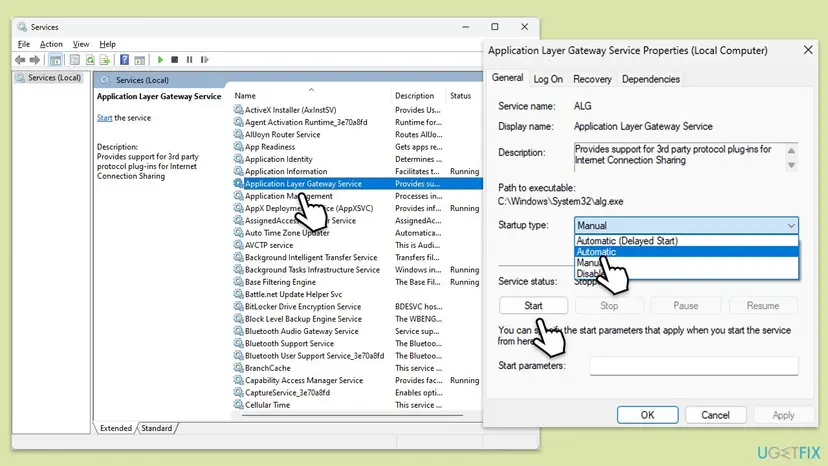
The same change from the command line, with Microsoft's syntax (keep the space after start=): sc config <name> start= demand for Manual, or start= auto for Automatic. Then run net start <name>.
Windows starts a Manual service by itself when another service needs it. Do not set dozens of services to Automatic, as older guides said. Change only the dependency Fix 1 found.
Opening Services, starting a service and changing its startup type: Check and restart Windows services
It worked if: The dependency shows Running, and the service that showed error 1068 starts.
If not: If the startup type is grey and cannot be changed, or it goes back to Disabled after a restart, go to Fix 4. If the dependency now answers 1069, go to Fix 3.
Fix 3. Put back the Log On account of a dependency that fails with error 1069
5 minutesLow risknet start on the dependency answered 1069, "The service did not start due to a logon failure."
Many Windows services sign in as the built-in Local Service or Network Service account, which has no password. If a tool or a user set another account, or a password, the service cannot sign in and everything that depends on it fails with 1068.
- In Services, open the dependency's Properties and select the Log On tab.
- Note what is there. On a working PC with the same Windows version, check the same service for the right account.
- For Local Service or Network Service, select This account and type
NT AUTHORITY\LocalServiceorNT AUTHORITY\NetworkService. - Clear both password boxes and select Apply.
- If the service should use the Local System account, select that option instead.
- Restart the PC and start the service again.
The same from an administrator Command Prompt (example: Network Service)
sc config <name> obj= "NT AUTHORITY\NetworkService" password= ""
net start <name>Older guides, including the earlier version of this page, said to run net localgroup administrators localservice /add. That gives every service that runs under these accounts full control of the PC. If you already did it, remove them again with the same command and /delete instead of /add.
It worked if: net start on the dependency succeeds, and the first service starts.
If not: If you cannot tell which account is right, go to Fix 7 and Fix 8, which put the default settings back.
Fix 4. Scan for malware when Security Center or Firewall services keep turning off
15 to 30 minutesNo riskSecurity Center, Windows Defender Firewall or one of their dependencies fails with 1068, or a service you turned on in Fix 2 is Disabled again after a restart.
Turning off Windows security services is a known way for malware to protect itself. If the services go back to Disabled, something on the PC is changing them, and fixing the startup type again will not last.
- Run a full scan with Windows Security, and the offline scan if the full scan finds anything.
- Remove what it finds and restart.
- Repeat Fix 2 for each service that was disabled.
- Check after the next restart that the services stay on.
Full and offline scan step by step: How to scan for malware with Microsoft Defender
It worked if: The scan is clean or the threat is removed, and the services stay on after a restart.
If not: If Windows Security itself will not open, go to Fix 7 and then Fix 8.
Fix 5. Reset the network when Network Location Awareness, WLAN AutoConfig or DHCP fails
10 minutes plus a restartLow riskA network service fails with 1068 and you have no internet, as in the question at the top, and Fix 2 and Fix 3 did not help.
Network services depend on a chain of network drivers and services. A network reset removes and reinstalls every adapter and puts network components back to their defaults, which rebuilds the chain.
- Write down your Wi-Fi password and VPN settings. A full reset removes them.
- Open Command Prompt as administrator and run
netsh winsock reset, then restart. - If the error stays, open Settings > Network & internet > Advanced network settings > Network reset (Windows 10: Settings > Network & Internet > Status > Network reset).
- Select Reset now, confirm, and let the PC restart.
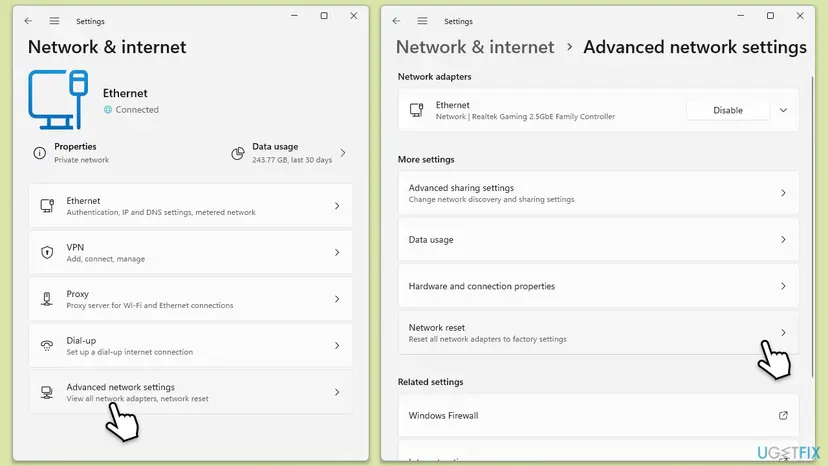
Every command and the full network reset in order: Reset the network and flush DNS
It worked if: After the restart the adapter connects, and the network services show Running in Services.
If not: Run Fix 1 again on the service that still fails. If a VPN or security driver is on its list, go to Fix 6.
Fix 6. Use a clean boot to find a third party program that blocks the chain
15 minutesLow riskThe error began after you installed a VPN, antivirus, firewall or network tool, or every dependency looks fine.
Some programs add their own drivers and services into the network or security chain. A clean boot starts Windows with only Microsoft services, so if the error is gone, one of the others is the cause.
- Open System Configuration. Select Search on the taskbar, type msconfig and select System Configuration from the results.
- Hide Microsoft services. On the Services tab, select the Hide all Microsoft services check box. Only services from other companies stay in the list.
- Disable the remaining services. Select Disable all, then select Apply.
- Open Task Manager. On the Startup tab of System Configuration, select Open Task Manager.
- Disable the startup apps. On the Startup apps tab in Task Manager, select each item whose status is Enabled and select Disable. Write down or take a screenshot of the items you disable: you need the list to turn them back on.
- Confirm the changes. Close Task Manager. On the Startup tab of System Configuration, select OK.
- Restart and test. Restart the PC. Windows now starts in a clean boot environment: try again the thing that failed (run the app, install the update, uninstall the program).
These steps were written for Windows 11 25H2 and 26H2. The full page with the other versions and what each result means: How to perform a clean boot in Windows
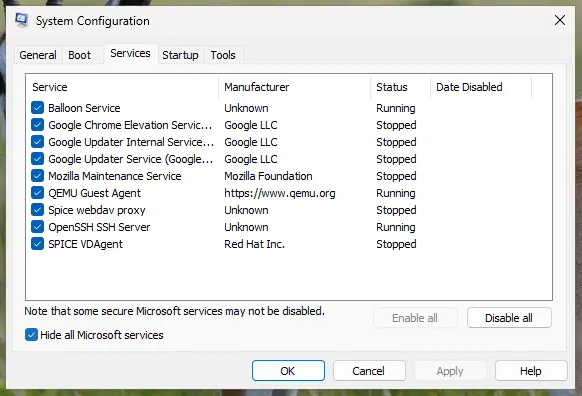
It worked if: In a clean boot the service starts. Turn the other services back on in small groups to find the program, then update or reinstall it.
If not: If the error stays in a clean boot, the cause is in Windows itself. Undo the clean boot and go to Fix 7.
Fix 7. Repair Windows system files with DISM and SFC
15 to 30 minutesNo riskSeveral Microsoft services fail, or the dependency gives an error that none of the fixes above explain.
When a Windows service's own files are damaged, it fails whatever its settings are. DISM repairs the store of Windows components, and SFC then puts damaged system files back from it.
- Open an elevated command window. Right-click Start and select Terminal (Admin), or type cmd in the search box, right-click Command Prompt and select Run as administrator. Select Yes when Windows asks for permission.
- Run DISM first. Type the command below and press Enter. DISM downloads clean copies of damaged components from Windows Update, so it can take several minutes. Wait until it says The operation completed successfully.
DISM.exe /Online /Cleanup-Image /RestoreHealth - Run System File Checker. In the same window, type the command below and press Enter. Do not close the window until the verification reaches 100%.
sfc /scannow - Read the result and restart. Compare the last message with the table below this guide, then restart the PC so that repaired files are loaded.
These steps were written for Windows 11 24H2 and 25H2. The full page with the other versions and what each result means: Run DISM and SFC to repair Windows system files
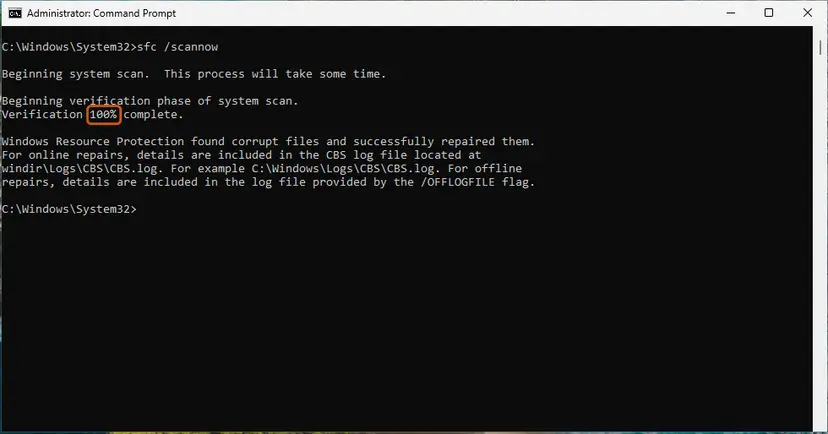
It worked if: SFC reports no integrity violations or says it repaired them, and the service starts after a restart.
If not: If the dependency still fails, go to Fix 8.
Fix 8. Go back to a restore point or reinstall Windows over itself
30 to 90 minutesRead the warningNothing above worked, or you cannot tell which startup type or account a service should have.
System Restore puts back the service settings and drivers of an earlier day in one step. A repair install replaces every Windows file and resets Windows services while it keeps your files and apps.
Your documents stay. Programs, drivers and updates installed after the restore point are removed. Back up important files first, especially before a repair install: Back up your files (Windows Backup, File History, Time Machine)
- Press Win + R, type
rstruiand press Enter. - Choose a restore point from before the error started and select Scan for affected programs.
- Select Next and Finish, and let the PC restart.
- With no usable restore point, reinstall Windows while you keep your files and apps.
System Restore step by step: Undo recent changes with System Restore Repair install: Reinstall Windows without losing files
It worked if: The dependency and the service start again.
If not: Collect the details in the next section before you ask Microsoft or a program's maker for help.
If error 1068 is still there: what to read and what to collect
With error 1068 the useful fact is always one level down: which dependency failed and why. Collect these before you post in Microsoft's forum or open a ticket.
- The output of
sc qc <service>for the failing service andsc queryfor each dependency. - The error of the dependency itself, from
net start <name>. - The System log. In Event Viewer, open Windows Logs > System and filter by the source Service Control Manager. Around the time of the failure there is usually one entry for the dependency and one for the service that depended on it.
- What changed. Run
perfmon /relto open Reliability Monitor, which lists installs, updates and removals by day. - Your Windows version and build. Press Win + R, type
winverand note both.
| Sign | What it means |
|---|---|
| The error is 1075, not 1068. | The dependency is missing, not stopped. Use the 1075 guide linked in the causes section. |
| The dependency answers 1058 and it is not Disabled. | It "has no enabled devices": the hardware it serves is off or missing. Check Device Manager and the device itself. |
| The network adapter is not in Device Manager at all. | A driver or hardware problem. Get the driver from the PC or adapter maker, or check the hardware. |
| Many services fail with different errors at once. | Windows is damaged. Fix 7 and Fix 8. |
Windows 10 left support on 14 October 2025. A Windows 10 PC whose services keep breaking gets no more security fixes, so a repair install is a good moment to plan the move to Windows 11.
How to avoid error 1068 in the future
- Change only the services a guide names, and note their old startup type first.
- Leave dependencies on Manual, which lets Windows start them when needed.
- Keep System Protection on for drive C:, so a restore point exists before big changes.
- Restart after you install or remove a VPN, antivirus or network tool.
- Do not use "disable unneeded services" lists or tweak tools; the services they turn off are dependencies of others.
- Do not add Local Service or Network Service to the Administrators group.
- Do not delete a service's DependOnService value in the registry to skip a dependency.
- Do not set every network service to Automatic; it does not fix a stopped dependency.
Frequently asked questions
What does error 1068 mean?
Error 1068 means Windows could not start a service because a service or group it depends on did not start. Microsoft's list of system error codes gives it the value 0x42C and the text "The dependency service or group failed to start." The service you clicked is usually fine. One service on its dependency list is installed but stopped, most often because it is disabled. Run sc qc on the failing service, sc query on each dependency, and net start on the stopped one to see its own error.
How do I fix "The dependency service or group failed to start"?
Find the dependency that does not start, as Fix 1 shows, and start it by hand with net start to see its own error. If it answers 1058, it is disabled: set its startup type back to Manual or Automatic in Services. If it answers 1069, its Log On account is wrong: set it back to Local Service, Network Service or Local System. For network services that still fail, reset the network. If several Windows services fail, repair Windows with DISM and SFC.
What does "System error 1068 has occurred" mean?
It is the same error shown by the net start command instead of the Services window. The next line, "The dependency service or group failed to start", is Microsoft's text for 1068. The fix is the same: run sc qc on the service you tried to start, find the dependency that is stopped, and start that one with net start to see what really fails. An error 1068 on the dependency too means the cause is one more level down.
Network Location Awareness or Wi-Fi fails with error 1068. What should I do?
This is the case in the question at the top. Run sc qc NlaSvc in an administrator Command Prompt and check each dependency with sc query. A disabled dependency is the most common reason, so try Fix 2 first, then Fix 3 if the dependency answers 1069. If the network services still do not start, reset Winsock and, if needed, the whole network from Settings, as Fix 5 shows. Write down your Wi-Fi password first.
Windows Defender Firewall or Security Center shows error 1068. Is it malware?
Not always, but check. Windows Defender Firewall and Security Center depend on other services, and a tweak tool or an old guide may have turned one off. Find the stopped dependency with Fix 1 and turn it back on with Fix 2. If it goes back to Disabled after a restart, or Windows Security will not open, something is changing it: run a full and an offline scan as Fix 4 shows. German Windows calls Security Center Sicherheitscenter; the error and the steps are the same.
Windows Connection Manager fails with error 1068. Is that the same problem?
Yes. Windows Connection Manager decides which network you connect to, and it depends on other network services. Run sc qc Wcmsvc to see its list, check each name with sc query, and start the stopped one with net start to read its error. Fix 2 or Fix 3 usually solves it. If the network services still fail, reset the network with Fix 5. The same applies to Windows Media Player Network Sharing Service, which needs other services such as Windows Search to run first.
Is error 1068 the same on Windows 11 and Windows 10?
Yes. The code, the text and the cause are the same on Windows 11 and Windows 10, and so are Services, sc qc, sc query, sc config and net start. Only the Settings path to Network reset differs a little, and Fix 5 gives both. Windows 10 left support on 14 October 2025, so a Windows 10 PC with services that keep failing is a good reason to plan the move to Windows 11.
What is the difference between error 1068 and error 1075?
Error 1068 means a dependency exists but did not start. Error 1075 means a dependency does not exist or has been marked for deletion. With 1068, sc query shows the dependency as STOPPED, and you fix what stops it. With 1075, sc query on the dependency answers 1060, and you restore the missing service or remove its name from the list. Both texts come from Microsoft's list of system error codes, and the 1075 guide is linked in the causes section above.
I see this error in German, Spanish or another language. Is it the same?
Yes. Windows translates the text, but the code 1068 and the fixes are the same. The German text is Fehler 1068: Der Abhängigkeitsdienst oder die Abhängigkeitsgruppe konnte nicht gestartet werden. The Spanish text reads Error 1068: no se puede iniciar el servicio o grupo de dependencia. Searches for errore 1068, erreur 1068, erro 1068 and błąd 1068 mean the same Windows error. The commands sc qc, sc query, sc config and net start are not translated, so the steps work as written.
Should I delete the dependencies in the registry to make the service start?
No. Older guides, including the earlier version of this page, told you to delete values in the DependOnService entry of the DHCP Client and EapHost services. That hides the error but lets a service start before what it needs is running, which can break networking in new ways. The dependency that does not start is the real problem, so fix it with Fix 2 or Fix 3. If you already changed the registry and the network misbehaves, use System Restore as Fix 8 shows.
Sources
Did this fix work?
One click, no account. It tells the next reader which guides are worth their time.
Questions and experiences: fix Error 1068: The dependency service or group failed to start in Windows
Still broken, or found a fix we did not cover? Ask here: members and our editors answer. Reading is open; writing needs a free account.
…