
How to fix Microsoft Office installation error 0-2060 in Windows?

Prefer to fix it yourself? The manual steps follow.
- 7methods
- 5 to 40 minutes
- Easy
Applies to Microsoft 365, Office 2024, Office 2021 and Office 2019 installed with the online installer from a Microsoft account on Windows 11 and Windows 10
7 methods in this guide
So I was trying to install Office 2021 on my new PC and I got an installation error code 0-2060. How can I fix it? I'm using the latest version of Windows 11.
Error Code: 0-2060 (0) appears when the online Office installer cannot get its files from Microsoft's servers, even though your internet and disk look fine. A proxy, a VPN or a company firewall is the usual blocker. Run setup again on another network, such as a phone hotspot, before you change anything else.
0-2060 (0) is Office setup failing to download Office. Connect the PC to another network without a proxy or firewall, for example a phone hotspot, and run the installer again (Fix 1). At home, turn off any VPN and the proxy in Settings > Network & internet > Proxy (Fix 2). If it still fails, download Microsoft's offline installer and install from that (Fix 3).
| Error | Couldn't install, then We're sorry, we had a problem installing your Office program(s). and Is your internet connection working? Do you have enough free space on your main hard drive? Under it: Error Code: 0-2060 (0). |
|---|---|
| Where it appears | In the small white Microsoft setup window, after you run the Office installer downloaded from your Microsoft account. It shows during the download stage, before Office is on the PC. |
| Main cause | Setup cannot reach Microsoft's servers through the network: a company proxy or firewall, a VPN, a proxy set in Windows, or a security program that filters web traffic. |
| Fastest fix | Run the installer again on another network without a proxy, such as a phone hotspot (Fix 1). |
| Also written as | error code 0-2060 (0), Error Code: 0-2060 (0), 0-2060(0), error 0 2060, error 02060. The same code appears in setup windows in every language. |
| Affects | Click-to-Run Office from the online installer: Microsoft 365, Office 2024, Office 2021 and Office 2019, on Windows 11 and Windows 10. |
| Microsoft's status | Not a known bug and not on Microsoft's list of Office installation error codes (checked 15 October 2026). A Microsoft community moderator advises turning off the proxy, antivirus, firewall or VPN and checking for other Office versions. |
| Not the cause | Your product key or payment. Setup has not checked the licence when this window appears. |
| Time to fix | 5 minutes when another network is at hand. 30 to 40 minutes with the offline installer or when an older Office has to be removed first. |
Facts checked on 15 October 2026. Steps written for Windows 11 (25H2 and 26H2) and Windows 10 22H2, read against Microsoft's support pages and the Microsoft Q&A thread for this code.
What error code 0-2060 (0) means when Office says Couldn't install
The window has the Microsoft logo and the orange heading Couldn't install. It asks two questions: whether your internet connection works and whether you have enough free space on your main hard drive. Under them are the link Go online for additional help. and the line Error Code: 0-2060 (0). The only button is Close.
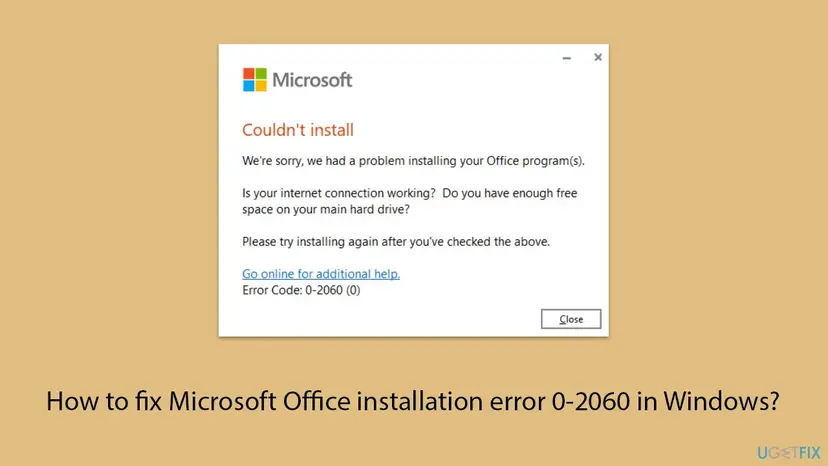
The file you download from your Microsoft account is not Office itself. It is a small installer that fetches the Office apps from Microsoft's servers while it runs. The code 0-2060 is shown when that download fails. The two questions are the same on many Office setup errors, so they do not tell you what really went wrong.
Error code 0-2060 (0), Error Code: 0-2060 (0), 0-2060(0), error 0 2060 and error 02060 are the same error. The (0) at the end is part of the code. Codes that start with 30, such as 30094 or 30182-1011, come from other stages of setup and have other causes.
Microsoft's page Troubleshoot installing Office links articles for codes such as 0-3, 0-1011 and 0-1018, but not for 0-2060. The best Microsoft evidence is a thread on Microsoft Q&A from 2022. There the person with the error had a working connection and more than 100 GB free, and the error ended on another network.
What causes Office error 0-2060, from the most common to the rare
Microsoft publishes no list of causes for this code. The order below follows the Microsoft moderator's answer on Microsoft Q&A, the solution the person who asked confirmed, and Microsoft's own note on what the offline installer is for. It is an order of likelihood, not a statistic.
| How often | Cause | Typical sign | Fix |
|---|---|---|---|
| Most often | A company or school proxy and firewall that does not let the installer reach Microsoft's servers | Websites open, but the PC is on an office, school, hotel or other managed network. | Fix 1 |
| Often | A VPN or a proxy set in Windows Settings, sometimes left there by an older program | A VPN app runs at startup, or Use a proxy server is on in Settings. | Fix 2 |
| Often | A slow or unstable connection that breaks the long download | Setup runs for a while and stops. Wi-Fi drops now and then. | Fix 3 |
| Less often | Another Office version on the PC that gets in the way of the new one | The PC came with Office preinstalled, or a trial or older Office is in Installed apps. | Fix 4 |
| Less often | Too little free space on the system drive | Drive C: shows a red bar in File Explorer. | Fix 5 |
| Rarely | Antivirus or firewall software that filters the download | A third-party security suite with web protection is installed. | Fix 6 |
| Rarely | Damaged network settings in Windows | Other programs also fail to download updates. | Fix 7 |
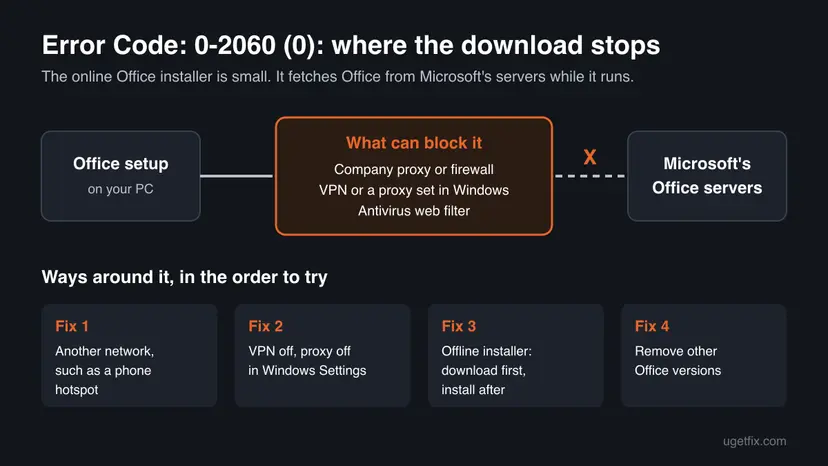
Several websites also blame damaged Windows system files or the Office file cache for this code. No Microsoft page and no solved report that we read supports that, so this guide does not include those steps.
How to fix error code 0-2060 (0) when installing Office
Fix 1 and Fix 2 remove what blocks the connection, and they solve most cases. Fix 3 avoids the online download altogether. Fix 4 to Fix 7 are for the rarer causes. Use the table to pick your start.
| What you see or have | Start with |
|---|---|
| The PC is on a work, school, hotel or public network | Fix 1 |
| A VPN app is installed, or you once set a proxy | Fix 2 |
| Your connection is slow or drops, or no other network is available | Fix 3 |
| Office came preinstalled, or an older Office or a trial is on the PC | Fix 4 |
| Drive C: is almost full | Fix 5 |
| A third-party antivirus with web protection is installed | Fix 6 |
Fix 1. Run Office setup again on another network
5 to 20 minutesNo riskEveryone first, above all on a work, school or other managed network.
On Microsoft Q&A, the person with this exact code moved the PC from a controlled network to a free network without a proxy and firewall, and Office installed. A new network removes the most common blocker without changing any setting.
- Close the error window with Close.
- Turn on the mobile hotspot on your phone, or use a home network you know works.
- Select the network icon next to the clock and connect the PC to that network.
- Disconnect from the old Wi-Fi network or unplug the network cable, so that Windows uses only the new one.
- Run the Office installer again from your Downloads folder.
- Keep the PC awake and on that network until setup says it is done.
Office is a large download. On a phone hotspot with a data limit, check how much data you have left before you start, or use Fix 3 to download the files once on a network that allows it.
If you must install on the company network, ask the IT department. The proxy or firewall has to allow the Office servers, and only the network administrator can change that.
It worked if: Setup shows its progress and ends with a message that Office is installed, and Word or Excel appears in the Start menu.
If not: If the error also appears on a hotspot, the block is on the PC itself. Go to Fix 2.
Fix 2. Turn off the VPN and the proxy in Windows Settings
5 minutesLow riskA VPN app is installed, or a proxy was ever set on this PC by you, a program or a former employer.
The Microsoft moderator who answered this code on Microsoft Q&A asked first to turn off the proxy and the VPN. Both route the installer's traffic through another server, which can refuse or break the download.
- Open your VPN app and select Disconnect. Close the app from the icon next to the clock as well.
- Press Win + I to open Settings.
- Windows 11: open Network & internet > VPN and check that no connection says Connected. Windows 10: open Network & Internet > VPN.
- Go back and open Proxy.
- Under Manual proxy setup, select Edit next to Use a proxy server. On Windows 10 the switch is shown on the page itself.
- Set Use a proxy server to Off and select Save.
- Run the Office installer again.
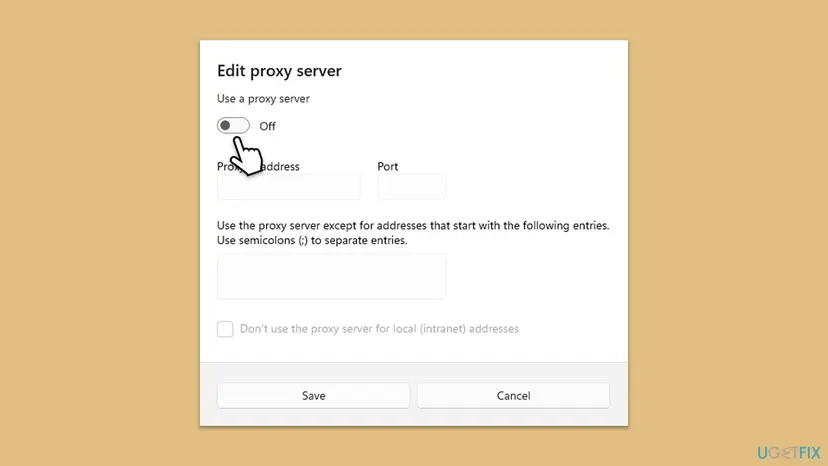
If the proxy address and port were filled in, write them down before you switch it off. On a work PC the proxy may be needed for other things, and on a managed PC the switch can be greyed out by policy. Then ask the administrator.
It worked if: The VPN app shows Disconnected, Use a proxy server is Off, and Office setup runs to the end.
If not: If no VPN or proxy was on, or setup still fails, skip the online download with Fix 3.
Fix 3. Install Office with Microsoft's offline installer
20 to 40 minutesNo riskYour connection is slow or unstable, no other network is at hand, or Fix 1 and Fix 2 did not help.
Microsoft says the offline installer may help bypass proxy, firewall, antivirus or internet connection issues during installation. It downloads all Office files as one image first, so setup no longer needs the servers while it installs.
- Open Microsoft's page Use the Office offline installer and pick the tab for your product, for example the one for home products.
- Select Download and sign in with the Microsoft account that owns Office.
- In the Install window, select Offline installer in the Choose a version list.
- Select your language, then Install, and save the file.
- Open the Downloads folder and double-click the image file, for example
O365HomePremRetail.img. Windows opens it as a new virtual drive. - Open the Office folder on that drive.
- Double-click
Setup64.exefor 64-bit Office orSetup32.exefor 32-bit Office.
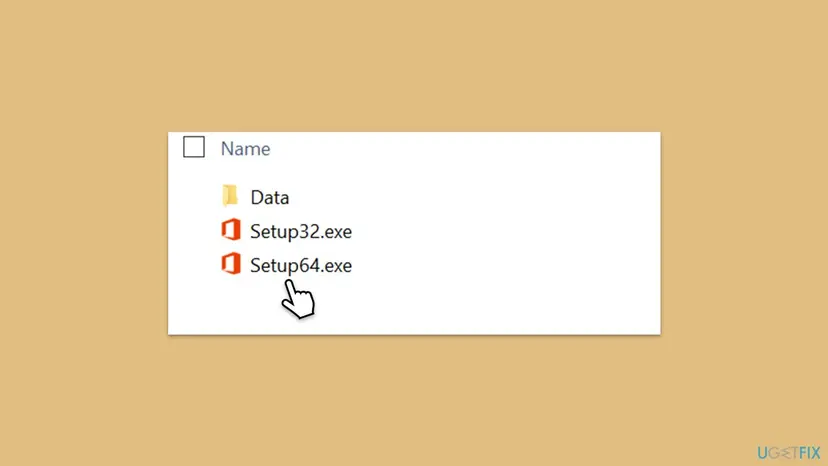
- If no virtual drive window opens, open File Explorer and look for a new drive, for example (D:). Double-click the image file again if it is not there.
- After setup ends, connect to the internet and open Word or Excel to activate Office. Then select File > Account > Update Options > Update Now.
- Choose 64-bit unless an old add-in needs 32-bit. Two Office editions with different bit versions cannot be installed side by side.
It worked if: The virtual drive opens, Setup64.exe runs without asking for the internet, and Office appears in the Start menu.
If not: If the offline setup also stops, another Office on the PC may be in the way. Go to Fix 4.
Fix 4. Remove other Office versions, then install again
15 to 30 minutesRead the warningOffice came preinstalled, a trial or an older Office is on the PC, or Office was installed before and removed badly.
The Microsoft moderator's second step for this code was to check Programs and Features for other Office versions. A preinstalled trial or a half-removed Office can stop the new setup from finishing.
Uninstalling Office removes the apps, not your documents. What you can lose is the way back to the old version: write down its product key or the Microsoft account it belongs to first. Close every Office app and save open files before you start.
- Windows 11: open Settings > Apps > Installed apps. Windows 10: open Settings > Apps > Apps & features.
- Type
Officein the search box of the list. - Note every entry such as Microsoft 365, Microsoft Office, Office Home or OneNote that belongs to another version than the one you want.
- Select the three dots next to it and choose Uninstall. Every screen: Uninstall a program or app in Windows.
- Restart the PC with Restart, not Shut down.
- Run the Office installer again.
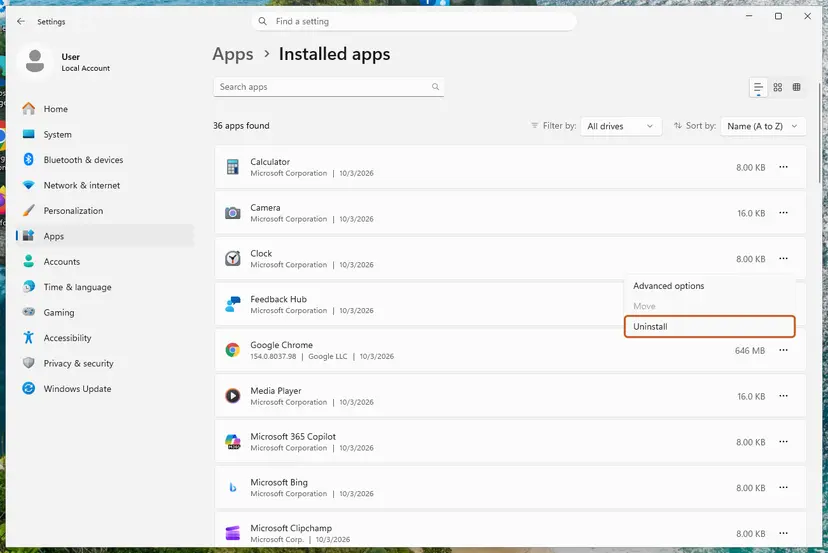
The classic Control Panel > Programs > Programs and Features list, which the Microsoft moderator named, shows the same desktop programs. If an entry refuses to go, Microsoft's page Uninstall Microsoft 365 or Office from a PC offers an uninstall troubleshooter. For a closely related setup code with the same remedy, see our guide to Office error 0-2035.
It worked if: No other Office version is left in Installed apps, and the new setup runs to the end after the restart.
If not: If no other Office was installed, check the free space on drive C: with Fix 5.
Fix 5. Make sure the system drive has enough free space
5 to 15 minutesLow riskDrive C: is nearly full, or the PC has a small SSD.
The error window itself asks about free space on the main hard drive. Office is always installed on the system drive, and Microsoft lists 4 GB of available disk space for current Office versions.
- Press Win + I and open System > Storage.
- Read the used and free space of drive C: at the top.
- If less than about 10 GB is free, empty Temporary files and the Recycle Bin. Every screen: Free up disk space and delete temporary files.
- Run the Office installer again.
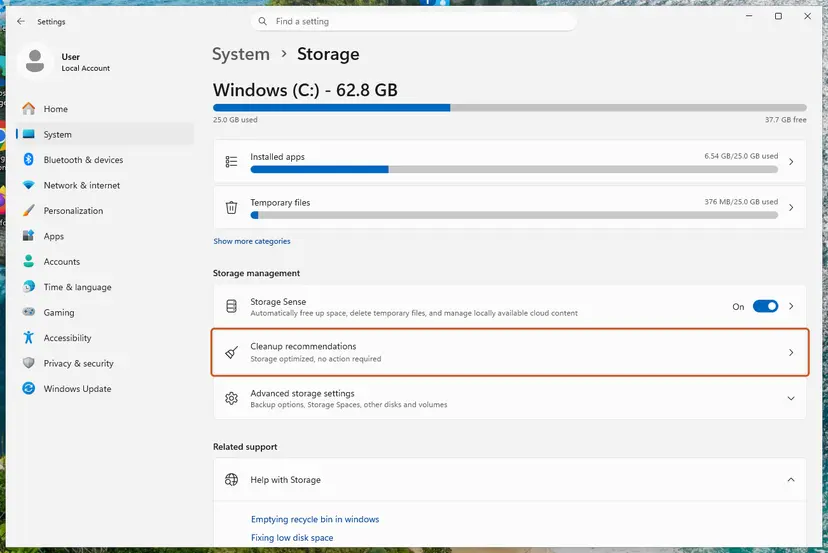
We suggest more than the 4 GB minimum because the download, the installed apps and the first updates need room at the same time. If you already have tens of gigabytes free, space is not your cause and you can move on.
It worked if: Storage shows several gigabytes free on drive C:, and setup no longer stops with 0-2060.
If not: If there was plenty of space, test the security software with Fix 6.
Fix 6. Pause the antivirus and firewall for one test
10 minutesLow riskA third-party security suite with web protection or its own firewall is installed, and Fix 1 to Fix 5 did not help.
The Microsoft moderator lists antivirus and firewall next to the proxy for this code. Web protection in some security suites inspects downloads and can cut off the installer's connection to Microsoft's servers.
- Open your security program and pause its real-time and web protection for a short time, such as 15 minutes. Steps for Microsoft Defender: Turn off Microsoft Defender protection for a moment.
- Run the Office installer again.
- Turn the protection back on straight after the test, whatever the result.
If setup works only with the protection paused, do not leave it off. Add the Office installer to the program's exclusions, or ask its maker why it blocks a Microsoft installer. Microsoft Defender on its own does not usually need this test.
It worked if: Office installs during the short pause, and the security program shows protection on again afterwards.
If not: Turn the protection back on. If setup still fails, reset the network settings of Windows with Fix 7.
Fix 7. Reset the network settings of Windows
10 minutesLow riskOther programs also fail to download, or a proxy or VPN left settings behind that Fix 2 could not clear.
Since 0-2060 is a download failure, broken network settings on the PC can cause it on every network. A network reset puts adapters and network components back to their defaults and clears leftovers of old VPN clients.
- Open an elevated command window. Right-click Start and select Terminal (Admin), or type cmd in the search box, right-click Command Prompt and select Run as administrator. Select Yes when Windows asks for permission.
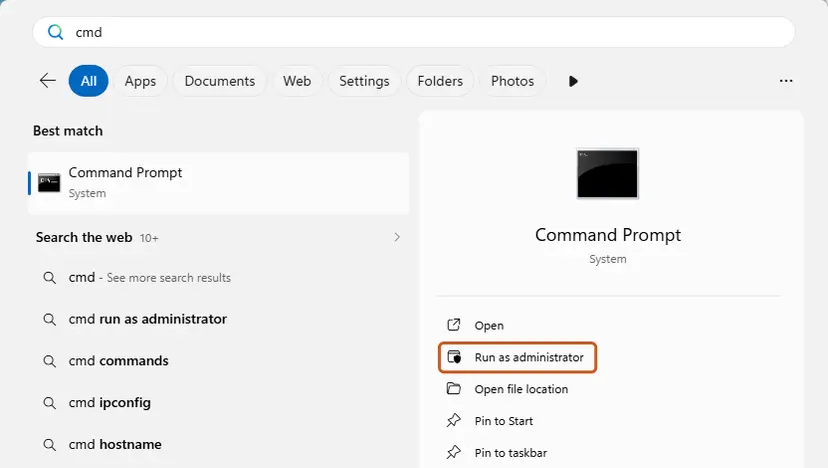
Search for cmd and choose Run as administrator. Screenshot: Windows 11 26H2. - Flush the DNS cache. Type the command below and press Enter. Windows forgets the website addresses it looked up earlier and asks for them again.
ipconfig /flushdns - Reset Winsock. Type the command below and press Enter. It returns the Windows sockets catalog to its default state.
netsh winsock reset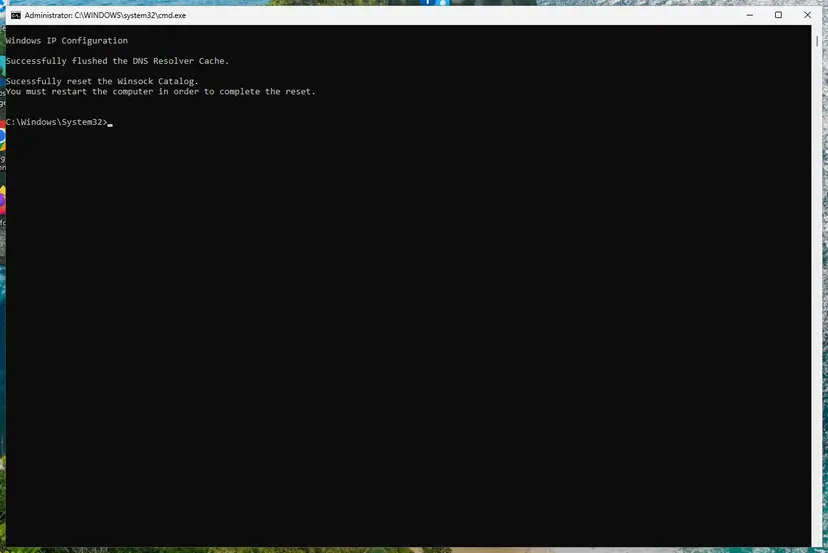
Both commands report success; the Winsock reset asks for a restart. Screenshot: Windows 11 26H2. - Reset TCP/IP. Type the command below and press Enter. If you entered an IP address or DNS server by hand, note it first: you may need to enter it again.
netsh int ip reset - Get a new IP address. Run these two commands one after the other. The connection drops for a moment between them.
ipconfig /release ipconfig /renew - Restart the PC. Restart Windows so the Winsock and TCP/IP resets take effect, then test the connection. If it still does not work, continue with the network reset below.
- Open Network reset. Open Settings > Network & internet > Advanced network settings and select Network reset.
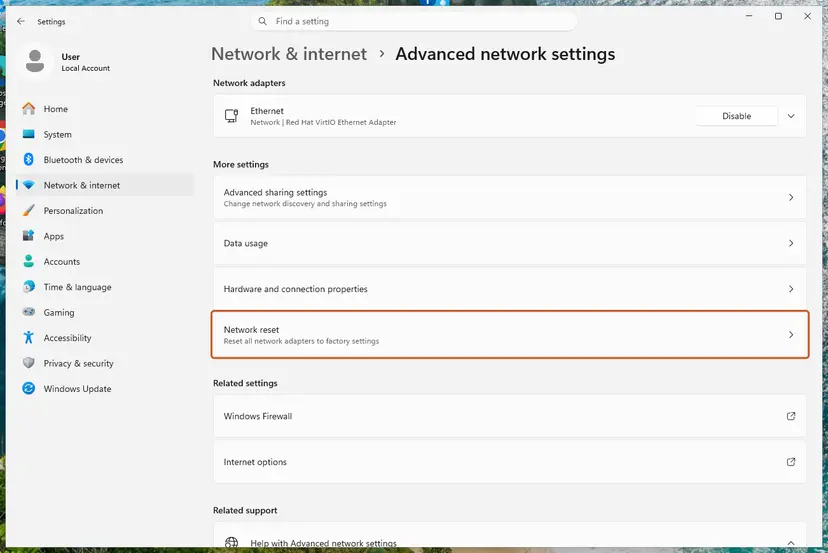
Network reset is under More settings in Advanced network settings. Screenshot: Windows 11 26H2. - Reset now. Select Reset now, then Yes to confirm. Windows removes and reinstalls all network adapters and restarts the PC.
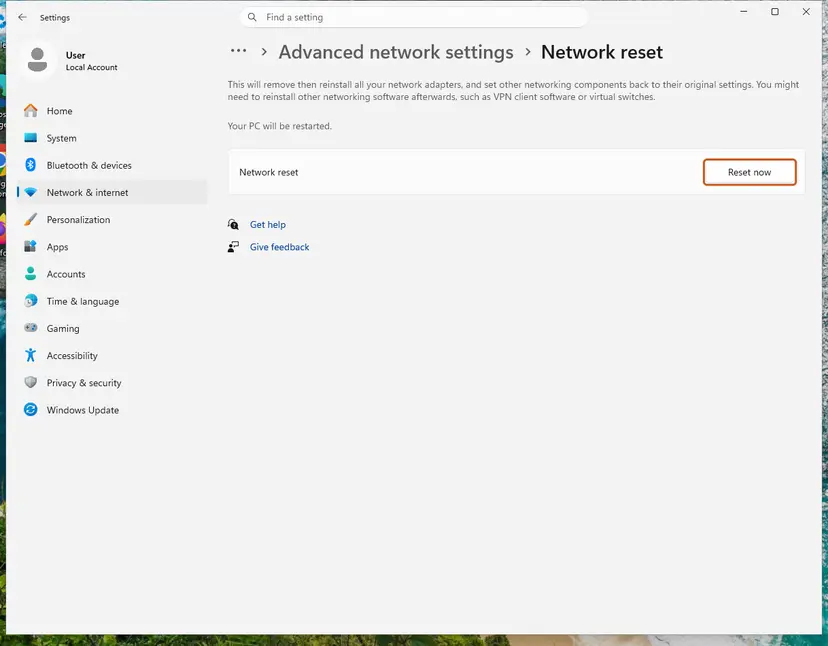
Network reset warns that VPN software or virtual switches may need to be reinstalled. Screenshot: Windows 11 26H2. - Reconnect. After the restart, connect to your Wi-Fi network again (you will need its password) and reinstall or reconfigure VPN software if it stopped working.
These steps were written for Windows 11 24H2 and later. The full page with the other versions and what each result means: Reset the network and flush DNS
- After the restart, connect to your network again and enter the Wi-Fi password if asked.
- Reinstall or reconnect a VPN client only if you need it, and keep it off while Office installs.
- Run the Office installer again.
It worked if: The PC is back online after the restart, websites open, and Office setup completes.
If not: If 0-2060 still appears, read the setup log as described in the next section and contact Microsoft support.
Still getting error 0-2060? Read the setup log and ask the right people
The window gives only general questions. Office setup writes more detail to log files in two temporary folders, and the newest file is usually the one from your failed attempt.
| Folder | How to open it | What is in it |
|---|---|---|
%temp% | Press Win + R, type %temp% and press Enter. | The log of the installer you started, written as your user. |
%windir%\Temp | Press Win + R, type %windir%\Temp and confirm the permission prompt. | Logs of the part of setup that runs under the system account. |
- Run the installer once more and note the time it fails.
- Open
%temp%, switch to the Details view and sort by Date modified, newest first. - Open the newest file whose name begins with the name of your PC and ends in
.log. - Press Ctrl + F and search for
error,failandproxy. Read the lines just before the end of the file. - Repeat it in
%windir%\Temp.
- What to send to Microsoft support: the error code, the name of your Office product, whether a proxy or VPN is in use, the newest log files and your Windows version from Settings > System > About.
- A managed work or school PC may block installers or the Office servers by policy. Then only the administrator can install Office, and no fix on this page will change that.
- A licence problem looks different. If your account shows no Office to install, contact the seller or Microsoft with the proof of purchase. That is not error 0-2060.
Microsoft does not document which line Office setup writes to the log for 0-2060, so we do not quote one. Treat the log as evidence: a timeout, a refused connection or a proxy address points back to Fix 1 to Fix 3.
How to avoid error 0-2060 the next time you install Office
The error is about the path between your PC and Microsoft's servers, so prevention is mostly about where and how you start setup. A few habits keep the next installation simple.
- Install Office on your home network or a hotspot, not on a company, hotel or school network.
- Disconnect a VPN before you start Office setup.
- Keep at least 10 GB free on drive C:.
- Keep the offline installer image for a PC with a poor connection.
- Remove a preinstalled Office trial before you install the version you bought.
- Leave a proxy setting on after the program or job that needed it is gone.
- Turn your antivirus off for good to make an installer work.
- Start setup several times in a row while the first attempt is still running.
- Use Office installers from other sites than your Microsoft account.
- Install two Office editions with different bit versions side by side.
Frequently asked questions
What does error code 0-2060 (0) mean?
It means that Office setup could not download the Office files from Microsoft's servers. The window says Couldn't install and asks whether your internet connection works and whether you have enough free space. Those questions are general, so many people with the error have a working connection and plenty of space. In the case answered on Microsoft Q&A, a company proxy and firewall were the real cause. Installing on another network ended the error.
My internet works and I have enough space. Why do I still get 0-2060?
Because a working connection for websites is not the same as a clear path for the Office installer. A proxy, a VPN, a company firewall or the web filter of an antivirus can let your browser through and still block or break the download. The person on Microsoft Q&A had more than 100 GB free and a working connection, and the fix was another network. Try a phone hotspot first, then turn off the VPN and the proxy.
How do I fix error code 0-2060 when installing Office 2021?
The same way as for Microsoft 365 and Office 2024, because Office 2021 uses the same online installer. Start setup on another network without a proxy, turn off any VPN and the proxy in Windows Settings, and if that fails use the offline installer from Microsoft's page. Microsoft lists Office 2021 among the products that page applies to. Remove a preinstalled Office trial first if your new PC came with one.
Will the offline installer fix 0-2060?
Often, yes. Microsoft says the offline installer may help bypass proxy, firewall, antivirus or internet connection issues during installation. It downloads all Office files as one image file, which Windows opens as a virtual drive. You then run Setup64.exe or Setup32.exe from the Office folder on that drive. The download itself still needs a connection, so on a blocked company network download the image somewhere else first.
Should I disable my antivirus to install Office?
Only for one short test, and only if the first fixes did not help. Pause real-time and web protection, run the installer once and turn the protection back on straight away, whatever the result. If Office installs only during the pause, add the installer to the exclusions of the security program instead of leaving protection off. Microsoft Defender on its own rarely blocks Office setup.
Is error 0-2054 (0) the same as 0-2060 (0)?
No. Both come from Office setup and both start with 0, but they are reported in different situations. Error 0-2054 (0) is usually seen with the Office Deployment Tool, the command-line installer for administrators, when the configuration file is not given. Error 0-2060 (0) comes from the normal online installer and points to the download. Our guide to Office error 0-2048 covers the Deployment Tool codes.
Do SFC, DISM or a clean boot fix error 0-2060?
Very unlikely. The error is about the download from Microsoft's servers, and System File Checker repairs Windows system files that have nothing to do with that path. A clean boot turns off startup programs, which only helps when one of them is a VPN or a security suite. Fix 2 and Fix 6 test those directly. No Microsoft source and no solved report that we read credits SFC or DISM for this code.
Can I fix 0-2060 on a work or school computer by myself?
Often not. On a managed PC the proxy and firewall are set by the organisation, and the switches in Settings may be greyed out. Taking the laptop home and installing on your own network is allowed in many organisations, but check the rules first. Otherwise ask the IT department to install Office or to allow the Office servers through the firewall. That is their job and needs administrator rights.
I see this error in another language. Is it the same?
Yes. The setup window is translated, but the code 0-2060 (0) and the cause stay the same in every language of Office and Windows. Searches such as kenapa ini, lỗi gì, no funciona nada or como soluciono eso with a picture of this window all lead to the same fixes. Try another network, turn off the VPN and the proxy, and use the offline installer if the online setup keeps failing.
Sources
- Microsoft Support: Troubleshoot installing Office (list of installation error codes and the offline installer note) (support.microsoft.com)
- Microsoft Support: Use the Office offline installer (support.microsoft.com)
- Microsoft Q&A: Error Code: 0-2060 (0) (answer by a Microsoft community moderator and the solution confirmed by the person who asked) (learn.microsoft.com)
Did this fix work?
One click, no account. It tells the next reader which guides are worth their time.
Questions and experiences: fix Microsoft Office installation error 0-2060 in Windows
Still broken, or found a fix we did not cover? Ask here: members and our editors answer. Reading is open; writing needs a free account.
…