
How to fix Kernel-PnP Event ID 411 in Windows?

Prefer to fix it yourself? The manual steps follow.
- 7methods
- 5 minutes to read the event, 15 to 40 minutes for a driver or firmware fix
- Intermediate
Applies to Windows 11, Windows 10
7 methods in this guide
For a while now, I have been experiencing extremely frustrating connectivity problems. My internet connection appears to cut out unexpectedly for a few seconds, exclusively on my PC. While this is generally not a major issue for most activities, online gaming has become almost impossible. Upon reviewing the event log, I noticed that Kernel-PnP Event ID 411 appears whenever these incidents occur.
Kernel-PnP Event ID 411 means Windows found a device during Plug and Play but its driver did not start. The event names the device and a Problem code, so the fix depends on which device it is. Read the newest 411 first: a removed USB device needs nothing, a Wi-Fi card or GPU needs its maker's driver.
Event 411 from Kernel-PnP says one device's driver failed to start. Open the newest 411 and read DeviceInstanceId and Problem (Fix 1): 0xa is Device Manager Code 10, 0x15 is a device being removed. Then install the maker's driver for that exact device (Fix 2), or roll back a new one (Fix 3). For Wi-Fi drops, also stop Windows from powering the adapter down (Fix 5).
| Error | Event ID 411, source Kernel-PnP (Microsoft-Windows-Kernel-PnP), level Error: "Device [device ID] had a problem starting." |
|---|---|
| Where it appears | In Event Viewer under Applications and Services Logs > Microsoft > Windows > Kernel-PnP > Device Configuration, the channel Microsoft-Windows-Kernel-PnP/Configuration, usually at startup or when a device is plugged in. |
| Main cause | The driver of the one device the event names did not start: a wrong, old or damaged driver, a device that was removed, or hardware that drops off the bus. |
| Fastest fix | Read DeviceInstanceId and Problem in the newest 411 (Fix 1), then reinstall that device's driver from its maker (Fix 2). |
| Also written as | Event 411, event id 411, kernel-pnp 411, kernel pnp 411, event 411 kernel pnp, Microsoft-Windows-Kernel-PnP EventID 411, evento 411 kernel pnp. |
| The Problem value | The Device Manager error code in hex: 0xa is Code 10, 0x1c is Code 28, 0x1f is Code 31, 0x2b is Code 43 (Microsoft's CM_PROB list). |
| Affects | Windows 11 and Windows 10, any device class: network adapters, graphics cards, audio, Bluetooth, USB and chipset devices. |
| Microsoft's status | Not a bug. A Microsoft support agent describes it as a driver that fails to load during Plug and Play. The fix lies with the device's driver or firmware. |
| Time to fix | 5 minutes to identify the device. A driver reinstall takes 10 to 20 minutes, a BIOS update up to 30. |
Facts checked on 15 October 2026. Steps written for Windows 11 (25H2 and 26H2) and Windows 10 22H2, from Microsoft's Device Manager documentation.
What Kernel-PnP Event ID 411 means
Kernel-PnP is the Plug and Play manager inside the Windows kernel. It detects each device, picks its driver and starts it, at every boot and every time you plug something in. It writes its steps to the log Microsoft-Windows-Kernel-PnP/Configuration, which Event Viewer shows as Device Configuration under Kernel-PnP.
Event ID 411 is the Error in that log. A Microsoft Community support specialist sums it up as a device driver that fails to load during the Plug and Play process. In Event Viewer the General tab reads like this, followed by the driver details:
Event 411 as Event Viewer shows it (example from a Dell PC, posted in Dell's community)
Device PCI\VEN_8086&DEV_8C3A&SUBSYS_05B71028&REV_04\3&11583659&0&B0 had a problem starting.

Driver Name: oem44.inf
Class Guid: {4D36E97D-E325-11CE-BFC1-08002BE10318}
Service: MEIx64
Lower Filters:
Upper Filters:
Problem: 0xA
Problem Status: 0xC000009E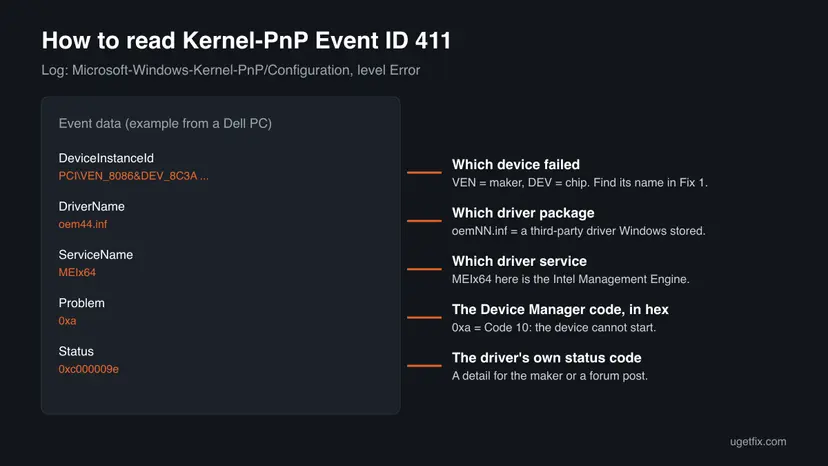
- DeviceInstanceId names the device.
VEN_is the maker's ID andDEV_the chip.PCI\means a card or a chip on the board,USB\a USB device,HID\a keyboard, mouse or game controller. - Problem is the Device Manager error code written in hex. Convert it to decimal and look it up in Microsoft's list (the causes table below).
- Status is a lower level status code from the driver. It is useful to the maker's support or in a forum post, rarely for choosing a fix.
- Other spellings. People search kernel-pnp 411, kernel pnp 411, event 411 and evento 411 kernel pnp. They all mean this one event.
Kernel-PnP only reports that a driver did not start. The real fault sits in the device the event names. That is why the generic advice to change DNS or run troubleshooters rarely helps: it does not touch the failing driver.
Why Event ID 411 appears: the causes, ranked
Most often the driver of the named device is the generic one Windows picked, an old one, or one a Windows update replaced. Less often the device was simply unplugged or is a leftover of hardware you no longer have. Rarely the card itself drops off the bus, which no driver can fix.
| Problem | Device Manager code | What it means | Fix |
|---|---|---|---|
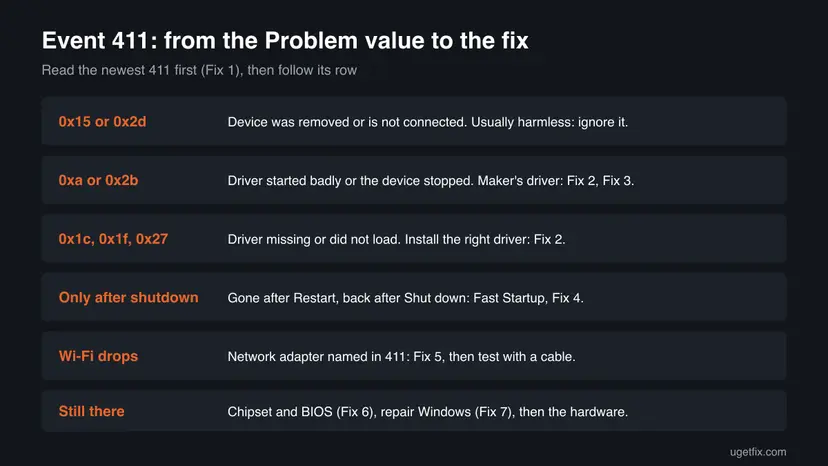
| 0x15 or 0x2d | Code 21 or Code 45 | The device is being removed or is not connected. Often harmless. | Fix 1 only |
| 0xa | Code 10, CM_PROB_FAILED_START | The driver loaded but the device did not start. | Fix 2, Fix 3 |
| 0x2b | Code 43, CM_PROB_FAILED_POST_START | The device stopped after it started. Common with graphics cards. | Fix 2, Fix 6 |
| 0x1c | Code 28, CM_PROB_FAILED_INSTALL | No driver is installed for the device. | Fix 2 |
| 0x1f or 0x27 | Code 31 or Code 39 | The driver could not be added or loaded. | Fix 2, Fix 7 |
| 0x30 or 0x34 | Code 48 or Code 52 | Windows blocked the driver or could not verify its signature. | Fix 2 |
- The 411 comes back only after a full shutdown, not after Restart: Fast Startup brings back the old driver state. Fix 4.
- The 411 names your Wi-Fi or Ethernet adapter and the internet drops for seconds: the driver or its power saving. Fix 2 and Fix 5.
- The 411 names a chipset device such as the Intel Management Engine: chipset driver and BIOS. Fix 6.
How to fix Kernel-PnP Event ID 411 in Windows 11 and 10
Fix 1 takes five minutes and tells you which device failed, which decides everything else. Fixes 2 and 3 repair that device's driver and solve most cases. Fixes 4 and 5 match two clear patterns. Fixes 6 and 7 are for the stubborn cases.
| What you see or have | Start with |
|---|---|
| You found 411 and do not know which device it is. | Fix 1 |
| Problem is 0x15 or 0x2d, and the device is something you unplugged. | Fix 1, then nothing |
| Problem is 0xa, 0x1c, 0x1f, 0x27 or 0x2b. | Fix 2 |
| 411 started right after a driver or Windows update. | Fix 3 |
| 411 disappears after Restart but returns after Shut down. | Fix 4 |
| 411 names the Wi-Fi or Ethernet adapter and the internet drops. | Fix 2, then Fix 5 |
| 411 names a chipset or system device, or nothing else helped. | Fix 6, then Fix 7 |
Fix 1. Read the newest 411 and find the device it names
5 minutesNo riskEveryone who found Event ID 411. It decides whether there is anything to fix and which driver it is.
Event 411 is written per device. Its DeviceInstanceId and Problem fields tell you exactly which driver failed and how, so every later fix targets that one device instead of guessing.
- Right-click Start and select Terminal (Admin). On Windows 10, select Windows PowerShell (Admin).
- Select Yes when Windows asks for permission.
- Paste the first command below and press Enter. It lists the last 20 events 411 with their device, driver, service and Problem.
- Copy the Device value of the newest event.
- Run the second command with that value between the quotes. It shows the device's name, class and whether it is present now.
- Note the time of each 411. Compare it with your Wi-Fi drops, a crash or the moment you plugged something in.
PowerShell (as administrator): the newest Kernel-PnP 411 events
Get-WinEvent -FilterHashtable @{ LogName='Microsoft-Windows-Kernel-PnP/Configuration'; Id=411 } -MaxEvents 20 |
  ForEach-Object { $d=@{}; ([xml]$_.ToXml()).Event.EventData.Data | ForEach-Object { $d[$_.Name]=$_.'#text' }
    [pscustomobject]@{ Time=$_.TimeCreated; Device=$d.DeviceInstanceId; Driver=$d.DriverName; Service=$d.ServiceName; Problem=$d.Problem; Status=$d.Status } } |
  Format-List
PowerShell: what device is behind the DeviceInstanceId
Get-PnpDevice -InstanceId 'PASTE-THE-DEVICE-VALUE-HERE' | Format-List FriendlyName, Class, Status, PresentPrefer to click? In Event Viewer open Applications and Services Logs > Microsoft > Windows > Kernel-PnP > Device Configuration and select an Error with ID 411. In Device Manager, the same ID is under the device's Properties > Details > Device instance path.
- Present is False and Problem is
0x15or0x2d: the device is gone. A 411 from a USB stick, phone or dock you unplugged needs no fix. - Present is True and Status is Error: Device Manager shows a yellow mark on it. Continue with Fix 2.
- Present is True and Status is OK: the driver failed once and started later. If nothing misbehaves, you can leave it. If it repeats at every start, see Fix 4.
It worked if: You know the device's name and class and the Problem code, or you see that the device is gone and there is nothing to fix.
If not: If the commands return nothing, there is no 411 in the last 20 entries. Look at the event you found again and check its source is Kernel-PnP.
Fix 2. Reinstall the device's driver from its maker
15 minutesLow riskThe 411 names a device that is present, with Problem 0xa, 0x1c, 0x1f, 0x27 or 0x2b, or Status Error.
Event 411 means this driver did not start. A clean reinstall removes a damaged or generic driver package, and the maker's current driver for your exact model replaces it. Microsoft's support answer for 411 also points to the driver first.
First download the driver for the device you found in Fix 1 from its maker: the PC maker's support page for a laptop, or Intel, Realtek, AMD, NVIDIA or Qualcomm for a desktop part. For a network adapter, download it before you uninstall, because the internet may stop until the driver is back.
- Open Device Manager. Right-click Start and select Device Manager.
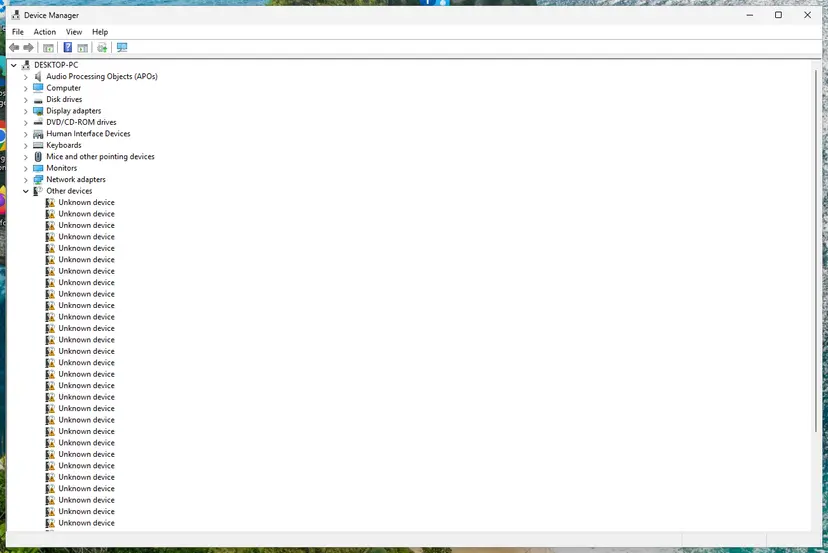
Device Manager lists devices by category; a yellow warning sign marks a device with a problem. Screenshot: Windows 11 26H2. - Open the device's Driver tab. Expand the category (for example Display adapters), right-click the device, select Properties and open the Driver tab. Driver Date and Driver Version show what is installed now.
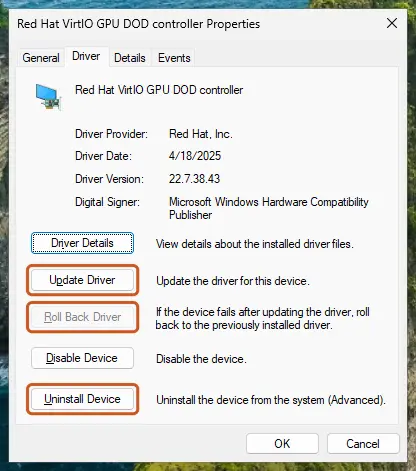
The Driver tab holds all three actions: update, roll back, uninstall. Screenshot: Windows 11 26H2. - Update the driver. Select Update Driver and let Windows search automatically. To use a driver you downloaded from the device maker, select Browse my computer for drivers instead and point to the unpacked folder.
- Or roll back the driver. If the problem started after a driver update, select Roll Back Driver, choose a reason and select Yes. The button is greyed out when Windows has no earlier driver to return to.
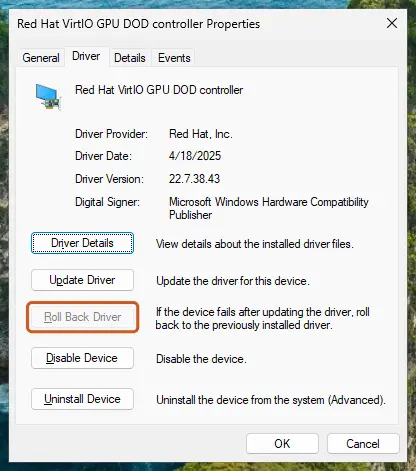
Roll Back Driver is greyed out here because there is no earlier driver. Screenshot: Windows 11 26H2. - Or reinstall the driver. Select Uninstall Device. Tick Attempt to remove the driver for this device only if you want Windows to delete the driver package too, then select Uninstall.
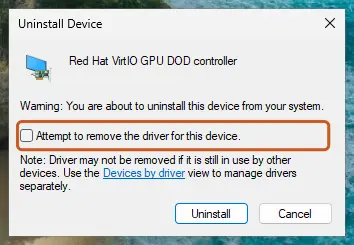
Tick the checkbox only to delete the driver package as well. Screenshot: Windows 11 26H2. - Restart. Restart the PC. Windows detects the device again and installs a driver for it.
- Check optional driver updates. Open Settings > Windows Update > Advanced options > Optional updates. If driver updates are listed, tick the ones you need and select Download & install.
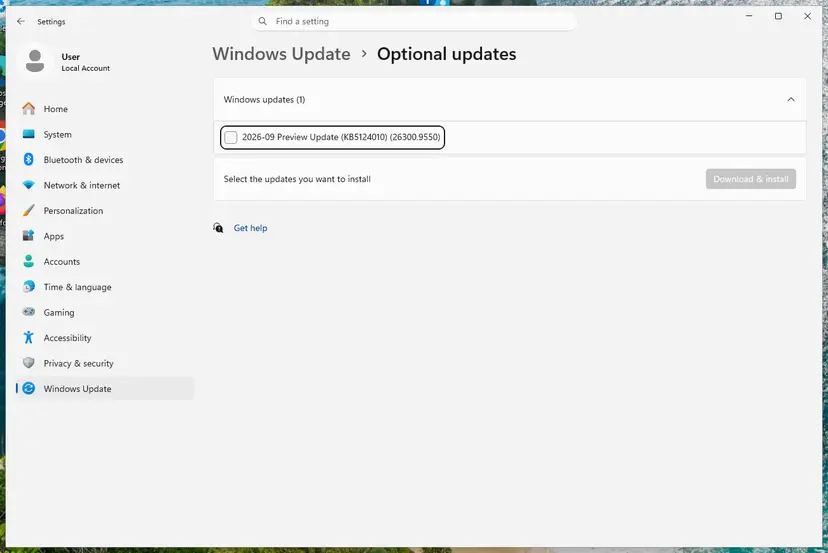
Optional updates on our test PC; driver updates appear here when Windows Update has any for your hardware. Screenshot: Windows 11 26H2.
These steps were written for Windows 11 24H2 and later. The full page with the other versions and what each result means: Update, roll back or reinstall a driver
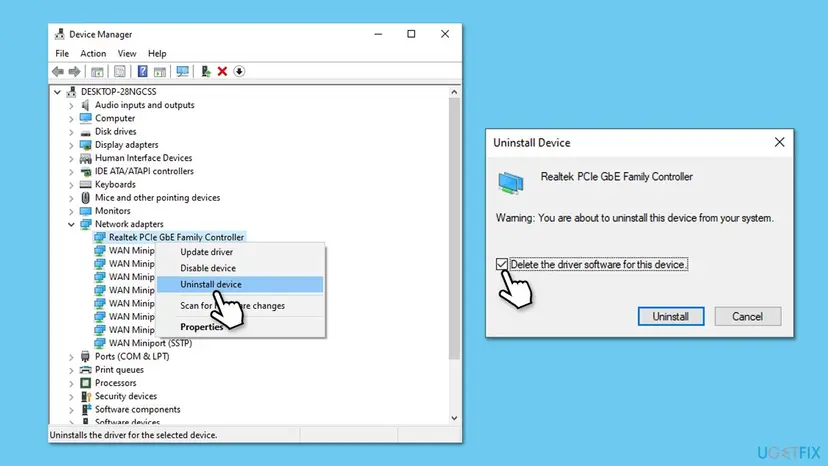
It worked if: After the restart and the new driver, Device Manager shows no yellow mark on the device, and the Fix 1 command shows no new 411 for it.
If not: If 411 started only after a recent driver or Windows update, try Fix 3. If it returns only after a shutdown, go to Fix 4.
Fix 3. Roll back a driver that a recent update changed
5 minutesLow riskThe first 411 for this device appeared right after Windows Update or a driver update.
A new driver can fail to start on your hardware even though the old one worked. Rolling back restores the previous driver package, so you can tell at once whether the update caused the 411.
- Right-click Start and select Device Manager.
- Open the category of the device from Fix 1, for example Network adapters or Display adapters.
- Right-click the device and select Properties.
- Open the Driver tab and select Roll Back Driver. If the button is grey, Windows kept no older driver: use Fix 2 instead.
- Pick a reason, select Yes and restart the PC.
If the rollback works, Windows Update may offer the same driver again. Check the maker's site for a newer version before you let it install, and report the problem to the maker with the event text.
It worked if: The driver version on the Driver tab is the older one and the Fix 1 command shows no new 411 after the restart.
If not: If 411 stays with the older driver too, the update was not the cause. Go to Fix 4 or Fix 5.
Fix 4. Turn off Fast Startup when 411 returns only after a shutdown
3 minutesLow riskThe 411 is gone after Restart but comes back after Shut down and a new start.
With Fast Startup, Shut down saves the kernel and its loaded drivers to disk and restores them, while Restart starts every driver fresh. A user in Dell's community reports exactly this pattern with 411, which points to a driver state Fast Startup brings back.
- Press Win + R, type
powercfg.cpland select OK. - In the left pane, select Choose what the power buttons do.
- Select Change settings that are currently unavailable, then Yes when Windows asks for permission.
- Under Shutdown settings, clear Turn on fast startup (recommended).
- Select Save changes.
- Shut down the PC, start it again and run the Fix 1 command.
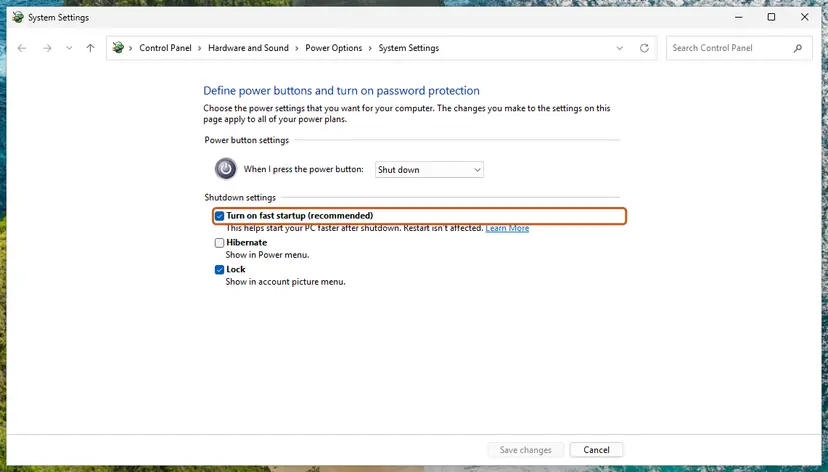
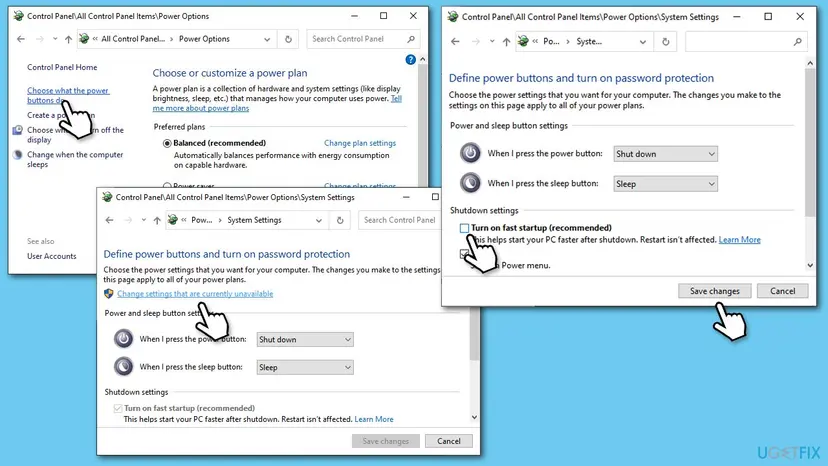
The full procedure with Windows 11 screenshots: Turn off Fast Startup.
It worked if: After a full Shut down and start, the Fix 1 command shows no new 411. The PC may take a few seconds longer to start.
If not: If 411 still appears after a cold start, turn Fast Startup back on if you like, and go to Fix 5 or Fix 6.
Fix 5. Stop Windows from powering down the network adapter
5 minutesLow riskThe 411 names your Wi-Fi or Ethernet adapter and the connection drops for a few seconds, as in the question above.
When Windows switches an idle adapter off to save power, the driver must start it again, and a driver that fails there drops the link. Turning off that power saving removes the restart, and a cable test shows whether the wireless card is at fault.
- Right-click Start and select Device Manager.
- Open Network adapters, right-click the adapter from Fix 1 and select Properties.
- Open the Power Management tab. Some adapters do not have it; then skip to step 5.
- Clear Allow the computer to turn off this device to save power and select OK.
- Connect the PC to the router with an Ethernet cable for a day and play or stream as usual.
- Compare: if the drops and the 411 stop on the cable, the Wi-Fi card or its driver is the cause.
A Microsoft support specialist gives the same test for 411 with Wi-Fi drops: try a cable, reseat the Wi-Fi card, and update the chipset driver and BIOS. The reader who asked that question later reported that a wired connection ended the drops.
If the network itself is unstable, a full network reset also reinstalls every adapter. Step by step: Reset the network and flush DNS. It removes saved Wi-Fi passwords and VPN adapters, so have them at hand.
It worked if: No drops and no new 411 for the adapter over a day of normal use.
If not: If the 411 continues with the cable unplugged and the power saving off, go to Fix 6.
Fix 6. Update the chipset driver and the BIOS
20 to 30 minutesRead the warningThe 411 names a chipset or system device, or keeps coming back for a PCI card after Fix 2.
Every PCI device starts through the chipset and the firmware's settings. An old chipset driver or BIOS can make a card's driver fail to start, and both Microsoft's and Dell's community answers for 411 name them.
A BIOS update cut off by a power loss can leave the PC unable to start. Plug a laptop into power and close all apps. If BitLocker is on, have the recovery key ready: a Microsoft account keeps it at aka.ms/myrecoverykey.
- Press Win + R, type
msinfo32and press Enter. - Note System Manufacturer, System Model, BaseBoard Product and BIOS Version/Date.
- Open the support page of your PC or motherboard maker and find your exact model.
- Install the newest chipset driver first and restart.
- If the maker lists a newer BIOS, install it with the maker's tool or instructions and let the PC restart by itself.
- Run the Fix 1 command again after one more restart.
It worked if: The device the 411 named starts normally and no new 411 appears after two starts.
If not: If the 411 stays, go to Fix 7.
Fix 7. Repair Windows system files, then do an in-place repair
20 minutes for SFC and DISM, about an hour for a repair installLow riskSeveral devices show 411, or nothing above worked and the hardware tests fine.
Drivers load through Windows components that can be damaged. SFC and DISM repair them, and an in-place repair install, which Microsoft's support specialist suggests for 411, replaces Windows files while keeping your apps and data.
Run the system file check first. Step by step: Run DISM and SFC to repair Windows system files.
If 411 still appears for a device with a correct driver, reinstall Windows in place, keeping your files and apps. Step by step: Reinstall Windows without losing files. Back up your important files first.
- After the repair, install the maker's driver for the device again (Fix 2).
- Restart twice and run the Fix 1 command.
It worked if: SFC reports that it found no problems or repaired them, and the 411 no longer appears after the repair.
If not: If the 411 survives a repair install with the maker's driver, the device itself is the likely cause. Read the next section.
If Event ID 411 continues: what to collect and when it is hardware
When the same device logs 411 after a clean driver install, a BIOS update and a Windows repair, the device or its slot is the most likely cause. Signs of hardware: the device disappears from Device Manager at random, it fails in another PC too, or the 411 started after the PC was moved or opened.
- Reseat the card. Shut down, unplug the PC and press the card or Wi-Fi module firmly back into its slot. Check that the Wi-Fi antenna cables are attached.
- Try another slot or port for PCI cards and USB devices.
- For a graphics card with 0x2b (Code 43), test it in another PC or try another card in yours.
- Contact the maker with the full event text, the DeviceInstanceId, the driver version from Device Manager and your BIOS version. Users report that replacing a faulty Wi-Fi card ended 411 for good.
Windows 10 left support on 14 October 2025. Device makers are dropping new Windows 10 drivers, so a 411 that comes from an old driver may only go away on Windows 11 or with the device maker's last Windows 10 release.
How to keep Event ID 411 from coming back
- Install drivers for network, graphics and chipset from the device or PC maker, and check for new ones every few months.
- Keep the BIOS up to date from your PC or motherboard maker.
- Read the device in a new 411 before you act. A 411 for a device you just unplugged needs nothing.
- Create a restore point before you install a new driver, so you can go back quickly.
- Do not change DNS or reset the network only because of 411. It does not touch the failing driver.
- Do not use driver updater tools that install drivers for the wrong model.
- Do not clear the event log to hide 411. You lose the record that tells you which device fails.
- Do not turn off your antivirus to test a driver. Pausing it for one test with Turn off Microsoft Defender protection for a moment is enough.
One or two 411 events from months ago, for a device that works, are normal history in the log. Act when 411 repeats for the same present device, or when its timing matches a real problem such as a Wi-Fi drop, no sound or a black screen.
Frequently asked questions
What is Kernel-PnP?
Kernel-PnP is the Plug and Play manager inside the Windows kernel. It detects every device at startup and when you plug one in, chooses its driver and starts it. Its log is Microsoft-Windows-Kernel-PnP/Configuration, which Event Viewer shows as Device Configuration under Applications and Services Logs, Microsoft, Windows, Kernel-PnP. Most of its events are information, such as a device that was configured or started. Event 411 is the error it logs when a driver does not start.
What does Event ID 411 mean?
Event ID 411 from Kernel-PnP means a device had a problem starting: Windows found it, but its driver did not start it. The event names the device in DeviceInstanceId and gives the reason as a Problem code, which is the Device Manager error code in hex. Problem 0xa, for example, is Code 10, the device cannot start. The event alone does not tell you whether anything is broken. A removed device also logs it.
Is Kernel-PnP Event 411 serious? Can I ignore it?
It depends on the device it names. You can ignore a 411 for a device you unplugged, such as a USB stick, phone or dock, or a single old 411 for a device that works. Act when 411 repeats for the same device that is still present, or when it matches a real problem: Wi-Fi drops, no sound, a black screen or a missing device. Fix 1 shows the device name and whether it is present in five minutes.
Does Event ID 411 cause internet drops?
It does not cause them, but it can record them. When the 411 names your Wi-Fi or Ethernet adapter and its time matches each drop, the adapter's driver failed and restarted, and the link went down with it. Reinstall the adapter's driver from its maker (Fix 2), turn off its power saving (Fix 5) and test with a cable. If the drops end on the cable, the Wi-Fi card or its driver is the cause.
What does Problem 0xa or Problem 0x15 mean in event 411?
The Problem field is the Device Manager error code in hex. 0xa is 10, which Microsoft lists as CM_PROB_FAILED_START: the device did not start. 0x15 is 21, CM_PROB_WILL_BE_REMOVED: the device is being removed, which is normal when you unplug it. Other common values are 0x1c (Code 28, no driver installed), 0x1f (Code 31), 0x2b (Code 43, the device stopped) and 0x2d (Code 45, not connected).
Kernel-PnP Event 411 with a graphics card and Code 43: what now?
Problem 0x2b is Code 43, which means the device started and then stopped. With a graphics card, first do a clean install of the newest driver from AMD, NVIDIA or Intel (Fix 2), then update the chipset driver and BIOS (Fix 6). If Code 43 stays, test the card in another PC or another card in yours. Users report Code 43 with 411 on cards that later proved faulty, so a hardware test matters here.
Where do I find Event 411 in Event Viewer?
Press Win + R, type eventvwr.msc and press Enter. Open Applications and Services Logs, then Microsoft, Windows, Kernel-PnP and select Device Configuration. Errors with Event ID 411 sit there among information events. Select one and read the General tab for the device and the Details tab for the fields. The PowerShell command in Fix 1 lists the same events faster, with the device and Problem for each one.
What are Kernel-PnP events 400, 410 and 420?
They are other events of the same Device Configuration log. As far as we can tell from the log, 400 is written when a device is configured and 410 when it is started, both as information, and 420 when a device is deleted. We could not confirm the exact text of each in a Microsoft page. They are normal history. Only the error 411, a device that had a problem starting, points to something to check.
Will changing DNS or running the network troubleshooter fix 411?
Rarely. Event 411 is about a device driver that did not start, and DNS settings or the troubleshooter do not change that driver. The reader on Microsoft's forum who asked about 411 had already tried DNS, troubleshooters, SFC, a clean boot and turning off Fast Startup without luck. What helps is to find the device in the event and fix its driver, firmware or hardware, as in Fixes 1, 2, 5 and 6.
Evento 411 Kernel-PnP: is this the same error?
Yes. Evento 411 Kernel-PnP is the Spanish name of the same event, and Configuración de dispositivo is the Spanish name of the Device Configuration log. The event ID, the fields and the fixes are the same on Windows in every language. This page is in English. Follow Fix 1 to find the device that failed, then fix its driver.
Sources
Did this fix work?
One click, no account. It tells the next reader which guides are worth their time.
Questions and experiences: fix Kernel-PnP Event ID 411 in Windows
Still broken, or found a fix we did not cover? Ask here: members and our editors answer. Reading is open; writing needs a free account.
…