
How to fix "The previous system shutdown was unexpected" event on Windows?

Prefer to fix it yourself? The manual steps follow.
- 8methods
- 10 minutes to find the cause, longer to fix it
- Intermediate
Applies to Windows 11, Windows 10
8 methods in this guide
Hello, I need some urgent help. My Windows 11 laptop just keeps randomly restarting several times a day. I checked the Event Log and the only thing I can see at the time of these crashes are messages "The previous system shutdown was unexpected." Any tips on how to address this?
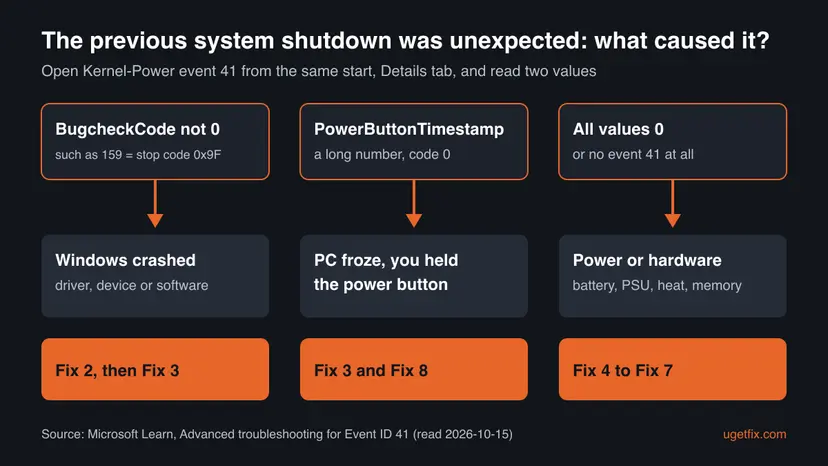
"The previous system shutdown was unexpected" is an Event Viewer entry that Windows writes after it went off without a clean shutdown. It records that the PC restarted or died, not why. Open the Kernel-Power event 41 from the same start: its values tell a crash, a forced power-off and a loss of power apart.
The message only says the last shutdown was not clean. Find the cause first (Fix 1): open Event Viewer, find the Kernel-Power event 41 logged at the same start and read its Details tab. A BugcheckCode above 0 means Windows crashed, so turn off automatic restart and undo the last driver or hardware change. All zeros on a PC that just goes dark points to power, battery, heat or memory.
| Error | "The previous system shutdown at [time] on [date] was unexpected." Event ID 6008, source EventLog, level Error, in the System log. |
|---|---|
| Where it appears | In Event Viewer under Windows Logs > System. Windows writes it at the next start, so it never appears on screen while the PC is running. |
| Main cause | A stop error (blue or black screen that restarts the PC), lost power, a drained or failing laptop battery, overheating, or a frozen PC you switched off with the power button. |
| Fastest fix | Read BugcheckCode and PowerButtonTimestamp in the Kernel-Power event 41 from the same start (Fix 1). They decide which fix is yours. |
| Also written as | "The previous shutdown was unexpected", "previous system shutdown was unexpected", "the previous system shutdown at [time] was unexpected", event 6008, dirty shutdown. |
| Logged together with | Kernel-Power event 41, "The system has rebooted without cleanly shutting down first", at the same start. |
| Affects | Windows 11 and Windows 10. The text is the same on both. Windows 10 left support on 14 October 2025. |
| Microsoft's status | Not a bug. Microsoft says unexpected shutdowns are mostly caused by components outside the operating system. |
| Where the cause is written | The Details tab of event 41, Reliability Monitor (perfmon /rel) and the stop code on screen if Windows crashed. |
| Time to fix | About 10 minutes to find the cause. The repair takes from a few minutes (a driver rollback) to a part replacement. |
Facts checked on 15 October 2026. Steps written for Windows 11 (25H2 and 26H2) and Windows 10 22H2.
What "The previous system shutdown was unexpected" means
The full text reads like this: "The previous system shutdown at 6:34:53 PM on 10/9/2026 was unexpected." Your time and date differ. It is event ID 6008 from the source EventLog in the System log, and Microsoft describes it as the record of an improper or dirty shutdown.
During a normal shutdown Windows closes files and tells running services and apps to save their data. When the PC goes off without those steps, Windows notices at the next start and writes this entry. The time in the text is roughly when the PC went off. The time in the Date and Time column is when it started again.
It holds two facts: the shutdown was not clean, and roughly when. It names no driver, program or part. So no single setting "fixes" it. What you fix is whatever made the PC go off, and event 41 next to it points there.
- Event 41 says the same thing, with more detail. Kernel-Power event 41, level Critical, reads "The system has rebooted without cleanly shutting down first. This error could be caused if the system stopped responding, crashed, or lost power unexpectedly."
- Event 6006 is the opposite. It means Windows was turned off properly. A restart you asked for also leaves event 1074 from User32, with the process or user that requested it.
- One entry after a power cut is normal. If it happened once after an outage or after you held the power button, there is nothing to fix. Act when it repeats.
Why the previous system shutdown was unexpected: causes ranked
Microsoft names three groups: a stop error, a hang ended by the power button, and a shutdown so fast that Windows could not write any code, which usually means power or hardware. The order below is the order in which they show up on home PCs and laptops that restart by themselves.
| Cause | How you can tell | Fix |
|---|---|---|
| Stop error from a driver, device or software | A blue or black screen flashes, or event 41 has a BugcheckCode above 0. | Fix 2, Fix 3 |
| Laptop battery drained, removed or failing | A laptop dies on battery with charge left, or only off the charger. Event 41 values are 0. | Fix 4 |
| Power supply too weak or faulty, unplugged PC, outage | A desktop goes dark at once, often under load or after an upgrade. Event 41 values are 0 or event 41 is missing. | Fix 5 |
| Overheating | Shutdowns during games or heavy work, loud fans, hot case. Event 41 values are 0. | Fix 6 |
| Overclocking or faulty memory | Random restarts with mixed symptoms, an overclock set in firmware or software, new RAM. | Fix 6, Fix 7 |
| A frozen PC you switched off | Event 41 has a PowerButtonTimestamp that is not 0. | Fix 3, Fix 8 |
| Low disk space, missing updates, damaged system files | Repeated crashes with the same stop code and a nearly full system drive. | Fix 8 |
How to fix "The previous system shutdown was unexpected"
Fix 1 is the diagnosis and takes about five minutes. It tells you which group you are in, so you can skip the fixes that do not apply. Fixes 2 and 3 are for crashes, Fixes 4 to 7 for power and hardware, Fix 8 for the rest.
| What you see or have | Start with |
|---|---|
| Only the message in Event Viewer, no idea what happened. | Fix 1 |
| A blue or black screen flashed before the restart. | Fix 2, then Fix 3 |
| Event 41 shows a BugcheckCode above 0. | Fix 3 |
| A laptop that turns off on battery or with the charger out. | Fix 4 |
| A desktop that goes dark at once, with no screen message. | Fix 5, then Fix 6 |
| Shutdowns only during games, rendering or other heavy load. | Fix 6 |
| New RAM, an overclock, or random restarts with no pattern. | Fix 7 |
| The PC froze and you held the power button. | Fix 8 |
Fix 1. Find out what happened in Event Viewer and Reliability Monitor
5 minutesNo riskEveryone. Do this before any other fix.
If Windows can, it records error codes as it goes down and puts them into event 41 at the next start. Two of those values separate a crash, a forced power-off and a sudden loss of power.
- Press Win + R, type
eventvwrand press Enter. - Go to Windows Logs > System and find the Error from EventLog with Event ID 6008. Note its date and time.
- Find the Kernel-Power event with ID 41 logged at the same start, just before or after it, and double-click it.
- Open the Details tab and read BugcheckCode and PowerButtonTimestamp.
- Press Win + R, type
perfmon /reland press Enter. Reliability Monitor shows each day with its failures and installs. - Select the days of the shutdowns and note what was installed or failed just before the first one.
| Values in event 41 | What Microsoft says it means | Go to |
|---|---|---|
| BugcheckCode is not 0 (for example 159) | A stop error. The number is the stop code in decimal form. | Fix 2, Fix 3 |
| BugcheckCode 0, PowerButtonTimestamp is a long number | The power button was pressed and held to restart the PC. | Fix 8 |
| All values 0, or no event 41 at all | Windows could not write a code. This might indicate a power supply problem, or a hardware problem. | Fix 4 to Fix 7 |
- The code is decimal. Open Calculator, switch to Programmer, enter the number with DEC selected and read HEX. Microsoft's example: 159 becomes 0x0000009F.
- All zeros but you saw a blue screen. Look for event 46 from volmgr, "Crash dump initialization failed!". Microsoft says a crash is then still possible, but Windows had no dump file to write to.
For every neighbouring event, a ready PowerShell command and how to read crash dumps, see our full guide to Event ID 6008.
It worked if: You know which group you are in: a crash with a stop code, a forced power-off, or a shutdown with all zeros.
If not: If you find the message but no event 41 at all, treat it as the all zeros case and go to Fix 4 or Fix 5.
Fix 2. Turn off automatic restart so the stop code stays on screen
2 minutesNo riskYou saw a blue or black screen flash, or event 41 has a stop code but you want the module name too.
Windows restarts by itself after a stop error, so the screen with the stop code and the failing module is gone in seconds. Microsoft's advice is to clear the automatic restart box so the next crash stays on screen.
- Press Win + S, type
advanced system settingsand open View advanced system settings. - On the Advanced tab, under Startup and Recovery, select Settings.
- Clear the Automatically restart check box.
- Select OK twice.
- When the PC crashes next, write down the stop code (such as MEMORY_MANAGEMENT) and the module name under it, then restart it yourself.
Microsoft changed the look of the stop error screen in Windows 11 version 24H2: it is black, not blue. Earlier versions and Windows 10 keep the blue screen. Both show the stop code at the bottom.
It worked if: The next crash stays on screen with a stop code and, if Windows knows it, the module name.
If not: If no stop screen ever appears and the PC just goes dark, it is not a crash Windows can catch. Go to Fix 4 or Fix 5.
Fix 3. Undo the last driver, device or update change
10 to 20 minutesLow riskEvent 41 has a BugcheckCode above 0, or the restarts began after new hardware, a driver or an update.
Microsoft says an unexpected restart might be caused by a hardware device, its driver or software, and lists removing new hardware and checking Device Manager first. The graphics driver is the most common driver to try because it runs all the time.
- If you added hardware before the restarts began, shut down, remove it and test for a day.
- Right-click Start and select Device Manager. Look for any device with an exclamation mark.
- Right-click that device and select Update driver. If that does not help, disable or uninstall the device, as Microsoft suggests.
- If a driver was updated just before the first restart, open the device's Properties, Driver tab, and select Roll Back Driver.
- For the graphics card, expand Display adapters, right-click it, select Uninstall device, tick Delete the driver software for this device if it is shown, and restart.
- Install the current driver from your PC maker or the graphics card maker.
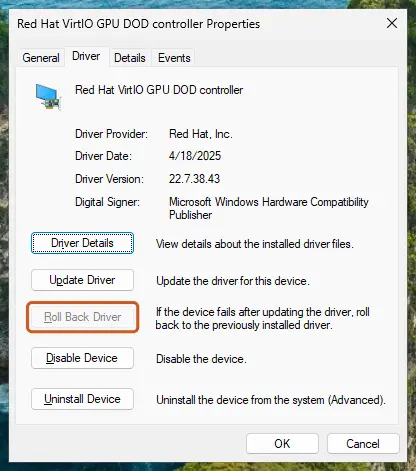
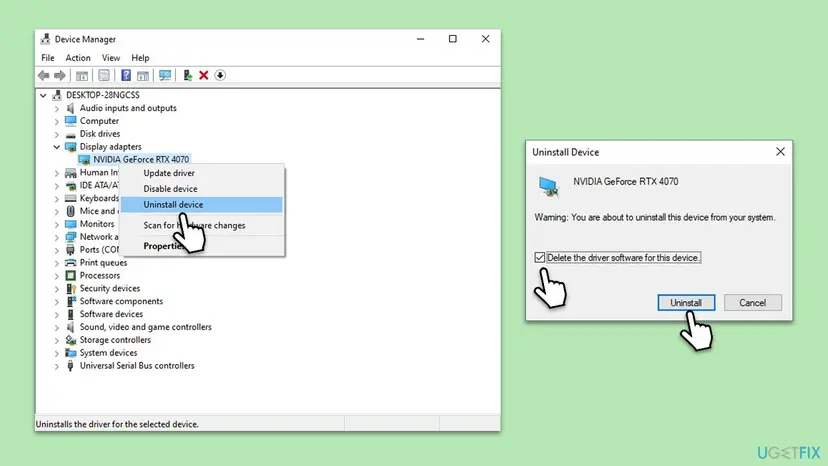
If a Windows update came just before the first crash, remove it for a test. Step by step: How to uninstall a Windows update. Full driver steps: Update, roll back or reinstall a driver.
It worked if: No new event 6008 or event 41 appears for several days of normal use.
If not: If the same stop code returns with another driver, the module name from Fix 2 tells you which program or device to look at. With different stop codes each time, test the memory in Fix 7.
Fix 4. Laptop: check the battery and the charger
10 minutes plus a day of testingNo riskA laptop that turns off on battery, at a low charge, or when the charger is pulled, and event 41 shows zeros.
Microsoft lists a removed or drained battery as a cause of event 41 with zero values on a portable computer. A worn battery can report charge it does not have, so the laptop dies with no warning and no stop code.
- Right-click Start and open Terminal or Command Prompt.
- Type
powercfg /batteryreportand press Enter. Windows saves an HTML report in the current folder and prints its path. - Open the report and compare Design capacity with Full charge capacity, and check the recent usage for drops to 0 %.
- Use the laptop on the charger for a day. If the shutdowns stop, the battery is the likely cause.
- Check the charger plug and cable for loose contact, and try another wall socket.
Terminal: battery report for the last 7 days
powercfg /batteryreport /duration 7Microsoft does not say at what capacity a battery should be replaced. A laptop that dies on battery but runs all day on the charger is the practical sign. Ask the maker's service for a battery test.
It worked if: On the charger the laptop runs without new 6008 entries, which points to the battery.
If not: If it also shuts down on the charger, the cause is not the battery. Go to Fix 6 for heat and Fix 7 for memory.
Fix 5. Desktop: check the power supply and the wall power
15 to 30 minutesLow riskA desktop that goes dark at once with no screen message, and event 41 shows zeros or is missing.
When power is interrupted, Windows cannot write a stop code. Microsoft lists an unplugged PC, a power outage, and a power supply that is underpowered or faulty for this pattern.
- Compare the time in the message with what else happened: flickering lights, other devices that restarted, a tripped breaker.
- Shut down and check that the power cable sits firmly at both ends. Plug the PC straight into the wall, not into a power strip, for a test.
- If you added RAM, a newer processor, drives, a graphics card or external devices, check that the power supply has enough wattage for them.
- If you can, test with another power supply of the right wattage, or let a workshop test yours.
- Where outages or brownouts are common, use an uninterruptible power supply (UPS), as Microsoft suggests.
A weak power supply is found by exclusion or by swapping it. Shutdowns that come only under load, such as when a game starts, fit both a weak supply and overheating, so check Fix 6 too.
It worked if: After the cable, socket or supply change, the PC runs under the same load with no new 6008 entry.
If not: If power checks out, go to Fix 6 for heat and Fix 7 for memory.
Fix 6. Clear the dust, check the fans and remove any overclock
20 to 30 minutesLow riskShutdowns during games or heavy work, a hot case, loud or silent fans, or an overclocked processor, memory or graphics card.
Hardware that overheats is switched off to protect it, too fast for a stop code. Microsoft lists overheating and overclocking among the first checks when event 41 shows zeros.
- Shut down and unplug the PC. On a laptop, also disconnect the charger.
- Blow dust out of the vents, fans and the power supply grille with compressed air, holding the fans still. Brush off stubborn dust with a soft brush.
- Make sure nothing blocks the vents where the PC stands. A laptop on a bed or sofa cannot breathe.
- Start the PC and check that every fan turns.
- If you overclocked anything in the firmware setup or with a tuning program, set it back to the default speed.
- Run the same load that used to switch the PC off and see if it holds.
- Use the PC maker's diagnostics or firmware screen to read temperatures.
- Open a desktop only when it is unplugged.
- Leave the laptop to the maker's service if it must be opened.
- Open the power supply unit itself.
- Spin fans with compressed air.
- Keep an overclock while you test for shutdowns.
It worked if: The PC gets through the load that used to switch it off, and no new 6008 entry appears.
If not: If it still shuts down with clean vents, working fans and default speeds, test the memory in Fix 7. If heat stays high, the cooling needs service.
Fix 7. Test the memory
20 minutes to several hoursNo riskRandom restarts with no pattern, different stop codes each time, or new or mixed RAM.
Microsoft's checks for unexplained restarts include memory health and configuration: all modules should run at the same speed and be set up correctly. A faulty module can crash Windows or switch the PC off without a code.
- Open Windows Memory Diagnostic. Press Windows + R, type mdsched.exe and select OK. You can also search for Windows Memory Diagnostic and open it from the results.
- Choose when to test. Select Restart now and check for problems (recommended) to test right away. Select Check for problems the next time I start my computer if you want to finish your work first: the test then runs at the next start.
- Let the test run. The PC restarts into a blue screen that shows the progress of the test. You do not have to do anything. When the test ends, the PC restarts by itself and Windows loads.
- Look for the notification. Sign in. After a short while Windows shows a notification with the result, also when no errors were found. If you missed it, read the result in Event Viewer.
- Open the System log. Press Windows + R, type eventvwr and select OK. In Event Viewer, expand Windows Logs and select System.
- Find the result. Right-click System and select Find. Type MemoryDiagnostics-Results and press Enter. Select the event that is found: its text says whether the test detected errors.
These steps were written for Windows 11 25H2 and 26H2, Windows 10 22H2. The full page with the other versions and what each result means: How to test your RAM with Windows Memory Diagnostic
If you added memory recently, take the new modules out and test for a few days. If you have two or more modules, test with one at a time to find the faulty one.
It worked if: The test reports no errors, or it names errors and the restarts stop once the faulty module is out.
If not: If the memory passes and the restarts go on, go to Fix 8, then to the section below on what to collect.
Fix 8. Repair Windows and find a program that freezes the PC
30 to 60 minutesLow riskThe PC froze and you held the power button, the same stop code keeps coming back, or the hardware checks found nothing.
Microsoft's basic steps for repeated restarts include enough free space on the system drive, the latest updates and, if nothing helps, a restore point. A freeze that ends with the power button is fixed by finding what froze, not by the shutdown itself.
- Check free space: Microsoft suggests keeping 10 % to 15 % of the system drive free. Step by step: Free up disk space and delete temporary files.
- Install the latest updates in Settings > Windows Update (Windows 10: Settings > Update & Security > Windows Update) and select Check for updates.
- Repair system files with DISM and SFC: Run DISM and SFC to repair Windows system files.
- If the PC freezes, start it with only Microsoft services to see if another program causes it: How to perform a clean boot in Windows.
- If none of this helps, go back to a restore point from before the first shutdown: Undo recent changes with System Restore.
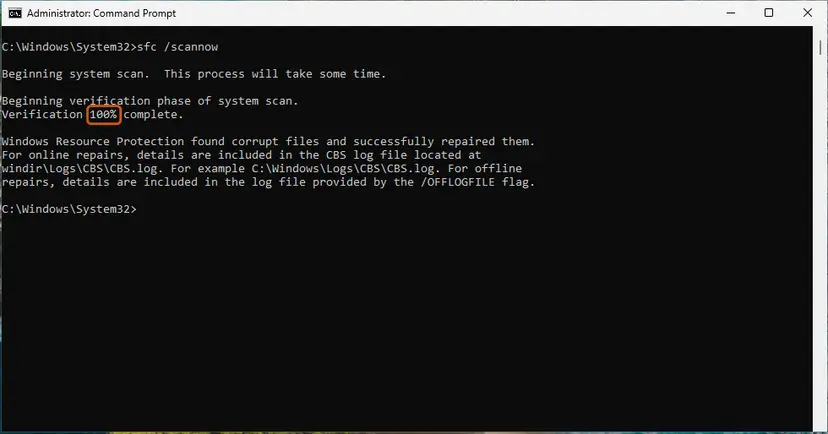
It worked if: The freezes and restarts stop, and Reliability Monitor shows no new critical events for several days.
If not: If the restarts continue after all eight fixes, collect the details below and take the PC to the maker's service.
If the PC still shuts down unexpectedly: what to collect
Microsoft says the symptoms of all zeros in event 41 typically indicate a hardware problem. When the checks above do not find it, a workshop or the maker's support needs facts, not just "it restarts".
- The times. The dates and times from several "previous system shutdown" entries.
- Event 41 values. BugcheckCode and PowerButtonTimestamp from each one.
- The stop code and module name from Fix 2, if a crash screen appeared.
- The battery report from Fix 4 on a laptop.
- What you already changed: drivers, removed hardware, cleaned fans, memory test result.
- Reliability Monitor for the days around the first shutdown.
Each sudden shutdown can damage open files. Microsoft notes that a dirty shutdown can cause data loss or corruption. Copy your important files to another drive or to the cloud before you test further. Step by step: Back up your files (Windows Backup, File History, Time Machine).
How to keep unexpected shutdowns from coming back
- Shut down from Start > Power. Hold the power button only when the PC does not respond at all.
- Keep the vents clear and remove dust every few months, more often with pets or a dusty room.
- Check the power supply wattage before you add a graphics card, drives or a faster processor.
- Use a UPS where outages are common.
- Keep 10 % to 15 % of the system drive free and install updates.
- Keep a restore point before driver and firmware updates, so you can go back.
Frequently asked questions
What does "The previous system shutdown was unexpected" mean?
It means Windows found at startup that its last session did not end with a normal shutdown. Windows writes it into the System log as event 6008 from EventLog, with the time the PC went off. It does not say why. The cause can be a crash, a loss of power, a dying laptop battery, overheating, or a frozen PC that you switched off with the power button. The Kernel-Power event 41 from the same start tells these apart.
Is the message an error I have to fix?
Not on its own. One entry after a power cut, a drained battery or a forced power-off is expected and needs no action. It becomes a problem when it repeats, especially when the PC restarts by itself several times a day. Then the entry marks every incident, and you fix the cause that event 41, the stop code or the hardware checks point to.
Why does the time in the message differ from the event time?
The two times mean different things. The time inside the text, such as "at 6:34:53 PM on 10/9/2026", is roughly when Windows was last known to be running. The Date and Time column shows when the entry was written, which is the next start. If the PC stayed off overnight, the two can be hours apart.
What is the difference between event 41 and event 6008?
Both are written at the next start after an unclean shutdown. Event 6008 from EventLog carries the text "The previous system shutdown was unexpected" and the time. Kernel-Power event 41, level Critical, says "The system has rebooted without cleanly shutting down first" and holds the useful details: BugcheckCode for a crash and PowerButtonTimestamp for a forced power-off. Read event 41 to find the cause.
My laptop keeps restarting randomly. Where do I start?
Open event 41 from the same start as the message (Fix 1). If BugcheckCode is above 0, Windows crashed: turn off automatic restart to read the stop code (Fix 2) and undo the last driver or update (Fix 3). If every value is 0, check the battery with powercfg /batteryreport and run the laptop on the charger for a day (Fix 4). Then clean the vents (Fix 6) and test the memory (Fix 7).
Can a power plan or the power troubleshooter fix this?
We found no Microsoft source that ties power plan settings to unexpected shutdowns, so this guide does not use them. A power plan changes sleep, display and processor behaviour, not the supply of power that disappears in an unclean shutdown. We could not confirm that the old Power troubleshooter finds anything that causes unexpected shutdowns, so it is left out too. Event 41 and the hardware checks lead to the cause faster.
Can unexpected shutdowns damage my PC or files?
They can damage files. Microsoft says a dirty shutdown can cause data loss or corruption and can lead to boot problems. Files that were open and unsaved are the most at risk. The hardware itself is usually not harmed by the shutdown, but the cause can be a hardware fault that gets worse, such as a failing power supply or battery. Back up your files while you search.
What does "Windows has recovered from an unexpected shutdown" mean?
It is a notice about the same situation: the previous session did not end normally. We could not confirm from Microsoft exactly when Windows shows this wording, but in practice it follows a crash and an automatic restart. Check whether event 41 from that start has a BugcheckCode above 0. Follow Fix 2 and Fix 3 to read the stop code and undo the last change.
What do "the last shutdown's success status was false" and "booted up from an improper shutdown" mean?
Both are other Windows log texts for the same situation. The first says the last shutdown did not finish and the start after it did. The second says Windows started after a shutdown that skipped the normal steps. Neither names a cause. Treat them like the message on this page: open event 41 from the same start and read its values (Fix 1).
Sources
- Microsoft Learn: Advanced troubleshooting for Event ID 41, "The system has rebooted without cleanly shutting down first" (learn.microsoft.com)
- Microsoft Support: Troubleshooting Windows unexpected restarts and stop code errors (support.microsoft.com)
- Microsoft Learn: Powercfg command-line options (learn.microsoft.com)
Did this fix work?
One click, no account. It tells the next reader which guides are worth their time.
Questions and experiences: fix "The previous system shutdown was unexpected" event on Windows
Still broken, or found a fix we did not cover? Ask here: members and our editors answer. Reading is open; writing needs a free account.
…