
wdcsam64.sys stops Memory integrity: how to fix it in Windows 11 and 10

Prefer to fix it yourself? The manual steps follow.
- 5methods
- 10 to 20 minutes
- Medium
Applies to Windows 11 and Windows 10 PCs where Memory integrity cannot be turned on because of wdcsam64.sys
5 methods in this guide
Hello. I am experiencing a Memory integrity error that is caused by wdcsam64.sys. What is this file and how do I fix this?
wdcsam64.sys is an old Western Digital driver for the WD SES Device that external WD drives add, and Windows will not turn Memory integrity on while it is installed. It is outdated, not malware. Delete its driver package, restart and switch Memory integrity on.
Windows lists wdcsam64.sys as an incompatible driver because it is too old to run under Memory integrity. Open Review incompatible drivers, note the Published name of each wdcsam64 entry and delete it with pnputil /delete-driver oemNN.inf /uninstall (Fix 1). Then uninstall old WD apps so they do not bring it back (Fix 2), restart and turn Memory integrity on. Do not leave the protection off to keep the driver.
| Error | Incompatible drivers list in Windows Security naming wdcsam64.sys, with Memory integrity stuck at Off |
|---|---|
| Where it appears | Windows Security > Device security > Core isolation details, and on some PCs as a sign-in message: A driver cannot load on this device |
| Main cause | An old Western Digital Technologies driver for the WD SES Device (version 1.0.9.0, dated 2011, in one report on Microsoft Q&A) that a WD external drive or WD software installed |
| Fastest fix | Delete the driver package with pnputil using its Published name (Fix 1) |
| Also written as | wdcsam64, wdcsam64 sys, WDCSAM64.SYS, the misspelling wdscam64.sys; the related entry is wdcsam64_prewin8.sys |
| Affects | Windows 11 (25H2, 26H2) and Windows 10 22H2 PCs that once had a WD My Passport, My Book or other WD USB drive connected |
| Is it malware? | No: it is a legitimate but outdated Western Digital driver. Windows only refuses to run it under Memory integrity |
| Vendor status | We found no Western Digital support article on it; users report that the current WD Drive Utilities installer clears the entry (Fix 5) |
| Your files | Deleting a driver does not touch the data on the drive |
| Time to fix | 10 to 20 minutes, with two restarts |
Facts checked on 16 October 2026. Steps written for Windows 11 (25H2 and 26H2) and Windows 10 22H2.
What wdcsam64.sys is and why it stops Memory integrity
Memory integrity, also called Hypervisor-protected Code Integrity (HVCI), checks kernel driver code inside an isolated, virtualized part of Windows before it may run. When you switch it on, Windows Security first checks the installed drivers. Any driver that cannot run under that check lands in a list called Incompatible drivers, and the switch stays off.
wdcsam64.sys is one of those drivers. Windows Security shows the company Western Digital Technologies and the device WD SES Device, which appears under WD Drive Management devices in Device Manager when a WD external drive is plugged in. The file name suggests a SCSI Architecture Model (SAM) driver, which is why people search for "WD SCSI Architecture Model (SAM) driver", but we could not confirm the name in a Western Digital document.
- Window
- Windows Security, Core isolation details
- Status line
- Memory integrity can't be turned on. Try resolving any incompatibilities with your drivers.
- List title
- Incompatible drivers
- List text
- Resolving incompatibilities with these drivers will enable you to turn on Memory integrity.
- Driver entry
- wdcsam64.sys, Western Digital Technologies, Driver version: 1.0.9.0
- Details to note
- Device: WD SES Device and the Published name, for example
oem0.inf. You need it for Fix 1 - Second entry
- Many PCs also list wdcsam64_prewin8.sys with its own Published name. Remove both
The same driver can also show up at sign-in as a Program Compatibility Assistant message: A driver cannot load on this device, Driver: wdcsam64.sys, A security setting is preventing this driver from loading. That is the same protection refusing the same old driver when the WD drive is connected. Microsoft's advice for that banner is an updated driver from Windows Update or the maker; when there is none, the fixes below remove it. The general case is in our guide to A driver can't load on this device.
wdcsam64.sys is a real driver from Western Digital, not a virus and not a damaged Windows file. It is simply too old for Memory integrity. Microsoft's advice for an incompatible driver is to get an updated one from the maker, or to remove the device or app that uses it. Removing the driver does not erase or change any file on your WD drive.
Why wdcsam64.sys appears in the incompatible drivers list, from most to least common
Most often the driver package stays in the Windows driver store long after the WD software or the drive itself is gone, and Windows Security checks the store too. Less often an old WD app is still installed and keeps the driver in place. Rarely a hidden WD SES Device entry, or a leftover driver service with no package, keeps the file listed.
| Cause | How common | What you see | Fix |
|---|---|---|---|
| Driver package left in the driver store | Most cases | The entry shows a Published name such as oem0.inf | Fix 1 |
| Old WD software still installed | Common | WD Discovery, WD Backup, WD Security or similar in Installed apps | Fix 2 |
| Hidden WD SES Device still uses the driver | Less common | pnputil says the INF is in use by a device | Fix 3 |
| Only a leftover driver service or file | Rare | pnputil says it could not find the path, or the entry returns | Fix 4 |
| You still use WD tools for the drive | Some readers | You need WD Drive Utilities or WD Security on this PC | Fix 5 |
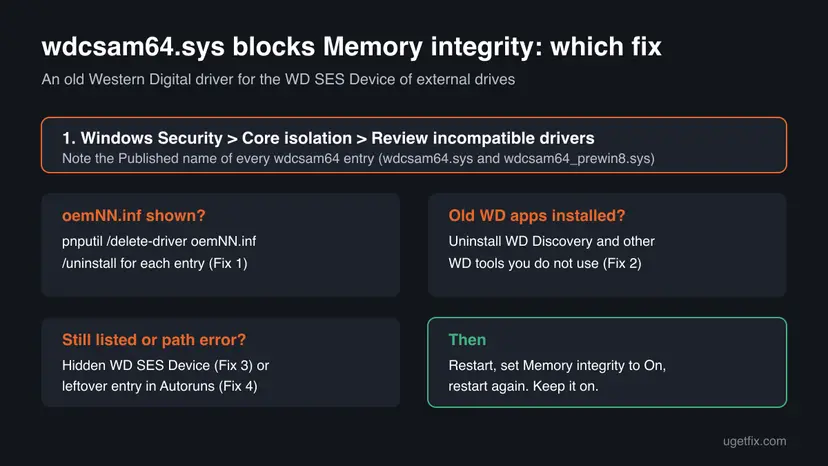
How to fix the wdcsam64.sys Memory integrity error on Windows 11 and Windows 10
Start by opening Windows Security > Device security > Core isolation details > Review incompatible drivers. Expand every wdcsam64 entry and write down its Published name. Then work from Fix 1 down. You need an administrator account. After each fix, restart and try the Memory integrity switch again.
| What you see or have | Start with |
|---|---|
| The entry shows a Published name like oem0.inf | Fix 1 |
| WD Discovery or other WD apps are in Installed apps | Fix 1, then Fix 2 |
| pnputil says one or more devices use the INF | Fix 3, then Fix 1 again |
| pnputil says the system could not find the path, or the entry comes back | Fix 4 |
| A driver cannot load on this device message at sign-in | Fix 1 |
| You still use WD Drive Utilities or WD Security on this PC | Fix 5 |
Fix 1. Delete the wdcsam64.sys driver package with pnputil
5 minutesRead the warningEveryone whose Windows Security entry shows a Published name such as oem0.inf. This is the fix that works for most readers.
Windows keeps third-party drivers as packages in its driver store, under a Published name like oemNN.inf. Uninstalling WD apps or the device often leaves that package behind, and Windows Security still finds it. Deleting the package with pnputil removes it from the store and from the devices that use it.
Delete only the packages that Windows Security lists for wdcsam64. Deleting the wrong oemNN.inf can switch off a graphics, network or storage device. Create a restore point first: Back up the registry before editing it. WD tools that talk to the drive, such as drive lock or diagnostics, may stop working until a current WD driver is installed (Fix 5).
- In Core isolation details, select Review incompatible drivers, expand wdcsam64.sys and note the Published name, for example
oem0.inf. Do the same for wdcsam64_prewin8.sys if it is listed. - Right-click Start, choose Terminal (Admin) on Windows 11 or Windows PowerShell (Admin) on Windows 10, and select Yes.
- Optional check: run
dism /online /get-drivers /format:tableand confirm your oemNN.inf belongs to Western Digital. - Run
pnputil /delete-driver oem0.inf /uninstall, with your own number in place of 0. The character before the number is a zero in oem0, not the letter O. - If it says a device is still installed using the INF, run
pnputil /delete-driver oem0.inf /uninstall /force. - Repeat for the second Published name if there was one.
- Restart the PC, then set Memory integrity to On and restart again.
The three commands, with oem0.inf as the example name:
dism /online /get-drivers /format:table
pnputil /delete-driver oem0.inf /uninstall
pnputil /delete-driver oem0.inf /uninstall /force
Users on Microsoft Q&A report that the /force command was the step that finally let them turn Memory integrity on, after uninstalling WD software and deleting files had not helped. Some found a second wdcsam64 entry only after the first was gone, so check the list again after the restart.
It worked if: pnputil reports that the driver package was deleted, the wdcsam64 entries leave the incompatible drivers list, and after the restart the Memory integrity switch stays On.
If not: If pnputil says a device still uses the package, remove the hidden device first (Fix 3). If it says the system could not find the path specified, use Fix 4.
Fix 2. Uninstall old Western Digital software you no longer use
5 minutesLow riskReaders with WD Discovery, WD Backup, WD Security, WD SmartWare, WD Drive Utilities or another WD program in Installed apps that they do not use.
Old WD programs came with the driver and may install it again when you plug in the drive. Removing the ones you do not use stops the entry from returning after Fix 1. On its own this step often is not enough, because uninstallers tend to leave the driver package in the store.
- Windows 11: open Settings > Apps > Installed apps. Windows 10: open Settings > Apps > Apps & features.
- Type
WDinto the search box above the list, then typeWestern Digitalto catch the rest. - Select ... next to each WD program you no longer use and choose Uninstall, then follow the prompts.
- Restart the PC.
- Open Review incompatible drivers again. If a wdcsam64 entry is still there, run Fix 1 for it.
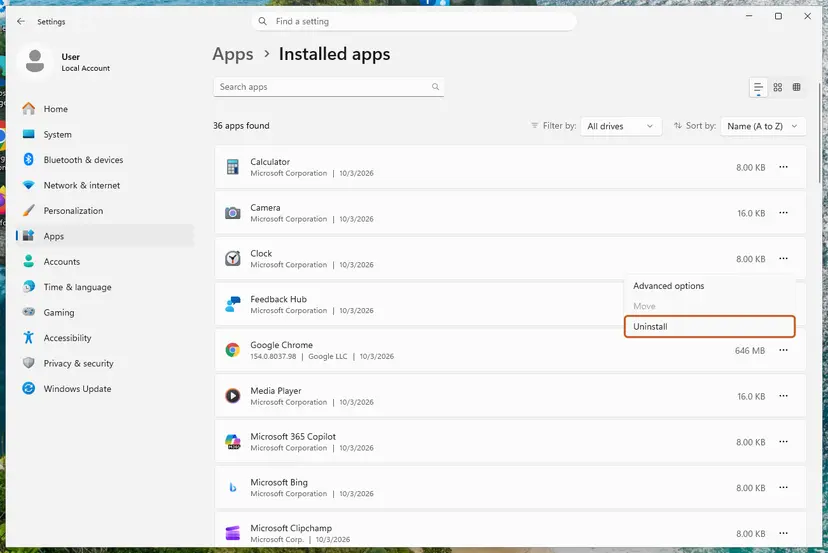
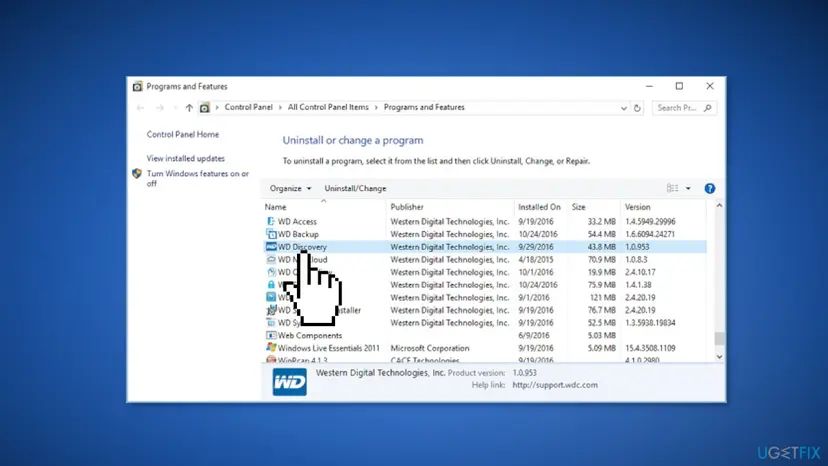
General steps for both Windows versions: Uninstall a program or app in Windows.
It worked if: No unused WD program is left, and after Fix 1 the wdcsam64 entry does not return when you plug in the drive.
If not: If the entry is still listed, go back to Fix 1. If pnputil refuses because a device uses it, go to Fix 3.
Fix 3. Uninstall the hidden WD SES Device in Device Manager
5 minutesLow riskReaders for whom pnputil refuses to delete the package because a device still uses it, or who prefer a window to a command.
Each WD drive that was ever connected leaves a WD SES Device entry, hidden when the drive is unplugged. While that entry exists, Windows keeps its driver. Removing the device together with its driver frees the package.
- Right-click Start and choose Device Manager.
- Open the View menu and select Show hidden devices.
- Expand WD Drive Management devices. Greyed entries belong to drives that are not connected now.
- Right-click each WD SES Device and choose Uninstall device.
- Tick Attempt to remove the driver for this device (Windows 10: Delete the driver software for this device) and select Uninstall.
- Restart, then try Memory integrity again, or run Fix 1 once more.
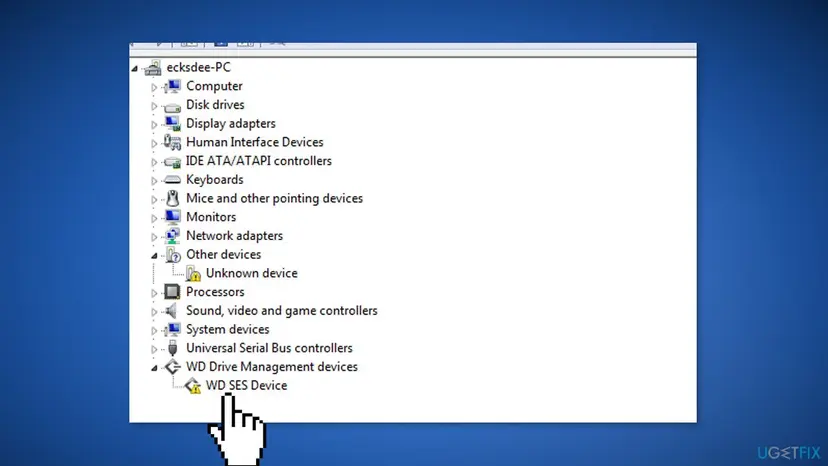
More on removing and reinstalling device drivers: Update, roll back or reinstall a driver.
It worked if: No WD SES Device is left under WD Drive Management devices, and wdcsam64.sys leaves the incompatible drivers list after the restart.
If not: Users report the entry can stay even after this step. Run Fix 1 again with /force, then use Fix 4.
Fix 4. Remove the leftover wdcsam64 driver entry with Autoruns
10 minutesRead the warningAdvanced readers whose pnputil command fails with "the system could not find the path specified", or for whom the entry returns after Fix 1.
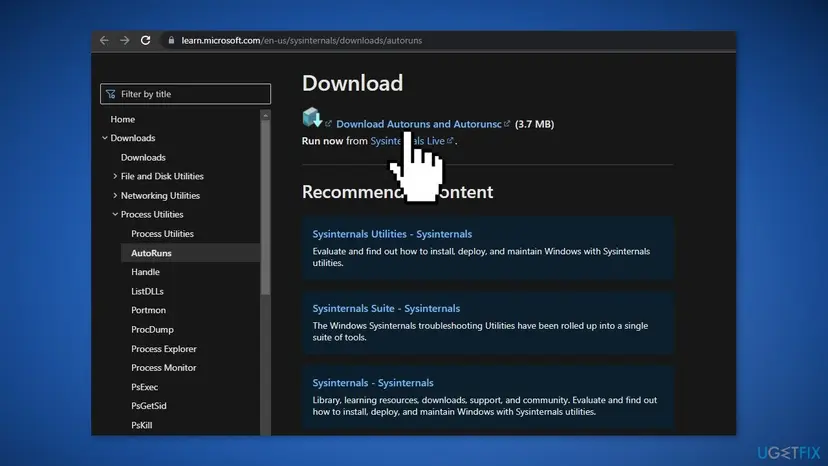
When the package files are gone but the driver's service entry stays, Windows Security can still list the file. Autoruns, a free Microsoft Sysinternals tool, shows every driver Windows tries to load and can delete that entry.
Deleting an entry in Autoruns removes its registry key. Deleting the wrong driver can stop a device or Windows from starting. Create a restore point or a registry backup first: Back up the registry before editing it.
- Download Autoruns from Microsoft's Sysinternals page on learn.microsoft.com and extract the ZIP file.
- Right-click Autoruns64.exe, choose Run as administrator and select Yes.
- Open the Drivers tab and type
wdcsaminto the filter box. - Check that the image path ends in
wdcsam64.sysorwdcsam64_prewin8.sysand the publisher is Western Digital. - Right-click each entry, choose Delete and confirm.
- Restart, then run Fix 1 once more for any Published name still listed, and set Memory integrity to On.
Deleting C:\Windows\System32\drivers\wdcsam64.sys in File Explorer leaves the package and the service behind, which is exactly what produces the "could not find the path" error later. Remove the package (Fix 1) and the entry (this fix) instead.
It worked if: No wdcsam64 entry is left in Autoruns, the incompatible drivers list is empty, and Memory integrity turns on after the restart.
If not: If the entry comes back, a WD program is still installed: check Installed apps again (Fix 2).
Fix 5. If you still use WD tools, install the current WD Drive Utilities instead
10 minutesLow riskReaders who still need WD software for the drive on this PC, such as drive settings, diagnostics or WD Security password lock.
Microsoft's first advice for an incompatible driver is an updated one from the maker. We found no Western Digital article on wdcsam64.sys, but many users on Microsoft Q&A report that installing the current WD Drive Utilities, without even running it, cleared the entry and let them turn Memory integrity on.
- Windows 11: open Settings > Windows Update > Advanced options > Optional updates. Windows 10: open Settings > Update & Security > Windows Update > View optional updates.
- Expand Driver updates and install any Western Digital entry offered, then restart.
- If nothing is offered, open Western Digital's official support site and its software downloads page, and download WD Drive Utilities for Windows.
- Install it and restart the PC.
- Open Review incompatible drivers. If wdcsam64 is gone, set Memory integrity to On. If it is still there, run Fix 1.
Turning Memory integrity off would let the driver load again, but it also removes the check that keeps malicious drivers out of the Windows kernel, and it switches off the vulnerable driver blocklist. Removing the driver does not change any file on the drive. Keep Memory integrity on.
It worked if: Either the installer replaces the old driver and Memory integrity turns on, or you know the old package must be removed with Fix 1.
If not: Go back to Fix 1 and remove the old driver.
Memory integrity still will not turn on: what to check
The incompatible drivers list is the log you need: after each restart it shows exactly which files still block the switch. If wdcsam64.sys is gone but other names appear, handle each one the same way: read its Published name and company, then remove or update the program behind it.
- A second wdcsam64 entry appears: that is usually wdcsam64_prewin8.sys or another copy with its own Published name. Run Fix 1 for it too.
- Another driver is now listed: old drivers often come in groups, such as phone, scanner or DVD burning drivers. Our HtcVComV64.sys guide shows the same steps for an old modem driver.
- The switch is greyed out: an organisation manages the PC, or hardware virtualization is off in UEFI or BIOS. Microsoft notes Memory integrity needs virtualization turned on. That is not caused by wdcsam64.sys.
- A WD tool stopped working after Fix 1: install the current WD Drive Utilities or WD Security from Western Digital's support site (Fix 5).
If the list is empty and the switch still fails after two restarts, contact Western Digital support with the driver details from Windows Security (file, version, Published name). Since February 2025 hard drives stay with Western Digital, while SSD and flash products are supported by SanDisk.
Keep wdcsam64.sys and other old drivers from blocking Memory integrity again
- Uninstall WD tools when you stop using them.
- Check Core isolation details once after you connect an old WD drive to a new PC.
- Keep Memory integrity on; Windows will warn you before an incompatible driver loads.
- Turn Memory integrity off for good to keep an old driver working.
- Download wdcsam64.sys from file download sites.
- Use "driver updater" programs to look for a replacement.
Microsoft notes that once Memory integrity is on, installing a device with an incompatible driver can bring up the same message. That is the protection working. Windows 10 left support on 14 October 2025, so a PC that stays on Windows 10 no longer gets security updates.
Frequently asked questions
What is wdcsam64.sys?
It is a 64-bit kernel driver from Western Digital Technologies for the WD SES Device, an extra interface that WD external drives such as My Passport and My Book show in Device Manager under WD Drive Management devices. WD software used it to talk to the drive. It is not a Windows file and Windows itself does not need it. We could not confirm in a WD document exactly which WD tools rely on it; removing it does not change any file on the drive.
Is wdcsam64.sys a virus?
No, not on its own. It is a legitimate Western Digital driver that is simply too old to run under Memory integrity. Windows lists it as incompatible, not as a threat. If the file sits outside C:\Windows\System32\drivers or the driver store, or you never connected a WD drive or installed WD software, run a full scan to be sure: How to scan for malware with Microsoft Defender.
Can I safely delete wdcsam64.sys?
Yes, if you do not need old WD tools on this PC. Delete the driver package rather than the bare file: use the Published name with pnputil (Fix 1), so Windows also removes the service and the store copy. Deleting only the .sys file by hand often leaves the entry behind and leads to path errors. Your files on the WD drive are not affected. Create a restore point first, as Fix 1 says.
What is wdcsam64_prewin8.sys and how do I remove it?
It is a second Western Digital driver file from the same family that many PCs list next to wdcsam64.sys, with its own Published name. The name suggests a build for Windows versions before Windows 8, but we could not confirm that in a WD document. Remove it the same way: note its Published name and run pnputil /delete-driver with /uninstall (Fix 1), then restart and check the list again.
Why does it say "A driver cannot load on this device: wdcsam64.sys"?
The message "A security setting is preventing this driver from loading" comes from the same protection: Memory integrity or the vulnerable driver blocklist refuses the old driver when your WD drive is connected or at sign-in. Remove the old driver with Fix 1 so the message stops, or install the current WD Drive Utilities if you need WD tools (Fix 5).
Is there a wdcsam64.sys driver update for Windows 11?
Western Digital publishes no separate update for this file that we could find. Check Windows Update optional updates first. Many users report that installing the current WD Drive Utilities from Western Digital's support site cleared the old entry (Fix 5). If that does not help, delete the old package with pnputil (Fix 1). Never download the .sys file from file sites.
pnputil says "Failed to delete driver package: the system could not find the path specified". What now?
The package's files are already partly gone, usually after someone deleted folders or the .sys file by hand, but its entry is still registered. Check the Published name again, because there may be a second one, and run pnputil with /uninstall /force. If it still fails, delete the leftover driver entry in Autoruns after a registry backup (Fix 4), restart and try again.
What does memory integrity do on Windows 11?
Memory integrity, also called Hypervisor-protected Code Integrity, makes it hard for malicious programs to use low-level drivers to take over the PC. It checks driver code inside an isolated environment built with hardware virtualization before Windows runs it. With it on, the vulnerable driver blocklist is on too. It needs virtualization enabled in UEFI or BIOS and works the same way on Windows 10.
Should I just leave Memory integrity off?
No. Memory integrity guards the Windows kernel against malicious drivers, and an old WD driver is not worth that risk. Removing wdcsam64.sys does not change any file on the drive and takes about ten minutes. If a WD tool you need stops working, install its current version rather than turning the protection off.
Is Western Digital the same company as the WD in my drive's name?
Yes. WD is Western Digital Corporation, a US maker of hard drives and storage based in San Jose, California. In February 2025 it split in two: hard drives stay with Western Digital, while SSD and flash products are now supported by SanDisk. This page is only about the wdcsam64.sys driver its external drives install.
Sources
- Microsoft Support: Device Security in the Windows Security app (Core isolation, Memory integrity, incompatible drivers, driver blocklist) (support.microsoft.com)
- Microsoft Q&A: How to resolve WDCSAM64 (Western Digital) driver incompatibility to enable memory integrity (user reports) (learn.microsoft.com)
- WD Community: Issues regarding wdcsam64.sys on Windows 11 (the sign-in message, Western Digital and SanDisk support split) (community.wd.com)
Did this fix work?
One click, no account. It tells the next reader which guides are worth their time.
Questions and experiences: wdcsam64.sys stops Memory integrity: how to fix it in Windows 11 and 10
Still broken, or found a fix we did not cover? Ask here: members and our editors answer. Reading is open; writing needs a free account.
…