
"A service installation section in this INF is invalid" in Windows: how to fix it

Prefer to fix it yourself? The manual steps follow.
- 6methods
- 5 to 20 minutes
- Easy
Applies to Windows 11 and Windows 10 PCs that fail to install an Android MTP driver, a Wi-Fi adapter driver or another device driver with this message
6 methods in this guide
I am trying to install a Wi-Fi driver, and it is not working. I receive an error "A service installation section in this INF is invalid" every time. Any idea what is going on and how do I fix this?
"A service installation section in this INF is invalid" means Windows could not set up the driver service that a driver's INF file asks for. Most often it appears when an Android phone connects as MTP Device and the built-in MTP driver fails to install. Start by picking MTP USB Device by hand in Device Manager.
For an Android phone or tablet, open Device Manager, right-click the failed MTP Device, select Update driver > Browse my computer for drivers > Let me pick from a list and choose MTP USB Device (Fix 1). On a Windows N edition, install the Media Feature Pack first (Fix 3). For a Wi-Fi card or other device, install the maker's package built for your exact Windows version (Fix 5).
| Error | "A service installation section in this INF is invalid." shown by the Update Drivers wizard or a driver setup |
|---|---|
| Where it appears | Device Manager, right after you connect an Android phone (listed as MTP Device with a yellow sign), or at the end of a Wi-Fi or USB driver installer |
| Main cause | The driver package names a Windows service that cannot be installed: on phones, the built-in MTP driver parts are missing or damaged; on other devices, a package made for another Windows version |
| Fastest fix | Pick MTP USB Device from the list of drivers in Device Manager (Fix 1) |
| Also written as | 0xE0000217, 0x800F0217, SPAPI_E_BAD_SERVICE_INSTALLSECT, ERROR_BAD_SERVICE_INSTALLSECT, "a service installation in this INF is invalid", "MTP device INF invalid" |
| In other languages | Spanish: "Una sección de instalación de servicios en este INF no es válida". Russian: "Неправильная секция установки службы в этом INF-файле" |
| Affects | Windows 11 (25H2, 26H2), Windows 10 22H2, Windows Server; Samsung, Xiaomi, Redmi and other Android phones, Wi-Fi adapters, Arduino boards |
| Vendor status | Not listed as a known issue by Microsoft. A Microsoft Q&A moderator confirmed in November 2025 that reinstalling the standard MTP USB Device driver fixed a Windows 11 case |
| Time to fix | 5 minutes for Fix 1; 15 to 20 minutes with a Media Feature Pack install and restart |
Facts checked on 15 October 2026. Steps written for Windows 11 (25H2 and 26H2) and Windows 10 22H2.
What "A service installation section in this INF is invalid" means
Every Windows driver comes with an INF file: a plain text file that tells Windows which files to copy and which driver service to create. The part that creates the service is the service installation section. When Windows cannot carry out that section, setup stops. The Update Drivers wizard then shows: "Windows found drivers for your device but encountered an error while attempting to install them." The line under it reads "A service installation section in this INF is invalid."
The wording blames the INF, but the INF itself is rarely broken. On a phone, the built-in Windows file wpdmtp.inf points to Windows Portable Devices parts that are missing, damaged or not yet chosen. With other hardware, the package often asks for a service that this Windows version does not accept.
- Error codes
0xE0000217in the setup log,0x800F0217in Windows Update and some installers; the name isSPAPI_E_BAD_SERVICE_INSTALLSECT- Built-in phone driver
C:\Windows\INF\wpdmtp.inf, shown in Device Manager as MTP USB Device under Portable Devices- Failed phone shows as
- MTP Device (sometimes the phone's name, such as Galaxy A31 or Redmi 13C) under Other devices with a yellow sign
- Setup log
C:\Windows\INF\setupapi.dev.log- Same family of messages
- "The INF file you selected does not support this method of installation", "The install class is not present or is invalid", "Invalid INF passed as parameter"
Readers with Samsung Galaxy, Xiaomi and Redmi phones search for this message, but the phone is fine. The failed part is the Windows driver that lets File Explorer browse the phone's storage. Nothing needs to change on the phone except the USB mode.
Why the INF service installation fails, from most to least common
Most often Windows picks the wrong or incomplete driver for an Android phone and the MTP setup fails. Less often the PC runs an N edition of Windows, which ships without the Windows Portable Devices parts. Rarely, the driver package does not fit the Windows version, or system files are damaged.
| Cause | How common | What you see | Fix |
|---|---|---|---|
| Windows tried a generic or wrong driver for the phone | Most cases | MTP Device under Other devices with a yellow sign | Fix 1, then Fix 2 |
| Windows 11 N or Windows 10 N without the Media Feature Pack | Common in Europe and Korea | The phone never opens in File Explorer, on any cable | Fix 3 |
| A half-installed device left from earlier tries | Common | The same error after every reconnect | Fix 4 |
| Driver package made for another Windows version (Wi-Fi card on Windows Server, old Arduino driver) | Less common | The maker's setup ends with the message | Fix 5 |
| Damaged system files or driver store | Rare | Several devices fail to install | Fix 6 |
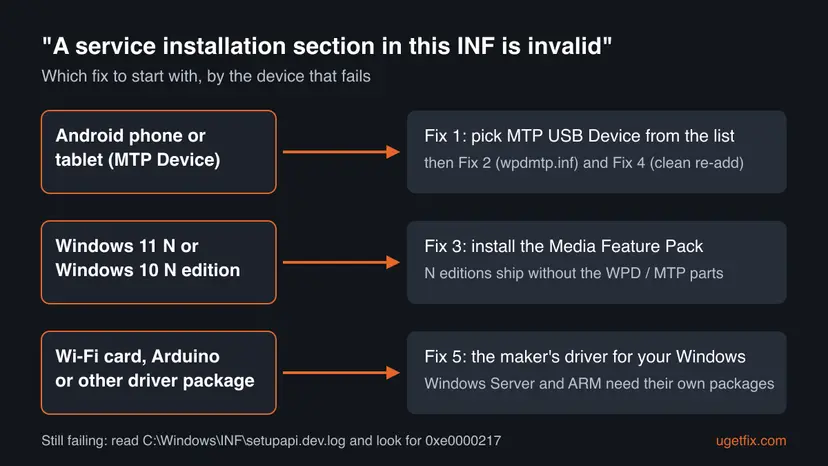
How to fix "A service installation section in this INF is invalid"
Fix 1 solves it for most phone owners and takes five minutes. Keep the phone plugged in and unlocked while you work. Readers with a Wi-Fi card or another device can go straight to Fix 5.
| What you see or have | Start with |
|---|---|
| An Android phone or tablet shows as MTP Device with a yellow sign | Fix 1 |
| MTP USB Device is not in the list of drivers | Fix 2, then Fix 3 |
| Settings > System > About shows an edition ending in N, such as Windows 11 Pro N | Fix 3 |
| The error comes back after every reconnect | Fix 4 |
| A Wi-Fi, Bluetooth or Arduino driver setup ends with the message | Fix 5 |
| Other devices also fail to install | Fix 6 |
Fix 1. Pick the built-in MTP USB Device driver in Device Manager
5 minutesLow riskAnyone whose Android phone or tablet shows as MTP Device with a yellow sign.
Windows already has the right driver for phones. Choosing it by hand stops Windows from using the generic match that failed, and it is the fix a Microsoft Q&A moderator confirmed for Windows 11.
- Unlock the phone, swipe down from the top and set the USB connection to File transfer (some phones call it Transferring files or MTP).
- Right-click Start and select Device Manager.
- Expand Other devices or Portable Devices and find MTP Device or the phone's name with a yellow sign.
- Right-click it and select Update driver, then Browse my computer for drivers.
- Select Let me pick from a list of available drivers on my computer. If Windows first asks for a device type, select Portable Devices and Next.
- Select MTP USB Device and then Next.
- Wait for the success message, select Close and open File Explorer > This PC to find the phone.
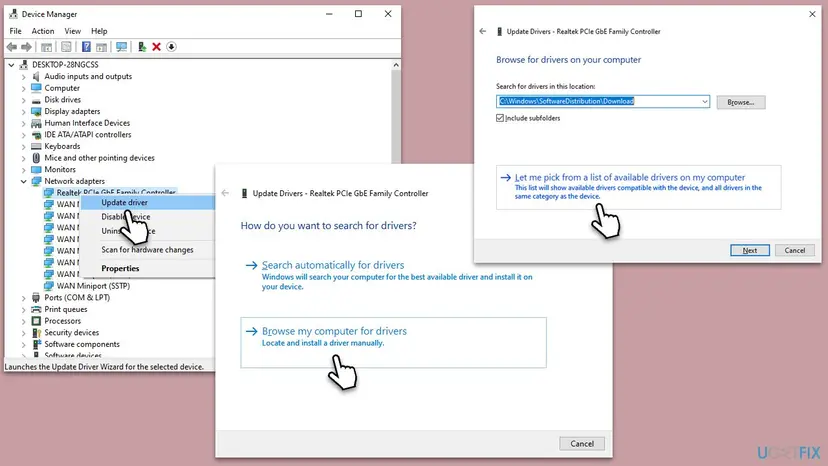
The general Update driver steps, with Windows 11 screenshots, are in Update, roll back or reinstall a driver.
It worked if: The phone moves under Portable Devices with its name, and its storage opens in File Explorer.
If not: If MTP USB Device is not in the list, or it fails with the same message, try Fix 2.
Fix 2. Install the MTP driver straight from wpdmtp.inf
5 minutesLow riskPhone owners for whom MTP USB Device is missing from the list or Fix 1 failed.
Installing wpdmtp.inf itself registers the MTP driver package again in Windows, which repairs the service section the phone driver depends on.
- Press Win + E to open File Explorer.
- Windows 11: select View > Show > Hidden items. Windows 10: open the View tab and tick Hidden items.
- Go to
C:\Windows\INF. - Type
wpdmtp.infin the search box in the top right corner. - Right-click wpdmtp in the results (on Windows 11 select Show more options first) and select Install. Select Yes if asked.
- Unplug the phone, plug it in again and repeat Fix 1.
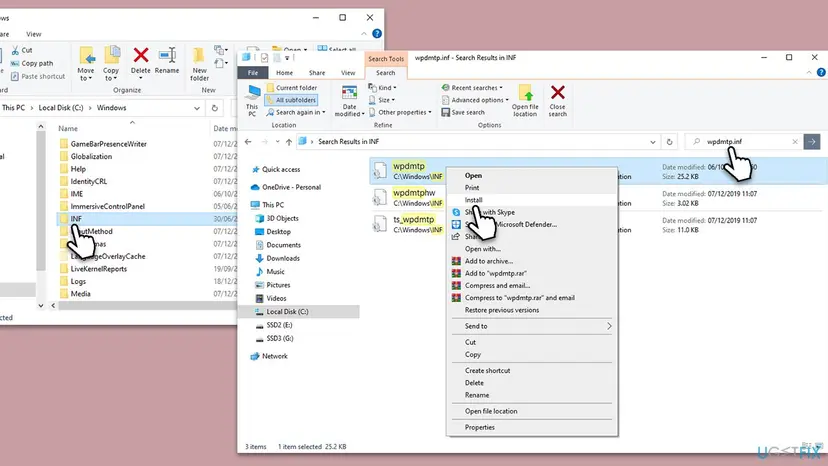
"The INF file you selected does not support this method of installation" means that INF has no part for a right-click install. That is normal for some driver files. Use Fix 1 with the list of drivers instead, or Fix 3 if wpdmtp.inf is not in the folder at all.
It worked if: Windows installs the file without a message, and Fix 1 now lists MTP USB Device.
If not: If wpdmtp.inf is missing from C:\Windows\INF, check whether your edition ends in N (Fix 3) or repair system files (Fix 6).
Fix 3. Install the Media Feature Pack on Windows 11 N or Windows 10 N
15 minutes with a restartLow riskPCs whose Windows edition ends in N, such as Windows 11 Pro N or Windows 10 Home N.
Microsoft lists the Windows Portable Devices infrastructure, which talks to devices that use the Media Transfer Protocol, among the parts N editions leave out. Without it the MTP driver cannot install its service.
- Open Settings > System > About and read Edition under Windows specifications. Continue only if it ends in N.
- Windows 11 N: open Settings > Apps > Optional features and select View features next to Add an optional feature.
- Windows 10 N: open Settings > Apps > Apps & features > Optional features and select Add a feature.
- Find Media Feature Pack, tick it and select Next, then Install (Windows 10: Install).
- Restart the PC when the install finishes. Windows does not ask you to, but Microsoft says the restart is required.
- Connect the phone and repeat Fix 1.
It worked if: After the restart the phone installs as MTP USB Device and appears in File Explorer.
If not: If the edition does not end in N, this fix does not apply: go to Fix 4.
Fix 4. Remove the failed device and let Windows detect the phone again
5 minutesLow riskReaders who tried several drivers and get the same message after every reconnect.
Each failed install can leave a half-made device entry that Windows reuses. Removing it gives the MTP driver a clean start on the next connection.
- In Device Manager, right-click the failed MTP Device and select Uninstall device.
- If a box Attempt to remove the driver for this device appears, leave it clear for a phone; the MTP driver is part of Windows. Select Uninstall.
- Unplug the phone and restart the PC.
- Plug the phone into a USB port directly on the PC with a data cable, not a charge-only cable, and choose File transfer on the phone.
- If the yellow sign comes back, repeat Fix 1 right away.
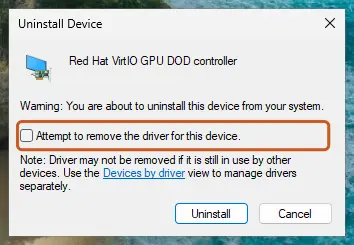
It worked if: The phone installs once without a message, or Fix 1 now works on the first try.
If not: If the phone is never detected at all, try another cable and port, then see Still not working below.
Fix 5. Install the maker's driver built for your exact Windows version
10 minutesLow riskWi-Fi, Bluetooth, Arduino or other devices whose own setup ends with the message.
Outside phones, the message usually means the package asks for a service this Windows does not accept. Users report it for Intel BE200 Wi-Fi drivers on Windows Server 2022, a system that package is not made for.
- Press Win + R, type
winverand press Enter. Note the version and whether it says Windows 11, Windows 10 or Windows Server. - Open Settings > System > About and read System type: x64-based, or ARM-based processor.
- On the device maker's support page, or the PC maker's page for a built-in card, download the driver listed for that exact Windows and system type.
- Uninstall the failed driver first, as in Fix 4, ticking Attempt to remove the driver for this device this time.
- Run the new setup with Run as administrator, or point Update driver > Browse my computer for drivers at its unpacked folder, and restart.
Changing an INF file breaks its digital signature, and Windows then refuses the whole package. If no package exists for your Windows, a supported adapter is the safe fix. Avoid driver packs and "driver updater" tools from unknown sites.
It worked if: The setup finishes without the message and the device works after the restart.
If not: If the maker lists no driver for your Windows, read the setup log under Still not working and contact the maker with it.
Fix 6. Repair Windows system files with SFC and DISM
20 minutesLow riskPCs where several devices fail to install, or wpdmtp.inf is missing on a non-N edition.
The MTP driver relies on Windows Portable Devices files that ship with Windows. If those files are damaged, SFC and DISM restore them from a clean copy.
Run DISM first and SFC after it, then restart and repeat Fix 1.
- Open an elevated command window. Right-click Start and select Terminal (Admin), or type cmd in the search box, right-click Command Prompt and select Run as administrator. Select Yes when Windows asks for permission.
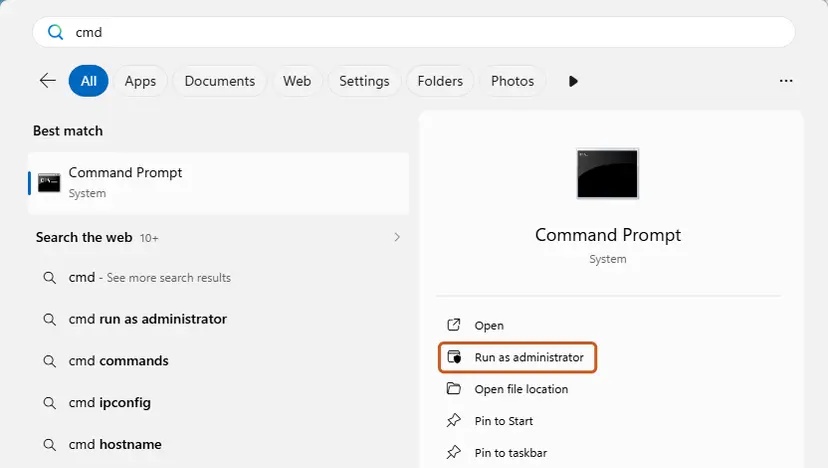
Search for cmd and choose Run as administrator. Screenshot: Windows 11 26H2. - Run DISM first. Type the command below and press Enter. DISM downloads clean copies of damaged components from Windows Update, so it can take several minutes. Wait until it says The operation completed successfully.
DISM.exe /Online /Cleanup-Image /RestoreHealth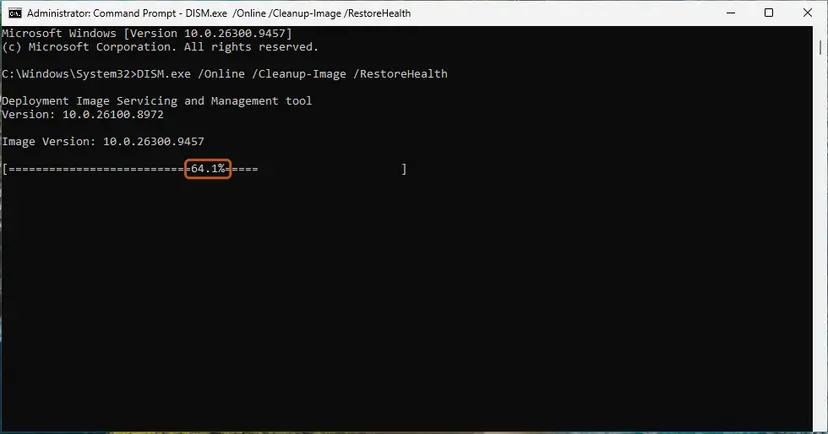
DISM /RestoreHealth running. Screenshot: Windows 11 26H2. - Run System File Checker. In the same window, type the command below and press Enter. Do not close the window until the verification reaches 100%.
sfc /scannow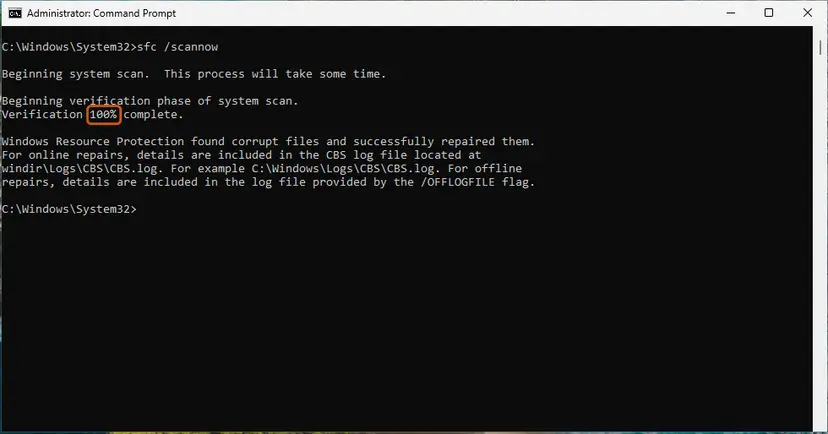
sfc /scannow at 100%. Screenshot: Windows 11 26H2. - Read the result and restart. Compare the last message with the table below this guide, then restart the PC so that repaired files are loaded.
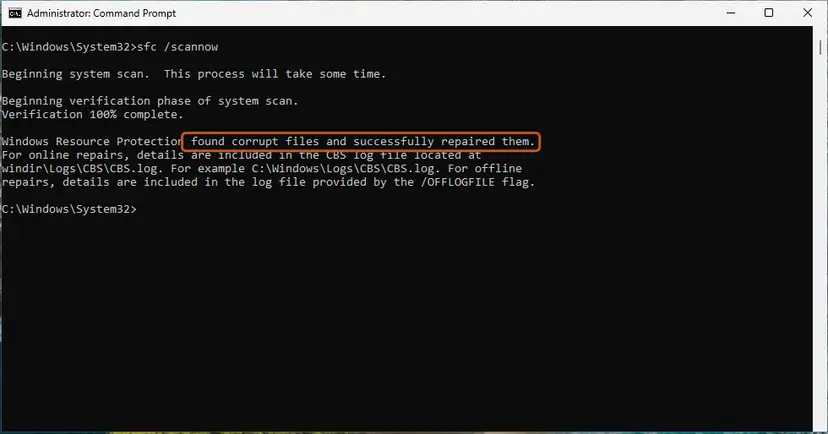
The result line tells you what SFC did. Screenshot: Windows 11 26H2.
These steps were written for Windows 11 24H2 and 25H2. The full page with the other versions and what each result means: Run DISM and SFC to repair Windows system files
It worked if: SFC reports that it repaired files or found no problems, and the phone installs after a restart.
If not: If nothing changed, read the setup log as described below.
Still "INF is invalid": the log to read and when it is the hardware
Windows writes every driver install to C:\Windows\INF\setupapi.dev.log. Open it in Notepad, press Ctrl + End, then search upward for 0xe0000217 or for wpdmtp. The lines just above name the INF and the service Windows tried to create.
- The log names a third-party INF, not wpdmtp.inf: a phone suite or old driver has taken over the phone. Uninstall that phone software in Settings > Apps and repeat Fix 4.
- The phone never appears in Device Manager on any port or cable: the cable is charge-only or the phone's port is faulty. Test with another phone or cable.
- Wi-Fi card on Windows Server: ask the maker whether the card supports Server at all; many consumer cards do not.
- ARM laptop (Snapdragon): only drivers built for ARM64 install. An x64 package cannot.
The winver version, the edition from Settings > System > About, the device's hardware ID from Properties > Details > Hardware Ids, and the setupapi.dev.log lines around 0xe0000217. With those four facts a helper can tell whether the driver or the hardware is at fault.
Prevent the error next time you connect a phone or install a driver
- Set the phone to File transfer before you plug it in, and use a data cable.
- Install the Media Feature Pack once on any Windows N PC that will connect phones or cameras.
- Take drivers from the device maker's page for your exact Windows version.
- Install phone suites or driver packs just to copy photos; Windows already has the MTP driver.
- Edit INF files or force unsigned drivers.
- Install Windows 10 or 11 client drivers on Windows Server without checking support.
Windows 10 left support on 14 October 2025. The fixes above still work on Windows 10 22H2, but a PC that stays on it gets no more security fixes.
Frequently asked questions
What does "a service installation section in this INF is invalid" mean?
It means Windows could not create the driver service that the driver's INF file describes, so the install stopped. The INF is the text file that comes with every driver. With Android phones, the failing file is usually the built-in wpdmtp.inf, and the real cause is a wrong driver choice or missing Windows Portable Devices parts. With other hardware, the package often does not fit the Windows version. Fix 1 solves the phone case for most readers; Fix 5 covers other devices.
How do I fix the MTP device INF invalid error on Windows 11?
Open Device Manager, right-click the MTP Device with the yellow sign and select Update driver. Choose Browse my computer for drivers, then Let me pick from a list of available drivers on my computer, and select MTP USB Device (Fix 1). If it is missing, install wpdmtp.inf from C:\Windows\INF (Fix 2). If your edition ends in N, install the Media Feature Pack and restart (Fix 3). The steps are the same on Windows 10.
Why does my Samsung, Xiaomi or Redmi phone show this error?
The phone itself is not at fault. Samsung Galaxy phones such as the A31, and Xiaomi or Redmi phones such as the Redmi 13C, all connect to Windows through the same built-in MTP driver. When that Windows driver fails to install, every brand shows the same message. Set the phone to File transfer, then follow Fix 1. Phone maker suites are not needed to copy files, and an old suite driver can even cause the failure.
The message is in Spanish or another language. Is it the same error?
Yes. Spanish Windows shows "Una sección de instalación de servicios en este INF no es válida", and Russian Windows shows "Неправильная секция установки службы в этом INF-файле". Users who search in Vietnamese, Arabic, Thai, Hindi or Indonesian for how to solve it see the same dialog in their language. The fixes on this page apply unchanged; only the menu names are translated. The key choice in Fix 1 is the driver named MTP USB Device, which keeps its name in most languages.
Why do I get this error installing a Wi-Fi driver?
Usually because the package does not fit your Windows. Users report the message with Intel BE200 Wi-Fi drivers on Windows Server 2022, which that consumer package is not built for. It also happens with a 32-bit or x64 package on an ARM PC, or an old package on a new Windows. Check winver and the system type, then download the driver listed for exactly that from the card or PC maker, as in Fix 5.
What is wpdmtp.inf and can I download it?
wpdmtp.inf is the Windows file that installs the MTP USB Device driver for phones, cameras and media players. It lives in C:\Windows\INF and comes with Windows, so you never need to download it. Copies on download sites are unsigned outside their package and can be unsafe. If the file is missing, your edition probably ends in N (install the Media Feature Pack, Fix 3), or system files are damaged (run SFC and DISM, Fix 6).
What does "the INF file you selected does not support this method of installation" mean?
You right-clicked an INF file and chose Install, but that INF has no section for this kind of install. Many device drivers are made only for Device Manager. It is not damage and not the same failure as the service section error. Install the driver through Device Manager instead: right-click the device, select Update driver, then Browse my computer for drivers, and point it at the folder or pick the driver from the list, as in Fix 1.
What do "invalid INF passed as parameter" and "the install class is not present or is invalid" mean?
Both are related SetupAPI messages about a driver package Windows cannot use. "Invalid INF passed as parameter" usually means the file is not a valid driver INF for this device or was changed. "The install class is not present or is invalid" means the INF names a device class this Windows does not know. In both cases the fix is the same as Fix 5: get the maker's package built for your exact Windows version and install it through Device Manager.
Is this error caused by a virus?
Almost never. The message comes from Windows setup and points to a driver package or missing Windows parts. Malware can damage system files, though, so if wpdmtp.inf is missing on a normal edition and SFC finds damage it cannot repair, run a full scan with How to scan for malware with Microsoft Defender. Do not download driver fixers that claim to remove this error; they are not needed for a driver Windows already includes.
Does the error mean my phone or adapter is broken?
No, the message itself is about software. A broken phone port or charge-only cable shows different signs: the phone does not appear in Device Manager at all, or it appears and disappears. If Device Manager shows MTP Device with a yellow sign, the hardware talked to Windows and only the driver failed. The same applies to Wi-Fi cards: the card is detected, but its driver package will not install.
Sources
- Microsoft Support: Media Feature Pack for Windows N (support.microsoft.com)
- Microsoft Q&A: a service installation in this INF is invalid, Windows 11 MTP driver issue solved (learn.microsoft.com)
- Intel Community: Server 2022 install Wi-Fi BE200 driver fail "A service installation section in this INF is invalid" (community.intel.com)
Did this fix work?
One click, no account. It tells the next reader which guides are worth their time.
Questions and experiences: "A service installation section in this INF is invalid" in Windows: how to fix it
Still broken, or found a fix we did not cover? Ask here: members and our editors answer. Reading is open; writing needs a free account.
…