
How to fix DSOUND.dll is missing or not found error in Windows?

Prefer to fix it yourself? The manual steps follow.
- 7methods
- 5 to 30 minutes
- Beginner
Applies to Windows 11 and Windows 10, including N and KN editions; games and audio programs that use DirectSound
7 methods in this guide
- What the error means
- Causes, ranked
- Do not download the DLL
- The fixes
- 1. Install Media Feature Pack
- 2. Check the game folder copy
- 3. Repair or reinstall it
- 4. Repair Windows with DISM, SFC
- 5. Update Windows and driver
- 6. Check for a blocked file
- 7. Reinstall Windows, keep files
- Still there: what to check
- Keep it from coming back
- FAQ
Sometimes I can't launch games. It happens occasionally and not with all games. When it does, I get an error saying "The program can't start because DSOUND.dll is missing from your computer." What does it mean and how do I fix it?
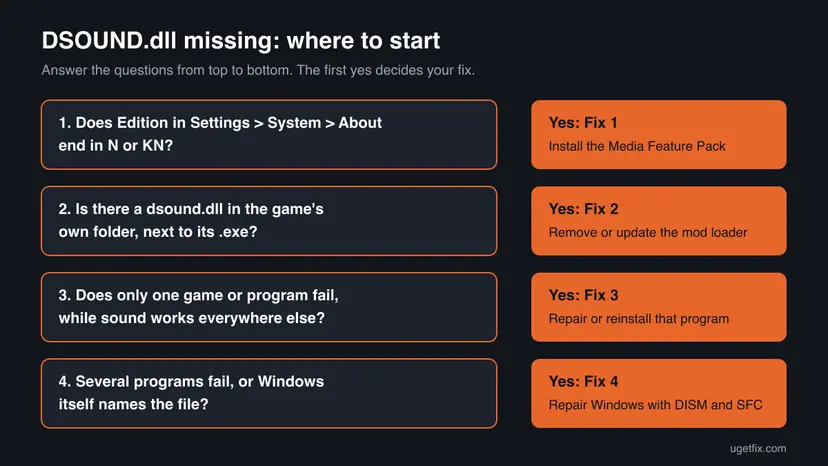
dsound.dll is the DirectSound library, the part of Windows that older games and audio programs use to play sound. When a program says it is missing, the PC most often runs an N or KN edition without the Media Feature Pack, or a mod loader left its own dsound.dll next to the game. Check those two first, then repair Windows.
Open Settings > System > About and read Edition. If it ends in N or KN, install the Media Feature Pack from Optional features and restart (Fix 1). Otherwise look for a dsound.dll in the game's own folder, which a mod loader put there, and move it out (Fix 2). Then repair the game, then Windows. Do not download dsound.dll from a DLL site.
| Error | "The code execution cannot proceed because DSOUND.dll was not found. Reinstalling the program may fix this problem." Older wording: "The program can't start because DSOUND.dll is missing from your computer." |
|---|---|
| Where it appears | In a small System Error window the moment a game or audio program starts. The title bar names the program's .exe file. |
| Main cause | An N or KN edition of Windows without the Media Feature Pack, or a dsound.dll from a mod loader in the game's own folder. |
| Fastest fix | Install the Media Feature Pack from Settings > Apps > Optional features on an N edition (Fix 1), or move the extra dsound.dll out of the game folder (Fix 2). |
| Also written as | DSOUND.dll, dsound dll, dssound.dll, "dsound.dll failed to load", "dsound.dll not found", "dsound.dll error". |
| The file | C:\Windows\System32\dsound.dll (64-bit) and C:\Windows\SysWOW64\dsound.dll (32-bit). A Windows file, signed by Microsoft. |
| Affects | Windows 11 and Windows 10, home and Pro. Users report it most often on N editions and in older games that use mods. |
| Vendor status | Not a known Windows bug. Microsoft says N editions leave out Windows Media Player and related technologies until the Media Feature Pack is installed. |
| Do not | Download dsound.dll from a DLL site or copy one into System32, SysWOW64 or a game folder by hand. |
| Time to fix | About 10 minutes for the Media Feature Pack and a restart. Up to 30 minutes when DISM and SFC have to repair Windows. |
Facts checked on 15 October 2026. Steps written for Windows 11 (25H2 and 26H2) and Windows 10 22H2.
What dsound.dll is and what the DSOUND.dll missing error means
dsound.dll holds DirectSound, the audio part of Microsoft DirectX. Games from the DirectX 9 era and many audio programs call it to open the sound card, mix effects and play music. Newer games mostly use other audio interfaces, but plenty of current titles and launchers still load dsound.dll at start.
- Full name
- DirectSound, part of DirectX and of Windows' media stack.
- Who installs it
- Windows itself. On N and KN editions the media technologies come with the Media Feature Pack instead.
- Who uses it
- Older and some newer games, audio programs such as FL Studio, emulators, voice chat and media players.
- Where it lives
- System32 for 64-bit programs and SysWOW64 for 32-bit programs, on a 64-bit Windows.
When a program reports dsound.dll missing, Windows found no usable copy in any folder it searched, or the copy it found would not load. The text of the window tells you which case you have, and each case has its own fix.
| What the window says | What it tells you |
|---|---|
| "The code execution cannot proceed because DSOUND.dll was not found. Reinstalling the program may fix this problem." | No dsound.dll in the game folder or in Windows. Typical of an N edition without the Media Feature Pack. |
| "The program can't start because DSOUND.dll is missing from your computer." | The same error in the wording of older Windows versions and older guides. |
| "DSOUND.dll failed to load" or a Bad Image window naming dsound.dll | A copy was found but would not load. Most often a mod loader's dsound.dll that does not fit the game or the Windows build. |
| A warning from a game mod about an old dsound.dll | The mod found an outdated proxy dsound.dll from an earlier mod setup in the game folder. Fix 2. |
| "Exception EFCreateError in module dsound.dll" | An error raised inside a program while dsound.dll was running. We could not confirm one cause. Repair or reinstall that program (Fix 3). |
What causes dsound.dll to be missing or not found, from most to least common
Most often the PC runs an N or KN edition and the Media Feature Pack was never installed, or a feature update removed it. Next comes a dsound.dll that a mod loader or patch placed in the game folder. Less often the game itself or Windows' own files are damaged.
| Cause | How often | How to tell | Fix |
|---|---|---|---|
| N or KN edition of Windows without the Media Feature Pack. | Most often | Edition in Settings > System > About ends in N or KN. Videos may not play in the Photos app either. | Fix 1 |
| A dsound.dll from a mod loader, game patch or crack in the game's folder. | Often | One modded game fails. Its folder holds a dsound.dll that is not signed by Microsoft. | Fix 2 |
| Damaged or incomplete files of the game or program. | Sometimes | No extra dsound.dll in its folder, other games start and play sound. | Fix 3 |
| Damaged Windows system files. | Sometimes | Several programs fail, or Windows' own copy in System32 is missing on a regular edition. | Fix 4 |
| Old Windows build or audio driver. | Rarely | Windows Update has pending updates, or sound fails in several apps. | Fix 5 |
| A security tool removed a dsound.dll, or malware dropped one. | Rarely | Protection history in Windows Security shows an entry naming dsound.dll. | Fix 6 |
Microsoft's Media Feature Pack page says Windows 10/11 N has the same functions as other editions except Windows Media Player and related technologies, and lists Media Foundation and the audio codecs among them. Microsoft does not publish a per-file list, so we could not confirm from Microsoft that dsound.dll itself is left out. Users on Windows 11 Pro N report the dsound.dll error in Valorant and other games, and that the Media Feature Pack ends it.
dsound.dll download: why a DLL site is the wrong place for this file
Searches for the file lead first to sites that offer single DLLs. Microsoft does not publish dsound.dll on its own: it reaches your PC inside Windows or, on N editions, with the Media Feature Pack. A downloaded copy has none of the files around it and no tie to your Windows build.
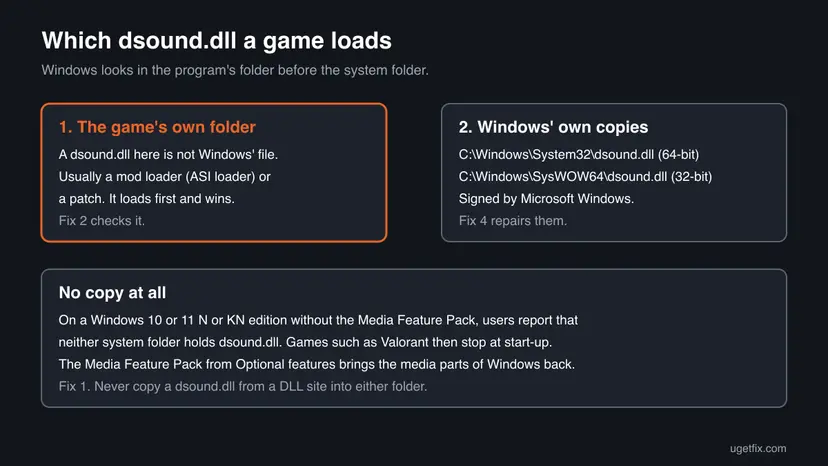
- It lands in the wrong place. A dsound.dll dropped next to a game is loaded before the genuine file and becomes exactly the kind of proxy that breaks games.
- Unknown builder. A DLL from a website was taken from somebody's PC or built by somebody else, and it runs inside every program that plays sound.
- Wrong build. A 32-bit file for a 64-bit game, or one from another Windows version, turns the missing window into a Bad Image window.
- It does not fill the gap. On an N edition more than one media file is absent, so the next window names the next missing file.
- The genuine routes are free. The Media Feature Pack is an optional feature in Settings, and DISM and SFC repair Windows' own copy.
Mod loaders use winmm.dll the same way. Our guide to the winmm.dll missing or not found error explains in detail how Windows picks which copy of a system DLL loads, and how to tell a proxy from Windows' own file.
How to fix DSOUND.dll is missing or not found in Windows
Fix 1 is for N and KN editions and ends the error for most readers who see it in every game. Fix 2 removes a mod loader's dsound.dll. Fix 3 repairs the program, Fix 4 repairs Windows. Fixes 5 to 7 cover updates and drivers, a blocked or planted file, and a Windows reinstall that keeps your files.
| What you see or have | Start with |
|---|---|
| Edition in Settings > System > About ends in N or KN. | Fix 1 |
| The failing game has mods, or its folder holds a dsound.dll next to the .exe. | Fix 2 |
| Only one program fails, it has no mods, other games play sound. | Fix 3 |
| Several programs fail on a regular edition of Windows. | Fix 4 |
| Sound is broken in many apps, or Windows Update has been paused for months. | Fix 5 |
| Windows Security showed an alert naming dsound.dll. | Fix 6 |
| Nothing above helped and Windows' own copy cannot be repaired. | Fix 7 |
Fix 1. Install the Media Feature Pack on an N or KN edition of Windows
10 minutesNo riskYour Windows edition name ends in N or KN, for example Windows 11 Pro N.
N and KN editions ship without Windows Media Player and the media technologies around it. The Media Feature Pack is Microsoft's own package that adds them back, and users report that games stop naming dsound.dll once it is installed.
- Press Win + I, select System > About and read Edition under Windows specifications. Go on only if it ends in N or KN.
- On Windows 11 N, select Apps > Optional features, then View features next to Add an optional feature.
- On Windows 10 N, select Apps > Apps and Features > Optional features > Add a feature.
- Find Media Feature Pack in the list, tick it and install it.
- Wait until it shows as installed. Microsoft says you are not prompted to restart, but you must restart to complete the installation.
- Restart the PC and start the game again.
- Not in the list: the pack is offered only on N and KN editions. If you do not see it, your edition is a regular one and Fix 2 is next.
- After a big update: if the error returns after a Windows feature update, open Optional features again and check that the pack is still installed.
- Extra codecs: Microsoft also suggests Store apps such as VP9 Video Extensions and Web Media Extensions for video in apps and the browser.
It worked if: Media Feature Pack shows under installed optional features, and the game starts without the DSOUND.dll window after the restart.
If not: If the pack is installed and the window still appears, check the game folder for its own dsound.dll with Fix 2.
Fix 2. Remove or update the dsound.dll that a mod loader put in the game folder
5 minutesLow riskThe failing game has mods, an ASI loader, a fan patch or an unofficial fix, or a mod warned about an old dsound.dll.
Windows loads a DLL from the program's own folder before the system folder. Ultimate ASI Loader, a common mod loader, ships a dsound.dll build for 32-bit and 64-bit games so it is loaded in place of Windows' file. An outdated or wrong build stops the game.
- Right-click the game's shortcut or its entry in the launcher and open its local files or file location.
- Look for
dsound.dllin the same folder as the game's.exefile. - Right-click it, select Properties and open Digital Signatures. Windows' own file shows Microsoft Windows as the signer. A mod loader's copy has no such tab or another signer.
- If it is not Microsoft's, rename it to
dsound.dll.bakinstead of deleting it. The game then loads Windows' own file. - Start the game. If it runs, the proxy was the cause.
- To keep your mods, download the current build of the mod loader from its own project page and put it back under the name its instructions give.
powershell -command "Get-AuthenticodeSignature 'C:\Windows\System32\dsound.dll' | Format-List Status,SignerCertificate"The command above shows the signature of Windows' own copy for comparison. Replace the path with the game folder's file to check that one: a status of NotSigned or a signer other than Microsoft means it is not Windows' file.
A dsound.dll that came with a cracked game or a repack is closed code from an unknown builder. We do not help make such files work. Remove it, buy or reinstall the game from its store, and scan the PC with Microsoft Defender (Fix 6).
It worked if: The game starts after the extra dsound.dll is renamed, or after the current mod loader build replaces it.
If not: If no extra dsound.dll is there, or renaming it did not help, repair the game's own files with Fix 3.
Fix 3. Repair or reinstall the game or program that shows the error
10 to 30 minutesLow riskOne program fails, it has no mods, and other programs play sound normally.
The window itself says reinstalling the program may fix the problem. A damaged install can lack its own audio files or bring broken settings, and a store's file check or a clean install replaces them without touching Windows.
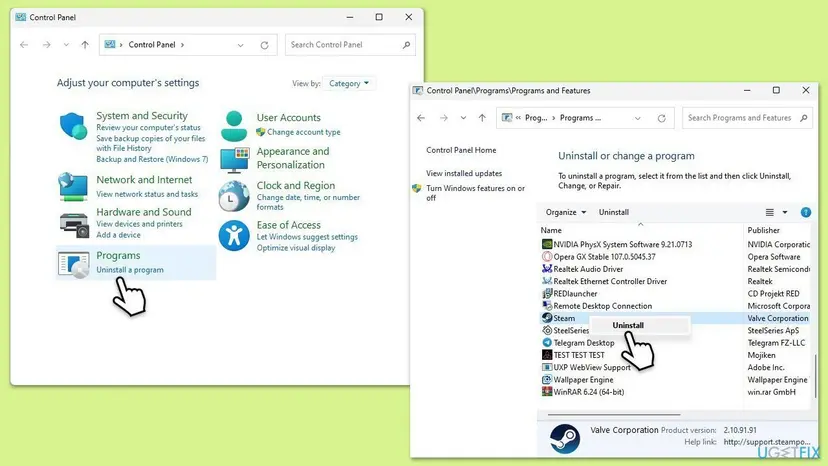
For a game in Steam, the EA app, Ubisoft Connect, the Epic Games Launcher or GOG Galaxy, let the launcher check its files first. Step by step: How to verify game files in Steam, Epic Games, Xbox app, EA app, Battle.net and GOG Galaxy
- If the check finds nothing, uninstall the program: Uninstall a program or app in Windows
- Restart the PC.
- Install the current version from its maker or store, not from an old setup file.
- Start it once as a normal user, not as administrator.
It worked if: The launcher reports repaired or verified files, or the fresh install starts without the DSOUND.dll window.
If not: If a fresh install shows the same window, Windows' own copy is the likely cause: run Fix 4.
Fix 4. Repair Windows' own dsound.dll with DISM and SFC
15 to 30 minutesNo riskA regular edition of Windows, several programs fail, or System32 has no dsound.dll.
dsound.dll is a Windows file, so Windows can rebuild it from its own store. DISM repairs that store, then System File Checker replaces damaged or missing system files, the audio libraries included.
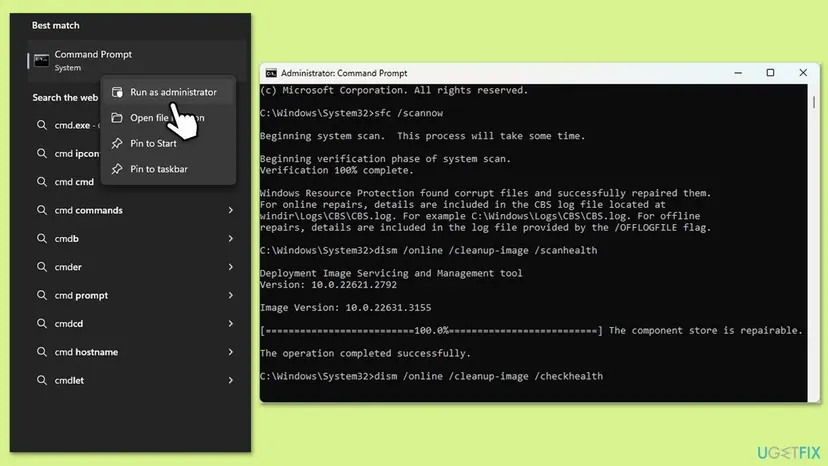
- Open an elevated command window. Right-click Start and select Terminal (Admin), or type cmd in the search box, right-click Command Prompt and select Run as administrator. Select Yes when Windows asks for permission.
- Run DISM first. Type the command below and press Enter. DISM downloads clean copies of damaged components from Windows Update, so it can take several minutes. Wait until it says The operation completed successfully.
DISM.exe /Online /Cleanup-Image /RestoreHealth - Run System File Checker. In the same window, type the command below and press Enter. Do not close the window until the verification reaches 100%.
sfc /scannow - Read the result and restart. Compare the last message with the table below this guide, then restart the PC so that repaired files are loaded.
These steps were written for Windows 11 24H2 and 25H2. The full page with the other versions and what each result means: Run DISM and SFC to repair Windows system files
- After the scan, check that both of Windows' copies are back. Each command should list one dsound.dll.
dir C:\Windows\System32\dsound.dll dir C:\Windows\SysWOW64\dsound.dll - Restart the PC so programs load the repaired file.
- Start the game or program again.
It worked if: SFC reports no integrity violations or a successful repair, both dir commands list the file, and the program starts.
If not: If dir finds no file on an N edition, go back to Fix 1. On a regular edition, run DISM again with the internet on, then SFC once more, then Fix 5.
Fix 5. Install Windows updates and update the audio driver
15 to 30 minutesLow riskWindows Update has pending updates, or sound fails or stutters in several apps.
DirectSound talks to the sound device through its driver, and updates bring fixed system files that DISM could not take from a damaged store. A broken audio driver does not delete dsound.dll, but it can make programs that use it fail at start.
- Press Win + I, open Windows Update and select Check for updates. Install everything offered and restart.
- Right-click Start, open Device Manager and expand Sound, video and game controllers.
- Update the audio device, for example Realtek High Definition Audio, or install the current driver from the PC or motherboard maker: Update, roll back or reinstall a driver
- Restart and start the program again.
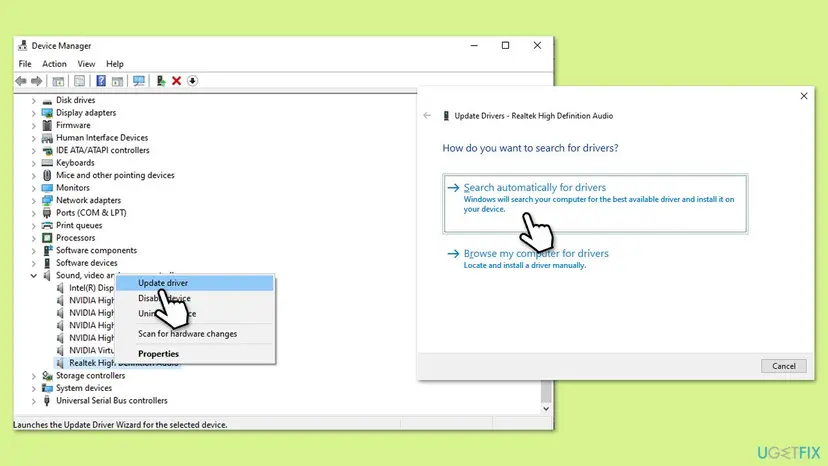
Windows 10 left support on 14 October 2025. A Windows 10 PC no longer gets regular fixes, so if the error keeps returning there, check whether the PC can move to Windows 11.
It worked if: Windows Update says you are up to date, the audio device shows no warning sign, and the program starts with sound.
If not: If the error remains, check Windows Security for a removed or planted dsound.dll with Fix 6.
Fix 6. Check Windows Security for a removed or planted dsound.dll
10 to 20 minutesLow riskWindows Security or another antivirus showed an alert around the time the error began, or a dsound.dll sits in an odd folder.
A proxy dsound.dll from a crack or an unknown mod is a classic place for unwanted code, so security tools remove it. The protection history shows what was removed and from which folder, so you can tell a false alarm from a real threat.
- Open Windows Security > Virus & threat protection > Protection history.
- Look for entries from the day the error began and read the file path of each.
- If the path is a game folder and the file came with a mod you trust, reinstall that mod's current build from its project page instead of restoring the old file.
- If you do not know where the file came from, leave it removed and run a full or offline scan: How to scan for malware with Microsoft Defender
- Restart and start the program again.
Do not switch protection off to make a blocked dsound.dll load. If you must test with protection paused, turn it back on right after the test: Turn off Microsoft Defender protection for a moment
It worked if: The scan finds nothing new, and the program starts with Windows' own dsound.dll.
If not: If Windows' own copy is still missing on a regular edition after Fix 4, reinstall Windows and keep your files with Fix 7.
Fix 7. Reinstall Windows and keep your files when nothing else repairs dsound.dll
1 to 2 hoursRead the warningA regular edition, Fixes 1 to 6 did not help, and DISM and SFC cannot restore Windows' own copy.
A repair install puts a fresh copy of every Windows file in place, dsound.dll included, while it keeps your files and most apps. It is the last step, after every repair that changes less.
A repair install keeps personal files and apps when you choose to keep them, but something can still go wrong. Copy important files to an external drive or cloud storage before you start: Back up your files (Windows Backup, File History, Time Machine)
- Open Recovery in Settings. Open Settings > System > Recovery. Next to Fix problems using Windows Update, select Reinstall now. This keeps your apps, files and settings.
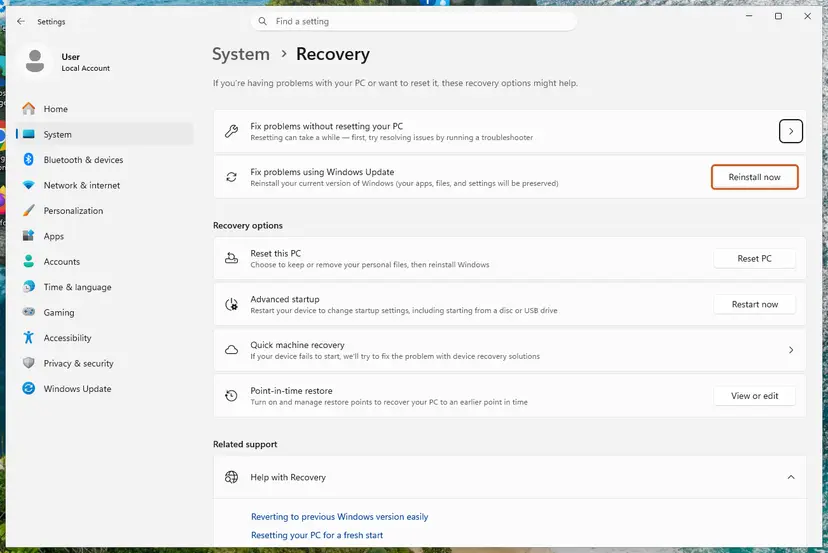
Fix problems using Windows Update reinstalls the current version and keeps apps, files and settings. Screenshot: Windows 11 26H2. - Start the reinstall. Choose whether the PC may restart on its own 15 minutes after the installation, then select OK.
- Wait and restart. Windows Update downloads and installs a repair copy of your current Windows version. Keep the PC plugged in and online, and restart it when asked.
- If that did not help: Reset PC. Back in Settings > System > Recovery, next to Reset this PC, select Reset PC. This keeps your personal files but removes installed apps and settings.
- Choose Keep my files. Select Keep my files. Do not select Remove everything.
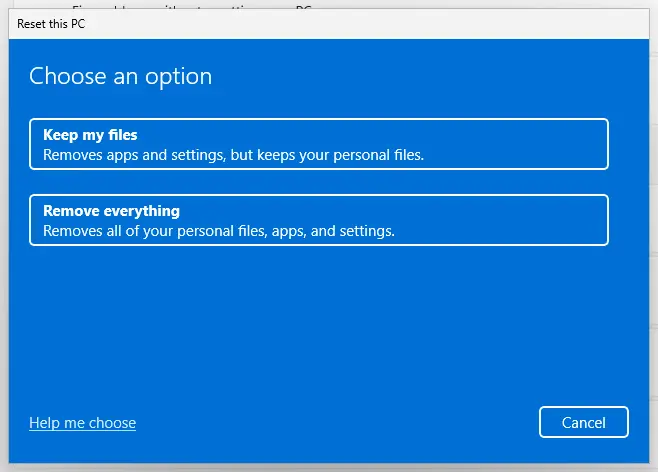
Keep my files removes apps and settings but keeps personal files. Screenshot: Windows 11 26H2. - Choose where Windows comes from. Select Cloud download to download a fresh copy of Windows, or Local reinstall to use the files already on the PC (faster, but may not include the latest updates).
- Reset. Review the summary and select Reset. The PC restarts several times.
These steps were written for Windows 11 22H2 and later. The full page with the other versions and what each result means: Reinstall Windows without losing files
It worked if: Windows starts with your files in place, dir C:\Windows\System32\dsound.dll lists the file, and the game starts.
If not: If the error survives a repair install, collect the details under "If the DSOUND.dll error is still there" and contact the game's or program's support.
If the DSOUND.dll error is still there: what to check and what to send
When the window survives the fixes that fit your PC, stop changing things and collect facts. These help the game's support, a forum or a technician find the cause quickly.
- The exact message: the full text of the window and its title bar, which names the program's .exe file.
- Your Windows edition and version: from Settings > System > About, including whether it ends in N or KN, and whether the Media Feature Pack is installed.
- The game folder: whether a dsound.dll, an
.asifile or ascriptsorpluginsfolder sits next to the .exe. - The Windows log: open Event Viewer > Windows Logs > Application and find Application Error entries at the time of the window. The faulting module line names the file that failed.
- What you tried: each fix from this page and its result, such as the SFC message.
If SFC repairs files and they are damaged again days later, check the disk with Check a disk for errors (chkdsk) and the memory with How to test your RAM with Windows Memory Diagnostic. Files that keep breaking point to hardware, not to the game.
How to keep the DSOUND.dll error from coming back
- On an N or KN edition, keep the Media Feature Pack installed and check it after each big Windows update.
- Install mod loaders only from their own project pages and update them when the game updates.
- Keep a note of which files a mod adds to the game folder, so you can remove them later.
- Install Windows updates and keep the audio driver current.
- Do not download dsound.dll or any other Windows file from a DLL site.
- Do not copy DLL files into System32, SysWOW64 or a game folder by hand.
- Do not run cleanup tools that delete DLL files they call unused.
- Do not switch off Windows Security to make a blocked file load.
If you are about to install Windows on a new PC, pick a regular edition unless you need an N edition for a reason. Then the media parts of Windows are there from the start and nothing extra has to stay installed.
Frequently asked questions
What is dsound.dll?
dsound.dll is the DirectSound library, a Windows system file that games and audio programs use to play sound through your sound card. It is part of DirectX and ships with Windows in System32 and SysWOW64. On N and KN editions the media parts of Windows come with the Media Feature Pack instead. The genuine file is signed by Microsoft. A dsound.dll in a game folder is usually a mod loader's copy, not Windows' file.
Where can I download dsound.dll safely?
Nowhere as a single file, because Microsoft does not publish one. dsound.dll comes with Windows, or with the Media Feature Pack on N and KN editions, which you install from Optional features in Settings. If the file is damaged on a regular edition, DISM and SFC restore it from Windows' own store, as in Fix 4. A copy from a DLL site has an unknown builder, may be the wrong build, and loads before Windows' file when placed next to a game.
Why is dsound.dll missing on Windows 11?
On Windows 11 the most common reason is an N or KN edition without the Media Feature Pack. Users of Windows 11 Pro N report the dsound.dll window in Valorant and other games, and that installing the pack ends it. Check Edition in Settings > System > About. If it ends in N, open Settings > Apps > Optional features, select View features, install the Media Feature Pack and restart. On a regular edition, look for a mod loader's copy in the game folder (Fix 2).
FL Studio says dsound.dll is missing. What do I do?
Start with your Windows edition, as for any program. FL Studio and other audio workstations can play through DirectSound, so on an N edition without the Media Feature Pack they can stop at the same file. Install the pack (Fix 1) and restart. If your edition is regular, reinstall FL Studio from Image-Line's own installer (Fix 3), then run DISM and SFC (Fix 4). An FL Studio copy that came with a crack can carry its own DLLs, and we do not help with those.
What does "old dsound.dll detected" mean?
It is a warning from a game mod, not from Windows. Users report it in modded Grand Theft Auto IV setups, where a patch finds an outdated dsound.dll from an earlier mod loader in the game folder. We could not confirm which mod shows the exact text. The fix is Fix 2: rename the old dsound.dll in the game folder to dsound.dll.bak, then install the current mod loader build its instructions name. Windows' own dsound.dll in System32 is not the file it means.
Is dsound.dll a virus?
No, the genuine dsound.dll is a Windows system file and should not be deleted. Like any DLL name, it can be copied by malware, and cracks often ship a dsound.dll as a loader. Windows' copy lives in System32 and SysWOW64 and is signed by Microsoft Windows. You can check any copy with the signature steps in Fix 2. If Windows Security flagged a dsound.dll in another folder, leave it removed and run a full scan with Microsoft Defender.
What does "Exception EFCreateError in module dsound.dll" mean?
It is an error raised inside the program while it was running code in dsound.dll, not a Windows error window. The exception name comes from the program itself, which could not create a file it needed. We could not confirm one cause that fits every program that shows it. Start the program once as a normal user, then repair or reinstall it with Fix 3. If the folder holds its own dsound.dll, check it with Fix 2.
Does installing DirectX fix the dsound.dll error?
Usually not. The earlier version of this guide suggested the DirectX End-User Runtime, but dsound.dll is part of Windows 10 and 11 itself, and Microsoft names the Media Feature Pack, not DirectX, as the way to restore media features on N editions. The legacy runtime can help when an old game names a different file afterwards, such as d3dx9_43.dll. For dsound.dll itself, use Fix 1 on an N edition or Fix 4 on a regular one.
Can I fix dsound.dll with regsvr32?
No. regsvr32 registers COM components, and registering a file cannot bring back one that is missing. On an N edition the problem is missing media parts of Windows, and on a modded game it is a wrong copy in the game folder. Neither is solved by registration. Install the Media Feature Pack, remove the proxy copy, or run DISM and SFC instead.
dsound.dll failed to load: is that the same as missing?
Close, but not the same. "Not found" means Windows found no copy at all, which points to an N edition or a removed file. "Failed to load" means a copy was found and refused, which most often points to a dsound.dll in the game folder from a mod loader that does not fit the game or the Windows build. Check the game folder first with Fix 2, then repair Windows' own copy with Fix 4.
Sources
Did this fix work?
One click, no account. It tells the next reader which guides are worth their time.
Questions and experiences: fix DSOUND.dll is missing or not found error in Windows
Still broken, or found a fix we did not cover? Ask here: members and our editors answer. Reading is open; writing needs a free account.
…