
How to fix error 0x80041010 in Windows?

Prefer to fix it yourself? The manual steps follow.
- 7methods
- 5 to 45 minutes
- Easy to intermediate
Applies to Windows 11 and Windows 10 when Event Viewer, a script, a program, Windows Update, Windows setup or a Configuration Manager client log reports 0x80041010
7 methods in this guide
Hello. I am in misery because of error 0x80041010, which appears during the installation of Windows. None of the tips I found online helped. The computer meets the requirements, so everything should go smoothly. Can you offer any other solutions?
Error 0x80041010 is a WMI code, WBEM_E_INVALID_CLASS, which Microsoft describes as "Specified class is not valid": a program asked Windows Management Instrumentation for a class that is not registered. Find which program asked in Event Viewer first. Often it is a leftover of removed software and harmless; otherwise repair that program or check the WMI repository.
0x80041010 means a program asked WMI for a class that does not exist on your PC. Open Event Viewer > Applications and Services Logs > Microsoft > Windows > WMI-Activity > Operational and see which program and class failed (Fix 1). If nothing is broken, it is noise. If a program or update fails, restart the WMI service (Fix 2) and repair that program (Fix 3).
| Error | 0x80041010, WBEM_E_INVALID_CLASS, "Specified class is not valid". Scripts and wmic usually show it as "Invalid class". |
|---|---|
| Where it appears | Event Viewer (WMI-Activity log), PowerShell or wmic queries, programs that read hardware or system data, Windows Update or setup, and Configuration Manager client logs. |
| Main cause | The program asks for a WMI class that was never registered or was removed with the software that owned it. Less often the WMI repository is damaged. |
| Fastest fix | Read the WMI-Activity log to find the program and class (Fix 1). If the PC works, the entry can be left alone. |
| Also written as | 80041010, error 0x80041010, return code 0x80041010, 2147749904 (the same number in decimal), "Invalid class". |
| Affects | Windows 11 (25H2 and 26H2), Windows 10 22H2 and Windows Server. WMI works the same way on all of them. |
| Vendor status | Not a bug with a patch. Microsoft lists it among the WMI error constants in WbemCli.h, so it is a normal answer to a wrong or missing class. |
| Time to fix | 5 minutes to find the cause, up to 45 minutes for repository checks and system file repair. |
Facts checked on 15 October 2026. Steps written for Windows 11 (25H2 and 26H2) and Windows 10 22H2.
What error 0x80041010 means in Windows
WMI (Windows Management Instrumentation) is the part of Windows that answers questions about the PC: which disks, which drivers, which updates, which antivirus. Programs ask it for a class, such as Win32_OperatingSystem, and WMI returns the data. In Microsoft's list of WMI error constants, 0x80041010 is WBEM_E_INVALID_CLASS with the text "Specified class is not valid".
So the code does not say that Windows is broken. It says that one question named a class the PC does not have. That happens when the program that added the class was removed, when a script was written for another Windows version, or when the WMI store itself lost the class.
- In Event Viewer it is a WMI-Activity error with
ResultCode = 0x80041010, the query, and the process ID of the program that asked. - In PowerShell or wmic it is "Invalid class" after a query such as
Get-CimInstanceorwmic path. - In Configuration Manager client logs it is the line "Error reading location override information from WMI. Return code: 0x80041010".
- During Windows Update or setup it is a failed step that reads system data through WMI.
- Neighbouring codes are different.
0x80041002is "Object cannot be found",0x8004100Eis "Namespace specified cannot be found" and0x80041003is a permission problem.
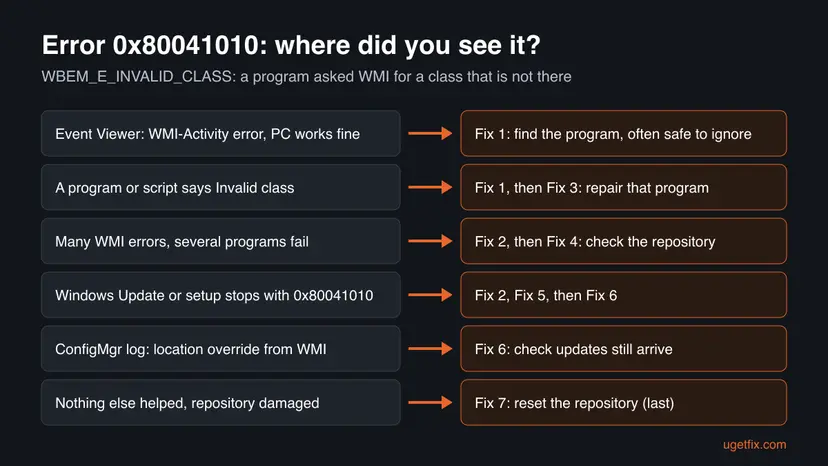
Why error 0x80041010 appears: causes in order
Most often a program or a scheduled task asks for a class that belonged to software you removed, and the request keeps failing in the log while nothing else is wrong. Less often the program that owns the class is half installed. Rarely the WMI repository or Windows system files are damaged, and then many classes fail at once.
| Cause | How often | How to tell | Fix |
|---|---|---|---|
| A leftover task or tool asks for a class of removed software | Most often | Only Event Viewer shows it, the PC and programs work. | Fix 1 |
| The WMI service is in a bad state after an update or a long uptime | Often | Several WMI queries fail, a restart helps for a while. | Fix 2 |
| The program that owns the class is half installed or outdated | Often | One program or its tray tool fails, the class name matches its maker. | Fix 3 |
| The WMI repository is inconsistent | Sometimes | Standard classes such as Win32_OperatingSystem fail too. | Fix 4 |
| Damaged Windows system files | Rarely | WMI errors come with other broken Windows features. | Fix 5 |
| Windows Update or the Configuration Manager client reads a missing class | Sometimes | Updates fail or the ConfigMgr log shows the location override line. | Fix 6 |
| The repository is damaged beyond salvage | Rarely | Fix 4 reports the repository is still not consistent. | Fix 7 |
How to fix error 0x80041010 in Windows
Fix 1 tells you which program asked and whether you need to do anything at all. Fixes 2 and 3 solve most real failures. Fixes 4 and 5 repair WMI and Windows files. Fix 6 is for Windows Update and Configuration Manager, and Fix 7 is the last resort.
| What you see or what you were doing | Start with |
|---|---|
| A WMI-Activity error in Event Viewer, but the PC works. | Fix 1 |
| One program, tool or script fails with Invalid class. | Fix 1, then Fix 3 |
| Several programs or standard WMI queries fail. | Fix 2, then Fix 4 |
| Windows Update or Windows setup stops with 0x80041010. | Fix 2, Fix 5, then Fix 6 |
| Configuration Manager log: Error reading location override information from WMI. | Fix 6 |
| Fix 4 says the repository is still not consistent. | Fix 7 |
Fix 1. Find the program and the class in the WMI-Activity log
5 minutesLow riskEveryone, and especially readers who saw 0x80041010 only in Event Viewer.
The code only says a class is missing. The WMI-Activity log names the query and the process that sent it, so you know whether a working program is affected or an old leftover keeps asking.
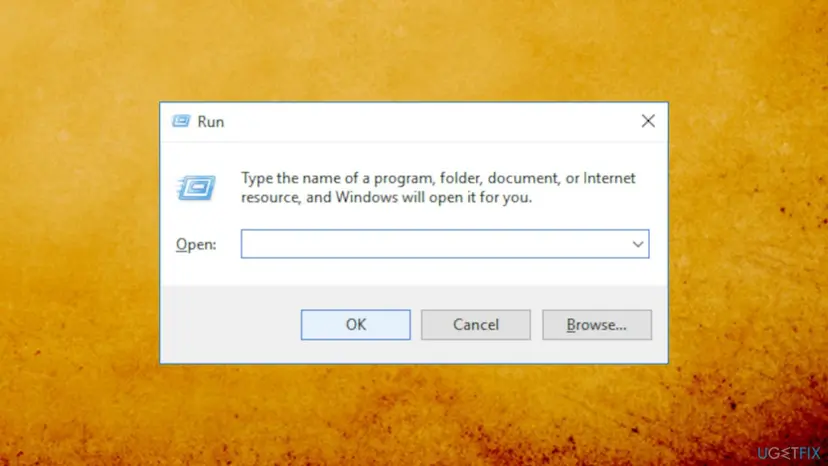
- Press Win + R, type
eventvwr.mscand press Enter. - Open Applications and Services Logs > Microsoft > Windows > WMI-Activity > Operational.
- Select an Error entry and read the text: note the Operation (the query with the class name), the ResultCode and the ClientProcessId.
- Press Ctrl + Shift + Esc, open the Details tab and find that process ID in the PID column to see the program name.
- Search the class name: if it belongs to software you removed and nothing fails, you can leave the entry alone.
Test WMI with a standard class in PowerShell. If this works, WMI itself is healthy:
Get-CimInstance -ClassName Win32_OperatingSystemIt worked if: You know which program sends the failing query, and the standard class test returns your Windows version.
If not: If the standard class test also fails, go to Fix 2 and then Fix 4. If one program fails, go to Fix 3.
Fix 2. Restart the Windows Management Instrumentation service
2 minutesLow riskSeveral WMI queries fail, or the error started after an update or a long time without a restart.
The WMI service (Winmgmt) loads the repository and the providers that serve each class. A restart makes it load them again, which clears a provider that stopped answering.
In Services, the service is called Windows Management Instrumentation. Restart it with the steps below, then restart the PC if Windows asks to stop dependent services. Step by step: Check and restart Windows services.
- Open Services. Press Windows+R, type the command below and press Enter. You can also type Services in the search box on the taskbar and open the app.
services.msc - Find the service. The list is sorted by Name. Click any row and type the first letter of the service to jump to it. Check the Status column (Running or empty) and the Startup Type column.
- Restart the service. Right-click the service and select Restart. If the service is not running, select Start instead. Wait until the progress window closes.
These steps were written for Windows 11 and Windows 10 (the steps are the same). The full page with the other versions and what each result means: Check and restart Windows services
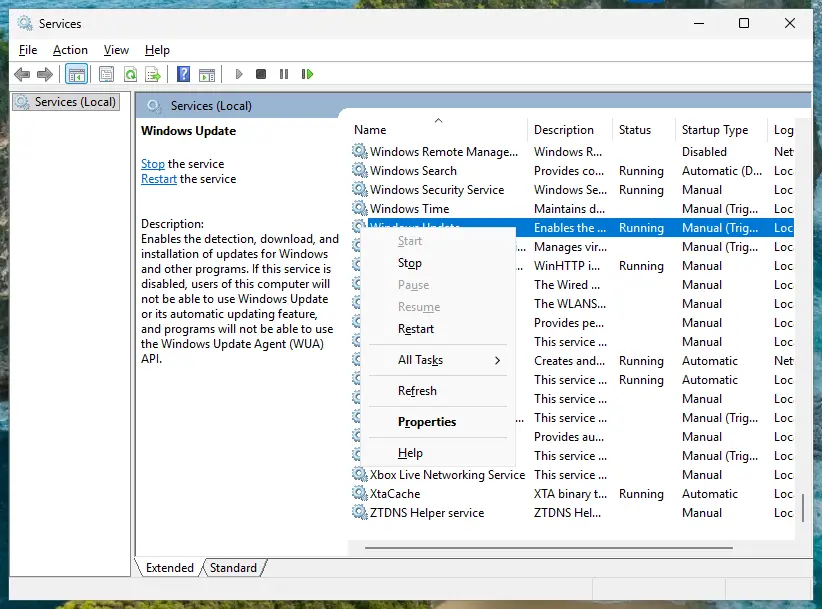
It worked if: The service status is Running again and the query or program no longer reports 0x80041010.
If not: If one program still fails, go to Fix 3. If standard classes fail, go to Fix 4.
Fix 3. Repair or reinstall the program that owns the class
10 to 20 minutesLow riskThe class name in Fix 1 belongs to one program, such as a hardware tool, an antivirus or a management agent.
Third-party classes are added by the program's installer. If the install was interrupted or an update removed them, only that installer can register the class again.
- Press Win + I and open Apps > Installed apps (Windows 10: Apps > Apps & features).
- Find the program from Fix 1 and select ... (Windows 10: select the program).
- Select Modify and choose Repair if the installer offers it.
- If there is no repair, uninstall the program and install the latest version from its maker. Step by step: Uninstall a program or app in Windows.
- Restart the PC and run the failing task or script again.
If you removed the program on purpose, the error comes from a scheduled task, a startup entry or a script that still calls its class. Delete or update that task instead of reinstalling the program.
It worked if: The program starts without errors and new WMI-Activity entries with 0x80041010 stop.
If not: If built-in classes fail as well, the problem is in WMI itself: go to Fix 4.
Fix 4. Check the WMI repository and salvage it
5 to 10 minutesLow riskStandard classes such as Win32_OperatingSystem fail, or many programs report WMI errors.
Microsoft's winmgmt tool can check the repository for consistency and, when it finds a problem, rebuild it and merge back whatever can still be read. That restores lost classes without wiping the rest.
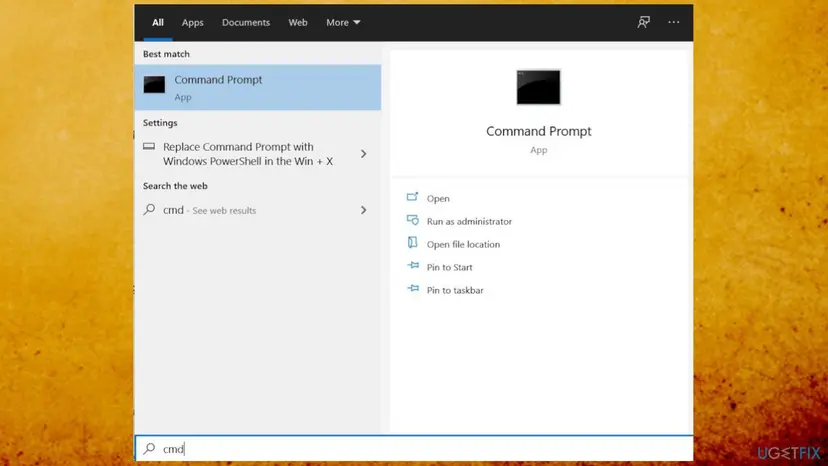
- Type
cmdin the search box on the taskbar. - Right-click Command Prompt and select Run as administrator, then select Yes.
- Run
winmgmt /verifyrepositoryand read the result. - If it says the repository is not consistent, run
winmgmt /salvagerepository. - Restart the PC and run the test command from Fix 1 again.
In Command Prompt (Admin):
winmgmt /verifyrepository
winmgmt /salvagerepository
It worked if: winmgmt reports that the WMI repository is consistent, and the standard class test works.
If not: If it is still not consistent after a restart, go to Fix 5 and then Fix 7.
Fix 5. Repair Windows system files with SFC and DISM
15 to 30 minutesLow riskWMI errors come together with other broken Windows features, or Fix 4 did not help.
The WMI service and its built-in providers are Windows system files. If one is damaged, its classes cannot load. DISM and SFC replace damaged files with good copies.
- Open an elevated command window. Right-click Start and select Terminal (Admin), or type cmd in the search box, right-click Command Prompt and select Run as administrator. Select Yes when Windows asks for permission.
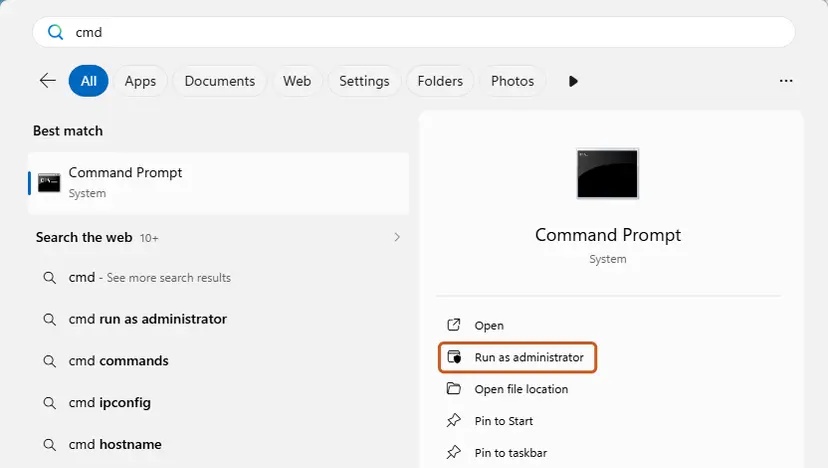
Search for cmd and choose Run as administrator. Screenshot: Windows 11 26H2. - Run DISM first. Type the command below and press Enter. DISM downloads clean copies of damaged components from Windows Update, so it can take several minutes. Wait until it says The operation completed successfully.
DISM.exe /Online /Cleanup-Image /RestoreHealth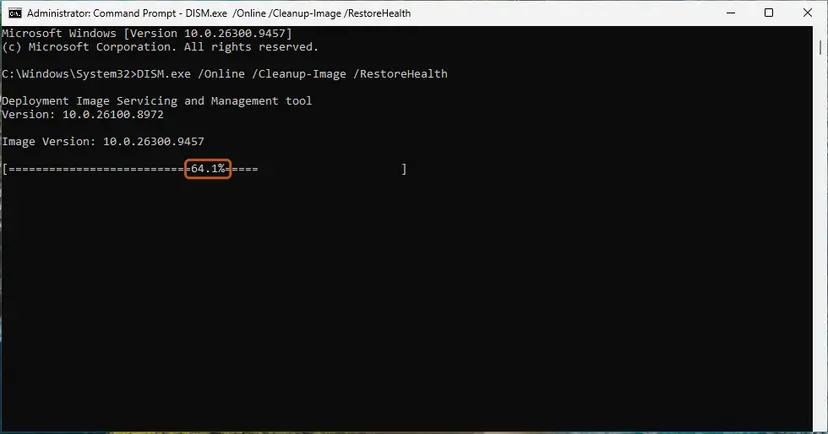
DISM /RestoreHealth running. Screenshot: Windows 11 26H2. - Run System File Checker. In the same window, type the command below and press Enter. Do not close the window until the verification reaches 100%.
sfc /scannow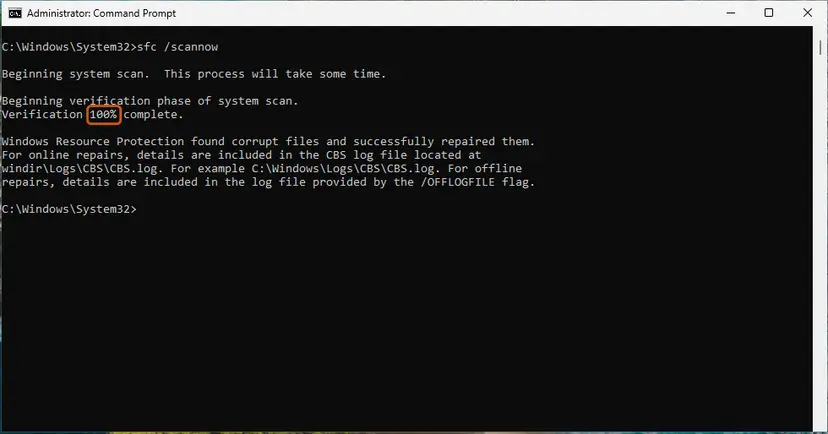
sfc /scannow at 100%. Screenshot: Windows 11 26H2. - Read the result and restart. Compare the last message with the table below this guide, then restart the PC so that repaired files are loaded.
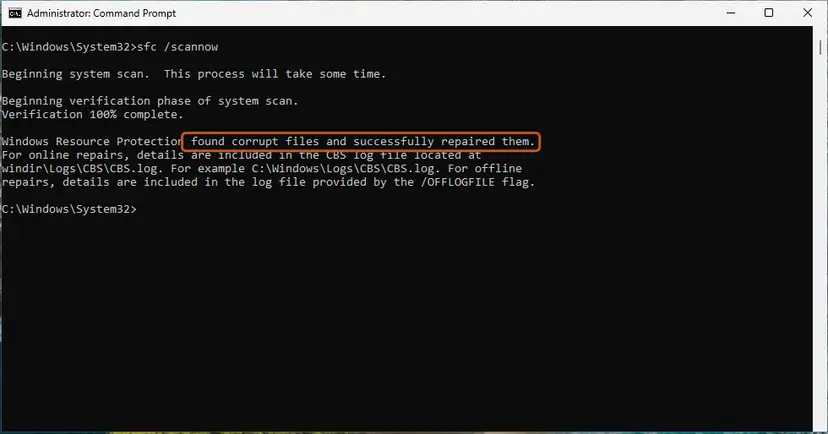
The result line tells you what SFC did. Screenshot: Windows 11 26H2.
These steps were written for Windows 11 24H2 and 25H2. The full page with the other versions and what each result means: Run DISM and SFC to repair Windows system files
It worked if: SFC reports no integrity violations or that it repaired them, and WMI queries work after a restart.
If not: If updates still fail, go to Fix 6. If the repository is still damaged, go to Fix 7.
Fix 6. Reset Windows Update components when updates or ConfigMgr report 0x80041010
15 minutesLow riskWindows Update or Windows setup stops with 0x80041010, or a Configuration Manager client log shows the location override line.
The update client reads system data through WMI and keeps its own cache. Clearing the cache and restarting its services removes a stale state that keeps asking for a class in the wrong place.
Admins on Configuration Manager forums report the line "Error reading location override information from WMI. Return code: 0x80041010" on many clients since version 2111. If policies and updates still arrive, they treat it as noise. One admin reported that a newer Windows build plus a Windows Update client reset ended it.
- Open Command Prompt as administrator. Type cmd in the search box, right-click Command Prompt and select Run as administrator. Select Yes when Windows asks for permission.
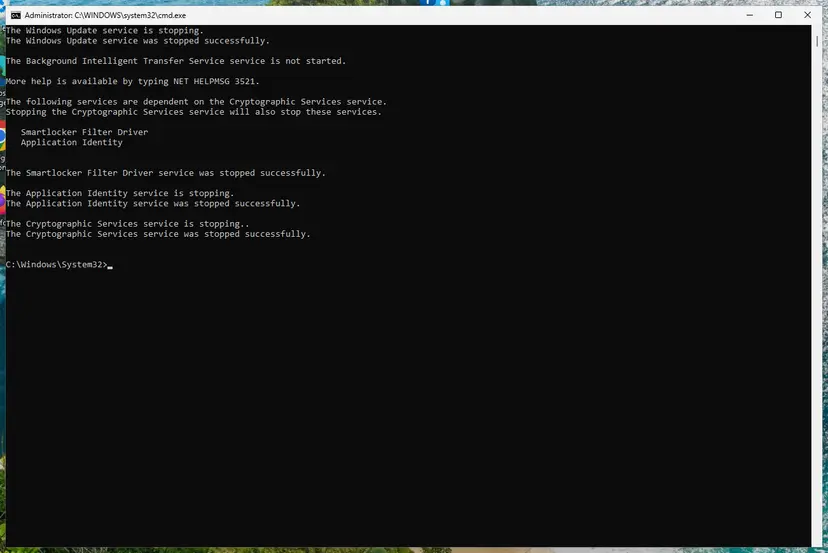
- Stop the update services. Type the commands below and press Enter after each one. If Windows says that other services depend on Cryptographic Services, it stops them too. A message that a service is not started is fine.
net stop wuauserv net stop bits net stop cryptsvc - Delete the download queue files. This clears the list of downloads that the Background Intelligent Transfer Service keeps. If Windows says it cannot find the files, continue.
del "%ALLUSERSPROFILE%\Application Data\Microsoft\Network\Downloader\qmgr*.dat" - Rename the update cache folders. Renaming keeps a copy in case you need it; Windows creates new, empty folders when the services start again. If you get Access is denied, a service is still running: repeat the previous step.
ren %systemroot%\SoftwareDistribution SoftwareDistribution.old ren %systemroot%\System32\catroot2 catroot2.old - Start the services again. Type the commands below and press Enter after each one. The requested service has already been started is fine: Windows started it on its own.
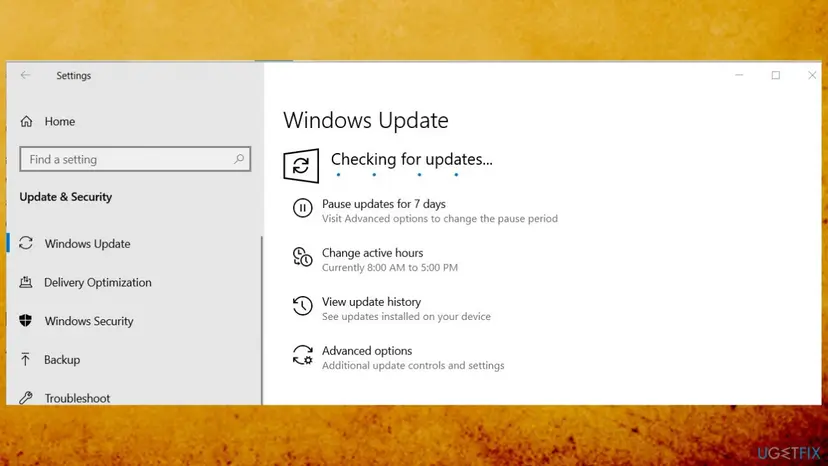
net start cryptsvc net start bits net start wuauserv - Restart and check for updates. Restart the PC. Then select Start > Settings > Windows Update > Check for updates. The first check can take longer than usual because everything is downloaded again.
These steps were written for Windows 11 and Windows 10 (the steps are the same). The full page with the other versions and what each result means: Reset Windows Update components
It worked if: Windows Update finishes its check and installs updates, and the client log shows successful scans.
If not: If updates still fail, install the update by hand with Install an update from the Microsoft Update Catalog, then try Fix 7.
Fix 7. Reset the WMI repository as a last resort
15 to 30 minutesRead the warningFix 4 still reports an inconsistent repository and standard classes keep failing after Fix 5.
Microsoft's winmgmt reset puts the repository back to the state of a fresh Windows install. Only classes marked for automatic recovery come back, so lost or broken ones are rebuilt from scratch.
Classes that third-party programs added, such as antivirus, backup, hardware or management agents, can disappear. Note these programs first and create a restore point with Undo recent changes with System Restore. Reinstall or repair them after the reset.
- Open Command Prompt as administrator, as in Fix 4.
- Run
winmgmt /resetrepository. - Restart the PC.
- Run the test command from Fix 1.
- Repair or reinstall each program from your list with Fix 3.
It worked if: The standard class test works and your programs work again after their repair.
If not: Use System Restore to go back to a date before the error, or read "Still not working" below.
If error 0x80041010 is still there
Collect these facts before you ask the maker of the failing program, your IT department or a forum. They show in minutes whether the problem is one program or WMI itself.
- The full text of a WMI-Activity error: the Operation with the class name, the ResultCode and the program name.
- Whether
Get-CimInstance -ClassName Win32_OperatingSystemworks. - The result of
winmgmt /verifyrepository. - Your Windows version: press Win + R and type
winver. - For Windows Update: the KB number and the date it failed in Settings > Windows Update > Update history.
- For Configuration Manager: the client version and whether policies and update scans still finish.
0x80041010 is never a hardware fault on its own. But if a hardware tool's class is missing because the device is gone or its driver failed, the fix is the driver: Update, roll back or reinstall a driver. If WMI keeps breaking after resets, check the disk and back up your files.
How to avoid error 0x80041010 in the future
- Remove programs with their own uninstaller, so their classes and tasks go with them.
- Update scripts that use old classes when you move to a new Windows version.
- Run
winmgmt /verifyrepositorybefore you reset anything. - Keep Windows updated. Windows 10 left support on 14 October 2025.
- Delete the
C:\Windows\System32\wbem\Repositoryfolder by hand. - Reset the repository as a first step: salvage it first.
- Delete Windows Update policy values on a PC your company manages.
- Chase every WMI-Activity error when the PC works fine.
Frequently asked questions
What does error 0x80041010 mean?
It is the WMI error WBEM_E_INVALID_CLASS, which Microsoft describes as "Specified class is not valid". A program, a script or Windows itself asked Windows Management Instrumentation for a class that is not registered on the PC. It is usually a class of software that was removed or never installed. Fix 1 shows which program asked, and whether you need to do anything at all.
Is 80041010 the same error as 0x80041010?
Yes. 80041010 is the same hexadecimal number without the 0x prefix, and some logs print it that way. In decimal it is 2147749904, which Microsoft's list of WMI error constants shows next to the name WBEM_E_INVALID_CLASS. Scripts and wmic usually print the short text "Invalid class" instead. Whatever the spelling, the meaning and the fixes on this page are the same.
Can I ignore 0x80041010 in Event Viewer?
Often, yes. Many WMI-Activity errors come from a scheduled task, a tray tool or a monitoring program asking for a class of software that is no longer installed. If your programs, updates and devices work, the entry does no harm. Use Fix 1 to see which program asks. Update or remove that program if you want a clean log, but do not reset WMI just because of one log line.
What is "Error reading location override information from WMI. Return code: 0x80041010"?
It is a line in Microsoft Configuration Manager client logs. Admins on ConfigMgr forums report it on many clients since version 2111, and many of them see no other problem. If policies arrive and update scans finish, it can be left alone. If updates are missing on that client, one admin reported success after moving to a newer Windows build and resetting the Windows Update client, which is Fix 6.
Why do I get 0x80041010 when installing or upgrading Windows?
Windows setup and Windows Update read system data through WMI. If the WMI service is stuck, the repository is inconsistent or system files are damaged, a step can fail with Invalid class. Restart the WMI service (Fix 2), repair system files (Fix 5) and reset Windows Update components (Fix 6). Then check the repository with Fix 4 before you start setup again.
Should I delete WUServer and WUStatusServer in the registry?
Not to fix this error. An earlier version of this guide suggested it, but those values point Windows Update to a company update server and have nothing to do with WMI classes. On a company PC, deleting them breaks how IT manages updates. On a home PC they are usually not there. Use Fix 6 for update problems instead, and back up the registry first with Back up the registry before editing it if you change anything there.
Is it safe to run winmgmt /resetrepository?
It is safe for Windows, but it is not free. Microsoft says it returns the repository to the state of a fresh install, and only classes marked for automatic recovery come back. Programs such as antivirus, backup or hardware tools can lose their classes and need a repair. That is why this page runs winmgmt /salvagerepository first and keeps the reset as Fix 7.
How do I check if WMI is working?
Open PowerShell and run Get-CimInstance -ClassName Win32_OperatingSystem. If it returns your Windows version and build, WMI works and the 0x80041010 error is about one class only. Then run winmgmt /verifyrepository in Command Prompt as administrator. It reports whether the repository is consistent. If both are fine, look at the program that asked for the missing class (Fix 3).
Is error 0x80041010 different on Windows 11 and Windows 10?
No. The code, its meaning and the fixes are the same on Windows 11 (25H2 and 26H2), Windows 10 22H2 and Windows Server, because WMI works the same way on all of them. Only menu names differ: Windows 11 has Installed apps, Windows 10 has Apps and features. Windows 10 left support on 14 October 2025, so it gets no more security updates.
Is this guide on ugetfix.com the right page for my 0x80041010 error?
Yes, if you see the code on a Windows PC or server in Event Viewer, a script, a program, Windows Update or a Configuration Manager log. This page covers the WMI meaning of 0x80041010 only. If a program shows 0x80041010 with a different meaning in its own documentation, follow its maker's help first, then use Fix 1 to see whether WMI is involved.
Sources
- Microsoft Learn: WMI Error Constants (WbemCli.h) (learn.microsoft.com)
- Microsoft Learn: winmgmt (learn.microsoft.com)
- Prajwal Desai forums: Error reading location override information from WMI. Return code: 0x80041010 (forums.prajwaldesai.com)
Did this fix work?
One click, no account. It tells the next reader which guides are worth their time.
Questions and experiences: fix error 0x80041010 in Windows
Still broken, or found a fix we did not cover? Ask here: members and our editors answer. Reading is open; writing needs a free account.
…