
How to fix Denuvo driver error code 2148204812?

Prefer to fix it yourself? The manual steps follow.
- 6methods
- 10 to 40 minutes
- Easy
Applies to Windows 11 and Windows 10; games from 2017 and 2018 such as Pro Evolution Soccer 2018, F1 2017, Injustice 2, Football Manager 2018, Sonic Mania and WRC 7
6 methods in this guide
Hello. Every time I try to open Pro Evolution Soccer 2018, I receive an error: "Failed to start Denuvo driver. Error code: 2148204812." I am not sure what I can do, so I would be grateful if you could help me with this. Thanks.
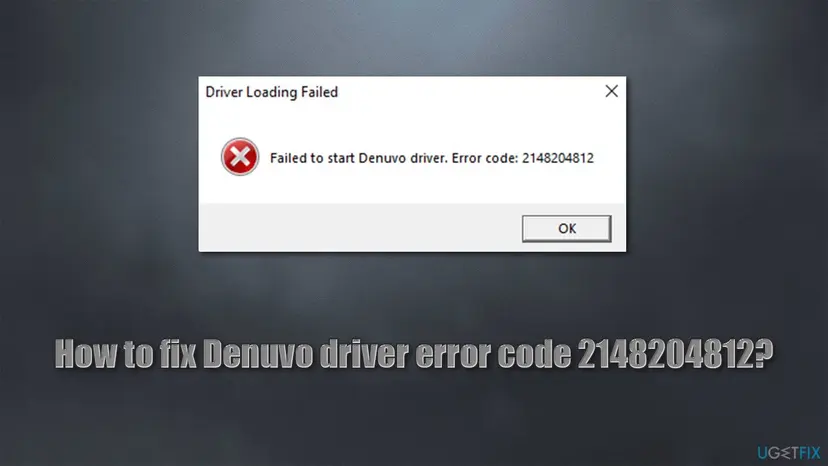
Denuvo driver error code 2148204812 means Windows refused to load a file called Denuvo64.sys because the certificate that signed it was revoked. Store copies of Denuvo games do not use that driver: a crack or a modified game pack adds it to the game folder. Look in the game folder first, then reinstall a clean copy.
Code 2148204812 is Windows error 0x800B010C, CERT_E_REVOKED: the driver Denuvo64.sys carries a revoked certificate, so Windows will not load it. Open the game folder and look for Denuvo64.sys, antidenuvo.dll and winmm.dll (Fix 1). If you bought the game, uninstall it, delete the folder and install it again from your store (Fix 2). Do not uninstall Windows updates or turn off Memory integrity: that only weakens Windows.
| Error | "Failed to start Denuvo driver. Error code: 2148204812" in a small window titled Driver Loading Failed. Variants end in Error code: 2 or Error code: 5. |
|---|---|
| Where it appears | Right after you open the game, before its first screen. Reported most for Pro Evolution Soccer 2018, F1 2017, Injustice 2, Football Manager 2018, Sonic Mania, WRC 7 and Dragon Ball FighterZ. |
| Main cause | A file named Denuvo64.sys in the game folder, shipped with game cracks of 2017 and 2018, is signed with a revoked certificate. Windows refuses to load it. |
| Fastest fix | Check the game folder for Denuvo64.sys (Fix 1). A bought copy: uninstall, delete the leftover folder and reinstall from the store (Fix 2). |
| Also written as | 0x800B010C, CERT_E_REVOKED, "A certificate was explicitly revoked by its issuer", "failed to start denuvo driver error code 2", "Denuvo driver error". |
| What the code means | 2148204812 is the decimal form of 0x800B010C. Microsoft lists it as CERT_E_REVOKED. Code 2 is ERROR_FILE_NOT_FOUND and code 5 is ERROR_ACCESS_DENIED. |
| Vendor status | Denuvo has published nothing about this message. Its anti-piracy product sits inside the game's own executable and installs no driver, according to PCGamingWiki. |
| Affects | Windows 10 and Windows 11. Users report it started after the July 2021 cumulative updates (KB5004237 for Windows 10 2004, 20H2 and 21H1). |
| Time to fix | 5 minutes to find the cause. 20 to 40 minutes for a clean reinstall, depending on the size of the game and your connection. |
Facts checked on 14 October 2026. Steps written for Windows 11 (25H2 and 26H2) and Windows 10 22H2.
What "Failed to start Denuvo driver, error code 2148204812" means
The message appears in a small Windows dialog titled Driver Loading Failed, with a red cross and one line of text: "Failed to start Denuvo driver. Error code: 2148204812". The game closes when you select OK. It is not a message of Windows itself and not a message of the game's real copy protection. A small program in the game folder tried to start a driver, Windows said no, and that program printed the code it got back.
- 2148204812
- The decimal form of the Windows code
0x800B010C. Microsoft names it CERT_E_REVOKED: "A certificate was explicitly revoked by its issuer." - Microsoft's note on drivers
- Microsoft's error reference adds that when the revoked certificate is Microsoft Windows PCA 2010, the driver was signed by a certificate no longer recognized by Windows.
- Error code: 2
- ERROR_FILE_NOT_FOUND: the driver file is missing. Most often your antivirus removed
Denuvo64.sys, or you deleted it while trying a fix. - Error code: 5
- ERROR_ACCESS_DENIED: "Access is denied." The program that tries to load the driver was not allowed to.
- The file behind it
Denuvo64.sys, a kernel driver that sits next to the game's .exe file, usually together withantidenuvo.dllandwinmm.dll.
People type the code in many ways: "error code 2148204812", "denuvo driver error", or just "2148204812". Some type the hex form, 0x800B010C, because another app showed it. All of these are the same refusal. A newer message, "Cannot start Denuvo service", appears with some games from 2025 and 2026. It is a different message from a different file, and this page does not cover it.
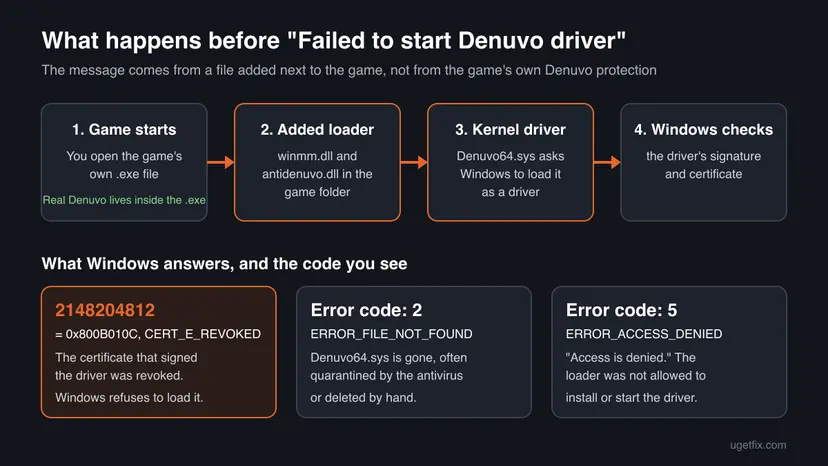
Why the Denuvo driver fails to start: causes ranked
The message names Denuvo, so most people blame Denuvo or the game. The facts point elsewhere. PCGamingWiki describes Denuvo Anti-Piracy (called Denuvo Anti-Tamper until 2026) as protection embedded in the game's executable that stores only a small licence token on the drive. It installs no driver. A file named Denuvo64.sys is not part of a store copy.
| How often | Cause | What you can check | Fix |
|---|---|---|---|
| Most often | The game folder holds Denuvo64.sys, antidenuvo.dll and winmm.dll from a crack or a modified game pack. Their driver is signed with a revoked certificate. | The three files sit next to the game's .exe file. | Fix 1, then Fix 2 |
| Often | The antivirus quarantined Denuvo64.sys, so the loader cannot find it (code 2), or blocked it (code 5). | Protection history in Windows Security lists the file. | Fix 3 |
| Sometimes | The same files came with malware. Security researchers found the DirtyMoe rootkit hidden in Denuvo64.sys files inside game cracks. | A full and an offline scan with Microsoft Defender. | Fix 4 |
| Sometimes | Riot Vanguard (Valorant, League of Legends) is installed. Riot says it blocks old drivers with untimestamped or stolen certificates while it is active. | Riot Vanguard in Installed apps, a red V icon near the clock. | FAQ below; the real fix is still Fix 2 |
| Rarely | A bought copy that a mod, trainer or "patch" pack changed, for example an option-file pack that replaced the .exe. | Files you did not install yourself in the game folder. | Fix 2, then Fix 6 |
Users report that the message started in July 2021, after cumulative updates such as KB5004237 for Windows 10. Microsoft's notes for that update list security fixes to the Windows kernel and to operating system security, and say nothing about drivers or games. We could not confirm what exactly changed, only that Windows now refuses this driver.
This also explains why the advice of 2021 did not last. Uninstalling the newest update brought the game back for some players until the next update arrived, and Windows Update brings back what you remove. A fix that depends on keeping Windows unpatched is not a fix: Windows 10 left support on 14 October 2025, and an unpatched PC is easier to attack.
How to fix "Failed to start Denuvo driver" error 2148204812
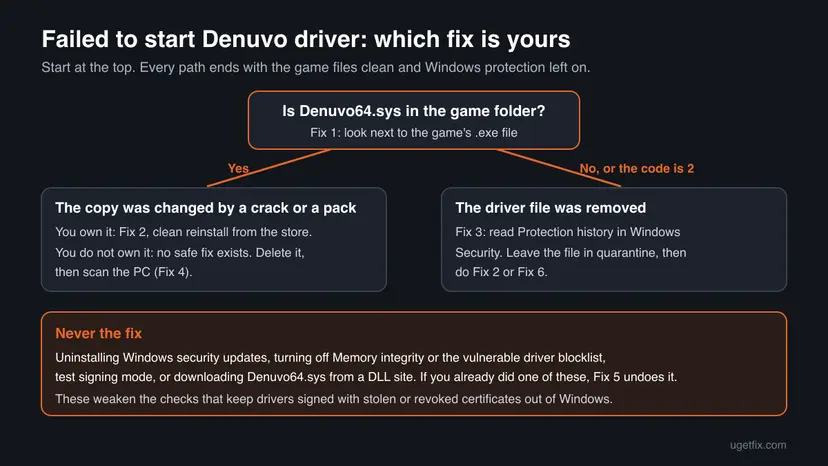
Fix 1 tells you in two minutes which case you have. Fixes 2 and 3 solve it for a copy you bought. Fix 4 checks the PC for the malware that travels with these files, Fix 5 undoes risky advice you may have followed, and Fix 6 is for a bought game that still will not start.
| What you see or have | Start with |
|---|---|
| Error code 2148204812, and you have not looked in the game folder yet. | Fix 1 |
Denuvo64.sys, antidenuvo.dll or winmm.dll are in the folder, and the game is in your Steam or other store library. | Fix 2 |
| Error code 2 or 5, or your antivirus showed a warning when you opened the game. | Fix 3, then Fix 2 |
| The game came from a download site, a repack or a friend's USB drive. | Fix 4 (delete the game first) |
| You already removed updates, turned off Memory integrity or used test mode following a video. | Fix 5 |
| A clean store copy still shows the message. | Fix 6 |
Fix 1. Find out whether Denuvo64.sys is in the game folder
3 minutesNo riskEveryone who sees the message, before trying anything else.
The dialog is printed by an added loader, not by the game. If its files are in the folder, you know the copy was changed and which fix applies. If they are not, the cause is somewhere else and you saved yourself a reinstall.
- In Steam, right-click the game in your Library and select Manage > Browse local files. For a game not from Steam, right-click its shortcut and select Open file location.
- In File Explorer, select View > Show > File name extensions (Windows 11) or tick File name extensions on the View tab (Windows 10), so you see
.sysand.dllendings. - Look in the folder that holds the game's .exe file for
Denuvo64.sys,antidenuvo.dllandwinmm.dll. Some games keep the .exe in a subfolder such asBinaries\Win64. - Also look for
steam_api64.dllnext to an unusual file such assteam_emu.inior a folder named after a crack group. Store copies do not ship these together. - Write down what you found. Do not run, rename or copy any of these files.
winmm.dll is also a real Windows file, but its home is C:\Windows\System32. Games do not normally carry their own copy, and loaders use that name because Windows loads a file from the game folder first. For more on this one file, see our guide winmm.dll missing or not found.
It worked if: You know which case you have: the three files are there (go to Fix 2 or Fix 4), or the folder holds only the game's own files (go to Fix 3).
If not: If you cannot find the game folder, search the drive for Denuvo64.sys in File Explorer, then continue with Fix 2.
Fix 2. Uninstall the game, delete its folder and reinstall it from your store
20 to 40 minutesRead the warningThe game is in your Steam, Epic or other store library and the folder holds files you did not get from the store.
A store download contains only the files the publisher shipped, and its Denuvo protection runs inside the .exe without a driver. Removing the whole folder takes the loader and Denuvo64.sys with it, which a simple file check may not do.
Deleting the game folder also deletes anything stored inside it: mods, option files, kits and sometimes saves. Before you start, copy the game's folder in Documents and the game folder itself to another drive. Many games of this era keep saves in Documents or in Steam Cloud, but we could not confirm the save location for every game.
- Close the game and quit any trainer, mod manager or "patch" tool you used with it.
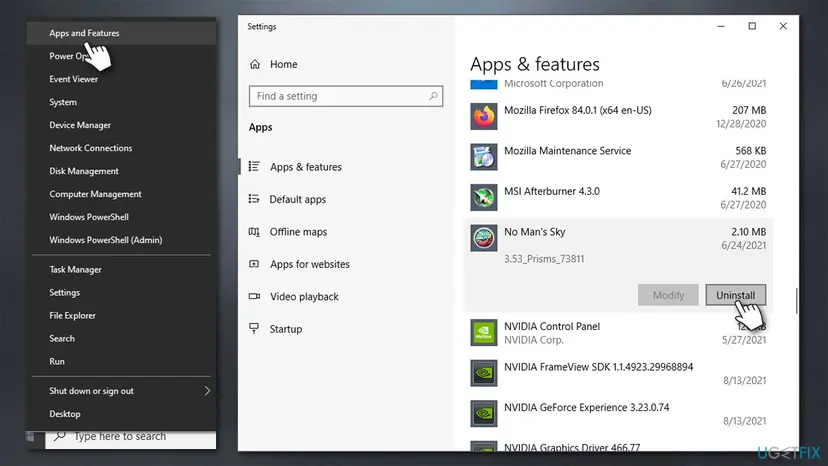
- In Steam, right-click the game in your Library and select Manage > Uninstall. For other stores, use their own uninstall command, or Windows itself: Uninstall a program or app in Windows.
- Open the store's game folder, for Steam by default
C:\Program Files (x86)\Steam\steamapps\common, and delete the game's folder if it is still there. - Empty the Recycle Bin, so the old
Denuvo64.syscannot be restored by mistake. - Restart Windows.
- Install the game again from your library and start it once from the store, with the internet on, so Denuvo can create its licence token.
After the reinstall, let the store check the files once more. It confirms that every file matches what the publisher shipped: How to verify game files in Steam, Epic Games, Xbox app, EA app, Battle.net and GOG Galaxy.
- Restart and open Steam. Restart your computer and launch Steam.
- Open the game's menu. Right-click the game in your Library, or open the game's Library page and select the gear icon on the far right.
- Open Properties. Select Properties in the menu.
- Verify the files. Select the Installed Files tab and select Verify integrity of game files.
- Wait for the result. Steam checks the game's files. This can take several minutes.
These steps were written for Steam on Windows. The full page with the other versions and what each result means: How to verify game files in Steam, Epic Games, Xbox app, EA app, Battle.net and GOG Galaxy
It worked if: The game opens to its first screen without the Driver Loading Failed window, and the game folder no longer holds Denuvo64.sys.
If not: If the message is back, run Fix 1 again: if the files reappeared, a mod tool or pack keeps adding them. Remove it, repeat this fix, then go to Fix 6.
Fix 3. Error code 2 or 5: see what your antivirus did with Denuvo64.sys
5 minutesNo riskThe message ends in Error code: 2 or Error code: 5, or a security warning appeared when you started the game.
Code 2 means the loader cannot find its driver, and the usual reason is that Microsoft Defender or another antivirus moved it to quarantine. Protection history tells you which file was taken and under which threat name, which is the evidence you need for the next step.
- Select Start, type Windows Security and open the app.
- Select Virus & threat protection > Protection history.
- Open each card with a date close to the error. Look for a path that ends in
Denuvo64.sysor names the game folder. - Read the threat name and the action, for example Quarantined or Removed.
- Leave the item in quarantine. Do not select Restore and do not add the folder to exclusions.
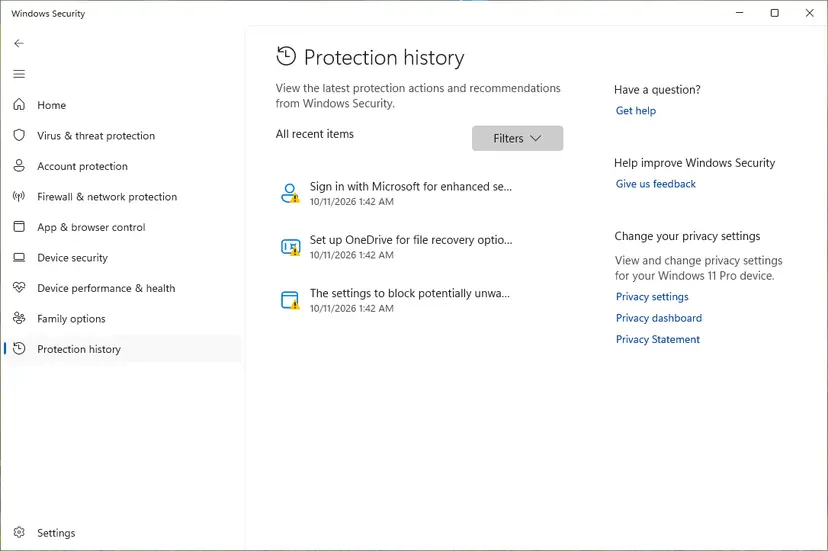
If you use another antivirus, its own quarantine or history list shows the same information. Microsoft Defender turns itself off when another antivirus is installed, so check that program instead.
It worked if: You see whether Denuvo64.sys was quarantined and why. If it was, the loader's driver is the threat, and the game will start only from a clean copy (Fix 2).
If not: If nothing in the history mentions the file and the folder never had it, the copy is clean but damaged: verify the files as in Fix 2, then go to Fix 6.
Fix 4. Scan the PC for the rootkit that hides in some Denuvo64.sys files
1 to 3 hours, mostly waitingLow riskThe game came from a download site, a repack or a USB drive, or Fix 1 found the three files.
In 2021 researchers at Gen Digital (Avast) found eight malicious Denuvo64.sys drivers in 1,046 cases, packed into cracks of games such as Injustice 2, Prey, Tekken 7 and Puyo Puyo Tetris. That driver installs the DirtyMoe rootkit, which an ordinary quick scan may not see while Windows runs.
Delete the game folder first, as in Fix 2, so the scan does not just find the same files again. Then run a full scan with the steps below or with How to scan for malware with Microsoft Defender.
- Open Windows Security. Select Start, type Windows Security and open the app.
- Open Virus & threat protection. Select Virus & threat protection. Under Current threats you see when the last scan ran, how long it took and how many files it checked.
- Run a quick scan. Select Quick scan. If Windows Security thinks a deeper scan is needed, it tells you when the quick scan is done.
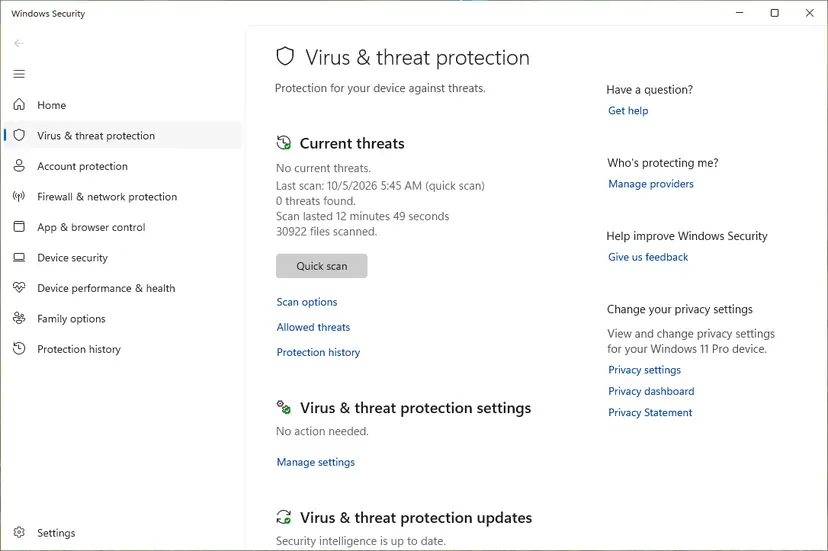
Quick scan and Scan options sit under Current threats. Screenshot: Windows 11 26H2. - Open Scan options. If the quick scan finds nothing and you still suspect an infection, select Scan options under Current threats.
- Run a full scan. Select Full scan and start it. It checks every file and program on the device, so it takes much longer than a quick scan. Leave the PC on until it ends.
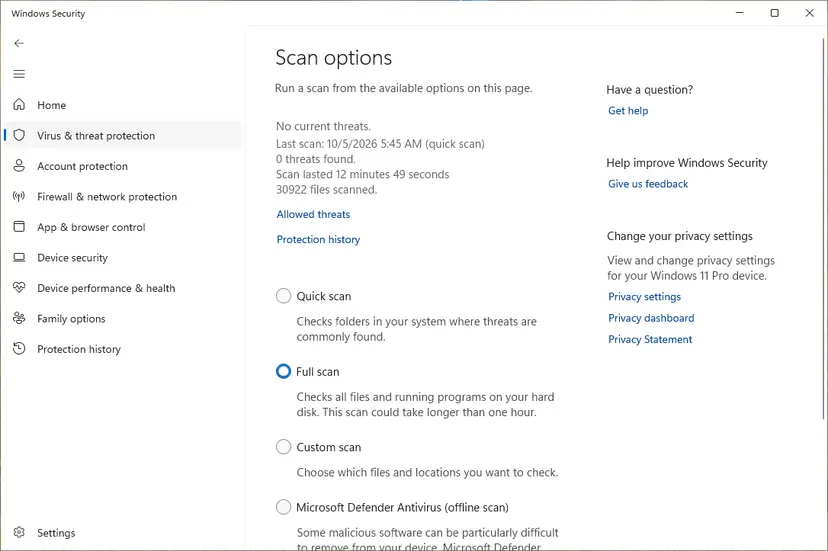
Scan options: Quick scan, Full scan, Custom scan and the offline scan. Screenshot: Windows 11 26H2.
These steps were written for Windows 11 25H2 and 26H2, Windows 10 22H2. The full page with the other versions and what each result means: How to scan for malware with Microsoft Defender
Then run the offline scan. Microsoft says it starts after a restart without loading Windows, "so any persistent malware has a more difficult time hiding or defending itself". Save your work first: the PC restarts on its own.
- In Windows Security, select Virus & threat protection > Scan options.
- Select Microsoft Defender Antivirus (offline scan) and then Scan now.
- Confirm the restart. The scan runs in the Windows Recovery Environment and the PC restarts again when it ends.
- Open Protection history to read what the offline scan found.
It worked if: Both scans finish with no current threats, or with found items listed as Quarantined or Removed in Protection history.
If not: If threats come back after every scan, back up your files and reset Windows with Remove everything. A rootkit that survives an offline scan is not worth chasing file by file.
Fix 5. Undo the risky changes from other "fixes"
15 minutes plus restartsLow riskYou uninstalled a Windows update, turned off Memory integrity or the driver blocklist, or used test mode to make the game start.
These changes do not repair anything: they lower the checks that stop drivers with revoked or stolen certificates. Microsoft's blocklist targets exactly drivers "signed with certificates used to sign malware", so leaving it off keeps the door open long after you stop playing.
- Open Settings > Windows Update (Windows 11) or Settings > Update & Security > Windows Update (Windows 10) and select Check for updates. Install everything offered, including updates you removed.
- Open Windows Security > Device security > Core isolation details.
- Turn Memory integrity on if your PC supports it, and restart when Windows asks.
- On the same page, turn Microsoft Vulnerable Driver Blocklist on. When Memory integrity is on, Windows keeps the blocklist on too.
- If a video told you to enable test mode, or you see Test Mode in the lower right corner of the desktop, right-click Start, select Terminal (Admin) or Windows PowerShell (Admin) and run the command below.
- Restart Windows.
Turn test signing off (Microsoft's documented command)
Bcdedit.exe -set TESTSIGNING OFFWindows lists the incompatible driver that stops it. If the list names Denuvo64.sys or a driver inside a game folder, delete that game folder. Do not leave Memory integrity off to keep a game running.
It worked if: Windows Update shows You're up to date, Core isolation shows Memory integrity and the blocklist as On, and the Test Mode text is gone from the desktop.
If not: If an update will not reinstall, see How to uninstall a Windows update for where Windows lists installed updates, and run Check for updates again after a restart.
Fix 6. Ask the publisher's support with proof of purchase
15 minutes to write, days for an answerNo riskA clean store copy still shows the message, or the game is no longer sold and you cannot reinstall it.
Only the publisher can say whether its build ever shipped a driver, and only the store can restore a game that left the shop. Some 2017 and 2018 games were removed from sale; PCGamingWiki lists the Steam version of Pro Evolution Soccer 2018 as unavailable.
- Make a screenshot of the error with Win + Shift + S.
- In the game folder, make a list of files with names you do not recognise, using View > Details so the dates are visible.
- Find the order number or receipt in your store account, for Steam under Account details > View purchase history.
- Open the support page of the publisher (Konami, Codemasters or EA, Warner Bros. Games, SEGA) from the game's store page, not from a search ad.
- Send the screenshot, the file list, your Windows version (Settings > System > About) and the proof of purchase.
Ask two questions: does the current build ship Denuvo64.sys, and is there a build without it. If the store still sells the game and it never started for you, ask the store about a refund as well.
It worked if: Support confirms the clean build or gives you steps for your copy, and a fresh install starts without the dialog.
If not: If the publisher does not answer, read the Code Integrity log as described in the next section and attach the event text to a second request.
Still broken: read the Code Integrity log to see which driver Windows refused
Windows records blocked drivers in the Code Integrity log. Microsoft's App Control documentation says event 3033 often means the file's signature is revoked, event 3077 is the main block event under an enforced policy, and event 3089 holds the signature details. The log tells you the exact file and folder, which ends the guessing.
- Press Win + X and select Event Viewer.
- Open Applications and Services Logs > Microsoft > Windows > CodeIntegrity > Operational.
- Start the game once, close the error, then select Refresh in the right pane.
- Look at the newest events with ID 3033, 3077 or 3089 and read the file path in the General tab.
- Copy the text with Copy > Copy Details as Text if you write to support.
| What the event names | What it means | What to do |
|---|---|---|
A path that ends in \Denuvo64.sys inside a game folder | Windows blocked the crack's driver. | Fix 2 or Fix 4. There is no safe way to load this driver. |
| A driver from another program | Something else on the PC is blocked too. | Update that program from its publisher. |
| No new event when the game fails | The driver was missing (code 2) or the loader stopped earlier. | Fix 3, then Fix 6. |
When it is not software at all: this message never comes from failing hardware, a full disk or a graphics driver. If a store copy of the game shows other errors after the reinstall, treat those as a separate problem with their own code.
How to keep the Denuvo driver error from coming back
- Install games only from the store or the publisher, and keep the store's files untouched.
- Read a mod or patch pack's file list before you copy it into the game folder. A pack that brings its own .exe,
winmm.dllor a.sysfile is a warning sign. - Keep Windows Update, Memory integrity and the vulnerable driver blocklist on.
- Scan any downloaded game pack with Microsoft Defender before you open it.
- Download
Denuvo64.sysor a "Denuvo driver" from a DLL site: no such official download exists. - Uninstall security updates to start a game.
- Turn on test signing mode or turn off driver signature checks.
- Restore a quarantined
Denuvo64.sysfrom Protection history.
Frequently asked questions
What does "Failed to start Denuvo driver, error code 2148204812" mean?
It means Windows refused to load a driver named Denuvo64.sys because the certificate that signed it was revoked. The number 2148204812 is the decimal form of 0x800B010C, which Microsoft lists as CERT_E_REVOKED: a certificate was explicitly revoked by its issuer. The driver is not part of the game you bought from a store. It comes with the files antidenuvo.dll and winmm.dll that cracks and modified game packs of 2017 and 2018 placed next to the game. Removing those files and installing a clean store copy is the fix.
How do I fix "Failed to start Denuvo driver" in PES 2018?
Open the Pro Evolution Soccer 2018 folder and check for Denuvo64.sys, antidenuvo.dll and winmm.dll (Fix 1). If you own the game on Steam, uninstall it, delete the leftover folder, empty the Recycle Bin and reinstall it from your library (Fix 2). Back up option files and kits first, because they live in the folder you delete. Some guides tell you to delete only the three files from a cracked copy: that removes the driver, but the copy is still unlicensed and may carry malware. PCGamingWiki lists the Steam version of PES 2018 as unavailable for new purchases.
Why do I get "Failed to start Denuvo driver" in F1 2017?
For the same reason as in PES 2018: a Denuvo64.sys file next to the game, signed with a revoked certificate, that Windows will not load. F1 2017 is one of the Codemasters games that PCGamingWiki lists with Denuvo Anti-Piracy, and that protection is built into the game's executable without a driver. If you see "error code 2", the driver was removed, usually by your antivirus. Check the folder (Fix 1), then reinstall a clean copy from Steam (Fix 2). If a clean copy still fails, contact Codemasters or EA support (Fix 6).
What does "failed to start Denuvo driver error code 2" mean?
Code 2 is the Windows error ERROR_FILE_NOT_FOUND: the program that wants to start the driver cannot find Denuvo64.sys. Most often Microsoft Defender or another antivirus quarantined the file, or someone deleted it while trying another fix. Open Windows Security > Virus & threat protection > Protection history to see whether the file was taken and under which threat name (Fix 3). Do not restore it. Code 5, ERROR_ACCESS_DENIED, is a close relative: the file is there, but the loader was not allowed to start it.
Where can I download the Denuvo driver?
Nowhere official, because there is none to download. Denuvo's anti-piracy protection, according to PCGamingWiki, is embedded in the game's executable and only stores a small licence token on the drive. The Denuvo product that does install a Windows driver is Denuvo Anti-Cheat, which games that use it install as a service you can remove from Installed apps. A file offered as "Denuvo64.sys" or "denuvo64.dll" on a DLL site is not from Denuvo, and Gen Digital found malicious drivers with exactly that name. Even a downloaded copy would carry the same revoked certificate and fail with 2148204812.
Will uninstalling a Windows update fix the Denuvo driver error?
Sometimes for a while, never for good. Users reported in 2021 that removing the July updates, such as KB5004237 on Windows 10, let the game start again. The next cumulative update brings the same protection back, because every Windows update includes the earlier fixes. Keeping Windows unpatched to run one old game leaves the whole PC exposed, and Windows 10 itself left support on 14 October 2025. If you already removed updates, reinstall them with Fix 5 and clean the game with Fix 2.
Does uninstalling Valorant or Riot Vanguard fix the Denuvo driver error?
Usually not. An independent advisor on Microsoft's forum suggested a conflict with Vanguard in 2021, and the person who asked replied that uninstalling it did not help. Riot itself says Vanguard blocks old drivers whose certificates lack a timestamp or were stolen by cheaters, so with Vanguard running the same driver is refused a second time. Removing Vanguard does not make a revoked certificate valid again. Clean the game with Fix 2 instead. For Vanguard's own problems, see our guide on Vanguard user mode service high CPU usage.
Is Denuvo64.sys a virus?
Not every copy, but some are, and you cannot tell them apart by name. Gen Digital (Avast) researchers analysed the DirtyMoe malware in 2021 and found eight malicious drivers named after Denuvo in 1,046 cases, packed into cracks of Injustice 2, Prey, Tekken 7, Puyo Puyo Tetris, Constructor and two Total War games. They describe the result as a rootkit backdoor prepared with each crack run. Treat any Denuvo64.sys as unsafe: delete the game folder and run a full and an offline Microsoft Defender scan (Fix 4).
Does this error appear in Injustice 2, Sonic Mania, WRC 7 or Football Manager 2018?
Yes, people search for the message with all of these games, plus Dragon Ball FighterZ and Tekken 7. They are Denuvo-protected games from 2017 and 2018, and their cracks of that time used the same Denuvo64.sys driver. The fix does not depend on the game: check the folder (Fix 1), reinstall a clean store copy (Fix 2) and scan the PC if the copy came from elsewhere (Fix 4). Sonic Mania's launch problem in 2017, an online requirement, was a different bug that PCGamingWiki traces to the game's use of the Steam API.
I don't speak English. Is this the right page for my error?
Yes, if your window says "Failed to start Denuvo driver" with code 2148204812, 2 or 5, whatever language you searched in. Many players search in Arabic for PES 2018, or in Russian and Spanish. The message is always in English because the program that prints it is not translated. The steps are the same in every language of Windows: the labels differ, but Windows Security, Protection history, Event Viewer and the game's folder are in the same places. Start with Fix 1 and follow the chooser table above the fixes.
Sources
- Microsoft Learn: [MS-ERREF] HRESULT Values (0x800B010C CERT_E_REVOKED) (learn.microsoft.com)
- Microsoft Learn: COM Error Codes (Security and Setup) (learn.microsoft.com)
- Microsoft Learn: System Error Codes (0-499) (learn.microsoft.com)
Did this fix work?
One click, no account. It tells the next reader which guides are worth their time.
Questions and experiences: fix Denuvo driver error code 2148204812
Still broken, or found a fix we did not cover? Ask here: members and our editors answer. Reading is open; writing needs a free account.
…