
How to fix evr.dll missing or not found in Windows?

Prefer to fix it yourself? The manual steps follow.
- 6methods
- 5 to 30 minutes
- Beginner
Applies to Windows 11 and Windows 10, including N and KN editions; Roblox and other apps that play or render video
6 methods in this guide
Hi, I have recently noticed that I get a pop-up randomly saying that evr.dll is missing from my computer. I am not sure what it is. Am I supposed to do something about it? I don't think this should be happening.
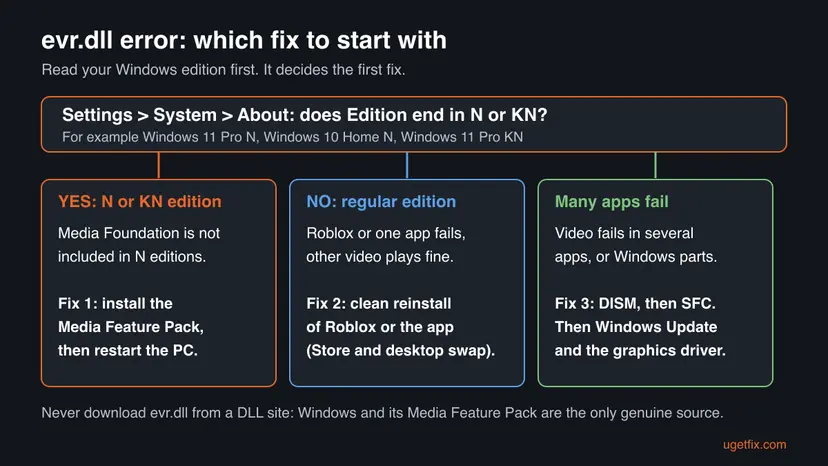
evr.dll is the Enhanced Video Renderer, the part of Windows that draws video on screen. When Roblox or another app says it failed to load evr.dll, the PC most often runs an N or KN edition of Windows, which ships without Media Foundation. Install the Media Feature Pack first, then reinstall the app or repair Windows.
Open Settings > System > About and read Edition. If it ends in N or KN, install the Media Feature Pack from Optional features and restart (Fix 1). On a regular edition, reinstall Roblox or the app cleanly (Fix 2), then run DISM and SFC (Fix 3). Do not download evr.dll from a DLL site.
| Error | "Failed to load library: EVR.dll" in Roblox, or a window saying evr.dll is missing or was not found when an app starts. |
|---|---|
| Where it appears | In a small window the moment Roblox, a video player or another app that shows video starts. Users report it most often with Roblox. |
| Main cause | An N or KN edition of Windows without the Media Feature Pack. Media Foundation, which the renderer belongs to, is left out of these editions. |
| Fastest fix | Install the Media Feature Pack from Settings > Apps > Optional features and restart the PC (Fix 1). |
| Also written as | EVR.dll, evr dll, evr-dll, "Failed to load library evr.dll", "failed to load evr.dll". |
| The file | A Windows file. Microsoft lists evr.dll as the executable of the Enhanced Video Renderer filter, supported since Windows Vista. |
| Affects | Windows 11 and Windows 10, both home and Pro. N and KN editions far more than the others. |
| Vendor status | Roblox calls the failed to load library error a client-side problem and lists the Media Feature Pack for N and KN editions among its fixes. |
| Do not | Download evr.dll from a DLL site or copy one into a Windows or Roblox folder. |
| Time to fix | About 10 minutes for the Media Feature Pack and a restart. Up to 30 minutes when DISM and SFC run. |
Facts checked on 15 October 2026. Steps written for Windows 11 (25H2 and 26H2) and Windows 10 22H2.
What evr.dll is and what the Failed to load library EVR.dll error means
evr.dll holds the Enhanced Video Renderer (EVR), the Windows component that puts decoded video on your monitor. Microsoft's reference page for the EVR filter names evr.dll as its executable and says it can mix up to 16 video streams. The same renderer exists as a Media Foundation media sink, so newer and older multimedia apps both rely on it.
- Full name
- Enhanced Video Renderer, part of Windows' media stack (Media Foundation and the older DirectShow).
- Who installs it
- Windows itself. On N and KN editions the media technologies come with the Media Feature Pack instead.
- Who uses it
- Games such as Roblox, video players, browsers, video calls and the Windows media apps.
- Since
- Windows Vista, according to Microsoft's requirements table for the EVR filter.
When an app says it failed to load evr.dll, Windows could not give it a usable copy of the renderer. Roblox shows this as Failed to load library followed by the file name. Roblox's own help page explains that this happens when the app cannot access a required Windows system file because it is missing, corrupted, outdated or blocked.
- The Roblox window: users report the text
Failed to load library: EVR.dllwhen Roblox starts. The same window can nameMFPlat.dll, another Media Foundation file, for the same reason. - Other spellings people search: EVR.dll, evr dll, evr-dll, failed to load evr.dll. Windows does not care about upper or lower case, so they all mean one file.
- The random pop-up: the reader's question above describes a box that appears without opening anything. That usually means an app that starts with Windows, or runs in the background, tries to play video.
- Windows 10 and Windows 11: the error and the fixes are the same on both. Only the Settings path for the Media Feature Pack differs.
What causes evr.dll to be missing, from most to least common
Most often the PC runs an N or KN edition and the Media Feature Pack was never installed, or was lost after a feature update. Less often the Roblox installation is damaged, or Windows' own media files are. Rarely a security tool blocked a file, or an old driver or Windows build is the problem.
| Cause | How often | How to tell | Fix |
|---|---|---|---|
| N or KN edition of Windows without the Media Feature Pack. | Most often | Edition in Settings > System > About ends in N or KN. Video does not play in other apps either. | Fix 1 |
| A damaged Roblox installation, or the Store version and the desktop version getting in each other's way. | Often | A regular edition, and only Roblox fails. Videos play fine in a browser. | Fix 2 |
| Damaged Windows system files, including the media components. | Sometimes | Several apps that show video fail, or Windows media apps do. | Fix 3 |
| A security tool quarantined a file the app needs. | Sometimes | Windows Security Protection history has an entry with a Roblox path at the time the error began. | Fix 4 |
| Outdated Windows or graphics driver. | Rarely | Windows Update has pending updates, or the driver is years old. | Fix 5 |
| A broken user profile or a recent change to Windows. | Rarely | Roblox starts in a second Windows account, or the error began after an install. | Fix 6 |
Microsoft's Media Feature Pack page says Windows 10/11 N has the same functions as other editions except Windows Media Player and related technologies. Its list of what is left out includes Media Foundation and the standard video codecs. Microsoft does not publish a per-file list, so we could not confirm from Microsoft that evr.dll itself is absent on N. The renderer is a Media Foundation component, and the Media Feature Pack is the fix Roblox names.
evr.dll download: why a DLL site is the wrong place for this file
Searches for the file lead first to sites that offer single DLLs. Microsoft does not publish evr.dll on its own: it reaches your PC inside Windows or, on N editions, inside the Media Feature Pack. A single downloaded file also does not bring along the other Media Foundation files the renderer works with.
- It fixes one name, not the gap. On an N edition the whole media stack is missing. One copied file usually turns the error into a different missing DLL, often
MFPlat.dll. - Unknown builder. A DLL from a website was taken from somebody's PC or built by somebody else, and it runs inside every app that loads it.
- Wrong build. A 32-bit file for a 64-bit app, or a file from another Windows version, ends in a new error window.
- The genuine route is free. The Media Feature Pack is an optional feature in Settings, and DISM and SFC repair Windows' own copy.
The same rule holds for other Windows files. Our guide to the winmm.dll missing or not found error explains how Windows chooses which copy of a system DLL loads, and why a copy next to a game can cause the error.
How to fix evr.dll missing or Failed to load library EVR.dll
Fix 1 is for N and KN editions and solves the error for most Roblox players who see it. Fix 2 reinstalls Roblox or the failing app cleanly. Fix 3 repairs Windows' own files. Fixes 4 to 6 cover a blocked file, old updates and drivers, and a broken account or recent change.
| What you see or have | Start with |
|---|---|
| Edition in Settings > System > About ends in N or KN. | Fix 1 |
| A regular edition, only Roblox fails, video plays in the browser. | Fix 2 |
| Several apps cannot play video, or the Media Feature Pack is already installed. | Fix 3 |
| Windows Security showed an alert about a Roblox file around the time the error began. | Fix 4 |
| Windows Update has been paused for months, or the graphics driver is very old. | Fix 5 |
| Nothing above helped, or the error started after a recent install or change. | Fix 6 |
Fix 1. Install the Media Feature Pack on an N or KN edition of Windows
10 minutesNo riskYour Windows edition name ends in N or KN, for example Windows 11 Pro N.
N and KN editions leave out Media Foundation and the media technologies around it. The Media Feature Pack is Microsoft's own package that adds them back, so Roblox and other apps find the video renderer again.
- Press Win + I, select System > About and read Edition under Windows specifications. Go on only if it ends in N or KN.
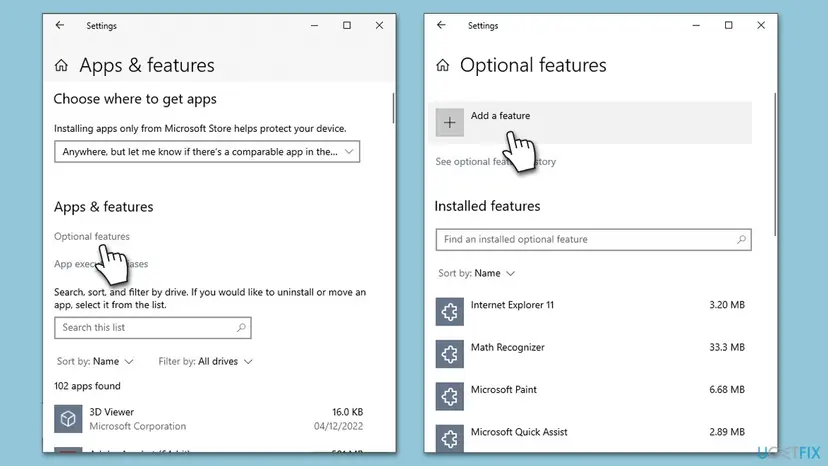
- On Windows 11 N, select Apps > Optional features, then View features next to Add an optional feature.
- On Windows 10 N, select Apps > Apps & features > Optional features > Add a feature.
- Type
Media Feature Packin the search box, tick it and select Next and Install (on Windows 10, Install). - Wait until the feature shows as installed. Microsoft says you are not asked to restart, but you must restart to finish.
- Restart the PC and start Roblox or the app again.
- After installing: Microsoft also suggests Store apps such as VP9 Video Extensions, Web Media Extensions and HEIF Image Extensions for codecs in apps and the browser.
- Not in the list: the pack appears only on N and KN editions. If you do not see it, your edition is not N, and Fix 2 is the next step.
- After a feature update: if the error came back after a big Windows update, check Optional features again and reinstall the pack if it is gone.
It worked if: Media Feature Pack is listed under installed features, and Roblox starts without the Failed to load library window after the restart.
If not: If the pack is installed and Roblox still names evr.dll, reinstall Roblox cleanly with Fix 2.
Fix 2. Reinstall Roblox cleanly, or switch between the Store and desktop versions
10 minutesLow riskA regular Windows edition, or Fix 1 is done, and only Roblox or one app shows the error.
Roblox calls a clean reinstall its most common and effective fix for this error. Deleting the old Roblox folder removes damaged files that a plain reinstall would keep, and changing version rules out a broken Store or desktop install.
- Close Roblox, including any Roblox icon near the clock.
- Uninstall Roblox from Settings > Apps > Installed apps: Uninstall a program or app in Windows
- Press Win + R, type
%localappdata%and press Enter. - Delete the Roblox folder there.
- If you used the Microsoft Store version, install the desktop version from roblox.com. If you used the desktop version, try the Store version.
- Restart the PC and start Roblox.
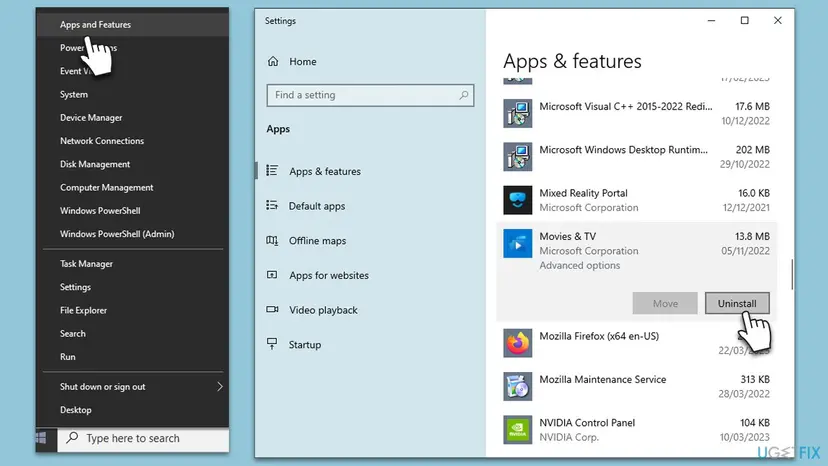
If the window names a video player or another program, uninstall it, restart, and install the current version from its maker. For a Store app, try Repair and Reset first: How to repair or reset an app in Windows
It worked if: Roblox installs fresh and opens to the home screen without the evr.dll window.
If not: If the fresh install shows the same window, Windows' own media files are the likely cause: run Fix 3.
Fix 3. Repair Windows' media files with DISM and SFC
15 to 30 minutesNo riskSeveral apps fail to play video, or the Media Feature Pack is installed and the error remains.
evr.dll is a Windows file, so Windows can rebuild it. DISM repairs the store that holds clean copies of system files, then System File Checker replaces damaged files, the media components included.
- Open an elevated command window. Right-click Start and select Terminal (Admin), or type cmd in the search box, right-click Command Prompt and select Run as administrator. Select Yes when Windows asks for permission.
- Run DISM first. Type the command below and press Enter. DISM downloads clean copies of damaged components from Windows Update, so it can take several minutes. Wait until it says The operation completed successfully.
DISM.exe /Online /Cleanup-Image /RestoreHealth - Run System File Checker. In the same window, type the command below and press Enter. Do not close the window until the verification reaches 100%.
sfc /scannow - Read the result and restart. Compare the last message with the table below this guide, then restart the PC so that repaired files are loaded.
These steps were written for Windows 11 24H2 and 25H2. The full page with the other versions and what each result means: Run DISM and SFC to repair Windows system files
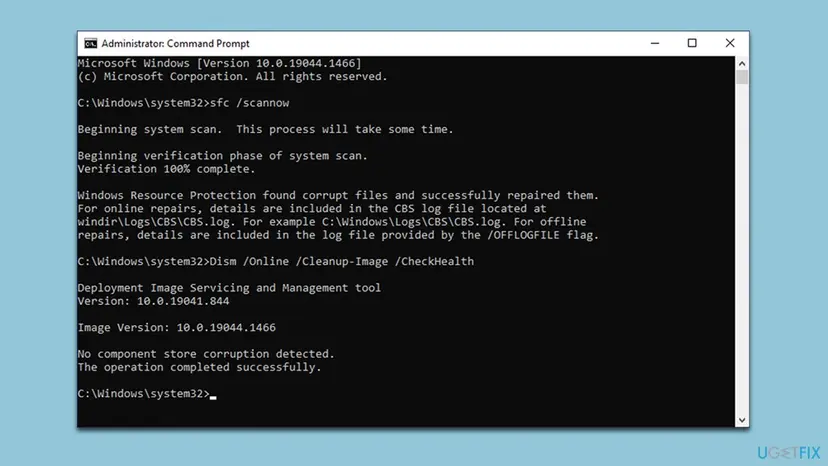
- After the scan, check that Windows' copy is back. The command should list one evr.dll.
dir C:\Windows\System32\evr.dll - Restart the PC so apps load the repaired files.
- Start Roblox or the app again.
It worked if: SFC reports no integrity violations or a successful repair, and the app starts after the restart.
If not: If SFC cannot repair some files, run DISM again with the internet on, then SFC once more. If the error stays, go to Fix 4.
Fix 4. Check Windows Security for a blocked Roblox file
10 minutesLow riskWindows Security or another antivirus showed an alert around the time the error first appeared.
Roblox lists security software that quarantines a needed file among the causes of this error. The protection history shows what was removed and from which folder, so you can tell a false alarm on Roblox from a real threat.
- Open Windows Security > Virus & threat protection > Protection history.
- Look for entries from the day the error began. Open each one and read the file path.
- If the path is inside the Roblox folder and Roblox came from roblox.com or the Microsoft Store, reinstall Roblox with Fix 2 instead of restoring the file.
- If the entry names a file you did not install yourself, leave it removed and run a full scan: How to scan for malware with Microsoft Defender
- Restart and start Roblox again.
Do not switch protection off to make the window go away. If you must test with protection paused, turn it back on right after the test: Turn off Microsoft Defender protection for a moment
It worked if: No new Roblox entries appear in Protection history, and Roblox starts after a fresh install.
If not: If nothing was blocked and the error remains, update Windows and the graphics driver with Fix 5.
Fix 5. Install Windows updates and update the graphics driver
15 to 30 minutesLow riskWindows Update has pending updates, or the graphics driver has not been updated in a long time.
The video renderer works through the graphics driver, and Roblox names outdated Windows and drivers among the causes. Updates also bring fixed system files that DISM could not get from a damaged store.
- Press Win + I, open Windows Update and select Check for updates. Install everything offered and restart.
- Right-click Start, open Device Manager and expand Display adapters.
- Update the graphics driver, or install the current one from NVIDIA, AMD or Intel: Update, roll back or reinstall a driver
- Restart the PC and start Roblox.
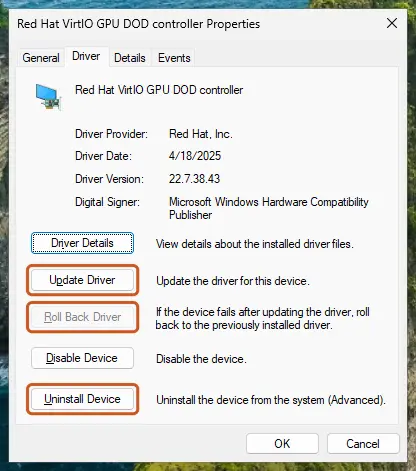
Windows 10 left support on 14 October 2025. A Windows 10 PC no longer gets regular fixes, so if the error keeps coming back there, moving to Windows 11 is worth checking if the PC qualifies.
It worked if: Windows Update says you are up to date, the driver shows a current date, and Roblox starts.
If not: If the error is still there, test a second account or undo a recent change with Fix 6.
Fix 6. Test a new Windows account, then undo recent changes with System Restore
20 to 40 minutesRead the warningFixes 1 to 5 did not help, or the error began right after an install or a change.
Roblox's advanced steps include a new local account and System Restore. If Roblox works in a fresh account, the problem sits in your profile; if the error began after a change, a restore point from before it puts Windows' files back.
- Create a second local account and sign in to it: Create a new user account to test a problem
- Install and start Roblox there. If it works, the cause is in your own profile, for example its Roblox cache.
- If it fails in the new account too, open System Restore and pick a point from before the error began: Undo recent changes with System Restore
- Restart and start Roblox again.
System Restore keeps documents and photos but removes apps, drivers and updates installed after the chosen point. Use Scan for affected programs before you confirm, and back up important files first: Back up your files (Windows Backup, File History, Time Machine)
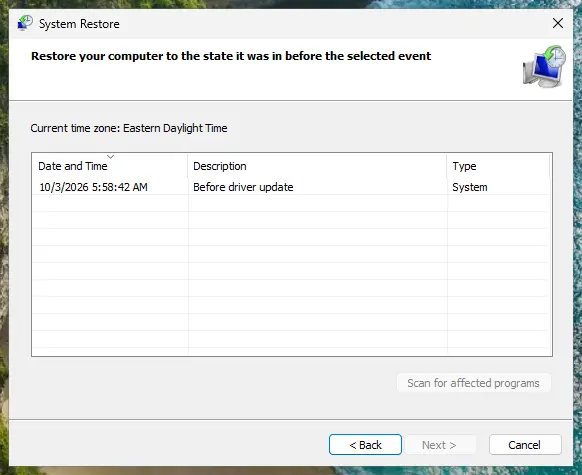
It worked if: Roblox starts in the new account or after the restore, without the evr.dll window.
If not: If neither helps, collect the details listed under "If the evr.dll error is still there" and contact Roblox Support or the app's maker.
If the evr.dll error is still there: what to check and what to send
When the window survives the fixes that fit your PC, stop changing things and collect facts. Roblox asks for three of them when you contact its support, and a few more help any app maker.
- The exact message: the full text of the window, including every DLL name it shows. Roblox asks for this first.
- Your Windows version and edition: from Settings > System > About, including whether it ends in N or KN.
- What you tried: the fixes from this page and their result, such as whether the Media Feature Pack is listed as installed.
- The Windows log: open Event Viewer > Windows Logs > Application and look for Application Error entries at the time of the window. The faulting module line shows which file failed.
- A second app: whether video plays in another app. If nothing plays video, the cause is Windows, not Roblox.
If SFC repairs files and they are damaged again days later, check the disk with Check a disk for errors (chkdsk) and the memory with How to test your RAM with Windows Memory Diagnostic. If the media files cannot be repaired at all, a reinstall that keeps your files is the last step: Reinstall Windows without losing files
How to keep the evr.dll error from coming back
- On an N or KN edition, keep the Media Feature Pack installed and check it after each big Windows update.
- Install Roblox only from roblox.com or the Microsoft Store.
- Install Windows updates and keep the graphics driver current.
- Keep restore points switched on for the Windows drive.
- Do not download evr.dll or any other Windows file from a DLL site.
- Do not copy DLL files into System32, SysWOW64 or the Roblox folder by hand.
- Do not run cleanup tools that delete DLL files they call orphaned.
- Do not switch off Windows Security to make a blocked file load.
If you are about to install Windows on a new PC, pick a regular edition unless you need an N edition for a reason. Then the media stack, evr.dll included, is part of Windows from the start and nothing extra has to stay installed.
Frequently asked questions
What is evr.dll?
evr.dll is the Enhanced Video Renderer, a Windows system file that displays decoded video on your monitor. Microsoft lists evr.dll as the executable of the EVR filter, which can mix up to 16 video streams and has the same core functions as the Media Foundation EVR media sink. Roblox, video players, browsers and video call apps use it. It comes with Windows, or with the Media Feature Pack on N and KN editions, so it is never a separate download.
Why does Roblox say failed to load library evr.dll?
Roblox could not load a Windows media file it needs. Roblox's help page says the Failed to load library error happens when a required Windows DLL is missing, corrupted, outdated or blocked, and that it is a problem with your device, not with Roblox servers. The most common reason for evr.dll is an N or KN edition of Windows without the Media Feature Pack. Install it with Fix 1, restart, and start Roblox again. On a regular edition, start with the clean reinstall in Fix 2.
How do I fix the evr.dll Roblox error on Windows 10?
On Windows 10, open Settings > System > About and read Edition. If it ends in N or KN, go to Settings > Apps > Apps & features > Optional features > Add a feature, install the Media Feature Pack and restart. If your edition is a regular one, uninstall Roblox, delete the Roblox folder in %localappdata% and install it again. Windows 10 left support on 14 October 2025, so also check whether your PC can move to Windows 11.
How do I fix the evr.dll Roblox error on Windows 11?
On Windows 11, open Settings > System > About and read Edition. If it ends in N or KN, open Settings > Apps > Optional features, select View features next to Add an optional feature, pick the Media Feature Pack and install it. Restart the PC afterwards: Microsoft says the install is only complete after a restart. If your edition is not N, follow Fix 2 and Fix 3 on this page.
Where can I download evr.dll safely?
Nowhere as a single file, because Microsoft does not publish one. evr.dll comes with Windows, or with the Media Feature Pack on N and KN editions, which you install from Optional features in Settings. If the file is damaged on a regular edition, DISM and SFC restore it from Windows' own store, as in Fix 3. A copy from a DLL site has an unknown builder, may be the wrong version, and usually leads to the next missing file, such as MFPlat.dll.
Is evr.dll a virus?
No, the genuine evr.dll is a Windows system file and should not be deleted. Like any DLL name, it can be copied by malware, which is why a copy in an unusual folder deserves a look. Windows keeps its own copy in the system folder, and you can check it with the dir command in Fix 3. If Windows Security flagged a file called evr.dll somewhere else, leave it removed and run a full scan with Microsoft Defender.
What is a Windows N or KN edition?
N and KN editions are versions of Windows sold without Windows Media Player and related media technologies. Microsoft's page says they otherwise include the same functions as other editions. The left-out parts include Media Foundation, Windows Media Format and standard audio and video codecs. Without the Media Feature Pack, webcams, Windows Hello, video in Photos and parts of Teams also do not work. Installing the pack restores most of these.
Can I fix evr.dll with regsvr32?
Registering a file cannot bring back one that is missing, and on an N edition the problem is a whole missing media stack, not one unregistered file. The earlier version of this guide suggested regsvr32 /u evr.dll and regsvr32 evr.dll as the first fix. We dropped it because neither Microsoft nor Roblox lists it for this error, and we could not confirm that it helps. Install the Media Feature Pack or run DISM and SFC instead.
The error mentions MFPlat.dll or another DLL now. Is that the same problem?
Very likely, yes. MFPlat.dll is the Media Foundation platform file, and Roblox's help page names it as the file N and KN editions lack. When a different media DLL appears after you tried to fix evr.dll, the Media Feature Pack is usually still missing, or a single copied file filled only one gap. Install the pack with Fix 1, restart, and delete any DLL you copied into the Roblox or Windows folders by hand.
I see this message in another language. Does this page apply?
Yes. People also search this error in Arabic, Portuguese, Thai, Vietnamese, Indonesian, Polish, French and other languages, often with words like how to fix or what is this. The window text changes with the Windows language, but the file name evr.dll stays the same, and so do the causes and fixes. The Settings menus have the same structure in every language, so follow the order of the steps even if the labels read differently.
Sources
- Microsoft Support: Media Feature Pack for Windows N (KB5007124), what N editions leave out and how to install the pack (support.microsoft.com)
- Microsoft Learn: Enhanced Video Renderer Filter (executable evr.dll, Windows Vista and later) (learn.microsoft.com)
- Roblox Support: Roblox Error: Failed to Load Library (en.help.roblox.com)
Did this fix work?
One click, no account. It tells the next reader which guides are worth their time.
Questions and experiences: fix evr.dll missing or not found in Windows
Still broken, or found a fix we did not cover? Ask here: members and our editors answer. Reading is open; writing needs a free account.
…