
Failed to load steamui.dll: why Steam will not start and how to fix it
steamui.dll is one of the core files of the Steam client. It sits in Steam's own install folder, and Steam.exe loads it right after you start Steam to build the client window, the Library and the store. When it cannot be loaded, Steam stops before any window appears. No game ships this file, so verifying a game does not help: the fix is to repair Steam itself, and your installed games can stay where they are.

Prefer to fix it yourself? The manual steps follow.
How to fix steamui.dll errors
Restart the PC first, then look at your security software's protection history for steamui.dll from the Steam folder. If the error stays, download the Steam installer from Steam's official site and install it into the same folder where Steam already is, by default C:\Program Files (x86)\Steam. Valve's own support page describes this repair: it replaces damaged client files and keeps every installed game, because the games sit in the steamapps folder that the installer leaves alone. Do not uninstall Steam first unless you mean to: removing it the usual way also removes the games inside its folder.
A steamui.dll from a DLL download site is not the fix. Steam updates its client files as one set, and steamui.dll has to match Steam.exe and the other files of the same build. A single file from elsewhere is of the wrong build at best, and the Steam client is the program that holds your account, saved logins and payment details.

Where steamui.dll comes from
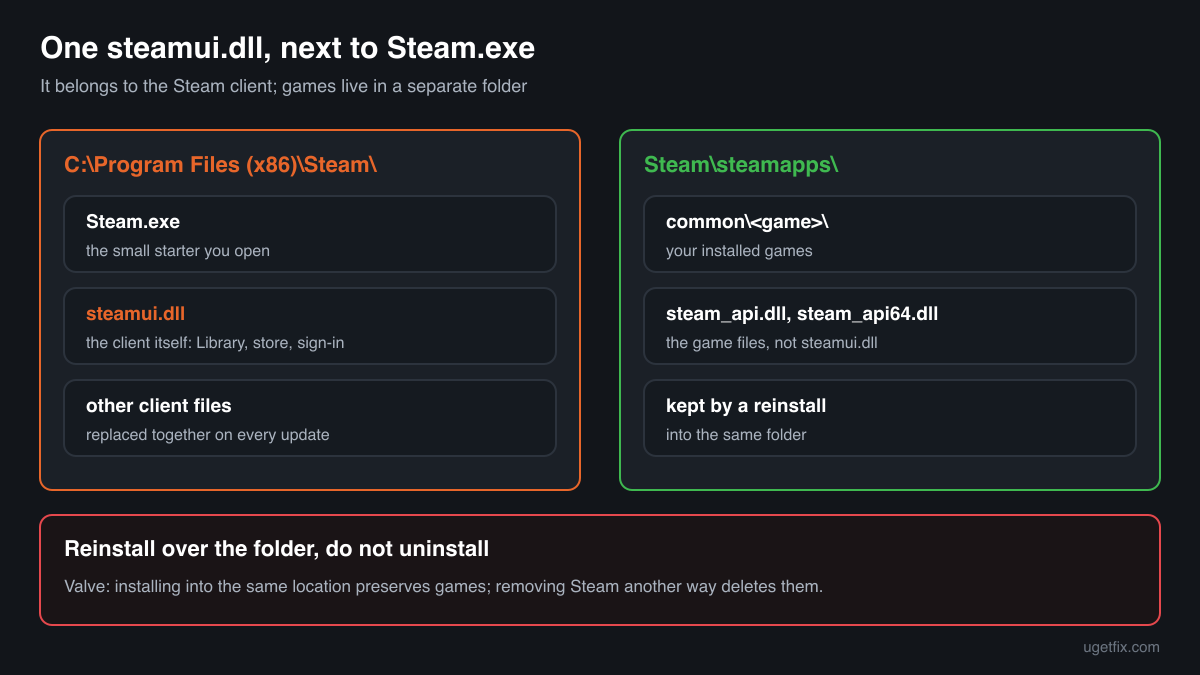
Unlike most game DLLs, steamui.dll has exactly one owner on a PC: the Steam client from Valve. There should be one copy, in the root of Steam's install folder. These are the situations in which people meet the file name.
| Program | Made by | What to know |
|---|---|---|
| The Steam client for Windows | Valve Corporation | The only program that uses steamui.dll. It lives next to Steam.exe in the Steam install folder, by default C:\Program Files (x86)\Steam. Steam replaces it with every client update. |
| Steam installed on another drive or folder | Valve Corporation | If you chose a different folder at install time, steamui.dll is in that folder instead, again next to Steam.exe. A reinstall has to point to that same folder to keep your games. |
| Steam games | Their developers | Games do not ship or load steamui.dll. They use steam_api.dll or steam_api64.dll in their own folders. Verifying a game's files never touches steamui.dll. |
| A steamui.dll inside a game folder or a download | Unknown | Valve never puts the file there. A copy beside a game's .exe or in Downloads came with a modified game or an unofficial package, not with Steam. |
| Tools that change how the Steam client looks or behaves | Third parties | Skins, patchers and unlockers that alter the client work on the files in the Steam folder. If Steam broke right after you installed one, remove the tool and reinstall Steam over its folder. |
Step by step
- Restart the PC, then start Steam. Valve lists this first for a reason: a restart releases file locks and clears a half-finished client update. Start Steam from the Start menu or its own shortcut, not from a copied Steam.exe in another folder.
- Look at the protection history. In Windows Security open Virus and threat protection, Protection history; other security programs keep a quarantine list of their own. If steamui.dll from the Steam folder was blocked or removed, the next step brings back a clean copy. Valve notes that security software hooks deep into the system and can interfere with Steam, so add an exception for the Steam folder afterwards if the same file is flagged again.
- Reinstall Steam into the same folder. Download the installer from store.steampowered.com/about, run it and choose the folder Steam is already in. The installer replaces the client files, steamui.dll included, and keeps the games in steamapps. Start Steam after it finishes and let it update itself to the newest client.
- Remove client mods before you reinstall. If you added a skin, patcher or unlocker to the Steam client, uninstall it first or delete the files it added to the Steam folder. Otherwise it may patch the fresh steamui.dll again on the next start.
- Close programs that interfere with Steam. Valve's list includes VPN software, firewalls, download accelerators, peer-to-peer clients and aggressive anti-spyware tools. Close them, restart Steam and see whether the client opens. If it does, add exceptions for Steam rather than leaving protection off.
- Update Windows and your drivers. Open Start, search for update and run Check for updates. Install the newest driver for your graphics card from its maker, because the client draws its window with the graphics driver.
- Check the drive and the memory. If steamui.dll keeps getting damaged, the cause may be hardware. Run Error checking on the drive (This PC, right-click the drive, Properties, Tools) and Windows Memory Diagnostic (search for mdsched). Turn off any overclocking while you test.
What not to do
Do not download steamui.dll from a DLL site.
The file is one piece of a client build that changes with every Steam update. A downloaded copy will not match your Steam.exe, and a file of unknown origin inside the Steam folder runs every time you sign in to your account.
Do not uninstall Steam through Settings, Apps to fix it.
Valve warns that uninstalling Steam any other way than reinstalling over it deletes the game and user data in its folder. Run the installer over the existing folder instead; it fixes the same files and keeps the games.
Do not copy steamui.dll from another PC.
Another PC may run a different client build or the beta, and the copy would be out of step with your other Steam files. The installer gives you a matching set in a few minutes.
Do not put steamui.dll into System32 or a game folder.
Steam.exe loads it only from its own folder, and nothing else on Windows uses it. A copy elsewhere fixes nothing and leaves an unknown file behind.
Do not switch your security software off for good.
Turning it off to test is what Valve suggests, but only for testing. Once you know it was the cause, add an exception for the Steam folder and switch protection back on.
Check the copy on your PC
Choose the steamui.dll from your Steam folder. Its checksum is calculated in your browser and compared with 7 copies of the file collected from PCs.
The file stays on your computer. Nothing is uploaded: the checksum is computed locally.
Found a steamui.dll outside the Steam folder, in a game folder or in Downloads, or one that does not report Valve Corporation? Then the question is not how to repair Steam but whether that file is Valve's at all. Is steamui.dll Valve's file or a fake? On 2-Spyware
The error messages and what each one means
steamui.dll errors appear when you start the Steam client, not when you start a game. The wording tells you whether the file is missing, damaged or blocked, or whether Steam itself crashed in it.
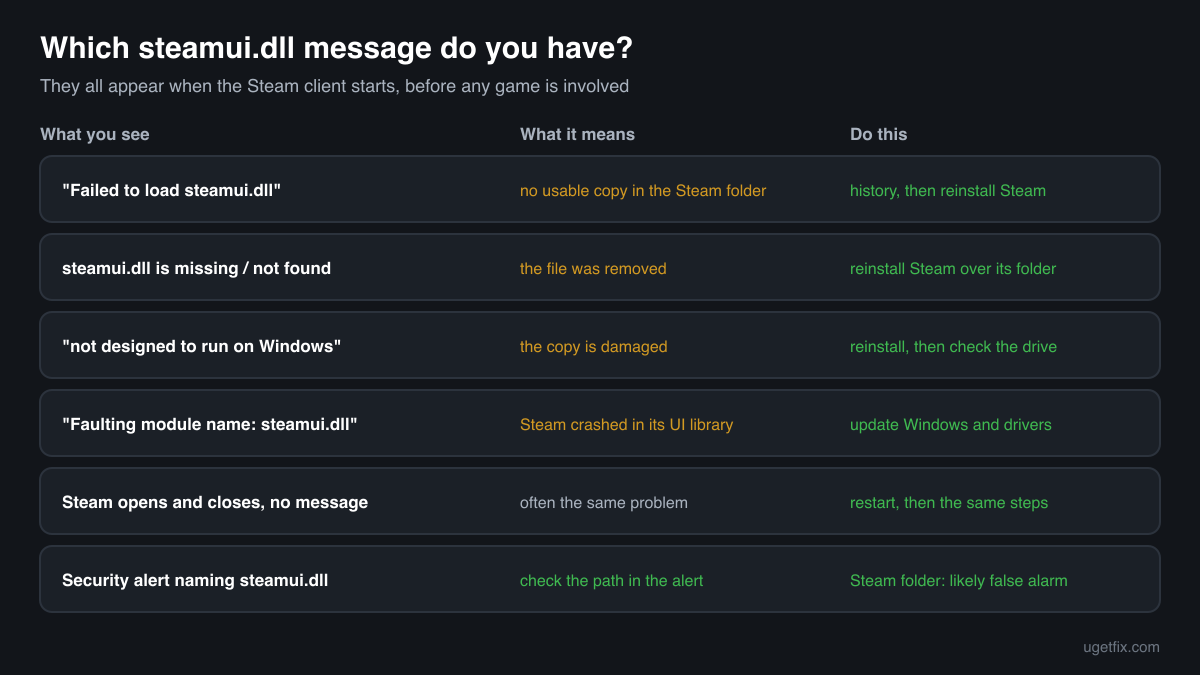
Failed to load steamui.dll
Steam's own error box, the one most people see. Steam.exe found no usable steamui.dll in its folder: it was removed, damaged by an interrupted update, or blocked while being read. Check the protection history, then reinstall Steam into the same folder.
A message that steamui.dll is missing or was not found
The file is gone from the Steam folder. A security scan, a cleaner tool or a manual delete is the usual cause. Reinstalling Steam over its folder puts it back.
steamui.dll is either not designed to run on Windows or it contains an error.
Windows found the file but could not use it: the copy is damaged or is not a valid Windows library. Reinstall Steam, then run Error checking on the drive if it happens again.
Faulting module name: steamui.dll
A line in Event Viewer, Windows Logs, Application, after Steam closed by itself. The client crashed inside its own UI library. Update Windows and the graphics driver, close programs that hook into other programs, and reinstall Steam over its folder.
Steam opens and closes at once, with no message
Often the same problem without a dialog. Restart the PC, then follow the steps above. Valve also collects crash dumps and fixes some crashes in client updates, so let Steam update after the reinstall.
Your security software reports steamui.dll
Check where the file sits. In the Steam install folder next to Steam.exe it is most likely Valve's file and the alert a false positive; reinstall Steam and add an exception. Anywhere else, the alert deserves to be taken seriously.
File facts
steamui.dll is the SteamUI Dynamic Link Library from Valve. Steam.exe is a small starter program: it checks for updates, then loads steamui.dll and the other client libraries that do the real work of the client, from sign-in to the Library, store, friends list and downloads. Games run as separate programs and never load it. What the catalogue copies of the file report:
- Description in the file
- SteamUI Dynamic Link Library
- Company in the file
- Valve Corporation
The genuine file sits in the root of the Steam install folder, beside Steam.exe, and nowhere else. In Properties, Details it reports Valve Corporation as the company and SteamUI Dynamic Link Library as the description. It is large for a DLL: the Valve copies in the catalogue below are about 10 MB to 16 MB, all 32-bit builds. Each Steam client update brings a new build, so the version on your PC changes often and an older or newer number than the ones listed is normal.
Copies of steamui.dll found on PCs
Public DLL catalogues have collected 7 copies of steamui.dll uploaded from PCs, from version 0.0.0.0 to 5.97.91.35. Each one came from the Steam folder of some PC at the time it was uploaded. The table lists them with their checksums, so you can tell whether your file is one of them.
Your copy will rarely match, and that is expected: Steam replaces steamui.dll with every client update, and the newest copy here, 5.97.91.35, is only the newest that someone uploaded. The fix never depends on finding your build in this list. Reinstalling Steam always fetches the build that fits the rest of your client.
| Version | Build | Size | MD5 | SHA-1 |
|---|---|---|---|---|
5.97.91.35 | 32-bit | 11.7 MB | dc0a926cd8610191d4f4b99f8b4e44de | 6ea8a34dcb4bc8ac75520b7efa7f4dc27148add6 |
4.69.34.61 | 32-bit | 10.8 MB | 022678e26d0a38b11d1ced6e96b5aae0 | 3fa014fc8eb7f89ea2dde58c05fb686bc6837cb8 |
3.78.49.52 | 32-bit | 10.1 MB | d618737cb8c04fb94251154ab0fc6009 | 581a2160fd3bcebb5d0a8cefe0a9148c211def59 |
2.59.12.64 | 32-bit | 10.7 MB | 2572abd1c2ed428f95250f7341b223c3 | 4d9a9e94f3ff2b616a463efae5e9823ae0e01bb1 |
2.45.19.81 | 32-bit | 15.8 MB | ae66d0db55509338f28f81dee4abd704 | 804888c9e19923d6f21920ccf87a68be2b0d684e |
1.84.85.72 | 32-bit | 9.9 MB | cef09a723346f2e98fe9a8eeccb0e539 | 1775d5c83d0648be5259cfb80587dcca59970b35 |
0.0.0.0 | 32-bit | 1.4 MB | e3976b26895e10b3315760e1412ef7c6 | ecb5cbe6834f3af60fb0432057395c9d59e8754d |
Copies uploaded by users to a public DLL catalogue, read on 17 October 2026. We list their checksums so you can identify a file; we do not offer them for download and we did not verify each one against Valve's signature. One listed copy reports no company and is far smaller than the Valve builds.
Questions people ask
Is steamui.dll a virus?
No. The steamui.dll next to Steam.exe in the Steam install folder is Valve's client library. A file with that name in any other place is not where Valve puts it and should be checked; the security page linked above explains how.
Will I lose my games if I reinstall Steam?
Not if you run the Steam installer and choose the folder Steam is already in. Valve states that installing into the same location preserves all installed games. Games are lost only when Steam is uninstalled in the usual way, which removes the steamapps folder inside it. Games in a second library on another drive are not touched either way.
Does verifying game files fix steamui.dll?
No. Verify integrity of game files checks the files of one game, and steamui.dll belongs to the Steam client, not to any game. It also needs a running Steam client, which is exactly what fails here. Reinstall Steam over its own folder instead.
Where is steamui.dll located?
In the root of the Steam install folder, next to Steam.exe. On most PCs that is C:\Program Files (x86)\Steam. If you installed Steam elsewhere, right-click the Steam shortcut, choose Open file location and you will see the file there.
Can I delete steamui.dll?
You can, but Steam will not start until the file is back. Deleting it is sometimes suggested as a way to force a fresh copy; running the Steam installer over the folder does the same job in a cleaner way, together with the other client files.
Why does the error come back after every restart?
Something keeps removing or changing the file. Look at the protection history for a repeated detection, at any skin or patcher you added to Steam, and at the health of the drive. Fix that cause, then reinstall Steam once more.
Is steamui.dll related to steam_api.dll?
Both come from Valve, but they do different jobs. steamui.dll is part of the Steam client and sits in the Steam folder. steam_api.dll and steam_api64.dll are shipped by each game in its own folder and connect the game to the client. A fix for one does nothing for the other.
Related guides
Failed to load steamui.dll: why Steam will not start and how to fix it
FixHow to fix Steam fatal error "Failed to load Steamui.dll"?
Sources
- Steam Support: Steam Client Troubleshooting (reinstall Steam into the same location)
- Steam Support: Programs Which May Interfere with Steam
- Steam: official Steam installer
File data read on October 17, 2026.

The editors who write and check uGetFix guides and reference pages. File facts are read from Microsoft's own installers and documentation, and every page shows the date its data was read.
Questions and experiences
Ask about this page: members and our editors answer. Reading is open; writing needs a free account.
…