
ucrtbased.dll was not found: what the debug runtime is and how to fix the error
ucrtbased.dll is the debug build of the Universal C Runtime, the version of the C library that Visual Studio uses while a developer tests a program. It comes with the Windows SDK, it is not part of Windows, and Microsoft does not allow it to be redistributed. When a program asks for it on a PC without Visual Studio, the program itself was published as a debug build, and the fix is a release build of it.

Prefer to fix it yourself? The manual steps follow.
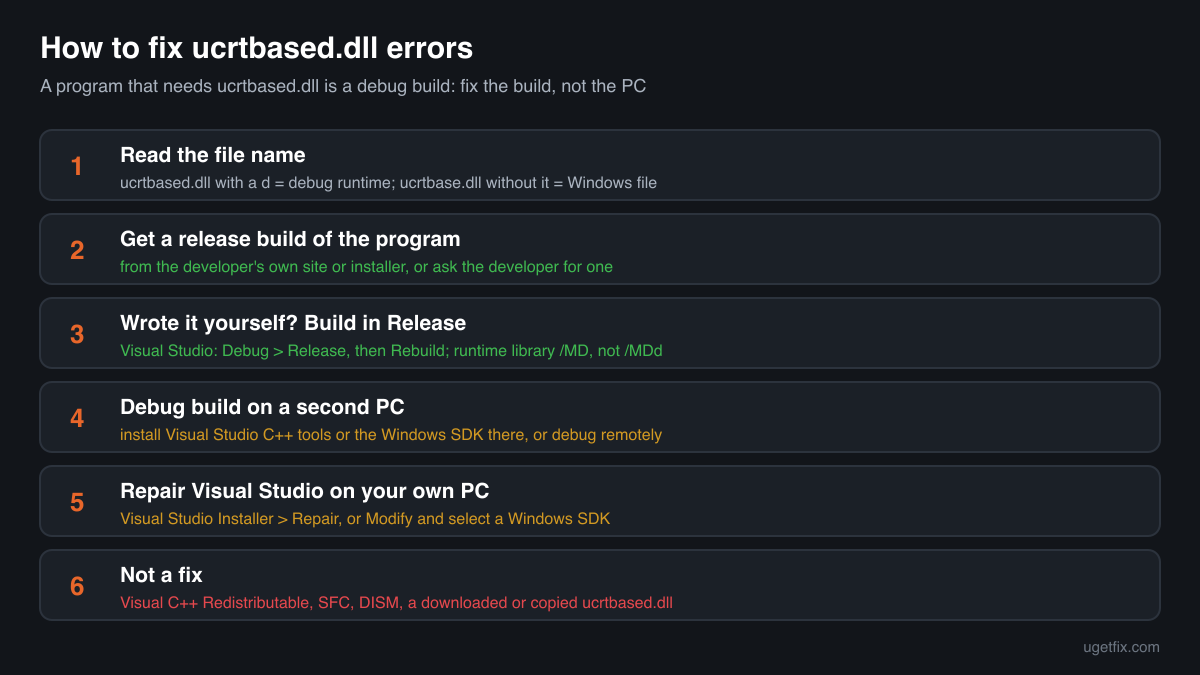
How to fix ucrtbased.dll errors
Look at who made the program that shows the error. If you only use it, ask its developer for a release build or download the normal installer from the developer's own site: a program that needs ucrtbased.dll was compiled in the Debug configuration, which links it to the debug runtime of a developer's PC. If you wrote the program, switch Visual Studio to the Release configuration and build again; the release program uses ucrtbase.dll, which every Windows 10 and Windows 11 PC already has. If Visual Studio on your own PC cannot find ucrtbased.dll, open the Visual Studio Installer and repair it, or add the Windows SDK to the Desktop development with C++ workload.
Installing or repairing the Visual C++ Redistributable does not add ucrtbased.dll, and neither do Windows Update, System File Checker or DISM. No official package for ordinary PCs contains the debug runtime. A ucrtbased.dll from a DLL download site may let a debug program start, but it is a file of unknown origin that Microsoft does not license for sharing, and the program stays a debug build.
Where ucrtbased.dll comes from
Only one place installs ucrtbased.dll legitimately: the Windows SDK, which developers get together with Visual Studio. Everything else that mentions the file either needs it, because it was built in debug mode, or offers a copy it has no right to share. These are the cases you will meet.
| Program or package | Made by | What to know |
|---|---|---|
| Windows SDK (Windows 10 and Windows 11 SDK) | Microsoft Corporation | The genuine source. Microsoft documents that the debug UCRT libraries sit under Windows Kits\10\bin\<architecture>\ucrt in Program Files or Program Files (x86), apart from the retail files, and that they are not redistributable. |
| Visual Studio with the Desktop development with C++ workload | Microsoft Corporation | Installs the Windows SDK, so a PC with Visual Studio's C++ tools has ucrtbased.dll. Programs built there in the Debug configuration (compiler option /MDd) link to it through ucrtd.lib and run fine on that PC only. |
| Programs and games published as a debug build | Their own developer | Class assignments, small tools shared as an .exe, test builds of games, mods and plugins. They start on the developer's PC and fail everywhere else with ucrtbased.dll not found, often together with vcruntime140d.dll or msvcp140d.dll. Only the developer can fix this with a release build. |
| Visual C++ Redistributable 2015-2022 | Microsoft Corporation | Does not contain ucrtbased.dll. It installs release files such as vcruntime140.dll and msvcp140.dll; debug files are excluded from every redistributable package. Reinstalling it does not change this error. |
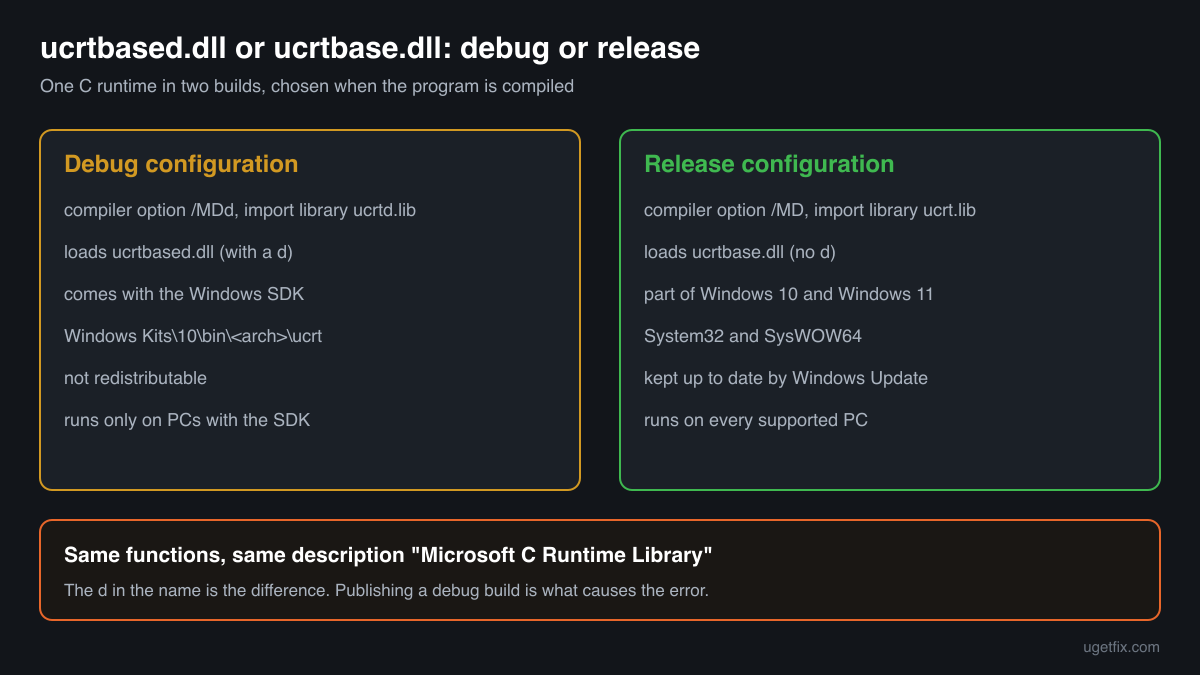
| Windows 10 and Windows 11 | Microsoft Corporation | Ship ucrtbase.dll, the release Universal C Runtime, in System32 and SysWOW64, and keep it updated through Windows Update. They never include ucrtbased.dll, with a d before the extension. |
| DLL download sites, repacks and cracked software | Unknown | No one outside Microsoft may hand out ucrtbased.dll. A copy from such a source cannot be traced to a Windows SDK release, and software that bundles it was packed by someone who either made a mistake or did not care where the file came from. |
Step by step
- Read the exact file name in the message. ucrtbased.dll, with a d before the dot, is the debug runtime and the steps on this page apply. ucrtbase.dll without the d is the release runtime that belongs to Windows and is repaired by Windows Update, System File Checker and DISM. If the message names vcruntime140d.dll or msvcp140d.dll, it is the same debug-build problem with another debug file.
- Get a release build of the program. If you downloaded or received the program, look on the developer's own site or code page for the release download or the installer, and update to it. If there is none, tell the developer that the program asks for ucrtbased.dll: that sentence tells them it was compiled in Debug and is enough for them to publish a release build.
- If you wrote the program, build it in Release. In Visual Studio set the configuration box on the toolbar from Debug to Release, choose the right platform (x64 or x86) and use Build, Rebuild Solution. The release build links to ucrtbase.dll and the other release runtime files. For a CMake project use a Release or RelWithDebInfo preset; in project properties, C/C++, Code Generation, the runtime library must be /MD or /MT, not /MDd or /MTd.
- Deploy the release runtime, not the debug one. On Windows 10 and Windows 11 the Universal C Runtime is already part of the system. If your release program also needs vcruntime140.dll or msvcp140.dll, ship the Visual C++ Redistributable with it or install it on the test PC. Microsoft supports this route for all release runtime files; copying debug files from your own PC to someone else's is not allowed.
- If a debug build must run on a second PC, set that PC up for development. A tester who needs a debug build can install Visual Studio with the Desktop development with C++ workload, or the Windows SDK alone, on that PC. Both install ucrtbased.dll in the official way. Remote debugging from your own PC is the other legitimate option.
- Repair Visual Studio when it fails on your own PC. If your own debug build stops with ucrtbased.dll not found on the PC where Visual Studio is installed, open the Visual Studio Installer, choose More, Repair, or choose Modify and make sure a Windows SDK is selected under Desktop development with C++. Then rebuild the project so it targets the SDK version that is installed.
- Check the protection history if the file vanished on a developer PC. In Windows Security open Virus and threat protection, Protection history, and look for ucrtbased.dll from the Windows Kits folder or from Visual Studio's folders. If you installed the SDK or Visual Studio yourself from Microsoft, repair them through the Visual Studio Installer instead of restoring a single file. Do not restore a copy that came from a download site.
What not to do
Do not download ucrtbased.dll from a DLL site.
Microsoft lists the debug runtime as not redistributable, so no download site has the right to offer it and none can prove where its copy came from. A DLL placed next to a program or in a Windows folder runs with your rights every time something loads it.
Do not copy ucrtbased.dll from a developer's PC to another PC.
It may let the program start, but it breaks the licence of the SDK, it leaves a debug runtime that nothing updates, and the program still behaves as a debug build: slower, with extra checks and with assertion dialogs that release users never should see.
Do not reinstall the Visual C++ Redistributable again and again.
The redistributable contains only release files. However many times you install, repair or reinstall it, ucrtbased.dll will not appear, and the error will stay exactly the same.
Do not rename ucrtbase.dll to ucrtbased.dll.
The two are different builds with different internal functions for debugging. A renamed release file either fails with an entry point error or lets the program start and crash later in a place that has nothing to do with the real cause.
Do not put ucrtbased.dll into System32 or SysWOW64 by hand.
A hand-placed file in the Windows folders is loaded by every debug program on the PC, is never updated by Windows Update and is easy to forget. On a developer PC the SDK and Visual Studio installers manage the file themselves.
Check the copy on your PC
Choose the ucrtbased.dll you found. Its checksum is calculated in your browser and compared with 2 copies of the file collected from PCs, all reporting Microsoft Corporation.
The file stays on your computer. Nothing is uploaded: the checksum is computed locally.
Found a ucrtbased.dll on a PC where nobody installed Visual Studio or the Windows SDK, next to a downloaded program, or in a folder like Downloads, Temp or AppData? Then the question is where that copy came from, and that is a security question rather than a missing-file one. Is ucrtbased.dll Microsoft's file or a planted copy? On 2-Spyware
The error messages and what each one means
Most messages about ucrtbased.dll mean the same thing: a debug program on a PC without the debug runtime. A few come from Visual Studio itself and are not errors in your program. These are the texts you will see, with the file name filled in.
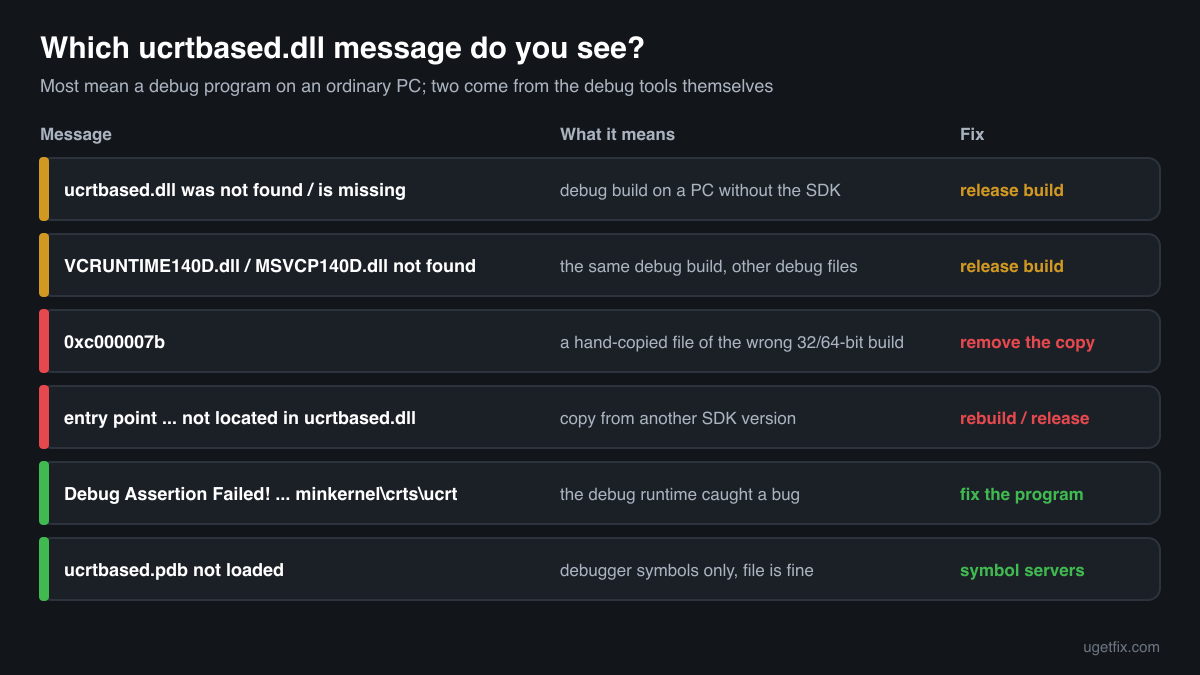
The code execution cannot proceed because ucrtbased.dll was not found. Reinstalling the program may fix this problem.
Windows 10 and Windows 11 wording. The program is a debug build and this PC has no Windows SDK. Reinstalling the same debug program does not help; a release build does.
The program can't start because ucrtbased.dll is missing from your computer. Try reinstalling the program to fix this problem.
The same situation in the older Windows wording. The fix is the same: a release build from the developer, or the Release configuration if you built it yourself.
The code execution cannot proceed because VCRUNTIME140D.dll was not found.
The other half of the same problem. vcruntime140d.dll and msvcp140d.dll are the debug files of the Visual C++ runtime and are missing for the same reason. When one is fixed by a release build, all of them are.
The application was unable to start correctly (0xc000007b).
A ucrtbased.dll was found but it is of the wrong architecture: a 32-bit copy for a 64-bit program or the other way round. Typical after copying the file from somewhere by hand. Remove the copy and use a release build.
The procedure entry point ... could not be located in the dynamic link library ucrtbased.dll.
A ucrtbased.dll was found, but from another SDK version than the one the program was built with, so a function the program needs is missing. On a developer PC, rebuild against the installed SDK; anywhere else, remove the stray copy and get a release build.
Debug Assertion Failed! Program: ... File: minkernel\crts\ucrt\src\...
Not a missing file. The debug runtime found a bug in the program, such as an invalid parameter or a bad memory operation, and stopped to tell you. Release users never see this dialog. If you are the developer, choose Retry to break into the debugger at that point.
ucrtbased.pdb not loaded / Cannot find or open the PDB file
Shown by the Visual Studio debugger while you debug your own program. The file is fine; only its debugging symbols are missing. Turn on Microsoft Symbol Servers under Tools, Options, Debugging, Symbols, or step over the runtime code.
Faulting module name: ucrtbased.dll
A line from the Application log in Event Viewer after a crash. The crash happened inside the debug runtime, usually because the debug runtime stopped the program after it found an error. Look at the program that crashed: it is a debug build, and the error is in that program.
File facts
ucrtbased.dll is the debug Universal C Runtime: the same C library functions as ucrtbase.dll, such as files, memory, strings and maths, with extra checks for developers. It checks parameters and memory use more strictly and reports mistakes with assertion dialogs instead of carrying on. A program uses it when it is compiled with the /MDd option, which Visual Studio sets for the Debug configuration, through the import library ucrtd.lib. Microsoft marks both the import library and the DLL as not redistributable. What the catalogue copies of the file report:
- Description in the file
- Microsoft® C Runtime Library
- Company in the file
- Microsoft Corporation
On a developer PC the Windows SDK installs the debug runtime under Windows Kits\10\bin\<architecture>\ucrt in Program Files or Program Files (x86), separately from the retail files under Windows Kits\10\Redist\ucrt, and Visual Studio puts it where debug programs find it. On a PC without Visual Studio or the Windows SDK there is no ucrtbased.dll at all, and that is normal. The genuine file describes itself as Microsoft C Runtime Library from Microsoft Corporation (Properties, Details), like the release file, so the d in the name is the difference. The catalogue copies below are about 1.6 MB (32-bit) and 1.8 MB (64-bit), larger than the release ucrtbase.dll because of the debug code. The version number follows the Windows SDK it came with.
Copies of ucrtbased.dll found on PCs
Public DLL catalogues have collected 2 copies of ucrtbased.dll uploaded from PCs, a 32-bit and a 64-bit file of version 10.0.10056.0, both reporting Microsoft Corporation as the company. They came from developer PCs with the Windows SDK. The table lists them with their checksums, so you can tell whether your file is one of them.
A match tells you that a copy is a known Microsoft build. It does not make the file right for a program on a PC without the SDK: the debug runtime is matched to the SDK a program was built with, and it is not licensed for sharing. On your own developer PC the Visual Studio Installer keeps the right copy in place.
| Version | Build | Size | MD5 | SHA-1 |
|---|---|---|---|---|
10.0.10056.0 | 64-bit | 1.7 MB | c3130cfb00549a5a92da60e7f79f5fc9 | 56c2e8fb1af609525b0f732bb67b806bddab3752 |
10.0.10056.0 | 32-bit | 1.6 MB | d2e30ccb8427870b1f8b3c2ecb6563bf | 9529cc4ee868a9f5cf996f7075e45b9619c066a6 |
Copies uploaded by users to a public DLL catalogue, read on 17 October 2026. We list their checksums so you can identify a file; we do not offer them for download and we did not verify each one against Microsoft's signature.
Questions people ask
Is ucrtbased.dll a virus?
Microsoft's ucrtbased.dll is a harmless part of the Windows SDK. The risk is in copies from elsewhere: a ucrtbased.dll from a DLL site or bundled with a downloaded program cannot be traced to Microsoft. Read the security page linked above for a copy of unknown origin.
Where can I download ucrtbased.dll?
Nowhere legitimate as a single file. Microsoft installs it only with the Windows SDK, which Visual Studio's C++ workload includes, and marks it as not redistributable. If you are a developer, install or repair those. If you only use the program, you need a release build of it, not the file.
Why does reinstalling the Visual C++ Redistributable not fix ucrtbased.dll?
Because the redistributable is made for release programs and contains only release files. ucrtbased.dll is a debug file, and Microsoft keeps every debug file out of the redistributable packages. The error comes from the program, which was built in Debug, not from a damaged runtime on your PC.
What is the difference between ucrtbase.dll and ucrtbased.dll?
ucrtbase.dll is the release Universal C Runtime, part of Windows 10 and Windows 11 and updated by Windows Update. ucrtbased.dll is the debug build with extra checks for developers, installed only with the Windows SDK. A release program uses the first, a debug program the second, and they cannot replace each other.
My own program runs in Visual Studio but not on my friend's PC. Why?
You sent the Debug build, which links to ucrtbased.dll and vcruntime140d.dll from your SDK. Your friend's PC does not have them. Switch the configuration to Release, rebuild, and send the program from the Release output folder, together with the Visual C++ Redistributable if it needs vcruntime140.dll or msvcp140.dll.
Can I just copy ucrtbased.dll next to the program?
It often makes the program start, which is why the advice is so common, but it is not a fix. The SDK licence does not allow the debug runtime to be redistributed, the copy is never updated, and the program still runs as a slow debug build that can stop with assertion dialogs. A release build avoids all of that.
A game asks for ucrtbased.dll. What does that mean?
The game or one of its plugins or mods was published as a debug build. Update it from its official store or site, and remove mods added since the error started. If the game came from a repack or a crack, a debug file in it says nothing good about how it was put together.
Related guides
ucrtbased.dll was not found: what the debug runtime is and how to fix the error
FixHow to fix ucrtbase.dll application error on Windows?
Sources
- Microsoft Learn: Upgrade your code to the Universal CRT (debug UCRT libraries are not redistributable, Windows Kits\10\bin\<architecture>\ucrt)
- Microsoft Learn: C runtime (CRT) and C++ standard library (STL) lib files (ucrtd.lib, ucrtbased.dll, /MDd, not redistributable)
- Microsoft Learn: Install C and C++ support in Visual Studio
- Microsoft: Windows SDK
File data read on October 17, 2026.

The editors who write and check uGetFix guides and reference pages. File facts are read from Microsoft's own installers and documentation, and every page shows the date its data was read.
Questions and experiences
Ask about this page: members and our editors answer. Reading is open; writing needs a free account.
…