How to fix
Error Code S1L457
on Windows
Encountering error code S1L457 on Windows 10 or 11? Discover effective troubleshooting tips to resolve it quickly and easily. Expert-tested solutions aw…

Repairs Windows system files, removes malware, and restores a clean OS state — without reinstalling.
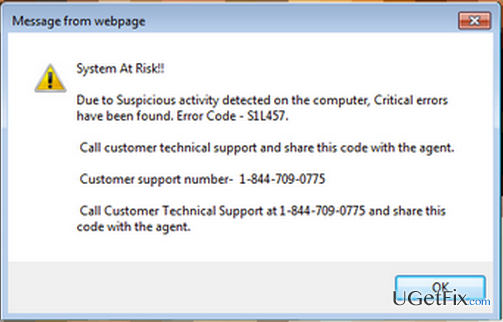
Has anyone seen these pesky pop-ups stating "System at Risk" Error Code S1L457 and some numbers to call like 1-844-709-0775? It is getting really annoying and I don't seem to find a way to fix this error. Any suggestions?
Errors is bane of existence for every PC or Mac user. Not only do they signify that there is something wrong with the system, but they might be simply annoying and intrusive. It has recently come to our attention that Error Code S1L457 has been bothering those Mac users who use Safari as their browser. The message reads as "Due to Suspicious activity Detected on the Computer, Critical Errors have been Found. Error Code – S1L457." There might also be an OK button which does nothing when you click on it. You should also ignore the tip to call the number as it is a scam. However, there are some options for you to solve this problem and we will discuss them here.
How to fix Error S1L457 manually
First of all, you will have to close the browser and delete all website data. You can do it by following these steps:
1. Simply quite the application. If you cannot do it, you might need to select the Force Quit option which you might find at Apple Menu > Force Quit > Select Application> Force Quit.
2. When the application is closed, open it again by holding Shift Key and clicking on the Icon in the Dock.
3. When the browser is relaunched, access Safari > Preferences > Privacy > Remove all Website Data. This will help you clear the cookies and other data which is causing this problem.
You might also open the Download folder and delete all files that you do not seem to recognize. This should be enough to solve the problem. Does it work? It is important to take care of your Mac. However, why not trusting this responsible task to some reputable tool that will make sure it is always neat and tidy? Errors like S1L457 can also be solved automatically which will save your time and ensure the maximum protection. Just follow the guide below.
How to fix Error S1L457 automatically
As we have already mentioned above, you could have avoided encountering this error if you regularly scanned your Mac with some trustworthy cleaning tool like [rev id=”MacKeeper”] which will get rid of programs and data you do not want to keep on your computer any longer.
Frequently asked questions
First, ensure that your Windows is updated to the latest version, as updates can resolve compatibility issues. If the error persists, consider reinstalling the application related to the error.
Yes, encountering this error can disrupt normal application functionality, potentially affecting overall system performance. It's advisable to troubleshoot the issue promptly to restore optimal performance.
While there isn't a one-size-fits-all fix, users often resolve the issue by clearing the app's cache or reinstalling the software. Additionally, running a system file check can help identify and fix underlying problems.




Report an issue
What's wrong with this guide? We review every report and update or remove content.
Report received — thank you. We'll review and fix it.
You need a free account to submit a report.
Be the first to comment