How to fix
Can’t sign in to OneDrive
on Windows
Resolve OneDrive sign-in issues on Windows 10 and 11 easily. Follow our expert-tested fixes and regain access to your files in minutes.

![[Fix] Can’t sign in to OneDrive in Windows](https://ugetfix.com/wp-content/uploads/articles/askit/fix-cant-sign-in-to-onedrive-in-windows_en-768x432.jpg)
What causes [Fix] Can’t sign in to OneDrive in Windows?
- Internet connectivity problems
- Outdated app versions
- Credential-related issues
- General application bugs
- Cache-related issues
Repairs Windows system files, removes malware, and restores a clean OS state — without reinstalling.
Hi, I am running Windows on a Dell laptop I purchased last year, so it is pretty new. Most recently, I have noticed that I can't sign in to OneDrive, and it just keeps saying "Signing in" constantly with no results. What can I do to fix this problem?
OneDrive is a cloud-based file storage and synchronization service developed by Microsoft. Millions of people use this service to store and share their files, documents, photos, and videos. It is an essential tool for people who work remotely or need access to their files from multiple devices.
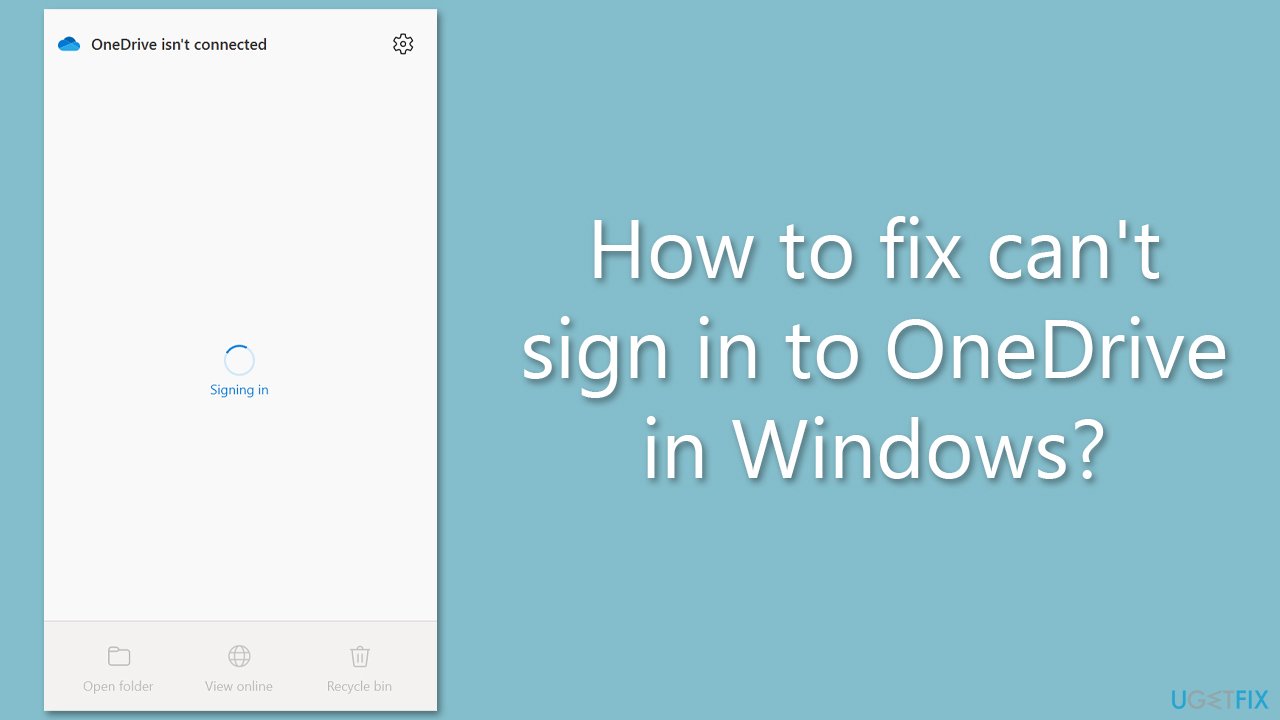
However, some users have reported difficulties in signing in to OneDrive on Windows. When attempting to sign in, some users are stuck on the "Signing in" screen, with the message "OneDrive isn't connected." These issues can be frustrating, especially if you need to access your files urgently.
The reasons for these issues can vary, but they are usually related to internet connectivity problems, general application bugs, credential-related mismatch, outdated apps, etc.
One of the most common causes of OneDrive sign-in issues is internet connectivity problems. The user's internet connection may be too slow or unstable, preventing OneDrive from connecting to Microsoft's servers. In such cases, the user can try to troubleshoot their internet connection or try signing in to the app from another device with a better internet connection.
Another possible cause of OneDrive sign-in issues is outdated app versions. Users must ensure they have the latest version of OneDrive installed to avoid any compatibility issues. Similarly, clearing the app's cache can help resolve app-related bugs that may cause sign-in issues.
Credentials-related issues are also a common cause of OneDrive sign-in issues. Users should ensure that they are using the correct login credentials for their Microsoft account. In some cases, resetting their password or re-entering their login credentials can help resolve sign-in issues.
We provide solutions to these and other issues below, so if you can't sign in to OneDrive, follow the steps carefully. We'd recommend running a PC repair scan with [d1] to ensure there are no underlying issues with your Windows.
Fix 1. Run troubleshooters
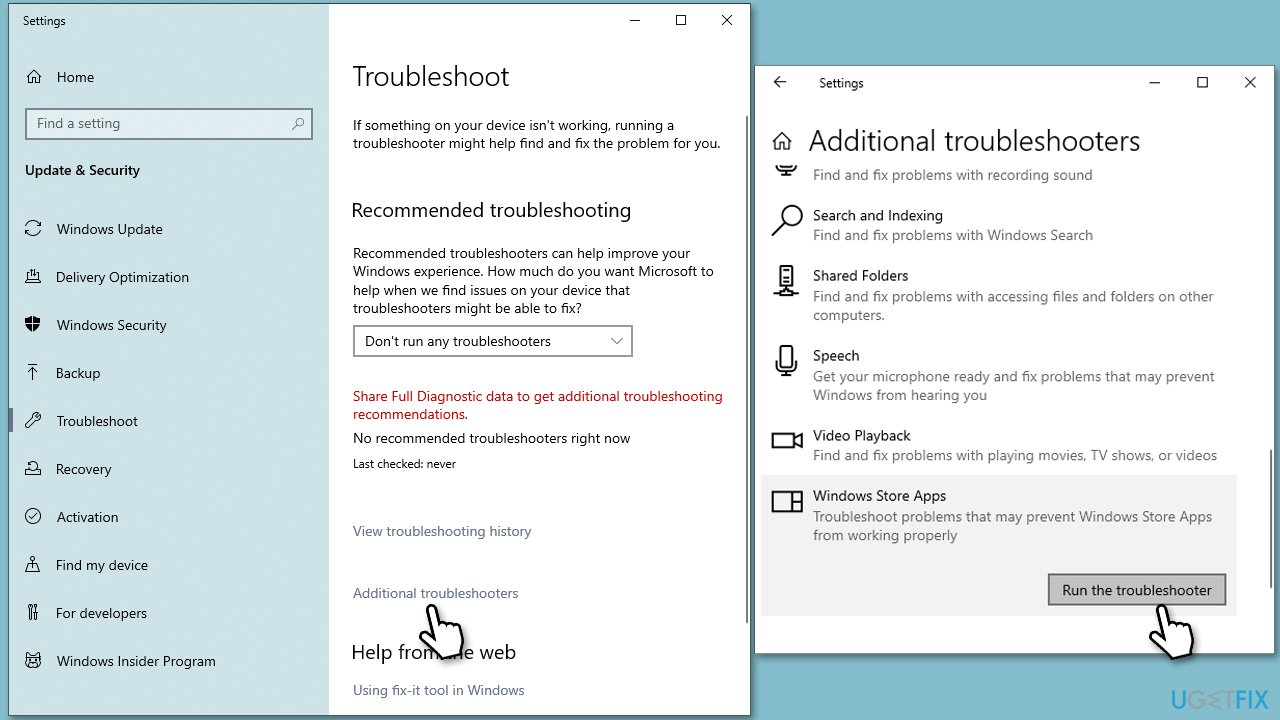
Running Windows Store Apps troubleshooter can determine whether there's something wrong with the app itself, and a network troubleshooter can check for your network issues.
- Type troubleshoot in Windows search and hit Enter.
- Click Other troubleshooters/Additional troubleshooters.
- Select Windows Store App.
- Click Run/Run the troubleshooter.
- Wait till the scan is completed and changes implemented.
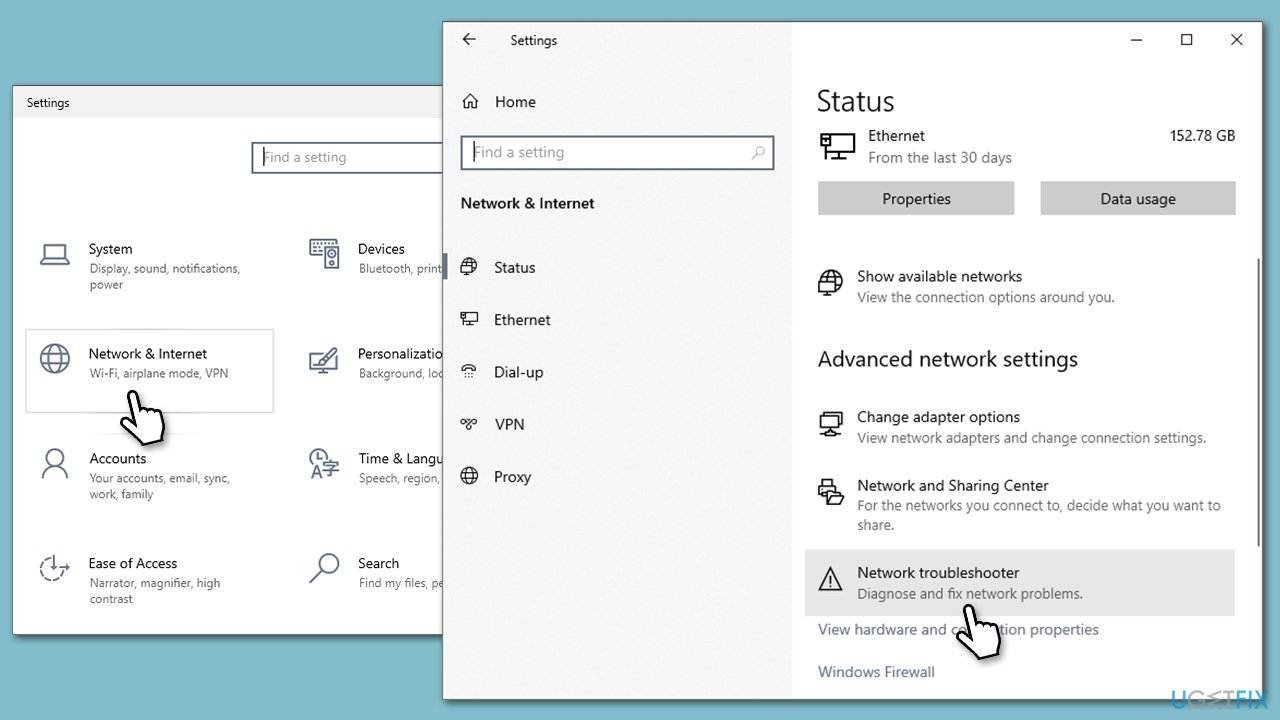
To run the network troubleshooter, follow these steps:
- Right-click on Start and pick Settings.
- Go to Network & Internet section.
- On the right side, find the Advanced network settings section.
- Click Network troubleshooter and wait till its scan is finished.
Fix 2. Update Windows
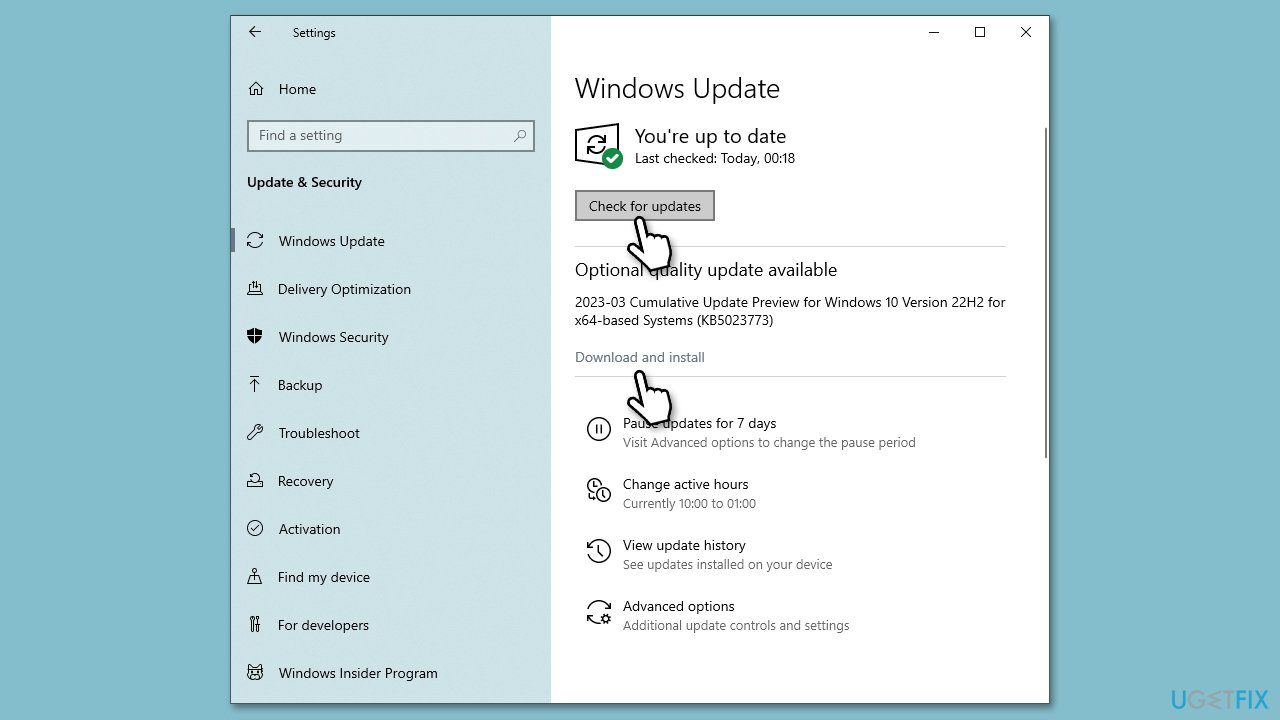
Make sure your operating system is fully updated:
- Type Updates in Windows search and hit Enter.
- In the new window, click Check for updates.
- If optional updates are available, install them as well.
- When all the update processes are complete, restart your PC.
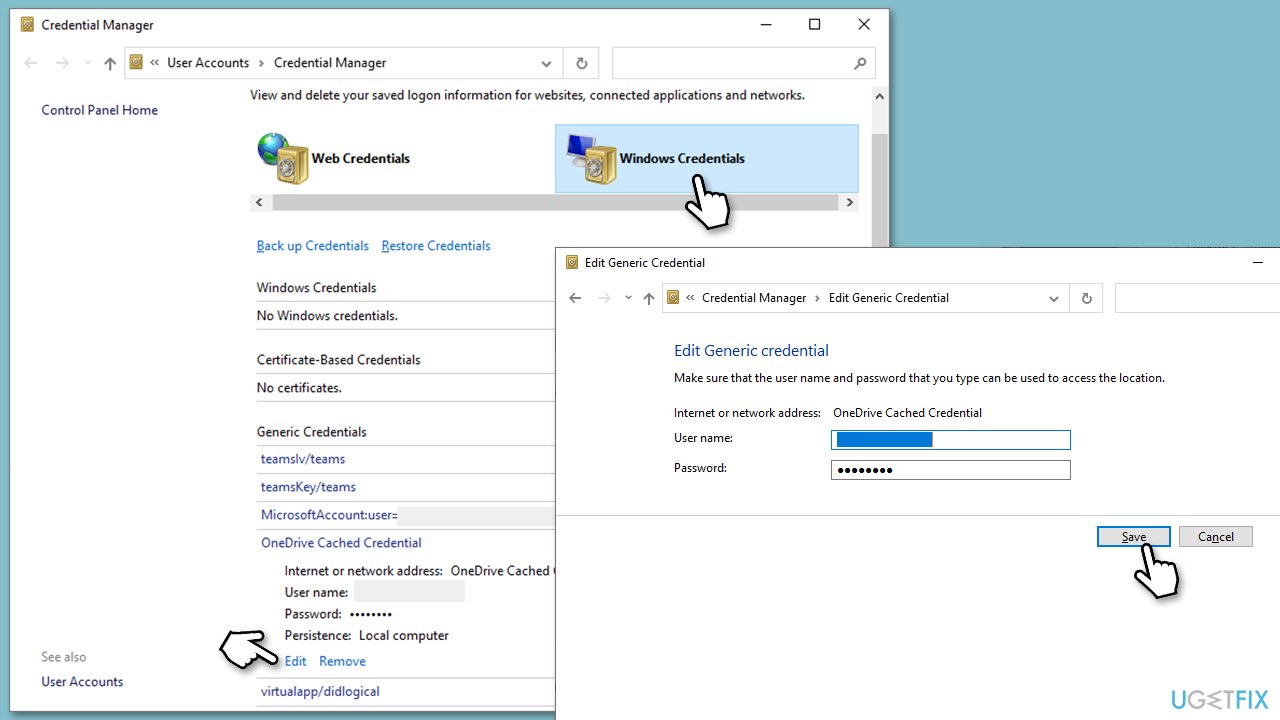
Fix 3. Use Credential Manager
If you can't sign in to OneDrive, there might be a mismatch in credentials.
- Type Credential manager in Windows search and press Enter.
- Click Windows Credentials on the right.
- Find OneDrive on the list and click an arrow to the right of it.
- Here, select Edit.
- Enter your Microsoft account login credentials and click Save.
- Open OneDrive to check if the problem is gone.
Fix 4. Reset OneDrive
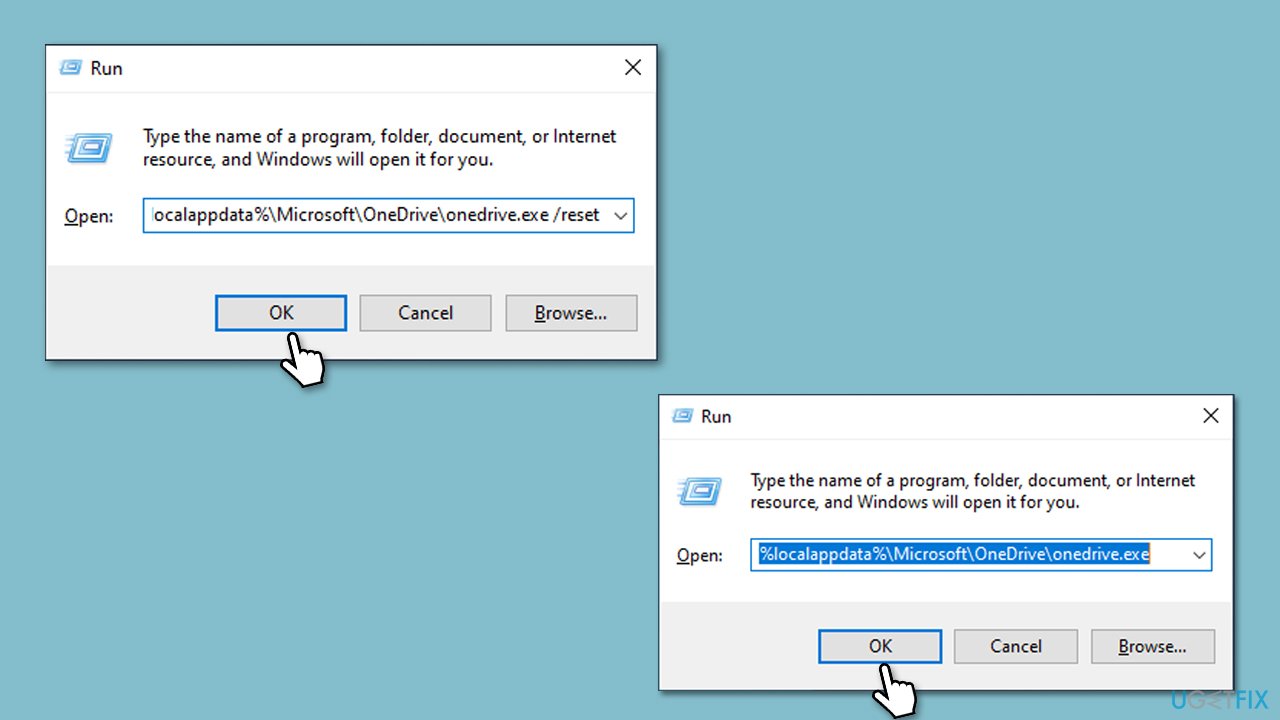
- Press Win + R on your keyboard.
- When the Run window opens, copy and paste the following text into it:
%localappdata%\Microsoft\OneDrive\onedrive.exe /reset
(use %programfiles(x86)%\Microsoft OneDrive\onedrive.exe /reset instead if you get an error here) - Press Enter or click OK.
- After this command is executed, the app should be reset, and OneDrive should open.
- If it doesn't, wait a few minutes, then open the Run window again and use the following command:
%localappdata%\Microsoft\OneDrive\onedrive.exe - Press Enter.
5. Reinstall OneDrive
If issues persist, you can reinstall the app altogether.
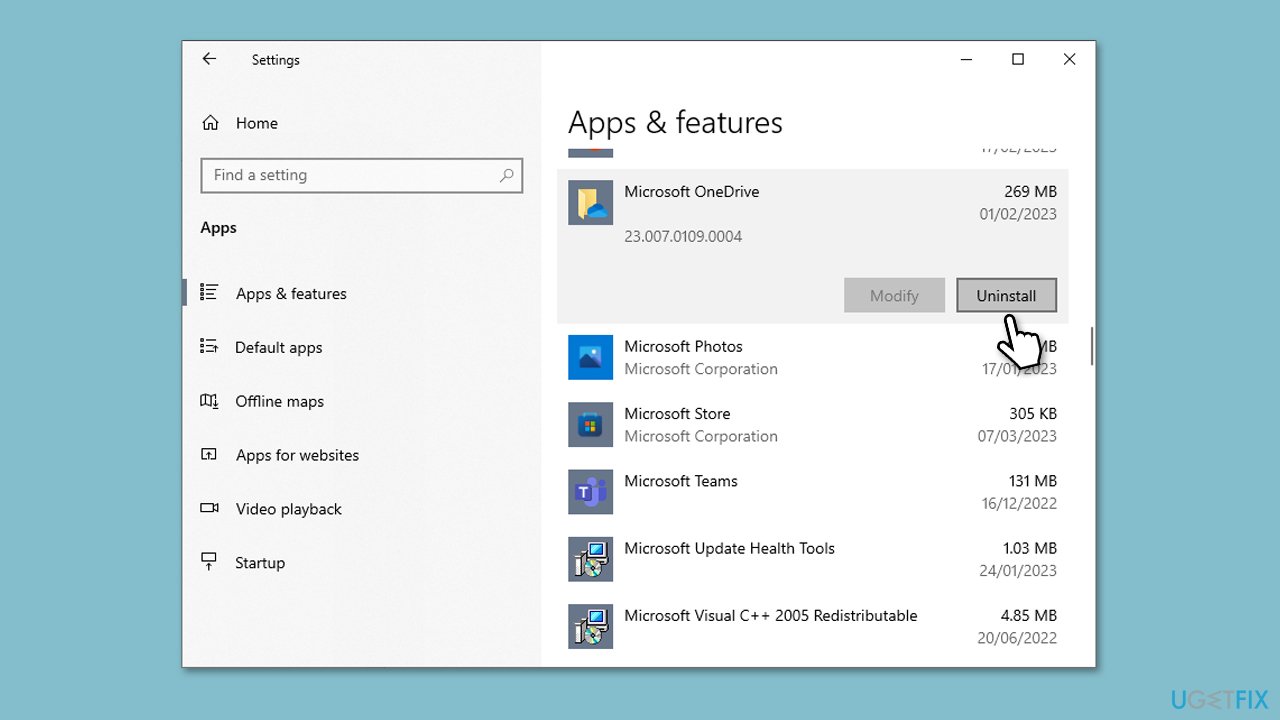
- Right-click on Start and pick Apps and Features.
- Scroll down to find Microsoft OneDrive.
- Click Uninstall > Uninstall.
- Follow provided prompts to finish the process.
- Restart your PC.
- You can then go to the official Microsoft website - OneDrive download page.
- Download the app and install the app by following the on-screen instructions.
Bottom line
To fix the OneDrive sign-in issue, users should troubleshoot their internet connection, ensure they have the latest version of OneDrive, and verify their login credentials. Clearing the app's cache may also help resolve any bugs. If none of these solutions work, consider running a PC repair scan.
Frequently asked questions
First, ensure your internet connection is stable and then try resetting your OneDrive app by running the command '%localappdata%\Microsoft\OneDrive\onedrive.exe /reset' in the Run dialog.
Check if your Windows 11 is up to date and ensure that your account credentials are correct; if the issue persists, consider unlinking and relinking your OneDrive account.
Yes, make sure that your device's date and time settings are correct, as discrepancies can prevent successful sign-ins to OneDrive.




Report an issue
What's wrong with this guide? We review every report and update or remove content.
Report received — thank you. We'll review and fix it.
You need a free account to submit a report.
Be the first to comment