
[Fix] Windows 10 update KB5017308 breaks shortcuts

Prefer to fix it yourself? The manual steps follow.
2 methods in this guide
Hello. After the KB5017308 update on Windows 10, I cannot create or copy shortcuts. How can this be fixed?
It is important to keep your Windows updated. Microsoft regularly releases updates that contain new features, bug fixes, and security patches. However, Windows updates are known to ruin things. We previously wrote about the network printing error 0x0000011b, which was caused by Windows updates. It left multiple small businesses and home users without the ability to print.
Recently, Microsoft released the KB5017308 update for Windows 10. The package addresses security issues and makes quality improvements to the servicing stack, which is the component that installs Windows updates. However, many users started experiencing issues after installing the update.
People report that GPO (Group Policy Object) file operations no longer work as they cannot create or copy shortcuts correctly. After the installation, the icons are not transferred over for the shortcut and the batch file is empty when copied over. Additionally, all shortcuts are created empty with 0 bytes and no information where the shortcut leads.
GPO is a collection of Group Policy settings that defines what a system will look like and how it will behave for a defined group of users. Group Policy settings can help secure a company’s network by running scripts, that stop users from accessing certain resources, and performing simple tasks.
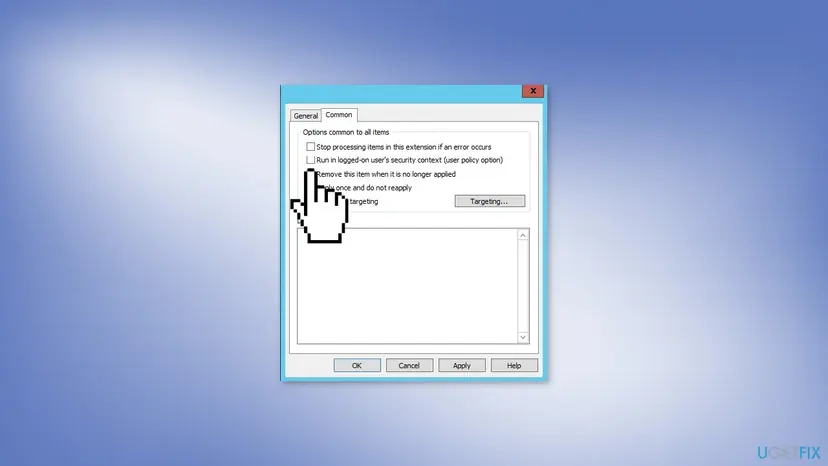
Microsoft has not yet publicly acknowledged the problem or provided a fix. Some Windows users found that unchecking the "Run in user security context" option on the affected GPOs fixes the issue. If that does not work, for now, it seems like the only option is to uninstall the KB5017308 update which resolves the bug but also removes all fixes for security vulnerabilities.
In this guide, you will find 2 steps that should help you fix the Windows 10 update KB5017308 breaks shortcuts issue. It can fix most system errors, Blue Screen errors, corrupted files, and registry issues. This powerful software can also automatically clear your machine from cookies and cache which are often the culprits of many malfunctions.
Method 1. Change GPO Settings
- Go to the Group Policy Object and uncheck the Run in user security context option
- Restart your computer
Method 2. Uninstall KB5017308
- Open Settings and select Update & Security
- Click on View update history
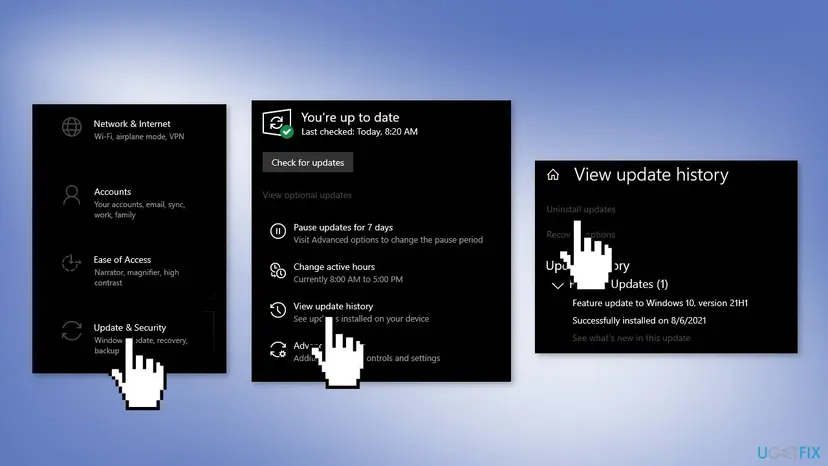
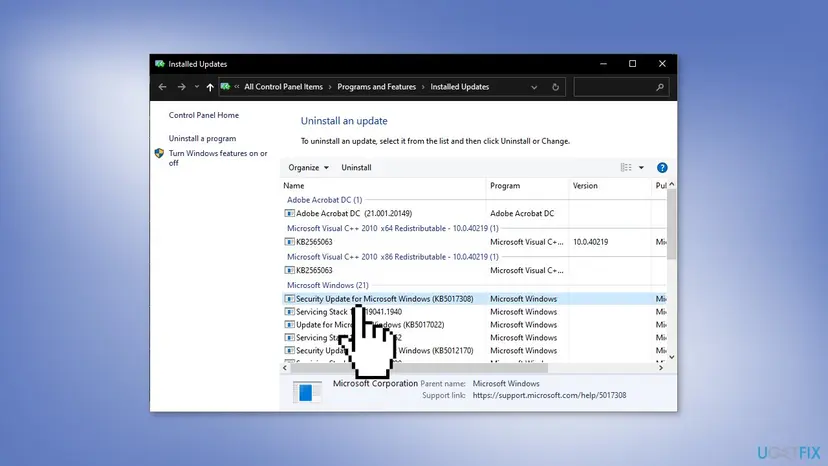
- Press on the Uninstall updates option
- Select KB5017308 from the list and proceed with the on-screen instructions
Did this fix work?
One click, no account. It tells the next reader which guides are worth their time.
Questions and experiences: [Fix] Windows 10 update KB5017308 breaks shortcuts
Still broken, or found a fix we did not cover? Ask here: members and our editors answer. Reading is open; writing needs a free account.
…