How to fix
Advapi32.dll missing or not found error
on Windows
Resolve the advapi32.dll missing error on Windows 10 or 11 quickly and efficiently. Get expert-tested solutions that fix issues in minutes!

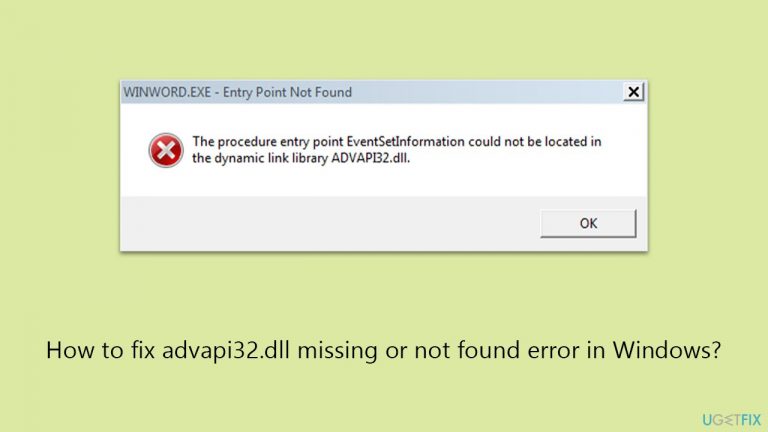
What causes How to fix advapi32.dll missing or not found error in Windows?
- Missing advapi32.dll file
- Corrupted advapi32.dll file
- Outdated Windows version
- Corrupted system files
- Drive errors
Repairs Windows system files, removes malware, and restores a clean OS state — without reinstalling.
My Windows keeps bringing up advapi32.dll cannot be found error. I can't open some apps because of it. What am I supposed to do to resolve it?
DLL files rank among the prevalent file formats within a Windows operating system, serving as a vital component for both built-in and third-party applications. Essentially akin to an executable (EXE) file, DLL files differ in that they cannot be directly executed and typically rely on hosts to facilitate their functioning.
With the help of these files, including advapi32.dll, Windows can run applications and tasks more efficiently by allowing them to use predefined functionalities. This allows developers to streamline the application development; it also contributes to more efficient memory usage and better system performance.
However, the reliance on DLL files can sometimes lead to complications, particularly when they are missing or not found. The "advapi32.dll missing or not found" error is a common issue that you might encounter in the Windows environment.
The error typically manifests when attempting to open various applications, with one prevalent example being the data storage platform OneDrive. When users are unable to access such an important app, it can be particularly disruptive, as it hampers file storage and synchronization capabilities.
The advapi32.dll file itself is a vital component of Windows, responsible for executing advanced API (Application Programming Interface) functions related to security, registry, and service control. The absence or corruption of this file can lead to the aforementioned error messages and hinder the normal operation of numerous applications.
Luckily, there are several things you can do in order to fix the advapi32.dll error, for example, installing all Windows updates, fixing corrupted system files, or checking the drive for errors worked for many people. Besides this, we also provide instructions for these and other solutions below. Before proceeding, you could run a powerful PC repair software [d1], which is an excellent tool when dealing with DLL errors in Windows.

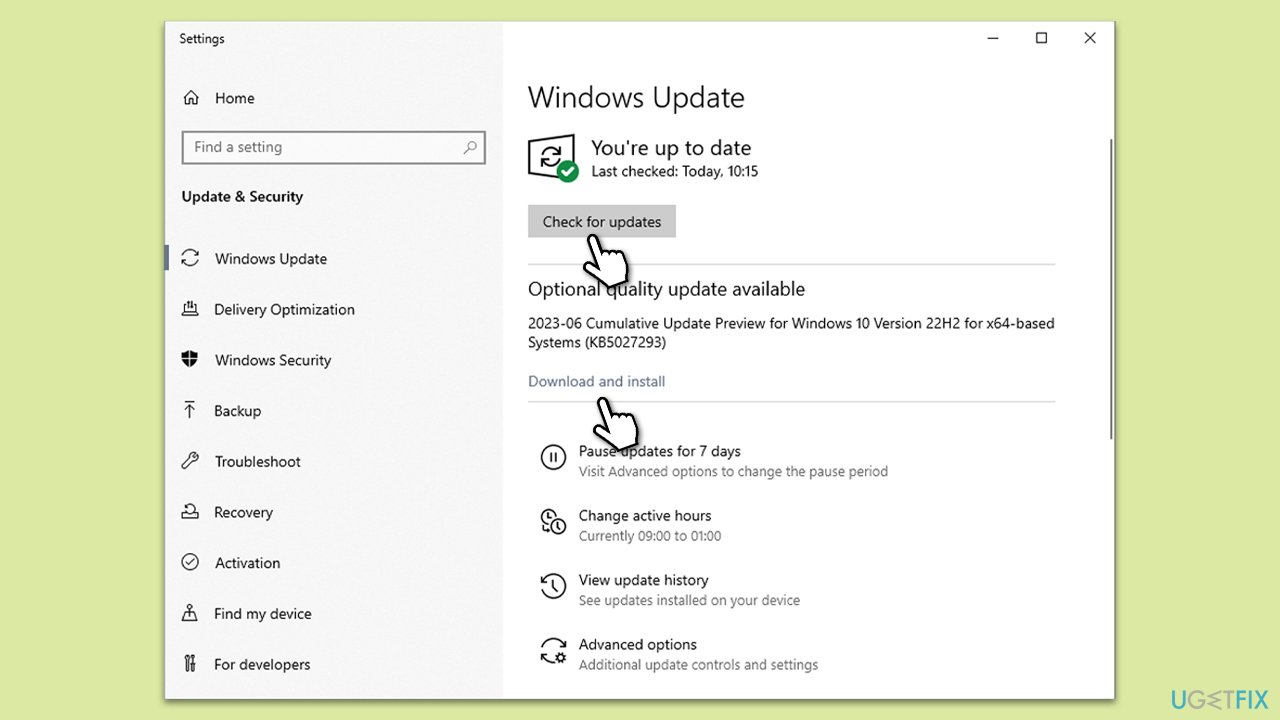
Fix 1. Install all Windows updates
Windows updates often contain important bug fixes, so make sure you install all of those available.
- Type Updates in Windows search and press Enter.
- Here, click Check for updates.
- Wait till Windows downloads and installs all the files.
- If optional updates are available, install them as well.
- Reboot your system.
Fix 2. Run SFC and DISM
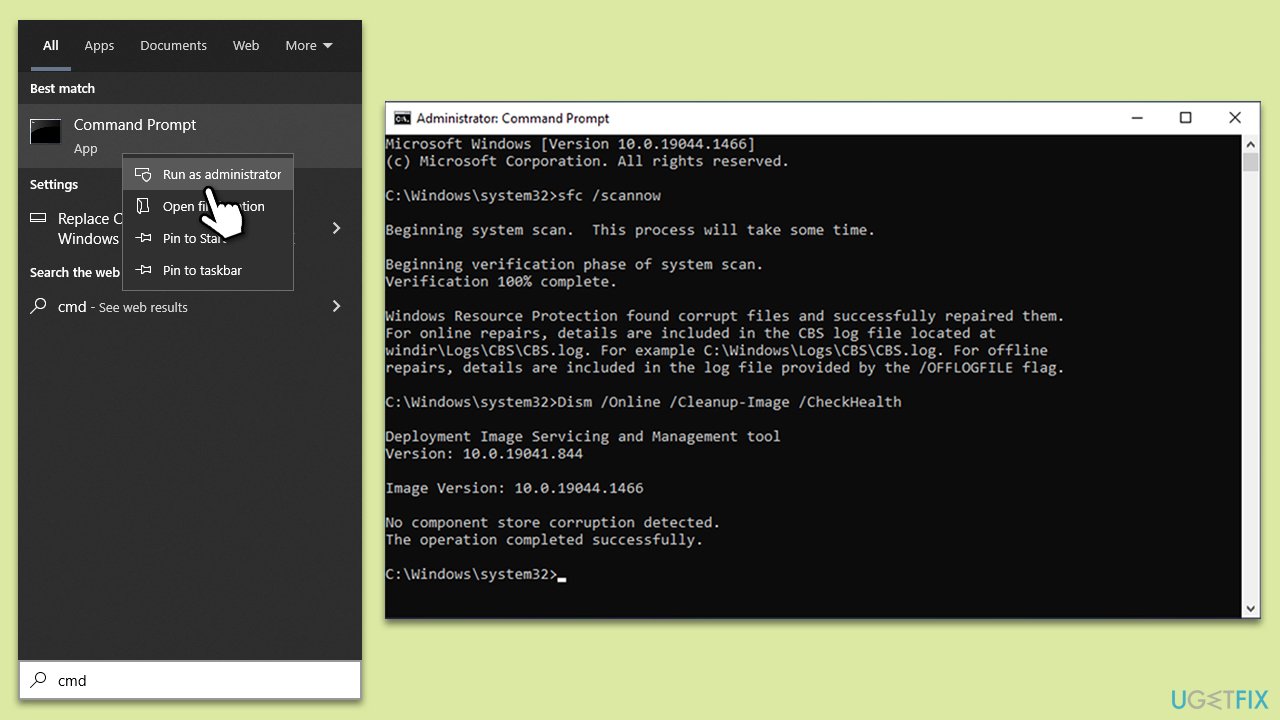
You can run an elevated Command Prompt to repair corrupted system files.
- Type cmd in Windows search.
- Right-click on Command Prompt and pick Run as administrator.
- When User Account Control asks you whether you want to allow changes, click Yes
- Paste the following command and press Enter:
sfc /scannow - Wait till the scan is finished
- Once that is done, use the following commands, pressing Enter each time:
dism /online /cleanup-image /scanhealth
dism /online /cleanup-image /checkhealth
dism /online /cleanup-image /restorehealth - Reboot your device.
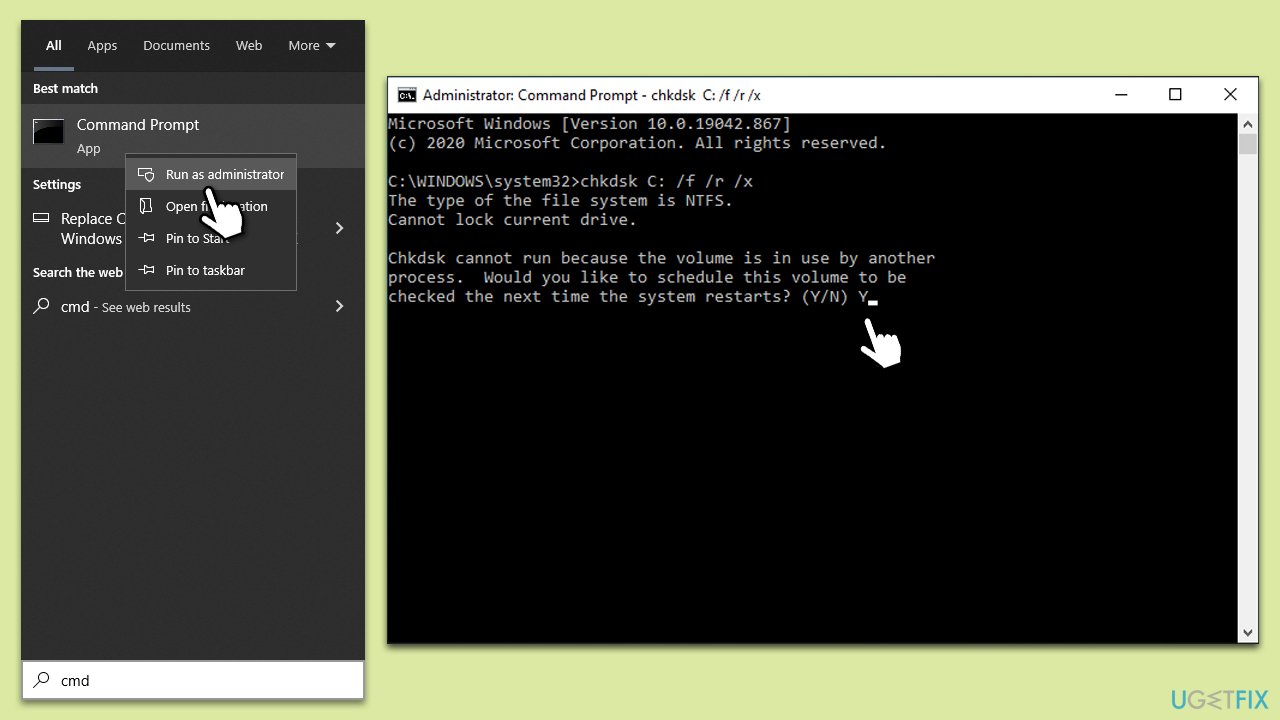
Fix 3. Check your drive for errors
- Open Command Prompt as administrator again.
- In the new window, type in the following command and press Enter after:
chkdsk c: /f
(Note: use chkdsk c: /f /r /x command if you are using SSD as your primary partition) - If you receive an error, type in Y, close down Command Prompt and restart your system.
- Wait until the scan is finished - you can find the results in the Event Viewer.
Fix 4. Reinstall the problematic app
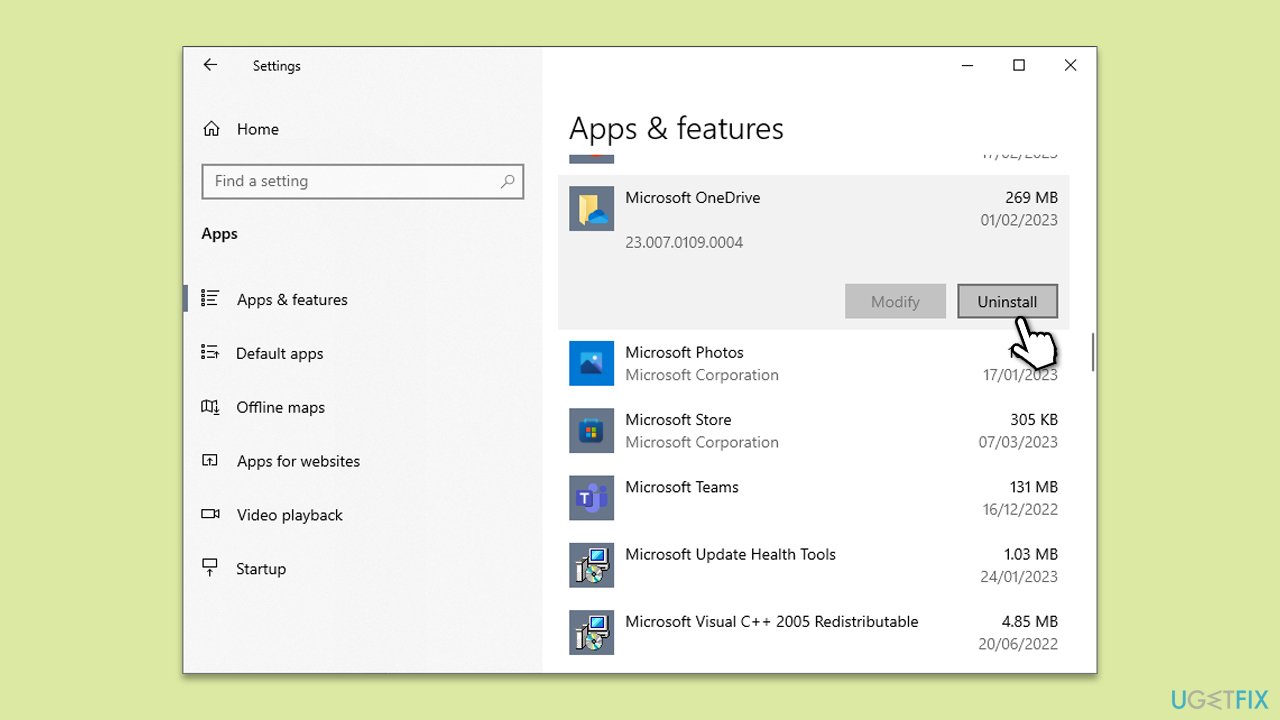
The error message typically shows the name of the application that's affected or you should know by which apps do not open. For example, if there are issues with OneDrive, reinstall it.
- Right-click on Start and pick Apps and Features.
- Scroll down to find Microsoft OneDrive.
- Click Uninstall > Uninstall.
- Follow the provided prompts to finish the process.
- Restart your PC.
- You can then go to the official Microsoft website - OneDrive download page.
- Download the app and install the app by following the on-screen instructions.
Fix 5. Re-register advapi32.dll
- Open Command Prompt as administrator.
- Type in the following commands and press Enter after each:
regsvr32 /u advapi32.dll
regsvr32 advapi32.dll - Close down everything and restart your computer.
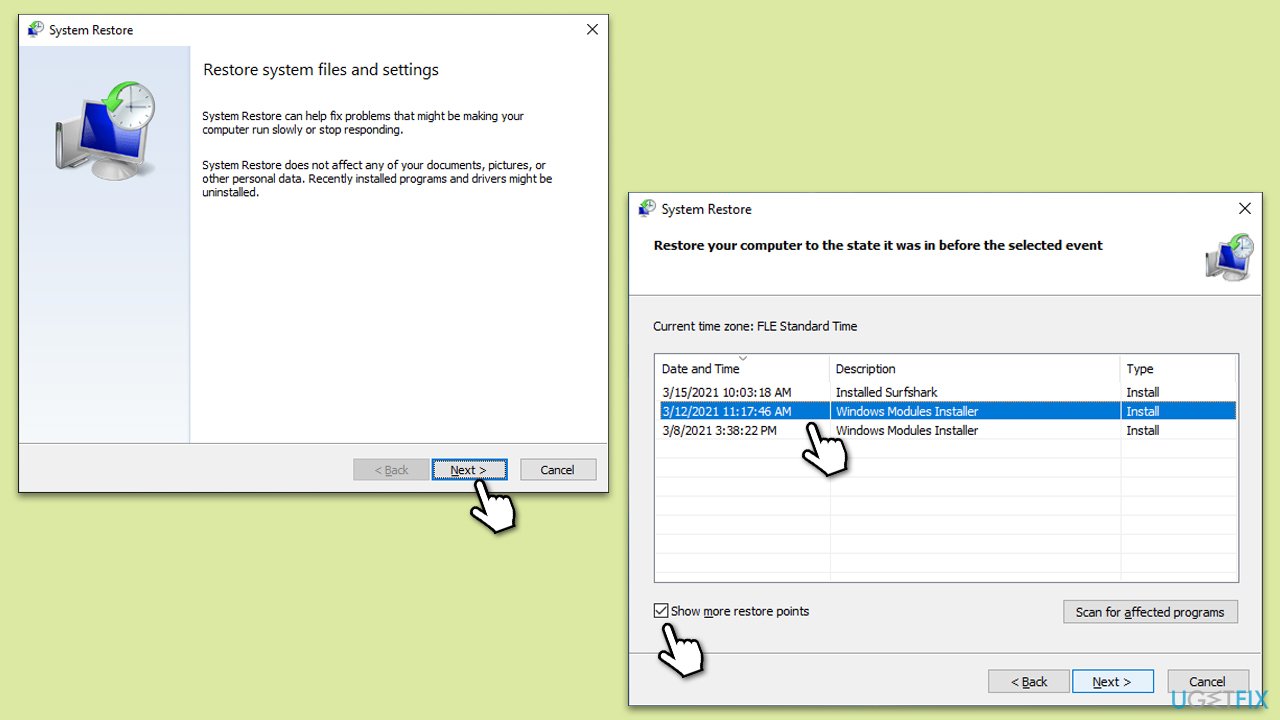
Fix 6. Try System Restore
You can always attempt to restore Windows to a previous state where the problem does not exist. You won't lose your personal files during this process.
- Type in rstrui.exe in the Windows search bar and press Enter.
- In the new window, click Next.
- If available, mark the More restore points checkbox.
- Select the point in time when the issue did not exist and click Next.
- Finally, click Finish.
- Your PC will restart.
Fix 7. Copy the file from another computer
We do not recommend downloading DLL files from third-party websites, as there's a risk of getting infected with malware. Instead, use a reliable Windows machine to copy the file from.
- First, locate and access a working computer with the same Windows operating system version as the one facing the error.
- On the working computer, open File Explorer.
- Navigate to the C:\Windows\System32 folder (the default location for system DLL files).
- In the System32 folder, find and copy the advapi32.dll file onto a USB flash drive or any portable storage device.
- Eject the storage device safely from the working computer and connect it to the computer with the missing or corrupted file.
- On the affected computer, open File Explorer and navigate to the C:\Windows\System32 folder.
- Paste the copied advapi32.dll file into the System32 folder. You may need to provide administrator permission to copy the file into this directory.
- Once the file is copied over, restart your computer.
Bottom line
To fix the advapi32.dll missing or not found error, you can install all Windows updates, repair corrupted system files, or check your drive for errors. If these solutions do not resolve the issue, consider running a powerful PC repair software to address DLL errors.
Frequently asked questions
The advapi32.dll missing error can be caused by corrupted system files, malware infections, or incorrect application installations in Windows 10 or Windows 11.
You can restore the advapi32.dll file by running the System File Checker tool using the command 'sfc /scannow' in the Command Prompt with administrative privileges.
No, downloading advapi32.dll from third-party websites can pose security risks and may lead to further issues; it's best to restore it using official Windows tools.




Report an issue
What's wrong with this guide? We review every report and update or remove content.
Report received — thank you. We'll review and fix it.
You need a free account to submit a report.
Be the first to comment