How to fix
AMD Catalyst Control Center won’t open
on Windows
Resolve AMD Catalyst Control Center issues on Windows 10 quickly and easily. Expert-tested solutions ensure your graphics settings are just a fix away!


What causes How to fix AMD Catalyst Control Center won’t open in Windows 10?
- Catalyst Control Center not installed
- Background process CCC.exe running without user knowledge
- Incompatibility with integrated and dedicated graphics switching
- Corrupted installation of AMD Catalyst Control Center
- Outdated or missing graphics drivers
Repairs Windows system files, removes malware, and restores a clean OS state — without reinstalling.
Please help, Catalyst Control Center won't open! I sometimes use the tool to help me tweak video card configuration for particular games, but I can not do this anymore. I tried to restart my PC but to no avail.
Catalyst Control Center is a utility designed by AMD (Advanced Micro Devices) tech company, and is typically shipped along drivers[ref en-3] that are installed with Radeon graphics cards. Initially, these GPUs were developed by a company called ATI, although it was later acquired by AMD, which is best known for its high-tech CPUs (Central Processing Units) known as Ryzen.
While Nvidia is dominating the GPU market globally, many more people are getting convinced that AMD deserves more recognition eve in the video processing sphere. Just like Nvidia, AMD provides a graphics utility Catalyst Control Center that allows users to control their video cards better: enable display profiles, adjust display settings and screen resolution, tweak performance, overclock[ref en-1] the GPU, etc.
This allows users to improve the functionality of their graphics cards, pulling the maximum performance out of it. However, these features are not available when AMD Catalyst Control Center won't open, seemingly for no reason at all.
In most cases, users who do not use graphic intensive tasks will not need the functionality of AMD Catalyst Control Center. However, if the tool is installed, it will run a background process CCC.exe, and those who installed the tool with AMD Radeon graphic card drivers might not know where the process is coming from. Others who do require the function of AMD Catalyst Control Center but do not have it installed can download the app from the official website.
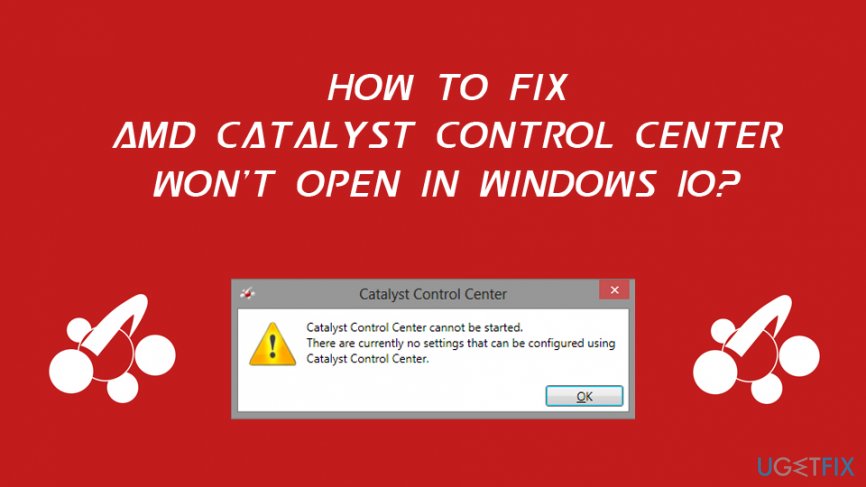
Many users who could not start CCC said that are also unable to switch between integrated and dedicated graphics cards,[ref en-2] which prevents them from using full power of their GPUs Here's the error that users see:
AMD Catalyst Control Center
AMD Catalyst Control Center cannot be started. There are currently no settings that can be configured using Catalyst Control Center.
As evident, the error does not provide much information that could help users fix Catalyst Control Center won't open issues. There are several reasons why the utility might fail to start, although most commonly the problem lies within corrupted or outdated graphics drivers. However, in case corrupted system files are at fault, you can instead run an automatic repair software [d1], as it can fix Windows problems within just a few minutes.
Fix 1. Shut down AMD Catalyst Control Center related processes
Once the executable of a particular program is launched, its process is initiated in the background. In some cases, the task fails to start the program correctly, although the process keeps running. As a result, users are incapable of starting another instance of AMD Catalyst Control Center. Here's what to do:
- Press Ctrl + Shift + Esc on your keyboard.
- Once the Task Manager is launched, press More details.
- Scroll down to locate Background processes.
- Locate Catalyst Control Center entry, right-click and select End Task.
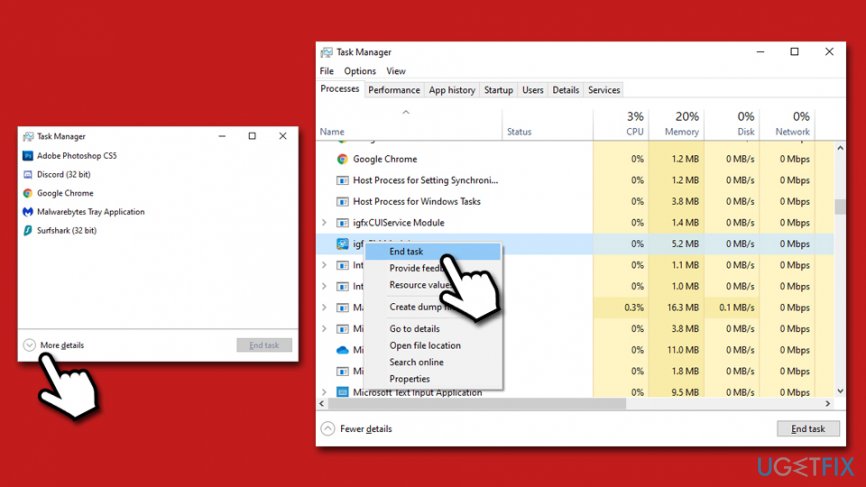
How to fix amd catalyst control center wont open shut down running processes
Fix 2. Start the app from its original location
In some cases, the shortcut of the Catalyst Control Center might get corrupted. As a result, you might not be able to open the program by using it. Thus, you should start CCC from the original location. For that, please navigate to the following location and double-click the CLIStart.exe file:
Program Files/ATI Technologies/ATI.ACE/Core-Static/amd64/
Fix 3. Reinstall graphics drivers
Graphic control drivers are exceptionally important when a dedicated GPU is used within a computer. Drivers help to interconnect hardware components and help them work well together. Thus, if drivers are malfunctioning, it might also be related to the AMD Catalyst Control Center not opening the issue.
Fix this problem by uninstalling and installing new set of GPU drivers on your system by following these steps:
- Right-click on Start and select Device Manager.
- Expand Display adapters section.
- Right-click on your graphics card and select Uninstall device.
- Tick the Delete the driver software for this device and pres Uninstall.
- Reboot the machine.
- Open Device Manager once more.
- Click on Scan for hardware changes - Windows should install missing drivers.
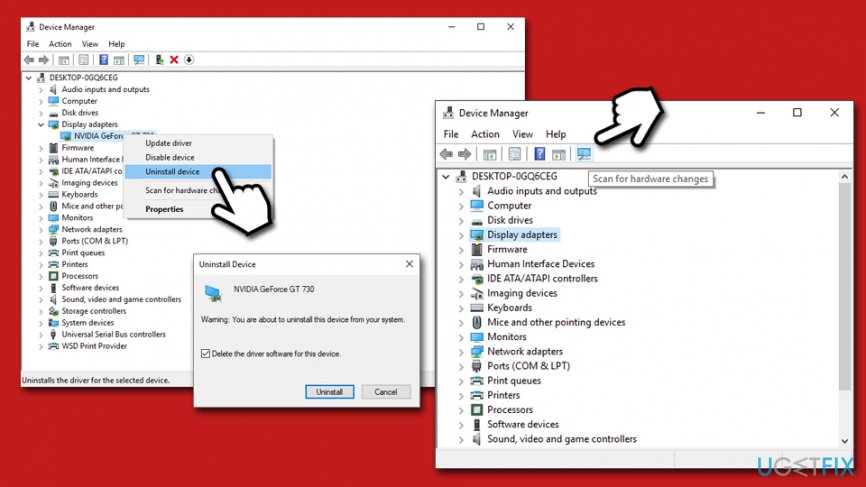
How to fix amd catalyst control center wont open reinstall gpu drivers
For best driver integrity, we recommend installing Drivers from the AMD official website instead of using Device Manager for the purpose.
Fix 4. Install all Windows updates
Ensure that the latest Windows updates are installed adequately. Here's how:
- Right-click on Start button and pick Settings.
- Go to Update & Security.
- On the right side, click on Check for updates.
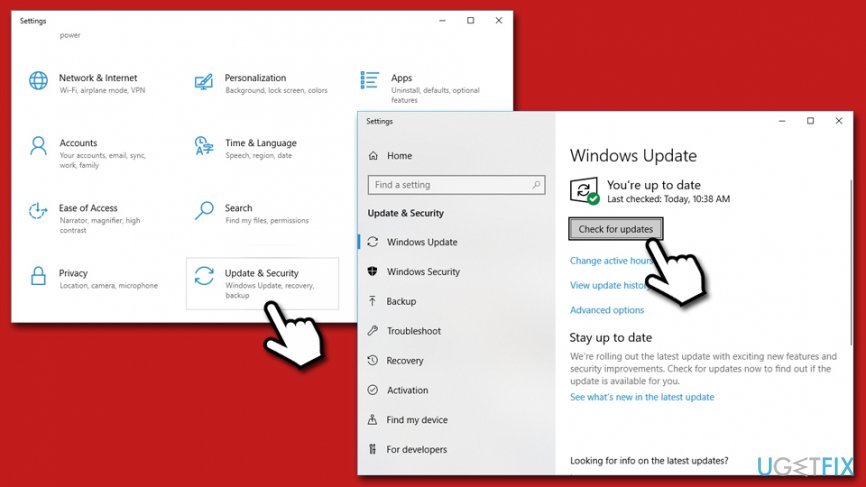
How to fix amd catalyst control center wont open install latest windows updates - Wait till Windows installs the latest updates.
- Reboot your PC.
Fix 5. Perform a System File Checker scan
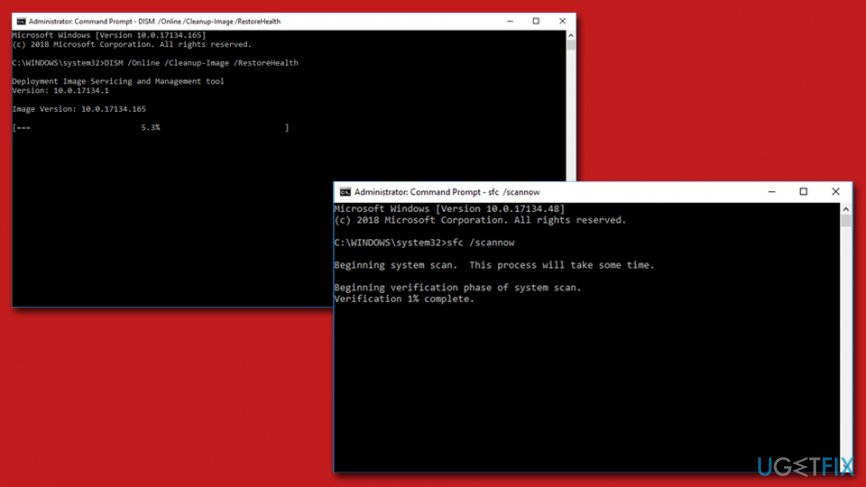
The built-in System File Checker is a great way to check system file integrity. To perform SFC scan, follow these steps:
- Type in cmd into Windows search.
- Right-click on Command Prompt search result and pick Run as administrator.
- If User Account Control pop-up shows up, press Yes.
- In the Command Prompt window type in the following and hit Enter:
sfc /scannow
- Wait till the scan finishes.
How to fix amd catalyst control center wont open perform dism sfc scan
If the above command did not help, use DISM - type in the following command and press Enter:
DISM /Online /Cleanup-Image /RestoreHealth
Fix 6. Use System Restore Point
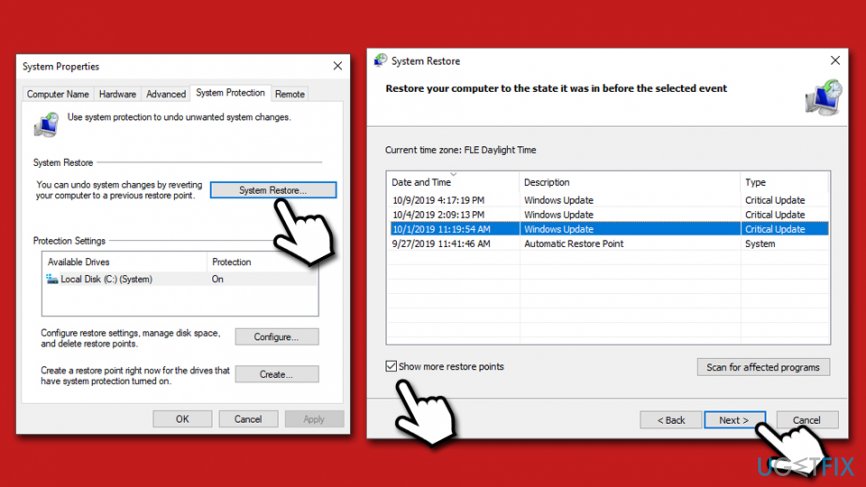
If none of the methods helped you to deal with AMD Catalyst Control Center won't open issue, you can restore your Windows to a previously known configuration. You might lose some of the installed applications in the process, although your personal files will not be affected:
- Type in Create a Restore Point in Windows search bar and press Enter.
- Go to System Protection tab.
- Click on System Restore and then select Next.
- Tick the Show more restore points.
- Select the best known restore point and press Next.
How to fix amd catalyst control center wont open perform system restore - Click on Finish and restart the system.
Bottom line
To resolve the issue of AMD Catalyst Control Center not opening, users can try reinstalling the software, updating their graphics drivers, or checking for compatibility issues with their system. If none of these solutions work, it is recommended to seek further assistance from AMD support or community forums.
Frequently asked questions
Try reinstalling the AMD graphics drivers, as updates can sometimes cause compatibility issues. Download the latest drivers from the AMD website and install them to see if that resolves the problem.
You can try running the program as an administrator by right-clicking on its icon and selecting 'Run as administrator'. If that doesn't work, consider reinstalling the software or checking for Windows updates.
Yes, you can try resetting the graphics settings by navigating to the Radeon Settings and selecting 'Factory Reset'. Additionally, check if any background applications are conflicting with the Catalyst Control Center.




Report an issue
What's wrong with this guide? We review every report and update or remove content.
Report received — thank you. We'll review and fix it.
You need a free account to submit a report.
Be the first to comment