How to fix
Amtlib.dll missing or not found error
on Windows
Resolve the Amtlib.dll missing error on Windows 10 or 11 quickly and easily. Get expert-tested solutions that fix the issue in minutes.

What causes How to fix Amtlib.dll missing or not found error in Windows?
- Corrupted system files
- Corrupted Adobe application installation
- Malware infections
- Outdated version of Amtlib.dll
- Incompatible version of Amtlib.dll
Repairs Windows system files, removes malware, and restores a clean OS state — without reinstalling.
Hi. I have recently purchased Adobe Photoshop, and I can't use it because of a "The program can't start because amtlib.dll is missing from your computer" error. Any tips on how to deal with it?
Windows operating system uses hundreds of file types, with DLL files being one of the most prevalent. DLL (Dynamic Link Library) files are executable files that differ from EXE files in that they allow multiple applications to use the same DLL simultaneously. These files contain functions and resources that enable various programs to perform specific tasks, thus promoting efficient memory usage and code reuse. A common error that users might encounter is the "Amtlib.dll missing or not found" error.
The Amtlib.dll file is often associated with Adobe applications such as Photoshop, Illustrator, and Premiere Pro. It contains functions and resources that these applications rely on to perform their tasks. When a program needs to use the Amtlib.dll file, Windows will locate and provide the necessary instructions for the program. However, if the file is missing or not found, the program cannot run correctly, resulting in an error message.
There are several reasons why the Amtlib.dll missing or not found error might occur. One of the main causes is corrupted system files or a corrupted Adobe application installation. This can happen when an installation process is interrupted or when system files become damaged due to software conflicts or hardware issues.
Malware infections can also be a significant cause of the Amtlib.dll error. Malicious programs, such as viruses or ransomware, can target and modify or delete essential DLL files like Amtlib.dll. This can result in various errors, including the "Amtlib.dll missing or not found" error. Ensuring that you have a robust antivirus solution and keeping it up to date is crucial in protecting your system from malware.
Another potential cause is an outdated or incompatible version of the Amtlib.dll file. This can happen when a software update fails to install the correct version of the DLL file or when the file has been replaced with an incompatible version. To resolve this issue, users should consider reinstalling the affected Adobe application or updating it to the latest version.
Below you will find full instructions on how to fix the error. If you would like to resolve it automatically, we recommend using [d1] PC repair tool.
Fix 1. Repair damaged PC files
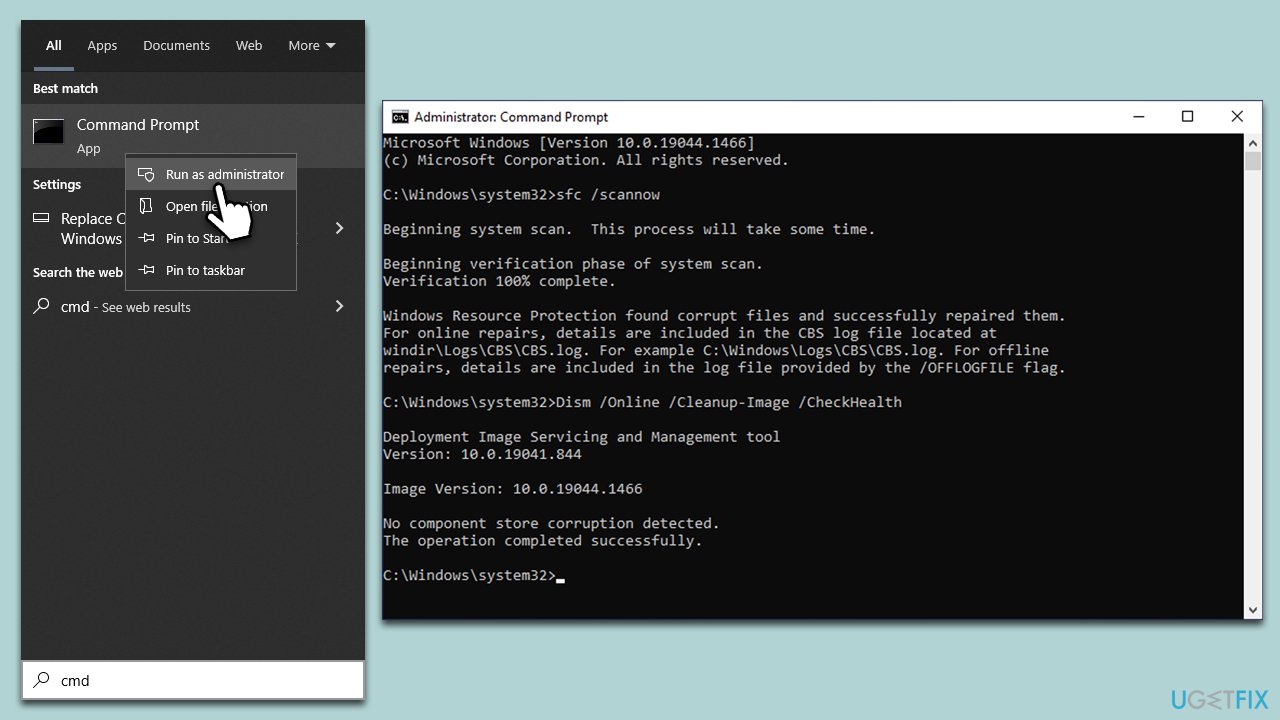
If you would like to attempt fixing Windows system files, you can do this by running DISM and SFC scans via an elevated Command Prompt. Here's how:
- Type cmd in Windows search.
- Right-click on the Command Prompt result and select Run as administrator.
- The User Account Control (UAC) window will ask whether you want to allow changes to your computer - click Yes.
- Next, copy and paste the following commands, pressing Enter after each:
sfc /scannow
DISM /Online /Cleanup-Image /CheckHealth
DISM /Online /Cleanup-Image /ScanHealth
DISM /Online /Cleanup-Image /RestoreHealth - Restart your computer when done.
Fix 2. Scan for malware
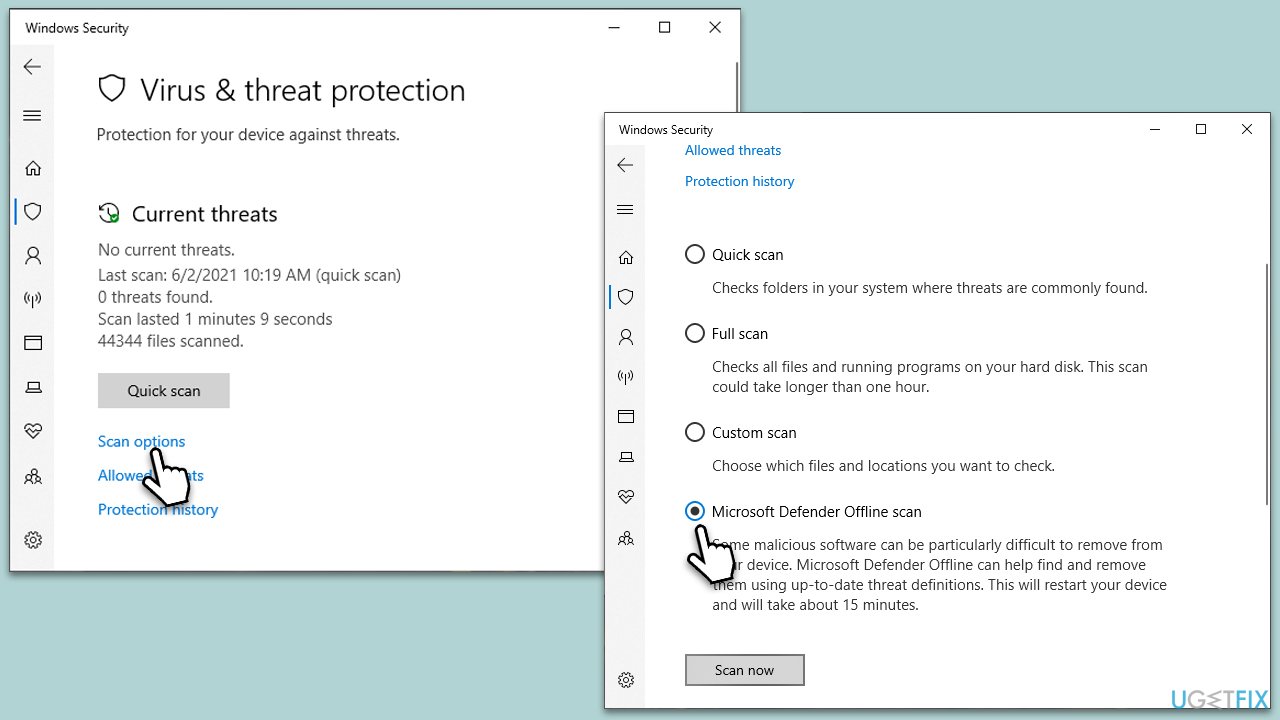
You can use any reputable anti-malware software of your choice, although Microsoft Defender offline scan should suffice. You can also download Microsoft Security Scanner - a free tool from Microsoft to check your system for infections.
- Type in Windows Security in Windows search and press Enter.
- Select Virus & threat protection.
- Pick Scan options.
- Select Microsoft Defender Offline scan and click Scan now.
- The computer will now restart, and the scan begin.
Fix 3. Re-register the file
- Open Command Prompt as administrator.
- Copy and paste the following commands, pressing Enter after each:
regsvr32 /u Amtlib.dll
regsvr32 Amtlib.dll - Close down the Command Prompt and restart the computer.
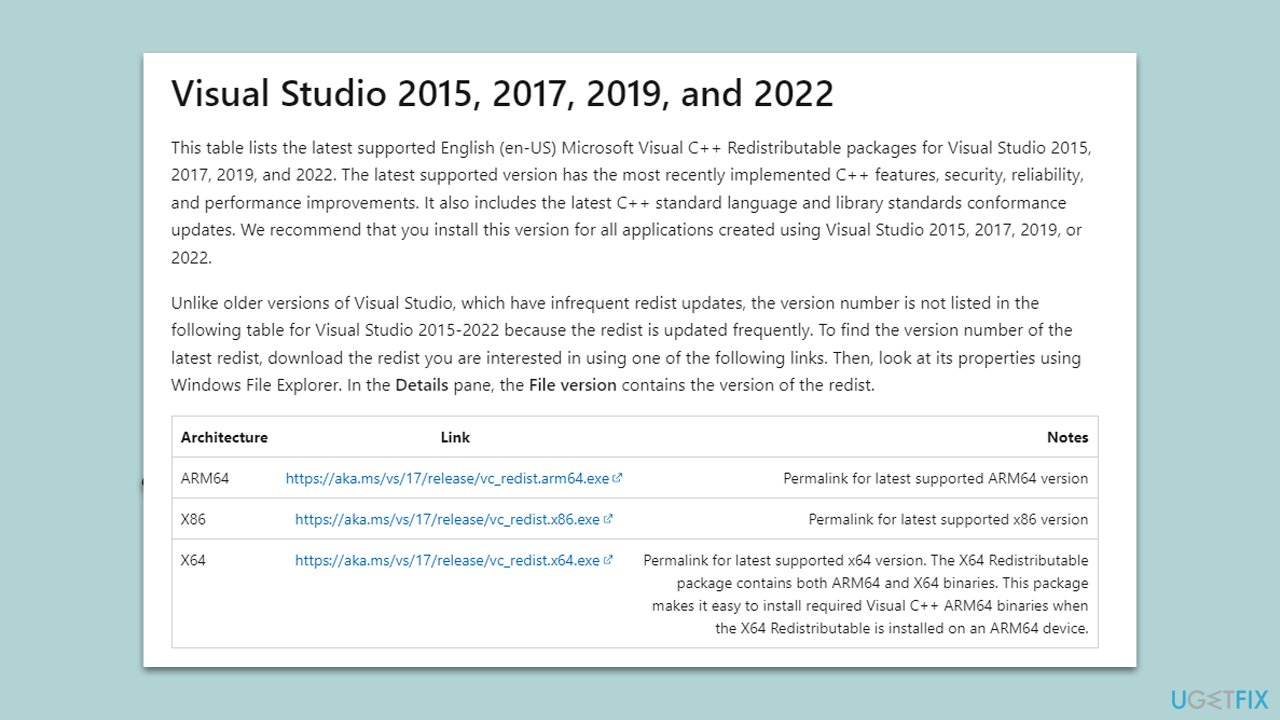
Fix 4. Install the missing Visual C++ components
- Open Control Panel and go to Programs > Uninstall a program.
- Here, scroll down and check the list of the installed Visual C++ versions.
- Open your browser and navigate to the official Microsoft Visual C++ download page.
- Download and install all the missing versions (including the x84 and x64 versions) of Visual Studio.
- Once done, restart your system and see if the error persists.
Fix 5. Reinstall the app
Note: the best way to repair the corrupt installation of a particular Adobe app is by using the Creative Cloud Cleaner tool provided by the developer.
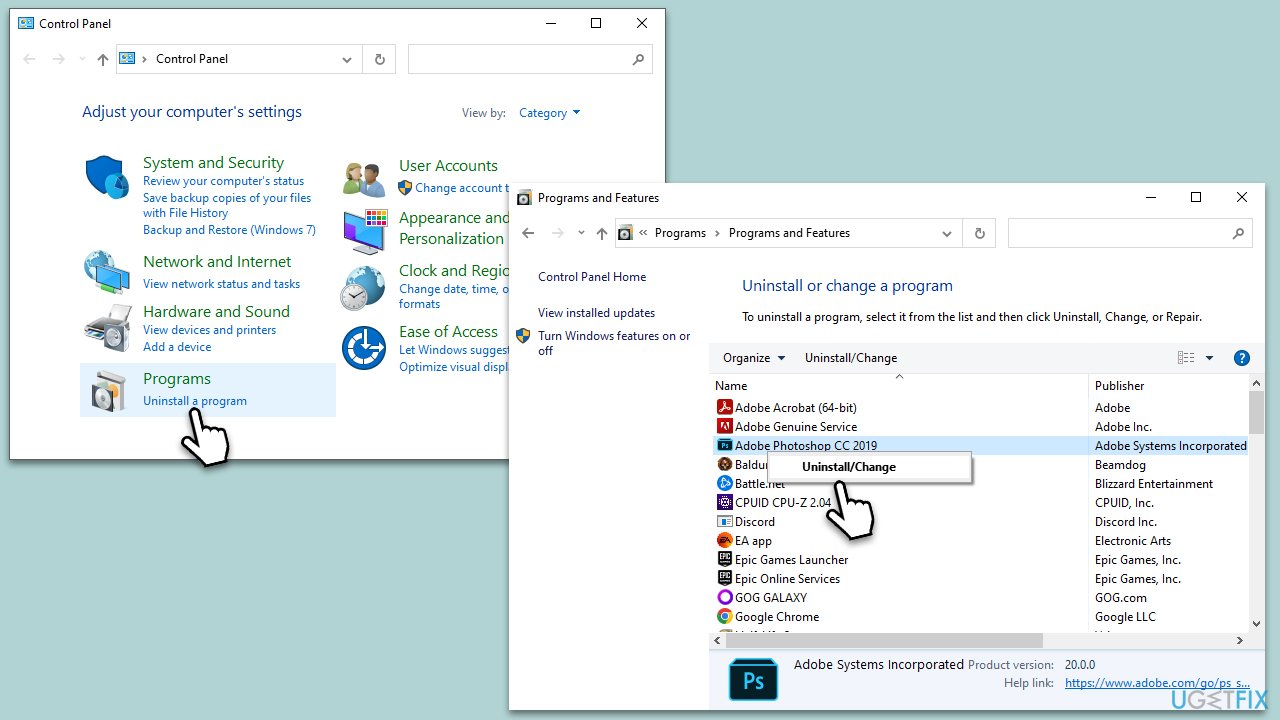
- Type Control Panel in Windows search and press Enter.
- Select Programs > Programs and Features.
- Find the application that's causing the Amtlib.dll error, for example, Adobe Photoshop.
- Right-click on it and select Uninstall.
- Follow the prompts to finalize the process.
- Restart your system and reinstall the app.
Bottom line
To fix the Amtlib.dll missing or not found error, you can try reinstalling the Adobe application, running a system file checker, or updating your antivirus software to remove any malware. If these solutions do not resolve the issue, consider restoring your system to an earlier point or seeking further technical support.
Frequently asked questions
The Amtlib.dll missing error typically occurs due to the accidental deletion of the file, corruption during software installation, or conflicts with antivirus programs that mistakenly identify the file as a threat.
You can restore the Amtlib.dll file by reinstalling the software that uses it, downloading the file from a trusted source, or using the System File Checker tool to repair any corrupted system files.
Downloading Amtlib.dll from third-party websites is not recommended, as it may expose your system to malware; it's safer to obtain the file through legitimate software installation or recovery tools.




Report an issue
What's wrong with this guide? We review every report and update or remove content.
Report received — thank you. We'll review and fix it.
You need a free account to submit a report.
Be the first to comment