How to fix
BSOD BAD_SYSTEM_CONFIG_INFO error
on Windows
Resolve the BSOD BAD_SYSTEM_CONFIG_INFO error on Windows 10/11 effortlessly. Expert-tested solutions ensure your system runs smoothly, fixed in minutes.


What causes How to Fix BSOD BAD_SYSTEM_CONFIG_INFO error on Windows?
- System drive is overfilled
- Recent software installation or update
- Registry errors
- Corrupted system files
- Insufficient free drive space
Repairs Windows system files, removes malware, and restores a clean OS state — without reinstalling.
Please help! My Windows screen has been blocked by a BSOD BAD_SYSTEM_CONFIG_INFO error. What should I do??
BAD_SYSTEM_CONFIG_INFO error can be a serious problem as the BSOD (Blue Screen of Dearth) may prevent you from using PC normally.[ref en-1] Just like the other Windows 10 errors, this one usually emerged after upgrading Windows 7, 8, or 8.1 to Windows 10. Although in most of the cases BSOD BAD_SYSTEM_CONFIG_INFO error disrupts Windows 10 users, quite a lot reports have been received from the Windows 7, 8, 8.1 users.
According to the recent research, this error tends to show up along with the error codes including 0x00000074, 0x00000003, 0x80087000, and 0x00000002. Thus, each web browsing session or PC usage session may be disrupted by a BSOD locked screen.

Before you start receiving BAD SYSTEM CONFIG INFO Error message, you may notice that the system works abruptly, i.e. runs slower than it used to, certain programs may crash, freeze, and so on. [ref en-2] Furthermore, you may receive a pop-up message saying:
“The BAD_SYSTEM_CONFIG_INFO bug check has a value of 0x00000074. This bug check indicates that there is an error in the registry.”
Finally, your screen may be locked by a BSOD window saying:
“A problem has been detected and windows has been shut down to prevent damage to your computer.
BAD_SYSTEM_CONFIG_INFO
If this is the first time you’ve seen this stop error screen,
restart your computer. If this screen appears again, follow these steps, etc.”
Ways to fix BAD_SYSTEM_CONFIG_INFO error on Windows
This error is a serious problem that may prevent you from normal PC usage. In order to fix BAD_SYSTEM_CONFIG_INFO error, you should take your time and check whether your system drive is not overfilled.[ref en-3] For this purpose, you should remove junk files and optimize the entire system. For this purpose, we recommend using or [d1]. It is recommended to have more than 15% free drive’s space.
Check your recent installs and updates
In case you have recently installed a new software or updated an old one, try to reinstall/update one more time because it might help to fix BAD_SYSTEM_CONFIG_INFO error.
You should also try to Undo the recently performed system changes by :
- using System Restore option
- using Last Known Good Configuration
Make sure that Windows service packs are updated to the newest versions.
Updating system drivers
- Go to Device manager.
- Click on the wanted Driver and then Update.
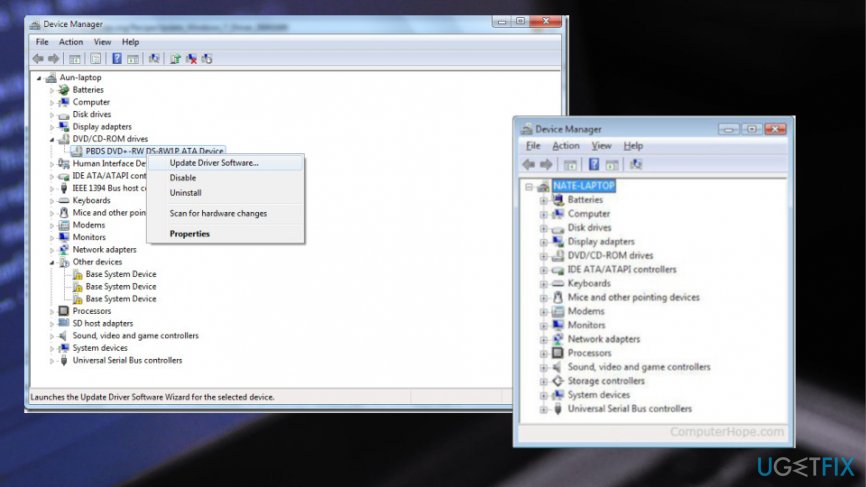
How to fix bsod bad system config info error driver update
Hardware problem fix
You should turn on the system with the minimum hardware. If the system does not load properly, it means that BSOD BAD_SYSTEM_CONFIG_INFO error is caused by hardware fault. Thus, you should then:
- Replace the hardware
- Confirm that firmware is updated.
Fix BAD_SYSTEM_CONFIG_INFO error by repairing Windows Registry Entries
- Go to Command Prompt with Administrators right and enter the following commands.
- Press Enter after each one:
cd C:\\Windows\\System32\\config
ren C:\\Windows\\System32\\config\\DEFAULT DEFAULT.old
ren C:\\Windows\\System32\\config\\SAM SAM.old
ren C:\\Windows\\System32\\config\\SECURITY SECURITY.old
ren C:\\Windows\\System32\\config\\SOFTWARE SOFTWARE.old
ren C:\\Windows\\System32\\config\\SYSTEM SYSTEM.old
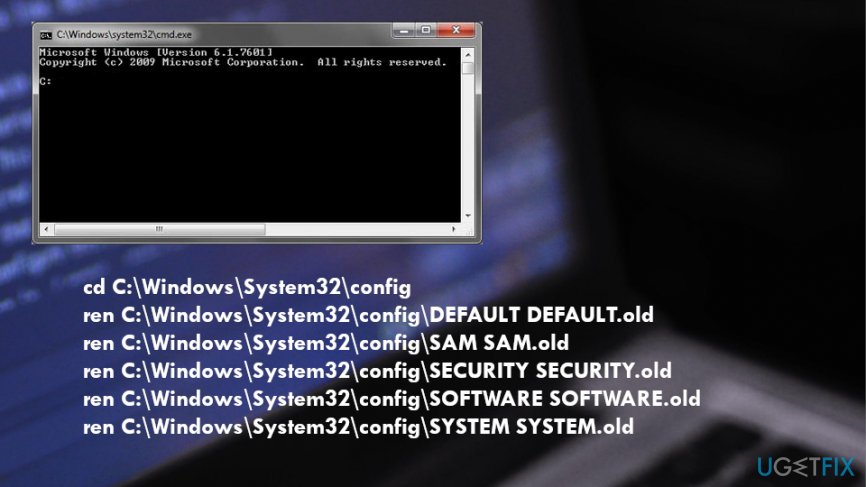
- This way you have renamed the current main registry files. Replace the original registry files using these commands:
copy C:\\Windows\\System32\\config\\RegBack\\DEFAULT C:\\Windows\\System32\\config\\
copy C:\\Windows\\System32\\config\\RegBack\\SAM C:\\Windows\\System32\\config\\
copy C:\\Windows\\System32\\config\\RegBack\\SECURITY C:\\Windows\\System32\\config\\
copy C:\\Windows\\System32\\config\\RegBack\\SYSTEM C:\\Windows\\System32\\config\\
copy C:\\Windows\\System32\\config\\RegBack\\SOFTWARE C:\\Windows\\System32\\config\\
Launch Diagnostics Tool to test Ram
This way, you will see the memory mode. For that, open dialogue box, click windows tab + R to open run command. Type Mdsched in the opened window and press enter. Furthermore, when the Diagnostics Tool window opens, choose one of the two selections and wait till windows boots.
Bottom line
To fix the BAD_SYSTEM_CONFIG_INFO error, check if your system drive is overfilled and remove junk files to optimize it. Additionally, consider reinstalling or updating any recent software that may have caused the issue. If these steps do not resolve the problem, further troubleshooting may be necessary.
Frequently asked questions
This error is often caused by corrupted system files, misconfigured registry settings, or issues with installed drivers. It can also occur after a failed Windows update or hardware changes.
You can fix this error by booting into Safe Mode and running the System File Checker (SFC) and DISM tools to repair corrupted files. Alternatively, restoring your system to a previous point may also resolve the issue.
Yes, regularly updating your drivers, keeping your system software up-to-date, and maintaining proper backups can help prevent this error. Additionally, avoiding abrupt shutdowns can minimize the risk of encountering BSOD errors.




Report an issue
What's wrong with this guide? We review every report and update or remove content.
Report received — thank you. We'll review and fix it.
You need a free account to submit a report.
Be the first to comment