How to fix
“Can not find script file C:\Windows\run.vbs” error
on Windows
Resolve the "Cannot find script file C:\Windows\run.vbs" error on Windows 10/11 effortlessly. Follow our expert-tested solutions for quick fixes!


What causes How to fix “Can not find script file C:\Windows\run.vbs” error ?
- Computer is infected with malware
- Malicious program manipulates Userinit registry value
- Malware deletes or moves the .vbs file from System32 folder
- Malware spreads via spam email attachments
- Malware spreads through peer-to-peer (P2P) networks
- Malware spreads through malvertising
Repairs Windows system files, removes malware, and restores a clean OS state — without reinstalling.
Hi, I tried logging into my computer and a black screen appeared with an error window stating that the Windows startup file cannot be found. I have no idea what this is. How can I fix this "Can not find script file C:\\Windows\\run.vbs" error?
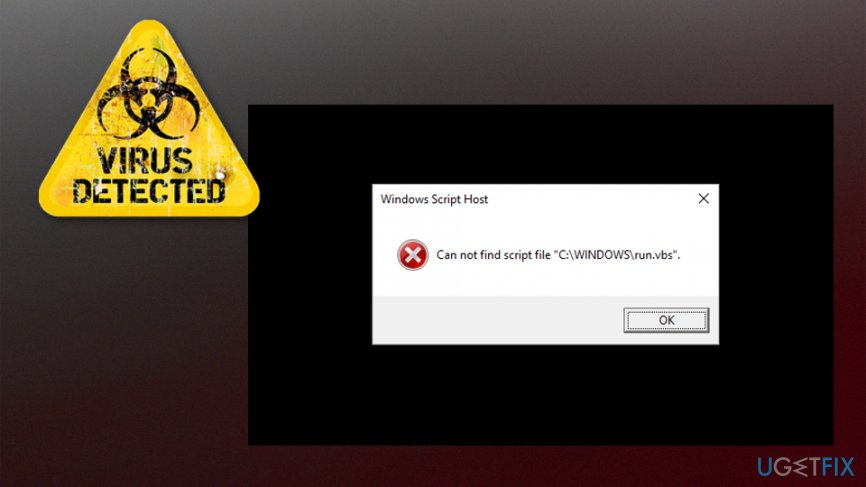
"Can not find script file C:\\Windows\\run.vbs" is an error which might appear on Windows operating systems[ref en-1]. Researchers note that this issue is not related to the software/hardware or applications. In fact, it indicates that your computer is infected with malware[ref en-2].
You can encounter a black screen when trying to log in into the computer as the malicious program manipulates Userinit registry value and changes Windows default value data with Vbscript filename. Since this virus deletes or moves the .vbs file from the common System32 folder, users receive "Can not find script file C:\\Windows\\run.vbs" error.
Usually, malware causing "Can not find script file C:\\Windows\\run.vbs" problem spreads via spam email attachments, peer-to-peer (P2P) networks or malvertising. Users who tend to download music or movies illegally, click on suspicious online ads, or open spam emails risk infecting their computers with this and other cyber threats.
Note malware which is leading to "Can not find script file C:\\Windows\\run.vbs" error can be programmed to perform other malicious actions on your system, including the following:
- Logging keystrokes;
- Infiltrating potentially unwanted programs (PUPs) or malware;
- Creating a backdoor by connecting the PC to the remote server.
Our security experts recommend you to protect your computer and private information. For that, you should use a reliable antivirus software to perform regular scans and eliminate potentially unwanted programs (PUPs) or malware. [d1] can help you fix "Can not find script file C:\\Windows\\run.vbs" error automatically and uninstall the malware as well.
Otherwise, you can try to fix "Can not find script file C:\\Windows\\run.vbs" issue by resetting the registry keys back to defaults. However, as it might get risky to cause more system damage, we have prepared instructions showing how to fix "Can not find script file C:\\Windows\\run.vbs" below.
Two ways to fix "Can not find script file C:\\Windows\\run.vbs" error on Windows
Note that if you choose to fix "Can not find script file C:\\Windows\\run.vbs" error manually, you must not forget to uninstall the malware as well. Unfortunately, this can only be done by running a full system scan with a professional antivirus or by an IT specialists.
This video will make your life easier:
[youtube xDbWVBfLJN8]
Method 1: Edit Registry Keys
Please, be attentive when editing Windows Registry[ref en-3] keys — if you fail to enter them correctly it might lead to further damage of the operating system. Likewise, carefully follow these steps:
- Log in and press CTRL + ALT + DEL until Task Manager appears;
- Click File button and select Run New Task;
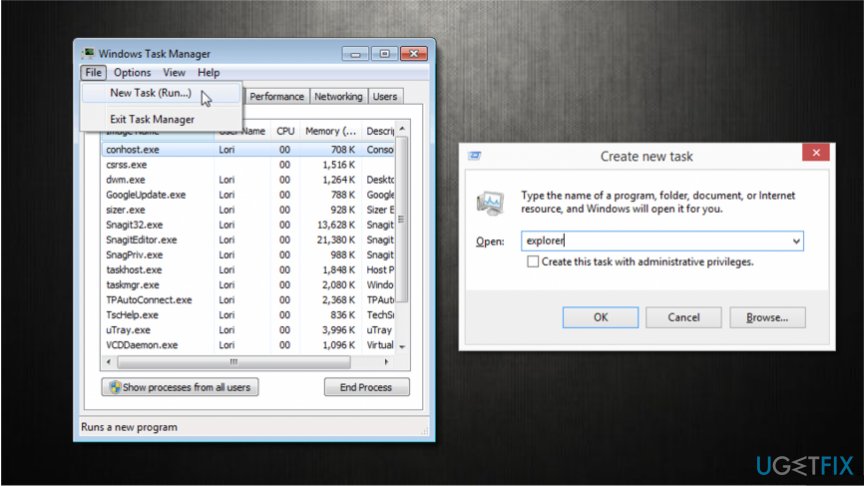
Create explorer exe task - Type explorer.exe and press Enter;
- Press Windows key + R and enter Regedit.exe;
- Go to HKEY_LOCAL_MACHINE\\Software\\Microsoft\\Windows NT\\Current Version\\Winlogon;
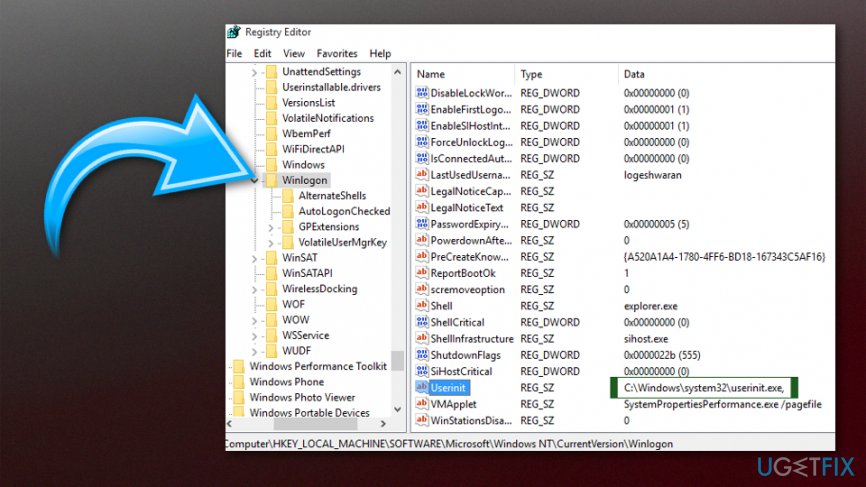
Run vbs error - Double-click on Userinit item;
- Change the value data from wscript C:WINDOWS\\run.vbs to C:\\Windows\\system32\\userinit.exe;
- Log off and log in again.
Method 2: Change the value of .vsb key
- Click Windows key + R and submit Regedit.exe;
- Go to Computer\\HKEY_CLASSES_ROOT\\.vbs on the left;
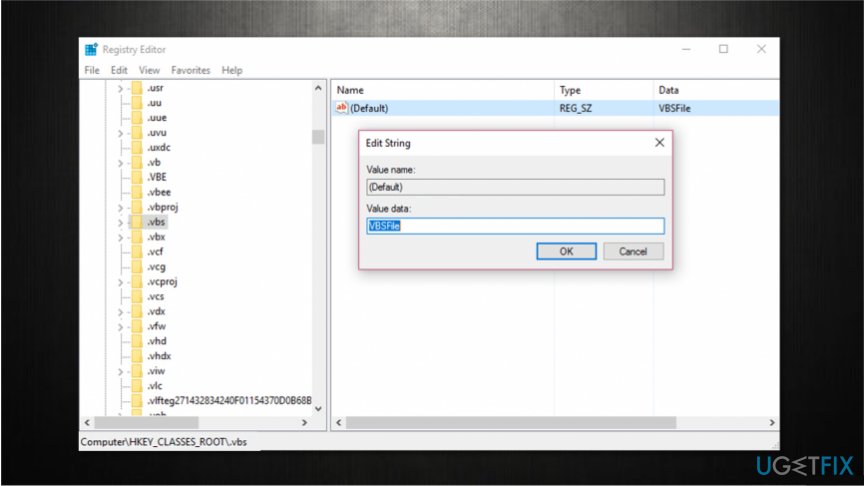
Change the value of vbs key - Double-click Default value;
- Set the value to VSBFile;
- Click OK and check if the problem is resolved.
Bottom line
To fix the 'Can not find script file C:\Windows\run.vbs' error, you can use reliable antivirus software to perform regular scans and eliminate malware. Alternatively, you can reset the registry keys back to their defaults, but this may risk further system damage. If these solutions do not work, consider seeking professional assistance.
Frequently asked questions
This error typically occurs when a scheduled task or startup process is attempting to run a VBScript file that has been deleted or is missing from the specified directory.
You can search for the run.vbs file in other directories or check your system restore points; if it’s not recoverable, you may need to recreate the script or remove the task trying to run it.
Open Task Scheduler, look for tasks that reference 'run.vbs', and either disable or delete them to stop the error from appearing during startup.




Report an issue
What's wrong with this guide? We review every report and update or remove content.
Report received — thank you. We'll review and fix it.
You need a free account to submit a report.
Be the first to comment